
【Vue 3 系列·第六篇】Pinia 完全指南:State、Getter、Action,优雅替代 Vuex
·
【Vue 3 系列·第六篇】Pinia 完全指南:State、Getter、Action,优雅替代 Vuex
更新时间:2026-05-19 | 阅读时长:约 22 分钟
系列:Vue 3 完全指南(共 8 篇)
标签:Vue3Pinia状态管理StoreVuexTypeScriptComposable
系列进度
| 篇次 | 主题 | 状态 |
|---|---|---|
| 第一篇 | Vue 3 是什么:Composition API vs Options API | ✅ 已发布 |
| 第二篇 | 响应式系统:ref、reactive、computed、watch | ✅ 已发布 |
| 第三篇 | 组件通信:props、emit、provide/inject | ✅ 已发布 |
| 第四篇 | 生命周期钩子:执行时机与正确用法 | ✅ 已发布 |
| 第五篇 | 路由:Vue Router 4 实战 | ✅ 已发布 |
| 第六篇(本篇) | 状态管理:Pinia 完全指南 | — |
| 第七篇 | 性能优化:懒加载、keep-alive、v-memo | 即将发布 |
| 第八篇 | 工程化:Vite + TypeScript + 最佳实践 | 即将发布 |
目录
- 一、为什么需要状态管理
- 二、Pinia vs Vuex:为什么选 Pinia
- 三、安装与基础配置
- 四、Options Store 写法
- 五、Setup Store 写法(推荐)
- 六、在组件中使用 Store
- 七、Store 之间的相互调用
- 八、持久化与插件
- 九、完整实战:电商购物流程
一、为什么需要状态管理
问题场景:多个不相关的组件需要共享同一份数据

Header(显示购物车数量)
  └── NavBar
       └── CartIcon ← 需要 cartCount

ProductList(点击加购)
  └── ProductCard
       └── AddToCartBtn ← 需要修改 cart

CartPage(展示购物车)
  └── CartItemList ← 需要完整 cart 数据

三个完全不相关的组件都依赖同一份 cart 数据。

方案1:props + emit 逐层传递 → Prop Drilling,中间组件都要参与
方案2:provide/inject → 适合只读配置,不适合频繁更新的业务数据
方案3:状态管理(Pinia)→ 集中管理共享状态,任意组件直接读写

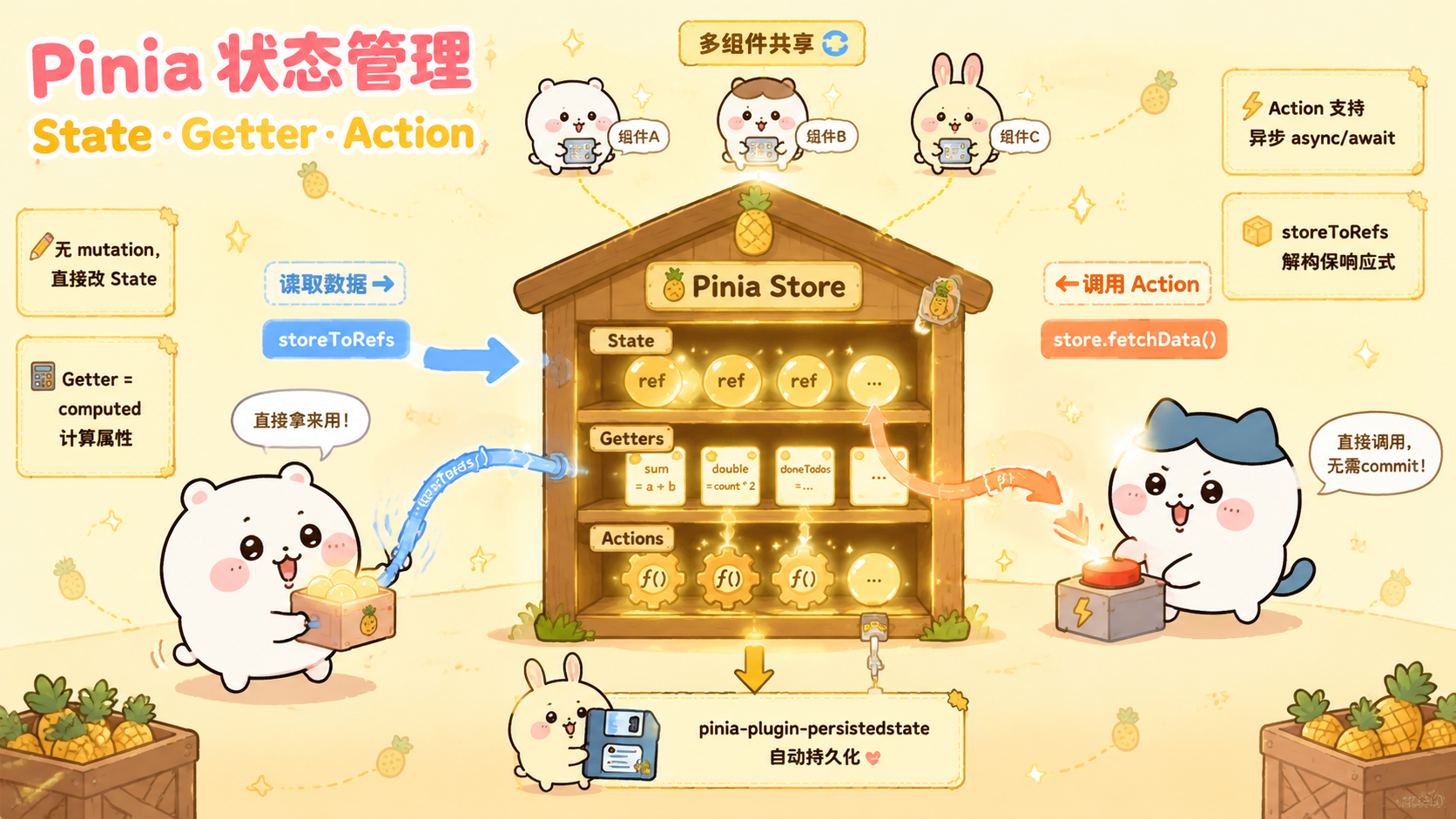
Pinia 的核心理念:
  把共享状态提取到独立的 Store
  任何组件都可以直接读取和修改 Store 中的状态
  状态变化自动触发相关组件更新
二、Pinia vs Vuex:为什么选 Pinia
| 特性 | Vuex 4 | Pinia |
|---|---|---|
| TypeScript 支持 | 较差,需要大量手动类型 | 完整,自动类型推导 |
| 代码量 | 多(mutation/action 分离) | 少(无 mutation) |
| DevTools | 支持 | 支持(更好用) |
| 模块化 | modules(较繁琐) | 多个独立 Store |
| Composition API | 不友好 | 原生支持 |
| 体积 | ~10KB | ~1KB(更轻量) |
| 官方推荐 | Vue 3 不推荐 | Vue 3 官方推荐 ✅ |
Vuex 的写法(繁琐):

// state + mutations + actions + getters 四个概念
// 修改状态必须通过 mutation(同步)
// 异步操作必须在 action 里,再调用 mutation
store.commit('setUser', user)         // 必须 commit mutation
store.dispatch('fetchUser', userId)   // 才能 dispatch action

Pinia 的写法(简洁):

// 只有 state + getters + actions,无 mutation
// 直接修改 state,同步异步都在 action 里
store.user = user                     // 直接赋值 ✅
await store.fetchUser(userId)         // 异步 action ✅
三、安装与基础配置
npm install pinia
// src/main.ts
import { createApp } from 'vue'
import { createPinia } from 'pinia'
import App from './App.vue'

const pinia = createPinia()
const app   = createApp(App)

app.use(pinia)  // 注册 Pinia
app.mount('#app')
推荐目录结构:

src/
└── stores/
    ├── auth.ts      # 用户认证
    ├── cart.ts      # 购物车
    ├── product.ts   # 商品
    └── ui.ts        # UI 状态(主题、loading 等)
四、Options Store 写法
类似 Vue 2 的 Options API 风格,熟悉 Vuex 的开发者容易上手。
// stores/counter.ts(Options 风格)
import { defineStore } from 'pinia'

export const useCounterStore = defineStore('counter', {
  // ① state:响应式状态(函数形式,与 Vue 2 data 类似)
  state: () => ({
    count:  0,
    name:   'Counter',
    history: [] as number[],
  }),

  // ② getters:计算属性(等价于 computed)
  getters: {
    // 第一个参数是 state
    doubled:    (state) => state.count * 2,
    isPositive: (state) => state.count > 0,

    // 可以使用 this 访问其他 getter
    doubledPlusOne(): number {
      return this.doubled + 1
    },

    // 返回函数(带参数的 getter)
    historyItem: (state) => (index: number) => state.history[index],
  },

  // ③ actions:方法(可以是异步的)
  actions: {
    // 直接修改 state,无需 mutation!
    increment() {
      this.count++
      this.history.push(this.count)
    },

    decrement() {
      this.count--
    },

    reset() {
      // $reset() 会重置为初始 state,也可手动重置
      this.count = 0
      this.history = []
    },

    // 异步 action(直接用 async/await)
    async fetchCount() {
      try {
        const res = await fetch('/api/count')
        const data = await res.json()
        this.count = data.count
      } catch (e) {
        console.error('获取失败', e)
      }
    },
  },
})
五、Setup Store 写法(推荐)
类似 <script setup>,使用 Composition API 风格,TypeScript 类型推导更完整,也更灵活。
// stores/counter.ts(Setup 风格)
import { defineStore } from 'pinia'
import { ref, computed } from 'vue'

// defineStore(id, setup函数)
export const useCounterStore = defineStore('counter', () => {
  // ── State:用 ref / reactive ──────────────────────────
  const count   = ref(0)
  const name    = ref('Counter')
  const history = ref<number[]>([])

  // ── Getters:用 computed ──────────────────────────────
  const doubled      = computed(() => count.value * 2)
  const isPositive   = computed(() => count.value > 0)
  const doubledPlusOne = computed(() => doubled.value + 1)

  // 带参数的 getter:返回函数
  const historyItem = computed(() =>
    (index: number) => history.value[index]
  )

  // ── Actions:普通函数(同步或异步)───────────────────
  function increment() {
    count.value++
    history.value.push(count.value)
  }

  function decrement() {
    count.value--
  }

  function reset() {
    count.value   = 0
    history.value = []
  }

  async function fetchCount() {
    try {
      const res  = await fetch('/api/count')
      const data = await res.json()
      count.value = data.count
    } catch (e) {
      console.error('获取失败', e)
    }
  }

  // ── 必须 return 所有需要暴露的内容 ───────────────────
  return {
    // state
    count, name, history,
    // getters
    doubled, isPositive, doubledPlusOne, historyItem,
    // actions
    increment, decrement, reset, fetchCount,
  }
})
5.1 两种写法的对比
Options Store            Setup Store
─────────────────────────────────────────────────────
state: () => ({})       const x = ref(0)
getters: { fn }         const y = computed(...)
actions: { fn }         function doSomething() {}
this.xxx                直接用变量名
较简洁,概念清晰         更灵活,TypeScript 更友好
不支持 watch/其他 API   可用所有 Composition API
适合简单 Store          适合复杂 Store(推荐)
六、在组件中使用 Store
6.1 基本读取和修改
<script setup lang="ts">
import { useCounterStore } from '@/stores/counter'

// 获取 store 实例(响应式)
const counterStore = useCounterStore()

// ── 读取 state 和 getter ──────────────────────────────

// ✅ 方式1:通过 store 实例访问(保持响应式)
console.log(counterStore.count)    // 响应式
console.log(counterStore.doubled)  // 响应式

// ❌ 方式2:直接解构(丢失响应式!)
const { count, doubled } = counterStore  // count 是普通变量,不响应

// ✅ 方式3:storeToRefs(解构但保持响应式)
import { storeToRefs } from 'pinia'
const { count, doubled, isPositive } = storeToRefs(counterStore)
// count、doubled 现在是 ref,保持响应式!

// ⚠️ 注意:actions 不需要 storeToRefs,直接解构即可
const { increment, decrement, reset } = counterStore

// ── 修改 state ────────────────────────────────────────

// 方式1:调用 action(推荐,便于追踪)
counterStore.increment()

// 方式2:直接修改(简单场景可以用)
counterStore.count = 10

// 方式3:$patch(批量修改,性能更好)
counterStore.$patch({
  count: 10,
  name:  'New Counter',
})

// 方式4:$patch 函数形式(处理数组等复杂操作)
counterStore.$patch((state) => {
  state.count++
  state.history.push(state.count)
})
</script>

<template>
  <div>
    <p>计数:{{ count }}</p>
    <p>双倍:{{ doubled }}</p>
    <button @click="increment">+1</button>
    <button @click="decrement">-1</button>
    <button @click="reset">重置</button>
    <button @click="counterStore.count = 100">直接设为100</button>
  </div>
</template>
6.2 监听 Store 变化
<script setup lang="ts">
import { useCounterStore } from '@/stores/counter'
import { watch } from 'vue'

const counterStore = useCounterStore()

// 方式1:watch store 的属性
watch(
  () => counterStore.count,
  (newCount, oldCount) => {
    console.log(`count: ${oldCount} → ${newCount}`)
  }
)

// 方式2:$subscribe(专为 Pinia 设计,可监听所有 state 变化)
counterStore.$subscribe((mutation, state) => {
  // mutation.type:'direct'(直接修改)| 'patch object' | 'patch function'
  // mutation.events:变化的详细信息
  // state:变化后的完整 state

  console.log('Store 变化:', mutation.type, state.count)

  // 常用场景:持久化到 localStorage
  localStorage.setItem('counter', JSON.stringify(state))
}, {
  // 组件卸载后是否继续监听(默认 false,组件卸载自动停止)
  detached: false,
})

// 方式3:$onAction(监听 action 调用)
counterStore.$onAction(({ name, args, after, onError }) => {
  console.log(`action ${name} 被调用,参数:`, args)

  after((result) => {
    console.log(`action ${name} 执行完毕,结果:`, result)
  })

  onError((error) => {
    console.error(`action ${name} 出错:`, error)
  })
})
</script>
6.3 重置 Store
// Options Store:内置 $reset() 方法
counterStore.$reset()  // 恢复到初始 state

// Setup Store:没有内置 $reset(因为 setup 函数无法重新执行)
// 需要手动实现:
export const useCounterStore = defineStore('counter', () => {
  const count = ref(0)
  const name  = ref('Counter')

  // 手动实现 reset
  function $reset() {
    count.value = 0
    name.value  = 'Counter'
  }

  return { count, name, $reset }
})
七、Store 之间的相互调用
// stores/user.ts
import { defineStore } from 'pinia'
import { ref, computed } from 'vue'

export const useUserStore = defineStore('user', () => {
  const currentUser = ref<User | null>(null)
  const isLoggedIn  = computed(() => !!currentUser.value)

  async function login(credentials: Credentials) {
    const user = await authAPI.login(credentials)
    currentUser.value = user
  }

  function logout() {
    currentUser.value = null
  }

  return { currentUser, isLoggedIn, login, logout }
})
// stores/cart.ts(调用 userStore)
import { defineStore } from 'pinia'
import { ref, computed } from 'vue'
import { useUserStore } from './user'  // 直接 import 其他 store

export const useCartStore = defineStore('cart', () => {
  const items = ref<CartItem[]>([])

  // 在 action 中使用其他 store
  async function checkout() {
    // 在 action 内部调用(确保 Pinia 已初始化)
    const userStore = useUserStore()

    if (!userStore.isLoggedIn) {
      throw new Error('请先登录')
    }

    await orderAPI.create({
      userId: userStore.currentUser!.id,
      items:  items.value,
    })

    items.value = []
  }

  const totalPrice = computed(() =>
    items.value.reduce((sum, item) => sum + item.price * item.quantity, 0)
  )

  return { items, totalPrice, checkout }
})
// stores/ui.ts(使用多个 store)
import { defineStore } from 'pinia'
import { ref } from 'vue'
import { useUserStore } from './user'
import { useCartStore } from './cart'

export const useUIStore = defineStore('ui', () => {
  const theme    = ref<'light' | 'dark'>('light')
  const isLoading = ref(false)

  // Getter 中也可以使用其他 store
  // (在 getter/computed 内部调用,确保每次都是最新的)
  function getPageTitle() {
    const userStore = useUserStore()
    const cartStore = useCartStore()
    const cartCount = cartStore.items.length
    const userName  = userStore.currentUser?.name ?? '游客'
    return `${userName} | 购物车(${cartCount})`
  }

  return { theme, isLoading, getPageTitle }
})
八、持久化与插件
8.1 手动持久化
// stores/settings.ts
import { defineStore } from 'pinia'
import { ref, watch } from 'vue'

export const useSettingsStore = defineStore('settings', () => {
  // 从 localStorage 读取初始值
  const saved = localStorage.getItem('settings')
  const initial = saved ? JSON.parse(saved) : { theme: 'light', language: 'zh' }

  const theme    = ref<'light' | 'dark'>(initial.theme)
  const language = ref<string>(initial.language)

  // 监听变化,自动保存
  watch(
    [theme, language],
    () => {
      localStorage.setItem('settings', JSON.stringify({
        theme:    theme.value,
        language: language.value,
      }))
    },
    { deep: true }
  )

  return { theme, language }
})
8.2 pinia-plugin-persistedstate(推荐)
npm install pinia-plugin-persistedstate
// main.ts
import { createPinia } from 'pinia'
import piniaPluginPersistedstate from 'pinia-plugin-persistedstate'

const pinia = createPinia()
pinia.use(piniaPluginPersistedstate)
// stores/auth.ts:使用持久化插件
import { defineStore } from 'pinia'
import { ref, computed } from 'vue'

export const useAuthStore = defineStore('auth', () => {
  const token = ref<string | null>(null)
  const user  = ref<User | null>(null)

  const isLoggedIn = computed(() => !!token.value)

  async function login(credentials: Credentials) {
    const res  = await authAPI.login(credentials)
    token.value = res.token
    user.value  = res.user
  }

  function logout() {
    token.value = null
    user.value  = null
  }

  return { token, user, isLoggedIn, login, logout }
}, {
  // 开启持久化(刷新页面不丢失)
  persist: {
    // 默认:存到 localStorage,key 为 store id
    key:     'auth-store',
    storage: localStorage,

    // 只持久化部分字段
    pick: ['token', 'user'],
    // 或排除某些字段
    // omit: ['sensitiveData'],

    // 序列化/反序列化(可处理特殊类型)
    serializer: {
      serialize:   JSON.stringify,
      deserialize: JSON.parse,
    },
  },
})
8.3 自定义 Pinia 插件
// plugins/pinia-logger.ts
import type { PiniaPluginContext } from 'pinia'

// 一个简单的 action 日志插件
export function piniaLogger({ store }: PiniaPluginContext) {
  store.$onAction(({ name, args, after, onError }) => {
    const start = Date.now()
    console.log(`[Pinia] ${store.$id}.${name}(`, args, ')')

    after((result) => {
      console.log(`[Pinia] ${store.$id}.${name} 完成,耗时 ${Date.now() - start}ms`)
    })

    onError((error) => {
      console.error(`[Pinia] ${store.$id}.${name} 出错:`, error)
    })
  })
}

// main.ts 中注册
// pinia.use(piniaLogger)
九、完整实战:电商购物流程
// stores/auth.ts:用户认证 Store
import { defineStore } from 'pinia'
import { ref, computed } from 'vue'

interface User {
  id:     number
  name:   string
  email:  string
  role:   'admin' | 'user'
}

export const useAuthStore = defineStore('auth', () => {
  const user  = ref<User | null>(null)
  const token = ref<string | null>(null)

  const isLoggedIn = computed(() => !!token.value)
  const isAdmin    = computed(() => user.value?.role === 'admin')

  async function login(email: string, password: string) {
    // 模拟 API
    const res = await fakeAPI.login({ email, password })
    user.value  = res.user
    token.value = res.token
  }

  function logout() {
    user.value  = null
    token.value = null
  }

  return { user, token, isLoggedIn, isAdmin, login, logout }
}, { persist: { pick: ['token', 'user'] } })
// stores/product.ts:商品 Store
import { defineStore } from 'pinia'
import { ref, computed } from 'vue'

interface Product {
  id:       number
  name:     string
  price:    number
  stock:    number
  category: string
  image:    string
}

export const useProductStore = defineStore('product', () => {
  const products  = ref<Product[]>([])
  const loading   = ref(false)
  const error     = ref<string | null>(null)

  // 按分类过滤
  const getByCategory = computed(() =>
    (category: string) =>
      products.value.filter(p => p.category === category)
  )

  // 搜索
  const search = computed(() =>
    (keyword: string) =>
      products.value.filter(p =>
        p.name.toLowerCase().includes(keyword.toLowerCase())
      )
  )

  async function fetchProducts(category?: string) {
    loading.value = true
    error.value   = null
    try {
      const res = await fakeAPI.getProducts(category)
      products.value = res
    } catch (e: any) {
      error.value = e.message
    } finally {
      loading.value = false
    }
  }

  return { products, loading, error, getByCategory, search, fetchProducts }
})
// stores/cart.ts:购物车 Store(核心)
import { defineStore } from 'pinia'
import { ref, computed } from 'vue'
import { useAuthStore }    from './auth'
import { useProductStore } from './product'

interface CartItem {
  productId: number
  name:      string
  price:     number
  quantity:  number
  image:     string
}

export const useCartStore = defineStore('cart', () => {
  const items   = ref<CartItem[]>([])
  const coupon  = ref<string>('')
  const discount= ref(0)

  // ── Getters ──────────────────────────────────────────

  // 总商品数
  const totalCount = computed(() =>
    items.value.reduce((sum, item) => sum + item.quantity, 0)
  )

  // 小计(折扣前)
  const subtotal = computed(() =>
    items.value.reduce((sum, item) => sum + item.price * item.quantity, 0)
  )

  // 折扣金额
  const discountAmount = computed(() =>
    subtotal.value * discount.value
  )

  // 最终总价
  const total = computed(() =>
    subtotal.value - discountAmount.value
  )

  const isEmpty = computed(() => items.value.length === 0)

  // 检查某商品是否在购物车中
  const isInCart = computed(() =>
    (productId: number) =>
      items.value.some(item => item.productId === productId)
  )

  // ── Actions ──────────────────────────────────────────

  function addItem(product: { id: number; name: string; price: number; image: string }) {
    const existing = items.value.find(item => item.productId === product.id)

    if (existing) {
      existing.quantity++
    } else {
      items.value.push({
        productId: product.id,
        name:      product.name,
        price:     product.price,
        quantity:  1,
        image:     product.image,
      })
    }
  }

  function removeItem(productId: number) {
    items.value = items.value.filter(item => item.productId !== productId)
  }

  function updateQuantity(productId: number, quantity: number) {
    if (quantity <= 0) {
      removeItem(productId)
      return
    }
    const item = items.value.find(item => item.productId === productId)
    if (item) {
      // 检查库存
      const productStore = useProductStore()
      const product      = productStore.products.find(p => p.id === productId)
      if (product && quantity > product.stock) {
        console.warn('超出库存限制')
        item.quantity = product.stock
        return
      }
      item.quantity = quantity
    }
  }

  function clearCart() {
    items.value  = []
    coupon.value = ''
    discount.value = 0
  }

  async function applyCoupon(code: string) {
    const validCoupons: Record<string, number> = {
      'SAVE10': 0.10,
      'SAVE20': 0.20,
      'VIP50':  0.50,
    }
    const rate = validCoupons[code.toUpperCase()]
    if (rate) {
      coupon.value   = code
      discount.value = rate
      return { success: true, message: `优惠码有效,享受 ${rate * 100}% 折扣` }
    } else {
      return { success: false, message: '无效的优惠码' }
    }
  }

  async function checkout() {
    const authStore = useAuthStore()

    if (!authStore.isLoggedIn) {
      throw new Error('请先登录')
    }

    if (isEmpty.value) {
      throw new Error('购物车为空')
    }

    try {
      const order = await fakeAPI.createOrder({
        userId:   authStore.user!.id,
        items:    items.value,
        total:    total.value,
        coupon:   coupon.value,
      })
      clearCart()
      return order
    } catch (e) {
      throw new Error('下单失败,请重试')
    }
  }

  return {
    // state
    items, coupon, discount,
    // getters
    totalCount, subtotal, discountAmount, total, isEmpty, isInCart,
    // actions
    addItem, removeItem, updateQuantity, clearCart, applyCoupon, checkout,
  }
}, {
  // 购物车持久化(刷新不丢失)
  persist: {
    pick: ['items', 'coupon', 'discount'],
  },
})
<!-- CartWidget.vue:购物车浮层组件 -->
<script setup lang="ts">
import { ref } from 'vue'
import { storeToRefs } from 'pinia'
import { useCartStore }  from '@/stores/cart'
import { useAuthStore }  from '@/stores/auth'
import { useRouter }     from 'vue-router'

const cartStore = useCartStore()
const authStore = useAuthStore()
const router    = useRouter()

// storeToRefs 解构,保留响应式
const { items, totalCount, subtotal, total, isEmpty, discount } = storeToRefs(cartStore)
const { isLoggedIn } = storeToRefs(authStore)

const isOpen      = ref(false)
const couponInput = ref('')
const couponMsg   = ref('')
const checkoutLoading = ref(false)

async function handleApplyCoupon() {
  const result = await cartStore.applyCoupon(couponInput.value)
  couponMsg.value = result.message
}

async function handleCheckout() {
  if (!isLoggedIn.value) {
    router.push({ name: 'Login', query: { redirect: '/checkout' } })
    return
  }

  checkoutLoading.value = true
  try {
    const order = await cartStore.checkout()
    router.push({ name: 'OrderSuccess', params: { id: order.id } })
  } catch (e: any) {
    alert(e.message)
  } finally {
    checkoutLoading.value = false
  }
}
</script>

<template>
  <div class="cart-widget">
    <!-- 购物车图标 -->
    <button class="cart-icon" @click="isOpen = !isOpen">
      🛒
      <span v-if="totalCount > 0" class="badge">{{ totalCount }}</span>
    </button>

    <!-- 购物车抽屉 -->
    <Transition name="slide">
      <div v-if="isOpen" class="cart-drawer">
        <div class="drawer-header">
          <h3>购物车({{ totalCount }} 件)</h3>
          <button @click="isOpen = false">×</button>
        </div>

        <div class="drawer-body">
          <div v-if="isEmpty" class="empty-hint">
            购物车是空的 🛒
          </div>

          <div v-else>
            <!-- 商品列表 -->
            <div
              v-for="item in items"
              :key="item.productId"
              class="cart-item"
            >
              <img :src="item.image" :alt="item.name" class="item-img" />
              <div class="item-info">
                <p class="item-name">{{ item.name }}</p>
                <p class="item-price">¥{{ item.price }}</p>
              </div>
              <div class="item-qty">
                <button @click="cartStore.updateQuantity(item.productId, item.quantity - 1)">
                  -
                </button>
                <span>{{ item.quantity }}</span>
                <button @click="cartStore.updateQuantity(item.productId, item.quantity + 1)">
                  +
                </button>
              </div>
              <button
                class="remove-btn"
                @click="cartStore.removeItem(item.productId)"
              >
                🗑
              </button>
            </div>

            <!-- 优惠码 -->
            <div class="coupon-section">
              <input
                v-model="couponInput"
                placeholder="输入优惠码"
                @keyup.enter="handleApplyCoupon"
              />
              <button @click="handleApplyCoupon">应用</button>
              <p v-if="couponMsg" class="coupon-msg">{{ couponMsg }}</p>
            </div>

            <!-- 价格汇总 -->
            <div class="summary">
              <div class="summary-row">
                <span>小计</span>
                <span>¥{{ subtotal.toFixed(2) }}</span>
              </div>
              <div v-if="discount > 0" class="summary-row discount">
                <span>折扣 {{ discount * 100 }}%</span>
                <span>-¥{{ (subtotal * discount).toFixed(2) }}</span>
              </div>
              <div class="summary-row total">
                <span>合计</span>
                <span>¥{{ total.toFixed(2) }}</span>
              </div>
            </div>
          </div>
        </div>

        <!-- 结算按钮 -->
        <div class="drawer-footer">
          <button
            class="checkout-btn"
            :disabled="isEmpty || checkoutLoading"
            @click="handleCheckout"
          >
            {{ checkoutLoading ? '处理中...' : '去结算' }}
          </button>
          <button
            v-if="!isEmpty"
            class="clear-btn"
            @click="cartStore.clearCart()"
          >
            清空
          </button>
        </div>
      </div>
    </Transition>
  </div>
</template>

<style scoped>
.cart-widget { position: relative; }
.cart-icon   { font-size: 1.5rem; background: none; border: none; cursor: pointer; position: relative; }
.badge       { position: absolute; top: -4px; right: -4px; background: #ff4757; color: white; border-radius: 50%; width: 18px; height: 18px; font-size: 11px; display: flex; align-items: center; justify-content: center; }
.cart-drawer { position: fixed; right: 0; top: 0; height: 100vh; width: 380px; background: white; box-shadow: -4px 0 20px rgba(0,0,0,.1); display: flex; flex-direction: column; z-index: 1000; }
.drawer-header { display: flex; justify-content: space-between; align-items: center; padding: 1rem; border-bottom: 1px solid #eee; }
.drawer-body   { flex: 1; overflow-y: auto; padding: 1rem; }
.cart-item     { display: flex; align-items: center; gap: .75rem; padding: .75rem 0; border-bottom: 1px solid #f5f5f5; }
.item-img      { width: 60px; height: 60px; object-fit: cover; border-radius: 6px; }
.item-name     { font-size: .9rem; }
.item-price    { color: #42b883; font-weight: bold; }
.item-qty      { display: flex; align-items: center; gap: .5rem; }
.item-qty button { width: 24px; height: 24px; border-radius: 50%; border: 1px solid #42b883; background: white; cursor: pointer; }
.summary-row   { display: flex; justify-content: space-between; padding: .4rem 0; }
.summary-row.total { font-weight: bold; font-size: 1.1rem; color: #42b883; }
.summary-row.discount { color: #ff4757; }
.drawer-footer { padding: 1rem; border-top: 1px solid #eee; display: flex; gap: .5rem; }
.checkout-btn  { flex: 1; background: #42b883; color: white; border: none; padding: .75rem; border-radius: 8px; cursor: pointer; font-size: 1rem; }
.checkout-btn:disabled { opacity: .5; cursor: not-allowed; }
.clear-btn     { background: none; border: 1px solid #ddd; padding: .75rem 1rem; border-radius: 8px; cursor: pointer; }
.slide-enter-active, .slide-leave-active { transition: transform .3s ease; }
.slide-enter-from, .slide-leave-to       { transform: translateX(100%); }
</style>
总结
| 概念 | Options Store | Setup Store |
|---|---|---|
| 状态 | state: () => ({}) |
const x = ref(0) |
| 计算属性 | getters: {} |
const y = computed(...) |
| 方法 | actions: {} |
function doSomething() {} |
| 访问其他 | this.xxx |
直接用变量 |
| 推荐场景 | 简单 Store | 复杂 Store、TypeScript 项目 |
Pinia 的三个核心原则:
- 无 mutation:直接修改 state 或通过 action,简洁
- 多 Store:按功能拆分,各自独立,互相可调用
- TypeScript 友好:自动类型推导,几乎不需要手动标注
下一篇预告:性能优化实战——v-memo、KeepAlive、懒加载图片、虚拟列表,以及如何用 DevTools 定位性能瓶颈。
💬 你是从 Vuex 迁移到 Pinia 的吗?迁移过程中有什么坑? 欢迎评论区分享!
🙏 如果这篇帮到你,点赞 + 收藏,系列持续更新!
更多推荐
 1
1 0
0- 0


 已为社区贡献12条内容

所有评论(0)