


- @zt102545


简介
该用户还未填写简介
擅长的技术栈
可提供的服务
暂无可提供的服务
安装Gityum updateyum install -y gitgit生成SSH Key[root@iZwz925p95hhdeZ Document]# git config --global user.name "zzt"[root@iZwz925p95hhdeZ Document]# git config --global user.email "xxxxxx@qq.com"[root@iZ
安装Gityum updateyum install -y gitgit生成SSH Key[root@iZwz925p95hhdeZ Document]# git config --global user.name "zzt"[root@iZwz925p95hhdeZ Document]# git config --global user.email "xxxxxx@qq.com"[root@iZ
文章目录1 引言2 系统主要功能需求3 系统架构3.1整体架构3.2 TS3.3 微服务4.技术方案4.1 爬虫4.1.1 网页抓取4.1.2 解析数据4.1.3 数据存储4.2 微服务4.2.1 Nginx4.2.2 负载均衡4.2.3 反向代理4.2.4 Netcore Web API4.3 数据展示4.3.1 前后端分离4.3.2 Vue4.3.3 百度地图api1 引言空着2 系统主...
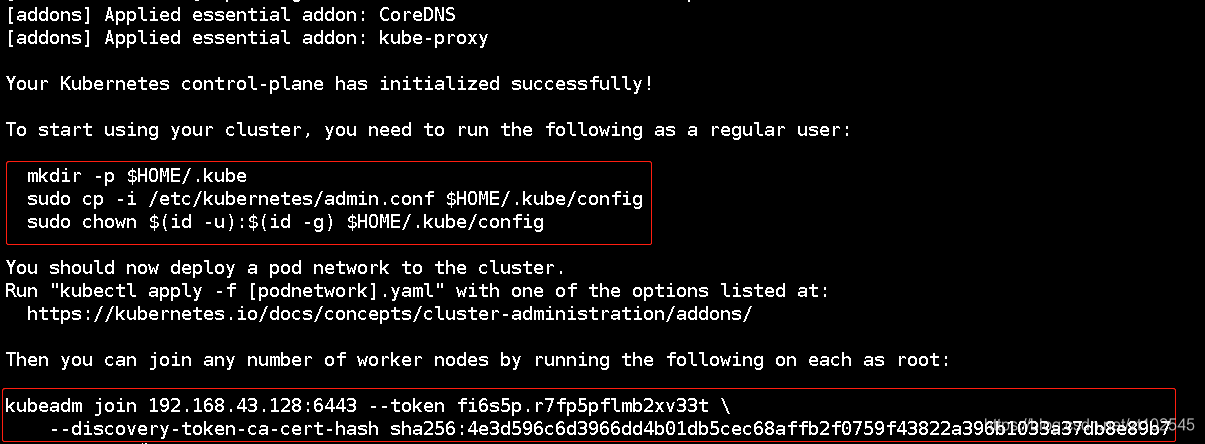
#配置镜像加速器,重启dockermkdir -p /etc/dockertee /etc/docker/daemon.json <<-'EOF'{"registry-mirrors": ["https://zmnwbg20.mirror.aliyuncs.com"]}EOFsystemctl daemon-reloadsystemctl restart docker#安装kubele
Jenkins上执行脚本内容#!/bin/bashserviceName=$1code_dir=/var/lib/jenkins/workspace/Dice_$serviceNameexport GOROOT=/micro/goexport PATH=$PATH:$GOROOT/binexport GOPATH=/opt/code/goexport PATH=/usr/local/bin/:$P
文章目录Day1P1P3P5P6~P8 Kubeadm方式搭建k8s集群P7~P17 二进制方式搭建k8s集群P18 两个搭建方式的总结P19 kubectlP20 YAMLP21 YAML生成方式Day1P1P3P5:C:\Program Files\Java\jdk-14\bin(你...