


- @juluwangriyue


简介
该用户还未填写简介
擅长的技术栈
可提供的服务
暂无可提供的服务
git 使用代理
千辛万苦,竟然还是用命令行编译通过的。源程序:#include "cuda_runtime.h"#include "device_launch_parameters.h"#include <stdio.h>void addWithCuda(int *c, const int *a, const int *b, size_t size);__global__ void addKernel
同样是图像分割的c++ inference,已经实现过
1、导出模型首先,利用pytorch自带的torch.onnx模块导出 .onnx模型文件,具体查看该部分pytorch官方文档,主要流程如下:import torchcheckpoint = torch.load(model_path)model = ModelNet(params)model.load_state_dict(checkpoint['model'])model.eval()inp
函数:string string.substr(startPos, length); 截取子函数, startPos默认值是0,但是实践中发现不设置有问题。string string.rfind(string separetor); 找到分隔符位置例子:string imgName = "001.jpg";string pureName = imgName.substr(0, imgName.rf
libtorch c++调用可能遇到的问题总结。1.算力不匹配问题import torchimport torchvisionprint(torch.cuda.is_available())上面的命令只是检测CUDA是否安装正确并能被Pytorch检测到,并没有说明是否能正常使用,要想看Pytorch能不能调用cuda加速,还需要简单的测试一下:a = torch.Tensor(5,3)a=a.c
libtorch下载地址:https://download.pytorch.org/libtorch/cpu/libtorch-shared-with-deps-1.5.1%2Bcpu.zip在linux系统下新建一个文件夹如:pytorch_test文件夹下新建一个文件:main.cpp,文件内容如下:#include <iostream>#include <torch/tor
在win10下安装了VMware和docker,发现这两个软件对硬件的设置要求冲突。vmware要求关闭Hyper-V属性,docker要求开启Hyper-V属性。有没有解决办法……
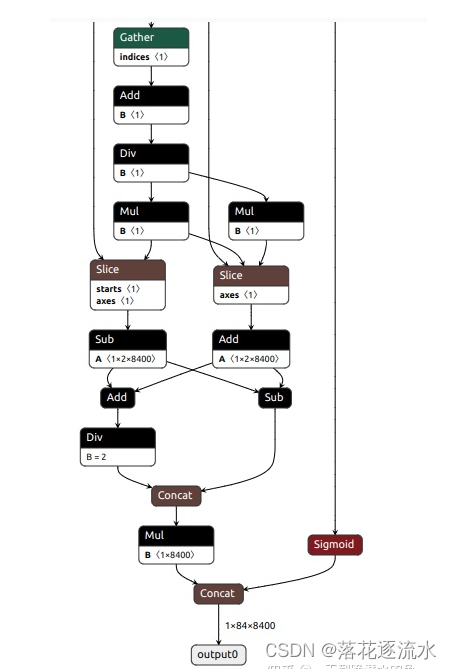
YOLOv8的3个检测头一共有80x80+40x40+20x20=8400个输出单元格,每个单元格包含x,y,w,h这4项再加80个类别的置信度总共84项内容,所以通过上面命令导出的onnx模型的输出维度为1x84x8400。这样的通道排列顺序有个问题,那就是后处理的时候会造成内存访问不连续。修改代码后需要执行前面的安装命令pip install -e '.[dev]'使代码生效。这样修改后再执行
docker自定义安装路径
