
使用LlamaFactory中的vLLm加载Llama3的时候报错
·
报错信息为“ValueError: The model's max seq len (4096) is larger than the maximum number of tokens that can be stored in KV cache (2704). Try increasing gpu_memory_utilization or decreasing max_model_len when initializing the engine.”
这是因为在LlamaFactory中,vLLM的配置中。设置了最大模型长度为4096,这个有的时候会因为硬件原因超出KV缓存的最大长度
解决方法:
在这个路径:
LLaMA-Factory/src/llamafactory/hparams/model_args.py
在model_args.py中定位到VLLM配置信息:
@dataclass
class VllmArguments:
    r"""Arguments pertaining to the vLLM worker."""

    vllm_maxlen: int = field(
        default=4096,
        metadata={"help": "Maximum sequence (prompt + response) length of the vLLM engine."},
    )
    vllm_gpu_util: float = field(
        default=0.7,
        metadata={"help": "The fraction of GPU memory in (0,1) to be used for the vLLM engine."},
    )
    vllm_enforce_eager: bool = field(
        default=False,
        metadata={"help": "Whether or not to disable CUDA graph in the vLLM engine."},
    )
    vllm_max_lora_rank: int = field(
        default=32,
        metadata={"help": "Maximum rank of all LoRAs in the vLLM engine."},
    )
    vllm_config: Optional[Union[dict, str]] = field(
        default=None,
        metadata={"help": "Config to initialize the vllm engine. Please use JSON strings."},
    )

    def __post_init__(self):
        if isinstance(self.vllm_config, str) and self.vllm_config.startswith("{"):
            self.vllm_config = _convert_str_dict(json.loads(self.vllm_config))
然后将这一行,修改为default=512,也可以大一些,视自身硬件条件设置(亲测有效):
vllm_maxlen: int = field(
        default=512,
        metadata={"help": "Maximum sequence (prompt + response) length of the vLLM engine."},
    )
也可以修改这一行的default大一点(这个我还没尝试):
vllm_gpu_util: float = field(
        default=0.7,
        metadata={"help": "The fraction of GPU memory in (0,1) to be used for the vLLM engine."},
    )
将上述修改保存之后,使用crtl+c停止当前LLamafactory
然后切换到LlamaFactory根目录下面重启,我这边用的是webui端(需要使用Vscode,因为它自带内网穿透)
重启命令为:
llamafactory-cli webui
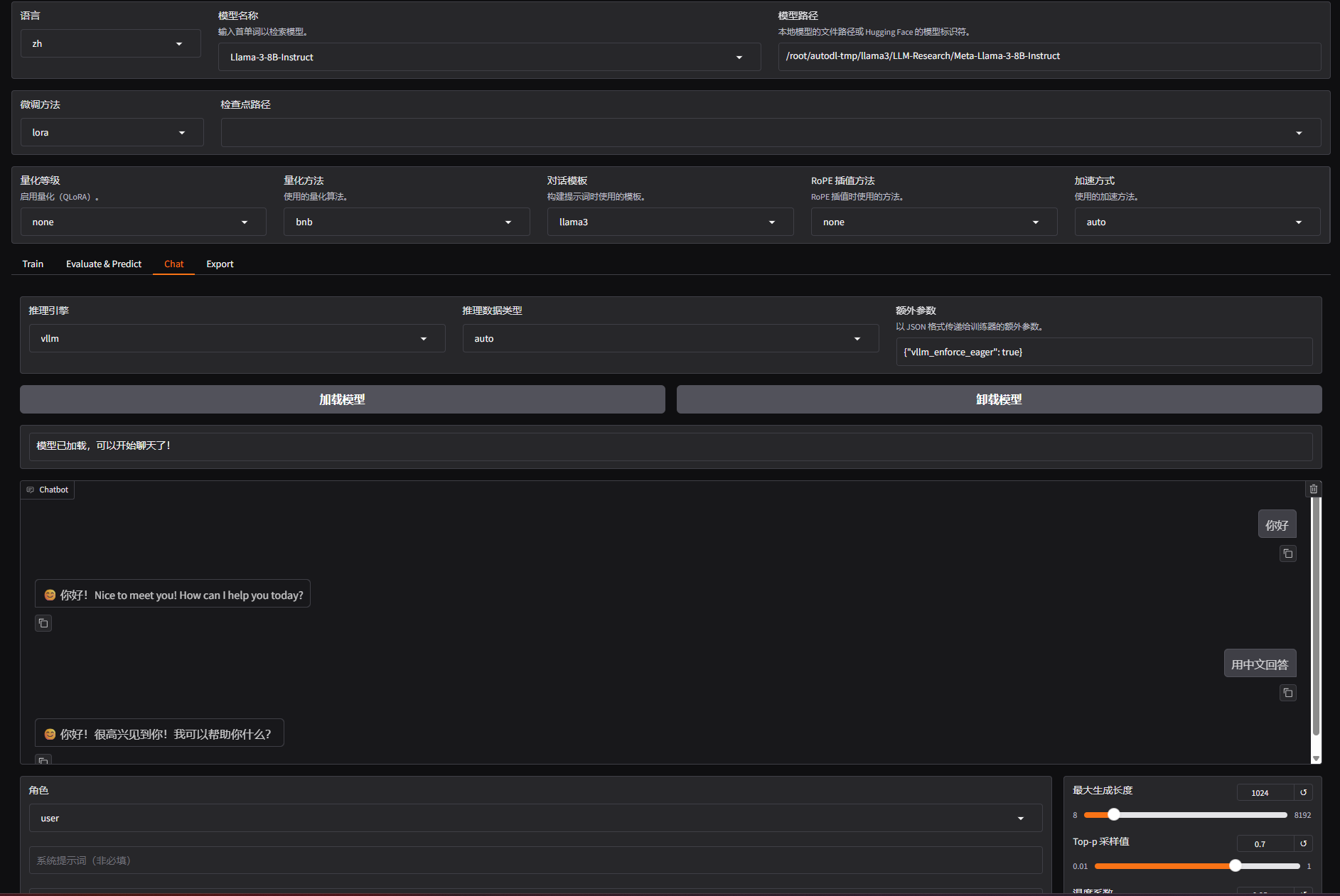
然后就能正常使用vllm部署Llama3:

免费领 150 小时云算力,进群参与显卡、AI PC 幸运抽奖
更多推荐

 2
2 0
0- 0


 已为社区贡献1条内容

所有评论(0)