


- @m0_46570767


简介
该用户还未填写简介
擅长的技术栈
可提供的服务
暂无可提供的服务
[渲染层网络层错误] Failed to load local image resource /page/login/undefined the server responded with a status of 500使用uni-app开发微信小程序,在HBuilder和微信开发者工具图片都显示正常,但是在微信开发者工具编译加载图片时,报图片为undefined原因:页面初次加载时,图片还没加载
一个粗心的错误,记录一下:微信小程序更改了起始页,同时压缩了wxml文件,上传体验版本测试,进入小程序页面一直显示空白,看后台调试说明一直显示:Page "pages/ser/index" has not been registered yet.Update view with init datapages/ser/index: onLoad have been invokedpages/ser/
微信公众号
使用uniapp开发微信小程序【Bug】合集在HBuilder x运行正常,但是运行到微信开发者工具就报错快速找到错误位置->右键选择格式化文档1.报错:Bad attrdatawith message使用的是嵌套数组:data:data() {return {boxArray: [{id: 1,type: 'aa',items: [{name: 'dd'}]},{id: 2,type: '
检查SDK文件夹(如:D:\android\Sdk\extras\intel\Hardware_Accelerated_Execution_Manager,你自己的SDK安装位置)是否有东西,如果没有则下载HAXM,执行1,重新安装HAXM;如果有,则执行2,检查是否正常运行;1.进入Android Studio设置,勾选HAXM installer。2.任务管理器 - 性能 - CPU,虚拟化:
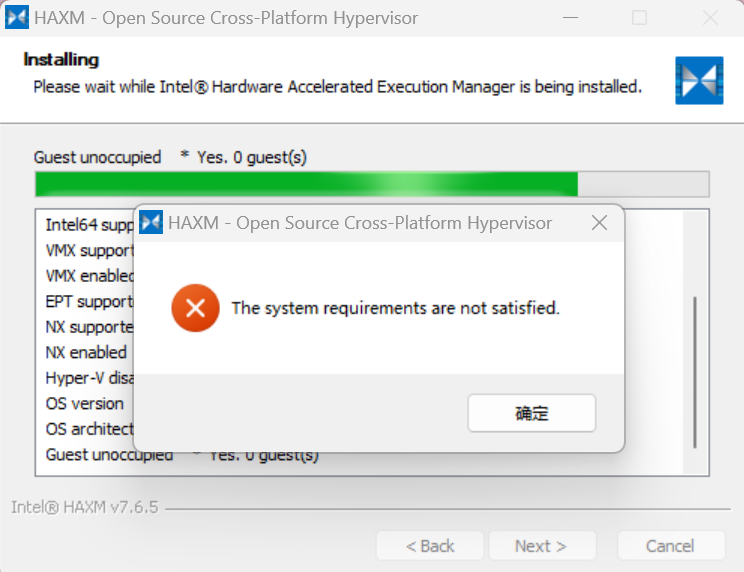
HAXM无法安装1.插入flutter插件、点击File/Setting/Appearance & Behavior/System Setting/Android SDK、更新Android Studio工具后,虚拟机无法启动,提示“Unable to install Intel® HAXM HAXM device is not found. ”2.D:\AndroidStudio\sdk
1.text.vue 页面代码<view class="will-back-after">Will back after<text>{{countdownTime}}s</text></view>2.data()里面声明countdownTime:data() {return {countdownTime: 5}}3.methods里面写方法:我这里
Vue/uniapp项目中,使用Base64转码和解码将字符串型转换为Base64,要做到兼容引入Base64,没有引入js-base64(1)引入Base64.jsnpm install base-64(2)在使用页面的<script></script>中引入:import Base64 from 'base-64'(3)在逻辑代码中使用:let keywords = '