
OpenCV联合C++/Qt 学习笔记(二十一)----ORB特征点、特征点匹配及RANSAC优化特征点匹配
·
一、ORB特征点
1、ORB特征点提取原理
ORB特征包括特征点和描述子。特征点用于从图像中筛选出较为“特殊”的位置,而描述子用来表示特征点周围区域的特征信息。
ORB特征点计算步骤:
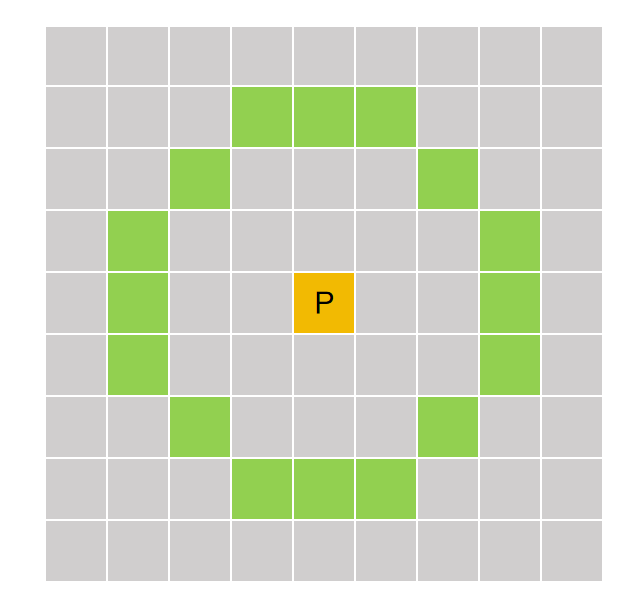
- 选择某个像素点作为中心点P,其像素值为Ip;
- 设置判定FAST角点的像素阈值,例如Tp = 20% * Ip;
- 比较中心点的像素值与半径为3的圆周上所有像素的像素值进行比较,如果存在连续N个像素的像素值大于(Ip + Tp)或者小于(Ip - Tp),将中心点P设置为FAST角点;
- 遍历图像中每个像素点,重复上述步骤,计算图像中的FAST角点。
计算特征描述:
得到特征点后我们需要以某种方式 F 描述这些特征点的属性。这些属性的输出我们称之为该特征点的描述子。ORB采用BRIEF算法来计算一个特征点的描述子。BRIEF算法的核心思想是在关键点P的周围以一定模式选取N个点对,把这N个点对的比较结果组合起来作为描述子。
以关键点P为圆心,以d为半径做圆O;
在圆O内某一模式选取N个点对。这里为方便说明,N=4,实际应用中N可以取512.
假设当前选取的4个点对如上图所示分别标记为:P1(A,B)、P2(A,B)、P3(A,B)、P4(A,B);
定义操作
,其中IA表示点A的灰度;
分别对已选取的点对进行T操作,将得到的结果进行组合 T(P1(A,B)) = 1、T(P2(A,B)) = 0、 T(P3(A,B)) = 1、 T(P4(A,B)) = 1;
最终的描述子为:1011
2、相关函数
- ORB特征点提取函数
/* 用途:用于创建ORB特征检测与描述子提取器 */
static Ptr<ORB> cv::ORB::create(int nfeatures=500, float scaleFactor=1.2f,
                                int nlevels=8, int edgeThreshold=31,
                                int firstLevel=0, int WTA_K=2,
                                ORB::ScoreType scoreType=ORB::HARRIS_SCORE,
                                int patchSize=31, int fastThreshold=20);
/*
nfeatures:检测ORB特征点的数目
scaleFactor:金字塔尺寸缩小的比例
nlevels:金字塔层数
edgeThreshold:边缘阈值
firstLevel:将原图像放入金字塔中的等级
WTA_K:生成每位描述子时需要用的像素点数目
scoreType:检测关键点时关键点评价方法
patchSize:生成描述子时关键点周围邻域的尺寸
fastThreshold:计算FAST角点时像素值差值的阈值
*/
3、示例代码
    QString imgPath = QApplication::applicationDirPath() + "/Images";
    cv::String s_imgPath = imgPath.toLocal8Bit().data();
    Mat img = imread(s_imgPath + "/lena.jpg", IMREAD_COLOR);
    if (img.empty())
    {
        qDebug() << "图片加载失败, 请确认图像文件名称是否正确";
        return;
    }
    Ptr<ORB> orb = ORB::create(500,/*特征点数目*/
        1.2f,/*金字塔层级之间的缩放比例*/
        8,/*金字塔图像层数系数*/
        31,/*边缘阈值*/
        0,/*原图在金字塔中的层数*/
        2,/*生成描述子时需要用的像素点数目*/
        ORB::HARRIS_SCORE,/*使用Harris方法评价特征点*/
        31,/*生成描述子时关键点周围邻域的尺寸*/
        20/*计算FAST角点时像素值差值的阈值*/
    );
    /*计算ORB关键点*/
    vector<KeyPoint> Keypoints;
    orb->detect(img, Keypoints);/*确定关键点*/
    /*计算ORB描述子*/
    Mat descriptions;
    orb->compute(img, Keypoints, descriptions);/*计算描述子*/
    /*绘制特征点*/
    Mat imgAngel;
    img.copyTo(imgAngel);
    /*绘制不含角度和大小的结果*/
    drawKeypoints(img, Keypoints, img, Scalar(255, 255, 255));
    /*绘制含有角度和大小的结果*/
    drawKeypoints(img, Keypoints, imgAngel, Scalar(255, 255, 255), DrawMatchesFlags::DRAW_RICH_KEYPOINTS);
    /*显示结果*/
    imshow("img", img);
    imshow("imgAngel", imgAngel);
    waitKey(0);
    destroyAllWindows();
二、特征点匹配
1、特征点匹配类的介绍
/* 用途:用于保存两个特征点之间的匹配关系。
       用于记录:
       “哪个特征点”和“哪个特征点”匹配成功,
       以及它们之间的相似程度 */
void cv::DMatch::DMatch(int _queryIdx, int _trainIdx, int _imgIdx, float _distance);
/*
_queryIdx:查询描述子集合中的索引,即待匹配图像中的特征点索引
_trainIdx:训练描述子集合中的索引,即目标图像中的特征点索引
_imgIdx:训练描述子所属图像的索引,主要用于多图像匹配场景
_distance:两个描述符之间的距离,表示匹配相似程度,距离越小表示越相似
*/
2、常用匹配方法及函数
/* 用途:用于在两个特征描述子集合之间寻找最佳匹配关系 */
void cv::DescriptorMatcher::match( InputArray queryDescriptors,
                                    InputArray trainDescriptors,
                                    CV_OUT std::vector<DMatch>& matches,
                                    InputArray mask=noArray() ) const;
/*
queryDescriptors:查询描述子集合,即待匹配图像的特征描述子
trainDescriptors:训练描述子集合,即目标图像的特征描述子
matches:两个集合描述子匹配结果,每个匹配结果由DMatch对象表示
mask:描述子匹配时的掩码矩阵,用于指定匹配哪些描述子
*/
/* 用途:用于执行K近邻特征匹配,即为每个查询描述子寻找前k个最相似的训练描述子 */
void cv::DescriptorMatcher::knnMatch( InputArray queryDescriptors,
InputArray trainDescriptors,
CV_OUT std::vector<std::vector<DMatch> >& matches, int k,
InputArray mask=noArray(), bool compactResult=false ) const;
/*
queryDescriptors:查询图像的描述子集合,即待匹配图像的特征描述子
trainDescriptors:训练图像的描述子集合,即目标图像的特征描述子
matches:输出K近邻匹配结果,每个查询描述子对应k个最佳匹配,因此为二维vector
k:每个查询描述子返回的最佳匹配数量
mask:匹配掩码矩阵,用于限制哪些描述子允许参与匹配
compactResult:输出匹配结果数目是否与查询描述子数目相同的选择标志
*/
/* 用途:用于执行“半径范围特征匹配”,即寻找所有距离小于指定阈值的描述子匹配结果 */
void cv::DescriptorMatcher::radiusMatch( InputArray queryDescriptors,
        InputArray trainDescriptors,
        CV_OUT std::vector<std::vector<DMatch> >& matches, float maxDistance,
        InputArray mask=noArray(), bool compactResult=false ) const;
/*
queryDescriptors:查询图像的描述子集合,即待匹配图像的特征描述子
trainDescriptors:训练图像的描述子集合,即目标图像的特征描述子
matches:输出半径匹配结果,每个查询描述子可能对应多个匹配结果,因此为二维vector
maxDistance:最大匹配距离阈值,只有距离小于该值的匹配才会被保留
mask:匹配掩码矩阵,用于限制哪些描述子允许参与匹配
compactResult:输出匹配结果数目是否与查询描述子数目相同的选择标志
*/
3、暴力匹配
/* 用途:用于创建暴力匹配器
       BFMatcher会逐个比较:查询描述子与训练描述子,计算所有可能距离,并寻找最佳匹配结果 */
cv::BFMatcher::BFMatcher( int normType=NORM_L2, bool crossCheck=false );
/*
normType:两个描述子之间距离的类型标志可以选择的参数为
            NORM_L1:L1距离(曼哈顿距离)
            NORM_L2:L2距离(欧式距离)
            NORM_HAMMING:汉明距离,常用于ORB、BRIEF、BRISK等二值描述子
            NORM_HAMMING2:改进汉明距离,常用于WTA_K为3或4的ORB描述子
crossCheck:是否进行交叉检测的标志
            false:单向匹配,query找到train最佳匹配即可
            true:双向匹配,query匹配train的同时,train也必须匹配回query,才认为匹配成功
*/
4、显示特征点匹配结果
void cv::drawMatches( InputArray img1, const std::vector<KeyPoint>& keypoints1,
                    InputArray img2, const std::vector<KeyPoint>& keypoints2,
                    const std::vector<DMatch>& matches1to2, InputOutputArray outImg,
                    const Scalar& matchColor=Scalar::all(-1),
                    const Scalar& singlePointColor=Scalar::all(-1),
                    const std::vector<char>& matchesMask=std::vector<char>(),
                    DrawMatchesFlags flags=DrawMatchesFlags::DEFAULT );
/*
img1:第一张输入图像
keypoints1:第一张图像中的特征点集合
img2:第二张输入图像
keypoints2:第二张图像中的特征点集合
matches1to2:两张图像之间的特征匹配结果,每个匹配结果由DMatch表示
outImg:输出绘制后的图像
matchColor:匹配连线颜色,默认值为随机颜色
singlePointColor:未匹配特征点颜色,默认值为随机颜色
matchesMask:匹配掩码,用于指定哪些匹配需要绘制,值为1表示绘制,值为0表示忽略
flags:绘制方式控制标志,用于控制是否绘制单个点、是否覆盖输出图像等
*/
5、示例代码
void orb_fratures(Mat& gray, vector<KeyPoint>& keypoints, Mat& descriptions)
{
    Ptr<ORB> orb = ORB::create(1000, 1.2f);
    orb->detect(gray, keypoints);
    orb->compute(gray, keypoints, descriptions);
}
/******************************************************************************/

    QString imgPath = QApplication::applicationDirPath() + "/Images";
    cv::String s_imgPath = imgPath.toLocal8Bit().data();
    Mat img1 = imread(s_imgPath + "/box.png");
    Mat img2 = imread(s_imgPath + "/box_in_scene.png");
    if (img1.empty() || img2.empty())
    {
        qDebug() << "图片加载失败, 请确认图像文件名称是否正确";
        return;
    }

    /*提取ORB特征点*/
    vector<KeyPoint> Keypoints1, Keypoints2;
    Mat descriptions1, descriptions2;
    orb_fratures(img1, Keypoints1, descriptions1);
    orb_fratures(img2, Keypoints2, descriptions2);
    /*特征点匹配*/
    vector<DMatch> matches;/*定义存放匹配结果的变量*/
    BFMatcher matcher(NORM_HAMMING);/*定义特征点匹配的类,使用汉明距离*/
    matcher.match(descriptions1, descriptions2, matches);/*进行特征点匹配*/
    cout << "matches: " << matches.size() << endl;/*匹配成功特征点数目*/

    /*通过汉明距离筛选匹配结果*/
    double min_dist = 10000, max_dist = 0;
    for (int i = 0; i < matches.size(); i++)
    {
        double dist = matches[i].distance;
        if (dist < min_dist)
        {
            min_dist = dist;
        }
        if (dist > max_dist)
        {
            max_dist = dist;
        }
    }
    /*输出所有匹配结果中最大汉明距离和最小汉明距离*/
    cout << "min_dist: " << min_dist << endl;
    cout << "max_dist: " << max_dist << endl;

    /*将汉明距离较大的匹配点对删除*/
    vector<DMatch> good_matches;
    for (int i = 0; i < matches.size(); i++)
    {
        if (matches[i].distance <= max(2 * min_dist, 20.0))
        {
            good_matches.push_back(matches[i]);
        }
    }
    cout << "good_matches: " << good_matches.size() << endl;/*剩余特征点数目*/
    /*绘制匹配结果*/
    Mat outimg, outimg1;
    drawMatches(img1, Keypoints1, img2, Keypoints2, matches, outimg);
    drawMatches(img1, Keypoints1, img2, Keypoints2, good_matches, outimg1);
    imshow("outimg", outimg);
    waitKey(0);
    imshow("outimg1", outimg1);
    waitKey(0);
    destroyAllWindows();
三、RANSAC优化特征点匹配
1、RANSAC算法介绍
RANSAC,随机采样一致性
- 随机取样,计算规律(特征点匹配中计算单应矩阵)
- 测试规律是否满足大多数据
- 循环前两步
- 选取最佳规律,并输出满足数据的点
2、相关函数
/* 返回值:3×3单应矩阵
    用途:用于根据两组对应点,计算两幅图像之间的单应变换矩阵。
    单应矩阵能够描述:平移、旋转、缩放、透视变换等几何关系 */
Mat cv::findHomography( InputArray srcPoints, InputArray dstPoints,
                        int method = 0, double ransacReprojThreshold = 3,
                        OutputArray mask=noArray(), const int maxIters = 2000,
                        const double confidence = 0.995);
/*
srcPoints:原图像中的二维点坐标集合,通常为匹配得到的特征点坐标
dstPoints:目标图像中的二维点坐标集合,与srcPoints一一对应
method:计算单应矩阵的方法标志
        0:普通最小二乘法
        RANSAC:随机采样一致性算法,可自动剔除错误匹配点
        LMEDS:最小中值法,对离群点具有较强鲁棒性
ransacReprojThreshold:RANSAC重投影误差阈值,小于该值的点认为是内点
mask:输出内点掩码,值为1表示该匹配为内点,值为0表示外点
maxIters:RANSAC最大迭代次数
confidence:RANSAC算法置信度,一般取0~1
*/
3、示例代码
void match_min(vector<DMatch> matches, vector<DMatch>& good_matches)
{
    /*通过汉明距离筛选匹配结果*/
    double min_dist = 10000, max_dist = 0;
    for (int i = 0; i < matches.size(); i++)
    {
        double dist = matches[i].distance;
        if (dist < min_dist)
        {
            min_dist = dist;
        }
        if (dist > max_dist)
        {
            max_dist = dist;
        }
    }
    /*输出所有匹配结果中最大汉明距离和最小汉明距离*/
    cout << "min_dist: " << min_dist << endl;
    cout << "max_dist: " << max_dist << endl;

    /*将汉明距离较大的匹配点对删除*/
    for (int i = 0; i < matches.size(); i++)
    {
        if (matches[i].distance <= max(2 * min_dist, 20.0))
        {
            good_matches.push_back(matches[i]);
        }
    }
}
void ransac(vector<DMatch> matches, vector<KeyPoint> queryKeyPoint, vector<KeyPoint> trainKeyPoint, vector<DMatch> &matches_ransac)
{
    /*定义保存匹配点对坐标*/
    vector<Point2f> srcPoints(matches.size()), dstPoints(matches.size());
    /*保存从关键点中提取到的匹配点对的坐标*/
    for (int i = 0; i < matches.size(); i++)
    {
        srcPoints[i] = queryKeyPoint[matches[i].queryIdx].pt;
        dstPoints[i] = trainKeyPoint[matches[i].queryIdx].pt;
    }
    /*匹配点对进行RANSAC过滤*/
    vector<int> inliersMask(srcPoints.size());
    findHomography(srcPoints, dstPoints, RANSAC, 5, inliersMask);
    for (int i = 0; i < inliersMask.size(); i++)
    {
        if (inliersMask[i])
        {
            matches_ransac.push_back(matches[i]);
        }
    }
}
/**********************************************************************/
    QString imgPath = QApplication::applicationDirPath() + "/Images";
    cv::String s_imgPath = imgPath.toLocal8Bit().data();
    Mat img1 = imread(s_imgPath + "/box.png");
    Mat img2 = imread(s_imgPath + "/box_in_scene.png");
    if (img1.empty() || img2.empty())
    {
        qDebug() << "图片加载失败, 请确认图像文件名称是否正确";
        return;
    }

    /*提取ORB特征点*/
    vector<KeyPoint> Keypoints1, Keypoints2;
    Mat descriptions1, descriptions2;
    /*基于区域分割的ORB特征点提取*/
    orb_fratures(img1, Keypoints1, descriptions1);
    orb_fratures(img2, Keypoints2, descriptions2);
    /*特征点匹配*/
    vector<DMatch> matches,good_min,good_ransac;
    BFMatcher matcher(NORM_HAMMING);
    matcher.match(descriptions1, descriptions2, matches);
    cout << "matches: " << matches.size() << endl;

    /*最小汉明距离*/
    match_min(matches, good_min);
    cout << "good_min: " << good_min.size() << endl;

    /*用RANSAC算法筛选匹配结果*/
    ransac(good_min, Keypoints1, Keypoints2, good_ransac);
    cout << "good_ransac: " << good_ransac.size() << endl;


    /*绘制匹配结果*/
    Mat outimg, outimg1, outimg2;
    drawMatches(img1, Keypoints1, img2, Keypoints2, matches, outimg);
    drawMatches(img1, Keypoints1, img2, Keypoints2, good_min, outimg1);
    drawMatches(img1, Keypoints1, img2, Keypoints2, good_ransac, outimg2);
    imshow("outimg", outimg);
    waitKey(0);
    imshow("outimg1", outimg1);
    waitKey(0);
    imshow("outimg2", outimg2);
    waitKey(0);
destroyAllWindows();更多推荐
 6
6 0
0- 0


 已为社区贡献7条内容

所有评论(0)