详解Unity协程
文章摘要: 本文系统介绍了Unity协程的原理与使用。第一部分对比了协程与线程的区别,指出协程是用户态轻量级并发模型,适合IO密集型任务。第二部分详细讲解Unity中协程的创建方法,包括使用IEnumerator和yield实现延时、分帧等功能。第三部分阐述了协程的启动和停止机制,强调StartCoroutine与StopCoroutine需要配套使用,并分析了字符串方式、IEnumerator方
前言
在进行Unity游戏开发时,不可避免的我们会使用到协程(Coroutine)来实现一些效果,如延迟执行、等待网络请求响应、分帧加载等。接下来我们将从协程是什么、Unity中的协程使用以及Unity协程的实现原理三方面来详解Unity协程。
一、协程是什么?
简单来说,协程是一种高效的并发编程模型,它通过用户态的协作式调度,以极低的开销实现大规模并发,尤其适合解决I/O密集型任务的性能瓶颈,让开发者能用同步代码的思维写出高性能的异步程序。
为了让大家更好的理解协程,这里我们引入线程进行对比。线程是系统层面可以执行的最小单元,而协程是用户层面可以执行的最小单元。线程可以做到并行,而协程只能做到并发,因为协程都会运行在一个线程上,单个线程是无法做到并行。线程的创建、调用以及销毁开销较大,主要是由于这些操作都需要使系统进行复杂上下文切换(用户态<>内核态),而协程的全部操作都是在用户态下进行,由协程调度器控制。线程创建需要的栈空间大小是MB级别,而协程只需KB级别,这就意味这可以轻松创建数十万甚至上百万个协程,但创建数万个线程就可能将系统资源耗尽,这对于需要海量连接的应用非常友好。线程对于CPU密集型任务更友好,协程对于IO密集型任务更友好。线程的状态转换由系统自动控制,而协程的状态转换由协程调度器控制。
| 线程 | 协程 |
|---|---|
| 系统层面最小可执行单元 | 用户层面最小可执行单元 |
| 可以做到并行 | 只能做到并发 |
| 状态转换需要进行用户态<>内核态转换 | 状态转换都在用户态进行 |
| 栈空间MB级别 | 栈空间KB级别 |
| CPU密集型任务友好 | IO密集型任务友好 |
二、Unity中的协程使用
1、创建协程
在Unity中我们通常使用IEnumerator和yield来创建一个协程。常用的一些用法如下:
void Start()
{
    StartCoroutine(Example());
}

public IEnumerator Example()
{
    Debug.Log($"当前帧为{Time.frameCount},当前时间{Time.realtimeSinceStartup}");
    // 暂停等待下一帧继续执行
    yield return null;
    Debug.Log($"当前帧为{Time.frameCount},当前时间{Time.realtimeSinceStartup}");
    // 暂停等待本帧帧末继续执行(使用这种方法可以获取某个数据在当前帧最后的值,忽略中间各个脚本修改的过程)
    yield return new WaitForEndOfFrame();
    Debug.Log($"当前帧为{Time.frameCount},当前时间{Time.realtimeSinceStartup}");
    // 暂停1秒后继续执行
    yield return new WaitForSeconds(1f);
    Debug.Log($"当前帧为{Time.frameCount},当前时间{Time.realtimeSinceStartup}");
    // 等待AnotherExample执行完后继续执行
    yield return StartCoroutine(AnotherExample());
    Debug.Log($"当前帧为{Time.frameCount},当前时间{Time.realtimeSinceStartup}");
    // 直接停止,后面的内容不再执行
    yield break;
    Debug.Log($"当前帧为{Time.frameCount},当前时间{Time.realtimeSinceStartup}");
}

public IEnumerator AnotherExample()
{
    yield return new WaitForSeconds(1f);
}
执行结果如下: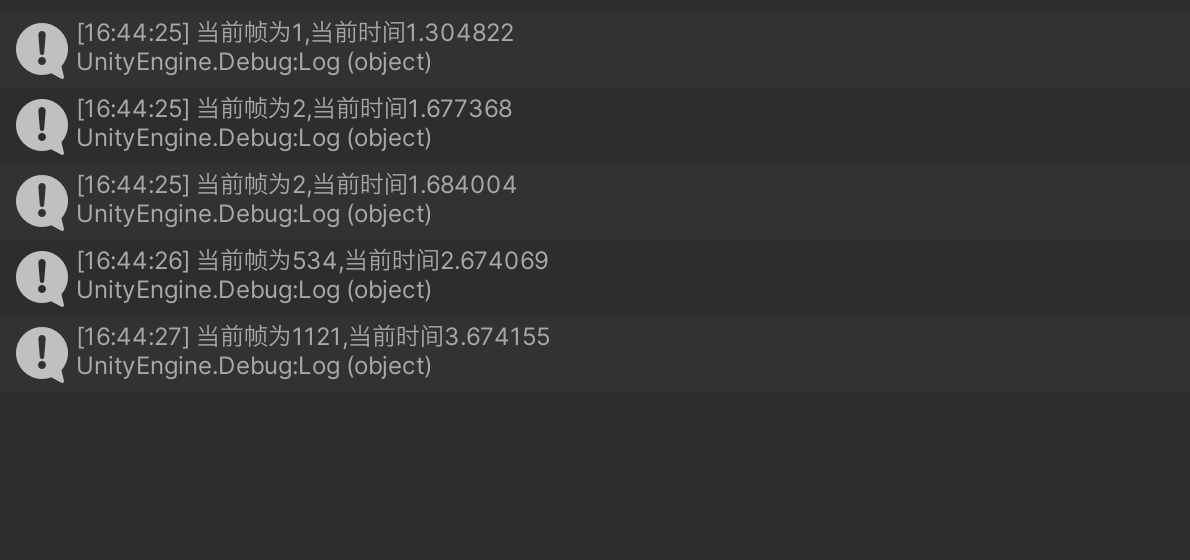
2、开始和停止协程
2.1 开始协程
开始协程一般使用StartCoroutine方法,StartCoroutine是MonoBehaviour类内的一个实例方法,因此我们只能在继承了MonoBehaviour类的实例方法中调用StartCoroutine,无法在静态方法和未继承MonoBehaviour类的实例方法中调用。StartCoroutine有这几种使用形式。
void Start()
{
    StartCoroutine(AnotherExample());    // 直接调用迭代器方法
    StartCoroutine(nameof(AnotherExample));  // 使用调用迭代器方法名
    StartCoroutine(AnotherExample(1.5f));  // 带参数
    StartCoroutine(nameof(Test), 5f);  // 使用方法名带参数
    StartCoroutine(nameof(AnotherExample), 1.5f);
}

public IEnumerator AnotherExample()
{
    yield return new WaitForSeconds(1f);
    Debug.Log($"当前时间{Time.realtimeSinceStartup},function finish!");
}

public IEnumerator AnotherExample(float passTime)
{
    yield return new WaitForSeconds(passTime);
    Debug.Log($"当前时间{Time.realtimeSinceStartup},custome function finish!");
}

public IEnumerator Test(float passTime)
{
    yield return new WaitForSeconds(passTime);
    Debug.Log("结束");
}
执行结果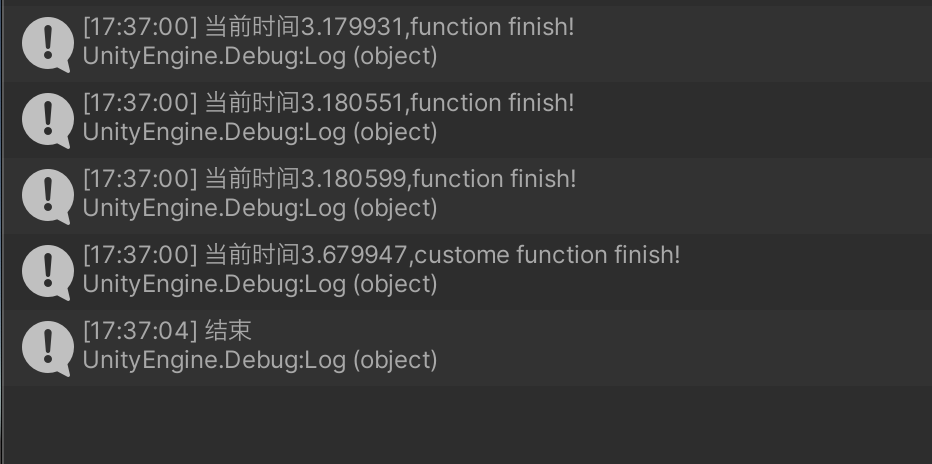
注意事项:方法名带参数这种使用方式最多只能有一个参数,多个参数的方法不能使用这种方式。另外从执行结果来看,只输出了一个custome fuction finish!StartCoroutine(nameof(AnotherExample), 1.5f);这行代码是执行的无参数的AnotherExample方法。所以这里要注意如果有函数重载,并且其中有一个无参的函数形式,不能使用函数名加参数这种方式进行调用,不然会都调用到无参的函数上。
2.2 停止协程
停止协程一般使用StopCoroutine和StopAllCoroutines方法,与StartCoroutine类似,这两种方法也只能在继承了MonoBehaviour类的实例方法中调用。StopCoroutine有这几种重载形式。具体
void StopCoroutine(string) (in class MonoBehaviour)
void StopCoroutine(System.Collections.IEnumerator) (in class MonoBehaviour)
void StopCoroutine(UnityEngine.Coroutine) (in class MonoBehaviour)
2.3 配套使用
上面提到了好几种开始和停止协程的方法,但这些方法不能随意混合搭配,必需指定的组合方式才能精准的停止协程。
- 字符串方式
void Start()
{
    StartCoroutine(nameof(TestStop), 10000);
}

// 点击鼠标左键可以停止输出
void Update()
{
    if (Input.GetMouseButtonDown(0))
    {
        StopCoroutine(nameof(TestStop));
    }
}

public IEnumerator TestStop(int loopNum)
{
    for (int i = 0; i < loopNum; i++)
    {
        yield return null;
        Debug.Log($"current loopNum {i}");
    }
}
- IEnumerator方式
private IEnumerator tmp = null;

void Start()
{
    tmp = TestStop(10000);
    StartCoroutine(tmp);
}

void Update()
{
    if (Input.GetMouseButtonDown(0))
    {
        StopCoroutine(tmp);
    }
}

public IEnumerator TestStop(int loopNum)
{
    for (int i = 0; i < loopNum; i++)
    {
        yield return null;
        Debug.Log($"current loopNum {i}");
    }
}
- Coroutine方式
private Coroutine tmpCor = null;

void Start()
{
    tmpCor = StartCoroutine(TestStop(10000));
}

void Update()
{
    if (Input.GetMouseButtonDown(0))
    {
        StopCoroutine(tmpCor);
    }
}

public IEnumerator TestStop(int loopNum)
{
    for (int i = 0; i < loopNum; i++)
    {
        yield return null;
        Debug.Log($"current loopNum {i}");
    }
}
可以看到上面除了第一种字符串方式,其他两种方式都需要引入一个变量来存储开始协程的一个值,以便于结束时能找到是结束哪个协程。字符串方式底层是系统使用反射方式获取到要执行的方法。这里有个要注意的点,同一个函数名称,无论使用字符串方式调用多少次协程,只要使用字符串方式停止协程一次,所有字符串方式调用相同名称的协程都会停止。 示例代码:
void Start()
{
    StartCoroutine(nameof(TestStop),10000);
    StartCoroutine(nameof(TestStop),20000);
}

void Update()
{
//点击一次可以停止两个协程
    if (Input.GetMouseButtonDown(0))
    {
        StopCoroutine(nameof(TestStop));
    }
}

public IEnumerator TestStop(int loopNum)
{
    for (int i = 0; i < loopNum; i++)
    {
        yield return null;
        Debug.Log($"current loopNum {i}");
    }
}
三、Unity协程的实现原理
协程底层简单来说无非是两个关键点——恢复(resume)和挂起(yield)。在Unity中主要通过IEnumerator和脚本生命周期来实现。
IEnumerator接口内有一个属性,两个方法。current表示能获取到的当前位置的元素。MoveNext方法会移动到下个元素的位置,Reset移动到第一个元素的前一个位置,之后调用MoveNext然后获取current刚好能拿到第一个位置的元素。
public interface IEnumerator
{
 /// <summary><para>Gets the current element in the collection.</para></summary>
 object Current { get; }

 /// <summary><para>Advances the enumerator to the next element of the collection.</para></summary>
 bool MoveNext();

 /// <summary><para>Sets the enumerator to its initial position, which is before the first element in the collection.</para></summary>
 void Reset();
}
这里我们写一个例子,体验一下使用原始API来进行协程调用。
void Start()
{
   IEnumerator testEnu = TestEnu();
   while (true)
   {
       bool notEnd = testEnu.MoveNext();  // 执行到下一个yield
       if (!notEnd)
       {
           break;
       }
       Debug.Log($"获取当前的值为{testEnu.Current}");
   }
   Debug.Log("元素遍历结束");
}

public IEnumerator TestEnu()
{
   Debug.Log("第一次调用yield!");
   yield return 1;
   Debug.Log("第二次调用yield!");
   yield return 2;
   Debug.Log("第三次调用yield!");
   yield return 3;
}
执行结果如下: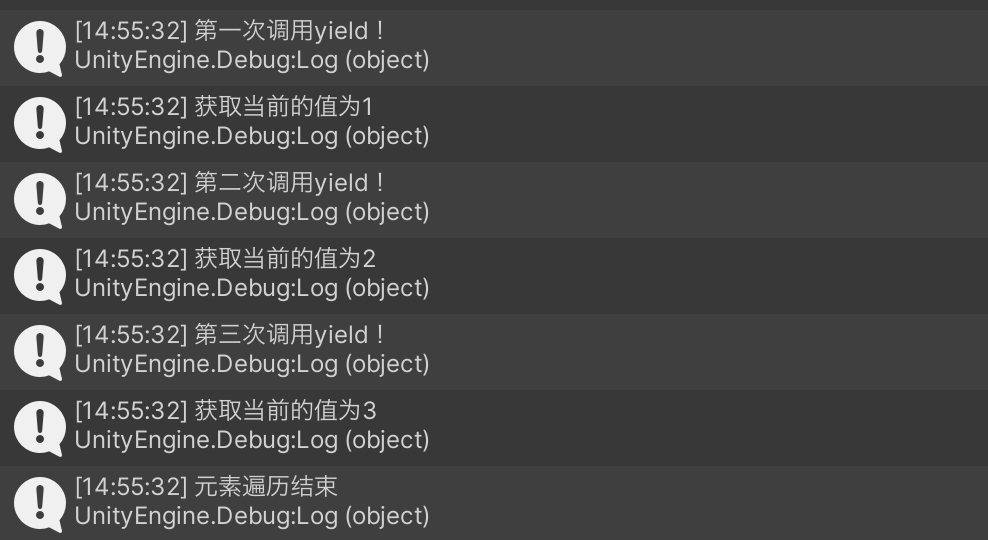
从结果可以看出,MoveNext方法会开始执行协程方法,当遇到yield之后会停止挂起,并返回一个值。当再次遇到MoveNext会恢复执行,直到再遇到yield或者方法结束,循环往复。
我们在Unity中使用协程会显式手动调用yield,但却没有手动恢复协程的印象,这是因为Unity引擎帮我们做了。从下面这种经典的Unity脚本生命周期图可以看到,在Update函数和帧末有几个yield,这就表明Unity主线程循环到这里的时候会唤起之前被挂起的并且满足条件的协程,而不用我们手动来处理,非常方便。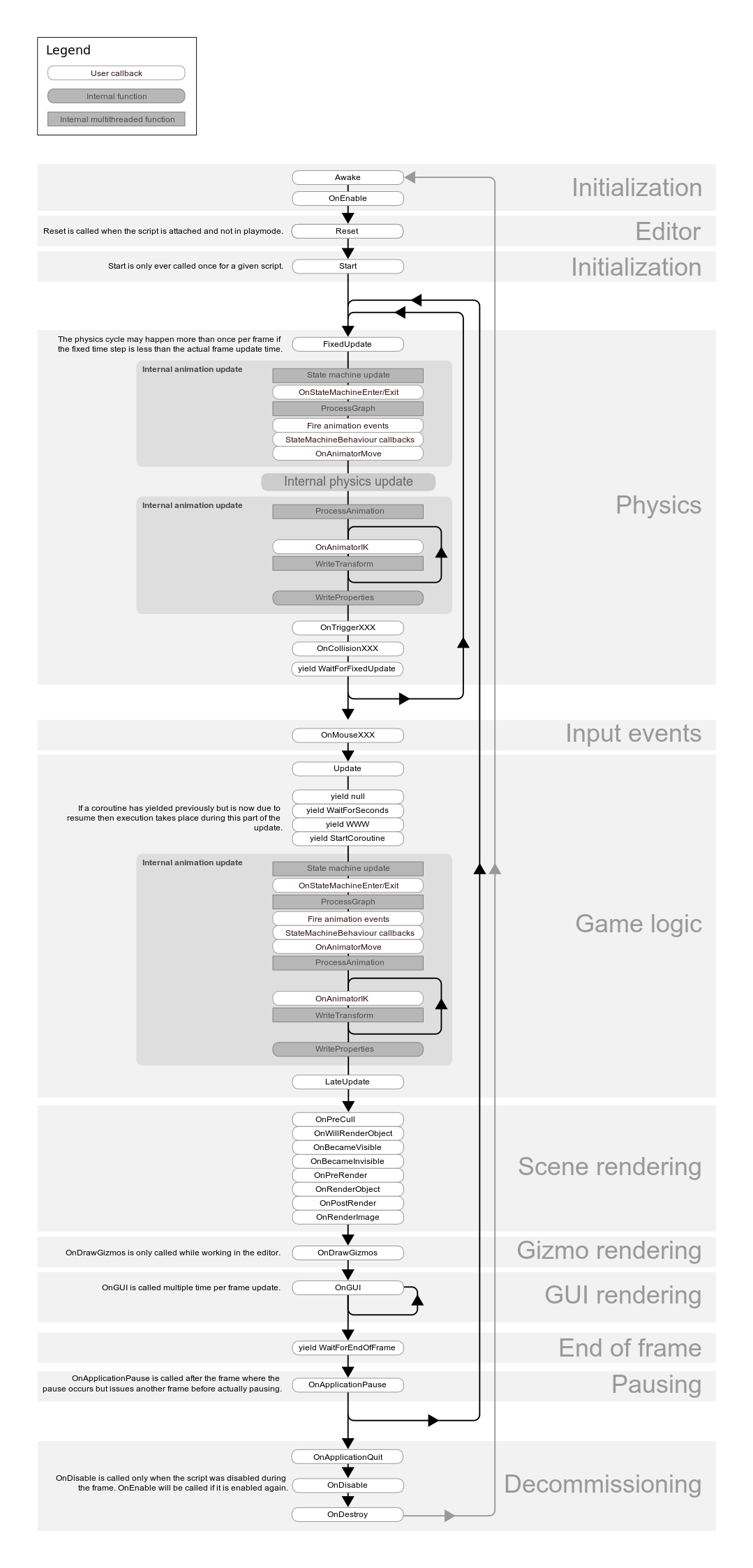
总结
本文主要介绍了什么是协程、如何在Unity中使用协程,最后简要介绍了协程的实现原理。

这里是一个专注于游戏开发的社区,我们致力于为广大游戏爱好者提供一个良好的学习和交流平台。我们的专区包含了各大流行引擎的技术博文,涵盖了从入门到进阶的各个阶段,无论你是初学者还是资深开发者,都能在这里找到适合自己的内容。除此之外,我们还会不定期举办游戏开发相关的活动,让大家更好地交流互动。加入我们,一起探索游戏开发的奥秘吧!
更多推荐



 63
63 0
0- 0


 已为社区贡献1条内容

所有评论(0)