
一个简单的模拟宇宙——基于NKS理论的3D元胞自动机
·
vibe coding版本
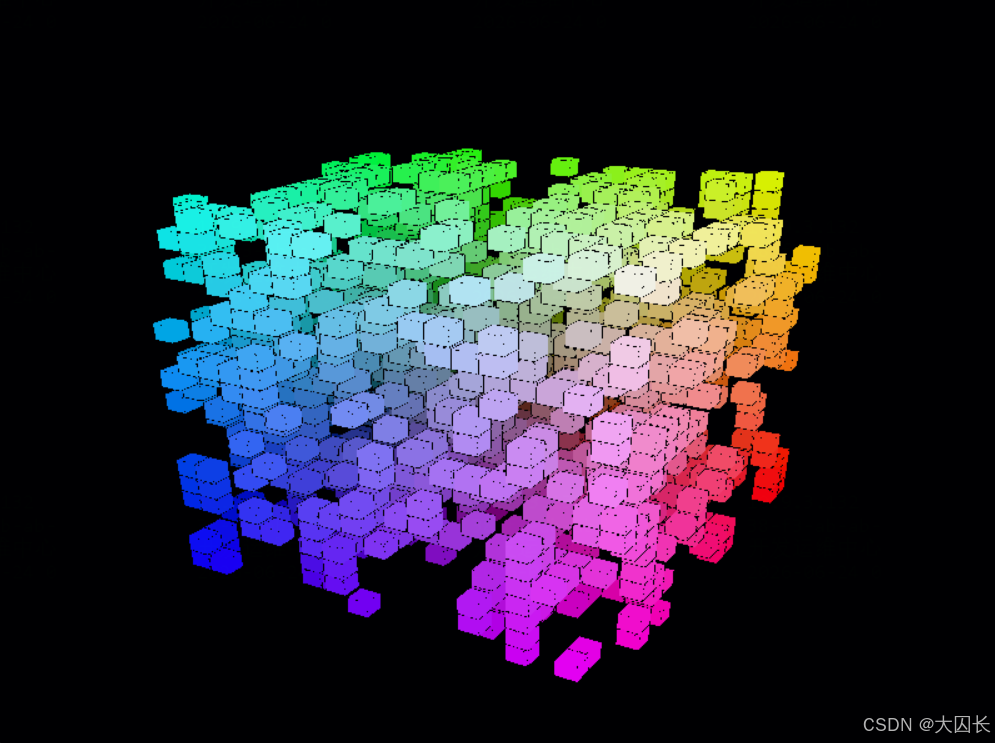
这是一个基于NKS(一种新科学)思想的3D元胞自动机模拟器。它使用 Python + Pygame + NumPy 实现,你可以在三维网格中探索简单规则如何产生复杂结构。
import pygame
import numpy as np
from pygame.locals import *
from OpenGL.GL import *
from OpenGL.GLU import *
import sys

# ==================== 配置参数 ====================
GRID_SIZE = 20           # 网格 20x20x20
CELL_SIZE = 0.5          # 单元格大小
CUBE_SIZE = CELL_SIZE * 0.9  # 立方体绘制大小(留间隙)
UPDATE_DELAY = 100       # 更新间隔(毫秒)

# ==================== 三维元胞自动机类 ====================
class CellularAutomaton3D:
    def __init__(self, size):
        self.size = size
        # 随机初始化三维网格 (0 或 1)
        self.grid = np.random.choice([0, 1], size=(size, size, size), p=[0.85, 0.15])
        self.new_grid = np.zeros_like(self.grid)

    def get_neighbor_sum(self, x, y, z):
        """计算 (x,y,z) 周围26个邻居的和(不包含自身)"""
        total = 0
        for i in (-1, 0, 1):
            for j in (-1, 0, 1):
                for k in (-1, 0, 1):
                    if i == 0 and j == 0 and k == 0:
                        continue
                    ni, nj, nk = x + i, y + j, z + k
                    if 0 <= ni < self.size and 0 <= nj < self.size and 0 <= nk < self.size:
                        total += self.grid[ni, nj, nk]
        return total

    def update(self):
        """根据 NKS 风格规则更新网格"""
        for x in range(self.size):
            for y in range(self.size):
                for z in range(self.size):
                    neighbors = self.get_neighbor_sum(x, y, z)
                    state = self.grid[x, y, z]

                    # ---- NKS 风格规则(可自由修改) ----
                    # 规则:死细胞周围恰好有3个活细胞时诞生;活细胞周围有2或3个活细胞时存活
                    if state == 1:
                        if neighbors < 2 or neighbors > 3:
                            self.new_grid[x, y, z] = 0
                        else:
                            self.new_grid[x, y, z] = 1
                    else:
                        if neighbors == 3:
                            self.new_grid[x, y, z] = 1
                        else:
                            self.new_grid[x, y, z] = 0

        self.grid, self.new_grid = self.new_grid, self.grid
        self.new_grid.fill(0)

# ==================== 3D 渲染函数 ====================
def draw_cube(x, y, z, size, color):
    """在 (x,y,z) 处绘制一个彩色立方体"""
    half = size / 2.0
    vertices = [
        [x-half, y-half, z-half], [x+half, y-half, z-half],
        [x+half, y+half, z-half], [x-half, y+half, z-half],
        [x-half, y-half, z+half], [x+half, y-half, z+half],
        [x+half, y+half, z+half], [x-half, y+half, z+half]
    ]
    edges = [
        (0,1), (1,2), (2,3), (3,0),
        (4,5), (5,6), (6,7), (7,4),
        (0,4), (1,5), (2,6), (3,7)
    ]
    glColor3f(*color)
    glBegin(GL_QUADS)
    # 六个面:每个面两个三角形
    faces = [
        (0,1,2,3), (4,5,6,7),
        (0,1,5,4), (2,3,7,6),
        (0,3,7,4), (1,2,6,5)
    ]
    for face in faces:
        glVertex3fv(vertices[face[0]])
        glVertex3fv(vertices[face[1]])
        glVertex3fv(vertices[face[2]])
        glVertex3fv(vertices[face[3]])
    glEnd()
    glColor3f(0, 0, 0)
    glBegin(GL_LINES)
    for edge in edges:
        glVertex3fv(vertices[edge[0]])
        glVertex3fv(vertices[edge[1]])
    glEnd()

def render(ca):
    """渲染整个三维网格"""
    glClear(GL_COLOR_BUFFER_BIT | GL_DEPTH_BUFFER_BIT)
    glLoadIdentity()
    gluPerspective(45, 1.0, 0.1, 50.0)
    glTranslatef(0.0, 0.0, -25)
    glRotatef(25, 1, 0, 0)
    glRotatef(-30, 0, 1, 0)

    offset = (ca.size - 1) * CELL_SIZE / 2.0
    for x in range(ca.size):
        for y in range(ca.size):
            for z in range(ca.size):
                if ca.grid[x, y, z] == 1:
                    # 根据位置映射颜色(从蓝色渐变到红色)
                    r = x / float(ca.size)
                    g = y / float(ca.size)
                    b = z / float(ca.size)
                    draw_cube(x * CELL_SIZE - offset,
                              y * CELL_SIZE - offset,
                              z * CELL_SIZE - offset,
                              CUBE_SIZE, (r, g, b))

# ==================== 主程序 ====================
def main():
    pygame.init()
    display = (800, 600)
    pygame.display.set_mode(display, DOUBLEBUF | OPENGL)
    pygame.display.set_caption("3D NKS 元胞自动机 - Pygame")
    glEnable(GL_DEPTH_TEST)

    ca = CellularAutomaton3D(GRID_SIZE)
    clock = pygame.time.Clock()
    last_update = pygame.time.get_ticks()
    running = True

    while running:
        for event in pygame.event.get():
            if event.type == pygame.QUIT:
                running = False
            elif event.type == pygame.KEYDOWN:
                if event.key == pygame.K_SPACE:
                    # 空格键:随机重置
                    ca.grid = np.random.choice([0, 1], size=(GRID_SIZE, GRID_SIZE, GRID_SIZE),
                                               p=[0.85, 0.15])
                elif event.key == pygame.K_r:
                    # R键:完全随机重置
                    ca.grid = np.random.choice([0, 1], size=(GRID_SIZE, GRID_SIZE, GRID_SIZE))
                elif event.key == pygame.K_c:
                    # C键:清空
                    ca.grid.fill(0)

        # 定时更新
        now = pygame.time.get_ticks()
        if now - last_update > UPDATE_DELAY:
            ca.update()
            last_update = now

        render(ca)
        pygame.display.flip()
        clock.tick(30)

    pygame.quit()
    sys.exit()

if __name__ == "__main__":
    main()
运行说明
- 安装依赖:
pip install pygame numpy PyOpenGL - 运行代码:直接执行即可
- 交互控制:
- 空格键:按85%/15%概率随机重置
- R键:完全随机重置
- C键:清空所有细胞
代码设计思路
- NKS核心思想:从极简单的局部规则出发,观察全局涌现的复杂模式。当前使用的是经典康威生命游戏规则(三维推广),你可以自由修改
update()方法中的规则逻辑,探索不同的NKS规则空间。 - 三维网格:使用
numpy存储20x20x20的0/1状态数组,邻居统计采用26邻域(周围所有相邻格子)。 - 3D渲染:基于
PyOpenGL绘制彩色立方体,颜色根据坐标位置从蓝到红渐变,方便观察结构分布。 - 性能优化:通过
UPDATE_DELAY控制演化速度,避免帧率过高导致卡顿。
html版本
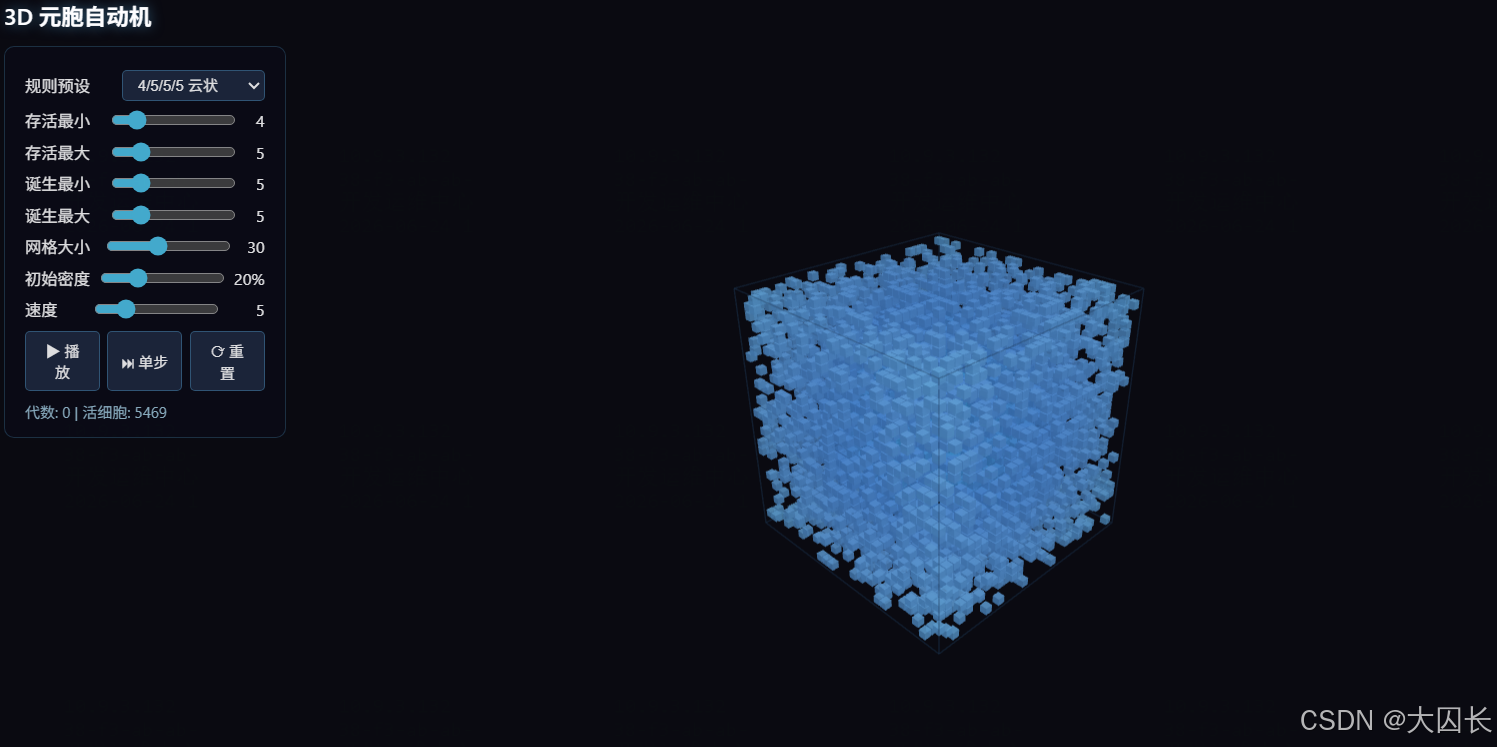
<!DOCTYPE html>
<html lang="zh-CN">
<head>
<meta charset="UTF-8">
<title>3D 元胞自动机</title>
<style>
* { margin: 0; padding: 0; box-sizing: border-box; }
body { overflow: hidden; background: #0a0a0f; font-family: 'Segoe UI', sans-serif; }
canvas { display: block; }

#ui {
  position: fixed;
  top: 16px;
  left: 16px;
  color: #e0e0e0;
  z-index: 100;
  user-select: none;
}

#ui h1 {
  font-size: 18px;
  font-weight: 600;
  margin-bottom: 12px;
  color: #fff;
  text-shadow: 0 0 10px rgba(100, 200, 255, 0.5);
}

.panel {
  background: rgba(10, 10, 20, 0.85);
  border: 1px solid rgba(100, 200, 255, 0.2);
  border-radius: 8px;
  padding: 12px 16px;
  margin-bottom: 10px;
  backdrop-filter: blur(8px);
  min-width: 220px;
}

.panel label {
  display: flex;
  justify-content: space-between;
  align-items: center;
  margin: 6px 0;
  font-size: 13px;
}

.panel input[type="range"] {
  width: 100px;
  accent-color: #4ac;
}

.panel select, .panel button {
  background: rgba(30, 40, 60, 0.9);
  color: #e0e0e0;
  border: 1px solid rgba(100, 200, 255, 0.3);
  border-radius: 4px;
  padding: 4px 8px;
  font-size: 12px;
  cursor: pointer;
}

.panel button:hover {
  background: rgba(60, 80, 120, 0.9);
  border-color: rgba(100, 200, 255, 0.6);
}

.btn-row {
  display: flex;
  gap: 6px;
  margin-top: 8px;
}

.btn-row button {
  flex: 1;
  padding: 6px 10px;
}

#stats {
  font-size: 12px;
  color: #8ab;
  margin-top: 8px;
}

#info {
  position: fixed;
  bottom: 16px;
  left: 16px;
  color: #567;
  font-size: 12px;
  z-index: 100;
}
</style>
</head>
<body>

<div id="ui">
  <h1>3D 元胞自动机</h1>
  <div class="panel">
    <label>规则预设
      <select id="rulePreset">
        <option value="4555">4/5/5/5 云状</option>
        <option value="amoeba">5/7/8/9 变形虫</option>
        <option value="pyro">6/7/8/9 烟火</option>
        <option value="crystal">0/1/3/3 晶体</option>
        <option value="builder">2/6/9/3 建造者</option>
        <option value="custom">自定义</option>
      </select>
    </label>
    <label>存活最小 <input type="range" id="surviveMin" min="0" max="26" value="4"><span id="surviveMinVal">4</span></label>
    <label>存活最大 <input type="range" id="surviveMax" min="0" max="26" value="5"><span id="surviveMaxVal">5</span></label>
    <label>诞生最小 <input type="range" id="birthMin" min="0" max="26" value="5"><span id="birthMinVal">5</span></label>
    <label>诞生最大 <input type="range" id="birthMax" min="0" max="26" value="5"><span id="birthMaxVal">5</span></label>
    <label>网格大小 <input type="range" id="gridSize" min="10" max="60" value="30"><span id="gridSizeVal">30</span></label>
    <label>初始密度 <input type="range" id="density" min="5" max="60" value="20"><span id="densityVal">20%</span></label>
    <label>速度 <input type="range" id="speed" min="1" max="20" value="5"><span id="speedVal">5</span></label>
    <div class="btn-row">
      <button id="btnPlay">▶ 播放</button>
      <button id="btnStep">⏭ 单步</button>
      <button id="btnReset">⟳ 重置</button>
    </div>
    <div id="stats">代数: 0 | 活细胞: 0</div>
  </div>
</div>

<div id="info">鼠标拖拽旋转 | 滚轮缩放 | 右键平移</div>

<script type="importmap">
{
  "imports": {
    "three": "https://cdn.jsdelivr.net/npm/three@0.160.0/build/three.module.js",
    "three/addons/": "https://cdn.jsdelivr.net/npm/three@0.160.0/examples/jsm/"
  }
}
</script>

<script type="module">
import * as THREE from 'three';
import { OrbitControls } from 'three/addons/controls/OrbitControls.js';

const PRESETS = {
  '4555':    { sMin: 4, sMax: 5, bMin: 5, bMax: 5 },
  'amoeba':  { sMin: 5, sMax: 7, bMin: 8, bMax: 9 },
  'pyro':    { sMin: 6, sMax: 7, bMin: 8, bMax: 9 },
  'crystal': { sMin: 0, sMax: 1, bMin: 3, bMax: 3 },
  'builder': { sMin: 2, sMax: 6, bMin: 9, bMax: 9 },
};

let gridSize = 30;
let grid, nextGrid;
let generation = 0;
let alive = 0;
let playing = false;
let speed = 5;
let frameCount = 0;

let surviveMin = 4, surviveMax = 5, birthMin = 5, birthMax = 5;
let density = 0.2;

// Three.js
const scene = new THREE.Scene();
scene.fog = new THREE.FogExp2(0x0a0a0f, 0.006);

const camera = new THREE.PerspectiveCamera(60, window.innerWidth / window.innerHeight, 0.1, 500);
camera.position.set(45, 35, 45);

const renderer = new THREE.WebGLRenderer({ antialias: true, alpha: true });
renderer.setSize(window.innerWidth, window.innerHeight);
renderer.setPixelRatio(Math.min(window.devicePixelRatio, 2));
document.body.appendChild(renderer.domElement);

const controls = new OrbitControls(camera, renderer.domElement);
controls.enableDamping = true;
controls.dampingFactor = 0.05;
controls.target.set(0, 0, 0);

// Lighting
const ambientLight = new THREE.AmbientLight(0x667788, 1.2);
scene.add(ambientLight);

const dirLight = new THREE.DirectionalLight(0xffffff, 1.8);
dirLight.position.set(30, 50, 20);
scene.add(dirLight);

const dirLight2 = new THREE.DirectionalLight(0x88ccff, 0.8);
dirLight2.position.set(-20, -10, -30);
scene.add(dirLight2);

const pointLight = new THREE.PointLight(0x66ddff, 2.0, 120);
pointLight.position.set(-20, 20, -20);
scene.add(pointLight);

// Instanced mesh for cells
const cellGeometry = new THREE.BoxGeometry(0.75, 0.75, 0.75);
const cellMaterial = new THREE.MeshPhongMaterial({
  color: 0x88ddff,
  emissive: 0x225588,
  specular: 0xffffff,
  shininess: 80,
  transparent: true,
  opacity: 0.9,
});

let instancedMesh;
const MAX_INSTANCES = 60 * 60 * 60;
const dummy = new THREE.Object3D();
const colorObj = new THREE.Color();

function createInstancedMesh() {
  if (instancedMesh) scene.remove(instancedMesh);
  instancedMesh = new THREE.InstancedMesh(cellGeometry, cellMaterial, MAX_INSTANCES);
  instancedMesh.instanceMatrix.setUsage(THREE.DynamicDrawUsage);
  instancedMesh.count = 0;
  scene.add(instancedMesh);
}

// Bounding box wireframe
let boundingBox;
function createBoundingBox() {
  if (boundingBox) scene.remove(boundingBox);
  const size = gridSize * 0.85;
  const geo = new THREE.BoxGeometry(size, size, size);
  const edges = new THREE.EdgesGeometry(geo);
  const mat = new THREE.LineBasicMaterial({ color: 0x224466, transparent: true, opacity: 0.4 });
  boundingBox = new THREE.LineSegments(edges, mat);
  scene.add(boundingBox);
}

function createGrid() {
  grid = new Uint8Array(gridSize * gridSize * gridSize);
  nextGrid = new Uint8Array(gridSize * gridSize * gridSize);
}

function idx(x, y, z) {
  return x + y * gridSize + z * gridSize * gridSize;
}

function randomize() {
  generation = 0;
  alive = 0;
  for (let i = 0; i < grid.length; i++) {
    grid[i] = Math.random() < density ? 1 : 0;
    if (grid[i]) alive++;
  }
}

function countNeighbors(x, y, z) {
  let count = 0;
  for (let dz = -1; dz <= 1; dz++) {
    for (let dy = -1; dy <= 1; dy++) {
      for (let dx = -1; dx <= 1; dx++) {
        if (dx === 0 && dy === 0 && dz === 0) continue;
        const nx = x + dx, ny = y + dy, nz = z + dz;
        if (nx >= 0 && nx < gridSize && ny >= 0 && ny < gridSize && nz >= 0 && nz < gridSize) {
          count += grid[idx(nx, ny, nz)];
        }
      }
    }
  }
  return count;
}

function step() {
  alive = 0;
  for (let z = 0; z < gridSize; z++) {
    for (let y = 0; y < gridSize; y++) {
      for (let x = 0; x < gridSize; x++) {
        const i = idx(x, y, z);
        const n = countNeighbors(x, y, z);
        if (grid[i]) {
          nextGrid[i] = (n >= surviveMin && n <= surviveMax) ? 1 : 0;
        } else {
          nextGrid[i] = (n >= birthMin && n <= birthMax) ? 1 : 0;
        }
        if (nextGrid[i]) alive++;
      }
    }
  }
  [grid, nextGrid] = [nextGrid, grid];
  generation++;
}

function updateVisuals() {
  let count = 0;
  const half = gridSize / 2;
  const scale = 0.85;

  for (let z = 0; z < gridSize; z++) {
    for (let y = 0; y < gridSize; y++) {
      for (let x = 0; x < gridSize; x++) {
        if (grid[idx(x, y, z)]) {
          dummy.position.set(
            (x - half) * scale,
            (y - half) * scale,
            (z - half) * scale
          );
          dummy.updateMatrix();
          instancedMesh.setMatrixAt(count, dummy.matrix);

          const dist = dummy.position.length() / (half * scale);
          colorObj.setHSL(0.5 + dist * 0.2, 0.9, 0.55 + dist * 0.25);
          instancedMesh.setColorAt(count, colorObj);

          count++;
          if (count >= MAX_INSTANCES) break;
        }
      }
      if (count >= MAX_INSTANCES) break;
    }
    if (count >= MAX_INSTANCES) break;
  }

  instancedMesh.count = count;
  instancedMesh.instanceMatrix.needsUpdate = true;
  if (instancedMesh.instanceColor) instancedMesh.instanceColor.needsUpdate = true;

  document.getElementById('stats').textContent = `代数: ${generation} | 活细胞: ${alive}`;
}

function reset() {
  createGrid();
  randomize();
  updateVisuals();
}

function init() {
  createInstancedMesh();
  createBoundingBox();
  createGrid();
  randomize();
  updateVisuals();
}

// Animation loop
function animate() {
  requestAnimationFrame(animate);
  controls.update();

  if (playing) {
    frameCount++;
    if (frameCount >= (21 - speed)) {
      frameCount = 0;
      step();
      updateVisuals();
    }
  }

  renderer.render(scene, camera);
}

// UI bindings
function bindUI() {
  const $ = id => document.getElementById(id);

  const sliders = ['surviveMin', 'surviveMax', 'birthMin', 'birthMax', 'gridSize', 'density', 'speed'];
  sliders.forEach(name => {
    $(name).addEventListener('input', e => {
      const v = parseInt(e.target.value);
      $(name + 'Val').textContent = name === 'density' ? v + '%' : v;
      switch(name) {
        case 'surviveMin': surviveMin = v; break;
        case 'surviveMax': surviveMax = v; break;
        case 'birthMin': birthMin = v; break;
        case 'birthMax': birthMax = v; break;
        case 'gridSize': gridSize = v; break;
        case 'density': density = v / 100; break;
        case 'speed': speed = v; break;
      }
    });
  });

  $('rulePreset').addEventListener('change', e => {
    const p = PRESETS[e.target.value];
    if (!p) return;
    surviveMin = p.sMin; surviveMax = p.sMax;
    birthMin = p.bMin; birthMax = p.bMax;
    $('surviveMin').value = p.sMin; $('surviveMinVal').textContent = p.sMin;
    $('surviveMax').value = p.sMax; $('surviveMaxVal').textContent = p.sMax;
    $('birthMin').value = p.bMin; $('birthMinVal').textContent = p.bMin;
    $('birthMax').value = p.bMax; $('birthMaxVal').textContent = p.bMax;
  });

  $('btnPlay').addEventListener('click', () => {
    playing = !playing;
    $('btnPlay').textContent = playing ? '⏸ 暂停' : '▶ 播放';
  });

  $('btnStep').addEventListener('click', () => {
    step();
    updateVisuals();
  });

  $('btnReset').addEventListener('click', () => {
    createInstancedMesh();
    createBoundingBox();
    reset();
  });
}

// Resize
window.addEventListener('resize', () => {
  camera.aspect = window.innerWidth / window.innerHeight;
  camera.updateProjectionMatrix();
  renderer.setSize(window.innerWidth, window.innerHeight);
});

bindUI();
init();
animate();
</script>
</body>
</html>

免费领 150 小时云算力,进群参与显卡、AI PC 幸运抽奖
更多推荐


 10
10 0
0- 0


 已为社区贡献1条内容

所有评论(0)