
从 Ollama 到云端:Hexo AI 摘要的多平台进化之路
·
目录
从 Ollama 到云端:Hexo AI 摘要的多平台进化之路
 https://blog.mingliangstar.com/2026/06/01/%E4%BB%8E-Ollama-%E5%88%B0%E4%BA%91%E7%AB%AF%EF%BC%9AHexo-AI-%E6%91%98%E8%A6%81%E7%9A%84%E5%A4%9A%E5%B9%B3%E5%8F%B0%E8%BF%9B%E5%8C%96%E4%B9%8B%E8%B7%AF/
从 Ollama 到云端:Hexo AI 摘要的多平台进化之路
之前我写了《使用 Ollama 为 Hexo 博客部署 AI 文章摘要》,介绍了本地部署大模型生成摘要的方案。运行一段时间后,发现几个问题:3B 模型效果一般,更大的模型又吃资源;生成速度慢,用户体验不佳;服务器配置有限,经常卡顿。于是,我重新设计了一套架构:保留前端交互,后端加入代理层,支持多个云端 API,并用 Redis 缓存加速。本文分享这个升级过程。
Ollama 方案的局限
之前的架构:
前端 JS → Ollama API (本地 11434 端口)遇到的问题:
|
问题 |
说明 |
|
模型效果 |
qwen2.5:3b 摘要质量一般,7b 又太慢 |
|
资源占用 |
8G 内存服务器,跑模型容易卡死 |
|
生成速度 |
本地生成一次摘要要 5-20 秒 |
|
维护成本 |
需要定期更新模型,管理模型文件 |
新架构设计
升级后的架构:
前端 JS → Nginx → Node.js 代理 → Redis 缓存 / 云端 API
              ↑
         静态文件 (Hexo)
核心变化:
- 加入代理层:前端不再直接调 AI API,而是通过代理转发
- 支持多平台:日日新、DeepSeek、Ollama 自由切换
- Redis 缓存:相同文章直接返回缓存,不重复调用 API
- Key 安全:API Key 放在服务器,前端不可见
部署
Docker拉起Redis(容器编排)
# 创建目录
mkdir -p /opt/redis/data
cd /opt/redis

# 创建 docker-compose.yml
cat > docker-compose.yml << 'EOF'
version: '3.8'
services:
  redis:
    image: redis:7-alpine
    container_name: redis-ai
    restart: always
    ports:
      - "127.0.0.1:6379:6379"
    volumes:
      - /var/lib/docker//redis:/data
    command: redis-server --appendonly yes
EOF

# 启动
docker-compose up -d

# 验证
docker exec redis-ai redis-cli ping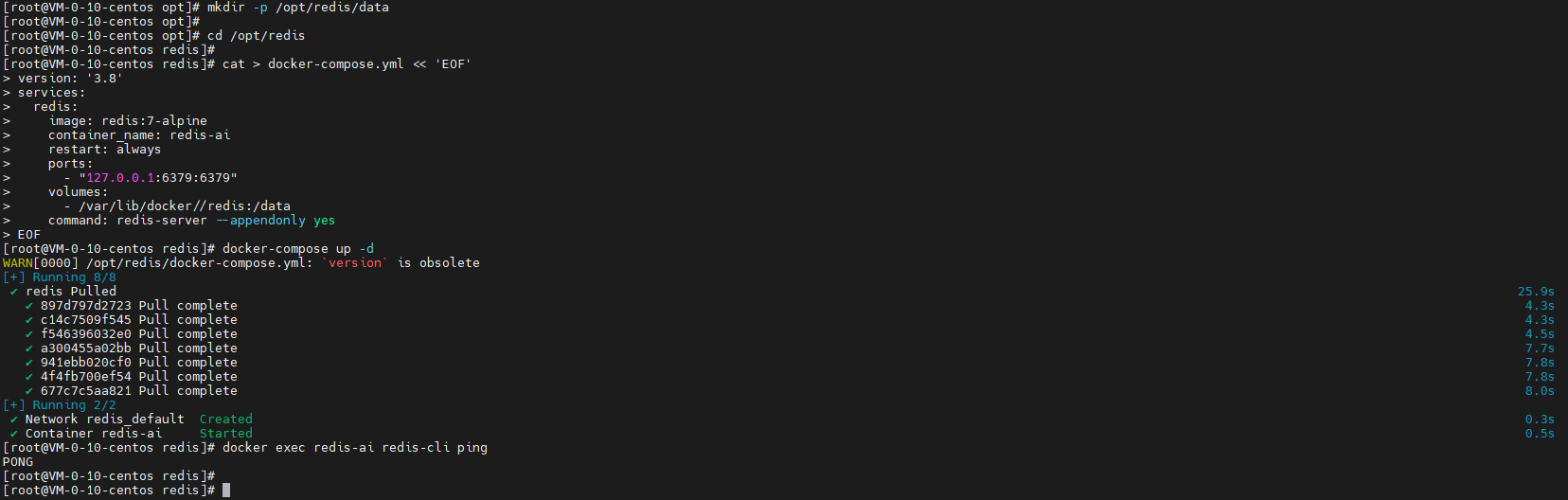
部署AI代理
# 创建目录
mkdir -p /opt/ai-proxy
cd /opt/ai-proxy

# 初始化
npm init -y
npm install express node-fetch ioredis

# 创建 index.js(代理代码)

# 启动
pm2 start index.js --name ai-proxy
pm2 save
pm2 startup
const express = require('express');
const fetch = require('node-fetch');
const Redis = require('ioredis');
const crypto = require('crypto');
const app = express();
// Redis 连接
const redis = new Redis({
host: '127.0.0.1',
port: 6379,
db: 0
});
redis.on('connect', () => console.log('[Redis] Connected'));
redis.on('error', (err) => console.error('[Redis] Error:', err));
// 缓存时间:7天(秒)
const CACHE_TTL = 7 * 24 * 60 * 60;
// 只用内容哈希生成缓存 key
function getCacheKey(text) {
const contentHash = crypto.createHash('md5').update(text.slice(0, 4000)).digest('hex').substring(0, 16);
return `ai:summary:${contentHash}`;
}
app.use(express.json());
app.use((req, res, next) => {
const allowedOrigins = ['https://blog.mingliangstar.com'];
const origin = req.headers.origin;
if (allowedOrigins.includes(origin)) {
res.header('Access-Control-Allow-Origin', origin);
}
res.header('Access-Control-Allow-Methods', 'POST, OPTIONS');
res.header('Access-Control-Allow-Headers', 'Content-Type, Authorization');
if (req.method === 'OPTIONS') return res.sendStatus(200);
next();
});
app.post('/api/ai-summary', async (req, res) => {
const { text } = req.body || {};
if (!text || text.length < 50) {
return res.status(400).json({ error: 'Text too short' });
}
const cacheKey = getCacheKey(text);
try {
// 1. 查 Redis 缓存
const cached = await redis.get(cacheKey);
if (cached) {
console.log('[Cache] Hit:', cacheKey);
return res.json({ summary: cached, cached: true });
}
console.log('[Cache] Miss:', cacheKey);
// 2. 调日日新 API
const response = await fetch('https://token.sensenova.cn/v1/chat/completions', {
method: 'POST',
headers: {
'Authorization': 'Bearer 输入自己的key',
'Content-Type': 'application/json'
},
body: JSON.stringify({
model: 'deepseek-v4-flash',
messages: [
{
role: 'system',
content: '请为以下文章生成一段简洁的摘要,突出核心内容。'
},
{
role: 'user',
content: text.slice(0, 4000)
}
],
max_tokens: 200,
temperature: 0.3
})
});
if (!response.ok) {
const error = await response.text();
return res.status(response.status).json({ error });
}
const data = await response.json();
const summary = data.choices?.[0]?.message?.content?.trim();
if (!summary) {
return res.status(500).json({ error: 'Empty summary' });
}
// 3. 写入 Redis 缓存
await redis.setex(cacheKey, CACHE_TTL, summary);
console.log('[Cache] Saved:', cacheKey);
res.json({ summary, cached: false });
} catch (err) {
console.error('[AI Proxy] Error:', err.message);
res.status(500).json({ error: err.message });
}
});
const PORT = 3000;
app.listen(PORT, '127.0.0.1', () => {
console.log(`AI Proxy running on http://127.0.0.1:${PORT}`);
});
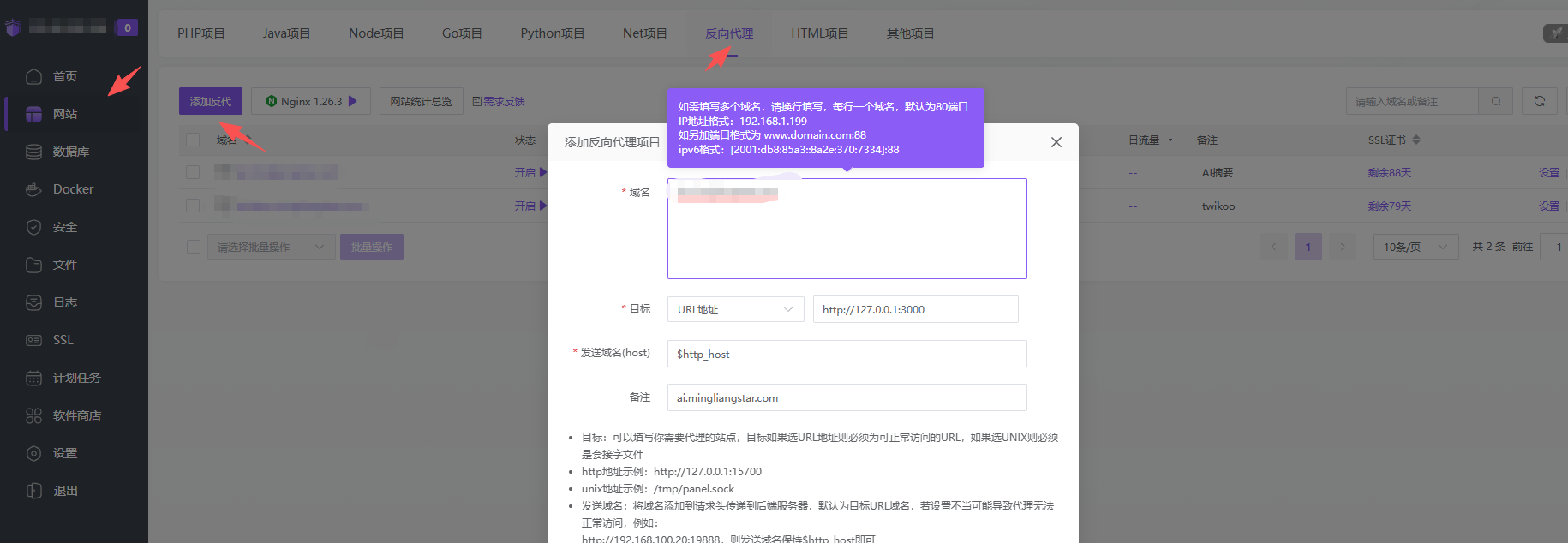
Nginx反向代理
这里直接再宝塔面板中配置
前端集成
这里不在做过多缀述,参考之前的文章即可,但是需要修改ai-summary.js代码
使用 Ollama 为 Hexo 博客部署 AI 文章摘要 | Eucalyptus
/**
 * 安知鱼主题 AI 摘要 - 代理版(无前端缓存)
 */
(function() {
  'use strict';

  const CONFIG = {
    apiUrl: 'https://ai.mingliangstar.com/api/ai-summary',
    typeSpeed: 35,
    maxSummaryLength: 1000,
    retryCount: 1
  };

  let isProcessing = false;
  let typeWriterTimer = null;
  let abortController = null;

  function waitForElement(selector, timeout = 3000) {
    return new Promise((resolve, reject) => {
      const element = document.querySelector(selector);
      if (element) return resolve(element);
      const observer = new MutationObserver(() => {
        const el = document.querySelector(selector);
        if (el) { observer.disconnect(); resolve(el); }
      });
      observer.observe(document.body, { childList: true, subtree: true });
      setTimeout(() => { observer.disconnect(); reject(new Error(`Timeout waiting for ${selector}`)); }, timeout);
    });
  }

  function escapeHtml(text) {
    if (!text) return '';
    const div = document.createElement('div');
    div.textContent = text;
    return div.innerHTML;
  }

  function typeWriter(element, text, speed = CONFIG.typeSpeed) {
    return new Promise((resolve) => {
      if (typeWriterTimer) { clearInterval(typeWriterTimer); typeWriterTimer = null; }
      let index = 0;
      element.textContent = '';
      typeWriterTimer = setInterval(() => {
        if (index < text.length) {
          element.textContent += text.charAt(index);
          index++;
        } else {
          clearInterval(typeWriterTimer);
          typeWriterTimer = null;
          resolve();
        }
      }, speed);
    });
  }

  function getArticleText() {
    const selectors = [
      '#article-container .post-content',
      '#article-container #post',
      '.post-content',
      'article .entry-content',
      '#post-content',
      '.article-content',
      '.markdown-body',
      '#content article'
    ];

    let article = null;
    for (const sel of selectors) {
      article = document.querySelector(sel);
      if (article && article.innerText.trim().length > 200) break;
    }

    if (!article) {
      console.warn('[AI Summary] Article content not found.');
      return '';
    }

    const clone = article.cloneNode(true);

    const removeSelectors = [
      'h1', 'h2.post-title', '.post-title', '.page-title',
      '.post-meta', '.meta', '.entry-meta', '.article-meta',
      '.post-date', '.post-time', '.published', '.updated',
      '.author', '.byline', '.post-author',
      '.post-tags', '.tags', '.tag-cloud', '.post-categories',
      '.categories', '.post-category', '.article-tags',
      'nav', '.nav', '.breadcrumb', '.crumbs',
            'aside', '.sidebar', '.widget', '.toc', '#toc',
            'header', '.post-header', '.entry-header', '.article-header',
            'footer', '.post-footer', '.entry-footer', '.article-footer',
            '#post-comment', '.comments', '.comment-area',
            '.share', '.social-share', '.reward', '.donate',
            '.post-copyright', '.copyright', '.license', '.declaration',
            '.relatedPosts', '.related-posts', '.related', '.recommend',
            '.anzhiyu-ai-summary', '#ai-summary',
            'script', 'style', 'pre', 'code', 'table',
            'img', 'figure', 'figcaption', 'svg',
            'blockquote',
            '.ads-wrap', '.ad', '.advertisement',
            '.highlight', '.mermaid', '.katex', '.mathjax',
            '.pagination', '.pager', '.page-nav',
            '.notice', '.alert', '.tips', '.warning'
        ];

        removeSelectors.forEach(sel => {
            clone.querySelectorAll(sel).forEach(el => el.remove());
        });

        let text = clone.innerText
            .replace(/\s+/g, ' ')
            .replace(/[*#\-_`~\[\]()>|]/g, ' ')
            .replace(/\b[A-Z]{5,}\b/g, ' ')
            .replace(/\d{4}[年/-]\d{1,2}[月/-]\d{1,2}[日]?/g, ' ')
            .replace(/[^\u4e00-\u9fa5a-zA-Z0-9,。!?;:""''()【】《》.,;:!?'"()\[\]<>、\-—\n]/g, ' ')
            .replace(/\s+/g, ' ')
            .trim();

        if (text.length < 100) {
            console.warn('[AI Summary] Content too short, trying fallback...');
            const paragraphs = Array.from(document.querySelectorAll('p'));
            const longestP = paragraphs
                .filter(p => {
                    const t = p.innerText.trim();
                    return t.length > 50 && !t.includes('标签') && !t.includes('分类') && !t.includes('作者');
                })
                .sort((a, b) => b.innerText.length - a.innerText.length)
                .slice(0, 10);

            if (longestP.length > 0) {
                text = longestP.map(p => p.innerText).join(' ');
                text = text.replace(/\s+/g, ' ').trim();
            }
        }

        return text;
    }

    async function callSummaryAPI(text, retry = 0) {
        if (abortController) abortController.abort();
        abortController = new AbortController();
        const timeoutId = setTimeout(() => abortController.abort(), 120000);

        try {
            const response = await fetch(CONFIG.apiUrl, {
                method: 'POST',
                headers: {
                    'Content-Type': 'application/json'
                },
                body: JSON.stringify({
                    text: text.slice(0, 4000)
                }),
                signal: abortController.signal
            });

            clearTimeout(timeoutId);

            if (!response.ok) {
                const errorText = await response.text();
                throw new Error(`HTTP ${response.status}: ${errorText}`);
            }

            const data = await response.json();
            let summary = data.summary || '';

            if (!summary) throw new Error('Empty response');

            summary = summary
                .replace(/^\s*(摘要|总结|概括)[::]\s*/i, '')
                .replace(/^\s*["']?|["']?\s*$/g, '')
                .replace(/\*\*/g, '')
                .replace(/^\s*[-*]\s+/gm, '')
                .replace(/^#{1,6}\s+/gm, '')
                .replace(/这篇文章主要(介绍|讲述|讨论|分析)了/g, '本文介绍了')
                .replace(/本文主要(介绍|讲述|讨论|分析)了/g, '本文介绍了')
                .replace(/该文章(介绍|讲述|讨论|分析)了/g, '本文介绍了')
                .replace(/此文章(介绍|讲述|讨论|分析)了/g, '本文介绍了')
                .replace(/综上所述[,。]/g, '')
                .replace(/总之[,。]/g, '')
                .replace(/总而言之[,。]/g, '')
                .trim();

            if (!/^本文(主要)?介绍了/.test(summary)) {
                summary = '本文介绍了' + summary.replace(/^[,。!?\s]+/, '');
            }

            const sentences = summary.split(/[。!?.!?]/).filter(s => s.trim());
            if (sentences.length > 3) {
                summary = sentences.slice(0, 3).join('。') + '。';
            }

            if (summary.length > CONFIG.maxSummaryLength) {
                summary = summary.slice(0, CONFIG.maxSummaryLength);
                const lastPunct = Math.max(
                    summary.lastIndexOf('。'),
                    summary.lastIndexOf('!'),
                    summary.lastIndexOf('?')
                );
                if (lastPunct > CONFIG.maxSummaryLength * 0.7) {
                    summary = summary.slice(0, lastPunct + 1);
                } else {
                    summary = summary.replace(/[^。!?]*$/, '') + '。';
                }
            }

            if (!/[。!?.!?]$/.test(summary)) {
                summary += '。';
            }

            return summary;

        } catch (err) {
            clearTimeout(timeoutId);
            if (retry < CONFIG.retryCount) {
                console.log(`[AI Summary] Retrying... (${retry + 1}/${CONFIG.retryCount})`);
                await new Promise(r => setTimeout(r, 2000));
                return callSummaryAPI(text, retry + 1);
            }
            throw err;
        }
    }

    function renderContainer(targetContainer, isLoading = false, content = '') {
        if (!targetContainer) return null;

        const loadingHtml = `
            <span class="ai-loading-inline">
                <svg class="ai-loading-svg" width="16" height="16" viewBox="0 0 50 50">
                    <circle cx="25" cy="25" r="20" fill="none" stroke="currentColor" stroke-width="3"
                        stroke-linecap="round" stroke-dasharray="80" stroke-dashoffset="60">
                        <animateTransform attributeName="transform" type="rotate" from="0 25 25" to="360 25 25" dur="1s" repeatCount="indefinite"/>
                    </circle>
                </svg>
                <span class="ai-loading-dots">AI 正在分析文章</span>
            </span>
        `;

        targetContainer.innerHTML = `
            <div class="ai-content">
                <div class="ai-header">
                    <i class="eucalyptus icon-bilibili"></i><span class="ai-titles">AI 摘要</span><span class="ai-badge">AGENT</span>
                </div>
                <div class="ai-text-box">
                    <p id="ai-summary-text">${isLoading ? loadingHtml : escapeHtml(content)}</p>
                </div>
            </div>
        `;
        return targetContainer.querySelector('#ai-summary-text');
    }

    function renderError(targetContainer, message) {
        if (!targetContainer) return;
        targetContainer.innerHTML = `
            <div class="ai-content">
                <div class="ai-header">
                    <i class="eucalyptus icon-bilibili"></i><span class="ai-titles">AI 摘要</span><span class="ai-badge">AGENT</span>
                </div>
                <div class="ai-text-box">
                    <p style="color: #999;">${escapeHtml(message)}</p>
                </div>
            </div>
        `;
    }

    function bootstrap() {
        if (abortController) {
            abortController.abort();
            abortController = null;
        }
        if (typeWriterTimer) {
            clearInterval(typeWriterTimer);
            typeWriterTimer = null;
        }
        isProcessing = false;

        if (document.getElementById('ai-summary')) {
            setTimeout(initAISummary, 100);
        }
    }

    async function initAISummary() {
        if (isProcessing) return;
        isProcessing = true;

        try {
            const container = await waitForElement('#ai-summary');
            const text = getArticleText();

            if (!text || text.length < 50) {
                renderContainer(container, false, '本文篇幅较短,暂无详细摘要。');
                isProcessing = false;
                return;
            }

            renderContainer(container, true);

            let summary;
            try {
                summary = await callSummaryAPI(text);
            }
            catch (err) {
                console.error('[AI Summary] API failed:', err);
                renderError(container, `AI 服务暂时不可用:${err.message}`);
                isProcessing = false;
                return;
            }

            const textEl = renderContainer(container, false, '');
            await typeWriter(textEl, summary);

        } catch (err) {
            console.error('[AI Summary] Init Error:', err);
            const container = document.getElementById('ai-summary');
            if (container) renderError(container, '初始化失败');
        } finally {
            isProcessing = false;
        }
    }

    if (document.readyState === 'loading') {
        document.addEventListener('DOMContentLoaded', bootstrap);
    } else {
        bootstrap();
    }

    document.addEventListener('pjax:complete', bootstrap);
    document.addEventListener('turbolinks:load', bootstrap);

    let lastUrl = location.pathname;
    new MutationObserver(() => {
        const url = location.pathname;
        if (url !== lastUrl) {
            lastUrl = url;
            bootstrap();
        }
    }).observe(document, { subtree: true, childList: true });

})();
重新构建Hexo
hexo clean
hexo generate
查看Redis缓存
#查看所有 AI 摘要缓存
docker exec redis-ai redis-cli KEYS "ai:summary:*"

#查看缓存数量
docker exec redis-ai redis-cli DBSIZE

#查看某个缓存内容
docker exec redis-ai redis-cli GET "ai:summary:具体的hash值"

#查看缓存剩余过期时间(秒)
docker exec redis-ai redis-cli TTL "ai:summary:具体的hash值"

#查看缓存详细信息(长度、类型等)
docker exec redis-ai redis-cli DEBUG OBJECT "ai:summary:具体的hash值"
删除Redis缓存
#删除单个缓存
docker exec redis-ai redis-cli DEL "ai:summary:具体的hash值"

#批量删除所有 AI 摘要缓存
docker exec redis-ai redis-cli EVAL "return redis.call('del', unpack(redis.call('keys', 'ai:summary:*')))" 0

#删除所有缓存(慎用)
docker exec redis-ai redis-cli FLUSHDB
进入Redis CLI交互式模式
docker exec -it redis-ai redis-cli

# 然后可以执行各种命令
127.0.0.1:6379> KEYS ai:summary:*
127.0.0.1:6379> GET ai:summary:5bc22daf2d8a9026
127.0.0.1:6379> TTL ai:summary:5bc22daf2d8a9026
127.0.0.1:6379> DEL ai:summary:5bc22daf2d8a9026
127.0.0.1:6379> exit
效果对比
|
指标 |
Ollama (3b) |
新方案 (日日新) |
|
生成速度 |
5-10 秒 |
1-3 秒 |
|
摘要质量 |
一般 |
较好 |
|
资源占用 |
500MB-1GB 内存 |
20MB 内存 |
|
并发能力 |
单用户 |
多用户共享缓存 |
|
成本 |
免费 |
按 API 调用计费 |
总结
从 Ollama 到云端代理,解决了三个核心问题:
- 质量:云端大模型效果优于本地小模型
- 速度:缓存命中时直接返回,无需等待生成
- 成本:缓存减少重复调用,降低 API 费用
对于 2C4G 的服务器,这套方案更轻量、更稳定。如果服务器资源充足,Ollama 仍是免费的不错选择。

免费领 200 小时云算力,进群参与显卡、AI PC 幸运抽奖
更多推荐


 6
6 0
0- 0


 已为社区贡献3条内容

所有评论(0)