
Spring AI 实战:基于RAG实现本地私有知识库问答
前言
RAG(检索增强生成)是目前企业落地大模型的主流方案,主要用来解决大模型 知识幻觉、数据滞后、无法读取私有业务数据 等问题。
之前我通过 LangChain4j 实现了 AI 函数调用、Agent 智能体,积累了大模型开发经验。
本次实战改用 Spring AI 官方框架,从零搭建一套 本地私有知识库问答系统,完成文档加载、向量化、向量库检索、智能问答的完整流程。
项目基于 Spring Boot 原生生态,结合 Ollama 本地大模型 + Chroma 向量数据库,全程不依赖第三方云服务,数据可控、本地可运行、学习与二次改造成本低。
一、RAG 是什么
RAG(Retrieval-Augmented Generation)即检索增强生成。
核心思路:先检索知识库 -> 再让大模型基于真实内容回答,避免胡编乱造,支持私有数据问答。
二、技术栈
- 开发框架:Spring Boot 3.x + Spring AI(官方原生,简化大模型/向量库集成)
- 本地大模型:Ollama(轻量级本地大模型运行环境,一键部署 llama3/qwen 等模型)
- 向量数据库:Chroma(轻量级开源向量库,支持本地部署,适配Spring AI原生集成)
- 资源读取:ClassPathResource(读取 resources 下 txt 知识库,适配Spring资源加载规范)
- 配置方式:多环境拆分(application.yml / local / prod,适配企业级多环境部署)
三、项目结构
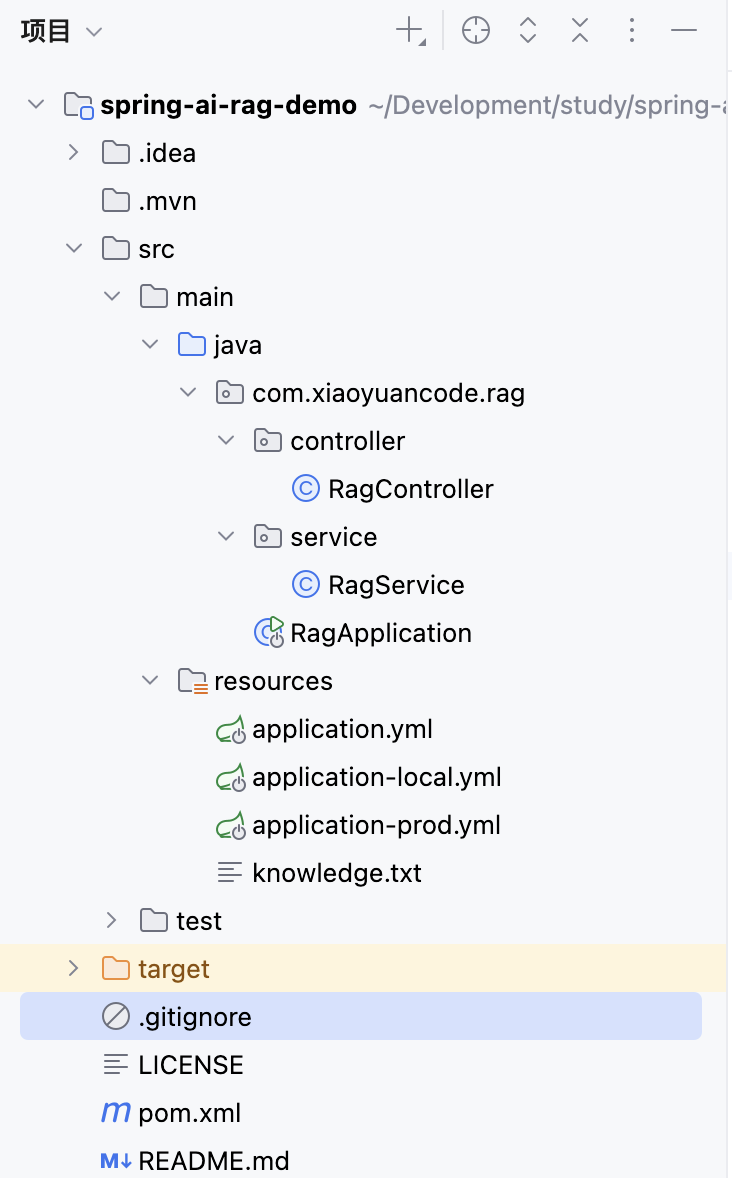
四、核心依赖
<dependencies>
        <dependency>
            <groupId>org.springframework.boot</groupId>
            <artifactId>spring-boot-starter-web</artifactId>
        </dependency>

        <!-- Ollama -->
        <dependency>
            <groupId>org.springframework.ai</groupId>
            <artifactId>spring-ai-starter-model-ollama</artifactId>
        </dependency>

        <!-- Chroma 向量库 -->
        <dependency>
            <groupId>org.springframework.ai</groupId>
            <artifactId>spring-ai-starter-vector-store-chroma</artifactId>
        </dependency>

        <!-- Tika 文档读取 -->
        <dependency>
            <groupId>org.springframework.ai</groupId>
            <artifactId>spring-ai-tika-document-reader</artifactId>
        </dependency>

         <!-- Lombok:@Slf4j、@Data、@RequiredArgsConstructor 等 -->
        <dependency>
            <groupId>org.projectlombok</groupId>
            <artifactId>lombok</artifactId>
            <optional>true</optional>
        </dependency>
    </dependencies>
五、配置文件
application.yml
spring:
  profiles:
    active: local # 本地开发
    #active: prod # 生产演示
  ai:
    vectorstore:
      chroma:
        initialize-schema: true # 自动创建集合
  # 自定义:知识库文件名
  app:
    knowledge:
      file: knowledge.txt
application-local.yml
server:
  port: 9090
spring:
  ai:
    ollama:
      base-url: http://localhost:11434
      chat:
        model: llama3.2:3b
      embedding:
        model: llama3.2:3b
    chroma:
        client:
          host: localhost
          port: 8000
application-prod.yml
server:
  port: 9090
spring:
  ai:
    ollama:
      base-url: http://localhost:11434
      chat:
        model: qwen2.5-coder:7b
      embedding:
        model: qwen2.5-coder:7b
    chroma:
        client:
          host: localhost
          port: 8000
六、核心代码
RagService
package com.xiaoyuancode.rag.service;

import org.springframework.ai.chat.client.ChatClient;
import org.springframework.ai.document.Document;
import org.springframework.ai.reader.tika.TikaDocumentReader;
import org.springframework.ai.transformer.splitter.TextSplitter;
import org.springframework.ai.transformer.splitter.TokenTextSplitter;
import org.springframework.ai.vectorstore.VectorStore;
import org.springframework.core.io.ClassPathResource;
import org.springframework.core.io.FileSystemResource;
import org.springframework.stereotype.Service;

import java.io.File;
import java.io.IOException;
import java.nio.file.Files;
import java.util.List;
import java.util.stream.Collectors;

@Service
public class RagService {

    // 向量数据库 (核心:存储、检索向量)
    private final VectorStore vectorStore;
    private final ChatClient chatClient;

    /**
     * 构造函数注入
     * @param vectorStore
     */
    public RagService(VectorStore vectorStore, ChatClient.Builder chatClientBuilder) {
        this.vectorStore = vectorStore;
        this.chatClient = chatClientBuilder.build();
    }

    /**
     * 清空向量库
     */
    public void clearVectorStore(){
        try{
            vectorStore.delete("*");
            System.out.println("向量库已清空");
        }catch (Exception e){
            System.err.println("清空向量库失败:" + e.getMessage());
        }
    }
    /**
     * 加载知识库文件(txt)
     * 步骤:读取文件 -> 文本分片 -> 向量化 -> 存入向量库
     * @param filePath
     * @throws IOException
     */
    public void loadKnowledge(String filePath) throws IOException {

        ClassPathResource resource = new ClassPathResource(filePath);
        File file = resource.getFile();

        System.out.println("===== 正在读取的文件内容是:=====");
        System.out.println(Files.readString(file.toPath())); // 看控制台!!!

        // 如果文件不存在,自动创建默认内容
        if (!file.exists()) {
            String defaultContext = """
                    上班时间:周一到周五早9晚6,午休1小时。
                    年假规则:工作满1年5天,每增加1年加1天,最多15天。
                    """;
            Files.writeString(file.toPath(),defaultContext);
        }

        // 1.读取文本文件
        TikaDocumentReader reader = new TikaDocumentReader(new FileSystemResource(file));
        List<Document> documents = reader.get();

        // 2.文本分片
        TextSplitter splitter = new TokenTextSplitter();
        List<Document> splitDocs = splitter.split(documents);

        // 3.向量化并保存到向量库
        vectorStore.add(splitDocs);
        System.out.println("✅ 知识库真正加载完成:" + splitDocs.size() + "条");
    }

    /**
     * 检索
     * @param question
     * @return
     */
    public String ask(String question){
        String context = retrieveContext(question);
        String prompt = """
                你是企业智能助手,只按资料回答,不编造。
                无答案则回复:暂无相关资料。

                参考资料:%s
                用户问题:%s
                """.formatted(context,question);
        return chatClient.prompt(prompt).call().content();
    }

    private String retrieveContext(String query){
        // 1.根据问题做相似度检索
        List<Document> docs = vectorStore.similaritySearch(query);

        System.out.println("检索到的条数:" + docs.size());
        docs.forEach(d -> System.out.println("内容:" + d.getText()));

        // 2.把检索到的文档转成字符串
        return docs.stream()
                .map(Document::getText) // 提取文本内容
                .collect(Collectors.joining("\n")); // 拼接成一段完整文字
    }
}
RagController
package com.xiaoyuancode.rag.controller;

import com.xiaoyuancode.rag.service.RagService;
import org.springframework.ai.chat.client.ChatClient;
import org.springframework.web.bind.annotation.GetMapping;
import org.springframework.web.bind.annotation.RequestParam;
import org.springframework.web.bind.annotation.RestController;

@RestController
public class RagController {

    private final RagService ragService;

    public RagController(RagService ragService) {
        this.ragService = ragService;
    }

    @GetMapping("/ai/rag/clear")
    public String clear(){
        ragService.clearVectorStore();
        return "向量库已清空成功!";
    }

    @GetMapping("/ai/rag/load")
    public String load() throws Exception {
        ragService.loadKnowledge("knowledge.txt");
        return "知识库加载完成";
    }

    @GetMapping("/ai/rag/ask")
    public String ask(@RequestParam String question){
        return ragService.ask(question);
    }
}
七、运行效果
-
/ai/rag/load
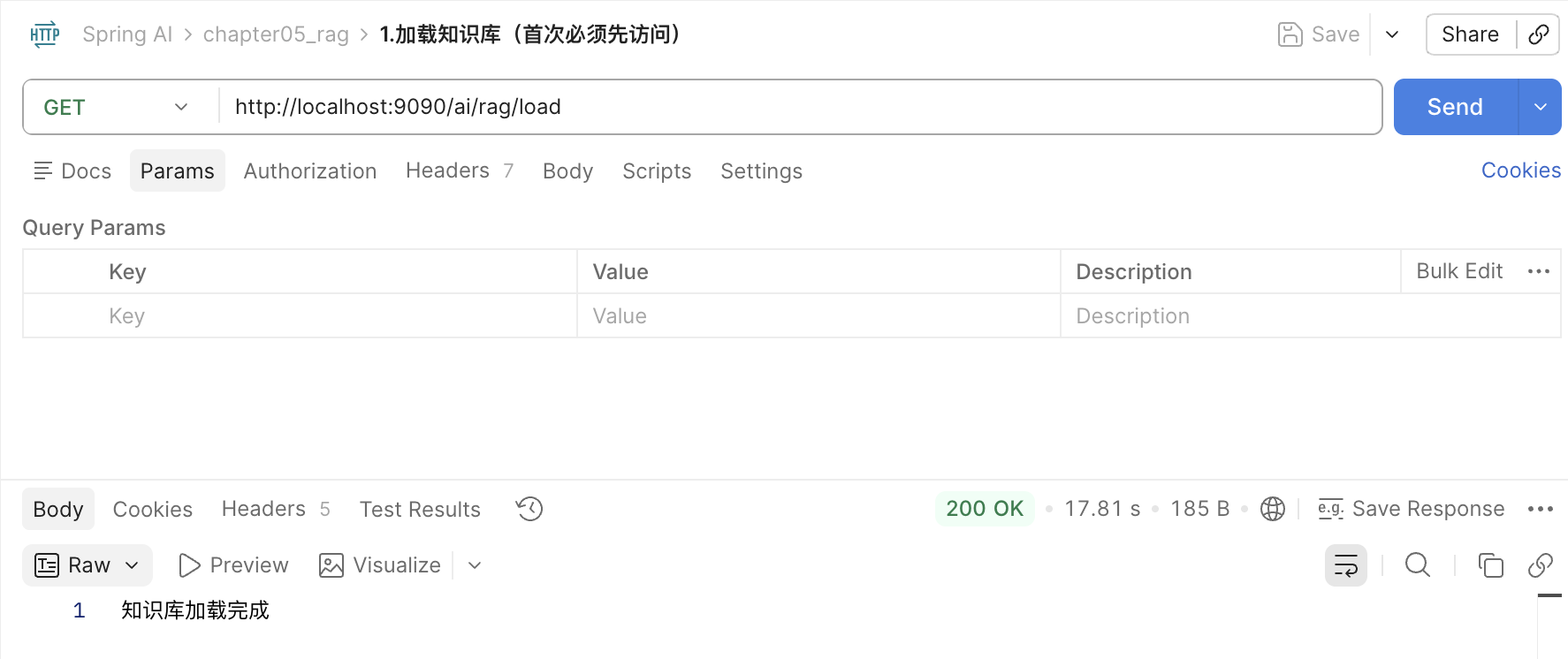
-
/ai/rag/ask?question=加班怎么算
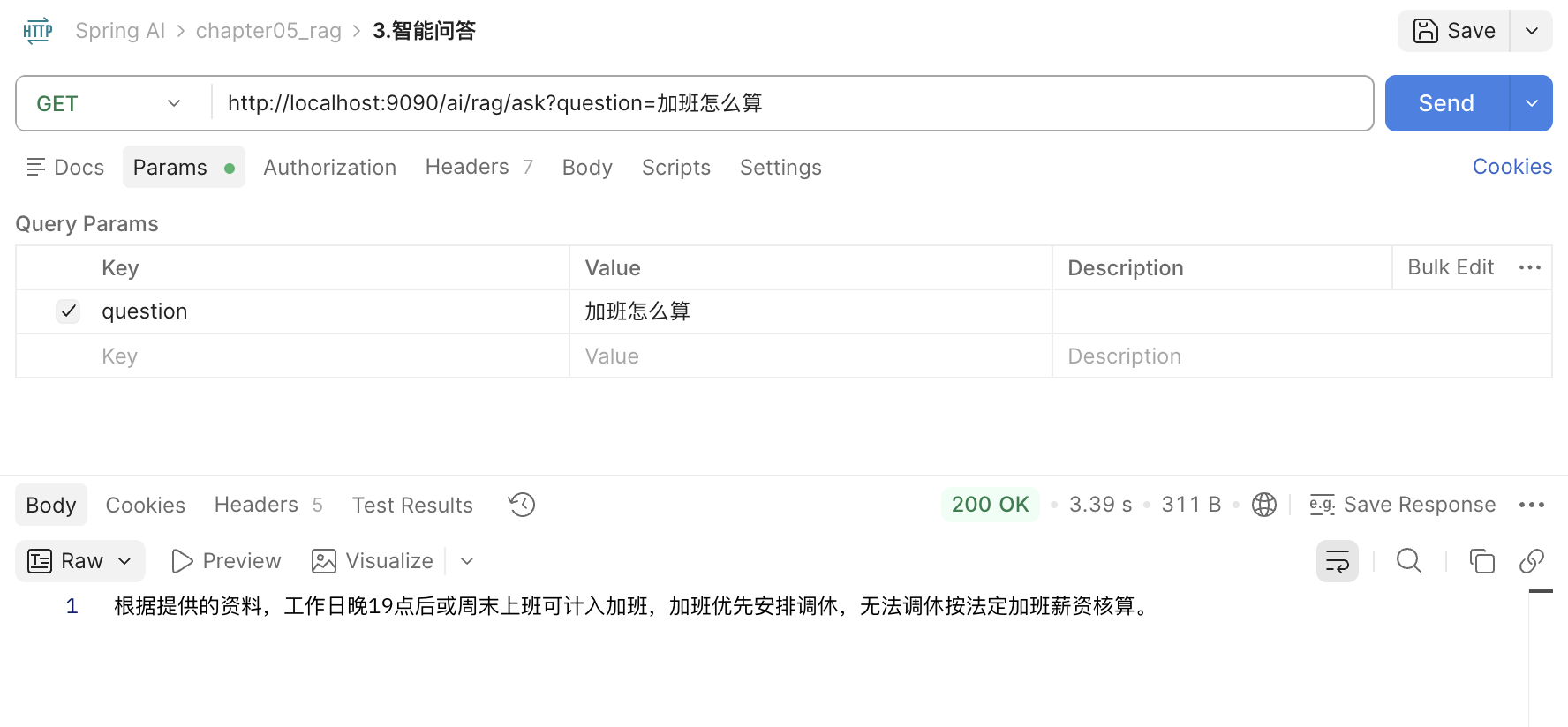
-
/ai/rag/clear
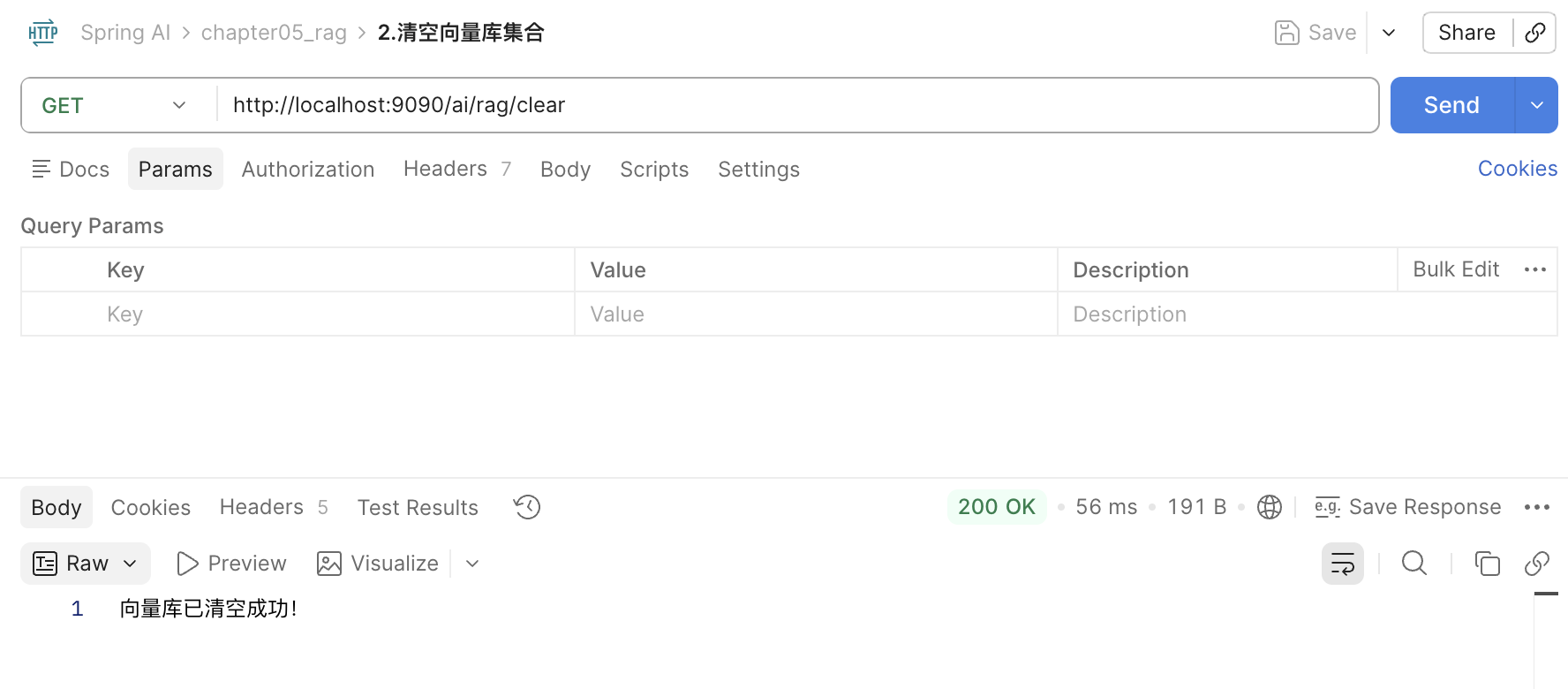
八、快速运行
- 启动 Ollama、Chroma
- resources 放入 knowledge.txt
- 启动项目,调用接口测试
源码已上传Gitee,欢迎 Start & Fork:
https://gitee.com/xiaoyuancode/spring-ai-rag-demo
作者简介
刘晓媛(XiaoYuanCode)
拥有多年全栈开发经验,前后端均有扎实的项目落地实践;
早期深耕 PHP 技术生态,近年主力技术栈全面转向 Java & Spring Boot;
现阶段聚焦大模型应用开发,持续研究 LangChain4j、Spring AI 等智能化技术;
专注输出实战向技术博文,记录学习与踩坑过程,共同进步。

免费领 200 小时云算力,进群参与显卡、AI PC 幸运抽奖
更多推荐

 8
8 0
0- 0


 已为社区贡献1条内容

所有评论(0)