
学习 Claude Code 子智能体的隔离之道,用完即丢,才是干净的上下文
本文介绍了通过父子智能体架构解决长任务中上下文污染问题的方法。父智能体负责委派任务,子智能体在独立上下文中执行复杂操作后仅返回摘要,从而避免中间结果污染父智能体上下文。关键技术包括:1)工具分离(子智能体无task工具防止递归);2)文件系统共享;3)30轮安全限制;4)消息完全隔离。实验显示该方法可减少88%的上下文占用,有效解决了智能体"记性太好"导致的性能下降问题。
读了五个文件,父 agent 只需要一句话的答案。把脏活交给子 agent,让它在自己的沙盒里折腾,用完直接丢掉。这一章揭示进程隔离如何免费赠送上下文隔离。
前三章,我们的 Agent 越来越能干:会用工具、会写计划、会持续推进。但能干带来了新问题——它越来越健忘,或者更准确地说,越来越"记性太好"。
每读一个文件,文件内容进 messages;每跑一条命令,输出进 messages;每轮对话,又多几条。这个数组只增不减。很快,一个"帮我分析项目结构"的请求,会让父 agent 的上下文装满几十个文件的原始内容——而它真正需要的,只是一句"这个项目用 pytest,入口是 main.py"。
上下文污染,是长任务 Agent 的头号隐患。这一章的解法,叫 Subagent
上下文膨胀有多严重
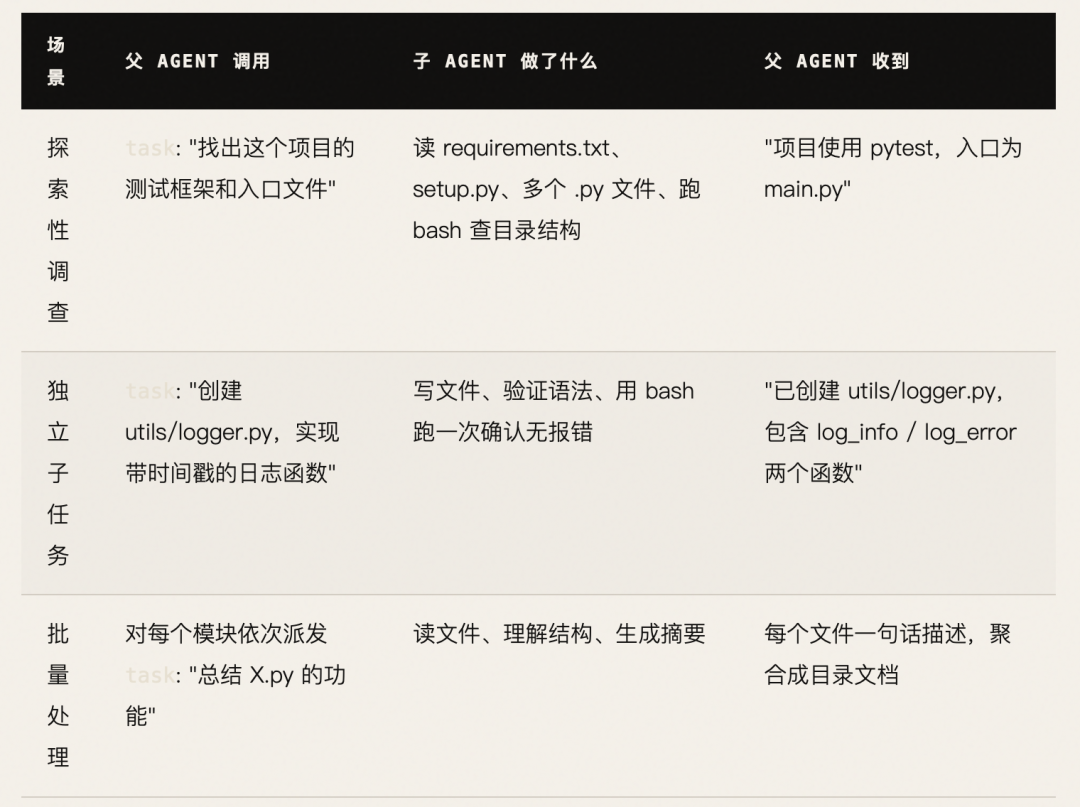
来看一个典型场景:父 agent 需要回答"这个项目用什么测试框架?"
如果不做隔离,整个探索过程会直接留在父 agent 的上下文里:
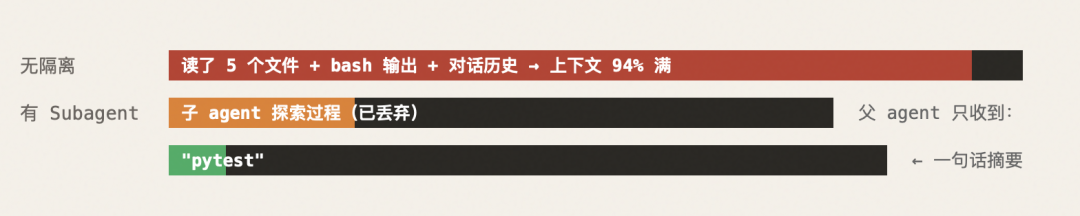
子 agent 在自己的messages里完成全部探索,可能产生了 30 条工具调用记录——但这些全部在子 agent 结束时被丢弃。父 agent 的上下文里,只多了一条简洁的tool_result。
架构:父子隔离,文件系统共享
Subagent 模式的核心是两个不变量:
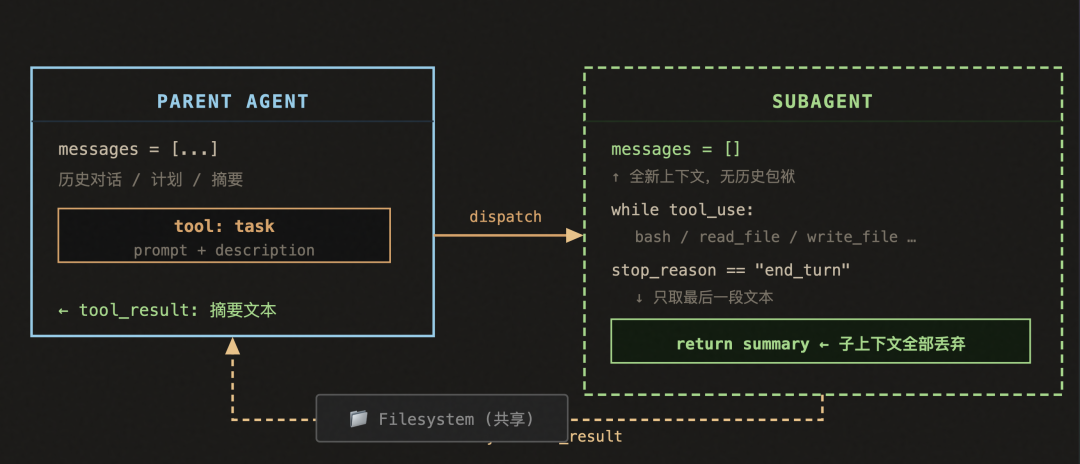
两个不变量值得反复强调:
① 子 agent 的 messages 是全新的,与父 agent 完全隔离;② 文件系统是共享的,子 agent 写的文件,父 agent 直接能读。这组合带来了一个非常优雅的属性——父 agent 可以用简短的task调用,让子 agent 完成一整块复杂工作,成果落到磁盘,父 agent 只接收一句摘要。
关键设计决策:子 agent 没有 task 工具
这一条看似小细节,实则是整个架构的护栏。
# 子 agent:只有基础工具,没有 taskCHILD_TOOLS = [bash, read_file, write_file, edit_file]# 父 agent:基础工具 + task 调度器PARENT_TOOLS = CHILD_TOOLS + [{"name": "task","description": "Spawn a subagent with fresh context.","input_schema": {"type": "object","properties": {"prompt": {"type": "string"},"description": {"type": "string"}, # 给日志用的短描述},"required": ["prompt"],},}]
如果子 agent 也有 task 工具,递归派生就没有天然终点——一个任务可以无限裂变,成本和复杂度指数膨胀,调试时根本无从追踪。
s04 用最简单的方式封住了这个口:子 agent 的工具列表里根本没有 task。工具层的约束,远比依赖模型自觉更可靠
S04 Subagents(子智能体)代码详解
一、S03 → S04:到底变了什么?S03 S04───────────────────────────── ─────────────────────────────1 个 agent_loop ✅ 2 个循环(父 + 子)1 个 SYSTEM prompt ✅ 2 个 SYSTEM promptTOOL_HANDLERS (5个工具) ✅ TOOL_HANDLERS (4个) ← 移除了 todoTOOLS (5个工具定义) ✅ CHILD_TOOLS (4个) ← 子智能体用✅ PARENT_TOOLS (5个) ← 父智能体 = 子 + task✅ run_subagent() 函数 ← 全新agent_loop() ✅ agent_loop() 修改 ← 区分 task 和普通工具───────────────────────────── ─────────────────────────────
被移除的:TodoManager、todo 工具、nag reminder
新增的:上下文隔离机制、子智能体循环
注意:s03 的 todo 机制在 s04 中被移除了。这不是退步,而是为了让示例聚焦于子智能体这一个新概念。在真实项目中,todo 和 subagent 可以共存。
二、核心问题:为什么需要子智能体?
上下文膨胀问题
没有子智能体的"探索项目"任务:轮次 模型行为 messages 长度──── ────────────────────────────── ────────────1 read_file("requirements.txt") +200 tokens2 read_file("setup.py") +300 tokens3 read_file("src/main.py") +1500 tokens4 read_file("src/utils.py") +800 tokens5 read_file("tests/test_main.py") +1200 tokens6 回答:"这个项目用 pytest" +50 tokens──── ────────────────────────────── ────────────总计 ≈ 4000 tokens
但父智能体真正需要的只是 "pytest" 这一个词。
其余 3990 tokens 的文件内容永远留在上下文里,
污染后续所有推理。
有了子智能体
有子智能体的"探索项目"任务:父智能体 messages 长度:轮次 父智能体行为 父 messages 长度──── ──────────────────────────── ───────────────1 task("读所有配置文件,判断测试框架") +100 tokens2 收到结果:"pytest" +20 tokens──── ──────────────────────────── ───────────────总计 ≈ 120 tokens
子智能体跑了 5 轮 read_file,读了几千行代码,
但整个 sub_messages 在子智能体结束后直接丢弃。
父智能体只收到一句摘要。
三、逐段解析
双 System PromptSYSTEM = f"You are a coding agent at {WORKDIR}. Use the task tool to delegate exploration or subtasks."SUBAGENT_SYSTEM = f"You are a coding subagent at {WORKDIR}. Complete the given task, then summarize your findings."两者的语气差异很微妙:父是"管理者",子是"执行者"。父说"delegate",子说"summarize"。
Prompt 使用者 关键指令
SYSTEM父智能体“用 task 工具委派任务”——鼓励它把探索性工作交给子智能体
SUBAGENT_SYSTEM 子智能体 “完成任务,然后总结发现”——强调它必须返回摘要,而不是只做事不说话
工具分离:CHILD_TOOLS vs PARENT_TOOLSCHILD_TOOLS —— 子智能体的工具集CHILD_TOOLS = [{"name": "bash", ...},{"name": "read_file", ...},{"name": "write_file", ...},{"name": "edit_file", ...},]
4 个基础工具,没有 task,也没有 todo。
为什么子智能体不能有 task?
如果子智能体也能调 task:父 → task("探索项目") → 子A子A → task("读配置文件") → 子B子B → task("读 setup.py") → 子C子C → task(...) → 子D...
递归派生!每个子智能体都可以再生成子智能体,
指数级膨胀,无法控制。 而且每一层子智能体的"摘要"都在丢失信息:子D的完整结果 → 子C只拿到摘要子C的摘要 → 子B只拿到摘要的摘要...最终父智能体拿到的是摘要的摘要的摘要的摘要信息损失极其严重PARENT_TOOLS —— 父智能体的工具集PARENT_TOOLS = CHILD_TOOLS + [{"name": "task","description": "Spawn a subagent with fresh context. It shares the filesystem but not conversation history.","input_schema": {"type": "object","properties": {"prompt": {"type": "string"},"description": {"type": "string", "description": "Short description of the task"}},"required": ["prompt"],}},]
关键设计点:
"properties": {"prompt": {"type": "string"}, # 必填:任务指令"description": {"type": "string", "description": ...}, # 可选:任务简述(仅用于日志显示)},"required": ["prompt"],参数 用途 谁用prompt 告诉子智能体做什么 子智能体(作为它的第一条消息)description 人类可读的任务标签 控制台日志(方便人类看子智能体在做什么)
description 不传给子智能体,纯粹是给开发者看的"标签"。
PARENT_TOOLS = CHILD_TOOLS + [...]
用列表拼接实现"继承"——父智能体拥有子智能体的所有工具,外加 task。
CHILD_TOOLS: [bash, read, write, edit]+ [task]PARENT_TOOLS: [bash, read, write, edit, task]run_subagent()—— 子智能体函数(核心新增)这是整个 s04 最关键的函数。逐行拆解:函数签名与初始化def run_subagent(prompt: str) -> str:sub_messages = [{"role": "user", "content": prompt}] # fresh context
-
prompt:父智能体传来的任务指令
-
sub_messages:子智能体独立的消息历史,初始只有一条 user 消息
- 关键
:这里没有用父智能体的 messages,而是从零开始。这就是"上下文隔离"
# 对比:
# 父智能体:messages = [user, assistant, user, assistant, ...](累积了几十轮)
# 子智能体:sub_messages = [user](干净!)
安全限制
for _ in range(30): # safety limit
最多 30 轮循环。这是子智能体的"生命上限"。
为什么需要?
如果没有限制:子智能体陷入死循环:read_file("a.py") → edit_file → read_file → edit_file → read_file → ...永远不停,父智能体永远等不到结果。30 轮足够完成绝大多数任务,同时防止失控。# for _ in range(30) 而不是 while True:# while True 可能永远不退出# for _ in range(30) 保证最多执行 30 次就跳出# 跳出后执行 return,子智能体强制结束子智能体循环体response = client.messages.create(model=MODEL,system=SUBAGENT_SYSTEM, # ← 子智能体自己的 system promptmessages=sub_messages, # ← 独立的上下文tools=CHILD_TOOLS, # ← 不包含 task,不能再生子智能体max_tokens=8000,)和父智能体的 client.messages.create 几乎一样,但三个关键差异:参数 父智能体 子智能体system SYSTEM(管理者语气)SUBAGENT_SYSTEM(执行者语气)messages 累积了几十轮的 messages 干净的sub_messagestools PARENT_TOOLS(含 task)CHILD_TOOLS(不含 task)sub_messages.append({"role": "assistant", "content": response.content})if response.stop_reason != "tool_use":break和父循环一样:追加助手响应,检查是否继续。但注意这里用的是break而不是return:# 父循环:if stop_reason != "tool_use": return# → 直接结束 agent_loop 函数# 子循环:if stop_reason != "tool_use": break# → 跳出 for 循环,继续执行后面的 return 语句# → return 提取摘要文本为什么不能用 return?因为 break 后还要提取最终文本:results = []for block in response.content:if block.type == "tool_use":handler = TOOL_HANDLERS.get(block.name)output = handler(**block.input) if handler else f"Unknown tool: {block.name}"results.append({"type": "tool_result", "tool_use_id": block.id,"content": str(output)[:50000]})sub_messages.append({"role": "user", "content": results})这部分和父循环的工具执行逻辑完全一致,不再赘述。返回值——仅摘要return "".join(b.text for b in response.content if hasattr(b, "text")) or "(no summary)"这是整段代码最精妙的一行。逐步拆解:# response.content 是一个列表,可能包含多种类型的 block:response.content = [TextBlock(type="text", text="The project uses pytest..."), ← 要这个ToolUseBlock(type="tool_use", name="bash", ...), ← 不要]# 第一步:过滤出有 text 属性的 block[b for b in response.content if hasattr(b, "text")]# → [TextBlock(type="text", text="The project uses pytest...")]# 第二步:提取 text 属性[b.text for b in response.content if hasattr(b, "text")]# → ["The project uses pytest..."]# 第三步:拼接成字符串"".join(b.text for b in response.content if hasattr(b, "text"))# → "The project uses pytest..."# 第四步:如果为空,返回默认值"...some string..." or "(no summary)"# → "...some string...""" or "(no summary)"# → "(no summary)"
整个子智能体跑了可能 30 轮,读了 10 个文件,执行了 20 条命令,但返回给父智能体的只有这一句话。
# 子智能体的"一生":sub_messages = [user] # 1条→ LLM → assistant # 2条→ tool_result → [user, assistant, user] # 3条→ LLM → assistant # 4条→ tool_result → 5条→ ... (可能到 60+ 条)→ LLM → assistant (stop_reason=end_turn) # 最终轮→ break# 提取最后一轮的 text → "pytest"# sub_messages 整个丢弃(函数结束,局部变量销毁)# 父智能体收到:"pytest"agent_loop()的变化——区分 task 和普通工具s04 的 agent_loop 相比 s03,核心变化在工具执行部分:results = []for block in response.content:if block.type == "tool_use":if block.name == "task": # ← 新增分支desc = block.input.get("description", "subtask")print(f"> task ({desc}): {block.input['prompt'][:80]}")output = run_subagent(block.input["prompt"]) # ← 调用子智能体else: # ← 原有逻辑handler = TOOL_HANDLERS.get(block.name)output = handler(**block.input) if handler else f"Unknown tool: {block.name}"print(f" {str(output)[:200]}")results.append({"type": "tool_result", "tool_use_id": block.id, "content": str(output)})逻辑分叉:block.name == "task"?/ \是 否| |run_subagent() TOOL_HANDLERS.get()| |子智能体完整执行 普通工具处理| |返回摘要字符串 返回工具输出\ /\ /\ /results.append()|messages.append()if block.name == "task":desc = block.input.get("description", "subtask")description 是可选参数,如果模型没传,默认用 "subtask" 作为标签。print(f"> task ({desc}): {block.input['prompt'][:80]}")打印子任务信息,截断到 80 字符:> task (find test framework): Read all config files and determine which testing framework this project usesoutput = run_subagent(block.input["prompt"])
这里是魔法发生的地方——父循环在处理一个工具调用时,实际上启动了一个完整的子智能体循环。子智能体可能跑 30 轮、消耗大量 token,但对父循环来说,这只是一个"工具调用",和 run_bash("ls") 没有本质区别。
print(f" {str(output)[:200]}")缩进两格打印结果——视觉上区分子智能体的输出和父智能体的直接输出:> bash: lsfile1.py file2.py requirements.txt> task (find test framework): Read all config files...The project uses pytest with coverage plugin. Configuration is in pyproject.toml.四、父与子的完整生命周期对比用户输入: "Use a subtask to find what testing framework this project uses"═══════════════════════════════════════════════════════════════父智能体生命周期═══════════════════════════════════════════════════════════════messages = [{ role: "user", content: "Use a subtask to find..." }]循环第 1 轮────────────────────────────────────────────────LLM: "我需要委派这个探索任务"│▼response.content = [{ type: "tool_use", name: "task",input: {prompt: "Read requirements.txt, setup.cfg, pyproject.toml, and any test files to determine the testing framework.",description: "find test framework"}}]│▼ block.name == "task"│╔══════════════════════════════════════════════════╗║ run_subagent(prompt="Read requirements...") ║║ ║║ ═══════════════════════════════════════════ ║║ 子智能体生命周期(独立) ║║ ═══════════════════════════════════════════ ║║ ║║ sub_messages = [user: "Read requirements..."] ║║ ║║ 轮1: read_file("requirements.txt") ║║ → "pytest>=7.0\npytest-cov>=4.0" ║║ ║║ 轮2: read_file("pyproject.toml") ║║ → "[tool.pytest]\naddopts = --cov" ║║ ║║ 轮3: read_file("tests/test_main.py") ║║ → "import pytest\ndef test_..." ║║ ║║ 轮4: stop_reason = "end_turn" ║║ → "This project uses pytest..." ║║ ║║ return "This project uses pytest with ║║ coverage. Config in pyproject.toml." ║║ ║║ sub_messages 被丢弃(共 9 条消息,含 3 个文件) ║╚══════════════════════════════════════════════════╝│▼ output = "This project uses pytest with coverage..."│▼ results.append(tool_result: "This project uses pytest...")▼ messages.append(user: [tool_result: "This project uses pytest..."])messages = [{ role: "user", content: "Use a subtask to find..." },{ role: "assistant", content: [tool_use: task(...)] },{ role: "user", content: [tool_result: "This project uses pytest..."] }]循环第 2 轮────────────────────────────────────────────────LLM: "子智能体告诉我用 pytest,现在告诉用户"│▼response.stop_reason = "end_turn"response.content = [{ type: "text", text: "This project uses **pytest** with the coverage plugin. The configuration is in `pyproject.toml`." }]│▼ 退出循环最终输出给用户:"This project uses **pytest** with the coverage plugin.The configuration is in `pyproject.toml`."
五、上下文大小对比——数字说话
场景:"探索项目测试框架"(读 5 个文件)
═══════════════════════════════════════════════════════❌ 没有子智能体(s02/s03 方式):父 messages 内容:┌──────────────────────────────────────┐│ user: 探索测试框架 │ ~50 tokens│ assistant: read_file(req.txt) │ ~100 tokens│ user: "pytest>=7.0\npytest-cov..." │ ~200 tokens│ assistant: read_file(pyproject.toml) │ ~100 tokens│ user: "[tool.pytest]\n..." │ ~300 tokens│ assistant: read_file(setup.cfg) │ ~100 tokens│ user: "[options.setup]\n..." │ ~150 tokens│ assistant: read_file(conftest.py) │ ~100 tokens│ user: "import pytest\n..." │ ~500 tokens│ assistant: read_file(test_main.py) │ ~100 tokens│ user: "import pytest\ndef test_..." │ ~1000 tokens│ assistant: "This project uses pytest"│ ~50 tokens└──────────────────────────────────────┘总计:~2750 tokens(永久留在上下文中)═══════════════════════════════════════════════════════✅ 有子智能体(s04 方式):父 messages 内容:┌──────────────────────────────────────┐│ user: 探索测试框架 │ ~50 tokens│ assistant: task("Read all config...") │ ~150 tokens│ user: "This project uses pytest │ ~50 tokens│ with coverage plugin..." ││ assistant: "Based on my subtask..." │ ~80 tokens└──────────────────────────────────────┘总计:~330 tokens(永久留在上下文中)子智能体 messages(已丢弃):┌──────────────────────────────────────┐│ (同样的 ~2600 tokens) ││ 但函数结束后全部销毁 │└──────────────────────────────────────┘═══════════════════════════════════════════════════════上下文节省:2750 → 330 tokens(节省 88%)六、工具执行路径的完整决策树block.type == "tool_use"?│├── block.name == "task"?│ ││ ├── 是 → run_subagent(prompt)│ │ ││ │ ├── 子智能体启动,独立 sub_messages│ │ ├── 最多 30 轮│ │ ├── 使用 CHILD_TOOLS(无 task)│ │ ├── 使用 SUBAGENT_SYSTEM│ │ └── 返回摘要文本│ ││ └── 否 → TOOL_HANDLERS.get(block.name)│ ││ ├── 找到 → handler(**block.input)│ │ ├── bash → run_bash│ │ ├── read_file → run_read│ │ ├── write_file → run_write│ │ └── edit_file → run_edit│ ││ └── 没找到 → "Unknown tool: xxx"│└── block.type != "tool_use"│└── 跳过(不是工具调用)七、架构对比图s03(单智能体):┌─────────────────────────────────────┐│ agent_loop ││ ││ messages = [─────────────────────] │ ← 所有工具结果永久累积│ ↑ ↑ ↑ ││ bash结果 read结果 edit结果││ ││ tools: [bash, read, write, edit, ││ todo] │└─────────────────────────────────────┘s04(父子智能体):┌─────────────────────────────────────┐│ agent_loop (父) ││ ││ messages = [──────────────────] │ ← 只累积摘要,不累积中间结果│ ↑ ↑ ││ task结果 task结果 ││ (1句话) (1句话) ││ ││ tools: [bash, read, write, edit, ││ task] ← 可以派生子智能体 ││ │ ││ ▼ ││ ┌──────────────────────┐ ││ │ run_subagent (子) │ ││ │ │ ││ │ sub_messages = [] │ ← 干净 ││ │ 最多 30 轮 │ ││ │ │ ││ │ tools: [bash, read, │ ││ │ write, edit] │ ← 无task││ │ │ ││ │ 结束后 sub_messages │ ││ │ 全部丢弃 │ ││ └──────────────────────┘ │└─────────────────────────────────────┘
八、设计思想总结
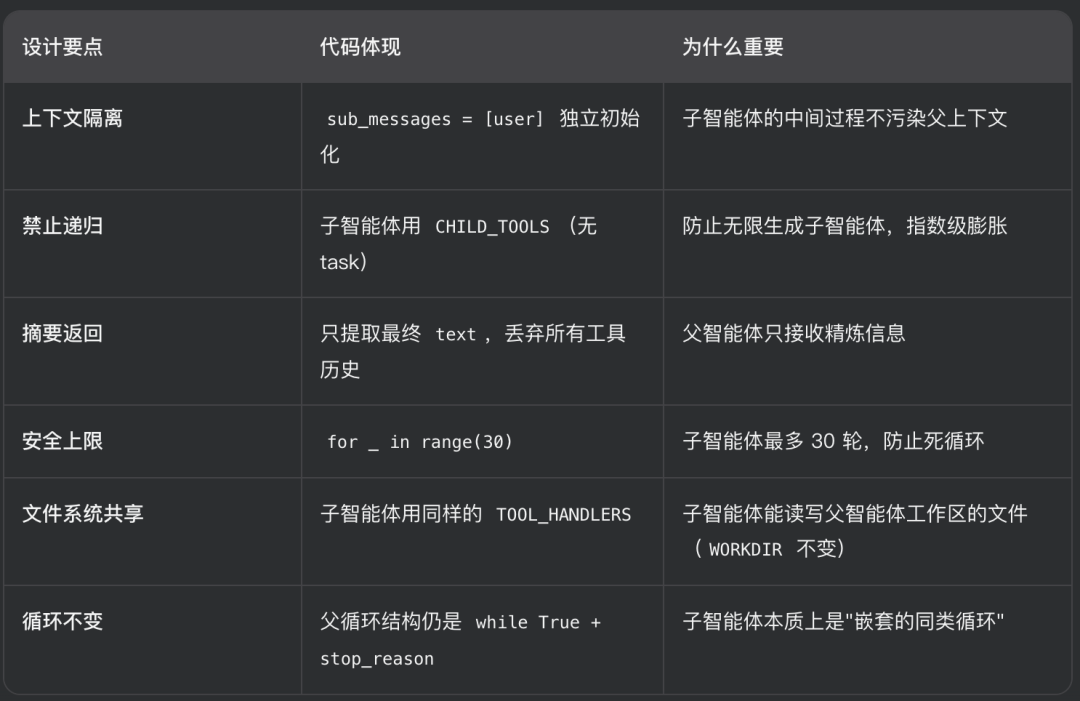
核心洞察:“Process isolation gives context isolation for free.” —— 进程隔离天然带来上下文隔离。子智能体是一个函数调用,函数有局部变量,函数结束变量销毁。不需要额外的"上下文管理器",Python 的作用域机制就是最好的隔离。
更多transformer,VIT,swin tranformer
参考头条号:人工智能研究所
v号:人工智能研究Suo, 启示AI科技
动画详解transformer 在线视频教程



小龙虾开发者社区是 CSDN 旗下专注 OpenClaw 生态的官方阵地,聚焦技能开发、插件实践与部署教程,为开发者提供可直接落地的方案、工具与交流平台,助力高效构建与落地 AI 应用
更多推荐



 7
7 0
0- 0


 已为社区贡献7条内容

所有评论(0)