
Generative AI Overview & Practice
目录
Types and Application of Gen AI
LLM (Large Language Model, 大语言模型)
RAG (Retrieval Augmented Generation, 检索增强生成)
LangChain & LangGraph, LlamaIndex, CrewAI, AutoGen, Pydantic AI
Running LLMs locally with Ollama & Docker
Serve local LLM (Ollama) via FastAPI
Project - Real-World AI Application - Agentic RAG Chatbot (End-to-End)
Useful links
| Book | 《AI Agents in Action》- Oreilly |
| Lastest News & Resources (Open-source, Newsletters, etc.) |
1. Official websites: Hugging Face (open source): https://huggingface.co/ Open AI News: https://openai.com/zh-Hans-CN/news/ Google AI News: https://deepmind.google/blog/ Anthropic News: https://www.anthropic.com/news 2. Third-party websites: AI Base: https://www.aibase.com/zh TLDR AI Newsletter: https://tldr.tech/ (Subscribe to free daily email, read in 5 mins) AI Weekly (Chinese version): https://quaily.com/op7418 3. Apps: Twitter/X, Reddit, Discord, etc. |
| API (GPT, Gemini, Ollama, etc.) |
GPT (Generative Pre-trained Transformer): https://developers.openai.com/api/docs Gemini: https://ai.google.dev/api |
Types and Application of Gen AI
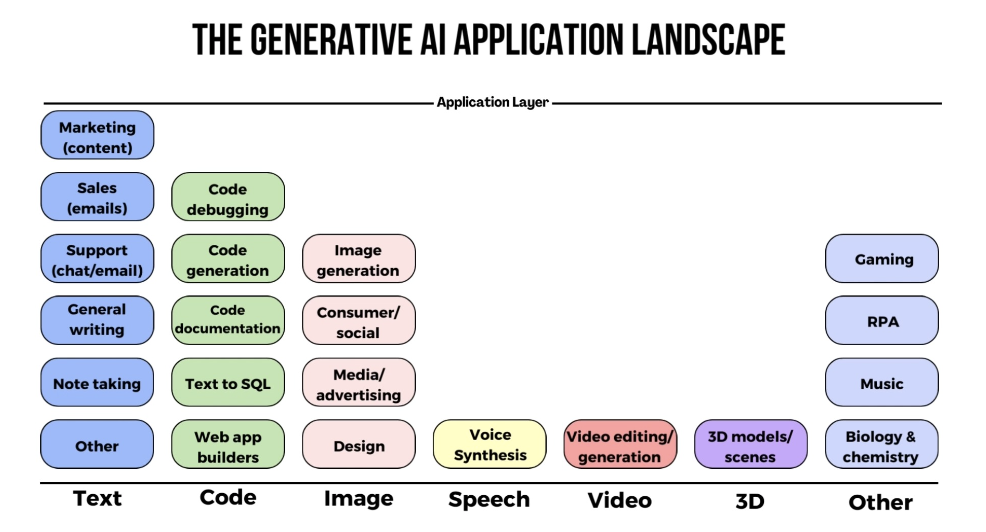
Types: Text, Image, Video, Audio, 3D, Code, Task, Music, etc.
Application:
- Text-to-Text
- Text-to-Image
- Text-to-Video
- Text-to-Audio
- Text-to-3D
- Text-to-Code
- Text-to-Task
- Image-to-Text
- Image-to-Image
- Video-to-Text
- Audio-to-Text
- Image-to-Video
- Text-to-Music
- Music-to-Text
- Audio-to-Audio
Image Generation:
- MidJourney
- Stable Diffusion
- DALL-E 3
Marketing
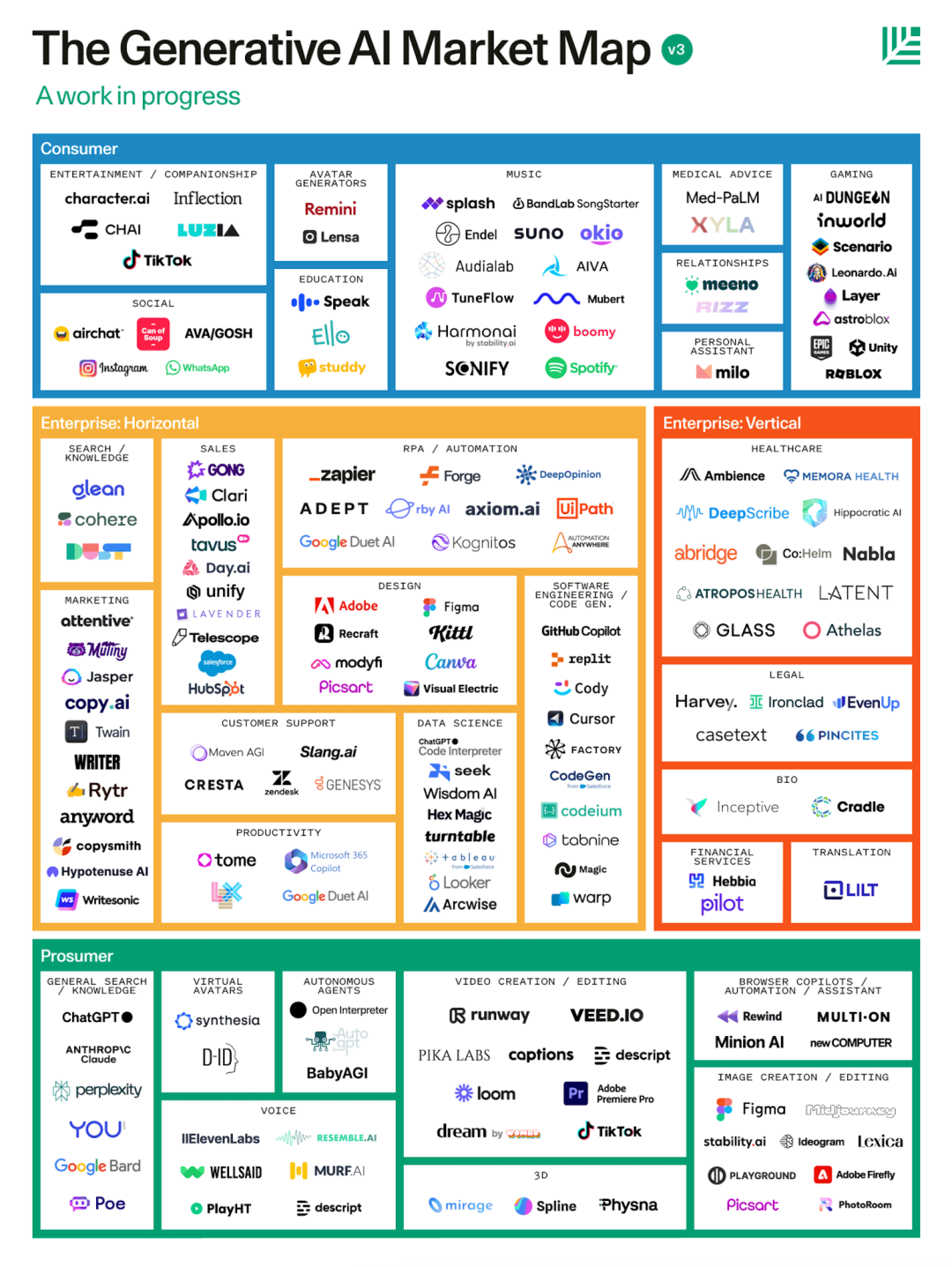
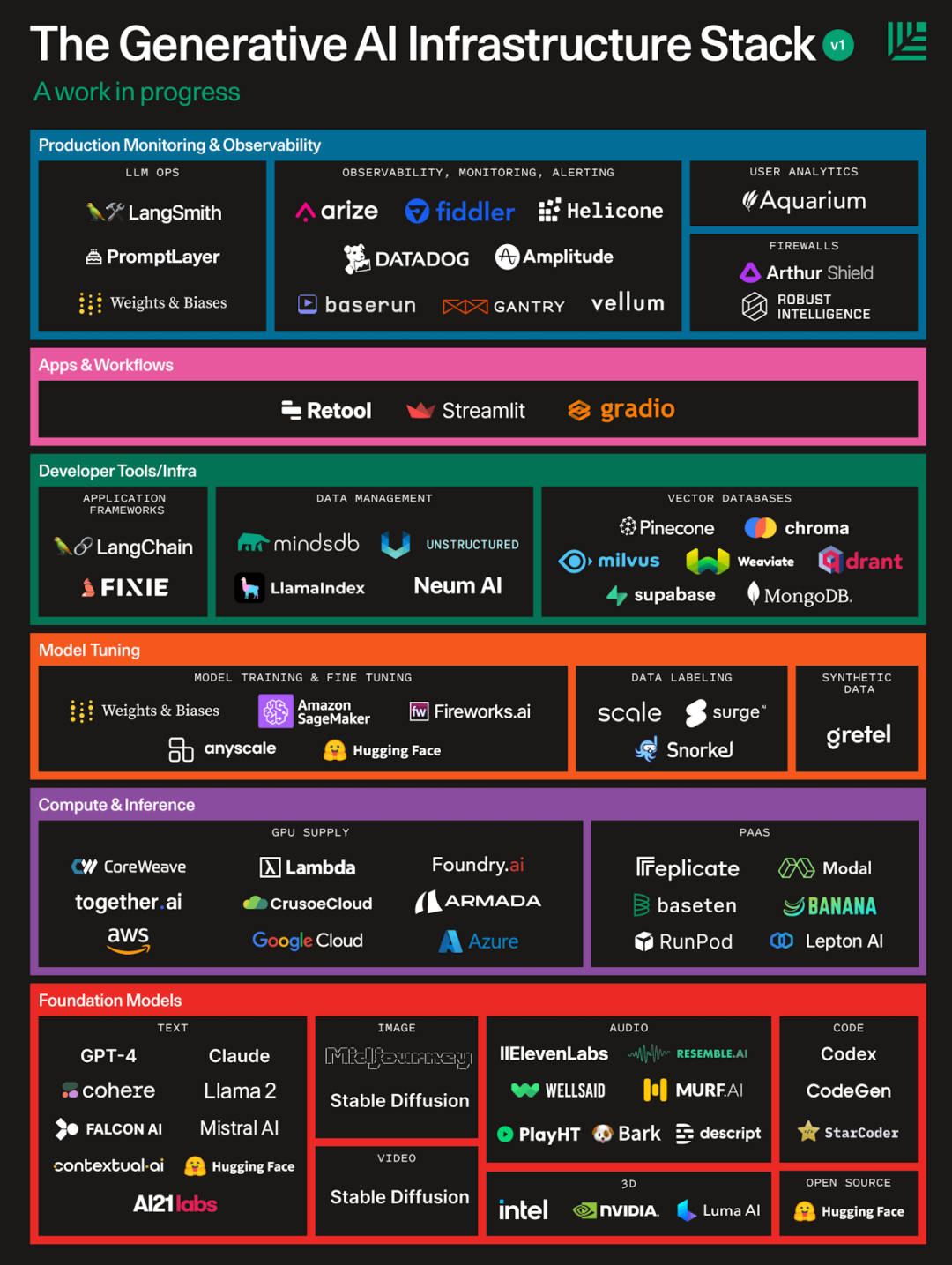
AI Hierarchy
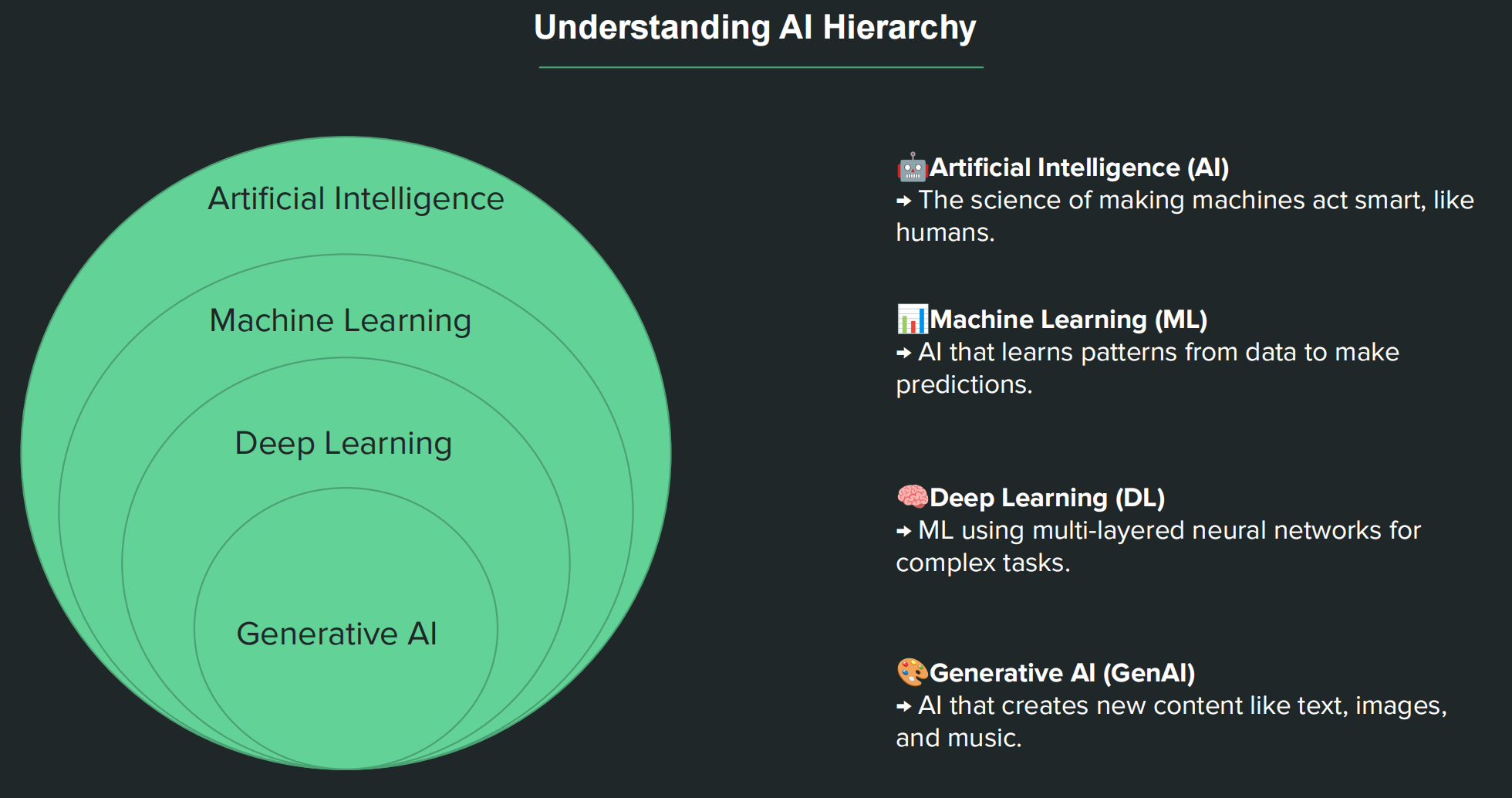
AIGC: Artificial Intelligence Generative Content
The emergence of AIGC is due to the breakthrough in parameter magnitude of large language models(LLM).
Tokenization
Breaks text into smaller units (words, subwords, characters) and maps them to numeric IDs.
Latest Engineering Concept:
Prompt Engineering (2022-2024) -> Context Engineering (2025) -> Harness Engineering (2026)
Harness Engineering (驾驭工程)
Context Engineering (上下文工程)
Prompt Engineering (提示工程)
Methods of Prompt Engineering:
- Domain-specific Knowledge
- Effective Keywords
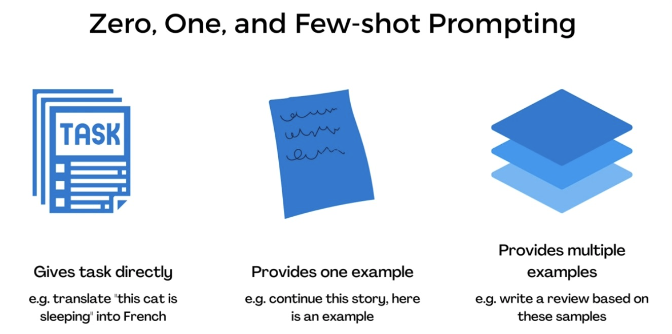
- Role Prompting, Shot Prompting, Chain of Thought Prompting
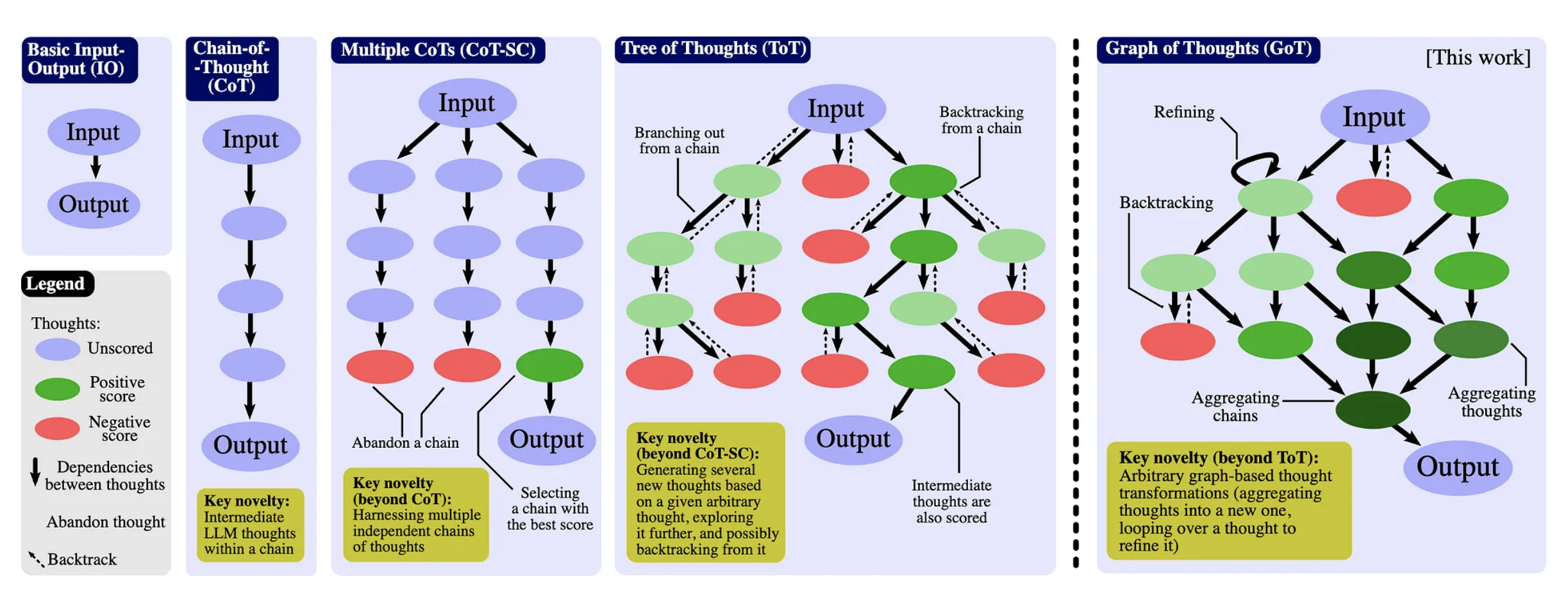
- Chain-of-Thoughts (CoT)
- Chain-of-Thought-Self-Consistency
- Tree-of-Thoughts (ToT)
- Graph-of-Thoughts (GoT)
- Algorithm-of-Thoughts
- Skeleton-of-Thought
- Program-of-Thoughts
LLM (Large Language Model, 大语言模型)
Popular Proprietary LLMs
- OpenAI - GPT
- Google - Gemini
- Anthropic - Claude
Open-Source LLMs
- Meta - Llama
- DeepSeek
- OpenAI - GPT-oss
- Google - Gemma
Applications
- Chatbots
- Doc QA
- Coding
- Agents
Local deploy DeepSeek
|
deepseek官网: |
|
|
ollama官网: |
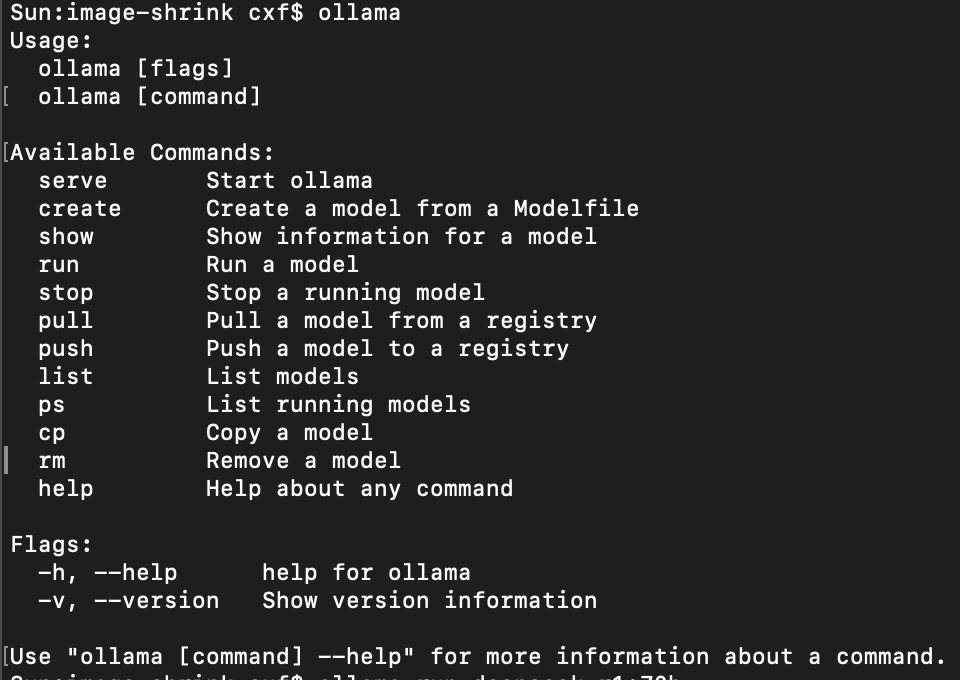
Download ollama app from official website and install:
ollama list
ollama run deepseek-r1:32b
Then download the open-source model:
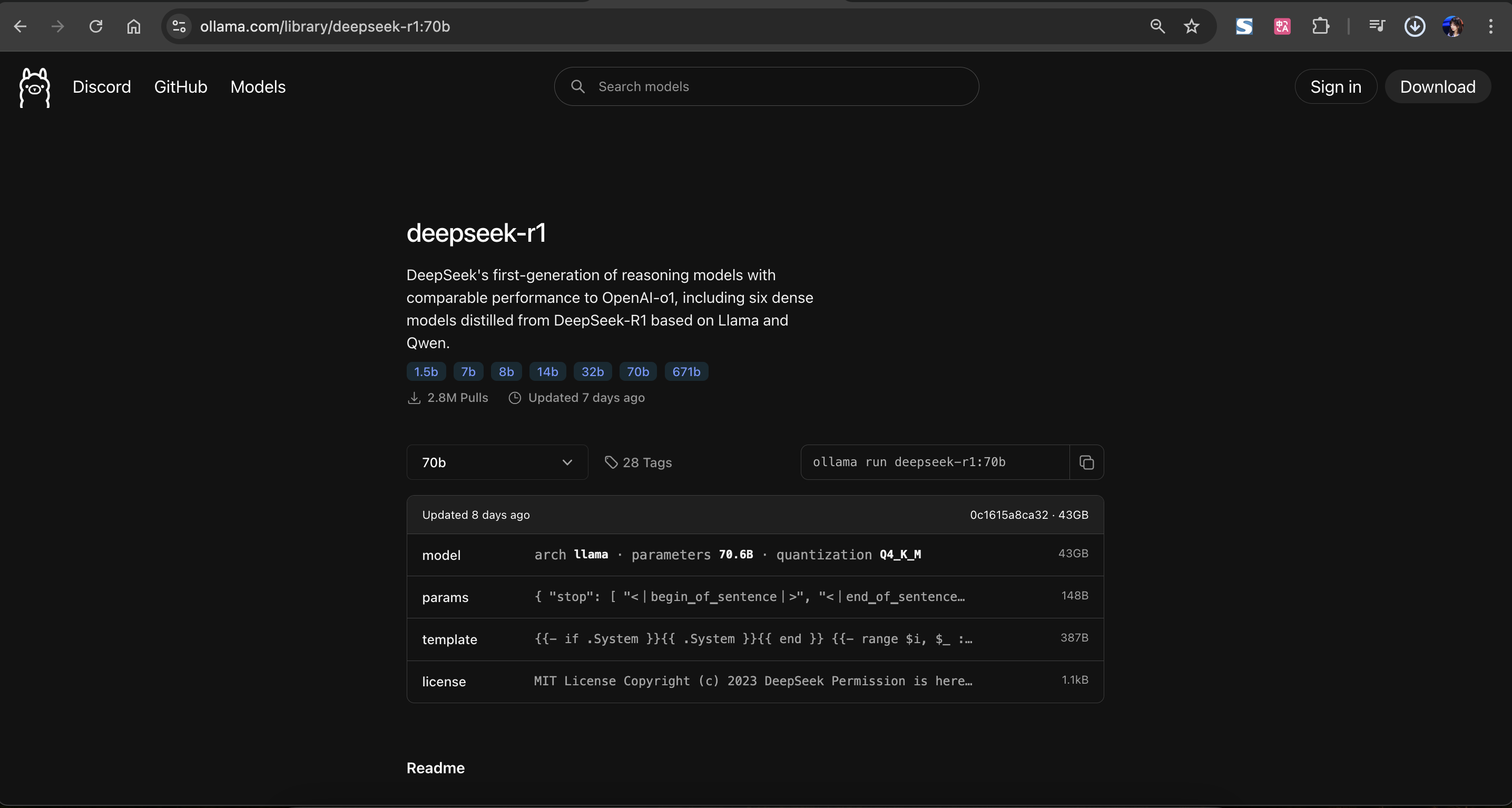
Choose the parameter level:
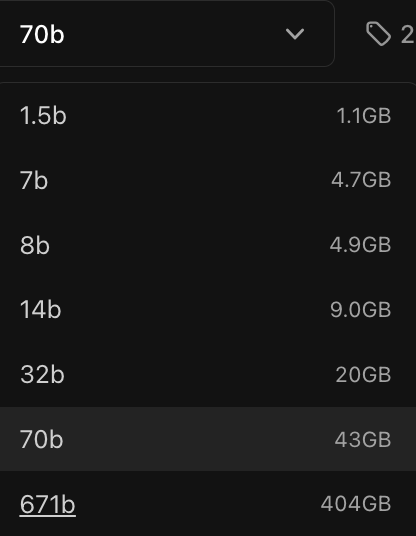
我的 Macbook 电脑的性能能支持跑14b,跑不动 32b。

You can input message to ask now!
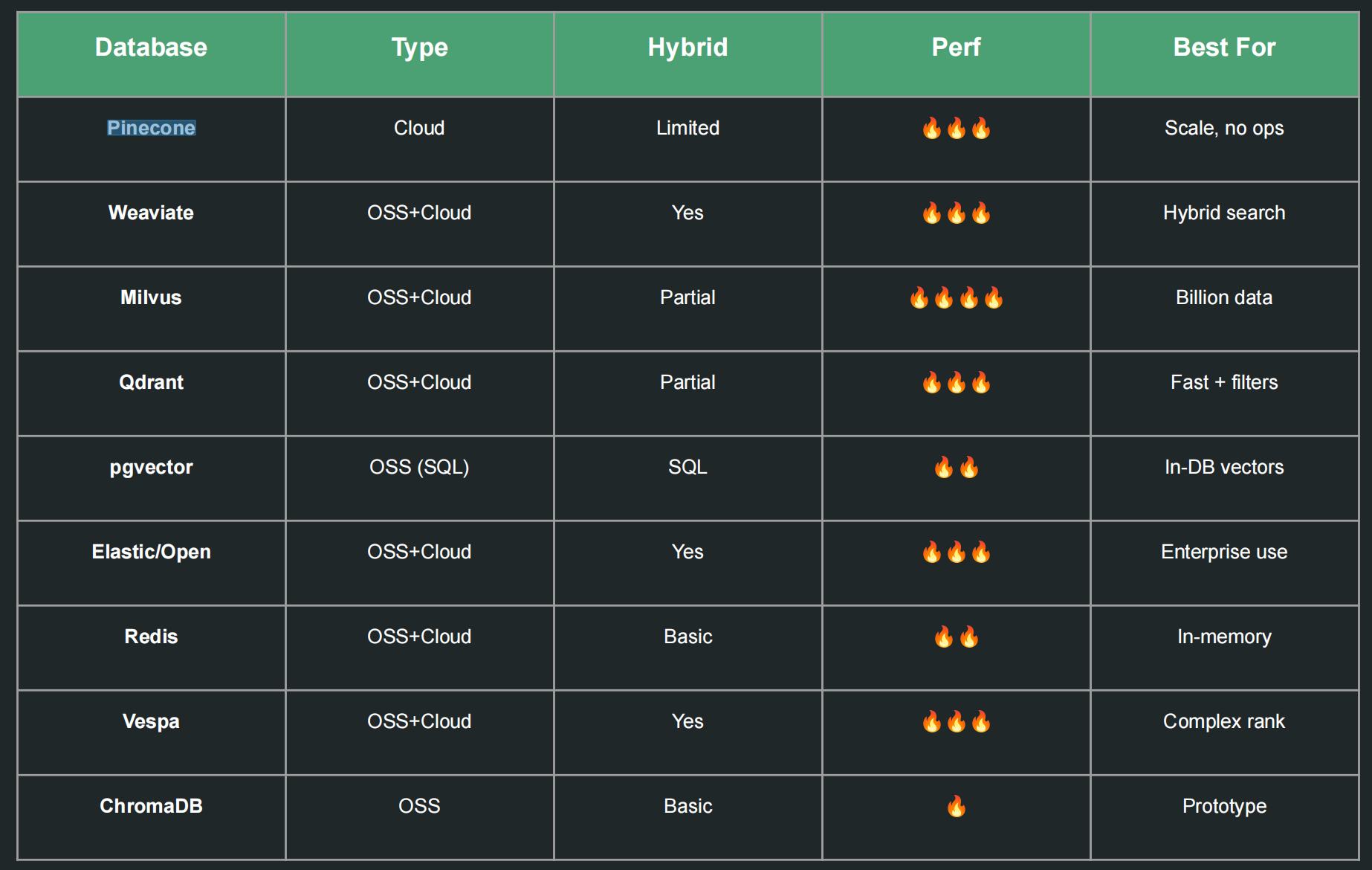
Vector Databases
Transformer
My blog written in 2020 for AI music composition is built by LSTM:
https://blog.csdn.net/Beth_Chan/article/details/111351195
but after new GenAi era, the AI generation is not LSTM, is replaced by Transformation .
The new Generative LLMs like GPT, Gemini are built using transformers.
分析 LSTM 和 Transformer 在 AI 音乐生成领域的代际变化:
一、LSTM在AI音乐生成中的特点
LSTM作为循环神经网络(RNN)的变体,曾经是AI音乐生成的主流模型,它的优势在于:
-
序列建模能力:擅长捕捉音乐中的时序依赖关系,比如旋律的走向、和弦的衔接逻辑
-
低资源适配性:在2020年算力资源相对有限的时期,LSTM的训练成本更低,更容易在中小规模数据集上实现可用的音乐生成效果
-
专注局部特征:对短片段的音乐风格模仿能力较强,适合生成段落级别的旋律
二、Transformer架构带来的代际提升
以GPT、Gemini为代表的大语言模型采用的Transformer架构,为AI音乐生成带来了质的飞跃:
-
全局注意力机制:通过自注意力机制可以同时捕捉音乐中的长距离依赖,比如整首曲子的主题呼应、结构对称性
-
多模态融合能力:不仅能处理音符序列,还能结合歌词、情感标签、乐器音色等多维度信息生成更丰富的音乐
-
通用模型适配性:基于大语言模型的Transformer可以直接处理文本描述,实现"文字转音乐"的跨模态生成
-
风格迁移能力:更擅长学习不同音乐流派的全局风格特征,生成的音乐完整性和艺术性更强
三、技术迭代背后的核心逻辑
-
算力驱动:Transformer的训练需要海量算力,这是2020年尚不具备的基础条件
-
数据爆发:音乐版权数据的开放和数字化音乐库的扩张,为大模型训练提供了充足的素材
-
需求升级:从单纯的"生成旋律"升级为"创作符合特定场景、情感、风格的完整音乐作品"
Encoder & Decoder
Why do transformers use positional encoding?
To provide word order information, since transformers look at all tokens simultaneously.
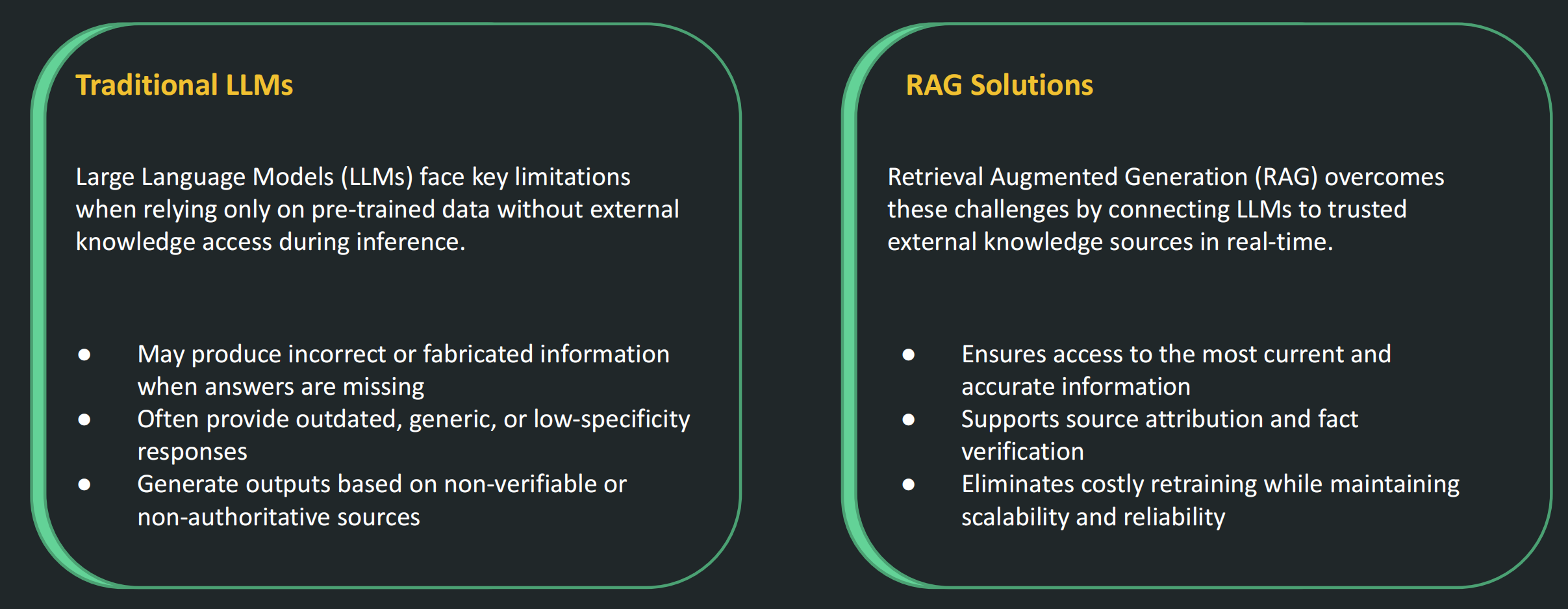
RAG (Retrieval Augmented Generation, 检索增强生成)
LLM Challenges
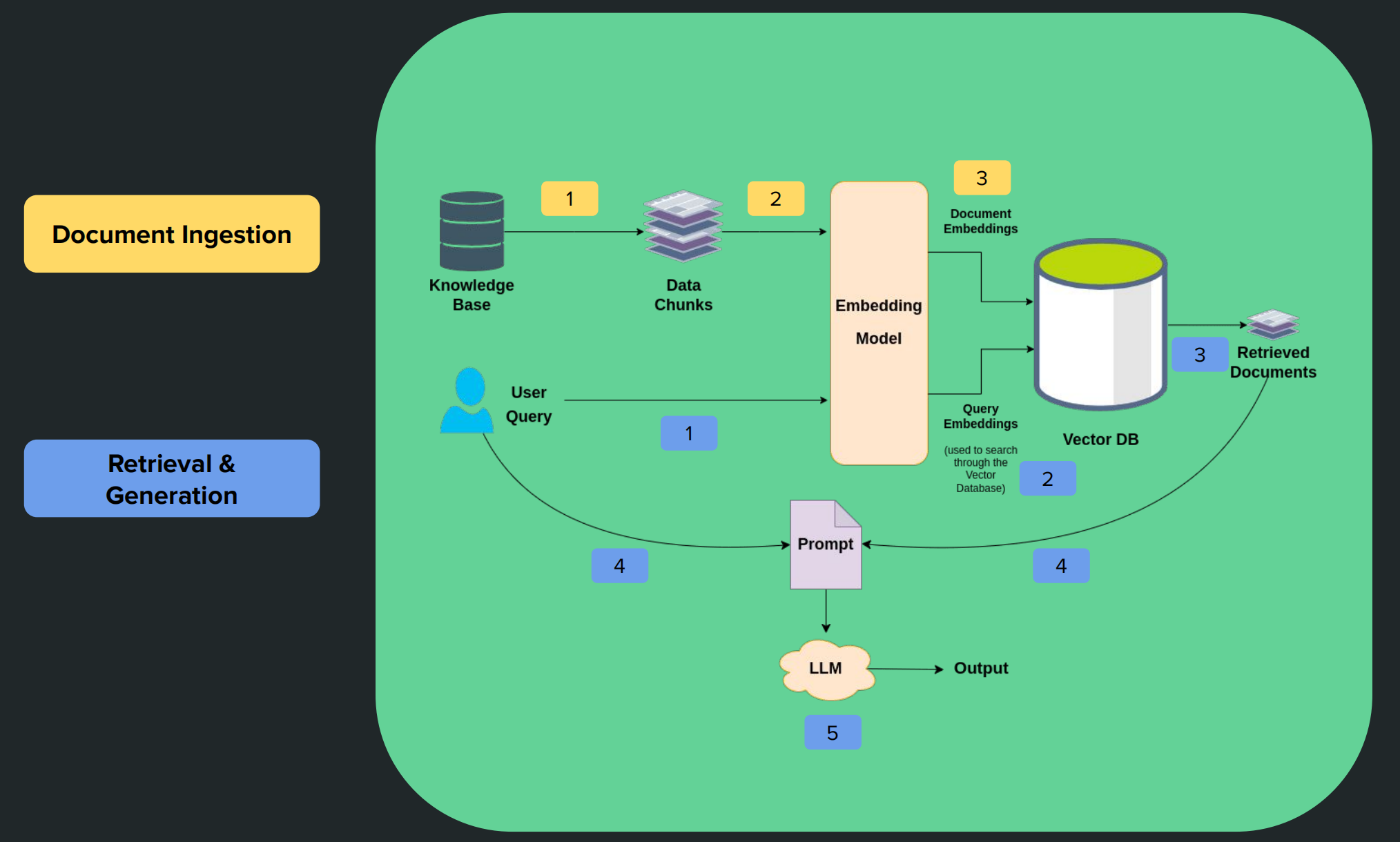
RAG Architecture
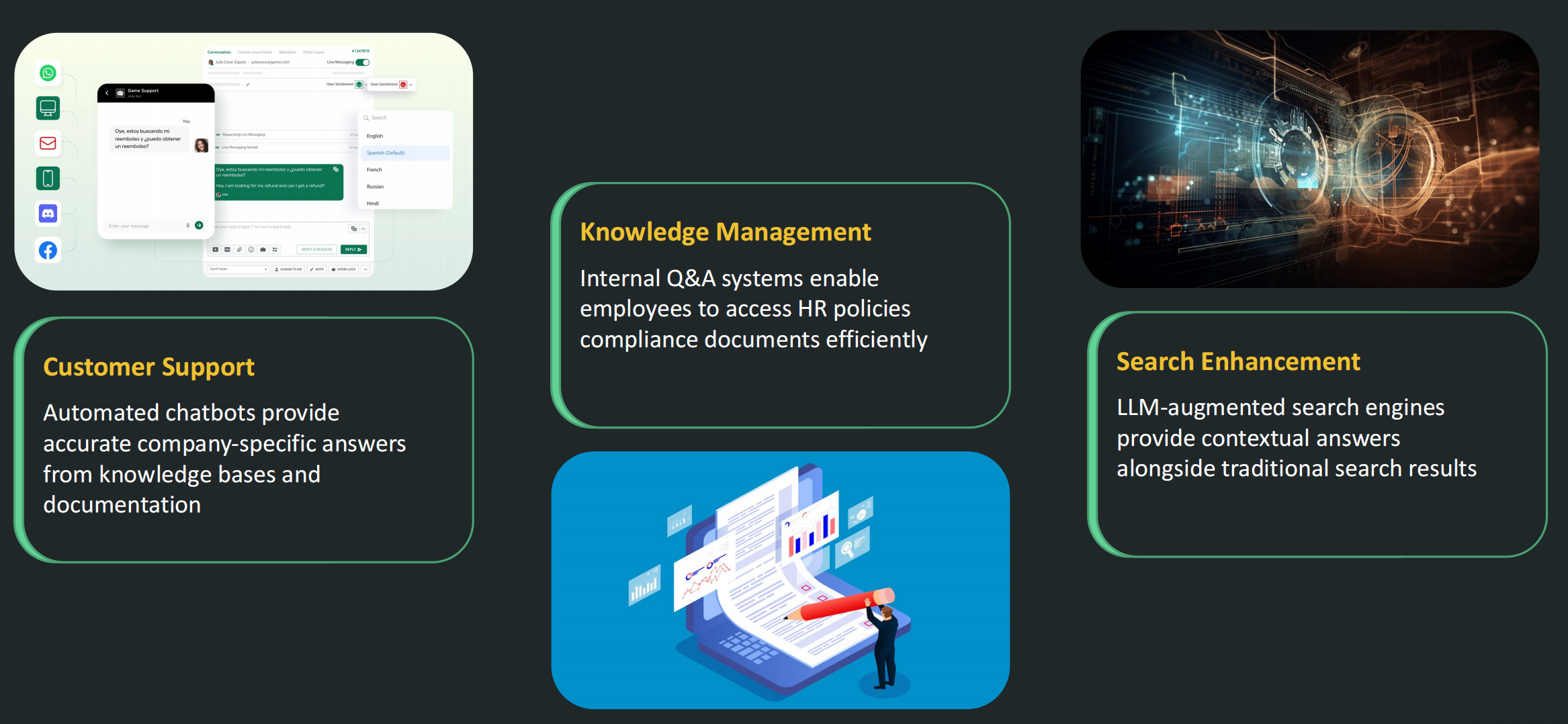
RAG Applications
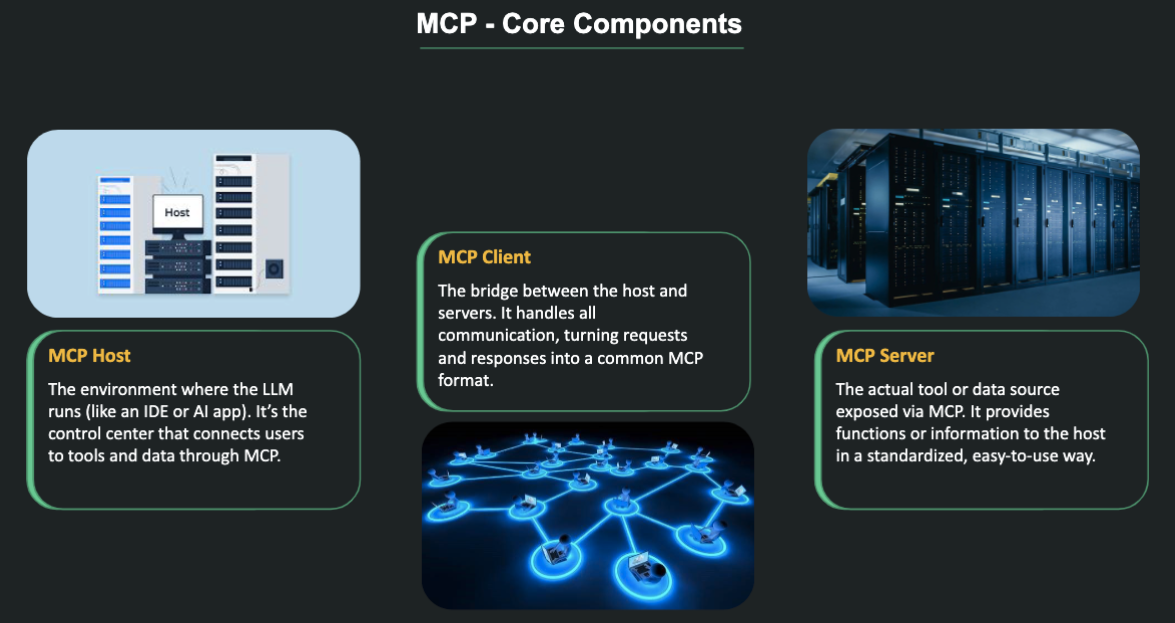
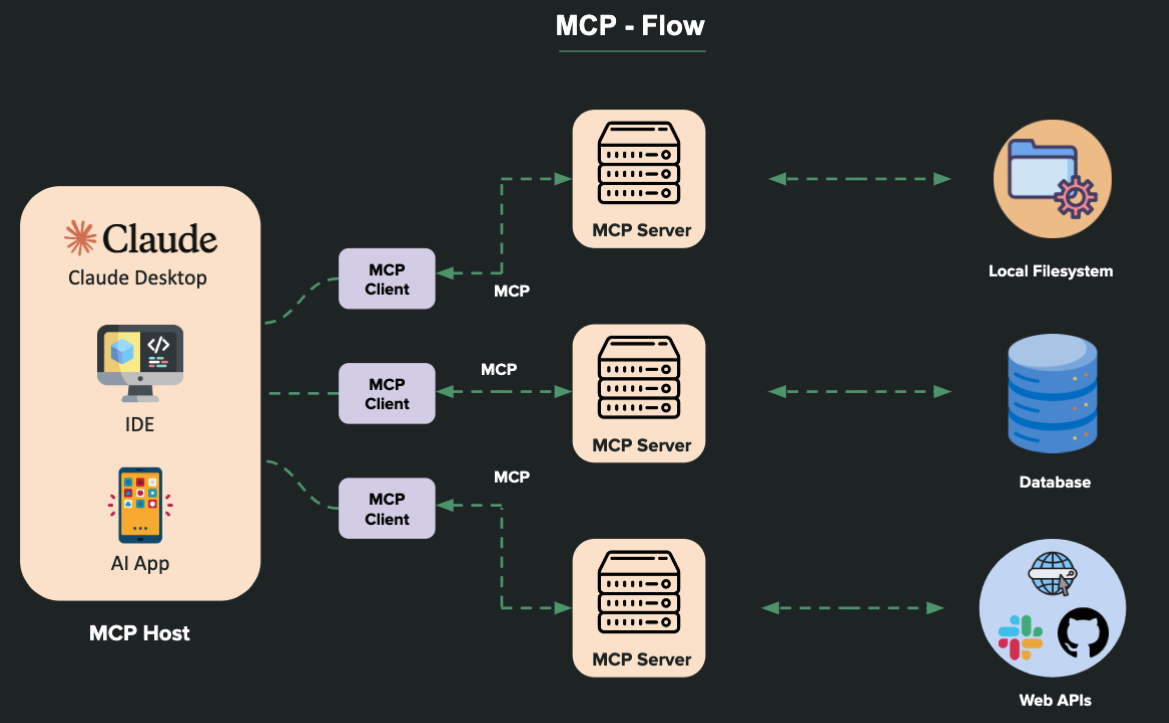
MCP (Model Context Protocol)
The USB-C for AI Applications
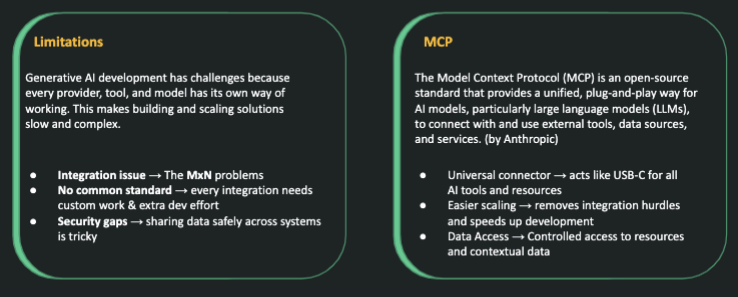
GenAI Challenges
1. Build your first hello-world MCP server using different programming languages
2. Extend your hello-world MCP server with tools, resources and prompts
3. Explore FastMCP framework
4. Integration test your MCP server
AI Agent (AI 智能体 / 代理)
Build AI Agents with LLMs
What are AI agents?
AI agents are autonomous software systems that perceive their environment, make decisions, plan, and take actions to achieve specific user-defined goals.
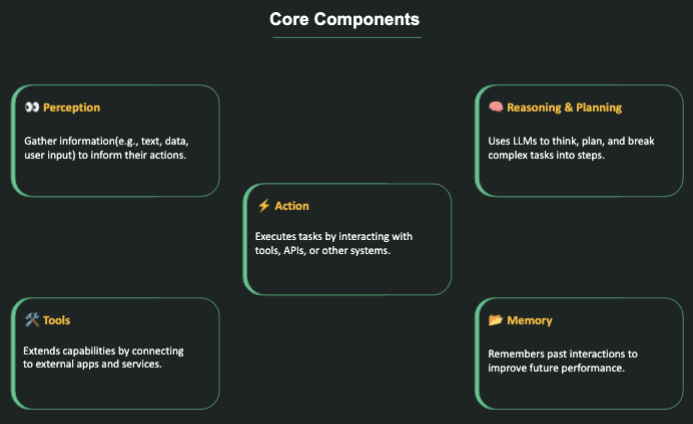
What exactly are AI agents, and why should you want to learn about them in the first place? AI agents are tools designed to allow users to interact with LLMs to achieve a more productive or creative workflow as seamlessly as possible. Before AI agents, users would be forced to build their own statistical language models—a time-consuming, technical, and expensive endeavor! Now, with AI agents, users who want to interact with AI simply get to log in to an interface and conduct business ranging from asking questions of their documents to getting help with their homework.
什么是人工智能代理,你为什么要首先了解它们?AI 代理是一种工具,旨在允许用户与 LLM 进行交互,以尽可能无缝地实现更高效或更具创造性的工作流程。在 AI 代理出现之前,用户将被迫构建自己的统计语言模型——这是一项耗时、技术且昂贵的工作!现在,有了人工智能代理,想要与人工智能互动的用户只需登录一个界面,就可以开展业务,从询问他们的文件问题到获得家庭作业的帮助。
At a more granular level, you might think of AI agents as UI “wrappers” around the models that power them. That is to say, AI agents are often user-friendly “frontends” that make using the models that fuel them easier, often by focusing and limiting just how users interact with the model. Take ChatGPT, for instance. The models fueling ChatGPT (GPT-3.5 Turbo or GPT-4) are massively complex, powerful, and difficult to use and operate on their own. As an AI agent, ChatGPT abstracts away these models’ technical features and allows users to interact with them simply via text.
在更精细的级别上,你可以将 AI 代理视为支持它们的模型的 UI“包装器”。也就是说,人工智能代理通常是用户友好的”前端”,通常通过关注和限制用户与模型的交互方式,使使用驱动它们的模型变得更加容易。以ChatGPT为例。为 ChatGPT(GPT-3.5 Turbo 或 GPT-4)提供动力的模型非常复杂、功能强大且难以单独使用和操作。作为人工智能代理,ChatGPT 抽象出这些模型的技术特征,允许用户简单地通过文本与它们进行交互。
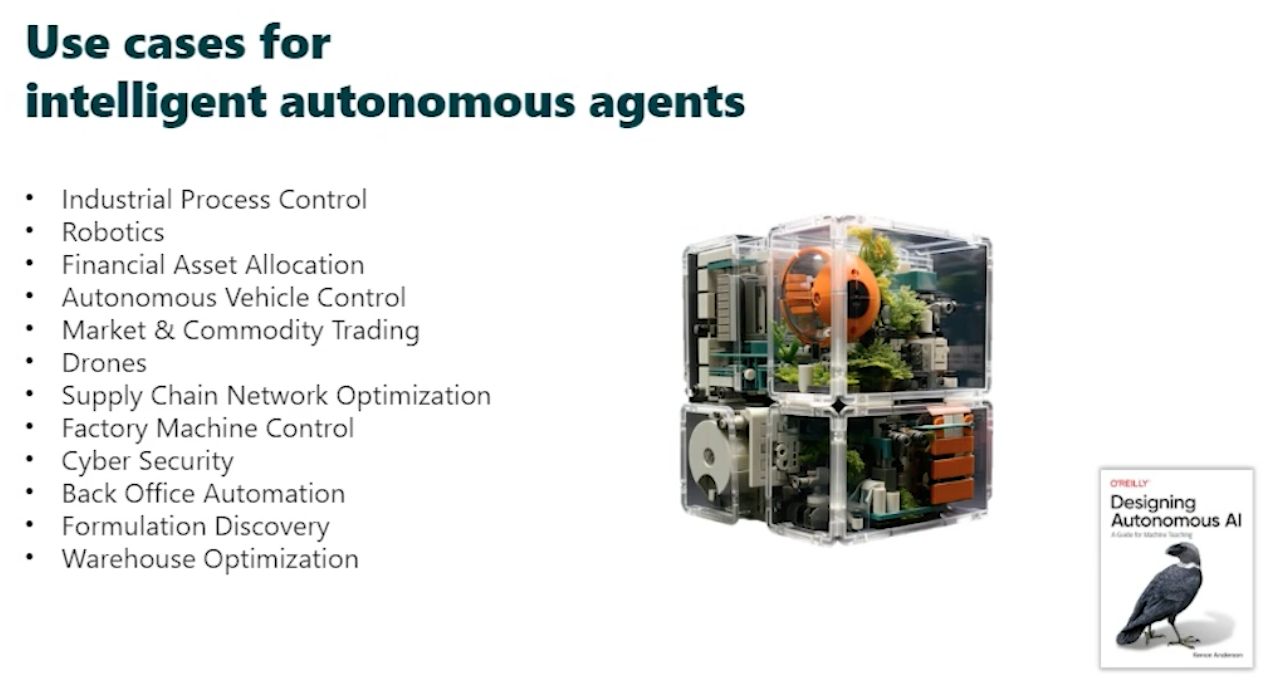
Use cases
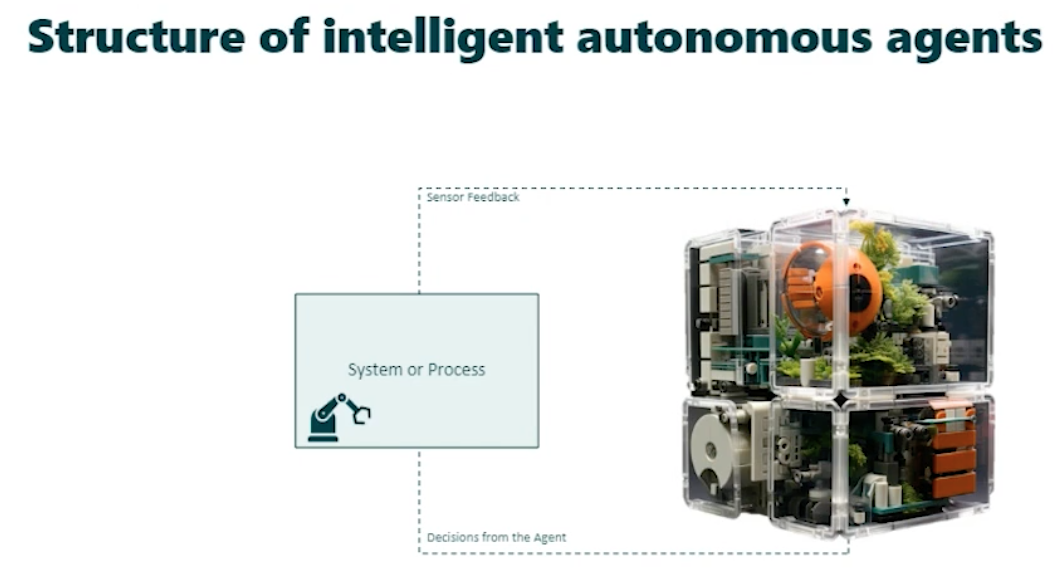
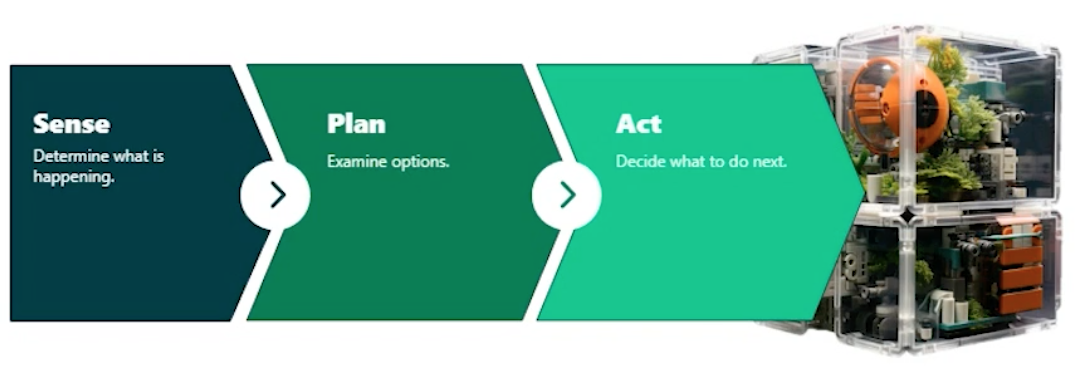
Structure
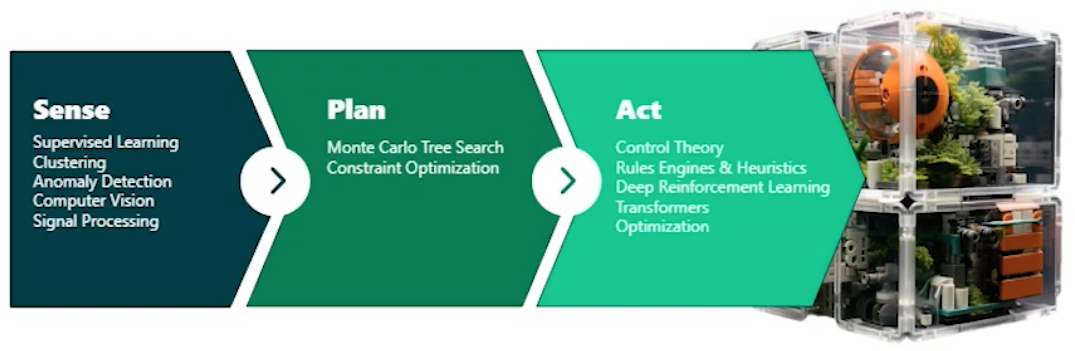
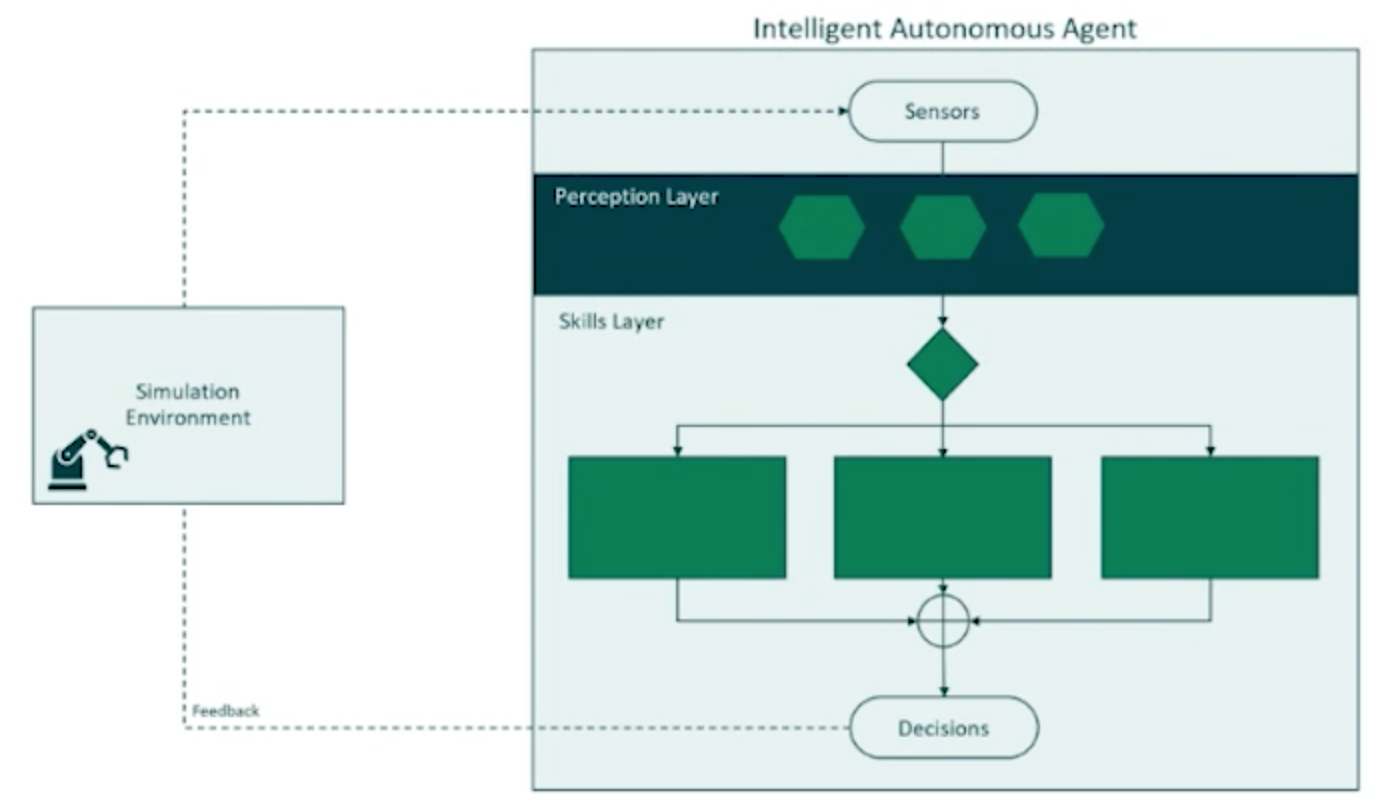
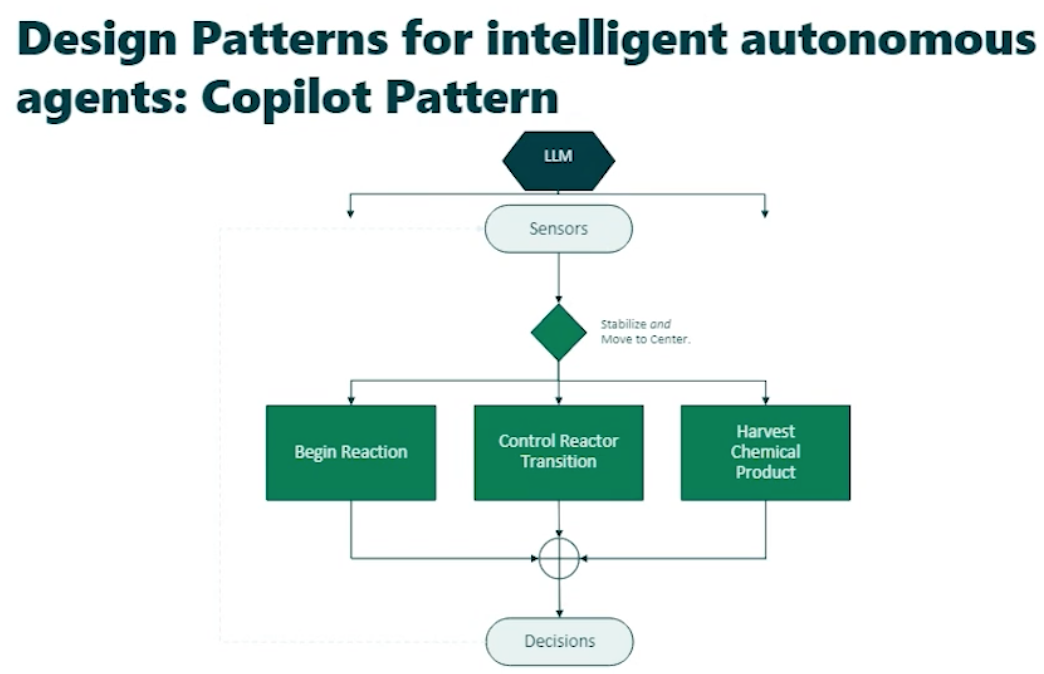
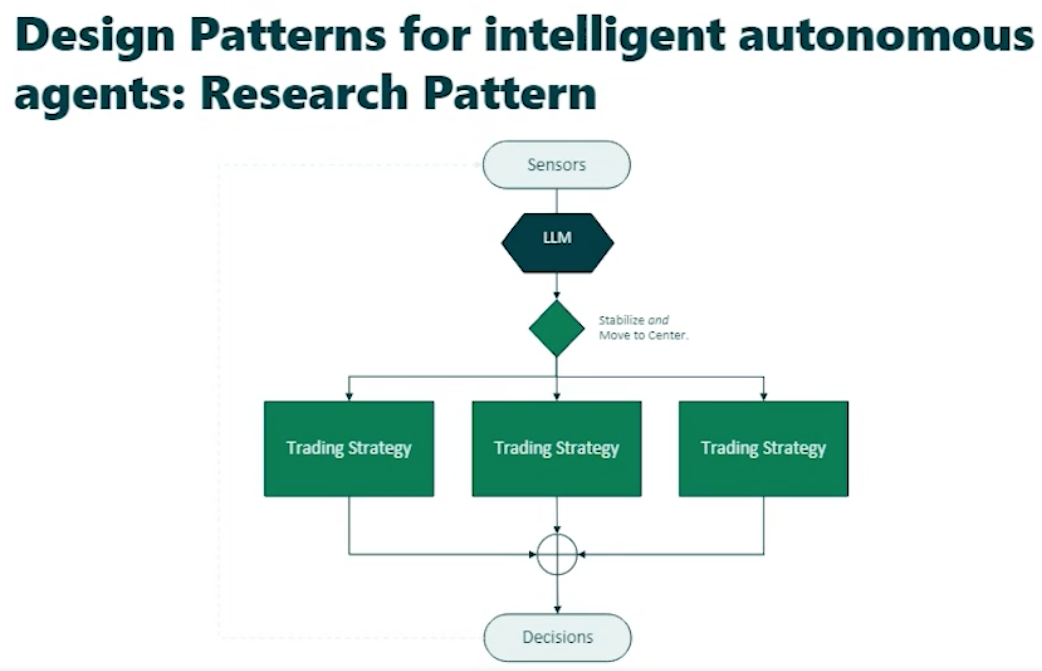
Design Patterns
Copilot Pattern
Research Pattern
OpenClaw & Claude Code Cowork
Claude Code: https://blog.csdn.net/Beth_Chan/article/details/159171466
OpenClaw: https://blog.csdn.net/Beth_Chan/article/details/159550332
核心定位差异
OpenClaw:开源私人AI管家
-
身份属性:第三方开源项目(原Clawdbot/Moltbot),非Anthropic官方产品
-
核心定位:个人级自主托管AI代理,主打"全天候主动服务"
-
用户画像:技术爱好者、独立开发者、追求极致个性化的效率用户
-
Slogan:"你的数字管家,7×24小时为你服务"
官方资源
-
GitHub仓库:https://github.com/moltbot/moltbot
Claude Code Cowork:企业级桌面AI文员
-
身份属性:Anthropic官方出品(Claude生态矩阵成员)
-
核心定位:面向知识工作者的安全型AI助理,主打"受控式任务执行"
-
用户画像:企业白领、非技术岗员工、注重数据安全的团队用户
-
Slogan:"像开发者使用Claude Code一样,轻松搞定非技术性任务"
安全架构差异
OpenClaw:完全开放的信任模式
-
权限机制:用户自主授予系统级权限,可访问任意文件、运行任意程序
-
部署方式:本地设备(Mac Mini/PC)或云端虚拟机自托管,数据完全本地化
-
扩展能力:支持安装任意第三方插件/子代理,甚至允许代理自主扩展功能
-
安全风险:高权限带来便利的同时存在潜在风险,需用户具备一定技术能力管理
Claude Code Cowork:沙箱隔离的安全模式
-
权限机制:所有操作需用户明确授权,采用MCP模型上下文协议严格限制访问范围
-
运行环境:技能模块全部在沙箱环境中执行,与主机系统资源完全隔离
-
扩展能力:仅支持官方认证的Skills模块,用户无法自行添加未经审核的功能
-
安全优势:符合企业数据安全合规要求,无需担心数据泄露或系统被篡改
能力边界差异
OpenClaw:长期主动型Agent
-
持续运行:可7×24小时后台运行,支持主动监控和触发任务
-
多端交互:通过IM网关接入Telegram/WhatsApp/飞书等,支持移动端远程指挥
-
记忆系统:具备长期记忆能力,可跨会话记住用户偏好和项目上下文
-
任务范围:覆盖从简单文件处理到复杂系统运维的全场景任务
Claude Code Cowork:短期任务型助理
-
运行模式:按需启动的会话式服务,会话结束即释放资源
-
交互方式:桌面端专属应用,不支持跨平台远程操作
-
记忆系统:基于会话的短期记忆,任务完成后自动清理上下文
-
任务范围:聚焦于文件整理、数据处理、文档生成等办公场景
适用场景对比
|
场景类型 |
OpenClaw 适用场景 |
Claude Code Cowork 适用场景 |
|---|---|---|
|
个人生产力提升 |
自动化监控、跨设备任务、个性化工作流定制 |
日常文件处理、数据分析、会议纪要整理 |
|
技术开发支持 |
服务器运维、代码部署、自动化测试 |
代码解释、文档生成、简单编程辅助 |
|
企业团队协作 |
不推荐(安全合规风险) |
团队文档协作、标准化流程执行、数据安全处理 |
|
特殊需求定制 |
自定义Agent开发、第三方系统集成 |
官方Skills覆盖的标准化任务 |
总结对比表
|
对比维度 |
OpenClaw |
Claude Code Cowork |
|---|---|---|
|
开发主体 |
第三方开源社区 |
Anthropic官方 |
|
部署方式 |
本地自托管/云端虚拟机 |
官方云端服务+桌面客户端 |
|
安全级别 |
高自由度/低管控(需用户自行负责安全) |
高管控/低风险(企业级安全标准) |
|
运行模式 |
7×24小时持续运行 |
按需启动的会话式服务 |
|
扩展能力 |
完全开放,支持任意插件/子代理 |
有限扩展,仅支持官方认证Skills |
|
交互方式 |
多平台IM接入,支持远程控制 |
桌面端专属应用,仅本地交互 |
|
价格模式 |
免费开源,需自行承担服务器/API费用 |
订阅制(包含在Claude Max套餐中) |
Skill
Skill Folder & md
Skill 会有 Folder 和 Markdown (.md) ,可以把它们想象成一套“说明书”和“知识库”。
Skill Folder(技能文件夹)
在 AI 开发框架(如 Semantic Kernel 或 AutoGen)中,Skill Folder 是存放 AI “超能力”的地方。
你可以把 AI 想象成一个刚入职的实习生,它虽然聪明,但不知道怎么处理你公司的特定业务。Skill Folder 就像是它的岗位职责手册。
核心组成:
一个标准的技能文件夹通常包含两个核心文件:
-
skprompt.txt:存放 Prompt(提示词)。告诉 AI 它的角色是什么,以及如何处理输入。 -
config.json:存放 配置参数。比如使用的模型版本、生成的随机程度(Temperature)以及输入变量的定义。
形象化理解:
-
技能: “写周报”。
-
Skill Folder 路径:
/Skills/WeeklyReport/。 -
内容: 里面存着如何把混乱的笔记转换成精美周报的指令。
假设你做了一个“法律助手” AI:
-
Skill Folder 里有一个
LegalSummary技能,教 AI 如何提取法律条款的摘要。 -
Markdown 文件 存着成千上万篇
Civil_Law.md(民法典)。 -
运行逻辑: AI 调用
LegalSummary技能,去阅读Civil_Law.md里的内容,最后产出结果。
GenAI Skill 的关键特点
-
任务特定:
每个技能被设计来执行特定的任务或一组相关的任务。例如,一个“总结”技能可能将长文章浓缩为简短的摘要,而一个“翻译”技能将文本从一种语言转换为另一种语言。
-
模块化:
技能通常作为独立的模块开发和打包,可以轻松集成到更大的AI系统或应用程序中。这种模块化使得技能在不同的上下文中可重用,而无需修改。
-
可定制化:
很多技能允许根据输入数据或用户偏好进行定制。例如,一个生成文本的技能可能允许用户指定语气、风格或长度等偏好。
-
自主执行:
技能通常设计为一旦激活,就可以独立运行。这意味着,AI可以在接收到请求后自动执行任务,无需人工干预,例如生成内容、分析数据或与其他系统交互。
-
可重用性:
一旦创建,技能可以应用于各种不同的上下文,无论是聊天机器人、内容生成应用还是企业工作流程。例如,“文本分类”技能可以用于客户反馈的情感分析、电子邮件的垃圾邮件检测,甚至文档分类。
GenAI Skills 的例子
例子: Coze 技能商店
LangChain & LangGraph, LlamaIndex, CrewAI, AutoGen, Pydantic AI
Build LLM-based applications
Deployment
Running LLMs locally with Ollama & Docker
1. Search "Docker Ollama" in google, then you can find it out: https://hub.docker.com/r/ollama/ollama (My Macbook Pro just exists CPU, no GPU, so I run the command for "CPU only" in this page)
docker run -d -v ollama:/root/.ollama -p 11434:11434 --name ollama ollama/ollama2. Check with command "docker images" and "docker ps"

3. Pull model, eg: "gemma2:2b"
docker exec -it ollama ollama pull gemma2:2bFastAPI
FastAPI 是一个现代、快速(高性能)的 Python Web 框架,特别适用于构建 API,具有以下几个特点:
-
高性能:FastAPI 的性能几乎可以与 Node.js 或 Go 相媲美,得益于其底层使用了 Starlette(用于 Web 部分)和 Pydantic(用于数据验证和模型)。它支持 异步 I/O(例如
async/await),因此适合处理高并发请求。 -
自动生成文档:FastAPI 内置了 OpenAPI 和 JSON Schema 支持,这意味着你不需要手动写 API 文档,框架会自动为你的 API 生成交互式文档(Swagger UI 和 ReDoc)。
-
类型安全:FastAPI 完全支持 Python 的类型提示,可以通过类型检查提供 静态类型分析。它自动验证请求体、查询参数等,并在类型不匹配时返回清晰的错误信息。
-
易于使用和扩展:FastAPI 允许你通过依赖注入、数据验证、自动生成文档等特性,使开发过程变得简单、直观,同时它也非常灵活,可以用来构建从简单到复杂的应用。
-
异步编程支持:FastAPI 完全支持异步操作,适用于高并发、IO密集型的应用程序(如 Web 爬虫、数据处理和大规模 API 服务)。
安装 FastAPI 和 Uvicorn
首先,你需要安装 FastAPI 和 Uvicorn(作为 ASGI 服务器来运行 FastAPI 应用)。
pip install fastapi uvicorn
快速入门示例:
1. 创建 FastAPI 应用
# main.py
from fastapi import FastAPI
app = FastAPI()
@app.get("/")

   async def read_root():

       return {"message": "Hello, World!"}
2. 运行 FastAPI 应用
uvicorn main:app --reload
-
app是 Python 文件名(不带扩展名), -
--reload使得代码变动后自动重启服务器。
-
访问 API
-
访问
http://127.0.0.1:8000/可以看到输出{"message": "Hello, World!"}。 -
自动生成的 API 文档可以访问:
-
Swagger UI:
http://127.0.0.1:8000/docs -
ReDoc UI:
http://127.0.0.1:8000/redoc
-
-
Serve local LLM (Ollama) via FastAPI
requirement.txt
fastapi==0.116.1
uvicorn==0.35.0
ollama==0.5.3
pydantic==2.11.7
python-dotenv==1.1.1
main.py
import os
from typing import List, Literal

from fastapi import FastAPI
from pydantic import BaseModel
from dotenv import load_dotenv
from ollama import Client

# Load environment variables from .env file
load_dotenv()
OLLAMA_HOST = os.getenv("OLLAMA_HOST", "http://localhost:11434")

client = Client(host=OLLAMA_HOST)

app = FastAPI(title="Ollama FastAPI Tutorial")

# schemas
Role = Literal["system", "user", "assistant"]

class Message(BaseModel):
    role: Role
    content: str

class ChatRequest(BaseModel):
    model: str = "gemma2:2b"
    messages: List[Message]

class ChatResponse(BaseModel):
    response: str
    model: str


# API Route
@app.post("/chat", response_model=ChatResponse)
def chat(request: ChatRequest):
    try:
        result = client.chat(
            model=request.model,
            messages=[m.model_dump() for m in request.messages],
            stream=False
        )
        return ChatResponse(
            response=result["message"]["content"],
            model=result.get("model", request.model),
        )
    except Exception as e:
        return ChatResponse(response=f"[error] {e}", model=request.model)
cd /Users/cxf/IT/AI/genAI/complete-generative-ai/8_5_fastapi_llm
python3 -m venv /Users/cxf/IT/AI/venv
source /Users/cxf/IT/AI/venv/bin/activate
pip install -r requirements.txt
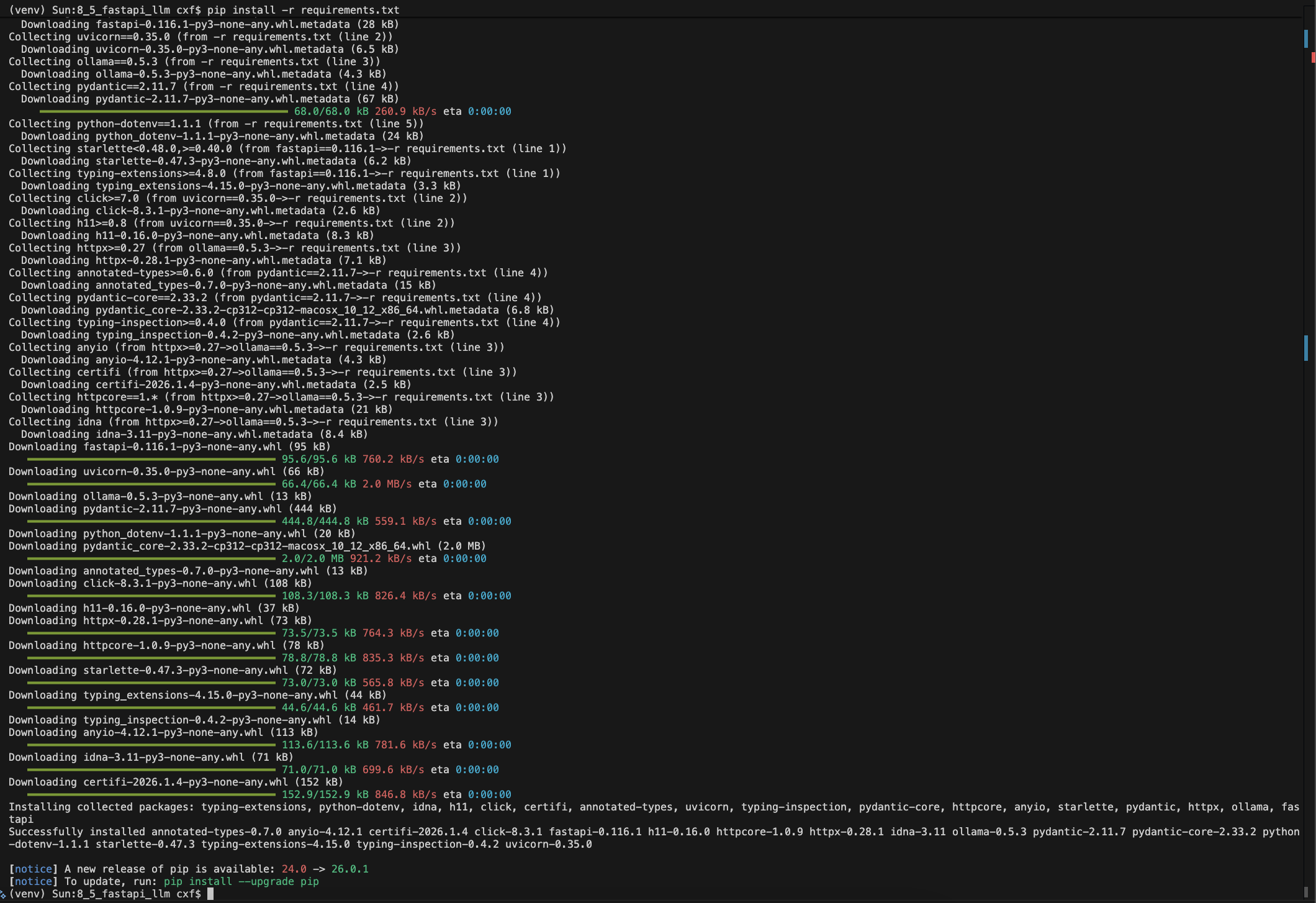
uvicorn main:app --reload

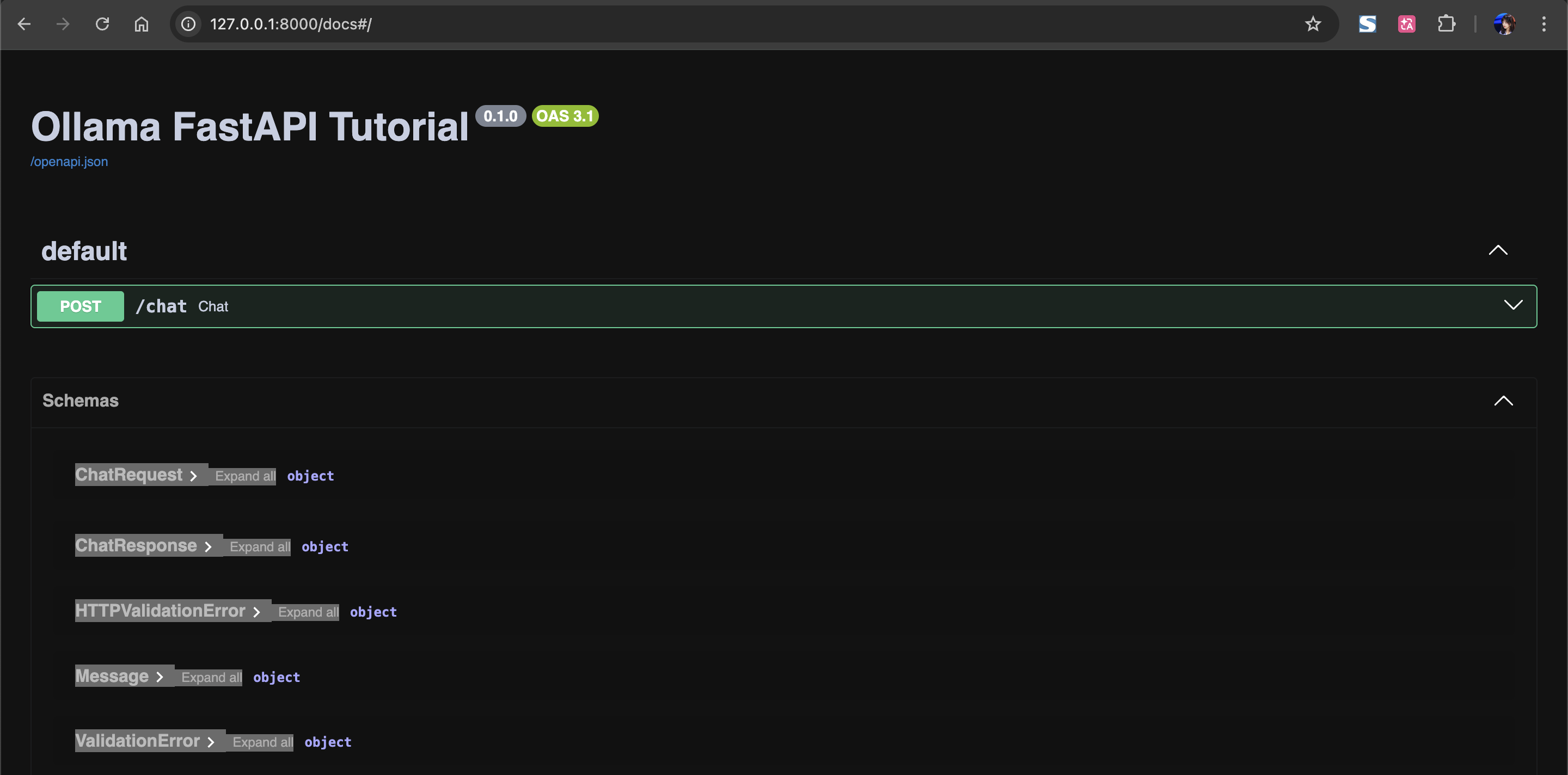
Interactive with LLM with API
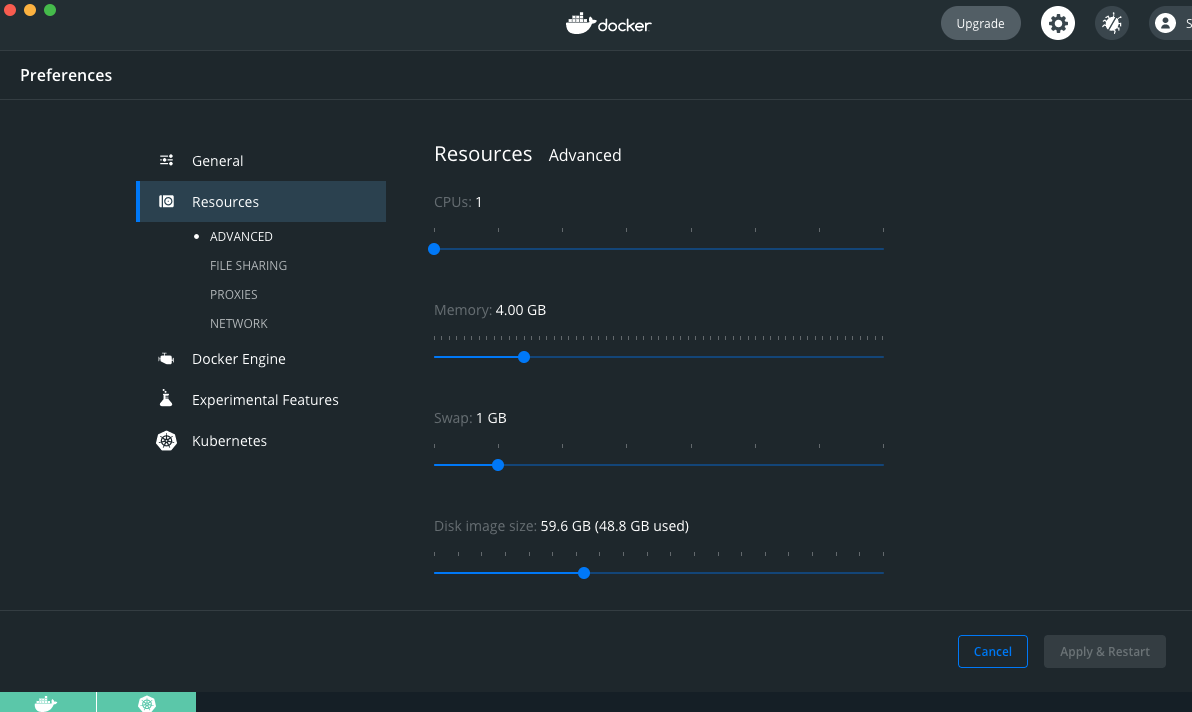
Refer to: Deployment - Running LLMs locally with Ollama & Docker in this page
Note: If necessary, you can change the memory in Docker, I change Memory from 2 GB to 4 GB and click on "Apply & Restart". Run the "docker start ollama".
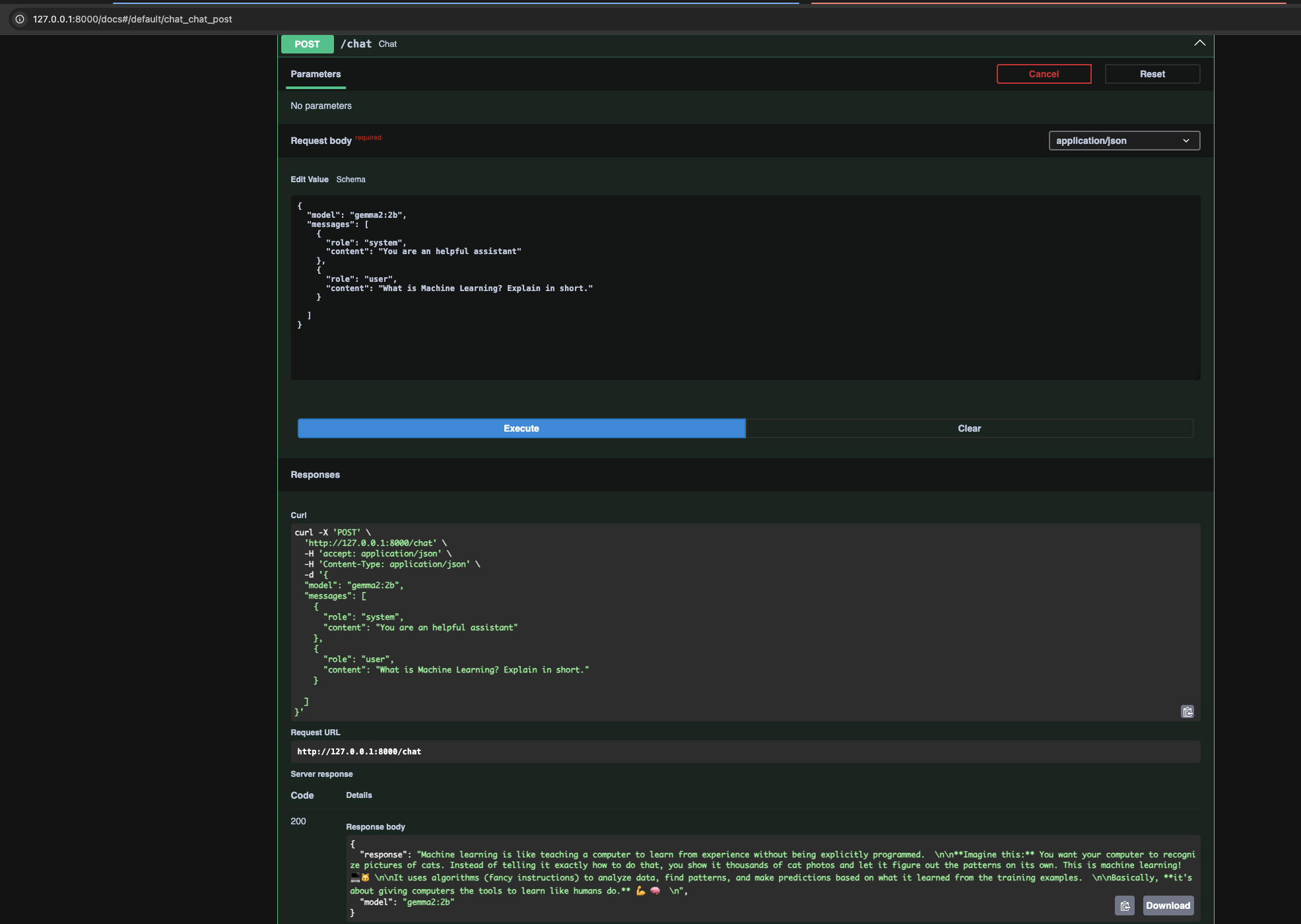
Sample request
{
  "model": "gemma2:2b",
  "messages": [
    {
      "role": "system",
      "content": "You are an helpful assistant"
    },
    {
      "role": "user",
      "content": "What is Machine Learning? Explain in short."
    }

  ]
}
Screenshot for sample request and response:
API Key
Open AI GPT API key (Free)
https://platform.openai.com/account/api-keys
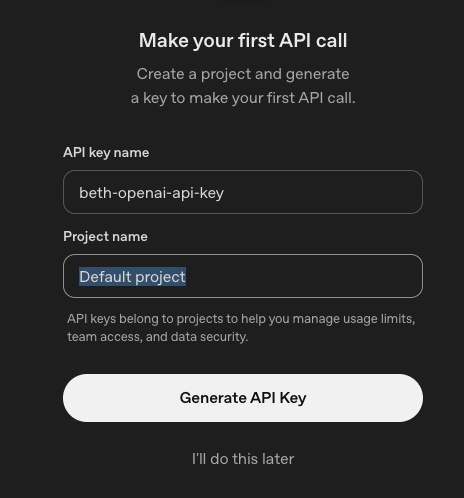
Groq API Key (Free)
Project - Real-World AI Application - Agentic RAG Chatbot (End-to-End)
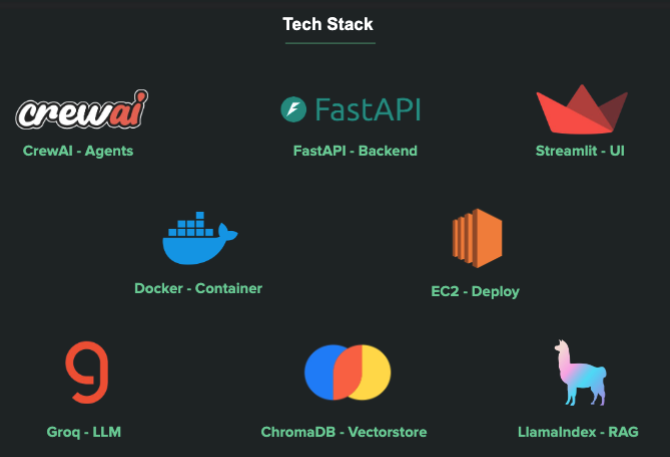
Application: Agentic RAG Chatbot (End-to-End)
Tech Stack:
-
Environment Setup
-
Document Ingestion
-
Build RAG Agent
-
Build Backend and Frontend
-
Deploy locally with Docker
-
Deploy AWS EC2 with Docker
(后续更新)

小龙虾开发者社区是 CSDN 旗下专注 OpenClaw 生态的官方阵地,聚焦技能开发、插件实践与部署教程,为开发者提供可直接落地的方案、工具与交流平台,助力高效构建与落地 AI 应用
更多推荐

 15
15 0
0- 0


 已为社区贡献1条内容

所有评论(0)