No chrome Binary at the given path - MacOS - Selenium - Python
·
Answer a question
I just started to work with selenium web driver with chromedrivers. I am using MacOS and When I try to set the path for the chrome browser as a binary path I always face the same error saying no chrome binary at so and so path given.
import os
from selenium import webdriver
from selenium.webdriver.chrome.options import Options
from selenium.webdriver.common.keys import Keys

chrome_options = Options()

chrome_options.binary_location = "/Applications/Google\ Chrome.app/Contents/MacOS/Google\ Chrome"

driver = webdriver.Chrome(executable_path = os.path.abspath("drivers/chromedriver") , chrome_options = chrome_options)
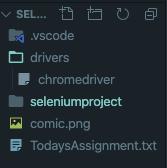
The given path in chrome_options.binary_location is correct and that is where I find my chrome browser. I also have included my chromedriver inside the project folder itself
/Applications/Codes/Selenium/seleniumproject/ChromeBinary.py:11: DeprecationWarning: use options instead of chrome_options
  driver = webdriver.Chrome(executable_path = os.path.abspath("drivers/chromedriver") , chrome_options = chrome_options)
Traceback (most recent call last):
  File "/Applications/Codes/Selenium/seleniumproject/ChromeBinary.py", line 11, in <module>
    driver = webdriver.Chrome(executable_path = os.path.abspath("drivers/chromedriver") , chrome_options = chrome_options)
  File "/Users/apple/opt/anaconda3/lib/python3.7/site-packages/selenium/webdriver/chrome/webdriver.py", line 81, in __init__
    desired_capabilities=desired_capabilities)
  File "/Users/apple/opt/anaconda3/lib/python3.7/site-packages/selenium/webdriver/remote/webdriver.py", line 157, in __init__
    self.start_session(capabilities, browser_profile)
  File "/Users/apple/opt/anaconda3/lib/python3.7/site-packages/selenium/webdriver/remote/webdriver.py", line 252, in start_session
    response = self.execute(Command.NEW_SESSION, parameters)
  File "/Users/apple/opt/anaconda3/lib/python3.7/site-packages/selenium/webdriver/remote/webdriver.py", line 321, in execute
    self.error_handler.check_response(response)
  File "/Users/apple/opt/anaconda3/lib/python3.7/site-packages/selenium/webdriver/remote/errorhandler.py", line 242, in check_response
    raise exception_class(message, screen, stacktrace)
selenium.common.exceptions.WebDriverException: Message: unknown error: no chrome binary at /Applications/Google\ Chrome.app/Contents/MacOS/Google\ Chrome
Answers
This resolved the issue
chrome_options.binary_location = "/Applications/Google Chrome.app/Contents/MacOS/Google Chrome"

Python社区为您提供最前沿的新闻资讯和知识内容
更多推荐

 0
0 0
0- 0


 已为社区贡献126445条内容

所有评论(0)