flask: how to bridge front-end with back-end service to render api authentication?
Answer a question
In flask-restplus, I want to render API authentication view for my minimal flask API, where whenever when I make a request to the server, the first API should pop up a protective view for asking the user to provide customized token value before using API call. I came up my solution to make API authentication pop view before using api function, but couldn't get that correctly. Can anyone help me out how to make my code work smooth? Any idea?
My current attempt with full implementation:
Here is the partial code of my implementation to do this task.
from functools import wraps
import requests, json, psycopg2, datetime
from time import time
from flask import Flask, request
from flask_sqlalchemy import SQLAlchemy
from flask_restplus import Resource, Api, abort, fields, inputs, reqparse
from itsdangerous import SignatureExpired, JSONWebSignatureSerializer, BadSignature


class AuthenticationToken:
    def __init__(self, secret_key, expires_in):
        self.secret_key = secret_key
        self.expires_in = expires_in
        self.serializer = JSONWebSignatureSerializer(secret_key)

    def generate_token(self, username):
        info = {
            'username': username,
            'creation_time': time()
        }

        token = self.serializer.dumps(info)
        return token.decode()

    def validate_token(self, token):
        info = self.serializer.loads(token.encode())

        if time() - info['creation_time'] > self.expires_in:
            raise SignatureExpired("The Token has been expired; get a new token")

        return info['username']


SECRET_KEY = "f4b58245-6fd4-4bce-a8a4-27ca37370a3c"
expires_in = 600
auth = AuthenticationToken(SECRET_KEY, expires_in)

db = SQLAlchemy(app)
I pretty much coded up all for API authentication but couldn't get the authentication pop view that I expected in my desired output.
Update: output at server endpoint:
When I tried http://127.0.0.1:5000/token at server endpoint, I got Not Found error. How can I get my desired output? any idea?
I am wondering how can I get api protection view that requires a token to access API. currently, I have an error, couldn't get my desired output, so I am hopeful SO community helps me through with this.
desired output:
I want to render a protective view for test API before using API call on the server endpoint. Here is a mockup API authorization view that I want to get:
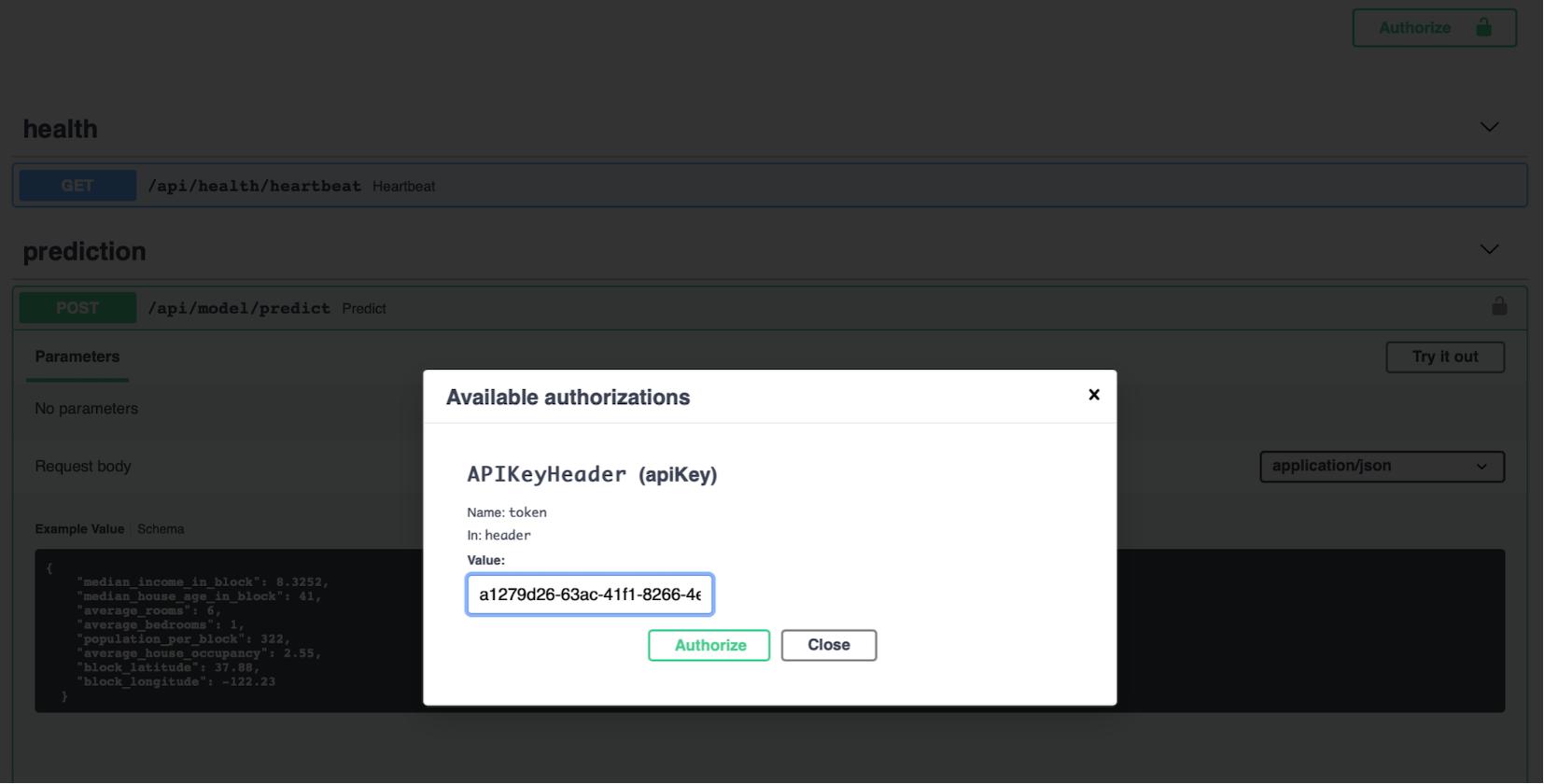
how can I make this happen using python flask, flask restful? any thought? thanks
Answers
I figured what you are doing, and @B--rian, @Matt L. mentioned above, it is not one-shot task that SO community would give help all code base. But this is what I did and I would guide you how you can finish you task with some pains.
we can try to solve this task by dividing several steps, but let's come around this step, I am gonna post nest one shortly:
from functools import wraps
from time import time
from flask import Flask
from flask import request
from flask_restplus import Resource, Api
from flask_restplus import abort
from flask_restplus import fields
from flask_restplus import inputs
from flask_restplus import reqparse
from psycopg2.extensions import AsIs
import psycopg2, datetime, requests, json
from itsdangerous import SignatureExpired, JSONWebSignatureSerializer, BadSignature

'''
## to get API security key, to do:
import uuid
print(str(uuid.uuid4()))
'''

class AuthenticationToken(object):
    def __init__(self, secret_key, expires_in):
        self.secret_key = secret_key
        self.expires_in = expires_in
        self.serializer = JSONWebSignatureSerializer(secret_key)

    def generate_token(self, username):
        info = {
            'username': username,
            'creation_time': time()
        }
        token = self.serializer.dumps(info)
        return token.decode()

    def validate_token(self, token):
        info = self.serializer.loads(token.encode())

        if time() - info['creation_time'] > self.expires_in:
            raise SignatureExpired("The Token has been expired; get a new token")

        return info['username']

SECRET_KEY = "f4b58245-6fd4-4bce-a8a4-27ca37370a3c"
expires_in = 600
auth = AuthenticationToken(SECRET_KEY, expires_in)

app = Flask(__name__)
api = Api(app,authorizations={
                'API-KEY': {
                    'type': 'apiKey',
                    'in': 'header',
                    'name': 'AUTH-TOKEN'
                }
            },
          security='API-KEY',
          default="API AUTH TOKEN",
          title="immunoMatch RESTful API",
          description="Immunomatch ED API Authentication View")

db = psycopg2.connect(database='test_db', user='postgres', password='password', host='localhost', port="5432")

def requires_auth(f):
    @wraps(f)
    def decorated(*args, **kwargs):

        token = request.headers.get('AUTH-TOKEN')
        if not token:
            abort(401, 'Authentication token is missing')

        try:
            user = auth.validate_token(token)
        except SignatureExpired as e:
            abort(401, e.message)
        except BadSignature as e:
            abort(401, e.message)

        return f(*args, **kwargs)
    return decorated

credential_model = api.model('credential', {
    'username': fields.String(required=True),
    'password': fields.String(required=True)
})

credential_parser = reqparse.RequestParser()
credential_parser.add_argument('username', type=str)
credential_parser.add_argument('password', type=str)

@api.route('/token')
class Token(Resource):
    @api.expect(credential_parser, validate=True)
    def get(self):
        args = credential_parser.parse_args()
        username = args.get('username')
        password = args.get('password')
        cursor = db.cursor()
        cursor.execute('SELECT * FROM public.authorized_user_table')
        user = cursor.fetchone()

        if username != user[1]:
            api.abort(404, "Username: {} doesn't exist".format(username))
        if password != user[2]:
            api.abort(401, "Wrong password")
        return {"token": auth.generate_token(username)}

if __name__ == '__main__':
    db = psycopg2.connect(database='test_db', user='postgres', password='password', host='localhost', port="5432")
    app.run(debug=True)
I suggest try to digest what @B--rian, @Matt L mentioned in their post, I think @Matt L did point out something worthy you should think of, their advice is nice except not much coding attempt was given. but I would come back to you as soon as I figured out rest.

Python社区为您提供最前沿的新闻资讯和知识内容
更多推荐

 0
0 0
0- 0


 已为社区贡献126445条内容

所有评论(0)