

I trying to deploy my app on GAE using their trial version. I was so far successful in creating an app.yaml with a custom settings for flexible environment with python 3.6.
However, while deploying the app, the app builds successfully, however, I keep getting the following error
Updating service [default] (this may take several minutes)...failed. ERROR: (gcloud.app.deploy) Error Response: [9] Application startup error: /bin/sh: 1: exec: gunicorn: not found
Following is the folder hierarchy of files in my project:
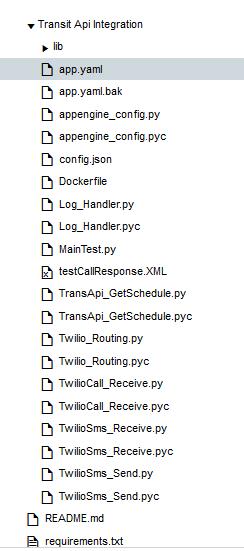
Following the code for app.yaml
env: flex
runtime: custom
api_version: 1
entrypoint: gunicorn -b :$PORT main:app
runtime_config:
    python_version: 3.6

#handlers:
#- url: /SmsResponse
#  script: Twilio_Routing.RecivedSms
#
#- url: /CallResponse
#  script: Twilio_Routing.ReceivedCall
I am surely missing out on something and I would really appreciate some help here. Link to git repo
requirements.txt
Flask==0.10.1
gunicorn==19.3.0
twilio==6.8.4
DockerFile
FROM gcr.io/google-appengine/python
LABEL python_version=python3.6
RUN virtualenv --no-download /env -p python3.6

# Set virtualenv environment variables. This is equivalent to running
# source /env/bin/activate
ENV VIRTUAL_ENV /env
ENV PATH /env/bin:$PATH

# Copy the application's requirements.txt and run pip to install all
# dependencies into the virtualenv.
ADD requirements.txt requirements.txt
RUN pip install -r requirements.txt

ADD . /app/

#CMD gunicorn -b :$PORT main:app
ENTRYPOINT [ "python", "Twilio_Routing.py" ]
P.S. After the changes for the requirements.txt, I am getting error 502 Bad Gateway.
Logs showing that the service was executed successfully.
017-12-25 01:29:03 default[20171224t212610]   * Running on http://127.0.0.1:8080/ (Press CTRL+C to quit)
2017-12-25 01:29:03 default[20171224t212610]   * Restarting with stat
2017-12-25 01:29:03 default[20171224t212610]   * Debugger is active!
2017-12-25 01:29:03 default[20171224t212610]   * Debugger PIN: 134-103-452
2017-12-25 01:29:17 default[20171224t212610]   * Running on http://127.0.0.1:8080/ (Press CTRL+C to quit)
2017-12-25 01:29:17 default[20171224t212610]   * Restarting with stat
2017-12-25 01:29:17 default[20171224t212610]   * Debugger is active!
2017-12-25 01:29:17 default[20171224t212610]   * Debugger PIN: 134-103-452
Can someone look at my code in git and tell me what is it that I am missing here?



 已为社区贡献126442条内容

所有评论(0)