Unity使用Excel+Protobuf以二进制形式实现游戏配置表的序列化与反序列化(一)Excel生成对应配置的结构代码
文章摘要:本文介绍了一种使用Protobuf替代传统XML/JSON存储游戏配置表的优化方案。作者通过读取Excel表格自动生成Protobuf格式的代码模板,实现配置数据的序列化和反序列化。方案采用懒加载机制,仅反序列化所需配置,大幅减少内存占用。核心结构包括IDIndex用于按ID查找配置位置,SelectIndex支持多条件高效查询。实验结果显示,与XML相比,Protobuf格式的配置表体
1.前言
大家好,我是开罗小8。游戏配置表的存储方式分为很多种,包括XML,JSON,ScriptableObject等等,其中XML和JSON采取文本的形式保存配置表,如果配置表的内容很多,会使得配置表体积变大,内存占用变多,最近我在学习Protobuf,Protobuf一般用于网络消息的序列化与反序列化,以体积小效率高为优点,突发奇想能不能用于配置表,于是有了此次尝试。
首先看一下最终成果。
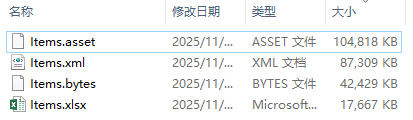
Items配置表中共有约4万条配置,其中.asset为ScriptableObject,.bytes为本文章最终转化的配置文件,可见体积相比于原始的xml,少了50%左右。
本文总共实现以下功能
- 使用Protobuf存储Excel中的配置文件
- 自动生成Excel表中配置的代码
- 配置支持懒加载,只序列化需要的配置
- 配置支持按ID或按指定字段的值进行高效查找
需要的库:
- protobuf-net:用于序列化与反序列化
- DocumentFormat.OpenXml:读写Excel文件
2.实现过程
读取Excel表并生成相应的代码文件
Excel的格式如下
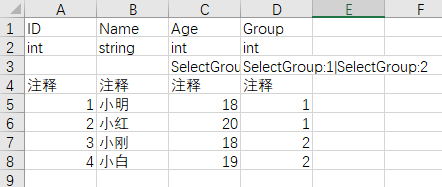
- 第一行为字段名称
- 第二行为字段类型
- 第三行为代码标签,标记字段用于生成查找代码或者其他用于
- 第四行为注释
- 第五行开始为配置内容
读取并遍历Excel的部分代码如下
using System.Collections;
using System.Collections.Generic;
using UnityEditor;
using UnityEngine;
using DocumentFormat.OpenXml;
using DocumentFormat.OpenXml.Packaging;
using DocumentFormat.OpenXml.Spreadsheet;
using System;
using System.IO;
using System.Linq;
using System.Reflection;
using ProtoBuf;
using System.Text;
using System.Text.RegularExpressions;
using DocumentFormat.OpenXml.Wordprocessing;


using (SpreadsheetDocument spreadsheetDocument = SpreadsheetDocument.Open(xlsxPath, false))
{
    WorkbookPart workbookPart = spreadsheetDocument.WorkbookPart;
    if (workbookPart == null)
    {
        throw new Exception("无法获取工作簿内容");
    }
    Sheet firstSheet = workbookPart.Workbook.Sheets.Elements<Sheet>().FirstOrDefault();
    if (firstSheet == null)
    {
        throw new Exception("Excel中没有Sheet");
    }
    string className = excelName;//取文件名字作为类名

    WorksheetPart worksheetPart = workbookPart.GetPartById(firstSheet.Id) as WorksheetPart;
    if (worksheetPart == null)
    {
        throw new Exception("无法获取工作表内容");
    }

    Dictionary<int,string> fieldNameDic = new Dictionary<int, string>();
    Dictionary<int,string> fieldTypeDic = new Dictionary<int, string>();
    Dictionary<int,string> commentDic = new Dictionary<int, string>();
    Dictionary<int,List<string>> selectIndexDic = new Dictionary<int, List<string>>();

    SharedStringTable sharedStringTable = workbookPart.SharedStringTablePart?.SharedStringTable;
    IEnumerable<OpenXmlElement> elements = null;
    if (sharedStringTable != null)
    {
        elements = sharedStringTable.Elements();
    }
    List<OpenXmlElement> sharedStringTableElements = null;
    if (elements != null)
    {
        sharedStringTableElements = elements.ToList();
    }
    foreach (Row row in worksheetPart.Worksheet.Descendants<Row>())
    {
        int lineIndex = (int)row.RowIndex.Value;
        foreach (Cell cell in row.Descendants<Cell>())//遍历每一行,取第一行内容作为字段的名字,获取字段信息
        {
            string cellValue = GetCellValue(cell, sharedStringTableElements);
            int collIndex = GetColumnIndex(cell);
            //根据项目需求自行实现,此处省略具体实现步骤
            if(lineIndex == 1)
            {
                //记录字段名
            }
            else if(lineIndex == 2)
            {
                //记录字段类型
            }
            else if(lineIndex == 3)
            {
                //记录记录脚本标记
            }
            else if(lineIndex == 4)
            {
                //记录注释
            }
        }
     }
}


    private static string GetCellValue(Cell cell, List<OpenXmlElement> sharedStringTable)
    {
        if (cell == null || cell.CellValue == null)
            return string.Empty;

        var value = cell.CellValue.InnerText;
        if (sharedStringTable == null)
        {
            return value;
        }
        // 处理共享字符串(类型为string时,值是共享字符串表的索引)
        if (cell.DataType != null && cell.DataType.Value == CellValues.SharedString)
        {
            if (int.TryParse(value, out int index) && sharedStringTable != null && index < sharedStringTable.Count)
            {
                return sharedStringTable[index].InnerText;
            }
        }
        // 其他类型(数字、日期等)直接返回原始值
        return value;
    }
    public static int GetColumnIndex(Cell cell)
    {
        string cellValue = cell.CellReference.Value;
        int columnIndex = 0;
        foreach (char c in cellValue)
        {
            if (char.IsLetter(c))
            {
                // 字母部分转换为列索引(A=1, B=2, ..., Z=26, AA=27 等)
                columnIndex = columnIndex * 26 + (c - 'A' + 1);
            }
        }

        return columnIndex;
    }
记录Excel中代码的关键信息,替换到代码模板中,代码模板如下
/*
|--------------------------------------------------|
|本文件为自动生成,Tools/生成配置脚本,请勿手动修改|
|--------------------------------------------------|
*/
using System.IO;
using UnityEngine;
using ProtoBuf;
using System.Collections.Generic;
[ProtoContract]
public class VO_{0}
{
{1}
    public void Serialize(MemoryStream ms)
    {
        Serializer.Serialize(ms, this);
    }
}
public class CONFIG_{0}: CONFIG_Base<VO_{0}, CONFIG_{0}>
{
    protected override string GetConfigPath()
    {
        return Path.Combine(Application.dataPath, $"{PathConst.CONFIG_PATH}/VO_{0}.bytes");
    }
{5}
    #1public static VO_{0} GetDataBy{2}(int {2})
    {
        return Instance.Select({3},{2});
    }#1
    #2public static List<VO_{0}> GetDataListBy{2}(int {2})
    {
        return Instance.SelectList({3}, {2});
    }#2
    #3public static VO_{0} GetDataBy{2}And{3}(int {2},int {3})
    {
        return Instance.Select({4},{2},{3});
    }#3
    #4public static List<VO_{0}> GetDataListBy{2}And{3}(int {2},int {3})
    {
        return Instance.SelectList({4},{2},{3});
    }#4
}
代码模板解释
将Excel中的字段信息读取完毕后,读取代码模板中的文本,将信息替换进去
{0}会被替换成类名
{1}会被替换成Excel中的每一个字段
{2}{3}{4}会替换成对应方法所需的参数
#1开头和#1结尾用于标记生成的查找方法,替换时使用正则表达式提取
以上面的配置表为例,生成的代码的结构应该为
/*
|--------------------------------------------------|
|本文件为自动生成,Tools/生成配置脚本,请勿手动修改|
|--------------------------------------------------|
*/
using System.IO;
using UnityEngine;
using ProtoBuf;
using System.Collections.Generic;
[ProtoContract]
public class VO_ExcelTemplate
{
    /// <summary>
    /// 注释
    /// </summary>
    [ProtoMember(1)]
    public int ID;
    /// <summary>
    /// 注释
    /// </summary>
    [ProtoMember(2)]
    public string Name;
    /// <summary>
    /// 注释
    /// </summary>
    [ProtoMember(3)]
    public int Age;
    /// <summary>
    /// 注释
    /// </summary>
    [ProtoMember(4)]
    public int Group;
    public void Serialize(MemoryStream ms)
    {
        Serializer.Serialize(ms, this);
    }
}
public class CONFIG_ExcelTemplate: CONFIG_Base<VO_ExcelTemplate, CONFIG_ExcelTemplate>
{
    protected override string GetConfigPath()
    {
        return Path.Combine(Application.dataPath, $"{PathConst.CONFIG_PATH}/VO_ExcelTemplate.bytes");
    }
    public static VO_ExcelTemplate GetDataByAgeAndGroup(int Age,int Group)
    {
        return Instance.Select(1,Age,Group);
    }
    public static List<VO_ExcelTemplate> GetDataListByAgeAndGroup(int Age,int Group)
    {
        return Instance.SelectList(1,Age,Group);
    }
    public static VO_ExcelTemplate GetDataByGroup(int Group)
    {
        return Instance.Select(2,Group);
    }
    public static List<VO_ExcelTemplate> GetDataListByGroup(int Group)
    {
        return Instance.SelectList(2, Group);
    }
}
VO_ExcelTemplate 中的Serialize方法用于序列化当前类
CONFIG_ExcelTemplate 里面GetConfigPath用于获取当前配置的路径,用于初始化配置
其他方法均为根据输入的参数查找对应配置的方法
Age:SelectGroup:1
Group:SelectGroup:1|SelectGroup:2
CONFIG_Base是配置的基类,负责初始化配置
using ProtoBuf;
using System;
using System.Collections.Generic;
using System.IO;
using System.Linq;
using UnityEngine;

public abstract class CONFIG_Base<T1,T2> where T2 : CONFIG_Base<T1, T2>, new()
{
    public static T2 Instance
    {
        get
        {
            if(instance == null)
            {
                instance = new T2();
            }
            return instance;
        }
    }
    protected static T2 instance;
    protected bool isInit = false;
    protected byte[] bytes;
    protected IDIndex idIndex;
    protected SelectIndex selectIndex;

    protected Dictionary<int, T1> _dataDic = new Dictionary<int, T1>();
    protected T1 Deserialize(byte[] bytes)
    {
        using (MemoryStream ms = new MemoryStream(bytes))
        {
            T1 deserializedObj = Serializer.Deserialize<T1>(ms);
            return deserializedObj;
        }
    }
    protected abstract string GetConfigPath();
    protected void InitConfig()
    {
        bytes = File.ReadAllBytes(GetConfigPath());
        using (MemoryStream ms = new MemoryStream(bytes))
        {
            idIndex = new IDIndex();
            idIndex.Read(ms);
            selectIndex = new SelectIndex();
            selectIndex.Read(ms);
            var keys = idIndex.offsetDic.Keys.ToArray();
            for (int i = 0; i < keys.Length; ++i)
            {
                int ID = keys[i];
                (long, int) offset = idIndex.offsetDic[ID];
                long newOffset = offset.Item1 + ms.Position;
                idIndex.offsetDic[ID] = (newOffset, offset.Item2);
            }
        }
        isInit = true;
    }
    public T1 _GetDataByID(int ID)
    {
        if (!isInit)
        {
            InitConfig();
        }
        if (_dataDic.ContainsKey(ID))
        {
            return _dataDic[ID];
        }
        if (idIndex.offsetDic.ContainsKey(ID))
        {
            (long, int) offset = idIndex.offsetDic[ID];
            byte[] temp = new byte[offset.Item2];
            Array.Copy(bytes, offset.Item1, temp, 0, offset.Item2);
            T1 vo = Deserialize(temp);
            _dataDic.Add(ID, vo);
            return vo;
        }
        else
        {
            return default;
        }
    }
    public List<T1> _GetAllList()
    {
        if (!isInit)
        {
            InitConfig();
        }
        List<T1> list = new List<T1>();
        var keys = idIndex.offsetDic.Keys.ToArray();
        for (int i = 0; i < keys.Length; ++i)
        {
            int ID = keys[i];
            T1 vo = GetDataByID(ID);
            list.Add(vo);
        }
        return list;
    }

    public static T1 GetDataByID(int ID)
    {
        return Instance._GetDataByID(ID);
    }
    public static List<T1> GetAllList()
    {
        return Instance._GetAllList();
    }
    public T1 Select(int sindex,int value1)
    {
        if (!isInit)
        {
            InitConfig();
        }
        if (selectIndex.selectDic1.ContainsKey(sindex))
        {
            if (selectIndex.selectDic1[sindex].ContainsKey(value1))
            {
                int ID = selectIndex.selectDic1[sindex][value1][0];
                return _GetDataByID(ID);
            }
        }
        return default;
    }
    public List<T1> SelectList(int sindex, int value1)
    {
        if (!isInit)
        {
            InitConfig();
        }
        List<T1> list = new List<T1>();
        if (selectIndex.selectDic1.ContainsKey(sindex))
        {
            if (selectIndex.selectDic1[sindex].ContainsKey(value1))
            {
                for(int i = 0; i < selectIndex.selectDic1[sindex][value1].Count; ++i)
                {
                    int ID = selectIndex.selectDic1[sindex][value1][i];
                    T1 data = _GetDataByID(ID);
                    if(data != null)
                    {
                        list.Add(data);
                    }

                }
            }
        }
        return list;
    }
    public T1 Select(int sindex,int value1,int value2)
    {
        if (!isInit)
        {
            InitConfig();
        }
        if (selectIndex.selectDic2.ContainsKey(sindex))
        {
            long v1 = value1;
            long v2 = value2;
            long key = (v1 << 32) | v2;
            if (selectIndex.selectDic2[sindex].ContainsKey(key))
            {
                int ID = selectIndex.selectDic2[sindex][key][0];
                return _GetDataByID(ID);
            }
        }
        return default;
    }
    public List<T1> SelectList(int sindex, int value1,int value2)
    {
        if (!isInit)
        {
            InitConfig();
        }
        List<T1> list = new List<T1>();
        if (selectIndex.selectDic2.ContainsKey(sindex))
        {
            long v1 = value1;
            long v2 = value2;
            long key = (v1 << 32) | v2;
            if (selectIndex.selectDic2[sindex].ContainsKey(key))
            {
                int ID = selectIndex.selectDic2[sindex][key][0];
                T1 data = _GetDataByID(ID);
                if(data != null)
                {
                    list.Add(data);
                }
            }
        }
        return list;
    }
}
核心原理如下
IDIndex使用Dictionary<int,(long,int)> 的结构存储每一个配置的位置信息
key为ID,long为配置在字节数组中的起始位置,int为配置的长度
在序列化时,也将这个字典序列化进配置中,初始化时首先反序列化这个字典
根据这些内容就可以做到根据ID查找配置的位置以及大小,并反序列化为对应的对象
实现随用随序列化,节省内存
SelectIndex同理,只不过以对应属性的值作为Key,存储配置ID,不再存储起始位置与大小
对于同时查找两个字段值的,采用将两个值通过位运算的形式组合在一起作为key
SelectIndex使用两个字典存储不同组的索引
Dictionary<int, Dictionary<int, List<int>>> selectDic1;
Dictionary<int, Dictionary<long, List<int>>> selectDic2;第一个字典存储只有一个组的索引
第二个字典存储有两个组的索引
字典的key存储组编号
目前只支持最多查找两个的值,并且只支持int类型的字段

这里是一个专注于游戏开发的社区,我们致力于为广大游戏爱好者提供一个良好的学习和交流平台。我们的专区包含了各大流行引擎的技术博文,涵盖了从入门到进阶的各个阶段,无论你是初学者还是资深开发者,都能在这里找到适合自己的内容。除此之外,我们还会不定期举办游戏开发相关的活动,让大家更好地交流互动。加入我们,一起探索游戏开发的奥秘吧!
更多推荐
 14
14 0
0- 0


 已为社区贡献1条内容

所有评论(0)