
和chatgpt玩cosplay之python爬虫(1)
本文记录了作者与ChatGPT进行Python爬虫学习的角色扮演过程。文章展示了四个初级实践任务:1) 爬取Quotes to Scrape网站前三页名人名言并保存为CSV;2) 从彼岸图网下载首页图片;3) 爬取Books to Scrape网站书籍标题和价格;4) 处理分页数据并去重。每个任务都提供了完整代码实现,包括网页请求、数据解析(BeautifulSoup)、文件存储等关键步骤。作者强
前言
工作之余和chatgpt玩了一下cosplay角色扮演,嘿嘿,由chatgpt当我的老师,我来做他的学员,来帮助我学习python爬虫,废话少说,事情多做,我们开始展示!
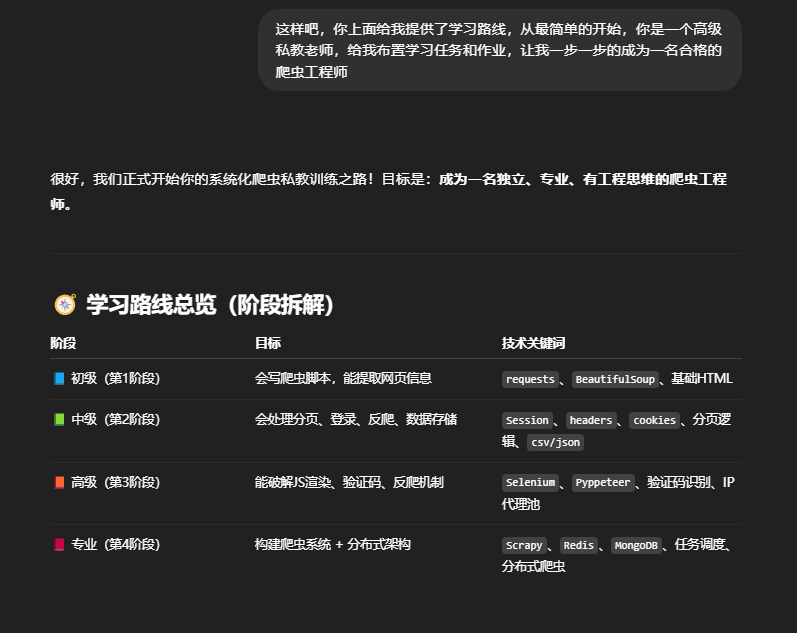
这里我告诉他让她做我的私教老师来帮助我学习python爬虫,他给出了4个阶段,本章我们练习初级的内容,对于一个有多年开发经验的工程师来说这些当然还是很easy的,感兴趣的小伙伴可以跟着煮啵一起学习一下辣。。。
小练习
理论学习任务:
-
学习 HTML 基础结构(
div,a,img,ul,li等标签) -
学会使用
requests发送 GET 请求 -
学会用
BeautifulSoup提取信息(select,find,get_text())
以上这些理论学习的任务就不详细介绍了,大家可以自行学习一下。
实践任务一(热身)
目标网站:Quotes to Scrape
任务内容:
-
抓取前3页的所有名人名言和作者
-
将数据保存为
quotes.csv
输出格式示例:
| quote | author |
| The world as we have created it is a process of our thinking. | Albert Einstein |
实践任务一代码
要求:独立完成,不依赖于AI或浏览器
import csv

import requests
from bs4 import BeautifulSoup
import os

# 定义网站地址
url = 'https://quotes.toscrape.com'

# 定义请求头User-Agent 模拟浏览器行为
headers = {
    'User-Agent': 'Mozilla/5.0 (Windows NT 10.0; Win64; x64) AppleWebKit/537.36 (KHTML, like Gecko) Chrome/137.0.0.0 Safari/537.36 Edg/137.0.0.0'
}

# 定义最大页码
page_max = 3

# 存储地址
save_dir = 'D:\\crawler\\quotes'
os.makedirs(save_dir, exist_ok=True)  # 若目录不存在则创建
filepath = os.path.join(save_dir, 'quotes.csv')

with open(filepath, 'w', newline='', encoding='utf-8') as f:
    writer = csv.writer(f)
    # 写入表头
    writer.writerow(['quote', 'author'])
    for page_num in range(1, page_max + 1):
        if page_num == 1:
            page_num_url = url
        else:
            page_num_url = url + '/page/' + str(page_num) + '/'
        print('>>>>>> 正在处理第', page_num, '页 <<<<<<')

        soup = BeautifulSoup(requests.get(page_num_url, headers=headers).text, 'html.parser')
        quote = soup.select('div.quote span.text')
        author = soup.select('small.author')
        # 用 zip 保证一一对应
        for quote_item, author_item in zip(quote, author):
            quote_text = quote_item.text.strip()
            author_text = author_item.text.strip()
            writer.writerow([quote_text, author_text])  # 写入一行数据
实践任务二(入门图像爬虫)
目标网站:彼岸图网
任务内容:
-
爬取第一页所有图片的名称和地址
-
下载图片到本地目录
-
若文件已存在,跳过下载
实践任务二代码
import os
import re

import requests
from bs4 import BeautifulSoup

# 定义网站地址
url = 'https://pic.netbian.com'
# 定义请求头User-Agent 模拟浏览器行为
headers = {
    'User-Agent': 'Mozilla/5.0 (Windows NT 10.0; Win64; x64) AppleWebKit/537.36 (KHTML, like Gecko) Chrome/137.0.0.0 Safari/537.36 Edg/137.0.0.0'
}
# 定义最大页码
max_page = 1167
# 图片存放地址
save_dir = 'D:\\crawler\\wallpaper'
os.makedirs(save_dir, exist_ok=True)  # 若目录不存在则创建

"""剔除非法字符"""


def sanitize_filename(alt):
    return re.sub(r'[\\/:*?"<>|\r\n\t]', '_', alt)


for page_num in range(1, max_page + 1):

    if page_num == 1:
        page_num_url = 'https://pic.netbian.com/index.html'
    else:
        page_num_url = f'https://pic.netbian.com/index_{page_num}.html'

    print(f'\n>>>> 正在处理第 {page_num} 页 <<<')

    try:
        response = requests.get(page_num_url, headers=headers, timeout=10)
        # 获取网站的编码,以防乱码
        response.encoding = response.apparent_encoding
        status = response.raise_for_status()
        print('response raise for status\n', status)
    except Exception as e:
        print(f"[错误] 无法请求第 {page_num} 页: {e}")
        continue
    soup = BeautifulSoup(response.text, 'html.parser')

    img_tags = soup.select('div.slist img')
    if not img_tags or len(img_tags) == 0:
        print(f"[警告] 第 {page_num} 页未找到图片")
        continue

    for img in img_tags:
        img_alt = img['alt']
        src = img['src']
        img_url = 'https://pic.netbian.com' + src

        filename = sanitize_filename(img_alt + '.jpg')
        filepath = os.path.join(save_dir, filename)
        if os.path.exists(filepath):
            print(f'[跳过] 文件已存在: {filename}')
            continue
        try:
            image = requests.get(img_url, timeout=10)
            image.raise_for_status()
        except Exception as e:
            print(f"[跳过] 下载失败: {img_url},原因: {e}")
            continue
        with open(filepath, 'wb') as f:
            f.write(image.content)
        print(f'[下载成功] {filename}')
到这里还远远没有结束,不可能就这两个任务就草草了事了,代码还是需要多打多敲才多理解,才能把它记在脑子里,所以我又让chatgpt给了一些任务,用来温故知新。

巩固训练任务(阶段一)
任务 1:爬取标题列表
目标网站: All products | Books to Scrape - Sandbox
任务目标:
-
爬取首页中所有书籍的标题(Book Title)
-
保存到
books.csv,格式如下
| title |
| A Light in the Attic |
| Tipping the Velvet |
| Soumission |
提示:用 soup.select('article.product_pod h3 a') 获取所有书名的 <a> 标签,书名在 title 属性中。
任务一代码
import requests
from bs4 import BeautifulSoup
import os
import csv
# 定义网站地址
url = 'https://books.toscrape.com/index.html'
# 定义请求头User-Agent模拟浏览器
headers = {
    'User-Agent': 'Mozilla/5.0 (Windows NT 10.0; Win64; x64) AppleWebKit/537.36 (KHTML, like Gecko) Chrome/137.0.0.0 Safari/537.36 Edg/137.0.0.0'
}

save_dir = 'D:\\crawler\\books'
os.makedirs(save_dir, exist_ok=True)
filepath = os.path.join(save_dir, 'books.csv')
try:
    response = requests.get(url, headers=headers, timeout=10)
    response.raise_for_status()
except requests.RequestException as e:
    print("请求失败:", e)
    exit(1)
soup = BeautifulSoup(response.text, 'html.parser')
titles = soup.select('ol.row h3 a')
with open(filepath, 'w', newline='', encoding='utf-8') as f:
    writer = csv.writer(f)
    writer.writerow(['title'])

    for title in titles:
        title_text = title.get('title')
        writer.writerow([title_text])
        print(f'>>>>>标题是  《{title_text}》 写入完毕 <<<<')
任务 2:爬取书籍标题 + 价格
目标网站: https://books.toscrape.com/
任务目标:
-
把首页中每本书的书名和价格都爬取下来
-
保存到
books_with_price.csv,格式如下:
| title | price |
| A Light in the Attic | £51.77 |
| Tipping the Velvet | £53.74 |
提示:价格在 <p class="price_color"> 中,使用 zip() 组合标题和价格列表。
任务二代码
import requests
from bs4 import BeautifulSoup
import os
import csv

# 定义网站地址
url = 'https://books.toscrape.com/index.html'

# 定义请求头User-Agent 模拟浏览器行为
headers = {
    'User-Agent': 'Mozilla/5.0 (Windows NT 10.0; Win64; x64) AppleWebKit/537.36 (KHTML, like Gecko) Chrome/137.0.0.0 Safari/537.36 Edg/137.0.0.0'
}

# 存储本地地址
save_dir = 'D:\\crawler\\books'
os.makedirs(save_dir, exist_ok=True)
filepath = os.path.join(save_dir, 'books_with_price.csv')

try:
    response = requests.get(url, headers=headers, timeout=10)
    response.raise_for_status()
except requests.RequestException as e:
    print('Request failed: {}'.format(e))
    exit(1)
soup = BeautifulSoup(response.text, 'html.parser')
titles = soup.select('ol.row h3 a')
prices = soup.select('ol.row p.price_color')
with open(filepath, 'w', encoding='utf-8') as f:
    writer = csv.writer(f)
    writer.writerow(['title', 'price'])
    for title, price in zip(titles, prices):
        title_text = title.get('title')
        price_text = price.text.strip()
        writer.writerow([title_text, price_text])
        print(f'>>>>> 标题是 《{title_text}》 价格是 {price_text} 写入完毕 <<<<')
任务 3:获取前 3 页数据(分页入门)
目标网站: https://quotes.toscrape.com/page/1/ ~ /page/3/
任务目标:
-
爬取前 3 页中所有名言和作者
-
保存到
quotes3.csv
|
quotes |
author |
| It is our choices, Harry... | J.K. Rowling |
| Imperfection is beauty... | Marilyn Monroe |
提示:使用循环拼接 https://quotes.toscrape.com/page/1/ 这样的 URL。
任务三代码
import requests
from bs4 import BeautifulSoup
import os
import csv

# 网站地址
url = 'https://quotes.toscrape.com'
# 定义请求头User-Agent 模拟浏览器行为
headers = {
    'User-Agent': 'Mozilla/5.0 (Windows NT 10.0; Win64; x64) AppleWebKit/537.36 (KHTML, like Gecko) Chrome/137.0.0.0 Safari/537.36 Edg/137.0.0.0'
}
# 最大页码
page_max = 3

# 存储本地地址
save_dir = 'D:\\crawler\\quotes'
if not os.path.exists(save_dir):
    os.makedirs(save_dir)
filepath = os.path.join(save_dir, 'quotes3.csv')
with open(filepath, 'a', encoding='utf-8', newline='') as f:
    writer = csv.writer(f)
    writer.writerow(['quote', 'author'])
    for page_num in range(1, page_max + 1):
        if page_num == 1:
            page_url = url
        else:
            page_url = url + '/page/' + str(page_num) + '/'
        print('>>>>>> 正在处理第', page_num, '页 <<<<<<')
        try:
            page = requests.get(page_url, headers=headers, timeout=10)
            page.raise_for_status()
        except requests.exceptions.RequestException as e:
            print('请求失败:', e)
            exit(1)
        soup = BeautifulSoup(page.text, 'html.parser')
        quotes = soup.select('div.quote span.text')
        authors = soup.select('small.author')
        for quote, authors in zip(quotes, authors):
            quote_text = quote.text.strip()
            author_text = authors.text.strip()
            writer.writerow([quote_text, author_text])
            print(f'>>>>> 名言:{quote_text}, 名人:{author_text} 写入完毕 <<<<')
任务 4:排除重复名言
目标网站: 同上
任务目标:
-
同样是前 3 页数据
-
但是要保证 去重,不要出现重复名言(同一个 quote 可能出现在多页)
提示:使用一个 set() 来记录已保存的 quote
任务四代码
import requests
from bs4 import BeautifulSoup
import os
import csv

# 网站地址
url = 'https://quotes.toscrape.com'
# 定义请求头User-Agent 模拟浏览器行为
headers = {
    'User-Agent': 'Mozilla/5.0 (Windows NT 10.0; Win64; x64) AppleWebKit/537.36 (KHTML, like Gecko) Chrome/137.0.0.0 Safari/537.36 Edg/137.0.0.0'
}
# 最大页码
page_max = 3
# 存储本地地址
save_dir = 'D:\\crawler\\quotes'
filepath = os.path.join(save_dir, 'quotes3_set.csv')
quote_set = set()
with open(filepath, 'w', encoding='utf-8', newline='') as f:
    writer = csv.writer(f)
    writer.writerow(['quote', 'author'])
    for page_num in range(1, page_max + 1):
        if page_num == 1:
            page_url = url
        else:
            page_url = url + '/page/' + str(page_num) + '/'
        print('>>>>>> 正在处理第', page_num, '页 <<<<<<')
        try:
            get_data = requests.get(page_url, headers=headers, allow_redirects=True, timeout=10)
            get_data.raise_for_status()
        except requests.exceptions.RequestException as e:
            print('请求失败:', e)
            exit(1)
        soup = BeautifulSoup(get_data.text, 'html.parser')
        quotes = soup.select('div.quote span.text')
        authors = soup.select('small.author')
        for quote, author in zip(quotes, authors):
            quote_text = quote.text.strip()
            author_text = author.text.strip()
            if quote_text not in quote_set:
                quote_set.add(quote_text)
                writer.writerow([quote_text, author_text])
                print(f'>>>>> 名言:{quote_text}, 名人:{author_text} 写入完毕 <<<<')
            else:
                print(f'>>>>> 名言:{quote_text}, 名人:{author_text} 已存在,跳过 <<<<')
    print('set quote: ', len(quote_set))
结语
本次的cosplay 就到此为止了,下次我们进入下一个阶段中级阶段,本博客只是煮啵在学习中做的记录,欢迎大家一起学习!

欢迎加入北京社区
更多推荐



 21
21 0
0- 0


 已为社区贡献1条内容

所有评论(0)