
YOLOv8交通标志识别项目 Python torch实现 智慧交通标志识别 检测+可视化+数据库 毕业设计✅
·
博主介绍:✌全网粉丝10W+,前互联网大厂软件研发、集结硕博英豪成立工作室。专注于计算机相关专业项目实战6年之久,选择我们就是选择放心、选择安心毕业✌
> 🍅想要获取完整文章或者源码,或者代做,拉到文章底部即可与我联系了。🍅🍅感兴趣的可以先收藏起来,点赞、关注不迷路,大家在毕设选题,项目以及论文编写等相关问题都可以给我留言咨询,希望帮助同学们顺利毕业 。🍅
1、毕业设计:2025年计算机专业毕业设计选题汇总(建议收藏)✅
1、项目介绍
技术栈:Python语言、PyTorch深度学习、YOLOv8技术、TT100K数据集、PySide6界面
研究背景:交通标志是道路安全的核心信息载体,其快速、准确识别是无人驾驶与智能交通的基础。YOLOv8在保持高帧率的同时进一步提升检测精度,配合TT100K中国交通标志数据集,可在车载或路侧设备实现实时识别。
研究意义:构建本地化交通标志检测系统,无需上传云端即可完成图像、视频、摄像头三种模式推理,降低数据泄露风险;配套PySide6界面与完整训练脚本,为智慧交通教学、科研及算法竞赛提供开箱即用的实践模板,推动AI在交通领域的普及落地。
2、项目界面
(1)交通标志检测识别—限速50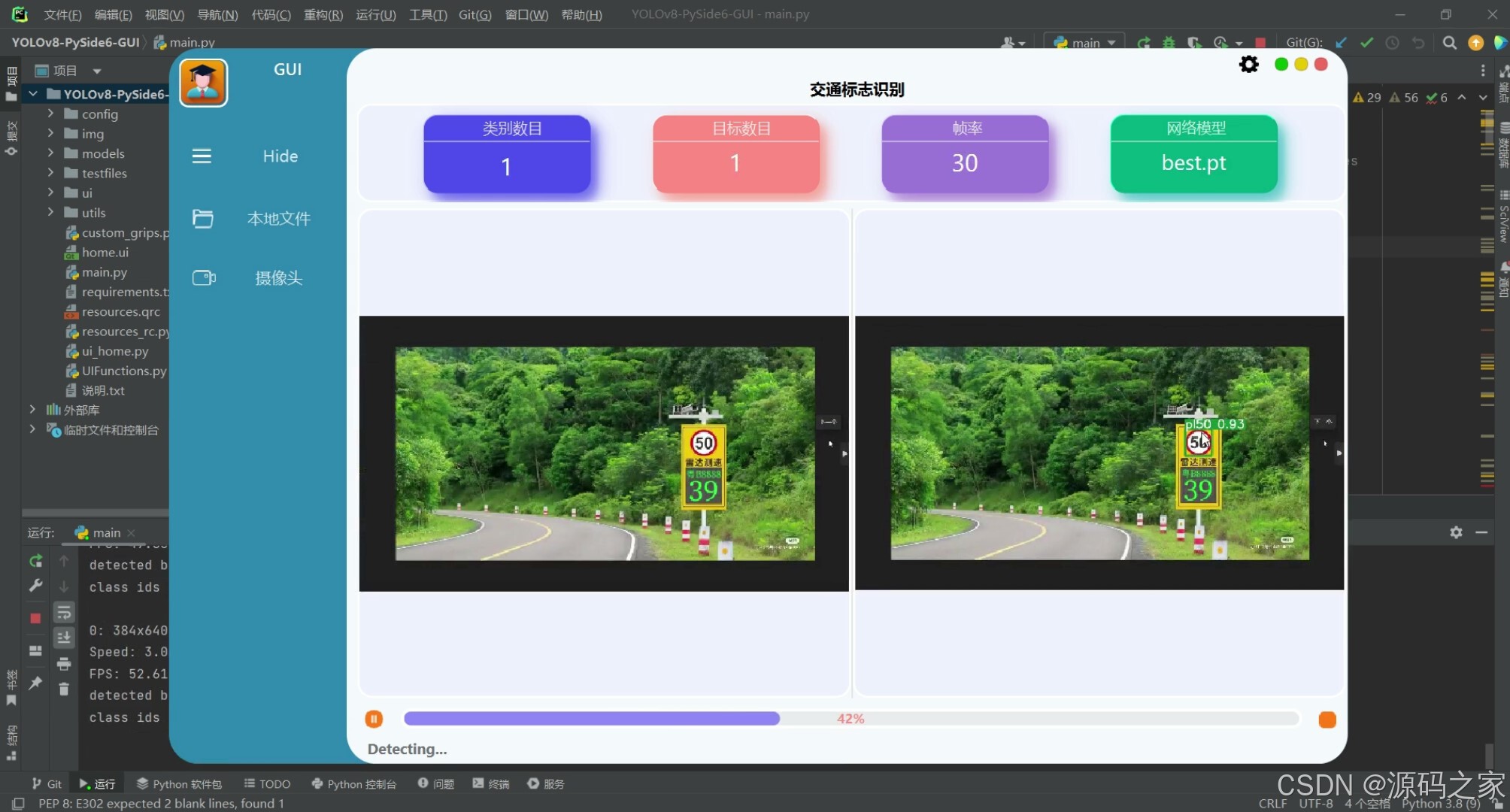
(2)交通标志检测识别—多个目标识别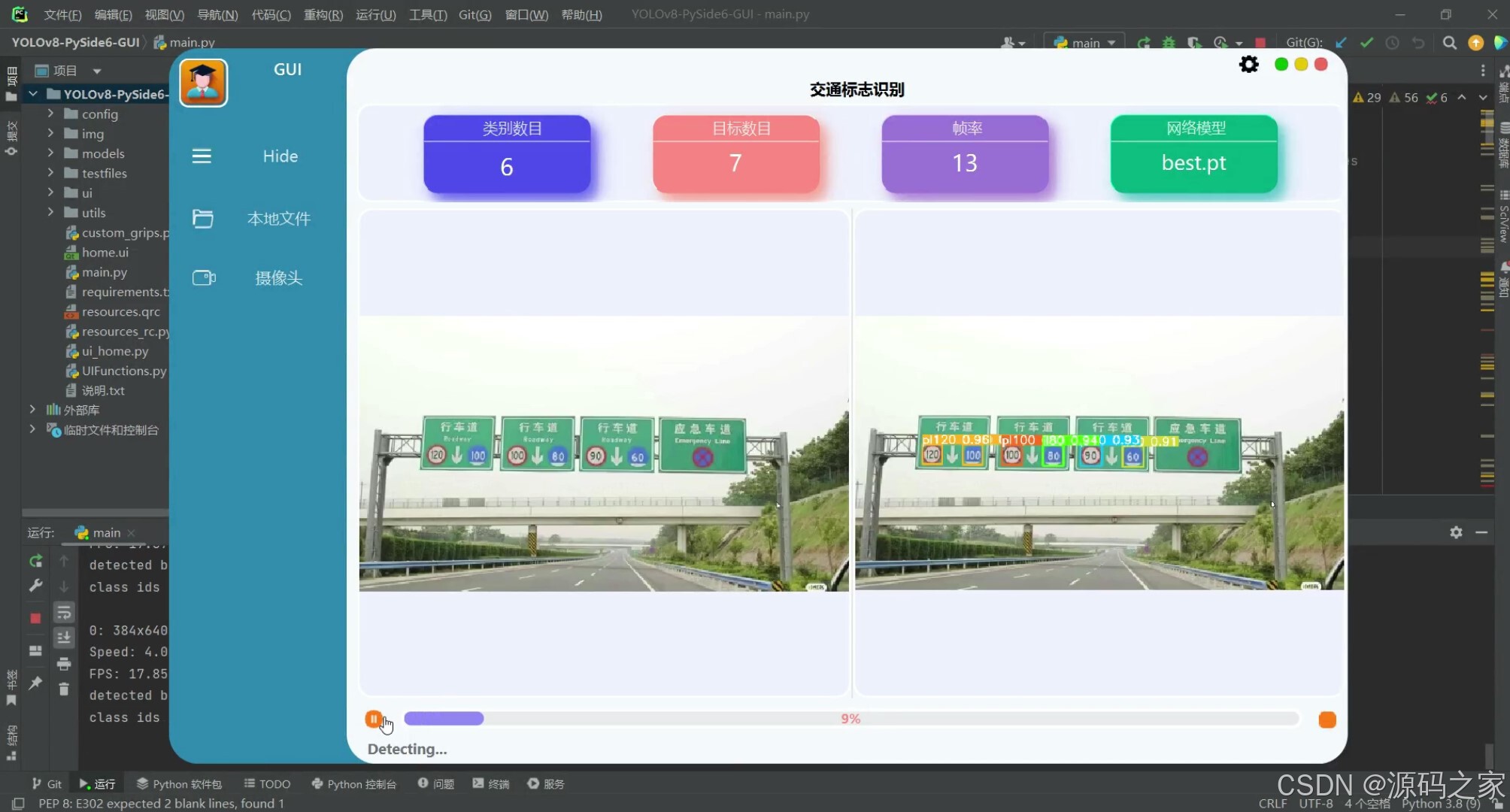
(3)交通标志检测识别—多个目标检测识别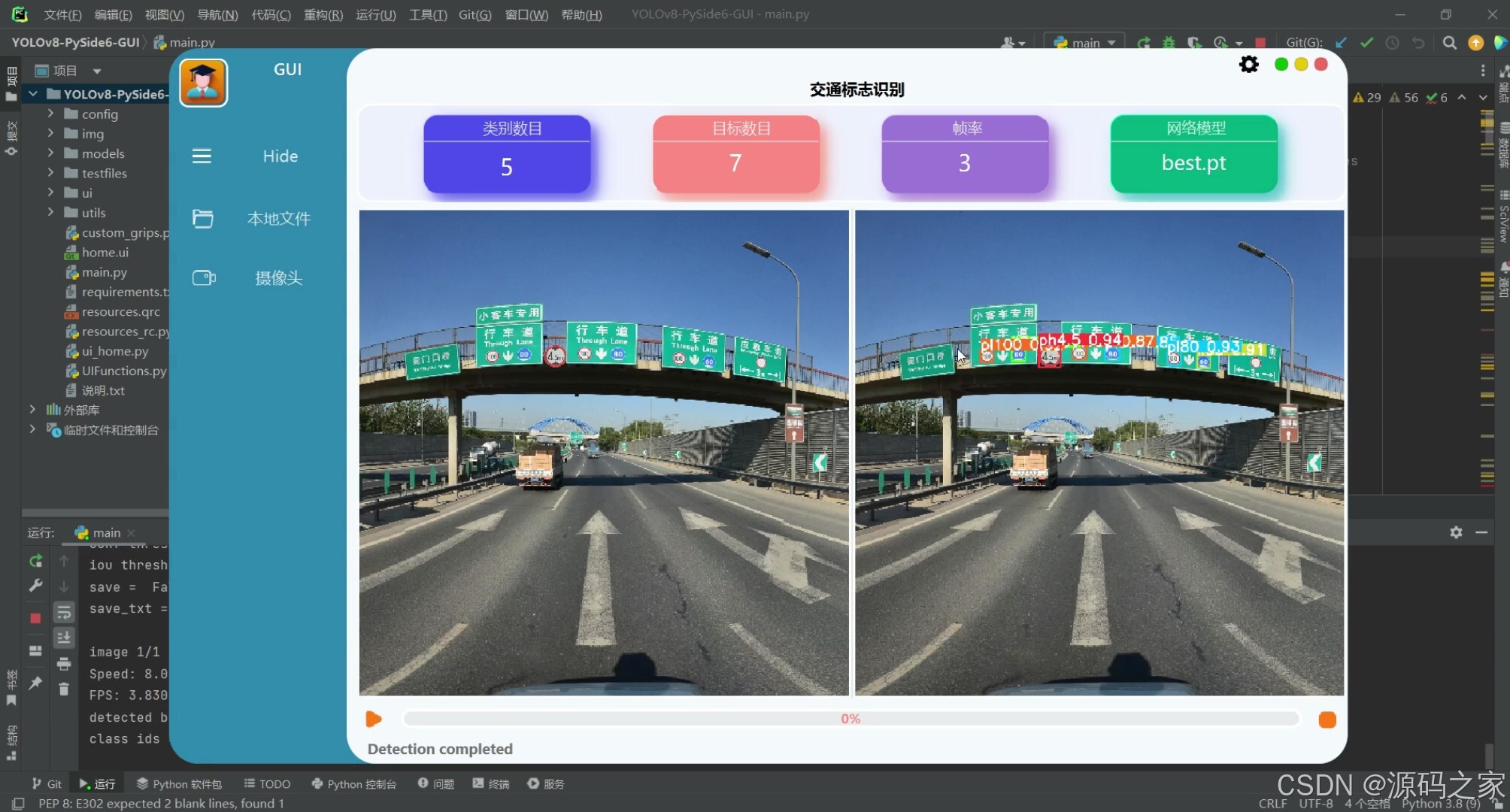
(4)交通标志检测识别—多个目标检测识别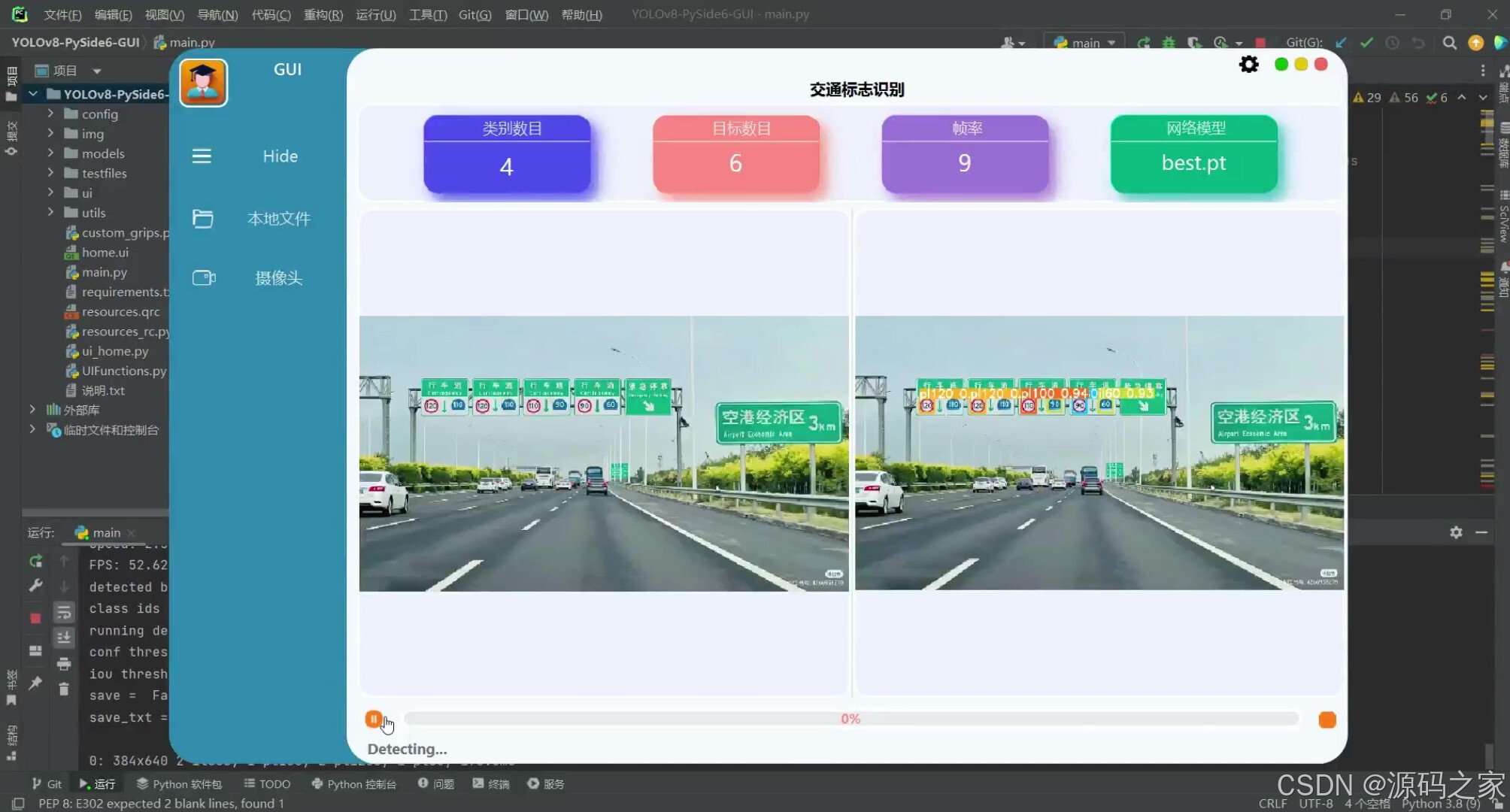
(4)交通标志检测识别—摄像头检测识别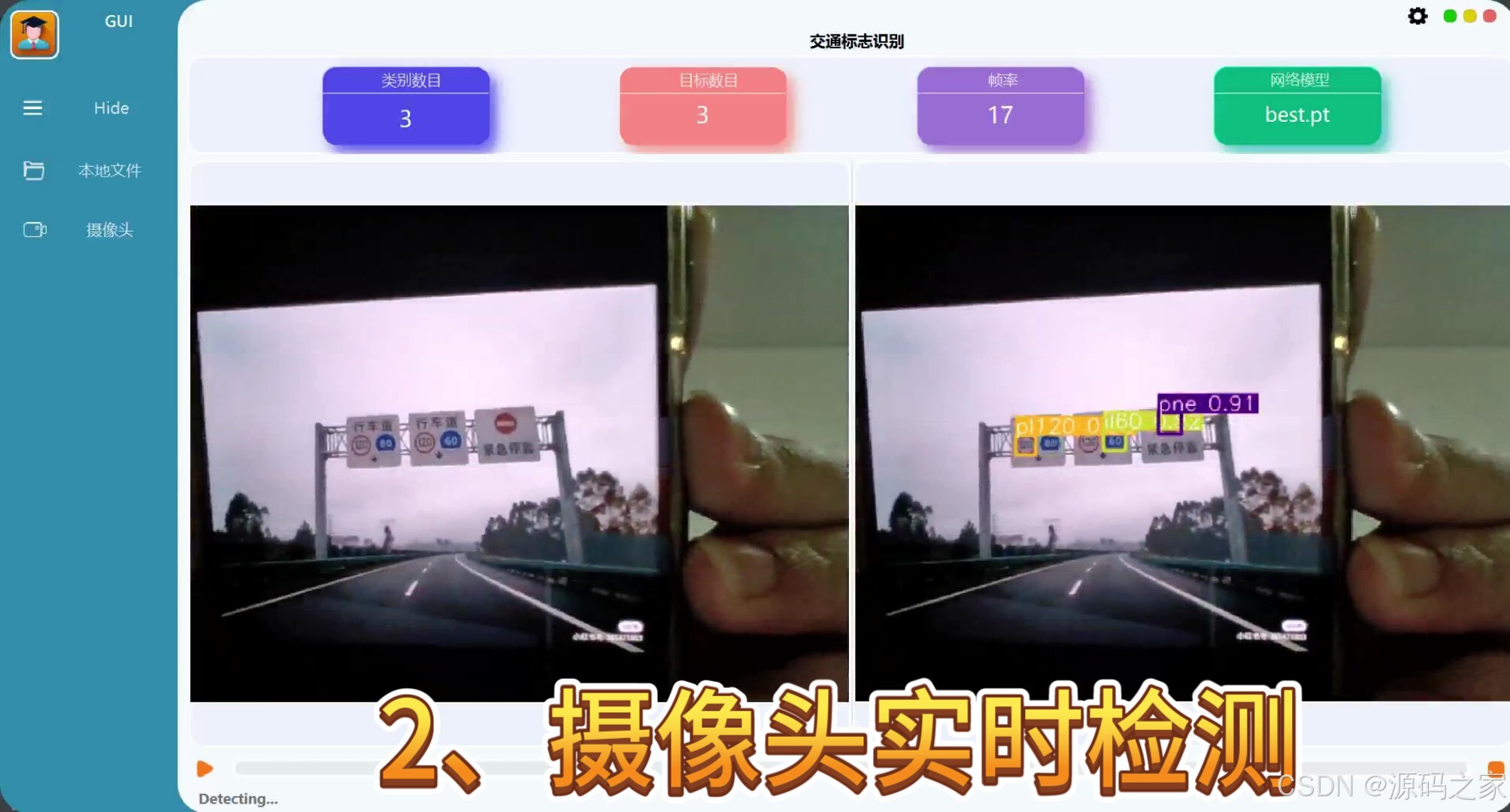
(5)交通标志检测识别—摄像头检测识别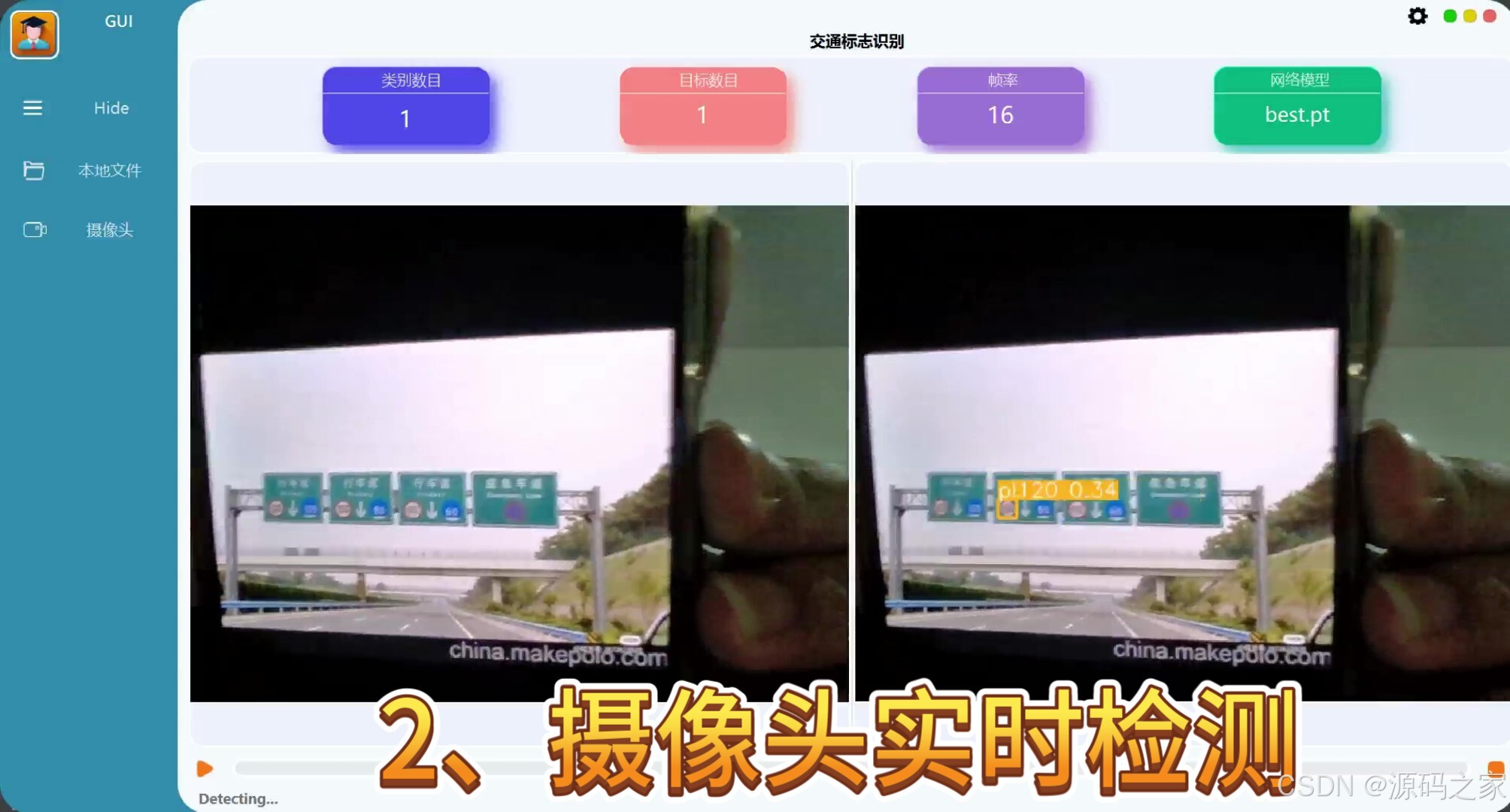
(6)交通标志检测识别—视频实时检测识别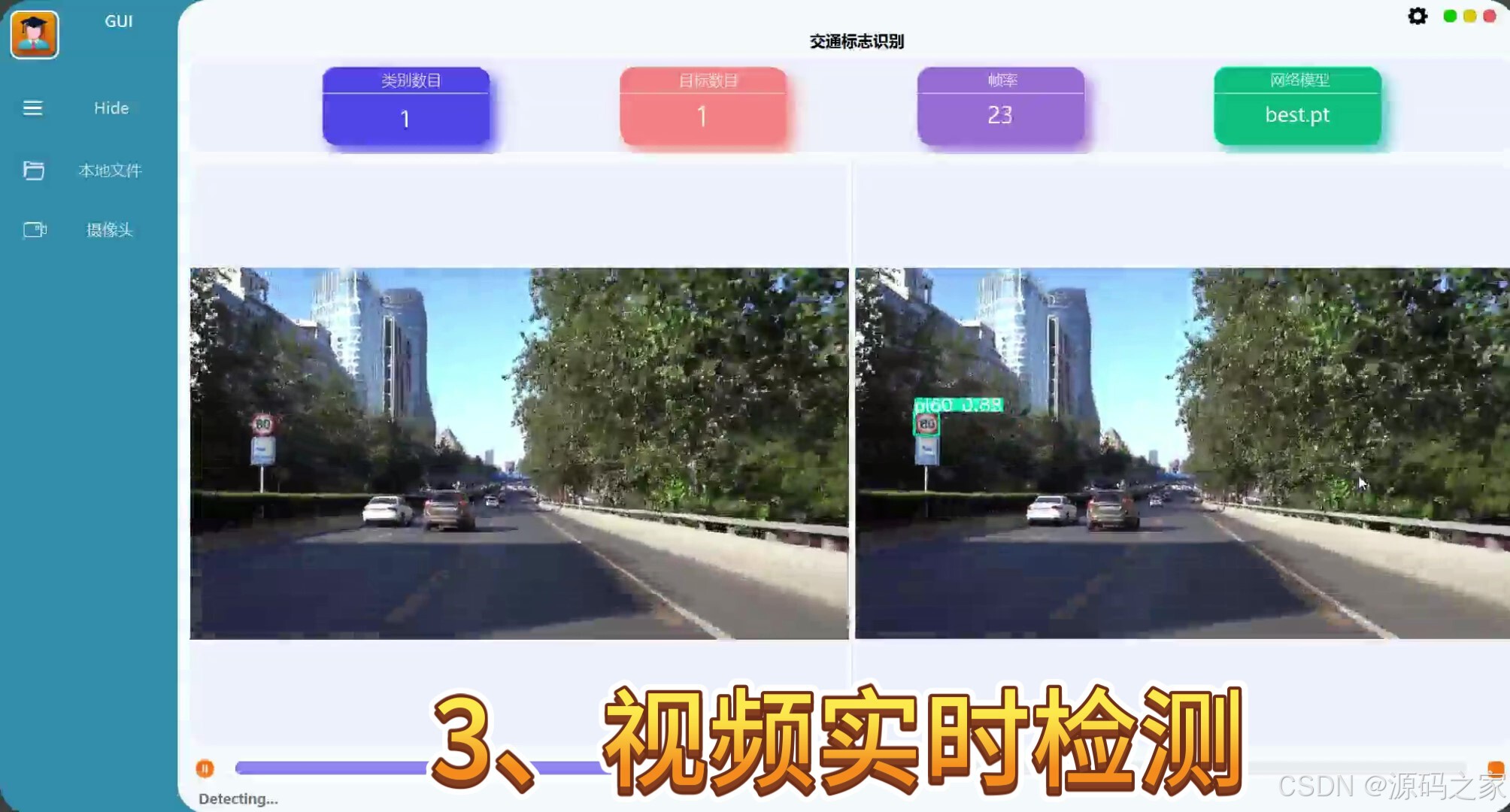
(7)交通标志检测识别—视频实时检测识别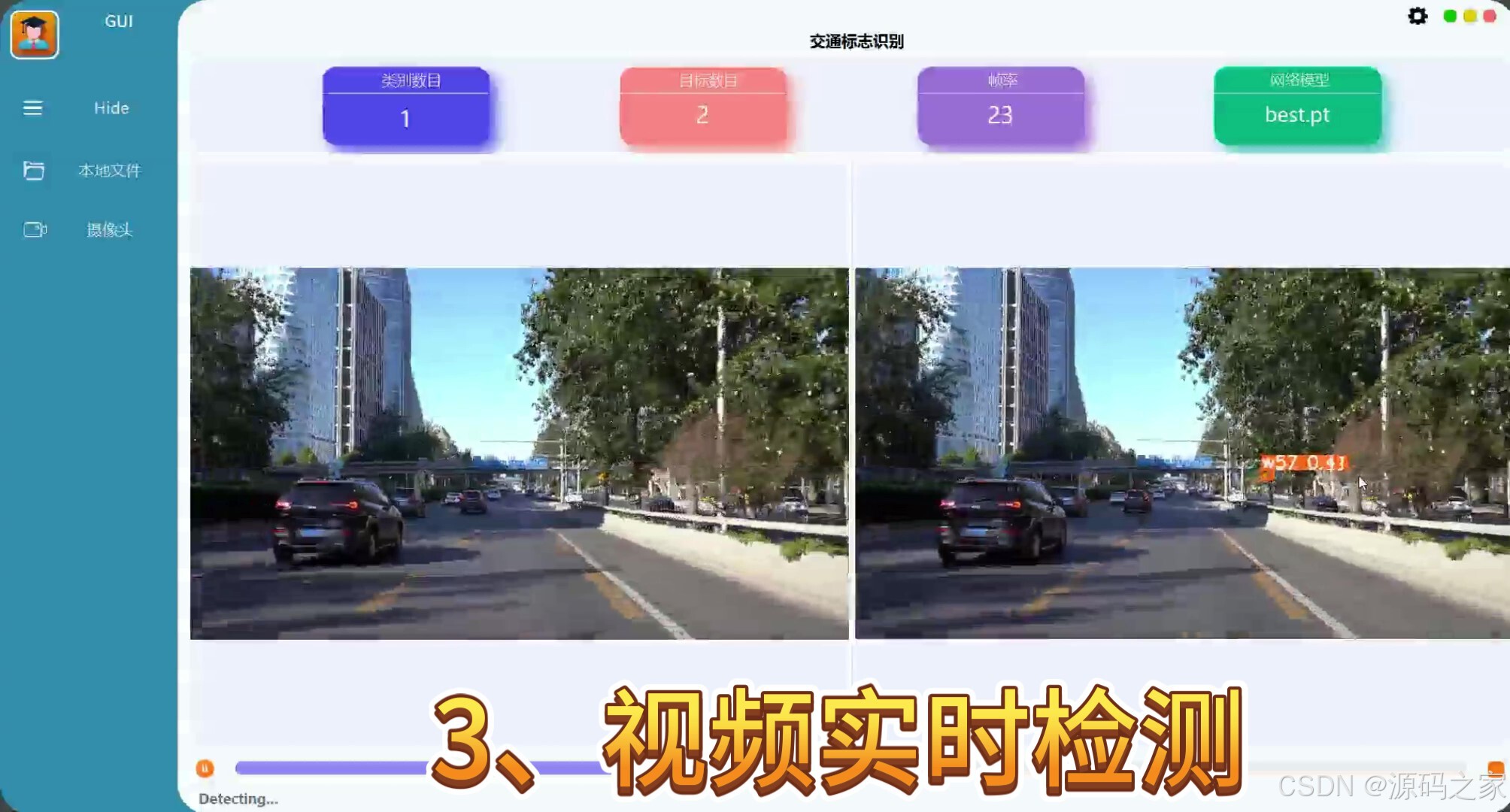
3、项目说明(约900字)
在科技飞速发展的今天,机动车数量激增导致的交通拥堵、违法行驶及交通事故已成为城市治理的突出难题。交通标志作为道路信息的核心载体,承担着引导、警示和限制等重要功能,其快速、准确识别是高级驾驶辅助系统(ADAS)和无人驾驶技术落地的关键环节。传统基于颜色分割或模板匹配的方法在光照变化、遮挡、视角倾斜等复杂环境下鲁棒性不足,而深度学习目标检测技术能够自动学习标志的深层特征,显著提升识别准确率。YOLOv8在继承前代高帧率优势的同时,通过优化骨干网络与特征融合结构,进一步提高了检测精度,为交通标志实时识别提供了理想的技术基础。
本系统使用YOLOv8在TT100K中国交通标志数据集上完成模型训练。TT100K由清华大学与腾讯联合发布,涵盖城市道路、高速、乡村等多场景图片,包含约二十万个标志实例,覆盖禁令、警告、指示等常见类别,为模型提供丰富的样本多样性。训练过程中采用mosaic、HSV、随机旋转等数据增强策略提升泛化能力,并使用余弦退火学习率与早停策略防止过拟合。最终得到的权重在保持高帧率的同时,对圆形、三角形、矩形等各类标志均取得良好检测效果。
系统在PySide6框架下构建可视化界面,集成“图片-视频-摄像头”三种输入模式:图片模式支持单张与批量检测,结果自动保存;视频模式逐帧推理,实时显示当前帧号与类别计数;摄像头模式通过多线程采集,延迟低于一百毫秒,满足实时演示需求。界面右侧提供置信度阈值、非极大抑制阈值等可调参数,用户可依据场景灵活微调。检测完成后,软件在图像上绘制边界框、类别名称与置信度,同时生成CSV记录,包含文件名、时间戳、类别、坐标等信息,方便后续数据分析。
考虑到教学与科研需求,代码采用模块化设计,模型权重、数据预处理、推理逻辑、界面层相互独立,用户只需替换权重文件即可快速迁移至其他目标检测任务。系统全程本地运行,无需联网,既保护数据隐私,又降低部署成本,适合部署于车载终端、路侧盒子或教学实验室。配套详细中文注释、环境配置脚本与模型转换教程,可帮助学生在短时间内完成从数据准备到界面打包的完整流程,显著降低毕业设计或课程作业的入门门槛。
在应用层面,交通标志识别系统可嵌入高级驾驶辅助系统,为驾驶员提供实时语音或图标提醒,减少因疏忽导致的超速、闯红灯等违法行为;也可作为智慧交通平台的前端感知模块,将识别结果上传至云端,用于交通流量分析、标志损坏巡检、车辆行为监管等更高层次的决策支持。通过开源代码与开放权重,项目期望吸引更多研究者关注交通视觉感知任务,共同推动智慧交通、智能驾驶领域的持续发展与产业落地。
4、核心代码
from ultralytics import YOLO
from PySide6.QtWidgets import QApplication, QMainWindow, QFileDialog, QMenu
from PySide6.QtGui import QImage, QPixmap, QColor
from PySide6.QtCore import QTimer, QThread, Signal, QObject, QPoint, Qt

from UIFunctions import *
from ui.home import Ui_MainWindow

#from utils.capnums import Camera
from utils.rtsp_win import Window
from collections import deque
import numpy as np
import time
import json
import sys
import cv2
import os

IMG_FORMATS = ('bmp', 'dng', 'jpeg', 'jpg', 'mpo', 'png', 'tif', 'tiff', 'webp', 'pfm')  # image suffixes
VID_FORMATS = ('asf', 'avi', 'gif', 'm4v', 'mkv', 'mov', 'mp4', 'mpeg', 'mpg', 'ts', 'wmv', 'webm')  # video suffixes

def is_video_file(path):
    suffix = path.split('.')[-1].lower()

    if suffix in IMG_FORMATS:
        return False
    elif suffix in VID_FORMATS:
        return True
    else:
        print(f"Suffix '{suffix}' is invalid!")
        raise ValueError("Invalid file suffix")

    def run_camera(self, frame):
        print("running camera detection ......")
        # set model
        self.loadmodel()
        self.yolo2main_status_msg.emit('Detecting...')
        print('conf threshold = ', self.YoloConfig['conf'])
        print('iou threshold = ', self.YoloConfig['iou'])
        print('save = ', self.YoloConfig['save_res'])
        print('save_txt = ', self.YoloConfig['save_txt'])

        res = self.model.predict(frame, save=self.YoloConfig['save_res'],
                                 save_txt=self.YoloConfig['save_txt'], imgsz=640, conf=self.YoloConfig['conf'],
                                 iou=self.YoloConfig['iou'], device=0)

        preprocess_speed = res[0].speed['preprocess']
        inference_speed = res[0].speed['inference']
        postprocess_speed = res[0].speed['postprocess']
        total_infer_speed = preprocess_speed + inference_speed + postprocess_speed
        fps = 1000 / total_infer_speed
        #print("FPS:", fps)

        # 每读取一帧增加计数器
        self.fps_counter += 1

        # 如果达到 10 帧,则计算 FPS
        if self.fps_counter == 10:
            elapsed_time = self.fps_frames[-1] - self.fps_frames[0]  # 计算最近 10 帧的时间差
            average_fps = 10 / elapsed_time
            self.fps = int(average_fps)
            print("Average FPS:", self.fps)

            self.fps_counter = 0  # 重置计数器
            self.fps_frames.clear()  # 清空时间队列

        # 记录当前时间
        self.fps_frames.append(time.time())

        detected_boxes = res[0].boxes
        # print(res[0])


    # Cycle monitoring model file changes
    def ModelBoxRefre(self):
        pt_list = os.listdir('./models')
        pt_list = [file for file in pt_list if file.endswith('.pt')]
        pt_list.sort(key=lambda x: os.path.getsize('./models/' + x))
        # It must be sorted before comparing, otherwise the list will be refreshed all the time
        if pt_list != self.pt_list:
            self.pt_list = pt_list
            self.model_box.clear()
            self.model_box.addItems(self.pt_list)

    # Get the mouse position (used to hold down the title bar and drag the window)
    def mousePressEvent(self, event):
        p = event.globalPosition()
        globalPos = p.toPoint()
        self.dragPos = globalPos

    # Optimize the adjustment when dragging the bottom and right edges of the window size
    def resizeEvent(self, event):
        # Update Size Grips
        UIFuncitons.resize_grips(self)

    # Exit Exit thread, save settings
    def closeEvent(self, event):
        config_file = 'config/setting.json'
        config = dict()
        config['iou'] = self.iou_spinbox.value()
        config['conf'] = self.conf_spinbox.value()
        config['rate'] = self.speed_spinbox.value()
        config['save_res'] = (0 if self.save_res_button.checkState()==Qt.Unchecked else 2)
        config['save_txt'] = (0 if self.save_txt_button.checkState()==Qt.Unchecked else 2)
        config_json = json.dumps(config, ensure_ascii=False, indent=2)
        with open(config_file, 'w', encoding='utf-8') as f:
            f.write(config_json)
        # Exit the process before closing
        if self.yolo_thread.isRunning():
            self.yolo_predict.stop_dtc = True
            self.yolo_thread.quit()
            MessageBox(
                self.close_button, title='Note', text='Exiting, please wait...', time=3000, auto=True).exec()
            sys.exit(0)
        else:
            sys.exit(0)


if __name__ == "__main__":
    app = QApplication(sys.argv)
    Home = MainWindow()
    Home.show()
    sys.exit(app.exec())
5、项目获取
更多推荐
 24
24 0
0- 0


 已为社区贡献14条内容

所有评论(0)