
SpringBoot后端:从分页查询到登录校验
分页查询
@GetMapping()
public Result list(Integer page, Integer pagesize){
    log.info("分页查询:page:{} pagesize{}", page, pagesize);
   PageEmp<Emp> result = empService.findAll(page,pagesize);
    return Result.success(result);
}
@Override
public PageEmp<Emp> findAll(Integer page, Integer pagesize) {
int start=(page-1)*pagesize;
long total=deptMapper.count();
List<Emp> data=deptMapper.findAll(start,pagesize);
return new PageEmp<>(total,data);
}
@Mapper
public interface EmpMapper {
@Select("select * from emp e left join dept d on e.dept_id = d.id limit #{start},#{pagesize}")
List<Emp> findAll(int start, Integer pagesize);
@Select("select count(*) from emp e left join dept d on e.dept_id = d.id ")
long count();
}
PageHelper
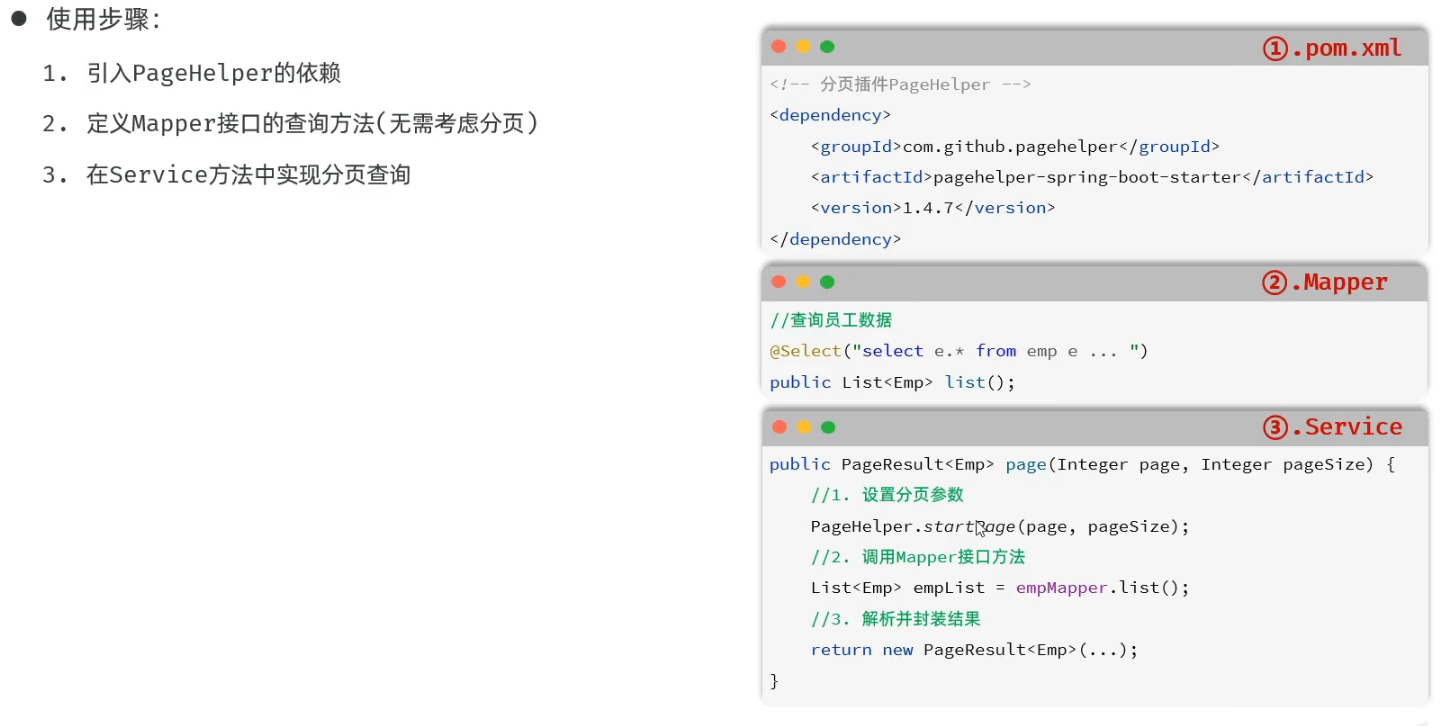
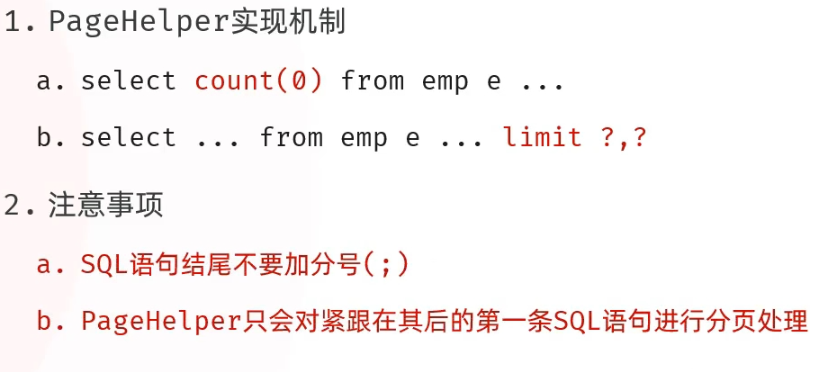
-
简单分页查询
@Mapper
public interface EmpMapper {
@Select("select * from emp e left join dept d on e.dept_id = d.id ")
List<Emp> findAll();
}
@Service
public class EmpServiceImpl implements EmpService {
@Autowired
private EmpMapper empMapper;
@Override
public PageEmp<Emp> findAll(Integer page, Integer pagesize) {
PageHelper.startPage(page,pagesize);
List<Emp> empList = empMapper.findAll();
Page<Emp> p = (Page<Emp>) empList;
return new PageEmp<>(p.getTotal(),p.getResult());
}
}
-
条件分页查询
   @GetMapping()
    public Result list(@RequestParam(defaultValue = "1")Integer page,
                       @RequestParam(defaultValue = "10")Integer pageSize,
                       Integer  id,  String name,
                       @DateTimeFormat(pattern = "yyyy-MM-dd") LocalDate begin,
                       @DateTimeFormat(pattern = "yyyy-MM-dd") LocalDate end)
    {
        log.info("分页查询:{},{},{},{},{},{}", page, pageSize,id,name,begin,end);
       PageEmp<Emp> result = empService.findAll(page,pageSize,id,name,begin,end);
        return Result.success(result);
    }
   public PageEmp<Emp> findAll(Integer page, Integer pageSize, Integer id, String name, LocalDate begin, LocalDate end) {
                PageHelper.startPage(page,pageSize);
                List<Emp> empList = empMapper.findAll(id, name, begin, end);
                Page<Emp> p = (Page<Emp>) empList;
                return new PageEmp<>(p.getTotal(),p.getResult());
        }
@Mapper
public interface EmpMapper {
List<Emp> findAll(Integer id, String name, LocalDate begin, LocalDate end);
}
<?xml version="1.0" encoding="UTF-8" ?>
<!DOCTYPE mapper
PUBLIC "-//mybatis.org//DTD Mapper 3.0//EN"
"http://mybatis.org/dtd/mybatis-3-mapper.dtd">
<mapper namespace="com.itwyz.demo2.mapper.EmpMapper">
<select id="findAll" resultType="com.itwyz.demo2.pojo.Emp">
select e.* from emp e left join dept d on e.dept_id=d.id
where
<if test="name!=null and name!=''">
e.name like concat('%',#{name},'%')
</if>
<if test="id!=null">
and e.id=#{id}
</if>
<if test="begin!=null">
and e.create_time >= #{begin}
</if>
</select>
</mapper>
-
条件查询优化
public class EmpQueryParam {
private Integer page=1;
private Integer pageSize=10;
private String name;
private Integer age;
private LocalDateTime createTime;
private LocalDateTime updateTime;
private String deptName;
}
    @GetMapping()
    public Result list(EmpQueryParam empQueryParam)
    {
        log.info("分页查询:{}", empQueryParam);
       PageEmp<Emp> result = empService.findAll(empQueryParam);
        return Result.success(result);
    }
        @Override
        public PageEmp<Emp> findAll(EmpQueryParam empQueryParam) {
                PageHelper.startPage(empQueryParam.getPage(),empQueryParam.getPageSize());
                List<Emp> empList = empMapper.findAll(empQueryParam);
                Page<Emp> p = (Page<Emp>) empList;
                return new PageEmp<>(p.getTotal(),p.getResult());
        }
@Mapper
public interface EmpMapper {
List<Emp> findAll(EmpQueryParam empQueryParam);
}
<?xml version="1.0" encoding="UTF-8" ?>
<!DOCTYPE mapper
PUBLIC "-//mybatis.org//DTD Mapper 3.0//EN"
"http://mybatis.org/dtd/mybatis-3-mapper.dtd">
<mapper namespace="com.itwyz.demo2.mapper.EmpMapper">
<select id="findAll" resultType="com.itwyz.demo2.pojo.Emp">
select e.* from emp e left join dept d on e.dept_id=d.id
where
<if test="name!=null and name!=''">
e.name like concat('%',#{name},'%')
</if>
<if test="age!=null">
and e.age=#{age}
</if>
<if test="createTime!=null">
and e.create_time = #{createTime}
</if>
<if test="updateTime!=null">
and e.create_time = #{updateTime}
</if>
</select>
</mapper>
新增(批量保存)
    @PostMapping()
    public Result add(@RequestBody Emp emp)
    {
        log.info("新增员工:{}", emp);
        empService.save(emp);
        return Result.success();
    }
public void save(Emp emp) {
//1.保存员工基本信息
emp.setCreateTime(LocalDateTime.now());
emp.setUpdateTime(LocalDateTime.now());
empMapper.insert(emp);
List<Expr> exprList = emp.getExprList();
if(!exprList.isEmpty()){
exprList.forEach(expr->{
expr.setEmpId(emp.getId());
});
}
empMapper.insertBach(exprList);
}
@Options(useGeneratedKeys = true,keyProperty = "id")//获取到生成的主键
@Insert("insert into emp(name,age,dept_id,create_time,update_time) values(#{name},#{age},#{deptId},#{createTime},#{updateTime})")
void insert(Emp emp);
void insertBach(List<Expr> exprList);
<mapper namespace="com.itwyz.demo2.mapper.EmpMapper">
    <insert id="insertBach">
        insert into expr (emp_id,expr) values
        <foreach collection="exprList" item="expr" separator=",">
            (#{expr.empId},#{expr.expr})
        </foreach>
    </insert>
不用xml映射文件
    @PostMapping()
    public Result add(@RequestBody Emp emp)
    {
        log.info("新增员工:{}", emp);
        empService.save(emp);
        return Result.success();
    }
      public void save(Emp emp) {
                //1.保存员工基本信息
                emp.setCreateTime(LocalDateTime.now());
                emp.setUpdateTime(LocalDateTime.now());
                empMapper.insert(emp);
                //2.保存员工的工作信息
                emp.getExprList().forEach(expr->{
                        expr.setEmpId(emp.getId());
                        empMapper.insertbach(expr);
                });

        }
@Options(useGeneratedKeys = true,keyProperty = "id")//获取到生成的主键
@Insert("insert into emp(name,age,dept_id,create_time,update_time) values(#{name},#{age},#{deptId},#{createTime},#{updateTime})")
void insert(Emp emp);
@Insert("insert into expr(emp_id,expr) values(#{empId},#{expr})")
void insertbach(Expr expr);
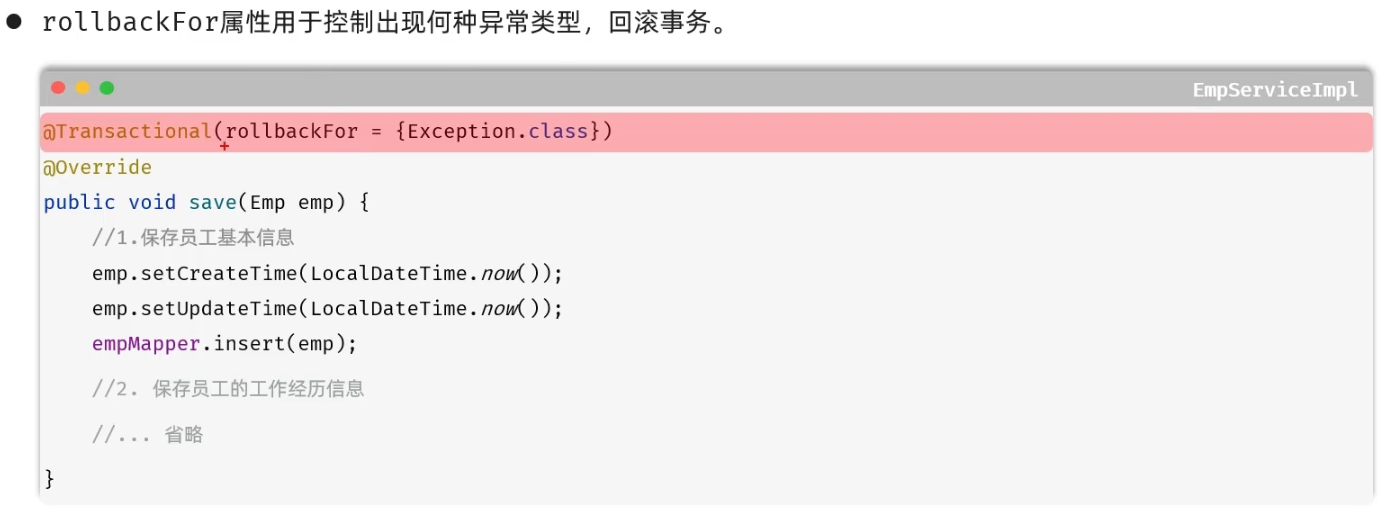
事务
事务是一组操作的集合,它是一个不可分割的单位。这些操作要么同时成功,要么同时失败。
-
开启:start transaction
-
提交:commit
-
回滚:rollback

-
REQUIRED(默认)
-
REQUIRED_NEW(需要在一个新事务中运行)
文件上传
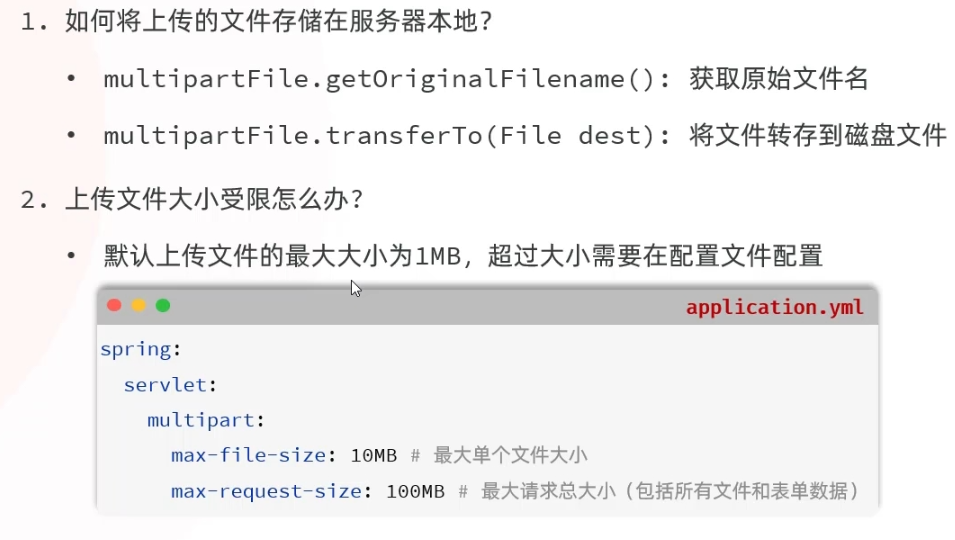
本地存储
<!DOCTYPE html>
<html lang="en">
<head>
    <meta charset="UTF-8">
    <meta name="viewport" content="width=device-width, initial-scale=1.0">
    <title>文件上传</title>
</head>
<body>
<form action="/upload" method="post" enctype="multipart/form-data">
    姓名:<input type="text" name="name"><br>
    年龄:<input type="text" name="age"><br>
    头像:<input type="file" name="file"><br>
    <input type="submit" value="提交">
</form>
</body>
</html>
    @PostMapping("/upload")
    public Result upload(String name,Integer age,MultipartFile file) throws IOException {
        log.info("接受参数:{}{}{}",name,age,file);
        String originalFilename = file.getOriginalFilename();
        String suffix = originalFilename.substring(originalFilename.lastIndexOf("."));
        String newName= UUID.randomUUID() +suffix;
        file.transferTo(new File("D:\\Code\\JAVA\\Web\\demo2\\src\\main\\File\\"+newName));
        return Result.success();
    }
阿里云OSS
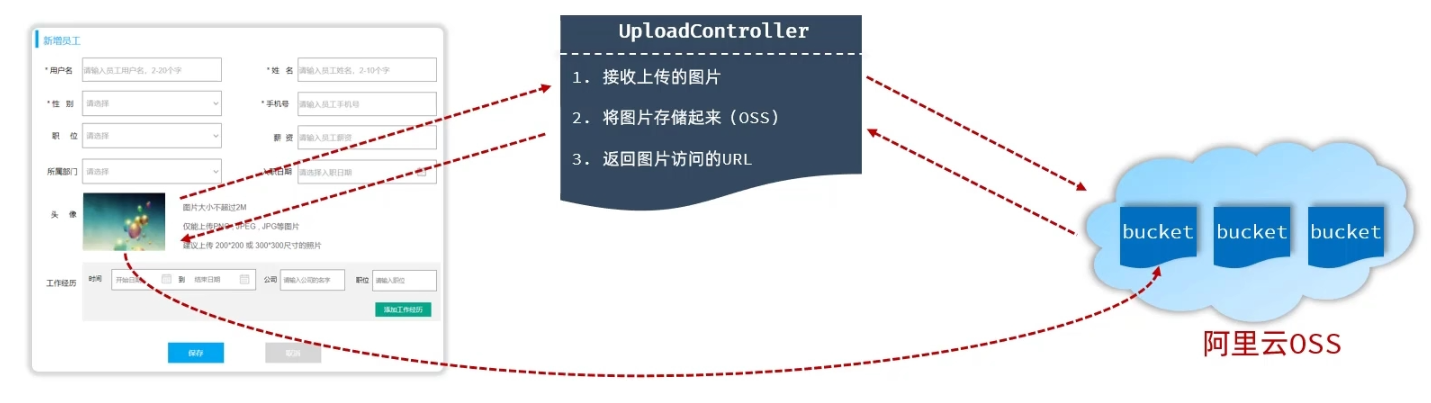
阿里云对象存储OSS,是一款海量、安全、低成本、高可靠的云存储服务。使用OSS,可以通过网络存储和调用包括文本、图片、音频和视频在内的各种文件。
创建
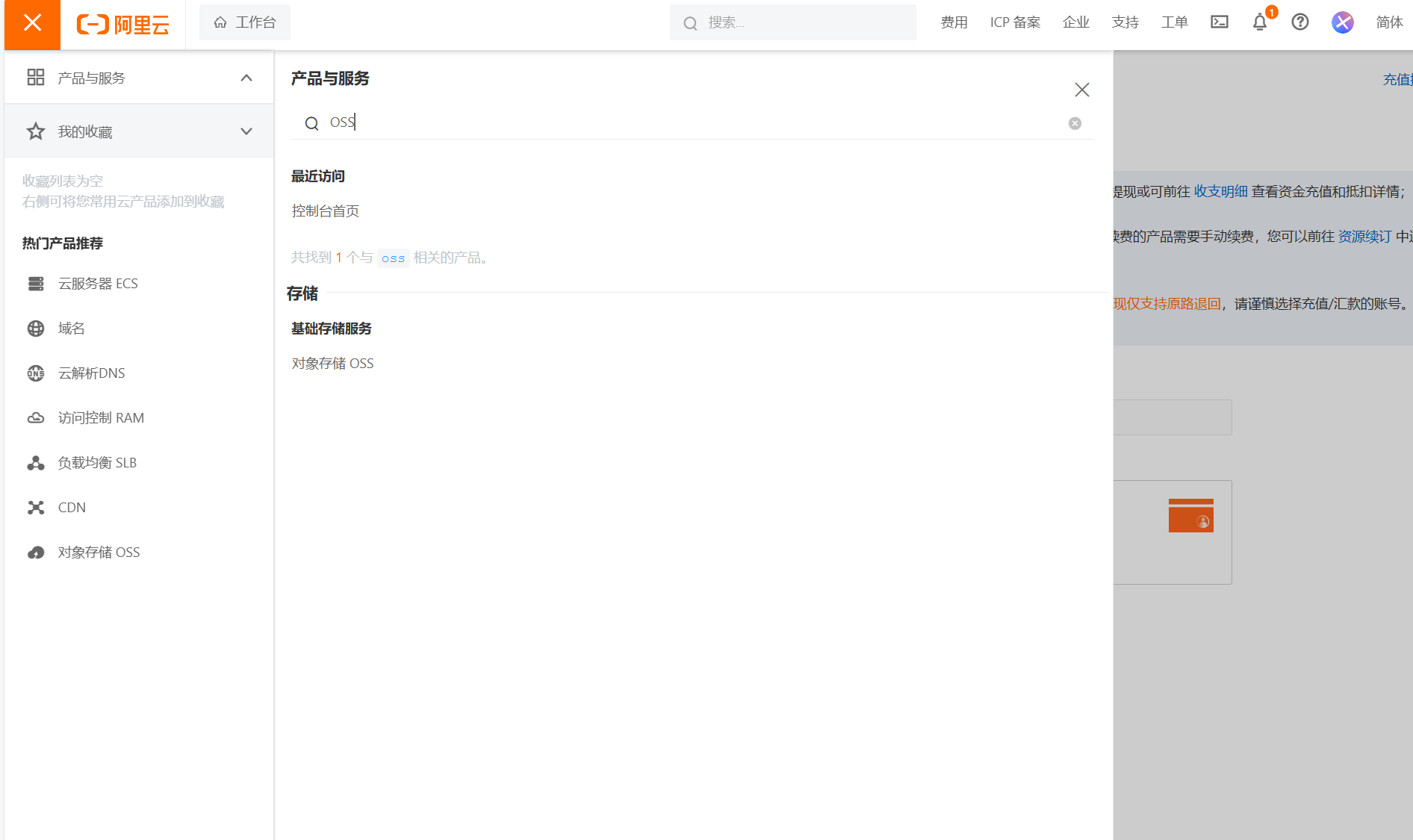
-
创建Bucket
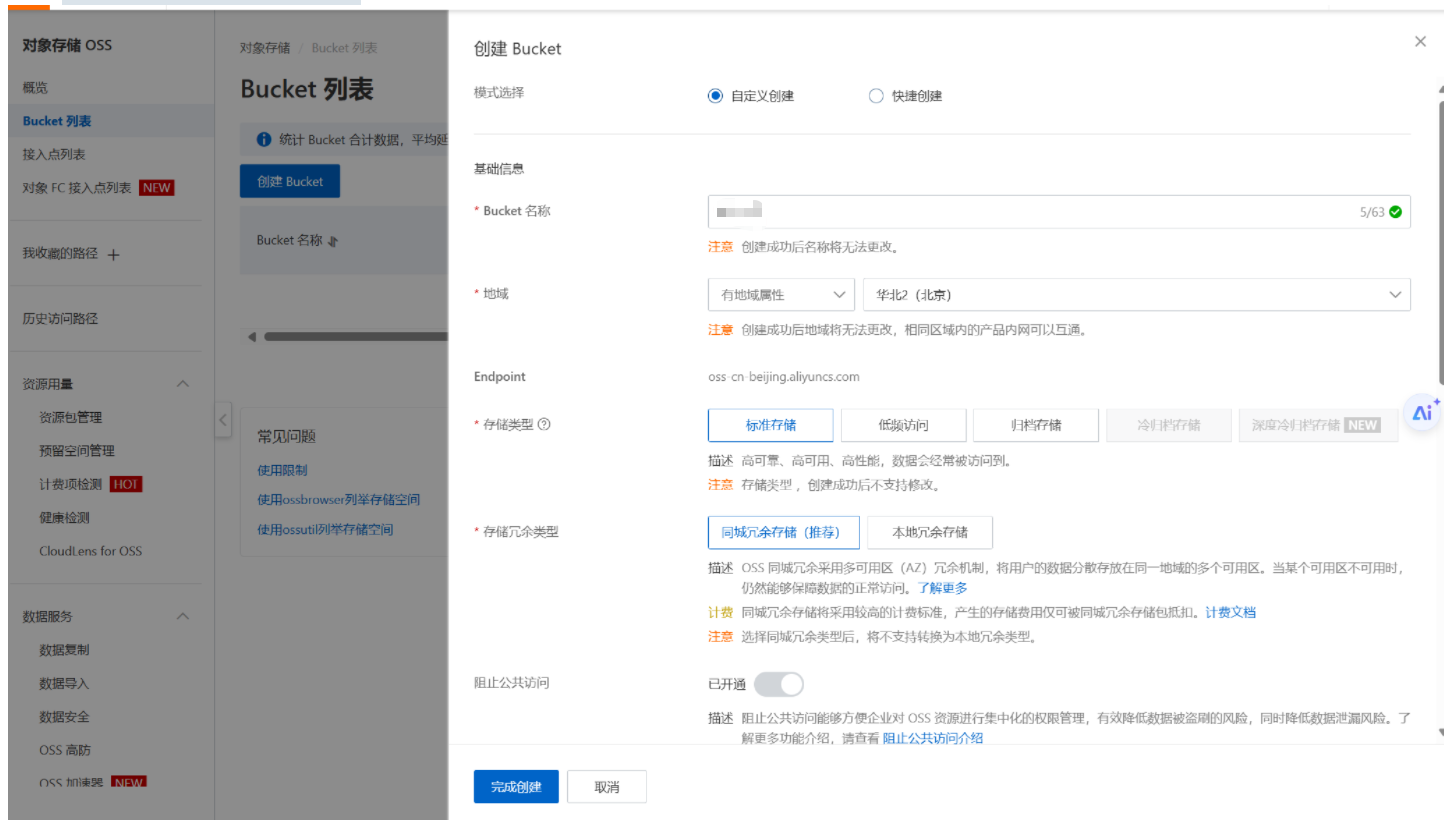
填入Buket名称,其它都不用动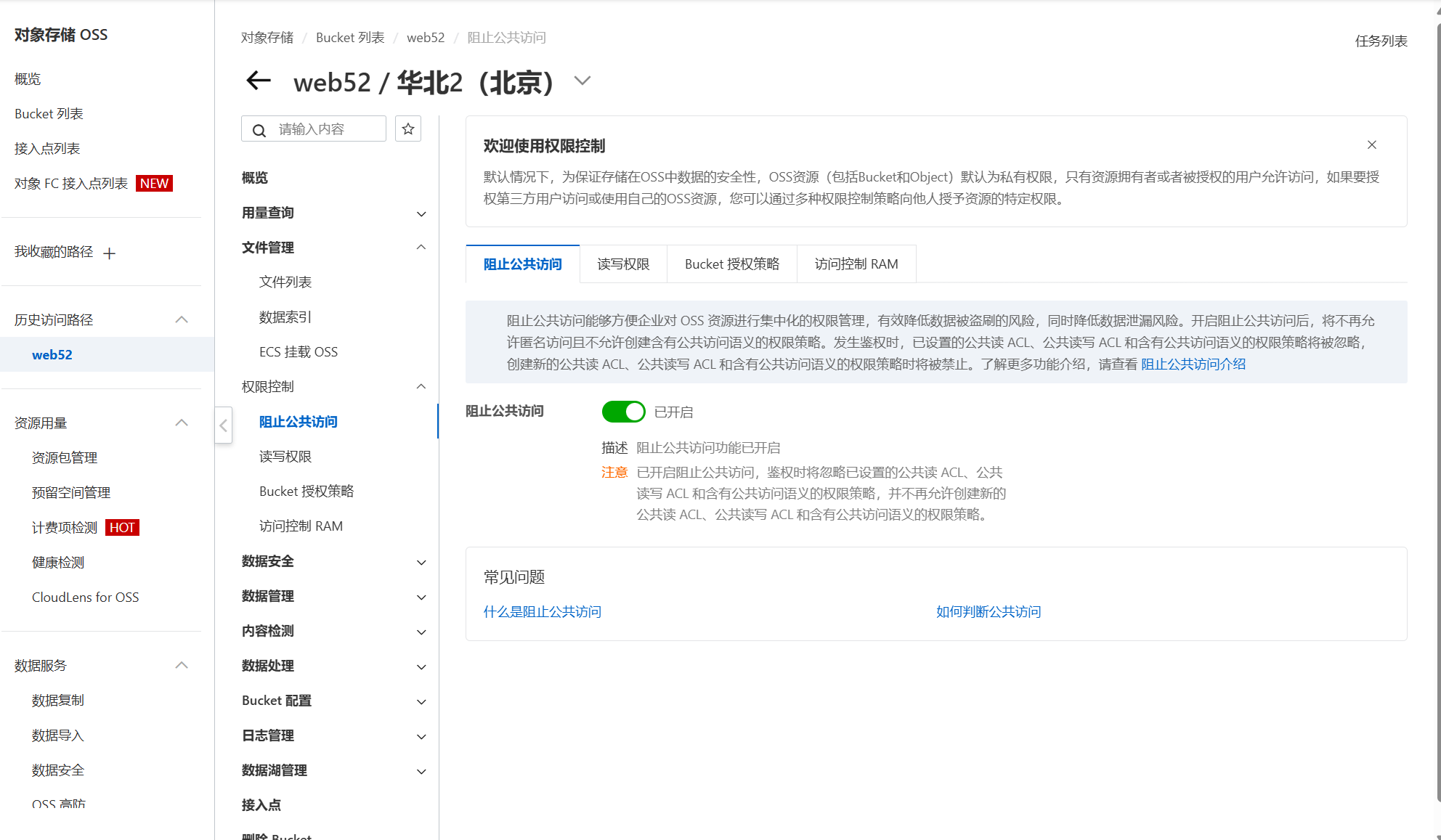
关闭阻止公共访问
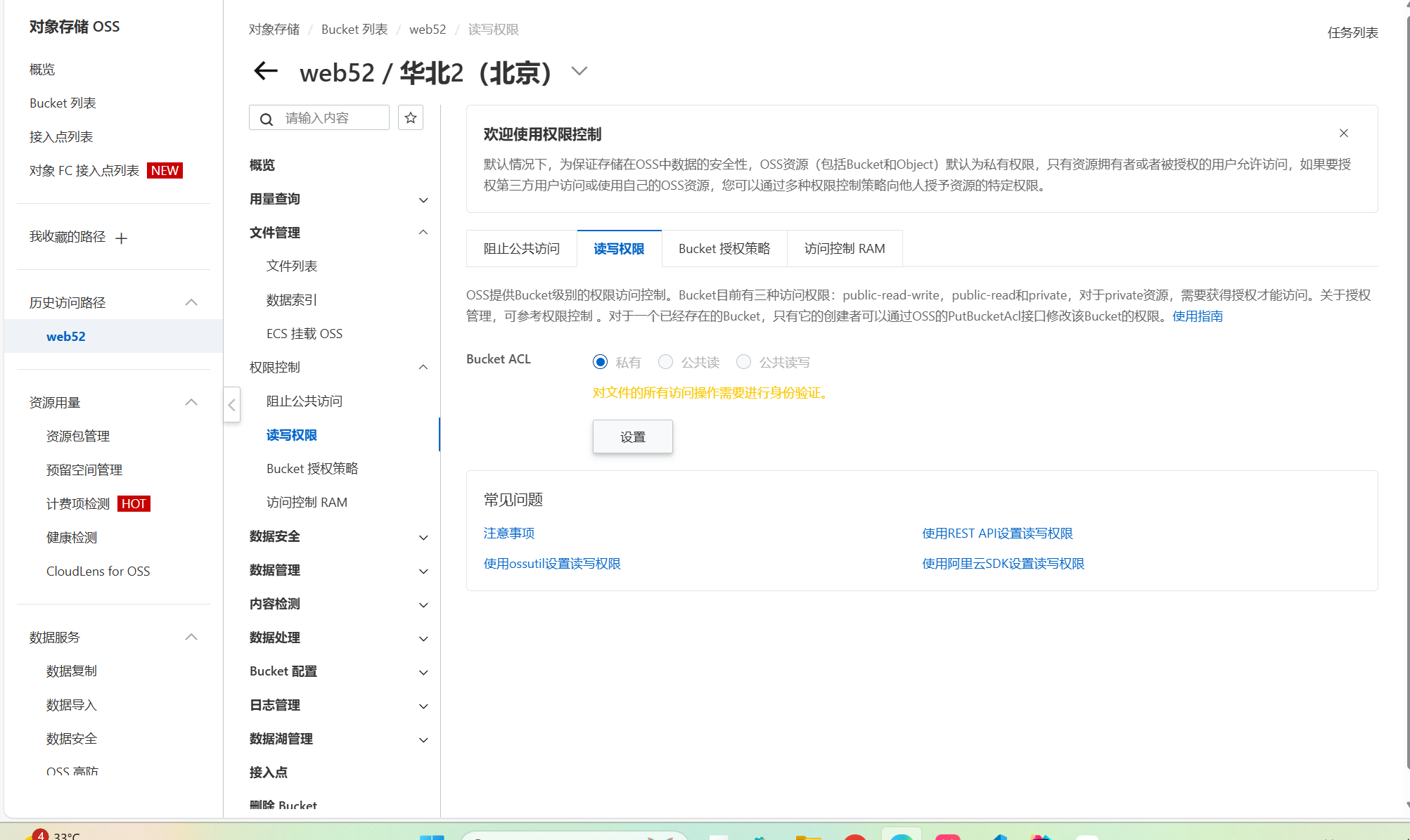
设置公共读
创建Accesskey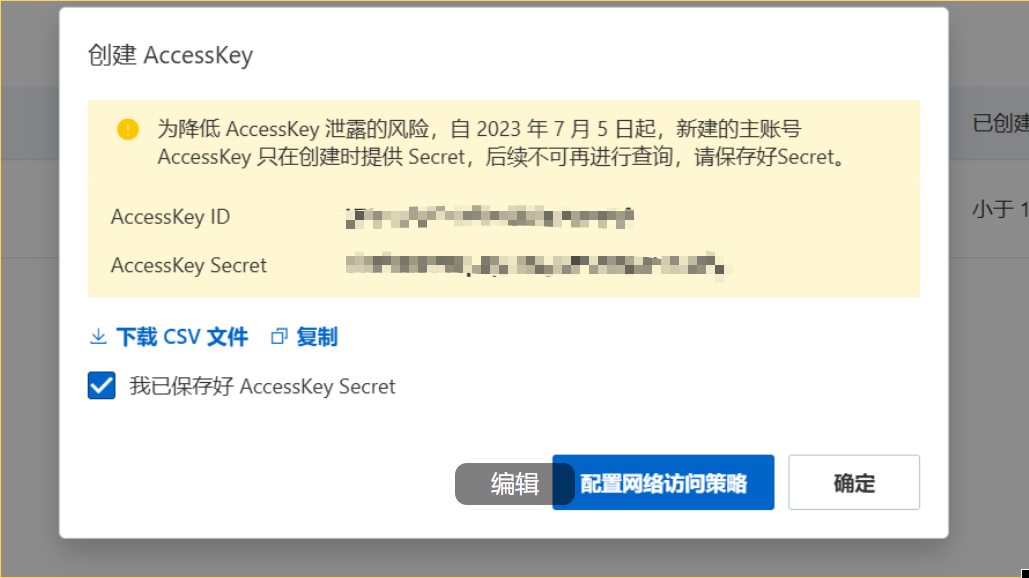
配置AccessKey
set OSS_ACCESS_KEY_ID=YOUR_ACCESS_KEY_ID
set OSS_ACCESS_KEY_SECRET=YOUR_ACCESS_KEY_SECRET
让更改生效
setx OSS_ACCESS_KEY_ID "%OSS_ACCESS_KEY_ID%"
setx OSS_ACCESS_KEY_SECRET "%OSS_ACCESS_KEY_SECRET%"
验证环境变量是否生效
echo %OSS_ACCESS_KEY_ID%
echo %OSS_ACCESS_KEY_SECRET%
案例
-
磁盘存储
package com.itwyz.demo2.controller;
import java.io.*;
import java.nio.file.Files;
import java.util.Random;
import com.aliyun.oss.*;
import com.aliyun.oss.common.auth.CredentialsProviderFactory;
import com.aliyun.oss.common.auth.EnvironmentVariableCredentialsProvider;
import com.aliyun.oss.model.OSSObject;
import com.aliyun.oss.model.ObjectListing;
import com.aliyun.oss.model.OSSObjectSummary;
import com.aliyun.oss.common.comm.SignVersion;
public class OssJavaSdkQuickStart {
public static void main(String[] args) throws com.aliyuncs.exceptions.ClientException {
// 设置 OSS Endpoint 和 Bucket 名称
String endpoint = "https://oss-cn-beijing.aliyuncs.com";
String bucketName = "web52";
String objectName = "001.jpg";
// 替换为您的 Bucket 区域
String region = "cn-beijing";
// 从环境变量中获取访问凭证。运行本代码示例之前,请先配置环境变量
EnvironmentVariableCredentialsProvider credentialsProvider =
CredentialsProviderFactory.newEnvironmentVariableCredentialsProvider();
// 创建 OSSClient 实例
ClientBuilderConfiguration clientBuilderConfiguration = new ClientBuilderConfiguration();
// 显式声明使用 V4 签名算法
clientBuilderConfiguration.setSignatureVersion(SignVersion.V4);
OSS ossClient = OSSClientBuilder.create()
.endpoint(endpoint)
.credentialsProvider(credentialsProvider)
.region(region)
.build();
try {
// 1. 创建存储空间(Bucket)
ossClient.createBucket(bucketName);
System.out.println("1. Bucket " + bucketName + " 创建成功。");
// 2. 上传文件
File file=new File("C:\\Users\\86131\\Pictures\\Screenshots\\屏幕截图 2025-04-15 163125.png");
byte[] content= Files.readAllBytes(file.toPath());
ossClient.putObject(bucketName, objectName, new ByteArrayInputStream(content));
System.out.println("2. 文件 " + objectName + " 上传成功。");
} catch (OSSException oe) {
System.out.println("Caught an OSSException, which means your request made it to OSS, "
+ "but was rejected with an error response for some reason.");
System.out.println("Error Message:" + oe.getErrorMessage());
System.out.println("Error Code:" + oe.getErrorCode());
System.out.println("Request ID:" + oe.getRequestId());
System.out.println("Host ID:" + oe.getHostId());
} catch (ClientException | IOException ce) {
System.out.println("Caught an ClientException, which means the client encountered "
+ "a serious internal problem while trying to communicate with OSS, "
+ "such as not being able to access the network.");
System.out.println("Error Message:" + ce.getMessage());
} finally {
if (ossClient != null) {
ossClient.shutdown();
}
}
}
}
-
上传阿里云存储
package com.itwyz.demo2.utils;
import java.io.*;
import java.time.LocalDate;
import java.time.format.DateTimeFormatter;
import java.util.UUID;
import com.aliyun.oss.*;
import com.aliyun.oss.common.auth.CredentialsProviderFactory;
import com.aliyun.oss.common.auth.EnvironmentVariableCredentialsProvider;
import com.aliyun.oss.common.comm.SignVersion;
import org.springframework.stereotype.Component;
@Component
public class AliyunOSSOperator {
public String upload(byte[]content,String originalFilename) throws com.aliyuncs.exceptions.ClientException {
// 设置 OSS Endpoint 和 Bucket 名称
String endpoint = "https://oss-cn-beijing.aliyuncs.com";
String bucketName = "web-52";
// 替换为您的 Bucket 区域
String region = "cn-beijing";
// 获取当前系统日期的字符串,格式为 yyyy/MM
String dir= LocalDate.now().format(DateTimeFormatter.ofPattern("yyyy/MM"));
// 生成一个不重复的文件名
String newFileName= UUID.randomUUID()+"."+originalFilename.substring(originalFilename.lastIndexOf("."));
String objectName=dir+"/"+newFileName;
// 从环境变量中获取访问凭证。运行本代码示例之前,请先配置环境变量
EnvironmentVariableCredentialsProvider credentialsProvider =
CredentialsProviderFactory.newEnvironmentVariableCredentialsProvider();
// 创建 OSSClient 实例
ClientBuilderConfiguration clientBuilderConfiguration = new ClientBuilderConfiguration();
// 显式声明使用 V4 签名算法
clientBuilderConfiguration.setSignatureVersion(SignVersion.V4);
OSS ossClient = OSSClientBuilder.create()
.endpoint(endpoint)
.credentialsProvider(credentialsProvider)
.region(region)
.build();
try {
// 1. 创建存储空间(Bucket)
ossClient.createBucket(bucketName);
System.out.println("1. Bucket " + bucketName + " 创建成功。");
// 2. 上传文件
ossClient.putObject(bucketName, objectName, new ByteArrayInputStream(content));
System.out.println("2. 文件 " + objectName + " 上传成功。");
} catch (OSSException oe) {
System.out.println("Caught an OSSException, which means your request made it to OSS, "
+ "but was rejected with an error response for some reason.");
System.out.println("Error Message:" + oe.getErrorMessage());
System.out.println("Error Code:" + oe.getErrorCode());
System.out.println("Request ID:" + oe.getRequestId());
System.out.println("Host ID:" + oe.getHostId());
} catch (ClientException ce) {
System.out.println("Caught an ClientException, which means the client encountered "
+ "a serious internal problem while trying to communicate with OSS, "
+ "such as not being able to access the network.");
System.out.println("Error Message:" + ce.getMessage());
} finally {
if (ossClient != null) {
ossClient.shutdown();
}
}
return endpoint.split("//")[0]+"//"+bucketName+"."+endpoint.split("//")[1]+"/"+objectName;
}
}
    @Autowired
    private  AliyunOSSOperator aliyunOSSOperator;
    @PostMapping("/upload2")
    public Result upload(MultipartFile file) throws Exception{
        log.info("文件上传:{}",file.getOriginalFilename());
        String url=aliyunOSSOperator.upload(file.getBytes(), file.getOriginalFilename());
        log.info("文件上传成功:{}",url);
        return Result.success(url);
    }
优化后(参数信息从配置文件读取)
参数配置化
-
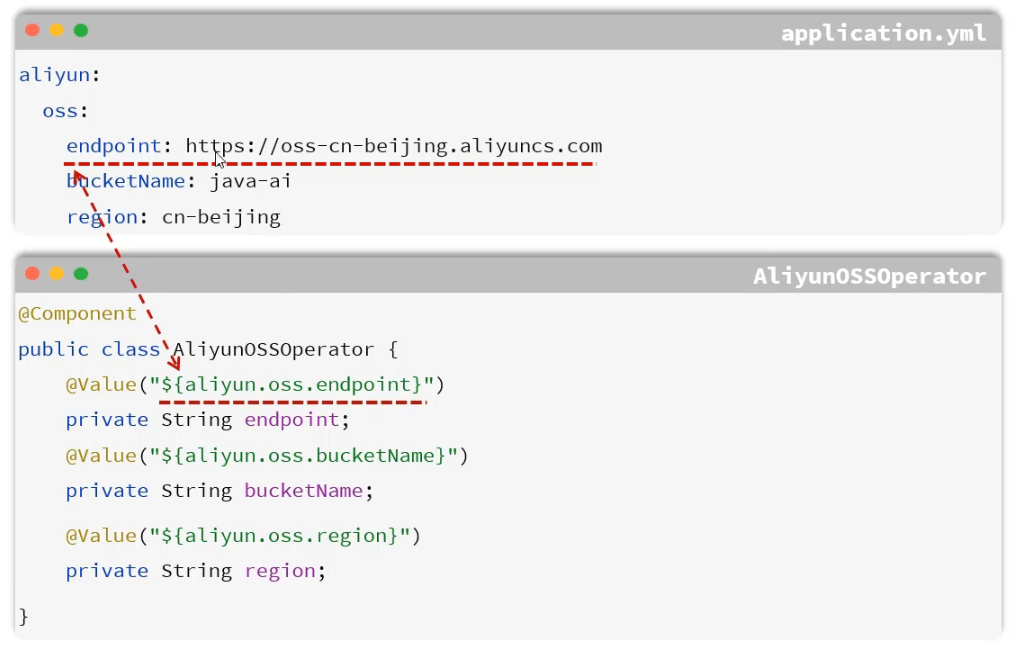
指将一些灵活变化的参数,配置在配置文件中,然后通过@Value注解来注入外部配置的属性
-
@Value
-
@ConfigurationProperties
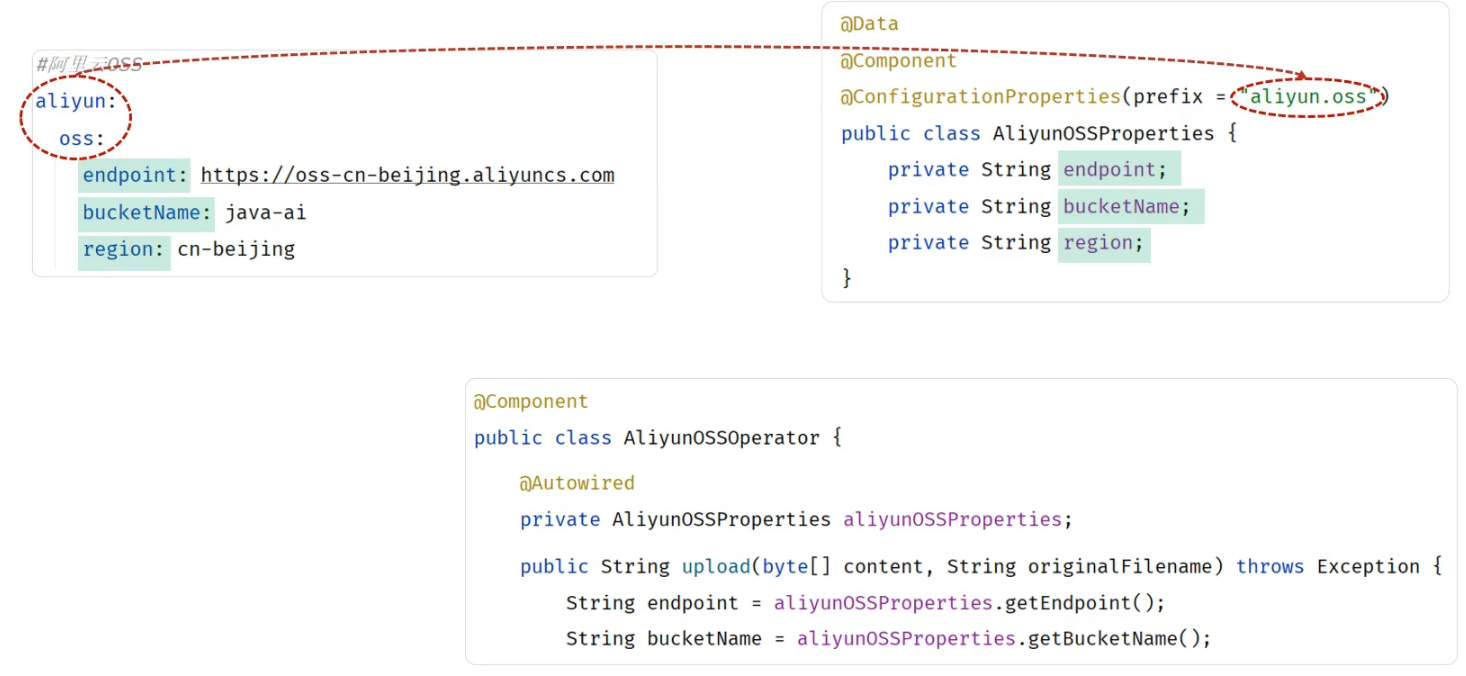
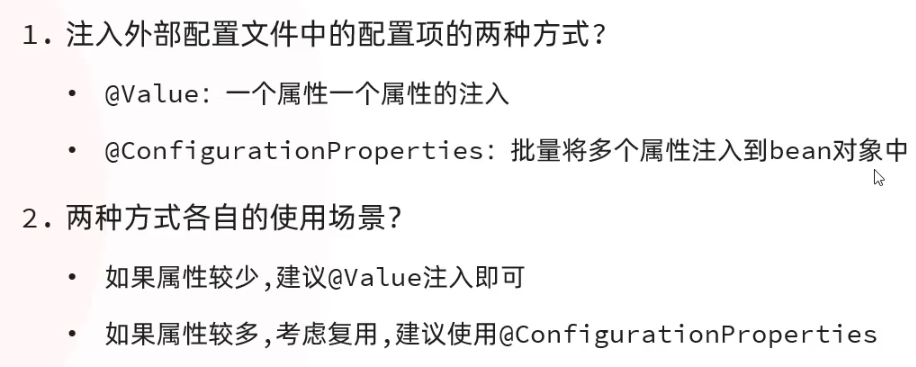
@Data
@Component
@ConfigurationProperties(prefix = "aliyun.oss")
public class AliyunOSSProperties {
    private String endpoint;
    private String buketName;
    private String region;
}
package com.itwyz.demo2.utils;

import java.io.*;
import java.time.LocalDate;
import java.time.format.DateTimeFormatter;
import java.util.UUID;

import com.aliyun.oss.*;
import com.aliyun.oss.common.auth.CredentialsProviderFactory;
import com.aliyun.oss.common.auth.EnvironmentVariableCredentialsProvider;
import com.aliyun.oss.common.comm.SignVersion;
import org.springframework.beans.factory.annotation.Autowired;
import org.springframework.stereotype.Component;

@Component
public class AliyunOSSOperator {
    @Autowired
    private AliyunOSSProperties aliyunOSSProperties;
    public String upload(byte[]content,String originalFilename) throws com.aliyuncs.exceptions.ClientException {
        String endpoint = aliyunOSSProperties.getEndpoint();
        String bucketName = aliyunOSSProperties.getBuketName();
        String region = aliyunOSSProperties.getRegion();

//        获取当前系统日期的字符串,格式为 yyyy/MM
        String dir= LocalDate.now().format(DateTimeFormatter.ofPattern("yyyy/MM"));
//        生成一个不重复的文件名
        String newFileName= UUID.randomUUID()+"."+originalFilename.substring(originalFilename.lastIndexOf("."));
        String objectName=dir+"/"+newFileName;
        // 从环境变量中获取访问凭证。运行本代码示例之前,请先配置环境变量
        EnvironmentVariableCredentialsProvider credentialsProvider =
                CredentialsProviderFactory.newEnvironmentVariableCredentialsProvider();

        // 创建 OSSClient 实例
        ClientBuilderConfiguration clientBuilderConfiguration = new ClientBuilderConfiguration();
        // 显式声明使用 V4 签名算法
        clientBuilderConfiguration.setSignatureVersion(SignVersion.V4);
        OSS ossClient = OSSClientBuilder.create()
                .endpoint(endpoint)
                .credentialsProvider(credentialsProvider)
                .region(region)
                .build();
        try {
            // 1. 创建存储空间(Bucket)
            ossClient.createBucket(bucketName);
            System.out.println("1. Bucket " + bucketName + " 创建成功。");
            // 2. 上传文件
            ossClient.putObject(bucketName, objectName, new ByteArrayInputStream(content));
            System.out.println("2. 文件 " + objectName + " 上传成功。");


        } catch (OSSException oe) {
            System.out.println("Caught an OSSException, which means your request made it to OSS, "
                    + "but was rejected with an error response for some reason.");
            System.out.println("Error Message:" + oe.getErrorMessage());
            System.out.println("Error Code:" + oe.getErrorCode());
            System.out.println("Request ID:" + oe.getRequestId());
            System.out.println("Host ID:" + oe.getHostId());
        } catch (ClientException ce) {
            System.out.println("Caught an ClientException, which means the client encountered "
                    + "a serious internal problem while trying to communicate with OSS, "
                    + "such as not being able to access the network.");
            System.out.println("Error Message:" + ce.getMessage());
        } finally {
            if (ossClient != null) {
                ossClient.shutdown();
            }
        }
        return endpoint.split("//")[0]+"//"+bucketName+"."+endpoint.split("//")[1]+"/"+objectName;
    }
}
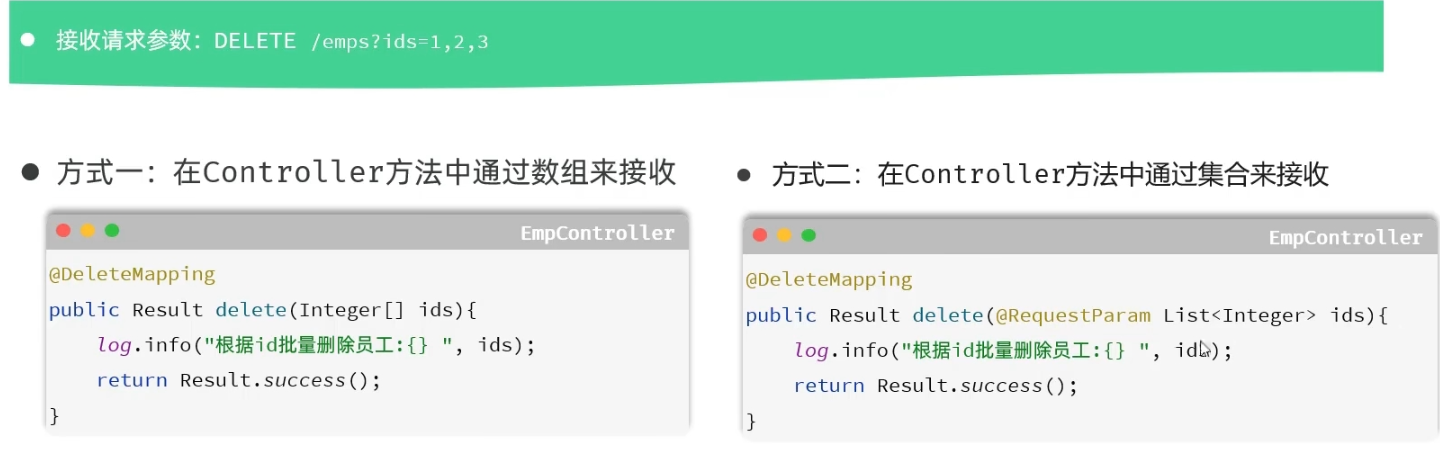
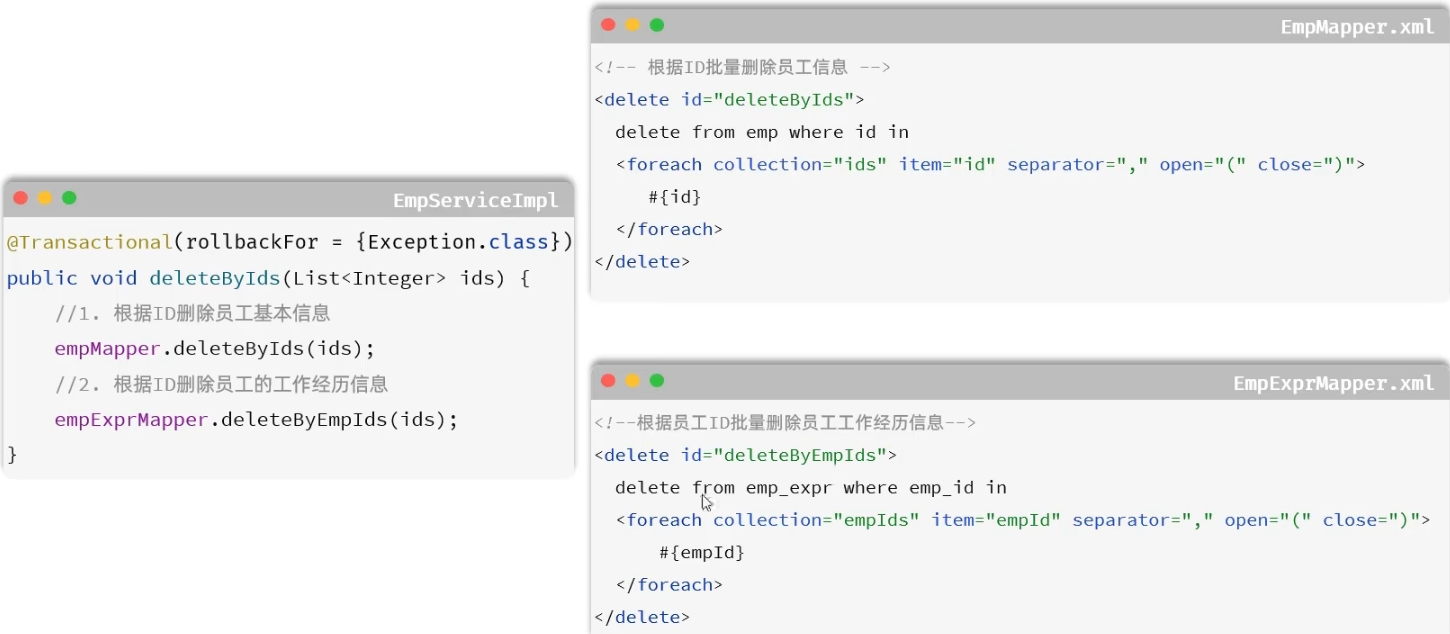
删除
逻辑实现
    @PostMapping("/user")
    public Result addUser(@RequestBody User user){
        System.out.println("添加用户数据"+user);
        userService.addUser(user);
        return Result.success();
    }
        @Transactional(rollbackFor = Exception.class)
        @Override
        public void delete(List<Integer> ids) {
                //删除员工基本信息
                empMapper.delete(ids);

                //删除员工工作信息
                empExprMapper.delete(ids);
        }
编辑
查询回显
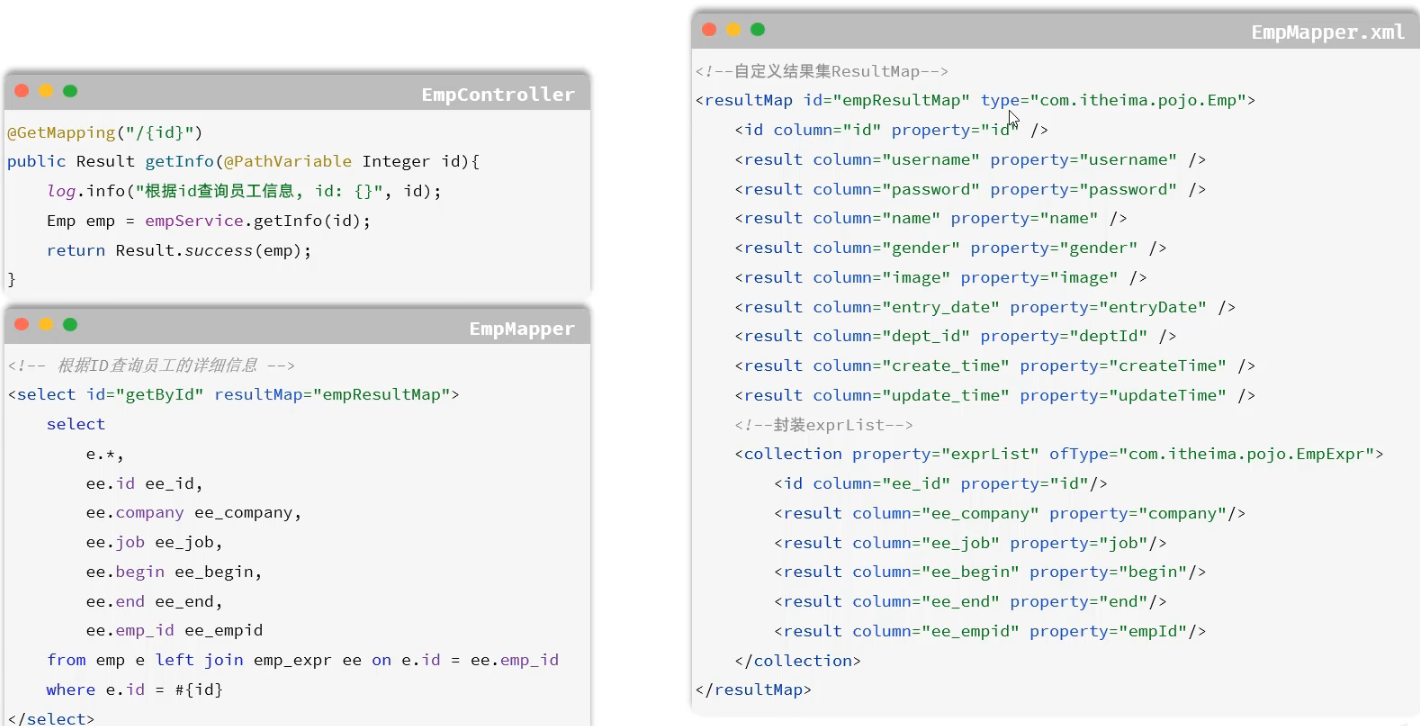
 <resultMap id="empResultMap" type="com.itwyz.demo2.pojo.Emp">
        <id column="id" property="id"/>
        <result column ="name" property="name"/>
        <result column="age" property="age"/>
        <result column="dept_id" property="deptId"/>
        <result column="create_time" property="createTime"/>
        <result column="update_time" property="updateTime"/>
        <collection property="exprList" ofType="com.itwyz.demo2.pojo.Expr">
            <result column="emp_id" property="empId"/>
            <result column="expr" property="expr"/>
        </collection>
    </resultMap>

    <select id="getInfo" resultMap="empResultMap">
    select e.*,ee.emp_id,ee.expr from emp e left join expr ee on e.id=ee.emp_id where e.id=#{id}
    </select>
修改
    @PutMapping()
    public Result update(@RequestBody Emp emp){
        log.info("修改员工:{}", emp);
        empService.update(emp);
        return Result.success();
    }
        @Transactional(rollbackFor = Exception.class)
        @Override
        public void update(Emp emp) {
                //1.更新员工基本信息
                emp.setUpdateTime(LocalDateTime.now());
                empMapper.updateById(emp);
                //2.更新员工工作信息
                empExprMapper.delete(Arrays.asList(emp.getId()));
                if (!CollectionUtils.isEmpty(emp.getExprList())) {
                        emp.getExprList().forEach(expr->{
                                expr.setEmpId(emp.getId());
                                empMapper.insertbach(expr);
                        });
                }
        }
    <update id="updateById">
        update emp
        <set>
            <if test="name != null and name != ''">
                name = #{name},
            </if>
            <if test="age != null and age != 0">
                age = #{age},
            </if>
            <if test="deptId != null">
                dept_id = #{deptId},
            </if>
            <if test="updateTime != null">
                update_time = #{updateTime}
            </if>
        </set>
        where id = #{id}
    </update>
全局异常处理器
项目中出现异常,例如mapper出现异常,异常会由mapper->service->controller然后返回一个JSON格式的Exception响应给前端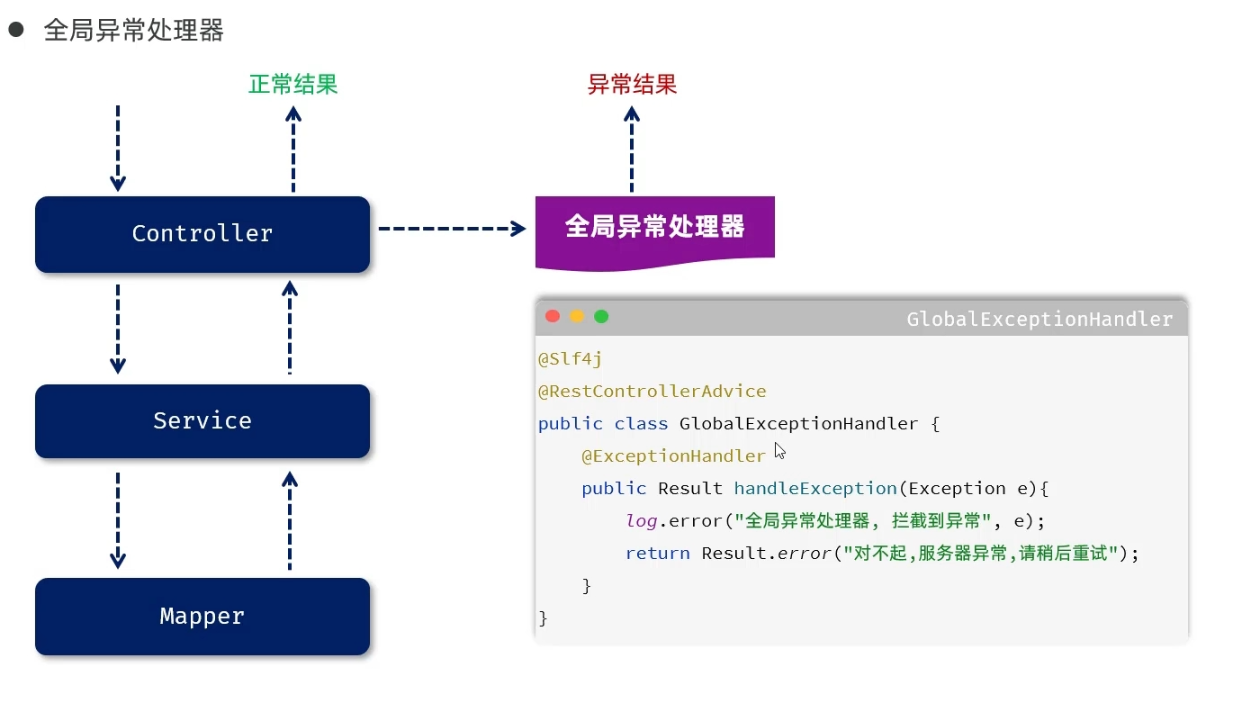
@Slf4j
@RestControllerAdvice
public class GlobalExceptionHandler {
    @ExceptionHandler
    public Result handleException(Exception e) {
        log.error("服务器异常:{}", e);
        return Result.error("服务器异常");
    }

    @ExceptionHandler
    public Result handleException(DuplicateKeyException e) {
        log.error("业务异常:{}", e);
        String s=e.getMessage();
        int i = s.indexOf("Duplicate entry");
        String errMsg=s.substring(i);
        String[] arr=errMsg.split(" ");
        return Result.error(arr[2]+"已存在");
    }
}
信息统计
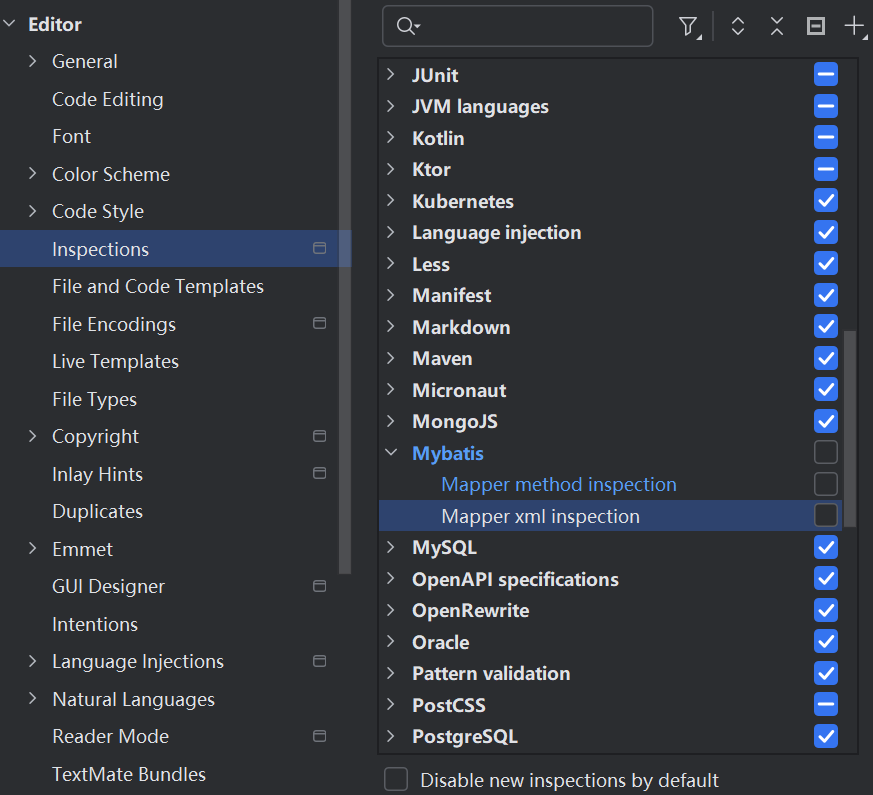
解决mybatisX误报
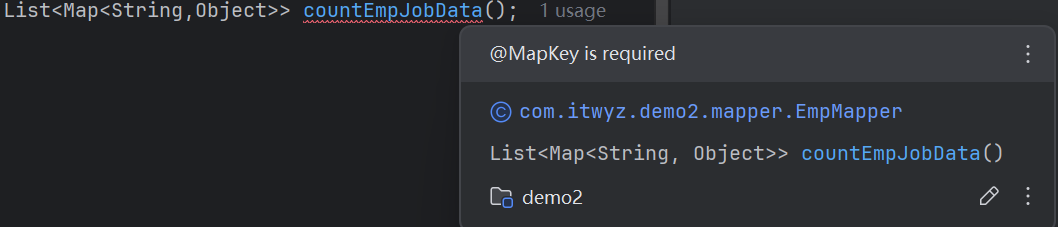
三种方案
-
删除MybatisX
-
添加@MapKey注解
-
如下设置
职位统计
结合Echarts的柱状图
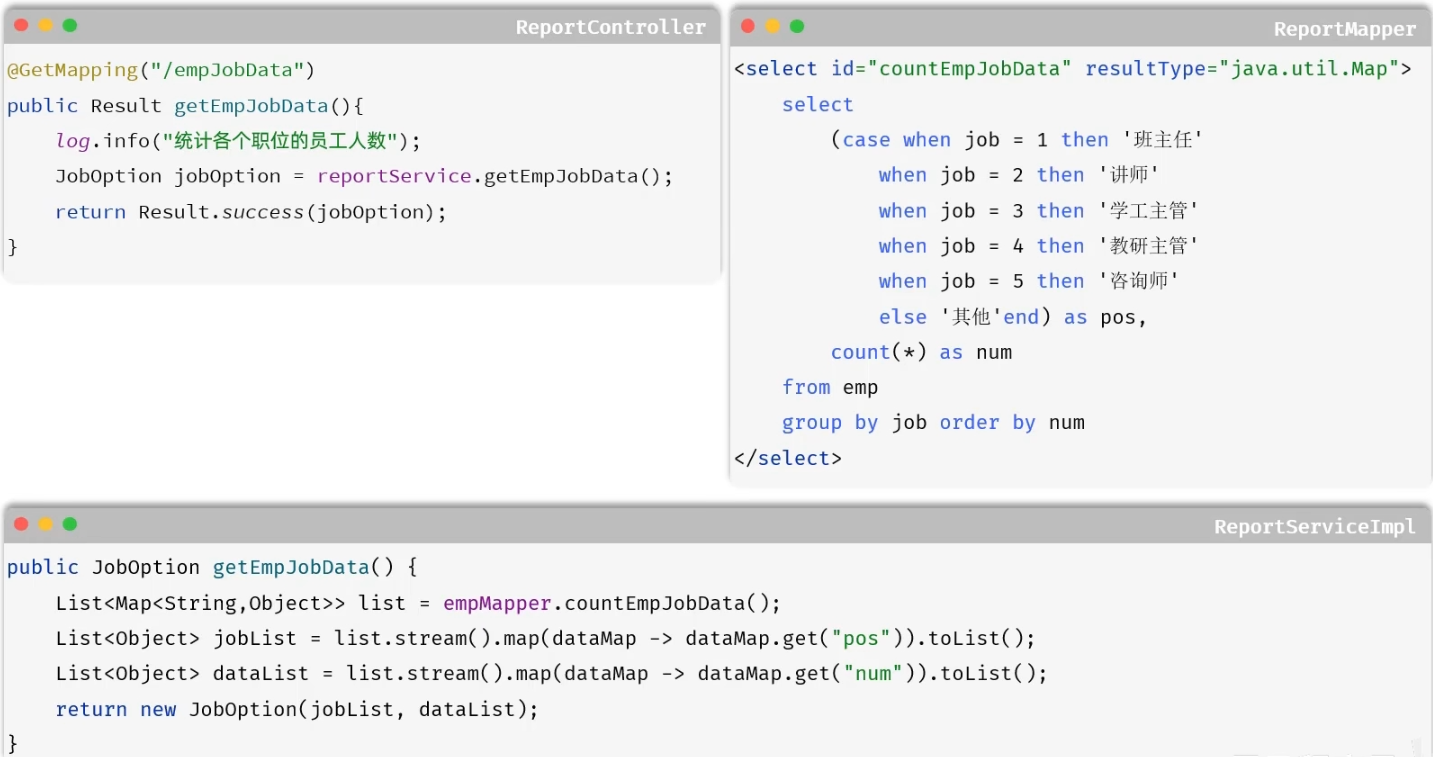
    public JobOption getEmpJobData() {
        List<Map<String, Object>> list = empMapper.countEmpJobData();
        List<Object> jobList = list.stream().map(dataMap -> dataMap.get("pos")).toList();
        List<Object> dataList = list.stream().map(dataMap -> dataMap.get("num")).toList();
        return new JobOption(jobList,dataList);
    }
    @MapKey("pos")
    List<Map<String,Object>> countEmpJobData();
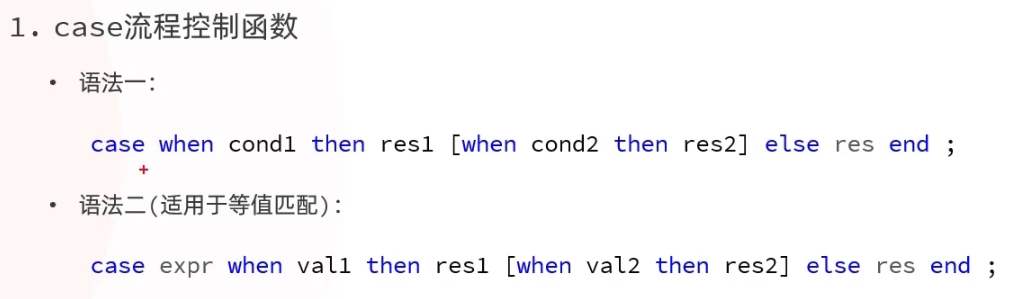
    <select id="countEmpJobData" resultType="java.util.Map">
        select
            case dept_id when 1 then '技术部'
                         when 2 then '财务部'
                         when 3 then '人事部'
                         when 4 then '市场部'
                         else '其他' end as pos,
            count(*) num
        from emp group by dept_id order by num;
    </select>
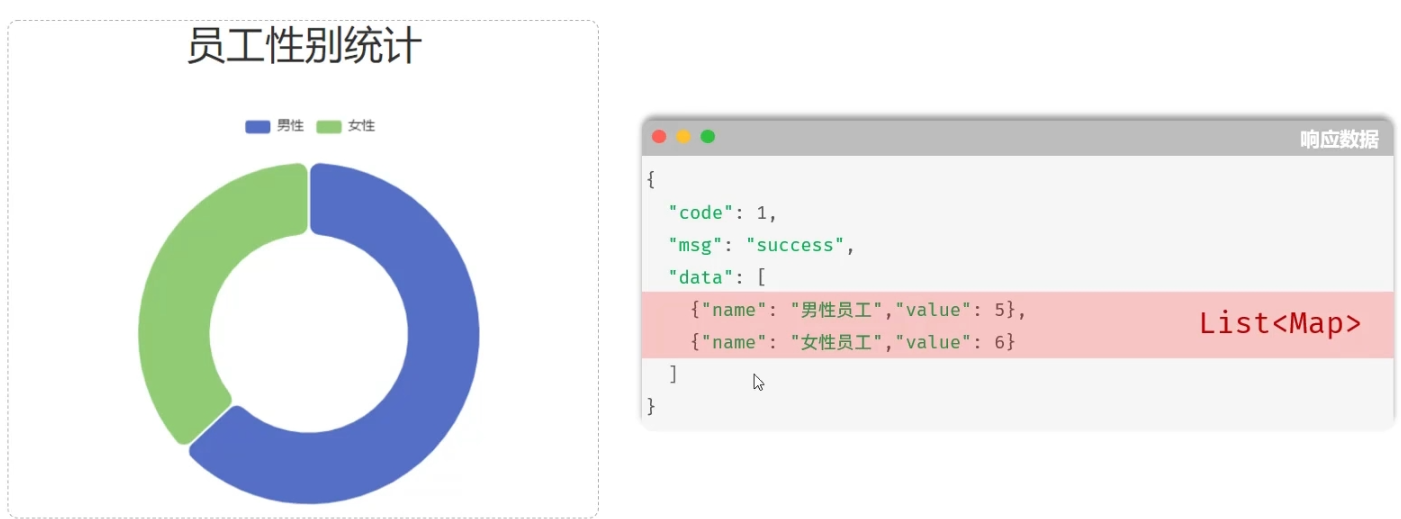
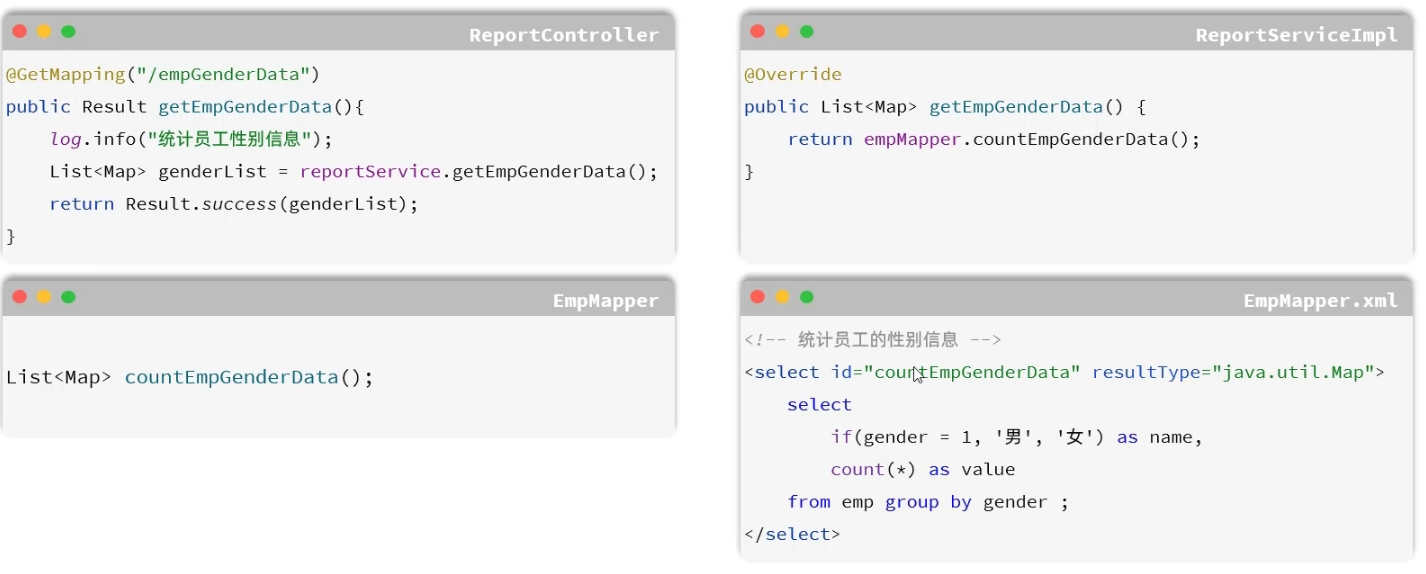
性别统计

登录
    @PostMapping("/login")
    public Result Login(@RequestBody User user){
        log.info("登录信息:{}", user);
        LoginInfo info =userService.login(user);
        if(info!=null){
            return Result.success(info);
        }
        return Result.error("用户名或密码错误");
    }
    @Override
    public LoginInfo login(User user) {
        // 根据用户名和密码查询员工信息
        User u =userMapper.selectByUsernameAndPassword(user.getUsername(),user.getPassword());
        //判断是否存在这个员工,如果存在,组装登录成功信息
        if(u!=null){
            return new LoginInfo(u.getUserId(),u.getUsername(),u.getPassword(),"00000");
        }
        //不存在返回null
        return null;
    }
    @Select("select user_id id,username,password from user where username=#{username} and password=#{password}")
    User selectByUsernameAndPassword(String username, String password);
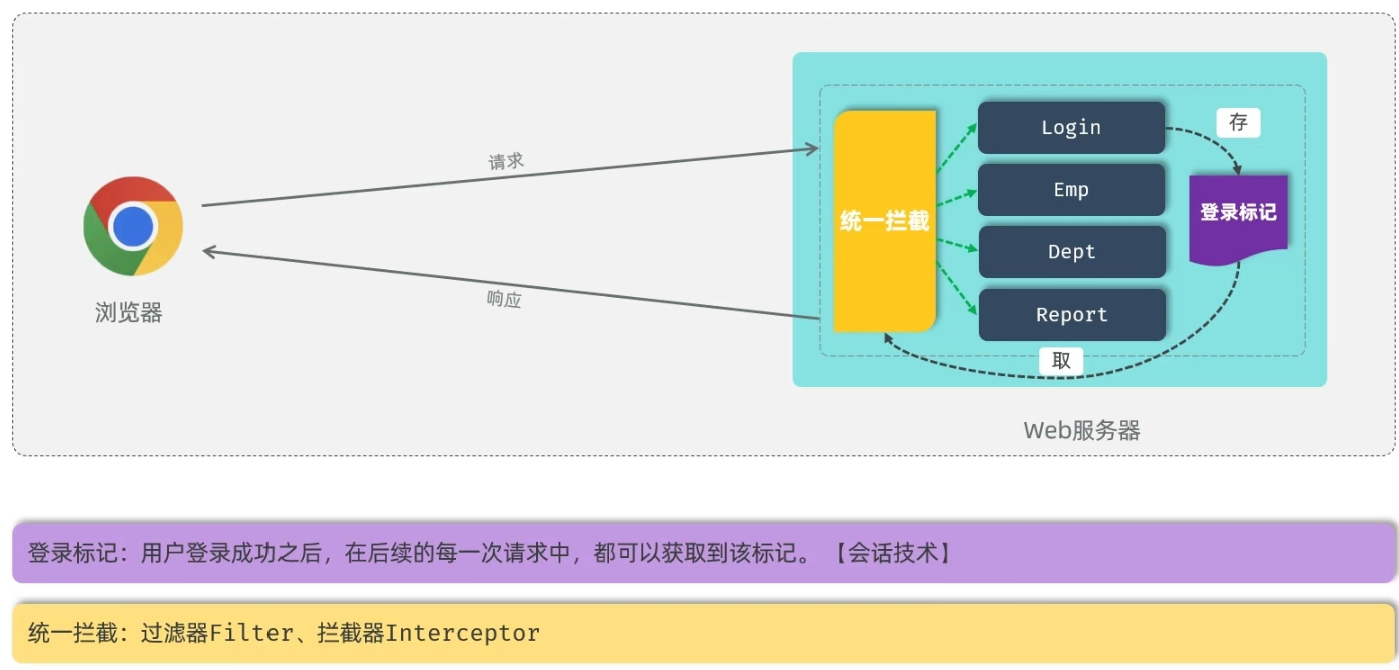
登录校验
会话
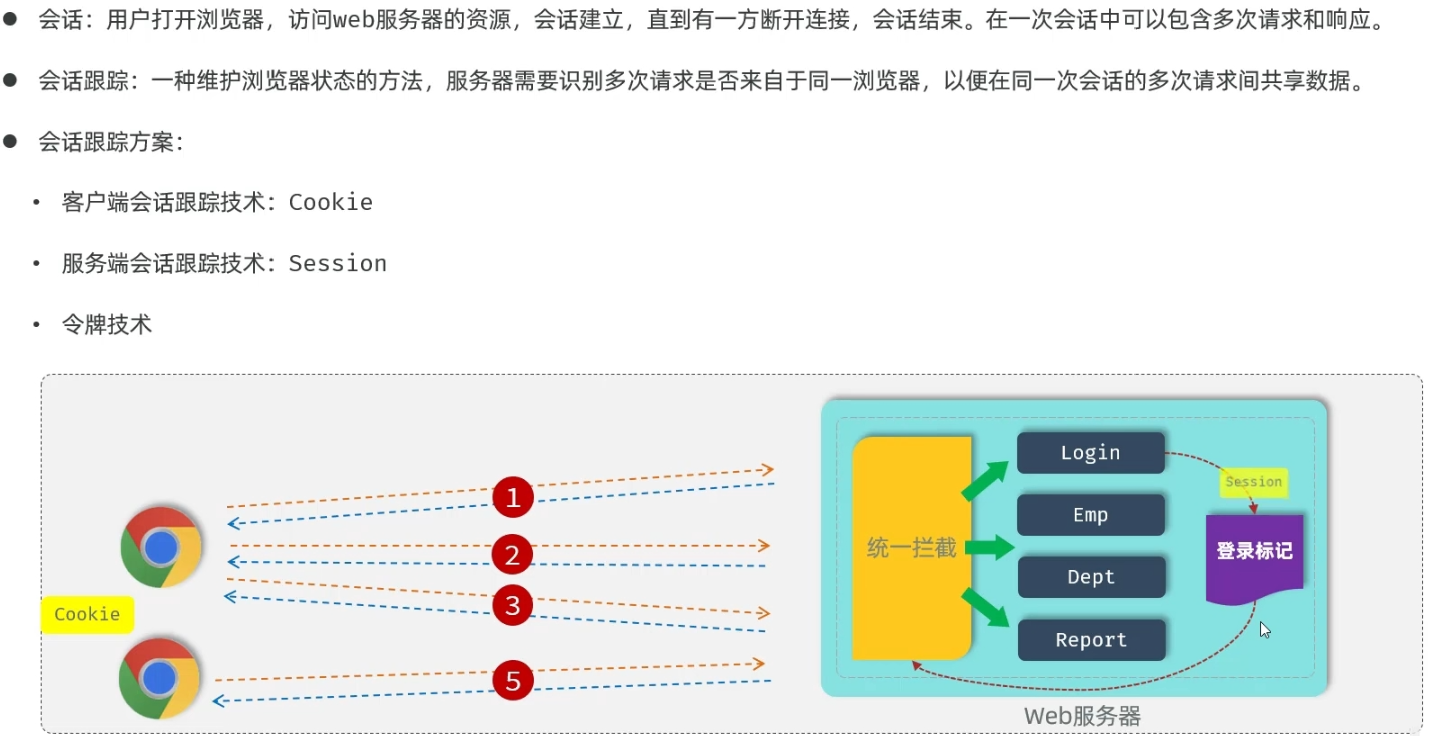
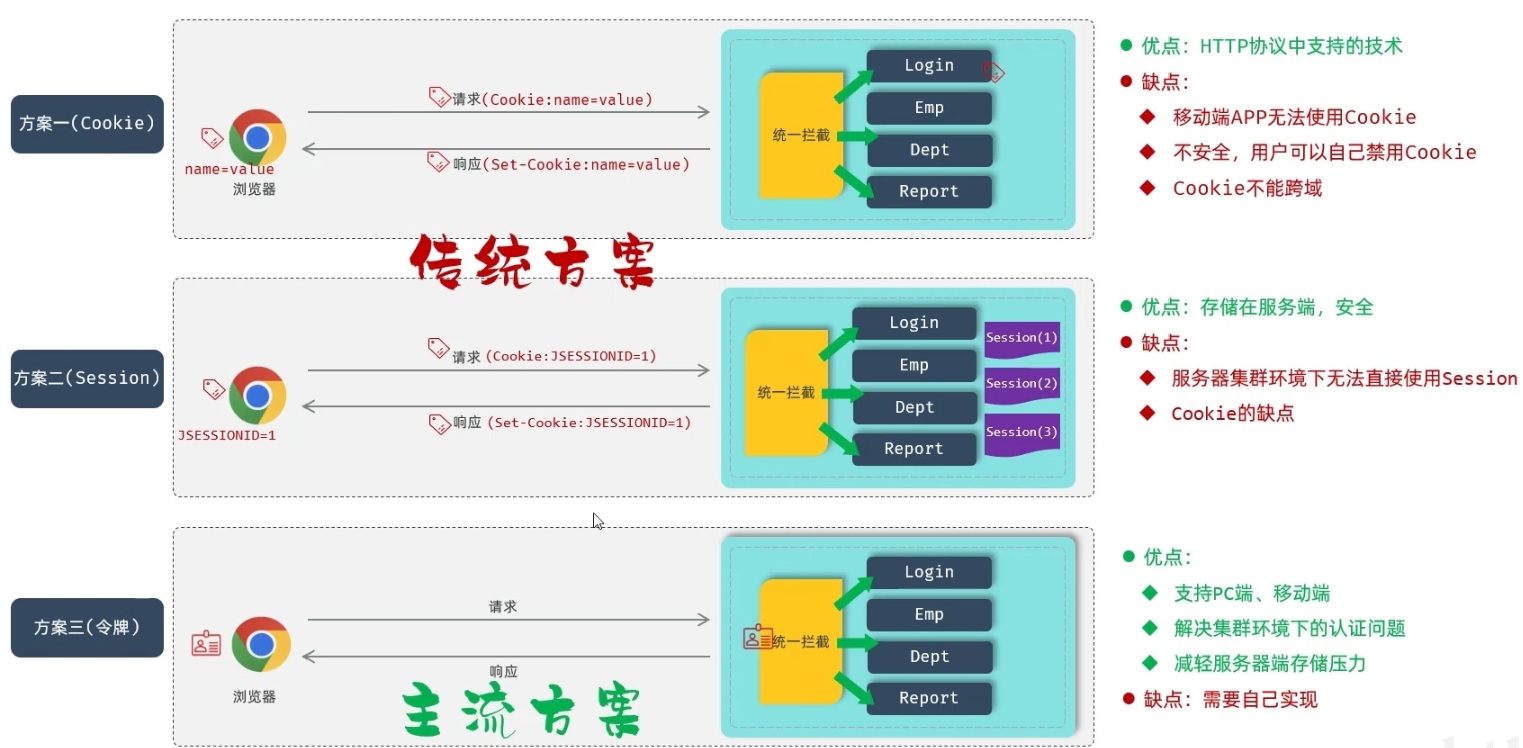
Cookie
三个自动
-
服务器端创建好cookie后会自动响应给浏览器
-
浏览器会自动将cookie存储在浏览器本地
-
后续请求中cookie会自动携带到浏览器
Session
底层是基于cookie,不同的是cookie中存储的是服务端会话对象session的id值
令牌
-
登录成功后创建令牌,响应给客户端
-
客户端存储令牌
-
之后每一次请求都携带令牌
-
服务器端校验有效性,有效放行,无效返回错误结果
JWT
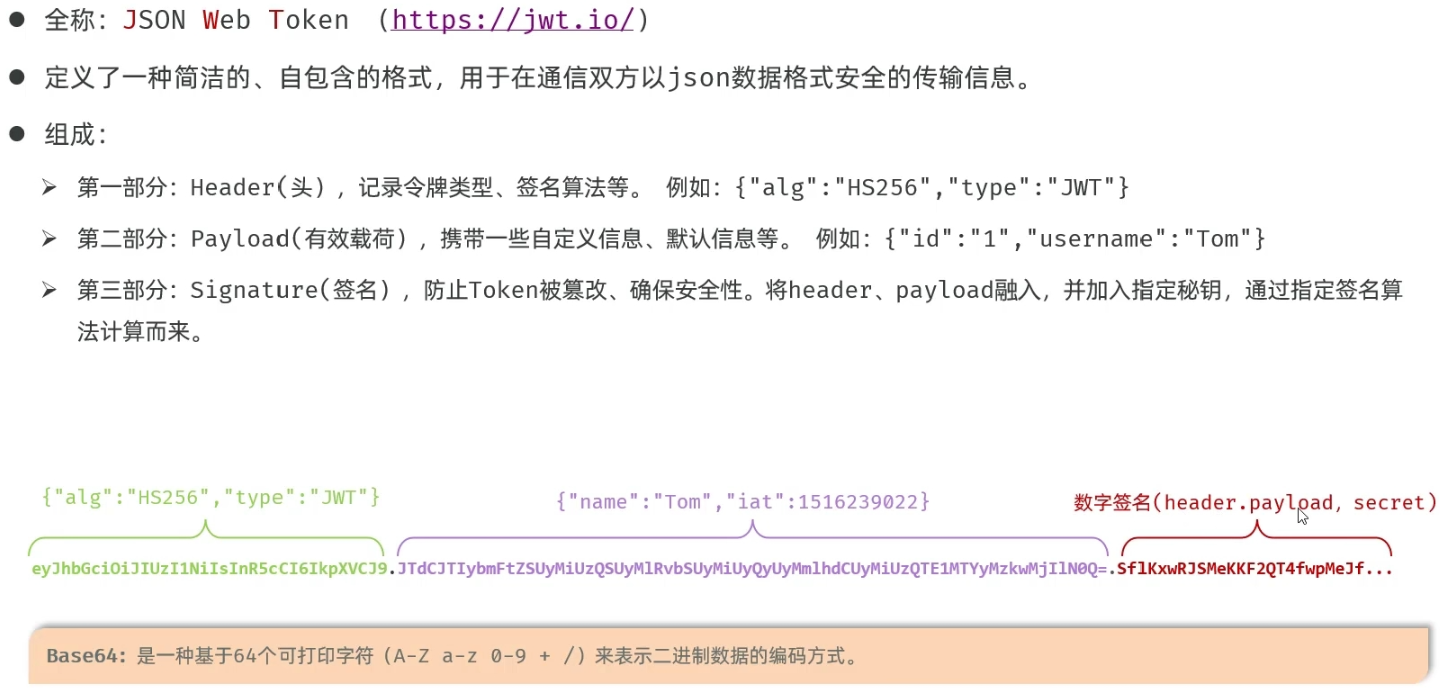
-
引入jjwt的依赖
<dependency>
			<groupId>io.jsonwebtoken</groupId>
			<artifactId>jjwt</artifactId>
			<version>0.9.1</version>
		</dependency>
-
调用官方提供的工具类Jwts来生成jwt令牌
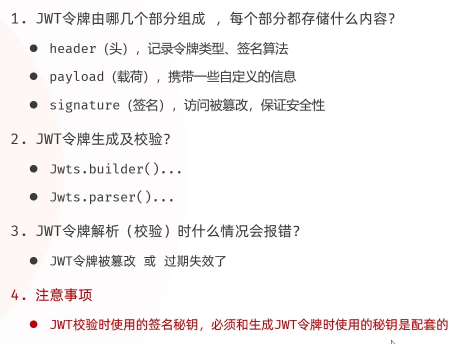
    public void testGenerateJwt() {
        Map<String, Object> dataMap = new HashMap<>();
        dataMap.put("id", 1);
        dataMap.put("username", "wyz");
        String jwt = Jwts.builder().signWith(SignatureAlgorithm.HS256, "aXR3eXo=")
                .addClaims(dataMap)
                .setExpiration(new Date(System.currentTimeMillis() + 3600 * 1000))
                .compact();
        System.out.println(jwt);
    }
    public void testParseJwt() {
        String token="eyJhbGciOiJIUzI1NiJ9.eyJpZCI6MSwidXNlcm5hbWUiOiJ3eXoiLCJleHAiOjE3NDY1NDU1ODV9.vR9wAR5Q1wQDDDfqTE9NMdB3DwzhZZNqSXRe0BGpCqw";
        Claims claims = Jwts.parser().setSigningKey("aXR3eXo=")
                .parseClaimsJws(token)
                .getBody();
        System.out.println(claims);
    }
-
登录完成后生成令牌
-
定义jwt令牌生成工具类
-
登录完成后,调用工具类生成jwt令牌并返回
-
package com.itwyz.demo2.utils;

import io.jsonwebtoken.Claims;
import io.jsonwebtoken.Jwts;
import io.jsonwebtoken.SignatureAlgorithm;

import java.util.Date;
import java.util.Map;

public class JwtUtils {

    // 密钥与测试类中一致
    private static final String SECRET_KEY = "aXR3eXo=";

    // 过期时间:12小时
    private static final long EXPIRATION = 12 * 60 * 60 * 1000;

    /**
     * 生成 JWT 令牌
     *
     * @param claims 自定义数据
     * @return 返回生成的令牌字符串
     */
    public static String generateToken(Map<String, Object> claims) {
        return Jwts.builder()
                .signWith(SignatureAlgorithm.HS256, SECRET_KEY)
                .addClaims(claims)
                .setExpiration(new Date(System.currentTimeMillis() + EXPIRATION))
                .compact();
    }

    /**
     * 解析 JWT 令牌
     *
     * @param token 要解析的令牌字符串
     * @return 返回解析后的 Claims 数据
     */
    public static Claims parseToken(String token) {
        return Jwts.parser()
                .setSigningKey(SECRET_KEY)
                .parseClaimsJws(token)
                .getBody();
    }
}
@Slf4j
@RestController()
@RequestMapping()
public class LoginController {

    @Autowired
    private UserService userService;
    @PostMapping("/login")
    public LoginInfo Login(@RequestBody User user){
        LoginInfo info =userService.login(user);
        if(info!=null){
            log.info("登录成功{}",info);
            //生成Jwt令牌
            Map<String,Object> claims=new HashMap<>();
            claims.put("id",info.getId());
            claims.put("username",info.getUsername());
            String jwt = JwtUtils.generateToken(claims);
            return new LoginInfo(info.getId(),info.getUsername(), info.getPassword(), jwt);
        }
        return null;
    }

}
Filter
Filter过滤器可以把对资源的请求拦截下来,从而实现一些特殊的功能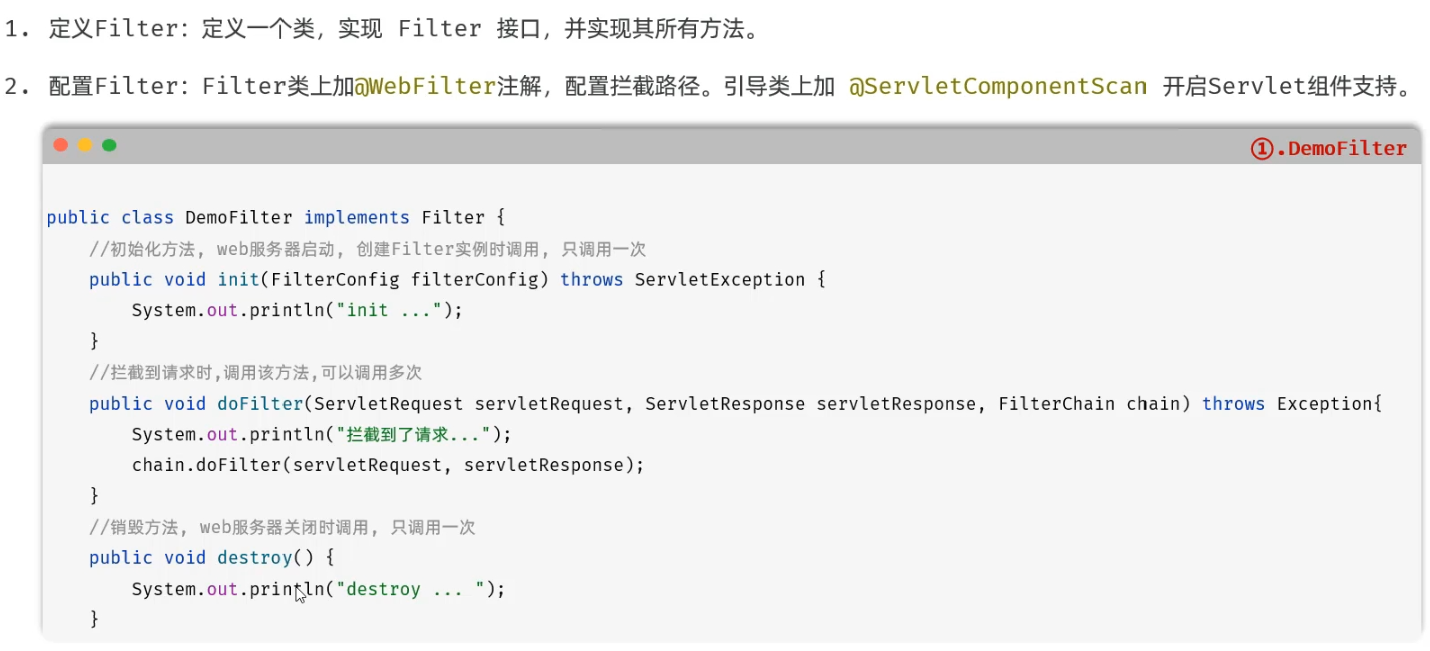
启动类上加@ServeletComponentScan
@WebFilter(urlPatterns = "/*")
@Slf4j
public class DemoFilter implements Filter {

    @Override
    public void init(FilterConfig filterConfig) throws ServletException {
       log.info("过滤器初始化");
    }

    @Override
    public void doFilter(ServletRequest servletRequest, ServletResponse servletResponse, FilterChain filterChain) throws IOException, ServletException {
        log.info("过滤器开始执行");
        filterChain.doFilter(servletRequest,servletResponse);
    }

    @Override
    public void destroy() {
        log.info("过滤器销毁");
    }
}
令牌校验
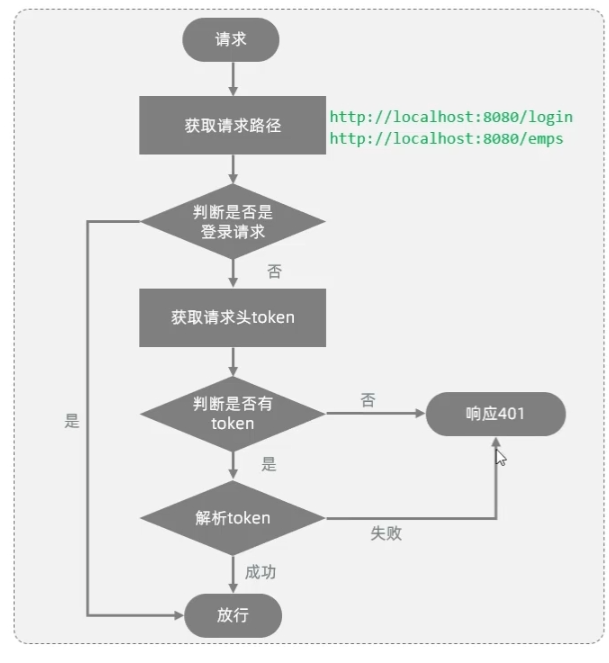
package com.itwyz.demo2.filter;

import com.itwyz.demo2.utils.JwtUtils;
import jakarta.servlet.*;
import jakarta.servlet.annotation.WebFilter;
import jakarta.servlet.http.HttpServletRequest;
import jakarta.servlet.http.HttpServletResponse;
import lombok.extern.slf4j.Slf4j;

import java.io.IOException;

@WebFilter(urlPatterns = "/*")
@Slf4j
public class TokenFilter implements Filter {
    @Override
    public void doFilter(ServletRequest servletRequest, ServletResponse servletResponse, FilterChain filterChain) throws IOException, ServletException {
        HttpServletRequest request = (HttpServletRequest) servletRequest;
        HttpServletResponse response = (HttpServletResponse) servletResponse;
        //1.获取到请求路径
        String requestURI = request.getRequestURI();
        //2.判断是否是登录请求,如果路径包含/login,放行
        if(requestURI.contains("/login")){
            filterChain.doFilter(request,response);
            return;
        }
        //3.获取请求头中的token
        String token =request.getHeader("token");
        //4.判读token是否为空,如果为空,返回错误信息,
        if(token==null|| token.isEmpty()){
            log.info("令牌为空,响应401");
            response.setStatus(HttpServletResponse.SC_UNAUTHORIZED);
            return;
        }
        //5.如果Token存在,校验令牌,如果校验失败,返回错误信息
        try {
            JwtUtils.parseToken(token);
        } catch (Exception e) {
            log.info("令牌校验不通过,响应401");
            response.setStatus(HttpServletResponse.SC_UNAUTHORIZED);
            return;
        }
        //6.校验通过,放行
        log.info("令牌校验通过,放行");
        filterChain.doFilter(request,response);
    }
}
-
放行后访问对应资源,访问完成后,还会回到Filter中,并执行之后的操作
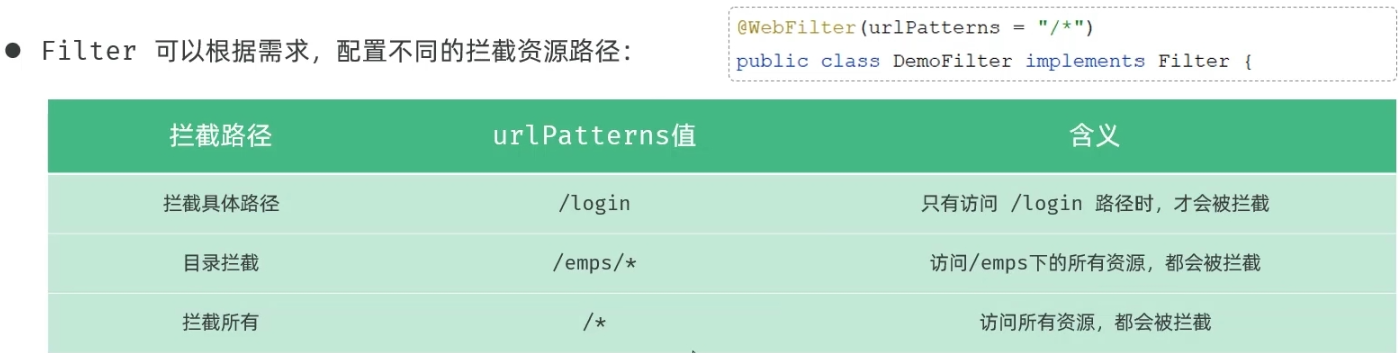
-
一个web应用中可以配置多个过滤器,这多个过滤器形成了一个过滤器链
-
注解配置的Filter,优先级是按照过滤器类名的自然排序
Interceptor
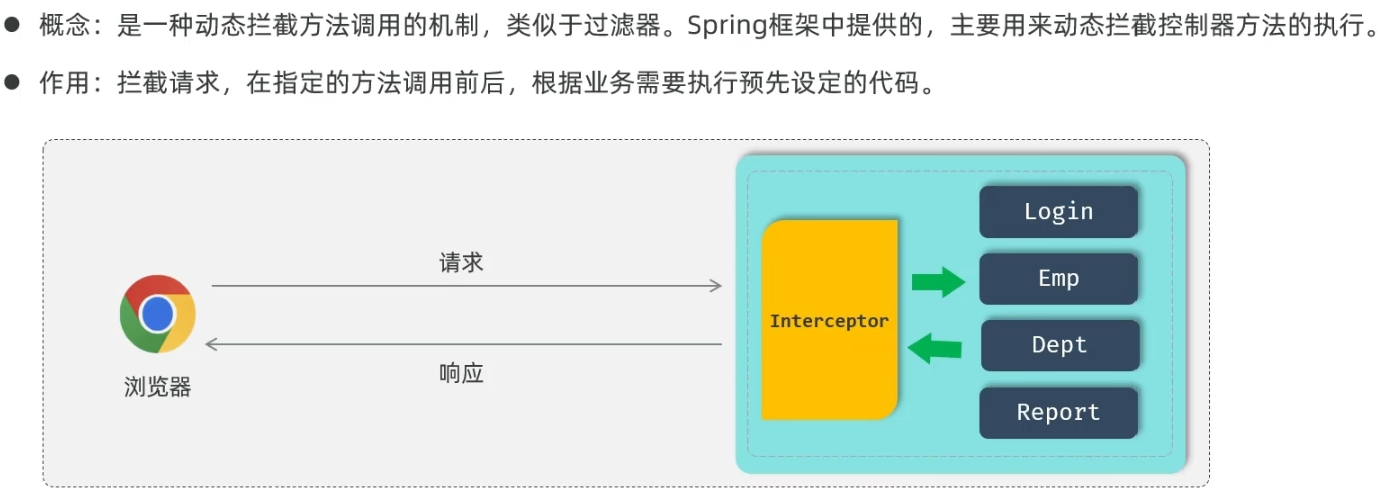
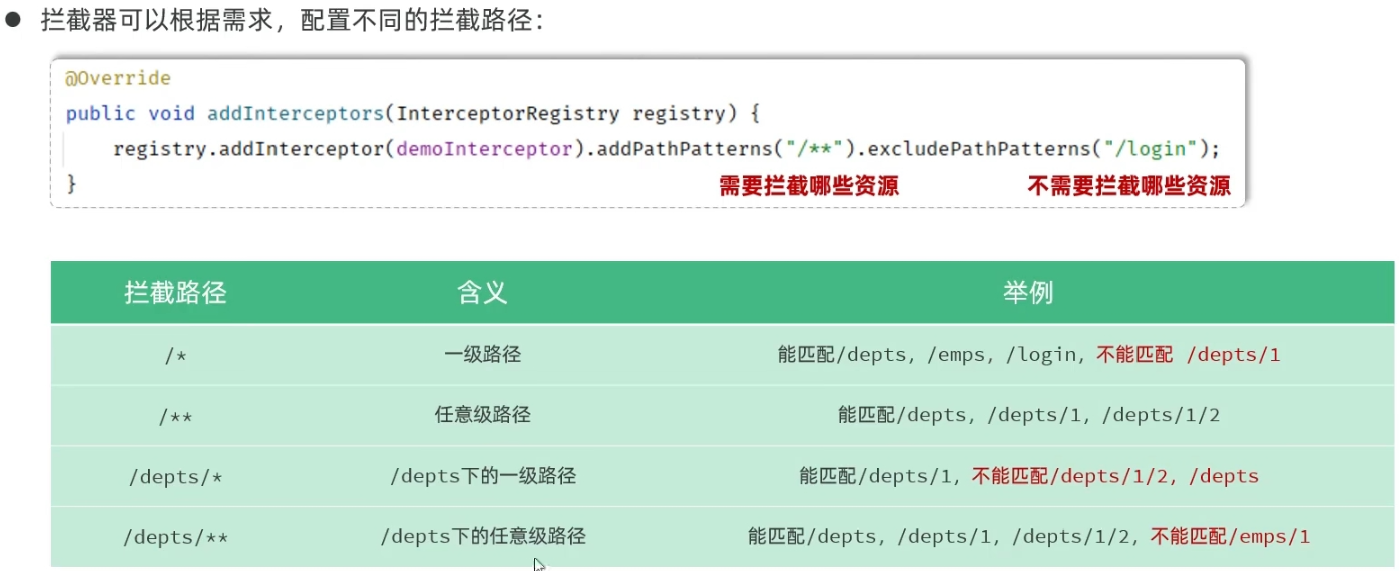
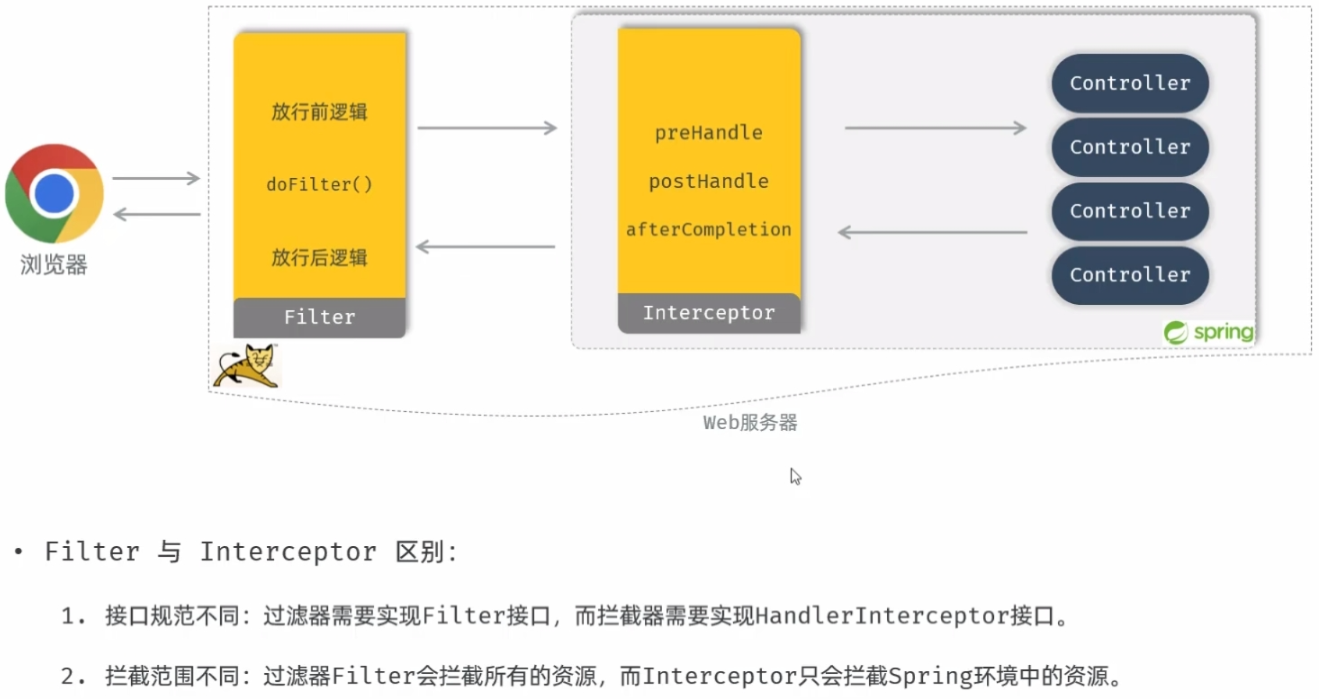
package com.itwyz.demo2.intercepter;

import com.itwyz.demo2.utils.JwtUtils;
import jakarta.servlet.http.HttpServletRequest;
import jakarta.servlet.http.HttpServletResponse;
import lombok.extern.slf4j.Slf4j;
import org.springframework.stereotype.Component;
import org.springframework.web.servlet.HandlerInterceptor;

@Slf4j
@Component
public class TokenIntercepter implements HandlerInterceptor {
    @Override
    public boolean preHandle(HttpServletRequest request, HttpServletResponse response, Object handler) throws Exception {

        //3.获取请求头中的token
        String token =request.getHeader("token");
        //4.判读token是否为空,如果为空,返回错误信息,
        if(token==null || token.isEmpty()){
            log.info("令牌为空,响应401");
            response.setStatus(HttpServletResponse.SC_UNAUTHORIZED);
            return false;
        }
        //5.如果Token存在,校验令牌,如果校验失败,返回错误信息
        try {
            JwtUtils.parseToken(token);
        } catch (Exception e) {
            log.info("令牌校验不通过,响应401");
            response.setStatus(HttpServletResponse.SC_UNAUTHORIZED);
            return false;
        }
        //6.校验通过,放行
        log.info("令牌校验通过,放行");
        return true;
    }
}
package com.itwyz.demo2.config;

import com.itwyz.demo2.intercepter.TokenIntercepter;
import org.springframework.beans.factory.annotation.Autowired;
import org.springframework.context.annotation.Configuration;
import org.springframework.web.servlet.config.annotation.InterceptorRegistry;
import org.springframework.web.servlet.config.annotation.WebMvcConfigurer;

@Configuration
public class WebConfig implements WebMvcConfigurer {

    @Autowired
    private TokenIntercepter tokenIntercepter;
    @Override
    public void addInterceptors(InterceptorRegistry registry) {
        registry.addInterceptor(tokenIntercepter)
                .addPathPatterns("/**")         //拦截所有请求
                .excludePathPatterns("/login"); //不拦截登录请求
    }
}
更多推荐

 9
9 0
0- 0


 已为社区贡献2条内容

所有评论(0)