
python + pygame + pywin32 + pynput 实现鼠标点击和拖尾特效脚本制作
·
1.下载脚本:
pip install pygame pynput pywin32
2. 实现效果:
点击效果:
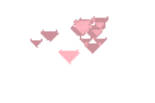
拖尾效果:
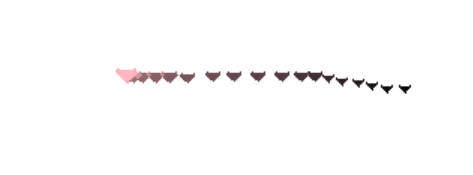
3.具体代码如下(可自行下载修改):
import pygame
import sys
import random
import win32gui
import win32con
from pynput import mouse

# ===================== 配置区(可自行改颜色/大小/长度)=====================
TRAIL_COLOR = (135, 206, 235)    # 天蓝色 清凉拖尾
HEART_COLOR = (255, 182, 193)    # 浅粉色 爱心
MAX_TRAIL_LEN = 22               # 拖尾长度
PARTICLE_COUNT = 12              # 单次点击爱心数量
FPS = 60
# =======================================================================

# 初始化Pygame
pygame.init()
screen_w = pygame.display.Info().current_w
screen_h = pygame.display.Info().current_h

# 创建无边框全屏窗口
screen = pygame.display.set_mode((screen_w, screen_h), pygame.NOFRAME)
pygame.display.set_caption("Mouse Cute Effect")

# ========== 修复版:窗口透明 + 置顶 + 颜色抠图 ==========
hwnd = pygame.display.get_wm_info()["window"]
# 扩展窗口样式
win32gui.SetWindowLong(
    hwnd,
    win32con.GWL_EXSTYLE,
    win32gui.GetWindowLong(hwnd, win32con.GWL_EXSTYLE) | win32con.WS_EX_LAYERED
)
# 关键修复:把RGB元组转成COLORREF整数(0x00BBGGRR)
black_color = 0x000000
win32gui.SetLayeredWindowAttributes(hwnd, black_color, 0, win32con.LWA_COLORKEY)
# 置顶
win32gui.SetWindowPos(hwnd, win32con.HWND_TOPMOST, 0, 0, 0, 0, win32con.SWP_NOMOVE | win32con.SWP_NOSIZE)

# 存储鼠标拖尾坐标
trail_list = []
# 爱心粒子列表
heart_list = []

# 爱心粒子类
class Heart:
    def __init__(self, x, y):
        self.x = x
        self.y = y
        self.size = random.randint(8, 16)
        self.vx = random.uniform(-2.5, 2.5)
        self.vy = random.uniform(-3.5, -1)
        self.life = 50
        self.color = HEART_COLOR

    def update(self):
        self.x += self.vx
        self.y += self.vy
        self.vy += 0.12
        self.life -= 1
        self.size *= 0.96

    def draw(self, surf):
        if self.life <= 0:
            return
        alpha = int(255 * (self.life / 50))
        heart_surf = pygame.Surface((self.size * 2, self.size * 2), pygame.SRCALPHA)
        s = self.size
        # 爱心顶点
        points = [
            (s, s * 0.25),
            (s * 0.2, s * 0.1),
            (s * 0.05, s * 0.4),
            (s, s * 1.3),
            (s * 1.95, s * 0.4),
            (s * 1.8, s * 0.1)
        ]
        pygame.draw.polygon(heart_surf, (*self.color, alpha), points)
        surf.blit(heart_surf, (self.x - s, self.y - s))

# 鼠标点击监听
def on_mouse_click(x, y, button, pressed):
    if pressed:
        for _ in range(PARTICLE_COUNT):
            heart_list.append(Heart(x, y))

# 启动监听
mouse_listener = mouse.Listener(on_click=on_mouse_click)
mouse_listener.start()

clock = pygame.time.Clock()
run_flag = True

# 主循环
while run_flag:
    # 事件监听
    for event in pygame.event.get():
        if event.type == pygame.QUIT:
            run_flag = False
        if event.type == pygame.KEYDOWN:
            if event.key == pygame.K_ESCAPE:
                run_flag = False

    # 获取鼠标坐标
    mx, my = pygame.mouse.get_pos()
    trail_list.append((mx, my))
    if len(trail_list) > MAX_TRAIL_LEN:
        trail_list.pop(0)

    # 填充纯黑(被设为透明色)
    screen.fill((0, 0, 0))

    # 绘制拖尾圆点
    for idx, (tx, ty) in enumerate(trail_list):
        ratio = idx / MAX_TRAIL_LEN
        alpha = int(255 * ratio)
        r = 2 + ratio * 4
        dot_surf = pygame.Surface((int(r*2), int(r*2)), pygame.SRCALPHA)
        pygame.draw.circle(dot_surf, (*TRAIL_COLOR, alpha), (int(r), int(r)), int(r))
        screen.blit(dot_surf, (tx - r, ty - r))

    # 更新+绘制爱心
    for h in heart_list[:]:
        h.update()
        if h.life <= 0:
            heart_list.remove(h)
        else:
            h.draw(screen)

    pygame.display.flip()
    clock.tick(FPS)

# 退出收尾
mouse_listener.stop()
pygame.quit()
sys.exit()更多推荐

 5
5 0
0- 0


 已为社区贡献1条内容

所有评论(0)