
JavaSE大神进阶篇(第十二期):Java数据库编程艺术之深度剖析JDBC原理、DAO模式与数据库设计三大范式
·
JDBC概述
-
什么是JDBC
-
JDBC访问数据库编码步骤
-
JDBD历史版本及特征
JDBC初识
-
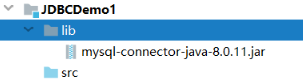
创建项目和模块, 将jar文件放入项目的lib目录中
-
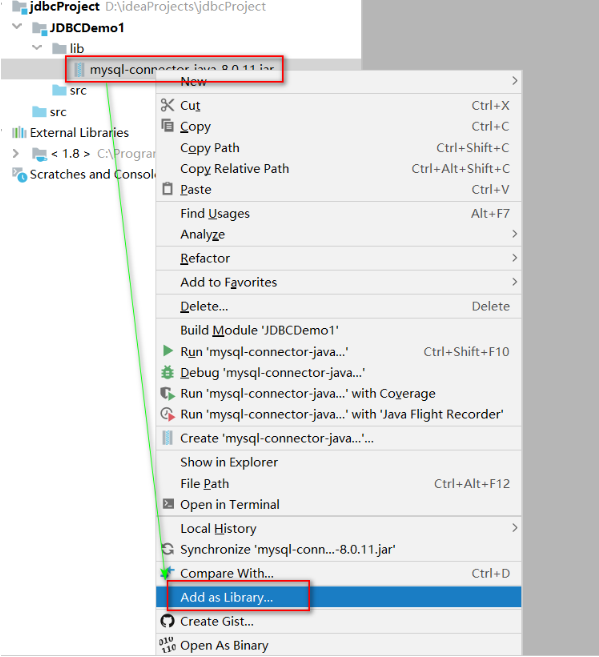
给当前项目添加依赖(告诉当前项目 / 模块可以依赖jar文件中的代码)
-
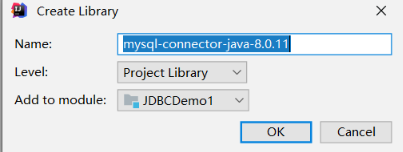
点击OK
-
向部门表中添加一条数据
package com.xxx.test1; import java.sql.Connection; import java.sql.Driver; import java.sql.DriverManager; import java.sql.Statement; public class TestJDBC { public static void main(String[] args) throws Exception { /* 向Dept表增加一条数据 */ //1加载驱动 Driver Driver driver = new com.mysql.cj.jdbc.Driver(); //2注册驱动 DriverManager DriverManager.registerDriver(driver); //3获得链接 Connection /* user: 用户名 password: 密码 url: 统一资源定位符 定位我们要连接的数据库的 1协议 jdbc:mysql 2IP 127.0.0.1/localhost 3端口号 3306 4数据库名字 mydb 5参数 协议://ip:端口/资源路径?参数名=参数值&参数名=参数值&.... jdbc:mysql://127.0.0.1:3306/mydb */ String url = "jdbc:mysql://127.0.0.1:3306/mydb?useSSL=false&useUnicode=true&characterEncoding=UTF-8&serverTimezone=Asia/Shanghai"; String user = "root"; String password = "root"; Connection connection = DriverManager.getConnection(url, user, password ); //4获得语句对象 Statment Statement statement = connection.createStatement(); //5执行SQL语句,返回结果 /* insert delete update 操作都是调用 statement.executeUpdate executeUpdate 返回一个int值, 代表数据库多少行数据发生了变化 */ String sql = "insert into dept values(50,'教学部','北京');"; int rows = statement.executeUpdate(sql); System.out.println("影响数据行数为:"+rows); //6释放资源 /* 注意顺序 后获得的先关闭,先获得的后关闭 */ statement.close(); connection.close(); } } -
总结
-
MySQL8中数据库连接的四个参数有两个发生了变化
-
错误1:
Exception in thread "main" java.lang.ClassNotFoundException: com.mysql.jdbc2.Driver -
错误2:
Exception in thread "main" java.sql.SQLException: No suitable driver found for jbdc:mysql://127.0.0.1:3306/stumgr -
错误3:
Exception in thread "main" java.sql.SQLException: Access denied for user 'root'@'localhost' (using password: YES) -
错误4:
Exception in thread "main" com.mysql.jdbc.exceptions.jdbc4.MySQLIntegrityConstraintViolationException:Duplicate entry '90' for key 'PRIMARY' -
错误5:
Public Key Retrieval is not allowed-
如果用户使用
sha256_password认证,密码在传输过程中必须使用TLS协议保护,但是如果RSA公钥不可用,可以使用服务器提供的公钥;可以在连接中通过ServerRSAPublicKeyFile指定服务器的RSA公钥,或者AllowPublicKeyRetrieval=True参数以允许客户端从服务器获取公钥;但是需要注意的是AllowPublicKeyRetrieval=True可能会导致恶意的代理通过中间人攻击(MITM)获取到明文密码,所以默认是关闭的,必须显式开启, 在jdbc连接添加上参数allowPublicKeyRetrieval=true即可,注意参数间用&
-
-
-
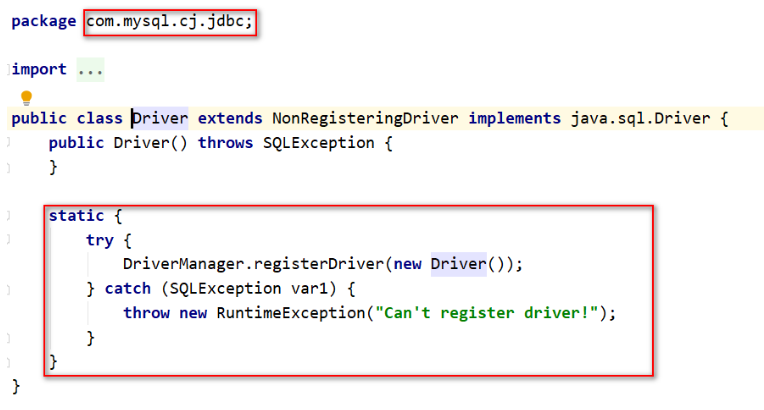
驱动的加载
-
结合异常处理代码
package com.xxx.test1;

import java.sql.Connection;
import java.sql.DriverManager;
import java.sql.SQLException;
import java.sql.Statement;

public class TestJDBC3 {
    private static String driver = "com.mysql.cj.jdbc.Driver";
    private static String url = "jdbc:mysql://127.0.0.1:3306/mydb?useSSL=false&useUnicode=true&characterEncoding=UTF-8&serverTimezone=Asia/Shanghai&allowPublicKeyRetrieval=true";
    private static String user = "root";
    private static String password = "root";

    public static void main(String[] args)  {
        Connection connection=null;
        Statement statement=null;

        try{
            Class.forName(driver);
            connection = DriverManager.getConnection(url, user, password);
            statement = connection.createStatement();
            String sql = "insert into dept values(DEFAULT, '助教部门','北京');";
            int rows = statement.executeUpdate(sql);
            System.out.println("影响数据行数为:"+rows);
        } catch (Exception e) {
            e.printStackTrace();
        } finally {
            if(null != statement){
                try {
                    statement.close();
                } catch (SQLException e) {
                    e.printStackTrace();
                }
            }

            if(null != connection){
                try {
                    connection.close();
                } catch (SQLException e) {
                    e.printStackTrace();
                }
            }
        }
    }
}
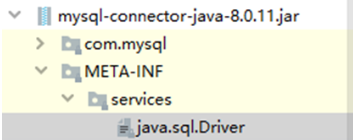
JDBC完成CURD
-
删除和修改部门信息
package com.xxx.test1; import java.sql.Connection; import java.sql.DriverManager; import java.sql.SQLException; import java.sql.Statement; public class TestJDBC4 { private static String driver = "com.mysql.cj.jdbc.Driver"; private static String url = "jdbc:mysql://127.0.0.1:3306/mydb?useSSL=false&useUnicode=true&characterEncoding=UTF-8&serverTimezone=Asia/Shanghai&allowPublicKeyRetrieval=true"; private static String user = "root"; private static String password = "root"; public static void main(String[] args) { //testDelete(); testUpdate(); } public static void testUpdate(){ Connection connection = null; Statement statement = null; try { Class.forName(driver); connection = DriverManager.getConnection(url, user, password); statement = connection.createStatement(); String sql = "update dept set dname='总部',loc='北京' where deptno= 30 "; int rows = statement.executeUpdate(sql); System.out.println("影响数据行数为:"+rows); } catch (Exception e) { e.printStackTrace(); } finally { if(null != statement){ try { statement.close(); } catch (SQLException e) { e.printStackTrace(); } } if(null != connection){ try { connection.close(); } catch (SQLException e) { e.printStackTrace(); } } } } public static void testDelete(){ Connection connection = null; Statement statement = null; try{ Class.forName(driver); connection = DriverManager.getConnection(url, user,password); statement = connection.createStatement(); String sql = "delete from dept where deptno = 40"; int rows = statement.executeUpdate(sql); System.out.println("影响数据行数为:"+rows); } catch (Exception e){ e.printStackTrace(); } finally { if(null != statement){ try { statement.close(); } catch (SQLException e) { e.printStackTrace(); } } if(null != connection){ try { connection.close(); } catch (SQLException e) { e.printStackTrace(); } } } } } -
查询全部 员工信息
package com.xxx.test1; import java.sql.*; public class TestJDBC5 { private static String driver = "com.mysql.cj.jdbc.Driver"; private static String url = "jdbc:mysql://127.0.0.1:3306/mydb?useSSL=false&useUnicode=true&characterEncoding=UTF-8&serverTimezone=Asia/Shanghai&allowPublicKeyRetrieval=true"; private static String user = "root"; private static String password = "root"; public static void main(String[] args) { testQuery(); } public static void testQuery(){ Connection connection = null; Statement statement = null; ResultSet resultSet = null; try{ Class.forName(driver); connection = DriverManager.getConnection(url, user, password); statement = connection.createStatement(); String sql = "select * from emp"; resultSet = statement.executeQuery(sql); while(resultSet.next()){ int empno = resultSet.getInt("empno"); String ename = resultSet.getString("ename"); String job = resultSet.getString("job"); int mgr = resultSet.getInt("mgr"); Date hiredate = resultSet.getDate("hiredate"); double sal = resultSet.getDouble("sal"); double comm = resultSet.getDouble("comm"); int deptno = resultSet.getInt("deptno"); System.out.println(""+empno+" "+ename+" "+job+" "+mgr+" "+hiredate+" "+sal+" "+comm+" "+deptno); } } catch (Exception e){ e.printStackTrace(); } finally { if(null != resultSet){ try { resultSet.close(); } catch (SQLException e) { e.printStackTrace(); } } if(null != statement){ try { statement.close(); } catch (SQLException e) { e.printStackTrace(); } } if(null != connection){ try { connection.close(); } catch (SQLException e) { e.printStackTrace(); } } } } } -
总结
-
ResultSet里的数据一行一行排列,每行有多个字段,且有一个记录指针,指针所指的数据行叫做当前数据行,我们只能来操作当前的数据行。 -
我们如果想要取得某一条记录,就要使用
ResultSet的next()方法, 如果我们想要得到ResultSet里的所有记录,就应该使用while循环 -
ResultSet对象自动维护指向当前数据行的游标。每调用一次next()方法,游标向下移动一行 -
初始状态下记录指针指向第一条记录的前面,通过
next()方法指向第一条记录。循环完毕后指向最后一条记录的后面方法名 说明 boolean next()将光标从当前位置向下移动一行 boolean previous()游标从当前位置向上移动一行 void close()关闭ResultSet对象 int getInt(int colIndex)以int形式获取结果集当前行指定列号值 int getInt(String colLabel)以int形式获取结果集当前行指定列名值 float getFloat(int colIndex)以float形式获取结果集当前行指定列号值 float getFloat(String colLabel)以float形式获取结果集当前行指定列名值 String getString(int colIndex)以String形式获取结果集当前行指定列号值 String getString(String colLabel)以String形式获取结果集当前行指定列名值
-
-
为什么将结果封装成对象或者对象集合?
-
封装后台查询数据并在前台显示
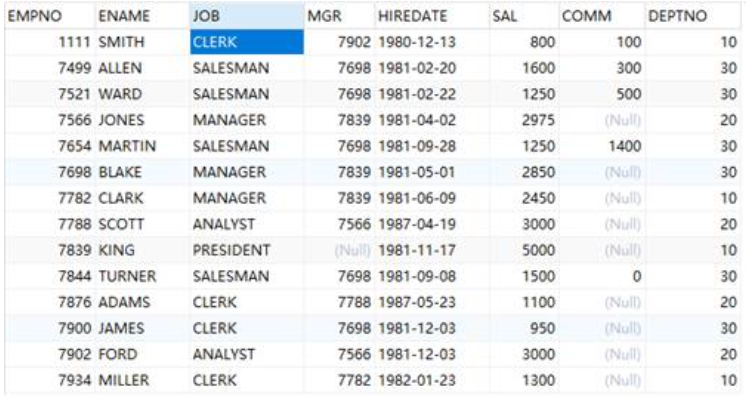
-
如何将结果集中的数据在java中进行存储和传递?
-
准备和数据库表格相对应的一个实体类, 用于封装结果集中的每一条数据, 数据库表格中的每一个字段就是实体类的一个属性, 实体类的一个对象就可以用于存储数据库表中的一条记录
-
准备实体类:
package com.xxx.entity import java.io.Serializable; import java.util.Date; /* 实体类: 和数据库表格名称和字段是一一对应的类 该类的对象主要用处是存储从数据库中查询出来的数据 除此以外, 该类没有任何的其他功能 要求: 类名和表名保持一致 属性个数和数据库的表的列数保持一致 属性的数据类型和列的数据类型保持一致 属性名和数据库表格的列名要保持一致 所有的属性必须都是私有的 (出于安全考虑) 实体类的属性推荐写成包装类 日期类型推荐写成 java.util.Date 所有的属性都要有get和set方法 必须具备空参构造方法 实体类应当实现序列化接口 (mybatis缓存 分布式需要) 实体类中其他构造方法可选 */ public class Emp implements Serializable { private Integer empno; private String ename; private String job; private Integer mgr; private Date hiredate; private Double sal; private Double comm; private Integer deptno; @Override public String toString() { return "Emp{" + "empno=" + empno + ", ename='" + ename + '\'' + ", job='" + job + '\'' + ", mgr=" + mgr + ", hiredate=" + hiredate + ", sal=" + sal + ", comm=" + comm + ", deptno=" + deptno + '}'; } public Emp(Integer empno, String ename, String job, Integer mgr, Date hiredate, Double sal, Double comm, Integer deptno) { this.empno = empno; this.ename = ename; this.job = job; this.mgr = mgr; this.hiredate = hiredate; this.sal = sal; this.comm = comm; this.deptno = deptno; } public Emp(){} public Integer getEmpno() { return empno; } public void setEmpno(Integer empno) { this.empno = empno; } public String getEname() { return ename; } public String getJob() { return job; } public void setJob(String job) { this.job = job; } public Integer getMgr() { return mgr; } public void setMgr(Integer mgr) { this.mgr = mgr; } public Date getHiredate() { return hiredate; } public void setHiredate(Date hiredate) { this.hiredate = hiredate; } public Double getSal() { return sal; } public void setSal(Double sal) { this.sal = sal; } public Double getComm() { return comm; } public void setComm(Double comm) { this.comm = comm; } public Integer getDeptno() { return deptno; } public void setDeptno(Integer deptno) { this.deptno = deptno; } } -
使用实体类封装结果集
package com.xxx.test1;

import com.msb.entity.Emp;
import java.sql.*;
import java.util.ArrayList;
import java.util.List;

public class TestJDBC5 {
    private static String driver = "com.mysql.cj.jdbc.Driver";
    private static String url = "jdbc:mysql://127.0.0.1:3306/mydb?useSSL=false&useUnicode=true&characterEncoding=UTF-8&serverTimezone=Asia/Shanghai&allowPublicKeyRetrieval=true";
    private static String user = "root";
    private static String password = "root";

    public static void main(String[] args)  {
        List<Emp> emps = testQuery();
        // 遍历集合
        for (Emp emp : emps) {
            System.out.println(emp);
        }
    }

    public static List<Emp>  testQuery(){
        Connection connection = null;
        Statement statement = null;
        ResultSet resultSet = null;

        List<Emp> list =null;
        try{
            Class.forName(driver);
            connection = DriverManager.getConnection(url, user, password);
            statement = connection.createStatement();
            String sql = "select * from emp";
            resultSet = statement.executeQuery(sql);

            list = new ArrayList<>();
            while(resultSet.next()){
                int empno = resultSet.getInt("empno");
                String ename = resultSet.getString("ename");
                String job = resultSet.getString("job");
                int mgr = resultSet.getInt("mgr");
                Date hiredate = resultSet.getDate("hiredate");
                double sal = resultSet.getDouble("sal");
                double comm = resultSet.getDouble("comm");
                int deptno = resultSet.getInt("deptno");
                Emp emp =new Emp(empno, ename, job, mgr, hiredate, sal, comm, deptno);
                list.add(emp);
            }
        } catch (Exception e) {
            e.printStackTrace();
        } finally {
            if(null != resultSet){
                try {
                    resultSet.close();
                } catch (SQLException e) {
                    e.printStackTrace();
                }
            }

            if(null != statement){
                try {
                    statement.close();
                } catch (SQLException e) {
                    e.printStackTrace();
                }
            }

            if(null != connection){
                try {
                    connection.close();
                } catch (SQLException e) {
                    e.printStackTrace();
                }
            }
        }
        return list;
    }
}
-
SQL注入攻击
-
概述
-
SQL注入攻击指的是通过构建特殊的输入作为参数传入Web应用程序,而这些输入大都是SQL语法里的一些组合,通过执行SQL语句进而执行攻击者所要的操作,其主要原因是程序没有细致地过滤用户输入的数据,致使非法数据侵入系统
-
以模拟登录为例: 在前台输入用户名和密码,后台判断信息是否正确,并给出前台反馈信息,前台输出反馈信息
-
具体实验步骤如下:
-
创建数据库表
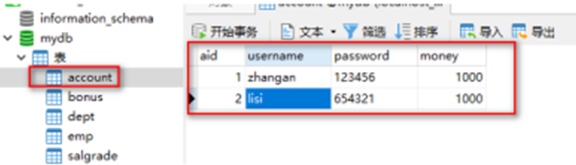
-
创建实体类
public class Account implements Serializable { private int aid; private String username; private String password; private int money; } -
测试代码
package com.xxx.test2; import com.xxx.entity.Account; import com.xxx.entity.Emp; import java.sql.*; import java.util.ArrayList; import java.util.List; import java.util.Scanner; public class TestInjection { private static String driver = "com.mysql.cj.jdbc.Driver"; private static String url = "jdbc:mysql://127.0.0.1:3306/mydb?useSSL=false&useUnicode=true&characterEncoding=UTF-8&serverTimezone=Asia/Shanghai&allowPublicKeyRetrieval=true"; private static String user = "root"; private static String password = "root"; public static void main(String[] args) { Scanner sc = new Scanner(System.in); System.out.println("请输入用户名"); String username = sc.next(); System.out.println("请输入密码"); String pwd = sc.next(); Account account = getAccount(username, pwd); System.out.println(null != account ? "登录成功" : "登录失败"); sc.close(); } public static Account getAccount(String username, String pwd){ Connection connection = null; Statement statement = null; ResultSet resultSet = null; Account account = null; try{ Class.forName(driver); connection = DriverManager.getConnection(url, user, password); statement = connection.createStatement(); String sql = "select * from account where username ='"+username+"' and password ='"+pwd+"'"; System.out.println(sql); resultSet = statement.executeQuery(sql); while(resultSet.next()){ int aid = resultSet.getInt("aid"); String usernamea = resultSet.getString("username"); String pwda = resultSet.getString("password"); double money = resultSet.getDouble("money"); account = new Account(aid, usernamea, pwda, money); System.out.println(account); } } catch (Exception e){ e.printStackTrace(); } finally { if(null != resultSet){ try { resultSet.close(); } catch (SQLException e) { e.printStackTrace(); } } if(null != statement){ try { statement.close(); } catch (SQLException e) { e.printStackTrace(); } } if(null != connection){ try { connection.close(); } catch (SQLException e) { e.printStackTrace(); } } } return account; } } -
测试结果为:
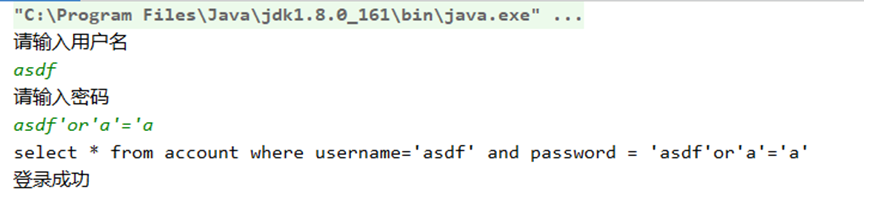
-
解决办法
-
-
预编译语句对象
-
使用预编译语句对象防止注入攻击
package com.xxx.test2; import com.msb.entity.Account; import java.sql.*; import java.util.Scanner; public class TestInjection2 { private static String driver = "com.mysql.cj.jdbc.Driver"; private static String url = "jdbc:mysql://127.0.0.1:3306/mydb?useSSL=false&useUnicode=true&characterEncoding=UTF-8&serverTimezone=Asia/Shanghai&allowPublicKeyRetrieval=true"; private static String user = "root"; private static String password = "root"; public static void main(String[] args) { Scanner sc =new Scanner(System.in); System.out.println("请输入用户名"); String username = sc.next(); System.out.println("请输入密码"); String pwd = sc.next(); Account account = getAccount(username, pwd); System.out.println(null != account ? "登录成功" : "登录失败"); sc.close(); } public static Account getAccount(String username, String pwd){ Connection connection = null; PreparedStatement preparedStatement = null; ResultSet resultSet = null; Account account = null; try{ Class.forName(driver); connection = DriverManager.getConnection(url, user, password); /* 使用PreparedStatement语句对象防止注入攻击 PreparedStatement 可以使用 ? 作为参数的占位符 使用 ? 作为占位符, 即使是字符串和日期类型, 也不使用单独再添加 '' connection.createStatement(); 获得的是普通语句对象 Statement connection.prepareStatement(sql); 可以获得一个预编译语句对象 PreparedStatement 如果 SQL 语句中有 ? 作为参数占位符号, 那么要在执行CURD之前先设置参数 通过 set***(问号的编号, 数据) 方法设置参数 */ String sql = "select * from account where username = ? and password = ?"; preparedStatement = connection.prepareStatement(sql); //这里已经传入SQL语句 //设置参数 preparedStatement.setString(1, username); preparedStatement.setString(2, pwd); //执行CURD resultSet = preparedStatement.executeQuery(); //这里不需要再传入SQL语句 while(resultSet.next()){ int aid = resultSet.getInt("aid"); String usernamea = resultSet.getString("username"); String pwda = resultSet.getString("password"); double money = resultSet.getDouble("money"); account = new Account(aid, usernamea, pwda, money); } } catch (Exception e){ e.printStackTrace(); } finally { if(null != resultSet){ try { resultSet.close(); } catch (SQLException e) { e.printStackTrace(); } } if(null != preparedStatement){ try { preparedStatement.close(); } catch (SQLException e) { e.printStackTrace(); } } if(null != connection){ try { connection.close(); } catch (SQLException e) { e.printStackTrace(); } } } return account; } } -
prepareStatment对象在set***方法上, 会对单引号进行转译处理, 也就是说,?中的数据的单引号‘会被转义成\’, 这样就单引号就不会破坏sql语句的结构-
SELECT * FROM users WHERE userName = ? AND password = ? -
preparedStatement.setString(1, "xiaoming"); -
preparedStatement.setString(2,'anything' OR 'x'='x'); -
会被转义为
-
而不是
-
说白了就是把值当中的所有单引号给转义了 --> 这就达到了防止
sql注入的目的,说白了mysql驱动的PreparedStatement实现类的setString(); 方法内部做了单引号的转义, 而Statement不能防止sql注入, 就是因为它没有把单引号做转义,而是简单粗暴的直接拼接字符串, 所以达不到防止sql注入的目的
-
-
预编译
-
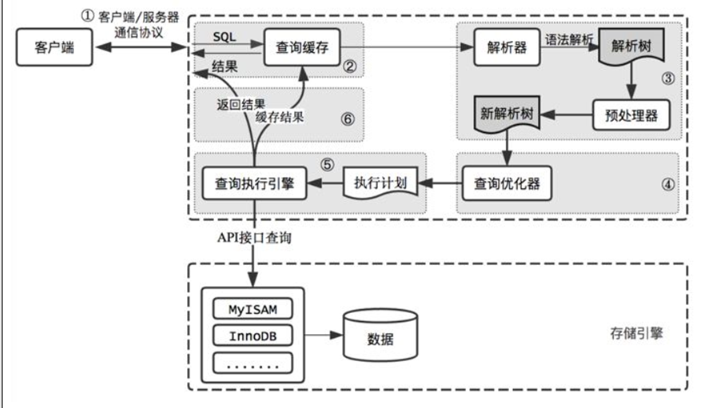
sql命令的执行流程如下
-
总结
-
客户发送一条SQL语句给DBMS后,DBMS总是需要校验SQL语句的语法格式是否正确,然后把SQL语句编译成可执行的函数,最后才是执行SQL语句。其中校验语法,和编译所花的时间可能比执行SQL语句花的时间还要多
-
预编译语句
PreparedStatement是java.sql中的一个接口,它是Statement的子接口。通过Statement对象执行SQL语句时,需要将SQL语句发送给DBMS,由DBMS首先进行编译后再执行。预编译语句和Statement不同,在创建PreparedStatement对象时就指定了SQL语句,该语句立即发送给DBMS进行编译。当该编译语句被执行时,DBMS直接运行编译后的SQL语句,而不需要像其他SQL语句那样首先将其编译。预编译的SQL语句处理性能稍微高于普通的传递变量的办法 -
例如: 我们需要执行多次
insert语句,但只是每次插入的值不同,MySQL服务器也是需要每次都去校验SQL语句的语法格式,以及编译,这就浪费了太多的时间。如果使用预编译功能,那么只对SQL语句进行一次语法校验和编译,所以效率要高
-
-
预编译如何开启?
-
Statement和PreparedStatment的关系和区别
PrepareStatement完成CURD
-
代码展示
package com.xxx.test3;

import com.xxx.entity.Emp;

import java.sql.*;
import java.util.ArrayList;
import java.util.List;

public class TestPreparedSstatement {
    private static String driver = "com.mysql.cj.jdbc.Driver";
    private static String url = "jdbc:mysql://127.0.0.1:3306/mydb?useSSL=false&useUnicode=true&characterEncoding=UTF-8&serverTimezone=Asia/Shanghai&allowPublicKeyRetrieval=true";
    private static String user = "root";
    private static String password = "root";
    public static void main(String[] args) {
        //testAdd();
        //testUpdate();
        //testDelete();
        testQuery();
    }

    public static void testAdd(){
        // 向 Emp表中增加一条数据
        Connection connection = null;
        PreparedStatement preparedStatement = null;

        try{
            Class.forName(driver);
            connection = DriverManager.getConnection(url, user,password);
            String sql = "insert into emp values(DEFAULT ,?,?,?,?,?,?,?)";
            preparedStatement = connection.prepareStatement(sql);   //这里已经传入SQL语句

            //设置参数
            preparedStatement.setString(1,"Mark");
            preparedStatement.setString(2,"MANAGER" );            preparedStatement.setInt(3,7839);
            preparedStatement.setDate(4,new Date(System.currentTimeMillis()));
            preparedStatement.setDouble(5,3000.12);
            preparedStatement.setDouble(6,0.0);
            preparedStatement.setDouble(7,30);

            //执行CURD
            int rows = preparedStatement.executeUpdate();    // 这里不需要再传入SQL语句
            System.out.println(rows);
        }
    } catch (Exception e){
        e.printStackTrace();
    } finally {
        if(null != preparedStatement){
            try {
                preparedStatement.close();
            } catch (SQLException e) {
                e.printStackTrace();
            }
        }

        if(null != connection){
            try {
                connection.close();
            } catch (SQLException e) {
                e.printStackTrace();
            }
        }
    }
}

public static void testUpdate(){
    // 根据工号修改员工表中的数据
    Connection connection = null;
    PreparedStatement preparedStatement = null;

    try{
        Class.forName(driver);
        connection = DriverManager.getConnection(url, user,password);
        String sql = "update emp set ename =? ,job=? where empno =?";
        preparedStatement = connection.prepareStatement(sql);   //这里已经传入SQL语句

        //设置参数
        preparedStatement.setString(1,"Jhon");
        preparedStatement.setString(2,"ANALYST" );
        preparedStatement.setInt(3,7935);

        //执行CURD
        int rows = preparedStatement.executeUpdate();    // 这里不需要再传入SQL语句
        System.out.println(rows);
    } catch (Exception e){
        e.printStackTrace();
    } finally {
        if(null != preparedStatement){
            try {
                preparedStatement.close();
            } catch (SQLException e) {
                e.printStackTrace();
            }
        }

        if(null != connection){
            try {
                connection.close();
            } catch (SQLException e) {
                e.printStackTrace();
            }
        }
    }
}

public static void testDelete(){
    // 根据工号删除员工表中的数据
    Connection connection = null;
    PreparedStatement preparedStatement = null;

    try{
        Class.forName(driver);
        connection = DriverManager.getConnection(url, user, password);
        String sql = "delete from emp where empno =?";
        preparedStatement = connection.prepareStatement(sql);   //这里已经传入SQL语句
        //设置参数
        preparedStatement.setInt(1, 7935);

        //执行CURD
        int rows = preparedStatement.executeUpdate();    // 这里不需要再传入SQL语句
        System.out.println(rows);
    } catch (Exception e){
        e.printStackTrace();
    } finally {
        if(null != preparedStatement){
            try {
                preparedStatement.close();
            } catch (SQLException e) {
                e.printStackTrace();
            }
        }

        if(null != connection){
            try {
                connection.close();
            } catch (SQLException e) {
                e.printStackTrace();
            }
        }
    }
}

public static void testQuery(){
    // 查询名字中包含字母A的员工信息
    Connection connection = null;
    PreparedStatement preparedStatement = null;
    ResultSet resultSet = null;

    List<Emp> list = null;
    try{
        Class.forName(driver);
        connection = DriverManager.getConnection(url, user, password);
        /*
        使用PreparedStatement语句对象防止注入攻击
        PreparedStatement 可以使用 ? 作为参数的占位符
        使用 ? 作为占位符, 即使是字符串和日期类型, 也不使用单独再添加 ''
        connection.createStatement();获得的是普通语句对象 Statement
        connection.prepareStatement(sql);可以获得一个预编译语句对象PreparedStatement
        如果SQL语句中有?作为参数占位符号,那么要在执行CURD之前先设置参数
        通过set***(问号的编号,数据) 方法设置参数
        */
        String sql = "select * from emp where ename like ? ";
        preparedStatement = connection.prepareStatement(sql);   //这里已经传入SQL语句
        //设置参数
        preparedStatement.setString(1,"%A%");

        //执行CURD
        resultSet = preparedStatement.executeQuery();   // 这里不需要再传入SQL语句
        list = new ArrayList<Emp>();
        while(resultSet.next()){
            int empno = resultSet.getInt("empno");
            String ename = resultSet.getString("ename");
            String job = resultSet.getString("job");
            int mgr = resultSet.getInt("mgr");
            Date hiredate = resultSet.getDate("hiredate");
            double sal = resultSet.getDouble("sal");
            double comm = resultSet.getDouble("comm");
            int deptno = resultSet.getInt("deptno");
            Emp emp = new Emp(empno, ename, job, mgr, hiredate, sal, comm, deptno);
            list.add(emp);
        }
    } catch (Exception e){
        e.printStackTrace();
    } finally {
        if(null != resultSet){
            try {
                resultSet.close();
            } catch (SQLException e) {
                e.printStackTrace();
            }
        }

        if(null != preparedStatement){
            try {
                preparedStatement.close();
            } catch (SQLException e) {
                e.printStackTrace();
            }
        }
    }
    // 遍历集合
    for (Emp emp : list) {
        System.out.println(emp);
    }
}
批处理
-
PreparedStatement批处理
-
什么是批处理?
-
statement语句对象实现批处理有如下问题
-
PreparedStatement + 批处理
-
优点
-
原理
-
注意
-
需要设置批处理开启
&rewriteBatchedStatements=truepackage com.xxx.test4; import java.sql.*; public class TestBatch { private static String driver = "com.mysql.cj.jdbc.Driver"; private static String url = "jdbc:mysql://127.0.0.1:3306/mydb?useSSL=false&useUnicode=true&characterEncoding=UTF-8&serverTimezone=Asia/Shanghai&allowPublicKeyRetrieval=true&useServerPrepStmts=true&cachePrepStmts=true&&rewriteBatchedStatements=true"; private static String user = "root"; private static String password = "root"; public static void main(String[] args) { testAddBatch(); } // 定义一个方法,向部门表增加1000条数据 public static void testAddBatch(){ Connection connection = null; PreparedStatement preparedStatement = null; try{ Class.forName(driver); connection = DriverManager.getConnection(url, user, password); String sql = "insert into dept values (DEFAULT ,?,?)"; preparedStatement = connection.prepareStatement(sql); //这里已经传入SQL语句 //设置参数 for (int i = 1; i <= 10663; i++) { preparedStatement.setString(1, "name"); preparedStatement.setString(2, "loc"); preparedStatement.addBatch(); // 将修改放入一个批次中 if(i%1000==0){ preparedStatement.executeBatch(); preparedStatement.clearBatch(); // 清除批处理中的数据 } } /* 整数数组中的元素代表执行的结果代号 SUCCESS_NO_INFO -2 EXECUTE_FAILED -3 */ /*int[] ints = */ preparedStatement.executeBatch(); preparedStatement.clearBatch(); } catch (Exception e){ e.printStackTrace(); } finally { if(null != preparedStatement){ try { preparedStatement.close(); } catch (SQLException e) { e.printStackTrace(); } } if(null != connection){ try { connection.close(); } catch (SQLException e) { e.printStackTrace(); } } } } }
-
-
-
事务及回滚点
-
JDBC中使用事务
-
事务回顾:
-
事务概念
-
JDBC控制事物主要就是在学习如何让多个数据库操作成为一个整体, 实现要么全都执行成功, 要么全都不执行
-
在JDBC中,事务操作是自动提交
-
一条对数据库的
DML(insert、update、delete)代表一项事务操作, 操作成功后, 系统将自动调用commit()提交, 否则自动调用rollback()回滚, 在JDBC中, 事务操作方法都位于接口java.sql.Connection中, 可以通过调用setAutoCommit(false)来禁止自动提交 -
之后就可以把多个数据库操作的表达式作为一个事务,在操作完成后调用
commit()来进行整体提交,倘若其中一个表达式操作失败,都不会执行到commit(),并且将产生响应的异常;此时就可以在异常捕获时调用rollback()进行回滚,回复至数据初始状态.事务开始的边界则不是那么明显了,它会开始于组成当前事务的所有statement中的第一个被执行的时候。事务结束的边界是commit或者rollback方法的调用
-
-
-
使用事务保证转账安全性
-
代码展示
package com.xxx.test5;

import java.sql.Connection;
import java.sql.DriverManager;
import java.sql.PreparedStatement;
import java.sql.SQLException;

public class TestTransaction {
    private static String driver = "com.mysql.cj.jdbc.Driver";
    private static String url="jdbc:mysql://127.0.0.1:3306/mydb?useSSL=false&useUnicode=true&characterEncoding=UTF-8&serverTimezone=Asia/Shanghai&allowPublicKeyRetrieval=true&useServerPrepStmts=true&cachePrepStmts=true&&rewriteBatchedStatements=true";    private static String user="root";
    private static String user = "root";
    private static String password = "root";
    public static void main(String[] args) {
        testTransaction();
    }
    // 定义一个方法, 向部门表增加1000条数据
    public static void testTransaction(){
        Connection connection = null;
        PreparedStatement preparedStatement = null;
        /*
        JDBC 默认是自动提交事务
        每条DML都是默认提交事务的, 多个preparedStatement.executeUpdate();    都会提交一次事务
        如果想手动控制事务, 那么就不能让事务自动提交
        通过Connection对象控制connection.setAutoCommit(false);
        如果不设置 默认值为true, 自动提交, 设置为false之后就是手动提交了
        无论是否发生回滚, 事务最终会一定要提交的 提交我们建议放在finally之中进行提交
        如果是转账的过程中出现异常了, 那么我们就要执行回滚, 回滚操作应该方法catch语句块中
        */
        try{
            Class.forName(driver);
            connection = DriverManager.getConnection(url, user, password);
            // 设置事务手动提交
            connection.setAutoCommit(false);
            String sql = "update account set money =money- ? where aid = ?";
            preparedStatement = connection.prepareStatement(sql);   //这里已经传入SQL语句
            // 转出
            preparedStatement.setDouble(1, 100);
            preparedStatement.setInt(2, 1);
            preparedStatement.executeUpdate();
            // 产生异常
            //int i = 1/0;

            // 转入
            preparedStatement.setDouble(1, -100);
            preparedStatement.setInt(2, 2);
            preparedStatement.executeUpdate();
        } catch (Exception e){
            if(null != connection){
                try {
                     connection.rollback(); // 回滚事务
                } catch (SQLException ex) {
                    ex.printStackTrace();
                }
            }
            e.printStackTrace();
        }finally {
            // 提交事务
            if(null != connection){
                try {
                    connection.commit();
                } catch (SQLException e) {
                    e.printStackTrace();
                }
            }

            if(null != preparedStatement){
                try {
                    preparedStatement.close();
                } catch (SQLException e) {
                    e.printStackTrace();
                }
            }

            if(null != connection){
                try {
                    connection.close();
                } catch (SQLException e) {
                    e.printStackTrace();
                }
            }
        }
    }
}
-
-
设置回滚点
-
代码展示
package com.xxx.test5;

import java.sql.*;
import java.util.LinkedList;

public class TestTransaction2 {
    private static String driver ="com.mysql.cj.jdbc.Driver";
    private static String url="jdbc:mysql://127.0.0.1:3306/mydb?useSSL=false&useUnicode=true&characterEncoding=UTF-8&serverTimezone=Asia/Shanghai&allowPublicKeyRetrieval=true&useServerPrepStmts=true&cachePrepStmts=true&&rewriteBatchedStatements=true";    private static String user="root";
    private static String user = "root";
    private static String password = "root";
    public static void main(String[] args) {
        testAddBatch();
    }
    // 定义一个方法, 向部门表增加1000条数据
    public static void testAddBatch(){
        Connection connection = null;
        PreparedStatement preparedStatement = null;

        LinkedList<Savepoint> savepoints = new LinkedList<Savepoint>();
        try{
            Class.forName(driver);
            connection = DriverManager.getConnection(url, user, password);
            connection.setAutoCommit(false);
            String sql = "insert into dept values (DEFAULT ,?,?)";
            preparedStatement = connection.prepareStatement(sql);   //这里已经传入SQL语句

            //设置参数
            for (int i = 1; i <= 10663; i++) {
                preparedStatement.setString(1, "name");
                preparedStatement.setString(2, "loc");
                preparedStatement.addBatch();   // 将修改放入一个批次中
                if(i%1000 == 0){
                    preparedStatement.executeBatch();
                    preparedStatement.clearBatch(); // 清除批处理中的数据

                    // 设置回滚点
                    Savepoint savepoint = connection.setSavepoint();
                    savepoints.addLast(savepoint);
                }
                // 数据在 100001条插入的时候出现异常

                if(i == 10001){
                    int x =1/0;
                }
            }

            /*
            整数数组中的元素代表执行的结果代号
            SUCCESS_NO_INFO -2
            EXECUTE_FAILED  -3
            /*int[] ints = */
            preparedStatement.executeBatch();
            preparedStatement.clearBatch();
        } catch (Exception e){
            if(null != connection){
                try {
                    //Savepoint sp = savepoints.getLast();
                    Savepoint sp = savepoints.get(4);
                    if(null != sp){
                        // 选择回滚点
                        connection.rollback(sp);    // 回滚
                    }
                } catch (SQLException e) {
                    e.printStackTrace();
                }
            }

            if(null != preparedStatement){
                try {
                    preparedStatement.close();
                } catch (SQLException e) {
                    e.printStackTrace();
                }
            }

            if(null != connection){
                try {
                    connection.close();
                } catch (SQLException e) {
                    e.printStackTrace();
                }
            }
        }
    }
}
-
JDBC API总结阅读
-
Connection接口
-
DriverManager类
-
Statement接口
-
PreparedStatement接口
-
ResultSet接口
-
ResultSet对象是executeQuery()方法的返回值,它被称为结果集,它代表符合 SQL 语句条件的所有行,并且它通过一套getXXX方法(这些 get 方法可以访问当前行中的不同列)提供了对这些行中数据的访问 -
ResultSet里的数据一行一行排列,每行有多个字段,且有一个记录指针,指针所指的数据行叫做当前数据行,我们只能来操作当前的数据行 -
我们如果想要取得某一条记录,就要使用
ResultSet的next()方法 ,如果我们想要得到ResultSet里的所有记录,就应该使用while循环 -
ResultSet对象自动维护指向当前数据行的游标。每调用一次next()方法,游标向下移动一行 -
初始状态下记录指针指向第一条记录的前面,通过
next()方法指向第一条记录。循环完毕后指向最后一条记录的后面方法名 说明 boolean next()将光标从当前位置向下移动一行 boolean previous()游标从当前位置向上移动一行 void close()关闭 ResultSet 对象 int getInt(int collIndex)以 int 形式获取结果集当前行指定列号值 int getInt(String collLabel)以 int 形式获取结果集当前行指定列名值 float getFloat(int collIndex)以 float 形式获取结果集当前行指定列号值 Float getFloat(String collLabel)以 float 形式获取结果集当前行指定列名值 String getString(int collIndex)以 String 形式获取结果集当前行指定列号值 String getString(String collLabel)以 String 形式获取结果集当前行指定列名值
-
DAO模式
-
引入
-
在核心J2EE模式中是这样介绍DAO模式的
-
概述
-
Dao模式要求项目必须具备这样几个结构
-
项目的搭建
-
导入各个层级的接口和页面之后的项目
-
项目结构截图如下
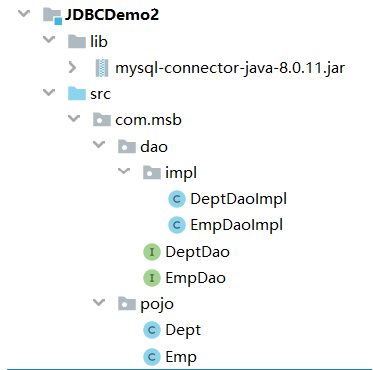
-
实体类代码
public class Emp implements Serializable {
    private Integer empno;
    private String ename;
    private String job;
    private Integer mgr;
    private Date hiredate;
    private Double sal;
    private Double comm;
    private Integer deptno;
public class Dept implements Serializable { private Integer deptno; private String dname; private String loc; -
DAO接口代码
package com.xxx.dao; import com.xxx.pojo.Emp; public interface EmpDao { /** * 向数据库Emp表中增加一条数据的方法 * @param emp 要增加的数据封装成的Emp类的对象 * @return 增加成功返回大于0 的整数,增加失败返回0 */ int addEmp(Emp emp); /** * 根据员工编号删除员工信息的方法 * @param empno 要删除的员工编号 * @return 删除成功返回大于0的整数,失败返回0 */ int deleteByEmpno(int empno); } -
DAO实现类代码
package com.xxx.dao.impl;

import com.xxx.dao.EmpDao;
import com.xxx.pojo.Emp;

import java.sql.*;

public class EmpDaoImpl implements EmpDao {
    private static String driver = "com.mysql.cj.jdbc.Driver";
    private static String url = "jdbc:mysql://127.0.0.1:3306/mydb?useSSL=false&useUnicode=true&characterEncoding=UTF-8&serverTimezone=Asia/Shanghai&allowPublicKeyRetrieval=true";
    private static String user = "root";
    private static String password = "root";

    @Override
    public int addEmp(Emp emp) {
        // 向 Emp表 中增加一条数据
        Connection connection = null;
        PreparedStatement preparedStatement = null;
        int rows = 0;

        try{
            Class.forName(driver);
            connection = DriverManager.getConnection(url, user, password);
            String sql = "insert into emp values(DEFAULT ,?,?,?,?,?,?,?)";
            preparedStatement = connection.prepareStatement(sql);   //这里已经传入SQL语句
            //设置参数
            preparedStatement.setObject(1,emp.getEname());
            preparedStatement.setObject(2,emp.getJob() );
            preparedStatement.setObject(3,emp.getMgr());
            preparedStatement.setObject(4,emp.getHiredate());
            preparedStatement.setObject(5,emp.getSal());
            preparedStatement.setObject(6,emp.getComm());
            preparedStatement.setObject(7,emp.getDeptno());
            //执行CURD
            rows = preparedStatement.executeUpdate();   // 这里不需要再传入SQL语句
        } catch (Exception e){
            e.printStackTrace();
        } finally {
            if(null != preparedStatement){
                try {
                    preparedStatement.close();
                } catch (SQLException e) {
                    e.printStackTrace();
                }
            }

            if(null != connection){
                try {
                    connection.close();
                } catch (SQLException e) {
                    e.printStackTrace();
                }
            }
        }
        return rows;
    }
    @Override
    public int deleteByEmpno(int empno) {
        // 向 Emp表 中增加一条数据
        Connection connection = null;
        PreparedStatement preparedStatement = null;
        int row = 0;

        try {
            Class.forName(driver);
            connection = DriverManager.getConnection(url, user,password);
            String sql = "delete from emp where empno =?";
            preparedStatement = connection.prepareStatement(sql);   //这里已经传入SQL语句
            //设置参数
            preparedStatement.setObject(1, empno);

            //执行CURD
            rows =preparedStatement.executeUpdate();    // 这里不需要再传入SQL语句
        } catch (Exception e){
            e.printStackTrace();
        } finally {
            if(null != preparedStatement){
                try {
                    preparedStatement.close();
                } catch (SQLException e) {
                    e.printStackTrace();
                }
            }

            if(null != connection){
                try {
                    connection.close();
                } catch (SQLException e) {
                    e.printStackTrace();
                }
            }
        }
        return rows;
    }
}
-
员工管理系统开发
-
DAO接口
package com.xxx.dao;

import com.xxx.pojo.Emp;

import java.util.List;

public interface EmpDao {
    /**
     * 向数据库Emp表中增加一条数据的方法
     * @param emp 要增加的数据封装成的Emp类的对象
     * @return 增加成功返回大于0 的整数,增加失败返回0
     */
    int addEmp(Emp emp);
    /**
     * 根据员工编号删除员工信息的方法
     * @param empno 要删除的员工编号
     * @return 删除成功返回大于0的整数,失败返回0
     */
    int deleteByEmpno(int empno);
    /**
     * 查看数据库表格中所有的员工信息
     * @return 所有员工信息封装的一个List<Emp>集合
     */
    List<Emp> findAll();

    /**
     * 根据员工编号修改员工其他所有字段的方法
     * @param emp 员工编号和其他7个字段封装的一个Emp类对象
     * @return 修改成功返回大于0的整数,失败返回0
     */
    int updateEmp(Emp emp);
}
package com.xxx.dao; import com.xxx.pojo.Dept; import java.util.List; public interface DeptDao { /** * 查询全部门的方法 * @return Dept对象封装的List集合 */ List<Dept> findAll(); int addDept(Dept dept); } -
DAO实现类
package com.xxx.dao.impl;

import com.xxx.dao.EmpDao;
import com.xxx.pojo.Emp;

import java.sql.*;
import java.util.ArrayList;
import java.util.List;

public class EmpDaoImpl implements EmpDao {
    private static String driver = "com.mysql.cj.jdbc.Driver";
    private static String url = "jdbc:mysql://127.0.0.1:3306/mydb?useSSL=false&useUnicode=true&characterEncoding=UTF-8&serverTimezone=Asia/Shanghai&allowPublicKeyRetrieval=true";
    private static String user = "root";
    private static String password = "root";

    @Override
    public int addEmp(Emp emp) {
        // 向 Emp表中增加一条数据
        Connection connection = null;
        PreparedStatement preparedStatement = null;
        int rows = 0;

        try{
            Class.forName(driver);
            connection = DriverManager.getConnection(url, user, password);
            String sql = "insert into emp values(DEFAULT ,?,?,?,?,?,?,?)";
            preparedStatement = connection.prepareStatement(sql);   //这里已经传入SQL语句
            //设置参数
            preparedStatement.setObject(1,emp.getEname());
            preparedStatement.setObject(2,emp.getJob() );
            preparedStatement.setObject(3,emp.getMgr());
            preparedStatement.setObject(4,emp.getHiredate());
            preparedStatement.setObject(5,emp.getSal());
            preparedStatement.setObject(6,emp.getComm());
            preparedStatement.setObject(7,emp.getDeptno());
            //执行CURD
            rows = preparedStatement.executeUpdate();    // 这里不需要再传入SQL语句
        } catch (Exception e){
            e.printStackTrace();
        } finally {
            if(null != preparedStatement){
                try {
                    preparedStatement.close();
                } catch (SQLException e) {
                    e.printStackTrace();
                }
            }

            if(null != connection){
                try{
                    connection.close();
                } catch (SQLException e) {
                    e.printStackTrace();
                }
            }
        }
        return rows;
    }

    @Override
    public int deleteByEmpno(int empno) {
        // 向 Emp表中增加一条数据
        Connection connection = null;
        PreparedStatement preparedStatement = null;
        int rows = 0;

        try {
            Class.forName(driver);
            connection = DriverManager.getConnection(url, user, password);
            String sql = "delete from emp where empno =?";
            preparedStatement = connection.prepareStatement(sql);   //这里已经传入SQL语句
            //设置参数
            preparedStatement.setObject(1,empno);
            //执行CURD
            rows = preparedStatement.executeUpdate();    // 这里不需要再传入SQL语句
        } catch (Exception e){
            e.printStackTrace();
        } finally {
            if(null != preparedStatement){
                try {
                    preparedStatement.close();
                } catch (SQLException e) {
                    e.printStackTrace();
                }
            }

            if(null != connection){
                try {
                    connection.close();
                } catch (SQLException e) {
                    e.printStackTrace();
                }
            }
        }
        return rows;
    }

    @Override
    public List<Emp> findAll() {
        // 查询名字中包含字母A的员工信息
        Connection connection = null;
        PreparedStatement preparedStatement = null;
        ResultSet resultSet = null;
        List<Emp> list = null;
        try{
            Class.forName(driver);
            connection = DriverManager.getConnection(url, user, password);
            String sql = "select * from emp";
            preparedStatement = connection.prepareStatement(sql);   //这里已经传入SQL语句
            //执行CURD
            resultSet = preparedStatement.executeQuery();   // 这里不需要再传入SQL语句
            list = new ArrayList<Emp>() ;
            while(resultSet.next()){
                int empno = resultSet.getInt("empno");
                String ename = resultSet.getString("ename");
                String job = resultSet.getString("job");
                int mgr = resultSet.getInt("mgr");
                Date hiredate = resultSet.getDate("hiredate");
                double sal = resultSet.getDouble("sal");
                double comm = resultSet.getDouble("comm");
                int deptno = resultSet.getInt("deptno");
                Emp emp = new Emp(empno, ename, job, mgr, hiredate, sal, comm, deptno);
                list.add(emp);
            }
        } catch (Exception e){
            e.printStackTrace();
        } finally {
            if(null != resultSet){
                try {
                    resultSet.close();
                } catch (SQLException e) {
                    e.printStackTrace();
                }
            }

            if(null != preparedStatement){
                try {
                    preparedStatement.close();
                } catch (SQLException e) {
                    e.printStackTrace();
                }
            }

            if(null != connection){
                try {
                    connection.close();
                } catch (SQLException e) {
                    e.printStackTrace();
                }
            }
        }
        return list;
    }

    @Override
    public int updateEmp(Emp emp) {
        // 向 Emp表中增加一条数据
        Connection connection = null;
        PreparedStatement preparedStatement = null;
        int rows = 0;

        try {
            Class.forName(driver);
            connection = DriverManager.getConnection(url, user,password);
            String sql = "update emp set ename =? ,job=?, mgr =?,hiredate =?,sal=?,comm=?,deptno=? where empno =?";
            preparedStatement = connection.prepareStatement(sql);    //这里已经传入SQL语句
            //设置参数
            preparedStatement.setObject(1,emp.getEname());
            preparedStatement.setObject(2,emp.getJob() );
            preparedStatement.setObject(3,emp.getMgr());
            preparedStatement.setObject(4,emp.getHiredate());
            preparedStatement.setObject(5,emp.getSal());
            preparedStatement.setObject(6,emp.getComm());
            preparedStatement.setObject(7,emp.getDeptno());
            preparedStatement.setObject(8,emp.getEmpno());

            //执行CURD
            rows = preparedStatement.executeUpdate();    // 这里不需要再传入SQL语句
        } catch (Exception e){
            e.printStackTrace();
        } finally {
            if(null != preparedStatement){
                try {
                    preparedStatement.close();
                } catch (SQLException e) {
                    e.printStackTrace();
                }
            }

            if(null != connection){
                try {
                    connection.close();
                } catch (SQLException e) {
                    e.printStackTrace();
                }
            }
        }
        return rows;
    }
}
package com.xxx.dao.impl; import com.msb.dao.DeptDao; import com.msb.pojo.Dept; import com.msb.pojo.Emp; import java.sql.*; import java.util.ArrayList; import java.util.List; public class DeptDaoImpl implements DeptDao { private static String driver = "com.mysql.cj.jdbc.Driver"; private static String url = "jdbc:mysql://127.0.0.1:3306/mydb?useSSL=false&useUnicode=true&characterEncoding=UTF-8&serverTimezone=Asia/Shanghai&allowPublicKeyRetrieval=true"; private static String user = "root"; private static String password = "root"; @Override public List<Dept> findAll() { // 查询名字中包含字母A的员工信息 Connection connection = null; PreparedStatement preparedStatement = null; ResultSet resultSet = null; List<Dept> list = null; try{ Class.forName(driver); connection = DriverManager.getConnection(url, user, password); String sql = "select * from dept"; preparedStatement = connection.prepareStatement(sql); //这里已经传入SQL语句 //执行CURD resultSet = preparedStatement.executeQuery(); // 这里不需要再传入SQL语句 list = new ArrayList<Dept>() ; while(resultSet.next()){ int deptno = resultSet.getInt("deptno"); String dname = resultSet.getString("dname"); String loc = resultSet.getString("loc"); Dept dept = new Dept(deptno, dname, loc); list.add(dept); } } catch (Exception e){ e.printStackTrace(); } finally { if(null != resultSet){ try { resultSet.close(); } catch (SQLException e) { e.printStackTrace(); } } if(null != preparedStatement){ try { preparedStatement.close(); } catch (SQLException e) { e.printStackTrace(); } } if(null != connection){ try { connection.close(); } catch (SQLException e) { e.printStackTrace(); } } } return list; } @Override public int addDept(Dept dept) { // 向 Emp表中增加一条数据 Connection connection = null; PreparedStatement preparedStatement = null; int rows = 0; try{ Class.forName(driver); connection = DriverManager.getConnection(url, user, password); String sql = "insert into dept values(?,?,?)"; preparedStatement = connection.prepareStatement(sql); //这里已经传入SQL语句 //设置参数 preparedStatement.setObject(1,dept.getDeptno()); preparedStatement.setObject(2,dept.getDname()); preparedStatement.setObject(3,dept.getLoc()); //执行CURD rows = preparedStatement.executeUpdate(); // 这里不需要再传入SQL语句 } catch (Exception e){ e.printStackTrace(); } finally { if(null != preparedStatement){ try { preparedStatement.close(); } catch (SQLException e) { e.printStackTrace(); } } if(null != connection){ try { connection.close(); } catch (SQLException e) { e.printStackTrace(); } } } return rows; } } -
EmpManageSystem类
package com.xxx.view;

import com.xxx.dao.DeptDao;
import com.xxx.dao.EmpDao;
import com.xxx.dao.impl.DeptDaoImpl;
import com.xxx.dao.impl.EmpDaoImpl;
import com.xxx.pojo.Dept;
import com.xxx.pojo.Emp;

import java.text.ParseException;
import java.text.SimpleDateFormat;
import java.util.Date;
import java.util.List;
import java.util.Scanner;

public class EmpManageSystem {
    private static Scanner sc = new Scanner(System.in);
    private static EmpDao empDao = new EmpDaoImpl();
    private static DeptDao deptDao = new DeptDaoImpl();
    private static SimpleDateFormat simpleDateFormat = new SimpleDateFormat("yyyy-MM-dd");;
    public static void main(String[] args) {
        while(true){
            showMenu();
            System.out.println("请录入选项");
            int option = sc.nextInt();
            switch (option){
                case 1:
                    case1();
                    break;
                case 2:
                    case2();
                    break;
                case 3:
                    case3();
                    break;
                case 4:
                    case4();
                    break;
                case 5:
                    case5();
                    break;
                case 6:
                    case6();
                    break;
                case 7:
                    break;
                default:
                    System.out.println("请正确输入选项");
            }
        }
    }

    private static void case1() {
        List<Emp> emps = empDao.findAll();
        emps.forEach(System.out::println);
    }

    private static void case2(){
        List<Dept> depts = deptDao.findAll();
        depts.forEach(System.out::println);
    }

    private static void case3(){
        System.out.println("请输入要删除的员工编号");
        int empno=sc.nextInt();
        empDao.deleteByEmpno(empno);
    }

    private static void case4(){
        System.out.println("请输入员工编号");
        int empno = sc.nextInt();
        System.out.println("请输入员工姓名");
        String ename =sc.next();
        System.out.println("请输入员工职位");
        String job =sc.next();
        System.out.println("请输入员工上级");
        int mgr =sc.nextInt();
        System.out.println("请输入员工入职日期,格式为yyyy-MM-dd");
        Date hiredate = null;
        try {
            hiredate = simpleDateFormat.parse(sc.next());
        } catch (ParseException e) {
            e.printStackTrace();
        }
        System.out.println("请输入员工工资");
        double sal = sc.nextDouble();
        System.out.println("请输入员工补助");
        double comm = sc.nextDouble();
        System.out.println("请输入员工部门号");
        int deptno = sc.nextInt();
        Emp emp = new Emp(empno, ename, job, mgr, hiredate, sal, comm,deptno);
        empDao.updateEmp(emp);
    }

    private static void case5(){
        System.out.println("请输入员工姓名");
        String ename = sc.next();
        System.out.println("请输入员工职位");
        String job = sc.next();
        System.out.println("请输入员工上级");
        int mgr = sc.nextInt();
        System.out.println("请输入员工入职日期,格式为yyyy-MM-dd");
        Date hiredate = null;
        try {
            hiredate = simpleDateFormat.parse(sc.next());
        } catch (ParseException e) {
            e.printStackTrace();
        }
        System.out.println("请输入员工工资");
        double sal = sc.nextDouble();
        System.out.println("请输入员工补助");
        double comm = sc.nextDouble();
        System.out.println("请输入员工部门号");
        int deptno = sc.nextInt();
        Emp emp = new Emp(null, ename, job, mgr, hiredate, sal, comm, deptno);
        empDao.addEmp(emp);
    }

    private static void case6(){
        System.out.println("请录入部门号");
        int deptno = sc.nextInt();
        System.out.println("请录入部门名称");
        String dname = sc.next();
        System.out.println("请录入部门位置");
        String loc = sc.next();
        Dept dept = new Dept(deptno, dname, loc);
        deptDao.addDept(dept);
    }

    public static void showMenu(){
        System.out.println("************************************");
        System.out.println("* 1 查看所有员工信息");
        System.out.println("* 2 查看所有部门信息");
        System.out.println("* 3 根据工号删除员工信息");
        System.out.println("* 4 根据工号修改员工信息");
        System.out.println("* 5 增加员工信息");
        System.out.println("* 6 增加部门信息");
        System.out.println("* 7 退出");
        System.out.println("************************************");
    }
}
-
BaseDao抽取
package com.xxx.dao; import com.xxx.pojo.Emp; import java.lang.reflect.Field; import java.sql.*; import java.util.ArrayList; import java.util.List; public abstract class BaseDao { private static String driver = "com.mysql.cj.jdbc.Driver"; private static String url = "jdbc:mysql://127.0.0.1:3306/mydb?useSSL=false&useUnicode=true&characterEncoding=UTF-8&serverTimezone=Asia/Shanghai&allowPublicKeyRetrieval=true"; private static String user = "root"; private static String password = "root"; public int baseUpdate(String sql, Object ... args){ // 向 Emp表中增加一条数据 Connection connection = null; PreparedStatement preparedStatement = null; int rows = 0; try{ Class.forName(driver); connection = DriverManager.getConnection(url, user, password); preparedStatement = connection.prepareStatement(sql); //设置参数 for (int i = 0; i <args.length; i++) { preparedStatement.setObject(i+1, args[i]); } //执行CURD rows = preparedStatement.executeUpdate(); // 这里不需要再传入SQL语句 } catch (Exception e){ e.printStackTrace(); } finally { if(null != preparedStatement){ try { preparedStatement.close(); } catch (SQLException e) { e.printStackTrace(); } } if(null != connection){ try { connection.close(); } catch (SQLException e) { e.printStackTrace(); } } } return rows; } public List baseQuery(Class clazz,String sql,Object ... args) { // 查询名字中包含字母A的员工信息 Connection connection = null; PreparedStatement preparedStatement = null; ResultSet resultSet = null; List list = null; try { Class.forName(driver); connection = DriverManager.getConnection(url, user, password); preparedStatement = connection.prepareStatement(sql); //这里已经传入SQL语句 //设置参数 for (int i = 0; i <args.length ; i++) { preparedStatement.setObject(i+1, args[i]); } //执行CURD resultSet = preparedStatement.executeQuery(); // 这里不需要再传入SQL语句 list = new ArrayList() ; // 根据字节码获取所有 的属性 Field[] fields = clazz.getDeclaredFields(); for (Field field : fields) { field.setAccessible(true); // 设置属性可以 访问 } while(resultSet.next()){ // 通过反射创建对象 Object obj = clazz.newInstance(); //默认在通过反射调用对象的空参构造方法 for (Field field : fields) { // 临时用Field设置属性 String fieldName = field.getName(); // empno ename job .... ... Object data = resultSet.getObject(fieldName); field.set(obj, data); } list.add(obj); } } catch (Exception e){ e.printStackTrace(); } finally { if(null != resultSet){ try { resultSet.close(); } catch (SQLException e) { e.printStackTrace(); } } if(null != preparedStatement){ try { preparedStatement.close(); } catch (SQLException e) { e.printStackTrace(); } } if(null != connection){ try { connection.close(); } catch (SQLException e) { e.printStackTrace(); } } } return list; } } -
到实现类代码
package com.xxx.dao.impl;

import com.xxx.dao.BaseDao;
import com.xxx.dao.EmpDao;
import com.xxx.pojo.Emp;

import java.sql.*;
import java.util.ArrayList;
import java.util.List;

public class EmpDaoImpl extends BaseDao implements EmpDao {
    @Override
    public int addEmp(Emp emp) {
        String sql = "insert into emp values(DEFAULT ,?,?,?,?,?,?,?)";
        return baseUpdate(sql, emp.getEname(),emp.getJob(),emp.getMgr(),emp.getHiredate(),emp.getSal(),emp.getComm(),emp.getDeptno());
    }

    @Override
    public int deleteByEmpno(int empno) {
        String sql = "delete from emp where empno = ?";
        return baseUpdate(sql, empno);
    }

    @Override
    public List<Emp> findAll() {
        String sql = "select * from emp";
        return baseQuery(Emp.class, sql);
    }

    @Override
    public int updateEmp(Emp emp) {
        String sql = "update emp set ename =? ,job=?, mgr =?,hiredate =?,sal=?,comm=?,deptno=? where empno =?";
        return baseUpdate(sql, emp.getEname(),emp.getJob(),emp.getMgr(),emp.getHiredate(),emp.getSal(),emp.getComm(),emp.getDeptno(),emp.getEmpno());
    }
}

package com.xxx.dao.impl;

import com.msb.dao.BaseDao;
import com.msb.dao.DeptDao;
import com.msb.pojo.Dept;
import com.msb.pojo.Emp;

import java.sql.*;
import java.util.ArrayList;
import java.util.List;

public class DeptDaoImpl extends BaseDao implements DeptDao {
    @Override
    public List<Dept> findAll() {
        String sql = "select * from dept";
        return baseQuery(Dept.class, sql);
    }

    @Override
    public int addDept(Dept dept) {
        String sql = "insert into dept values(?,?,?)";
        return baseUpdate(sql, dept.getDeptno(),dept.getDname(),dept.getLoc());
    }
}
连接池的使用
-
建立数据库连接的两种方式:
-
传统方式存在问题
-
连接池的优势
-
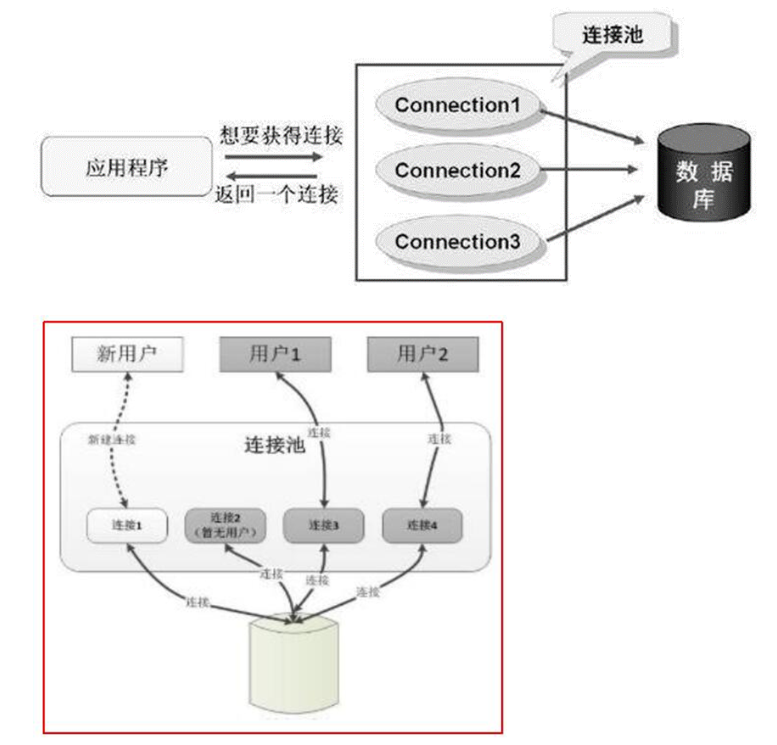
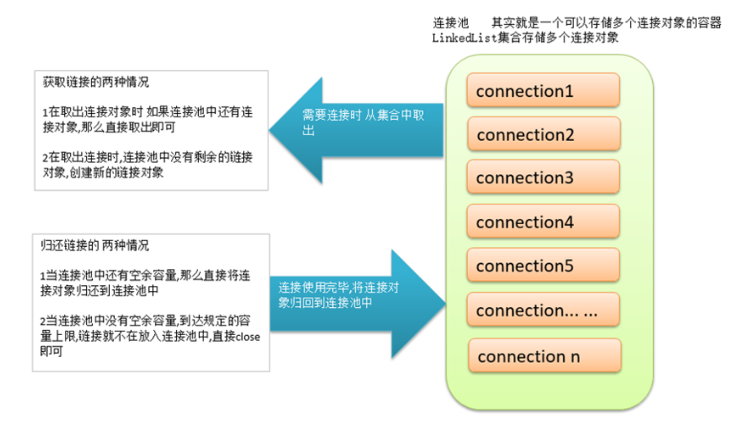
预先准备一些链接对象, 放入连接池中, 当多个线程并发执行时, 可以避免短时间内一次性大量创建链接对象, 减少计算机单位时间内的运算压力, 提高程序的响应速度
-
实现链接对象的反复使用, 可以大大减少链接对象的创建次数, 减少资源的消耗
-
定义连接池
package com.xxx.dao;

import java.sql.Connection;
import java.sql.DriverManager;
import java.sql.SQLException;
import java.util.LinkedList;

public class MyConnectionPool {
    private static String driver = "com.mysql.cj.jdbc.Driver";
    private static String url = "jdbc:mysql://127.0.0.1:3306/mydb?useSSL=false&useUnicode=true&characterEncoding=UTF-8&serverTimezone=Asia/Shanghai&allowPublicKeyRetrieval=true";
    private static String user = "root";
    private static String password = "root";
    private static int initSize = 1;
    private static int maxSize = 1;

    private static LinkedList<Connection> pool;
    static{
        // 加载驱动
        try {
            Class.forName(driver);
        } catch (ClassNotFoundException e) {
            e.printStackTrace();
        }
        // 初始化pool
        pool = new LinkedList<Connection>();
        // 创建5个链接对象
        for (int i = 0; i <initSize; i++) {
            Connection connection = initConnection();
            if(null != connection){
                pool.add(connection);
                System.out.println("初始化连接"+connection.hashCode()+"放入连接池");
            }
        }
    }

    // 私有的初始化一个链接对象的方法
    private static Connection initConnection(){
        try {
            return DriverManager.getConnection(url, user, password);
        } catch (SQLException e) {
            e.printStackTrace();
        }
        return null;
    }

    // 共有的向外界提供链接对象的
    public static Connection getConnection(){
        Connection connection = null;
        if(pool.size() > 0){
            connection = pool.removeFirst();    // 移除集合中的第一个元素
            System.out.println("连接池中还有连接:"+connection.hashCode());
        } else{
            connection = initConnection();
            System.out.println("连接池空,创建新连接:"+connection.hashCode());
        }
        return connection;
    }

    // 共有的向连接池归还连接对象的方法
    public static void returnConnection(Connection connection){
        if(null != connection){
            try {
                if(!connection.isClosed()){
                    if(pool.size()<maxSize){
                        try {
                            connection.setAutoCommit(true);     // 调整事务状态
                            System.out.println("设置连接:"+connection.hashCode()+"自动提交为true");
                        } catch (SQLException e) {
                            e.printStackTrace();
                        }
                        pool.addLast(connection);
                        System.out.println("连接池未满,归还连接:"+connection.hashCode());
                    } else {
                        try {
                            connection.close();
                            System.out.println("连接池满了,关闭连接:"+connection.hashCode());
                        } catch (SQLException e) {
                            e.printStackTrace();
                        }
                    }
                } else {
                    System.out.println("连接:"+connection.hashCode()+"已经关闭,无需归还");
                }
            } catch (SQLException e) {
                e.printStackTrace();
            }
        } else {
            System.out.println("传入的连接为null, 不可归还");
        }
    }
}
-
log4j日志框架_了解
-
什么是日志log
-
如何记录日志
-
log4j日志的级别
-
使用log4j记录日志
-
加入jar包
log4j-1.2.8.jar -
加入属性文件 src 下
log4j.propertieslog4j.rootLogger = error,logfile log4j.appender.stdout = org.apache.log4j.ConsoleAppender log4j.appender.stdout.Target = System.err log4j.appender.stdout.layout = org.apache.log4j.SimpleLayout log4j.appender.logfile = org.apache.log4j.FileAppender log4j.appender.logfile.File = d:/msb.log log4j.appender.logfile.layout = org.apache.log4j.PatternLayout log4j.appender.logfile.layout.ConversionPattern = %d{yyyy-MM-dd HH:mm:ss} %l %F %p %m%n
-
-
通过属性文件理解log4j的主要API
-
代码中记录日志
//创建一个日志记录器 private static final Logger logger = Logger.getLogger(DBUtil.class.getName()); //在合适的地方添加日志 logger.info("正确的读取了属性文件:"+prop); logger.debug("正确的关闭了结果集"); logger.error("DML操作错误:"+e); -
理解日志格式化字符的含义
-
使用log4j记录日志 连接池中通过log4j记录日志
-
代码展示
package com.xxx.dao;

import com.msb.util.PropertiesUtil;
import org.apache.log4j.Logger;

import java.sql.Connection;
import java.sql.DriverManager;
import java.sql.SQLException;
import java.util.LinkedList;

public class MyConnectionPool {
    private static String driver;
    private static String url;
    private static String user;
    private static String password;
    private static int initSize;
    private static int maxSize;
    private static Logger logger;
    private static LinkedList<Connection> pool;

    static{
        logger = Logger.getLogger(MyConnectionPool.class);
        // 初始化参数
        PropertiesUtil propertiesUtil = new PropertiesUtil("/jdbc.properties");
        driver = propertiesUtil.getProperties("driver");
        url = propertiesUtil.getProperties("url");
        user = propertiesUtil.getProperties("user");
        password = propertiesUtil.getProperties("password");
        initSize = Integer.parseInt(propertiesUtil.getProperties("initSize"));
        maxSize = Integer.parseInt(propertiesUtil.getProperties("maxSize"));
        // 加载驱动
        try {
            Class.forName(driver);
        } catch (ClassNotFoundException e) {
            logger.fatal("找不到数据库驱动类"+driver, e);
        }
        // 初始化pool
        pool = new LinkedList<Connection>();
        // 创建5个链接对象
        for (int i = 0; i < initSize ; i++) {
            Connection connection = initConnection();
            if(null != connection){
                pool.add(connection);
                logger.info("初始化连接"+connection.hashCode()+"放入连接池");
            }
        }
    }

    // 私有的初始化一个链接对象的方法
    private static Connection initConnection(){
        try {
            return DriverManager.getConnection(url, user, password);
        } catch (SQLException e) {
            logger.fatal("初始化连接异常",e);
        } return null;
    }

    // 共有的向外界提供链接对象的
    public static Connection getConnection(){
        Connection connection = null;
        if(pool.size() > 0){
            connection = pool.removeFirst();     // 移除集合中的第一个元素
            logger.info("连接池中还有连接:"+connection.hashCode());
        } else {
            connection = initConnection();
            logger.info("连接池空,创建新连接:"+connection.hashCode());
        }
        return connection;
    }

    // 共有的向连接池归还连接对象的方法
    public static void returnConnection(Connection connection){
        if(null != connection){
            try {
                if(!connection.isClosed()){
                    if(pool.size()<maxSize){
                        try {
                            connection.setAutoCommit(true);     // 调整事务状态
                            logger.debug("设置连接:"+connection.hashCode()+"自动提交为true");
                        } catch (SQLException e) {
                            e.printStackTrace();
                        }
                        pool.addLast(connection);
                        logger.info("连接池未满,归还连接:"+connection.hashCode());
                    } else {
                        try {
                            connection.close();
                            logger.info("连接池满了,关闭连接:"+connection.hashCode());
                        } catch (SQLException e) {
                            e.printStackTrace();
                        }
                    }
                } else {
                    logger.info("连接:"+connection.hashCode()+"已经关闭,无需归还");
                }
            } catch (SQLException e) {
                e.printStackTrace();
            }
        } else {
            logger.warn("传入的连接为null,不可归还");
        }
    }
}
-
三大范式
-
概述
-
第一范式
-
第二范式
-
第三范式
-
要求
-
示例1:学生班级表
学号(主键) 学生姓名 班级编号 班级名称 班级信息 023145 张三 987654 3班特招班023146 李四 987654 3班特招班023147 王五 987655 4班普通班023258 赵六 987654 3班特招班 -
示例2:订单明细表
编号(主键) 图书id 图书名称 价格 作者 出版社 出版日期 数量 0231451 精通Java 60.00 张三 清华出版社 2007 1 0231462 Oracle 65.00 李四 机械出版社 2009 1 0231473 JSP 87 王五 电子出版社 2014 3 0232581 精通Java 60.00 张三 清华出版社 2007 2 0232592 Oracle 65.00 李四 机械出版社 2009 3 图书id 图书名称 价格 作者 出版社 出版日期 1 精通 Java 60.00 张三 清华出版社 2007 2 Oracle 65.00 李四 机械出版社 2009 3 JSP 87 王五 电子出版社 2014 4 Struts2 56 赵六 清华出版社 2005 编号(主键) 图书id 数量 023145 11 023146 21 023147 33 023258 22 023259 23
-
-
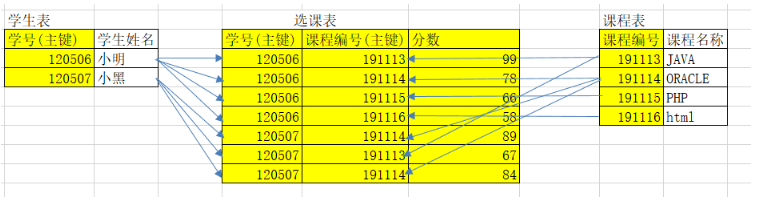
范式的总结

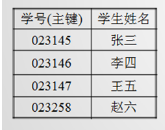
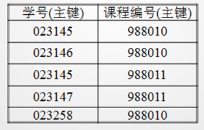
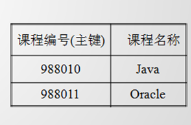
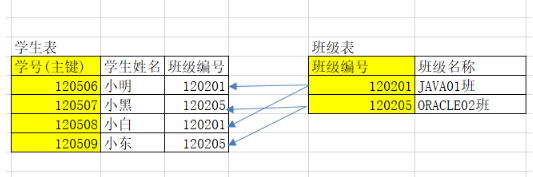
数据之间的三大关系

更多推荐
 10
10 0
0- 0


 已为社区贡献9条内容

所有评论(0)