
本地搜图系列-3:局部搜图-基于Python的本地文件夹以图搜图 上传局部截图 查找包含图片内容的所有本地图片
·
这个应用也是本地搜图系列的,通过局部截图查找本地图片。
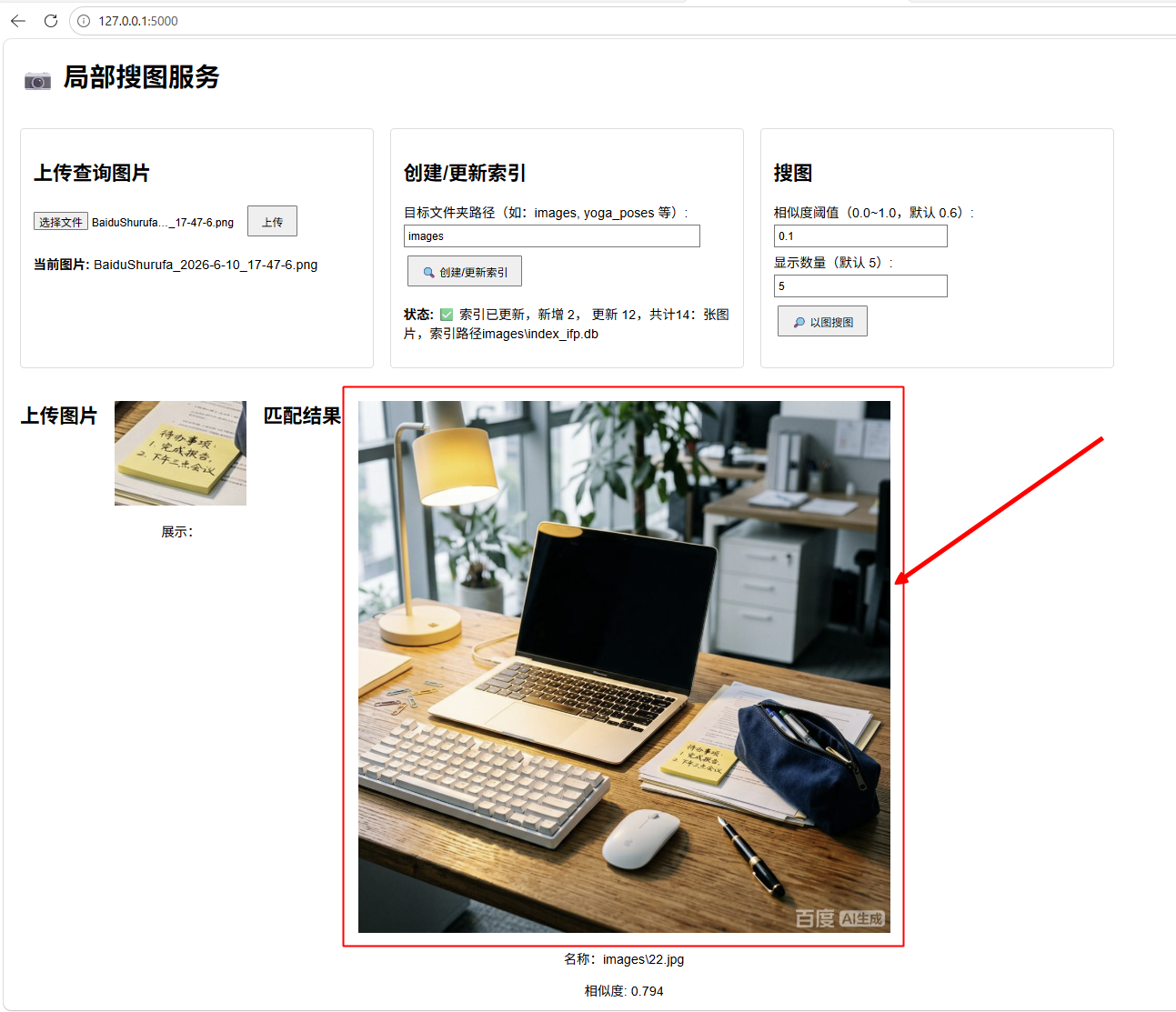
启动py程序后,在浏览器访问,上传对局部照片,就可以在本地文件夹搜索查找包含上传照片内容的本地照片了。(代码照例在结尾处)
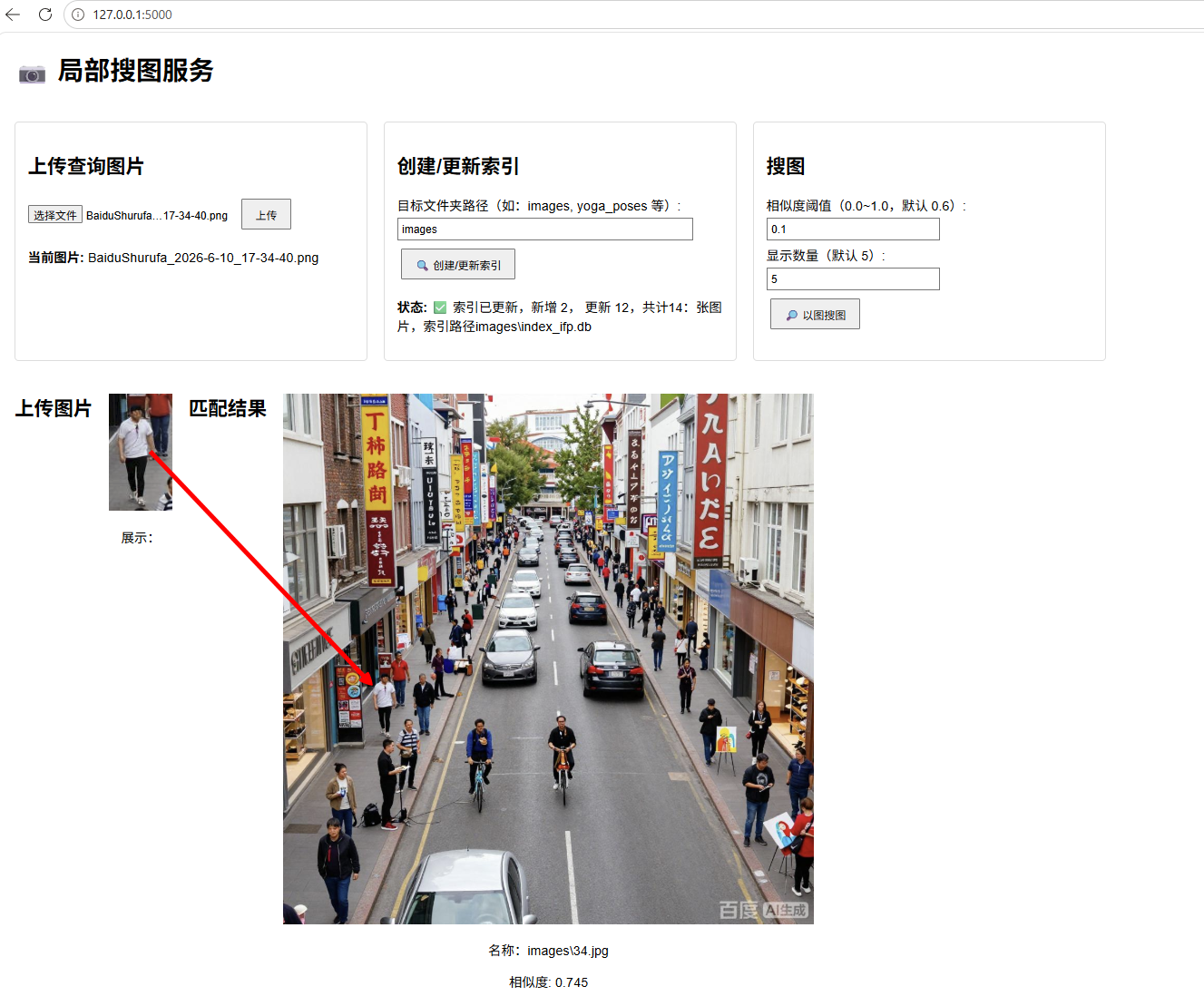
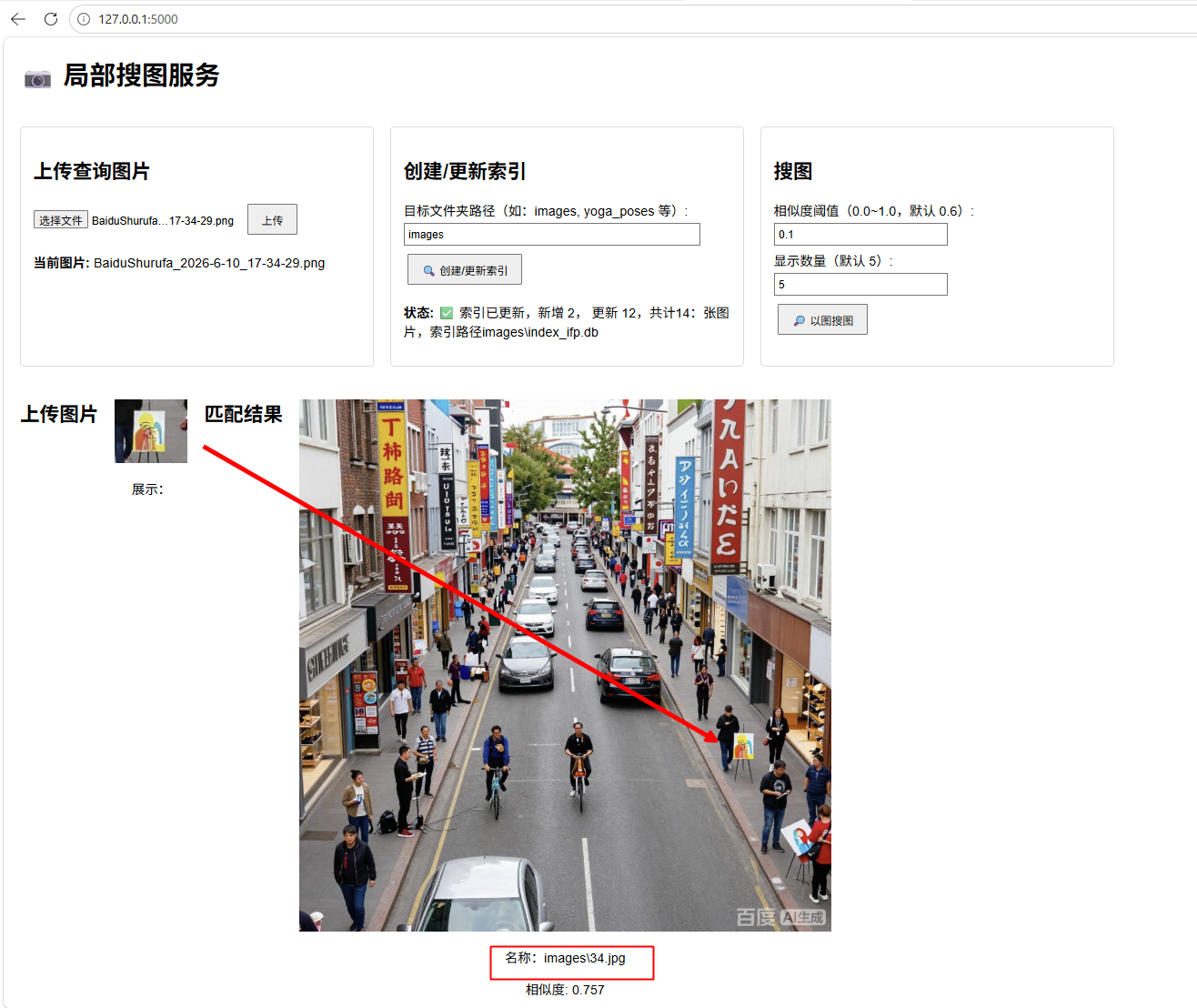
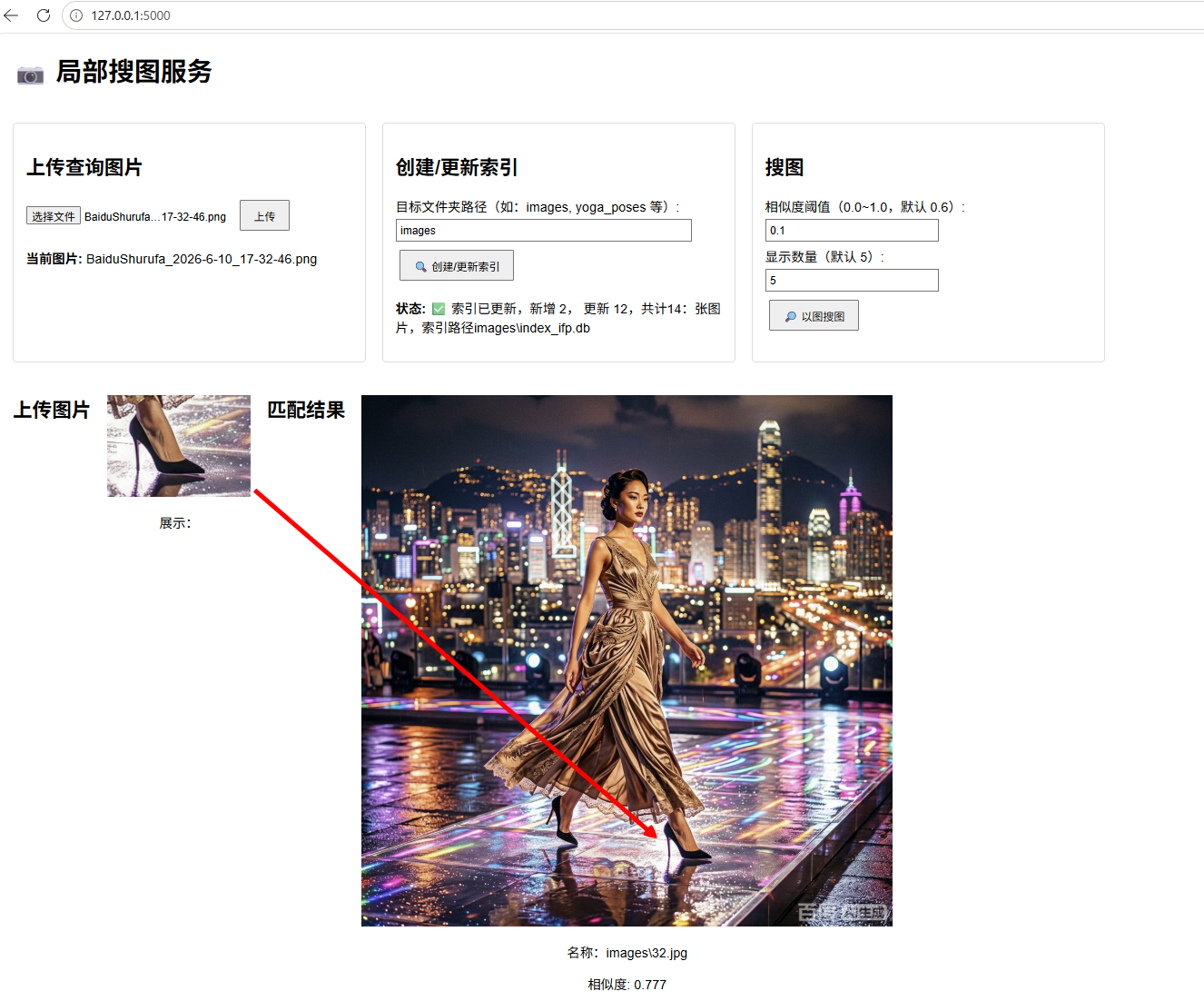
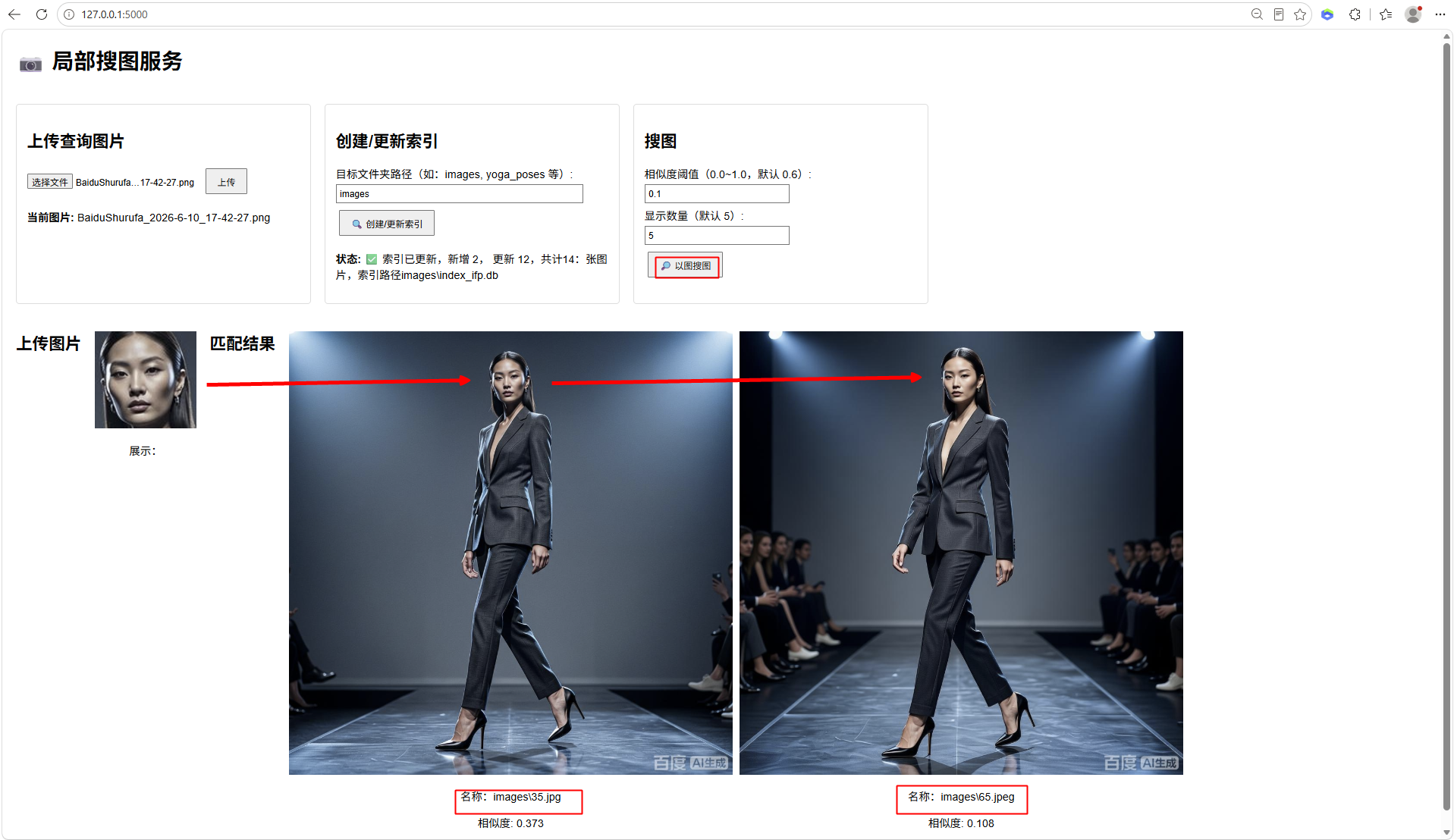
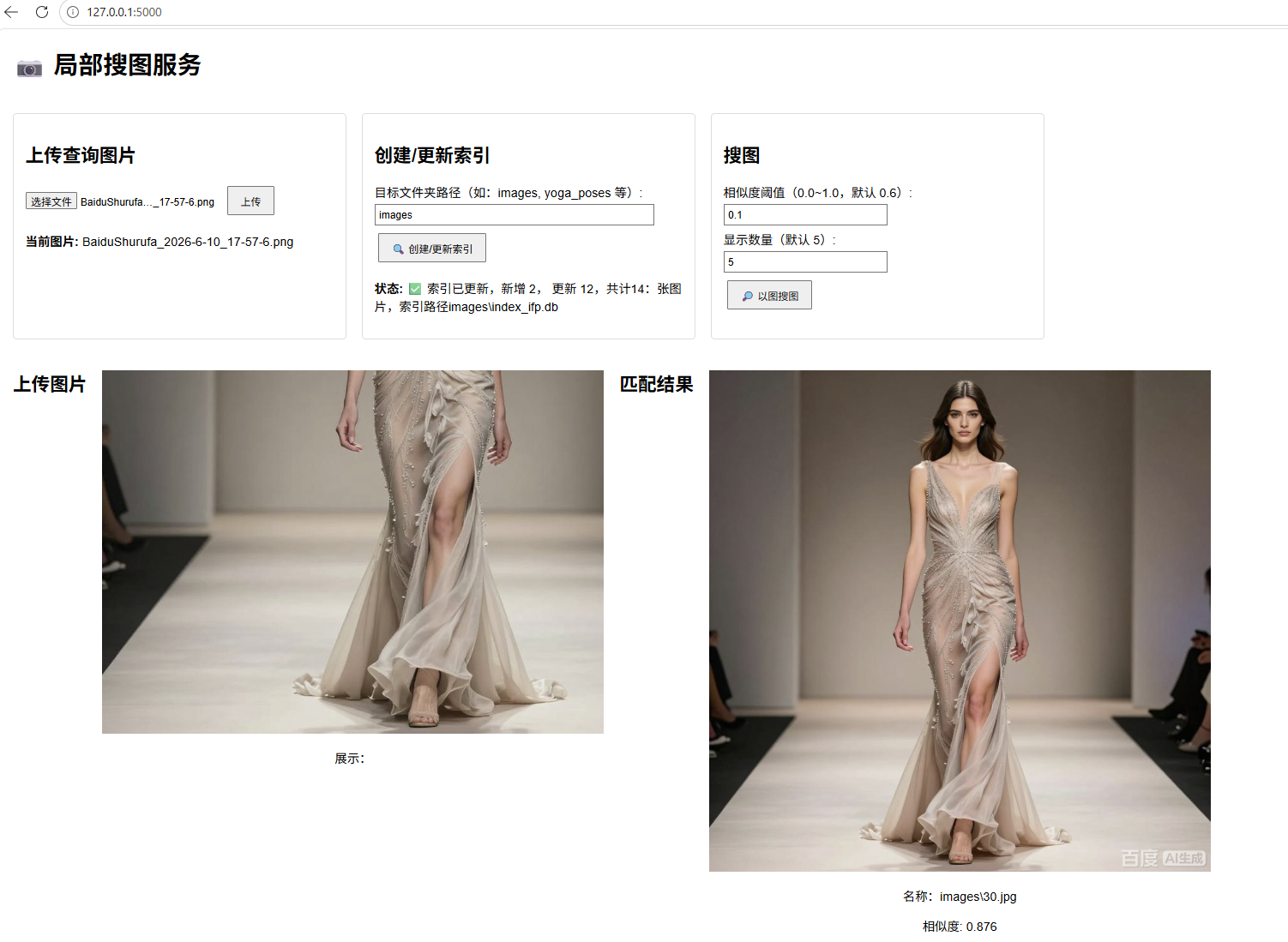
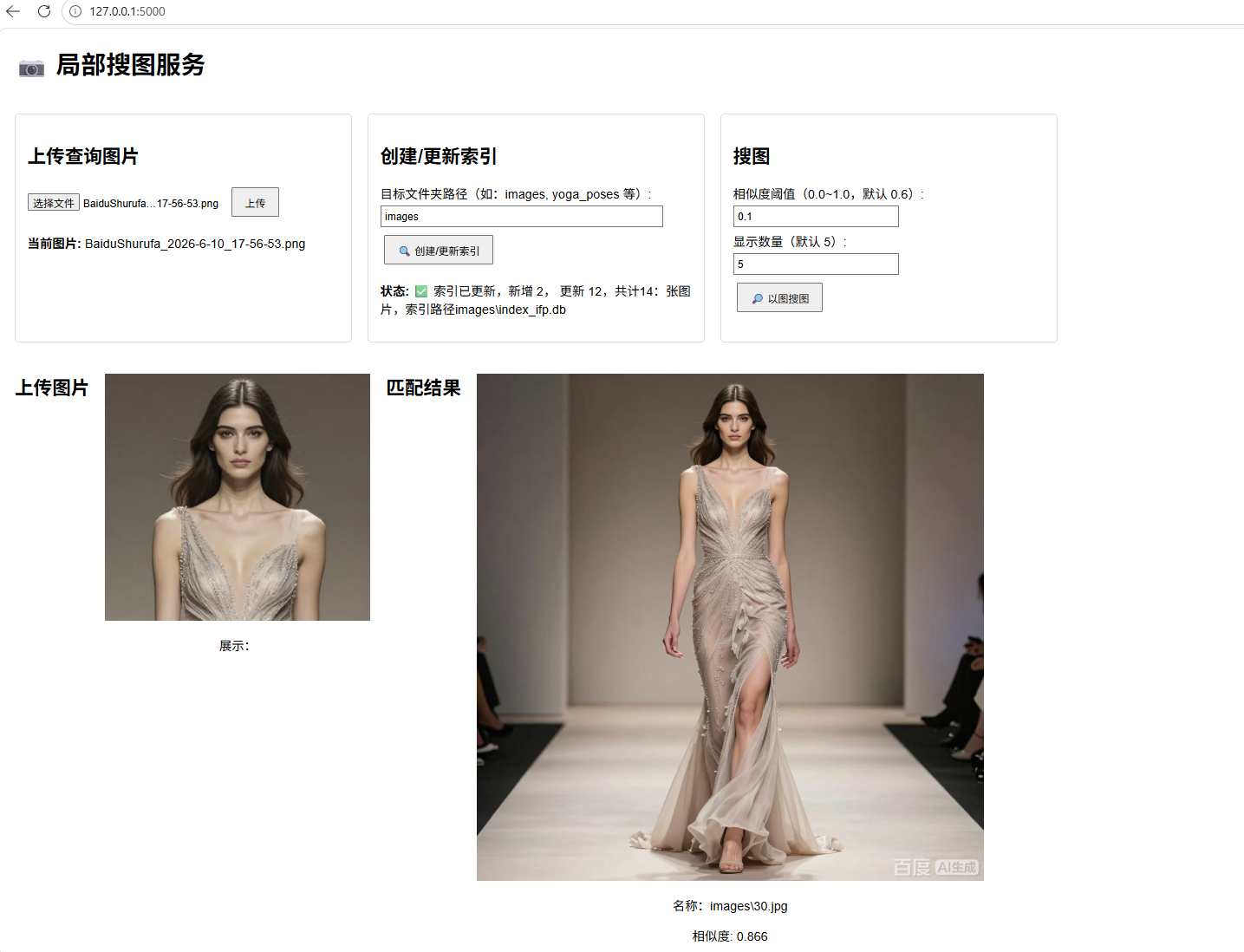


单击搜索出的图片,可以将图片放大,并支持滚轮缩放;

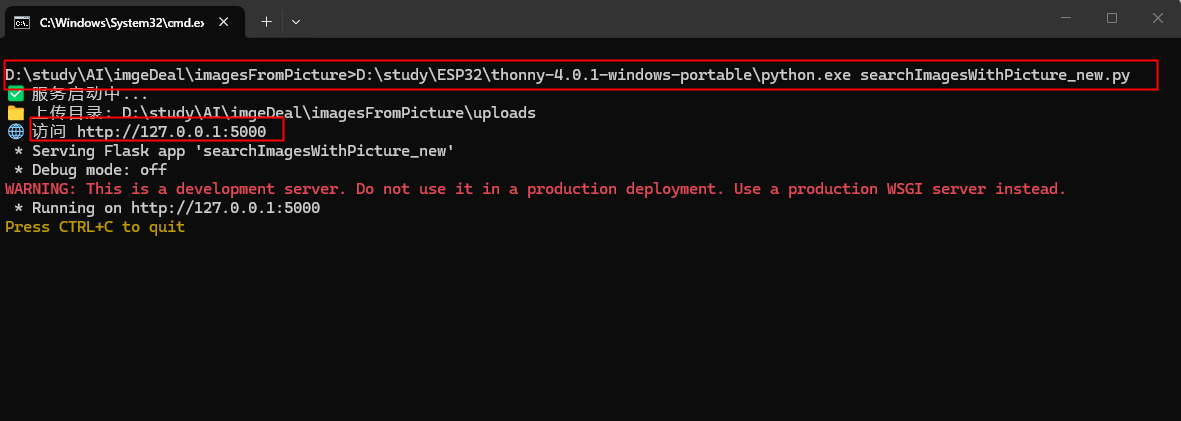
程序启动后,在浏览器访问http://127.0.0.1:5000即可,访问后将本地需要查找的路径粘贴到2的位置,然后创建索引,首次创建会消耗比较多的时间,且创建图片所有元素索引,时间要比姿势搜图和人脸搜图数据大,会更慢。索引创建完成后,就可以上传需要查找的照片局部元素进行搜索了。
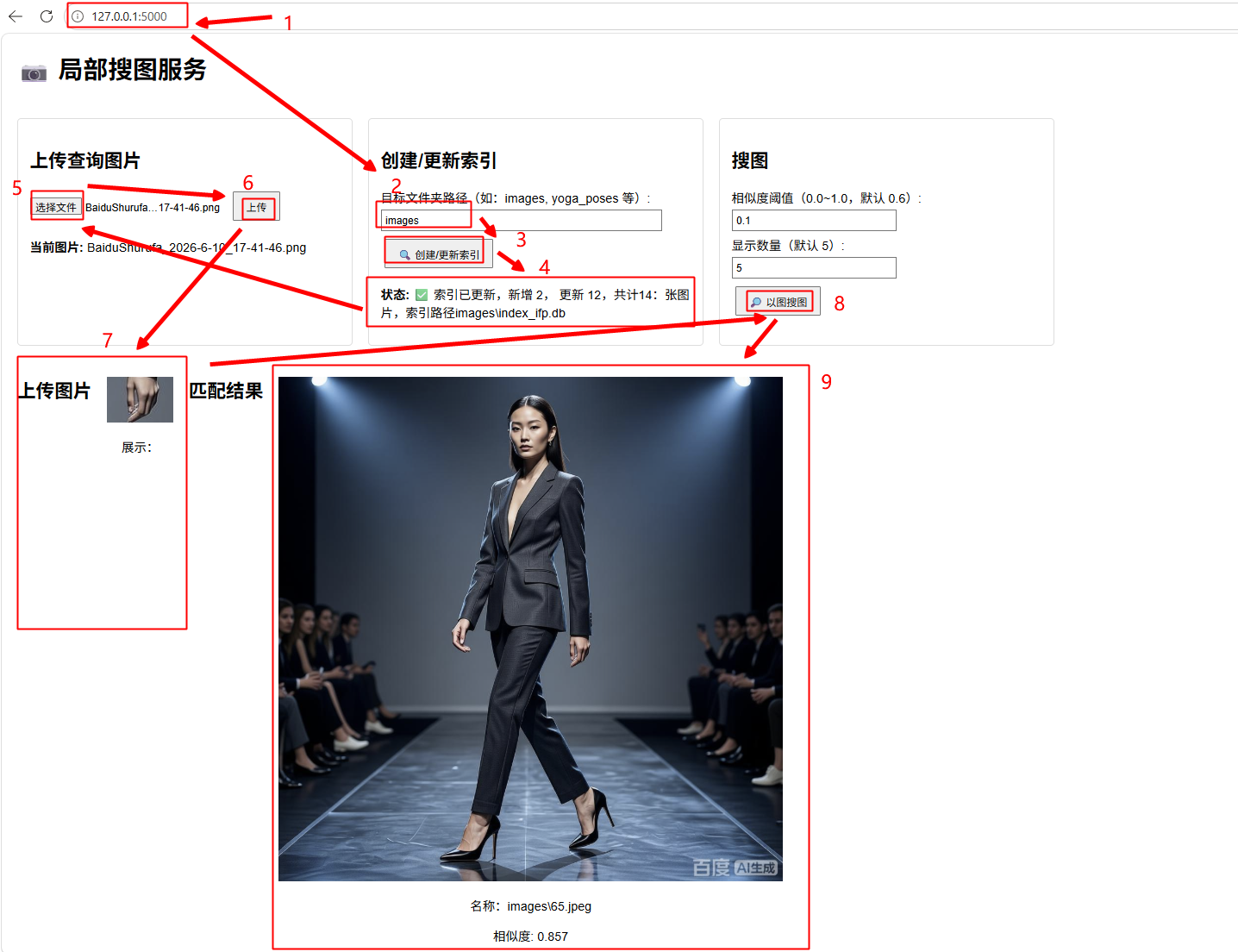
以下为代部分(千问及百度提供技术支持,图片由百度AI生成,避免肖像及版权风险):
#以图找人,人脸识别,SQLite创建索引
# pose_match_web.py
import os
import cv2
import sqlite3
#from PIL import Image
import numpy as np
#import pickle
#from sklearn.preprocessing import MinMaxScaler
from pathlib import Path
import logging
from flask import Flask, render_template_string, send_file,request, jsonify, send_from_directory #, url_for
from werkzeug.utils import secure_filename
from urllib.parse import quote, unquote
import traceback
import base64
#from scipy.spatial import procrustes

# -----------------------------
# 配置
# -----------------------------
INDEX_DB = 'index_ifp.db' #索引库文件 ifp:image from picture
UPLOAD_FOLDER = 'uploads'
DEFAULT_SIMILARITY_THRESHOLD = 0.1  # ✅ 降低阈值,更容易匹配
DEFAULT_RESULTS_COUNT = 5
os.makedirs(UPLOAD_FOLDER, exist_ok=True)

# -----------------------------
# 初始化 Flask
# Flask App
# -----------------------------
app = Flask(__name__)
app.config['UPLOAD_FOLDER'] = UPLOAD_FOLDER


# 初始化索引库
def init_database(db_folder):
    """处理 SQLite 数据库文件夹路径"""
    if not isinstance(db_folder, Path):
        db_folder = Path(db_folder)
    # 确保文件夹存在
    db_folder.mkdir(parents=True, exist_ok=True)

    # 构建数据库文件的完整路径
    db_path = db_folder / INDEX_DB

    """初始化 SQLite 数据库"""
    conn = sqlite3.connect(db_path)
    cursor = conn.cursor()

    cursor.execute('''
        CREATE TABLE IF NOT EXISTS image_index (
            id INTEGER PRIMARY KEY,
            filename TEXT UNIQUE NOT NULL,
            file_path TEXT NOT NULL,
            file_size INTEGER NOT NULL,
            file_mtime REAL NOT NULL,
            features BLOB NOT NULL  -- 存储序列化的特征向量
        )
    ''')

    # 创建索引,加速查询
    cursor.execute('CREATE INDEX IF NOT EXISTS idx_filename ON image_index(filename)')
    cursor.execute('CREATE INDEX IF NOT EXISTS idx_mtime ON image_index(file_mtime)')

    conn.commit()
    conn.close()
    print("✅ 数据库初始化完成")

SUPPORTED_EXTENSIONS = {'.jpg', '.jpeg', '.png', '.bmp', '.webp', '.tiff', '.tif'}

# -----------------------------
# 构建索引 → 保存在目标文件夹下
# -----------------------------
def build_or_update_index(image_folder='images'):
    """构建或更新 SQLite 索引"""
    image_folder = Path(image_folder)
    if not image_folder.exists():
        raise FileNotFoundError(f"图片文件夹不存在: {image_folder}")

    image_files = [f for f in image_folder.iterdir()
                   if f.is_file() and f.suffix.lower() in SUPPORTED_EXTENSIONS]

	# 构建数据库文件的完整路径
    index_path = image_folder / INDEX_DB
    conn = sqlite3.connect(index_path)
    cursor = conn.cursor()

    processed = 0
    reused = 0

    for img_path in image_files:
        stat = img_path.stat()
        file_size = stat.st_size
        file_mtime = stat.st_mtime
        filename = img_path.name

        # 检查是否已存在且未修改
        cursor.execute(
            "SELECT file_mtime, features FROM image_index WHERE filename = ?",
            (filename,)
        )
        row = cursor.fetchone()

        if row and abs(row[0] - file_mtime) < 1:  # 时间差小于1秒视为未修改
            reused += 1
            continue  # 跳过,复用旧特征

        # 否则重新提取特征
        try:
            features = extract_sift_features(img_path)

            # 插入或替换
            cursor.execute('''
                INSERT OR REPLACE INTO image_index
                (filename, file_path, file_size, file_mtime, features)
                VALUES (?, ?, ?, ?, ?)
            ''', (filename, str(img_path), file_size, file_mtime, features))

            processed += 1
            print(f"✅ 处理成功 {img_path}")
        except Exception as e:
            print(f"❌ 处理失败 {img_path}: {e}")
            traceback.print_exc()#打印追踪信息
            #break
            continue  # 出错也跳过,不要中断整个索引过程

    conn.commit()
    conn.close()

    print(f"✅ 索引更新完成 | 新增/更新: {processed}, 复用: {reused}, 总计: {processed + reused}")
    return processed,reused,processed + reused,index_path


#特征提取
def extract_sift_features(image_path):
	img = cv2.imread(image_path)
	gray = cv2.cvtColor(img, cv2.COLOR_BGR2GRAY)
	sift = cv2.SIFT_create()
	kp, des = sift.detectAndCompute(gray, None)
	return des

def load_index_db():
	# 获取目标文件夹(默认 images)
    folder = request.args.get('folder', '').strip()
    image_folder = Path(folder)
    if not image_folder.is_absolute():
        image_folder = Path.cwd() / image_folder

    index_path = image_folder / INDEX_DB
    if not index_path.exists():
        return jsonify({'error': f'索引文件不存在: {index_path}'})

    return load_index_from_sqlite(index_path)


def load_index_from_sqlite(db_path):
    """
    从 SQLite 数据库加载索引数据,格式与旧 pkl 一致
    返回: [{'filename': ..., 'file_size': ..., 'file_mtime': ..., 'features': [...], 'image_path': ...}, ...]
    """
    try:
        conn = sqlite3.connect(str(db_path))
        cursor = conn.cursor()

        cursor.execute("SELECT filename, file_path, file_size, file_mtime, features FROM image_index")
        rows = cursor.fetchall()
        conn.close()

        return rows

    except Exception as e:
        raise RuntimeError(f"读取 SQLite 索引失败: {e}")


# HTML 模板(内嵌)
HTML_TEMPLATE = '''
<!DOCTYPE html>
<html lang="zh">
<head>
    <meta charset="UTF-8">
    <title>局部搜图服务</title>
    <style>
        body { font-family: Arial, sans-serif; margin: 20px;}
        .all {display: flex; gap: 20px; /* 现代浏览器支持的间距属性 */ }
		.resultsAll {display: flex; gap: 20px; /* 现代浏览器支持的间距属性 */ align-items: flex-start;}
		.upload, .query, .index { margin: 20px 0; padding: 15px;width: 400px; border: 1px solid #ddd; border-radius: 5px; }
        .results { display: flex; flex-wrap: wrap; gap: 10px; margin-top: 20px; }
        .result-item { text-align: center; max-width: 650px; }
        .result-item img { width: 100%; height: auto; }
        input[type="text"], input[type="number"] { width: 200px; padding: 5px; margin: 5px 0; }
        button { padding: 8px 16px; margin: 5px; }

		/* 图片缩放功能 */
		.gallery { display: flex; flex-wrap: wrap; gap: 15px; justify-content: center; }
		.gallery img { width: 200px; height: 200px; object-fit: cover; border: 3px solid #ddd; border-radius: 8px; cursor: pointer; transition: transform 0.2s, box-shadow 0.2s; }
		.gallery img:hover { transform: scale(1.05); box-shadow: 0 4px 10px rgba(0,0,0,0.2); }
		.modal { display: none; position: fixed; top: 0; left: 0; width: 100%; height: 100%; background-color: rgba(0,0,0,0.9); justify-content: center; align-items: center; z-index: 1000; animation: fadeIn 0.3s ease-in-out; overflow: hidden; }
		.modal img { max-width: 90vw; max-height: 90vh; border: 4px solid white; border-radius: 6px; box-shadow: 0 0 20px rgba(255,255,255,0.1); animation: zoomIn 0.3s ease-out; transition: transform 0.2s; cursor: grab; }
		.modal img:active { cursor: grabbing; }
		@keyframes fadeIn { from { opacity: 0; } to { opacity: 1; } }
		@keyframes zoomIn { from { transform: scale(0.8); opacity: 0; } to { transform: scale(1); opacity: 1; } }
	</style>
</head>
<body>
    <h1>📷 局部搜图服务</h1>
	<div class = "all">
		<div class="upload">
			<h2>上传查询图片</h2>
			<form method="post" enctype="multipart/form-data" action="/upload" onsubmit="handleUpload(event)">
				<input onchange="handleUpload(event)" type="file" name="file" accept="image/*" required>
				<button type="submit">上传</button>
			</form>
			<p><strong>当前图片:</strong> <span id="currentFile">无</span></p>
		</div>

		<div class="index">
			<h2>创建/更新索引</h2>
			<form method="post" action="/create_index" onsubmit="updateIndex(event)">
				<label>目标文件夹路径(如:images, yoga_poses 等):</label><br>
				<input type="text" id = "folder1" name="folder" value="images" style="width: 350px;"><br>
				<button type="submit">🔍 创建/更新索引</button>
			</form>
			<p><strong>状态:</strong> <span id="indexStatus">未创建</span></p>
		</div>

		<div class="query">
			<h2>搜图</h2>
			<label>相似度阈值(0.0~1.0,默认 0.6):</label><br>
			<input type="number" id="similarity" step="0.01" min="0" max="1" value=""><br>
			<label>显示数量(默认 5):</label><br>
			<input type="number" id="count" min="1" value=""><br>

			<button onclick="findSimilar()">🔎 以图搜图</button>
		</div>
    </div>
	<div class = "resultsAll">
		<h2>上传图片</h2>
		<div id="uploadSource" class="results"></div>

		<h2>匹配结果</h2>
		<div id="results" class="results"></div>
	</div>

    <div class="modal" id="modal" onclick="closeModal(event)">
        <img id="modal-img" />
    </div>

	<script>
		document.addEventListener('DOMContentLoaded', function () {
			// DOM加载完成后执行的代码 而不需要等待样式表、图片和子框架的加载
            fetch('/getArgs', {
                method: 'POST'
            })
            .then(response => response.json())
            .then(data => {
                document.getElementById('similarity').value = data.similarity;
                document.getElementById('count').value = data.count;

            });
		});

        let currentFile = null;
        function handleUpload(event) {
            const fileInput = event.target;
            const file = fileInput.files[0];

            if (!file) {
                return;
            }
			document.getElementById('currentFile').textContent = file.name;
            // 创建FormData对象并添加文件
            const formData = new FormData();
            formData.append('file', file);

            fetch('/upload', {
                method: 'POST',
                body: formData
            })
            .then(response => response.json())
            .then(data => {
                if (data.filename) {
                    currentFile = data.filename;
                    document.getElementById('currentFile').textContent = currentFile;

					const uploadedUrl = data.uploaded_img_url;
					const names = "up_"+data.filename;
					document.getElementById('uploadSource').innerHTML =
                    `<div class="result-item">
						<img src="${uploadedUrl}" class="result-item" onclick="showImage('${data.filename}','${names}','${data.upload_path}')" ><br>
						<p>展示:<span id = "${names}"/></p>
						<img id = "img_${names}" src="" onclick = zoomImg(event) >
					  </div>`
					document.getElementById('results').innerHTML = '';

                } else {
                    alert('上传失败: ' + (data.error || '未知错误'));
                }
            });
        }

        function updateIndex(event) {
            document.getElementById('indexStatus').textContent = '更新中...';
			event.preventDefault();
            const formData = new FormData(event.target);
            fetch('/create_index', {
                method: 'POST',
                body: formData
            })
            .then(response => response.json())
            .then(data => {
                if (data.error) {
                    document.getElementById('indexStatus').textContent = '错误: ' + data.error;
                } else {
                    document.getElementById('indexStatus').textContent =
                        `✅ 索引已更新,新增 ${data.processed},
						更新 ${data.reused},共计${data.allcount}:张图片,索引路径${data.index_path}`;
                }
            });
        }

        function findSimilar() {
            if (!currentFile) {
                alert('请先上传一张图片!');
                return;
            }
            document.getElementById('results').innerHTML = '🔍 匹配中...';

            const similarity = document.getElementById('similarity').value;
            const count = document.getElementById('count').value;
			//const  folder1 = document.getElementById('folder1').value;
			const folder = document.getElementsByName('folder')[0].value;
			//alert(folder)
            fetch('/find_similar?filename=' + encodeURIComponent(currentFile) +
                  '&similarity=' + similarity + '&count=' + count + '&folder=' + folder )
            .then(response => response.json())
            .then(data => {
                const resultsDiv = document.getElementById('results');
                resultsDiv.innerHTML = '';
                if (data.error) {
                    resultsDiv.innerHTML = '<p style="color:red;">' + data.error + '</p>';
                    return;
                }
                if (data.length === 0) {
                    resultsDiv.innerHTML = '<p>未找到相似姿势</p>';
                    return;
                }

                data.forEach(item => {
                    resultsDiv.innerHTML += `
                        <div class="result-item">
                            <img src="${item.img}" alt="match" onclick=zoomImg(event)>
							<p>名称:${item.image_name}</p>
                            <p>相似度: ${item.similarity.toFixed(3)}</p>
                        </div>`;
                });
            });
         }

        function showImage(name,names,folder) {
			if (folder == "null"){
				folder = document.getElementsByName('folder')[0].value;
			}
			types = name.split('.').pop();
			const spanEle = document.getElementById(names);
			const imgEle = document.getElementById('img_'+names);
			spanEle.innerHTML = '';
			imgEle.src = '';
			const url = '/show_image?folder=' + folder + '&name=' + name + '&types=' + types ;
            fetch(url, {
                method: 'POST',
				headers: {
					'Content-Type': 'application/x-www-form-urlencoded',
				},
            })
            .then(response => response.json())
            .then(data => {


                if (data.error) {
                    spanEle.innerHTML = 'data.error';
                    return;
                }

                spanEle.innerHTML = '√';
				//imgEle.src=`"data:image/${data.type};base64,${data.str}"`
				const blobUrl = base64ToBlobUrl(`image/${data.type}`, data.str);
				imgEle.src = blobUrl;

				//alert(imgEle.src)
            });
			URL.revokeObjectURL(blobUrl);
         }

		function base64ToBlobUrl(mimeType,base64Str) {
			// 将 base64 转换为二进制数据
			const binaryString = atob(base64Str);
			const bytes = new Uint8Array(binaryString.length);
			for (let i = 0; i < binaryString.length; i++) {
				bytes[i] = binaryString.charCodeAt(i);
			}

			// 创建 Blob 和 URL
			const blob = new Blob([bytes], { type: mimeType });
			return URL.createObjectURL(blob);
		}

		//图片缩放函数------start
		const gallery = document.getElementById('gallery');
		const modal = document.getElementById('modal');
		const modalImg = document.getElementById('modal-img');

		let scale = 1;
		let isDragging = false;
		let startPos = { x: 0, y: 0 };
		let currentTranslate = { x: 0, y: 0 };

		// 打开模态框
		function zoomImg(e) {
		  if (e.target.tagName === 'IMG') {
			modalImg.src = e.target.src;
			modal.style.display = 'flex';
			document.body.style.overflow = 'hidden';
			scale = 1;
			currentTranslate = { x: 0, y: 0 };
			modalImg.style.transform = `scale(${scale}) translate(0px, 0px)`;
		  }
		}

		// 关闭模态框(直接绑定在HTML上)
		function closeModal(e) {
		  if (e.target === modal || e.target === modalImg) {
			modal.style.display = 'none';
			document.body.style.overflow = 'auto';
			// 重置状态
			isDragging = false;
			scale = 1;
			currentTranslate = { x: 0, y: 0 };
		  }
		}

		// 滚轮缩放
		modalImg.addEventListener('wheel', function(e) {
		  e.preventDefault();
		  const delta = e.deltaY > 0 ? -0.1 : 0.1;
		  scale = Math.min(Math.max(scale + delta, 0.5), 5); // 支持放大到5倍
		  applyTransform();
		});

		// 鼠标按下:开始拖拽
		modalImg.addEventListener('mousedown', function(e) {
		  if (scale <= 1) return; // 仅在放大时允许拖拽
		  isDragging = true;
		  startPos = { x: e.clientX - currentTranslate.x, y: e.clientY - currentTranslate.y };
		  modalImg.style.cursor = 'grabbing';
		});

		// 鼠标移动:实时更新位置
		document.addEventListener('mousemove', function(e) {
		  if (!isDragging) return;
		  currentTranslate = {
			x: e.clientX - startPos.x,
			y: e.clientY - startPos.y
		  };
		  applyTransform();
		});

		// 鼠标松开:结束拖拽
		document.addEventListener('mouseup', function() {
		  isDragging = false;
		  modalImg.style.cursor = 'grab';
		});

		// 应用缩放和平移变换
		function applyTransform() {
		  modalImg.style.transform = `scale(${scale}) translate(${-currentTranslate.x}px, ${-currentTranslate.y}px)`;
		}
		//图片缩放函数------end

	</script>
</body>
</html>
'''

@app.route('/')
def index():
    return render_template_string(HTML_TEMPLATE)

@app.route('/upload', methods=['POST'])
def upload():
    if 'file' not in request.files:
        return jsonify({'error': '未选择文件'})
    file = request.files['file']
    if file.filename == '':
        return jsonify({'error': '文件名为空'})

    filename = secure_filename(file.filename)
    upload_path = os.path.join(app.config['UPLOAD_FOLDER'], filename)
    file.save(upload_path)

    # 返回上传图的 URL
    uploaded_img_url = f"/uploads/{filename}"

    return jsonify({
        'filename': filename,
        'uploaded_img_url': uploaded_img_url,
		"upload_path":app.config['UPLOAD_FOLDER']
    })

@app.route('/uploads/<filename>')
def uploaded_file(filename):
    return send_from_directory(UPLOAD_FOLDER, filename)

@app.route('/create_index', methods=['POST'])
def create_index():
    folder = request.form.get('folder', '').strip()
    if not folder:
        return jsonify({'error': '请填写图片文件夹路径'})

    try:
        print(f"=====目标路径文件夹{folder}")
        image_folder = Path(folder)
        if not image_folder.is_absolute():
            image_folder = Path.cwd() / image_folder

		# 1. 初始化数据库
        init_database(folder)

		# 2. 构建或更新索引
		#build_or_update_index(str(image_folder))

        processed, reused,allcount,index_path = build_or_update_index(str(folder))
        return jsonify({
            'status': 'success',
			'processed': processed,
			'reused': reused,
            'allcount': allcount,
            'index_path': str(index_path)
        })
    except Exception as e:
        traceback.print_exc()#打印追踪信息
        return jsonify({'error': str(e)})


@app.route('/getArgs', methods=['POST'])
def getArgs():
	return jsonify({
		'similarity': DEFAULT_SIMILARITY_THRESHOLD,
		'count': DEFAULT_RESULTS_COUNT,
	})


@app.route('/find_similar')
def find_similar():
	print("-----开始匹配")
	filename = request.args.get('filename')
	if not filename:
		return jsonify({'error': '缺少查询图片'})

	query_path = os.path.join(UPLOAD_FOLDER, filename)
	if not os.path.exists(query_path):
		return jsonify({'error': f'查询图片不存在: {query_path}'})

	try:
		similarity_threshold = float(request.args.get('similarity', 0.1))
		results_count = int(request.args.get('count', 5))
	except:
		return jsonify({'error': '参数错误'})


	try:
		# ✅ 使用 SQLite 加载索引
		index_data = load_index_db()
	except Exception as e:
		return jsonify({'error': f'加载索引失败: {str(e)}'})

	# 提取上传图片查询特征
	query_descriptors = extract_sift_features(query_path)

	matches = search_similar_images(query_descriptors,index_data,similarity_threshold,results_count)

	print(f"🎯 匹配完成,匹配数: {len(matches)}")
	return jsonify(matches)


# -----------------------------
# 相似度匹配
# -----------------------------
def search_similar_images(query_descriptors, index_data,similarity_threshold, top_k=5):
    """
    使用 SIFT 描述子在 index_data 中搜索最相似图片
    返回归一化后的相似度分数(0~1),避免因图像大小差异导致评分偏差

    Args:
        query_descriptors: 查询图的 SIFT 描述子 (numpy array, shape: N x 128)
        index_data: 图片索引数据列表,每项为元组或列表,其中 row[4] 是描述子 bytes,row[1] 是路径
        top_k: 返回前 k 个结果

    Returns:
        [
            {"path": "a.jpg", "similarity": 0.85, "matches": 42},
            {"path": "b.jpg", "similarity": 0.67, "matches": 31},
            ...
        ]
    """
    if query_descriptors is None or len(query_descriptors) == 0:
        return []

    # 创建 FLANN 匹配器
    FLANN_INDEX_KDTREE = 1
    index_params = dict(algorithm=FLANN_INDEX_KDTREE, trees=5)
    search_params = dict(checks=50)
    flann = cv2.FlannBasedMatcher(index_params, search_params)

    results = []

    num = 0;
    for row in index_data:
        num = num + 1
        print("-----比对数:",num)
        img_name = row[0]
        img_path = row[1]
        db_descriptor_bytes = row[4]

        # 恢复数据库中的描述子
        try:
            db_descriptors = np.frombuffer(db_descriptor_bytes, dtype=np.float32).reshape(-1, 128)
        except Exception as e:
            continue  # 跳过损坏或格式错误的数据

        if len(db_descriptors) == 0:
            continue

        # KNN 匹配 + Lowe's Ratio Test
        matches = flann.knnMatch(query_descriptors, db_descriptors, k=2)
        good_matches = []
        for m, n in matches:
            if m.distance < 0.7 * n.distance:
                good_matches.append(m)  # 注意:这里 append(m) 即可,不是 [m]

        num_good_matches = len(good_matches)
        if num_good_matches == 0:
            continue

        # 归一化相似度:匹配数 / min(查询图关键点数, 数据库图关键点数)
        num_query_kp = len(query_descriptors)
        num_db_kp = len(db_descriptors)
        normalized_score = num_good_matches / min(num_query_kp, num_db_kp)
        if normalized_score >= similarity_threshold:
            print("✅✅✅✅✅✅✅✅命中")
			# 使用 URL 编码路径,防止特殊字符
            img_url = f"/image_proxy/{quote(str(img_path))}"
            results.append({
				"image_name": img_path,
				"img": img_url,
				"similarity": float(normalized_score),  # 转为 Python float,便于 JSON 序列化
				"matches": num_good_matches
			})

    # 按 similarity 降序排序
    results.sort(key=lambda x: x["similarity"], reverse=True)

    return results[:top_k]


@app.route('/image_proxy/<path:encoded_path>')
def image_proxy(encoded_path):
    try:
        img_path = unquote(encoded_path)
        img_path = Path(img_path)

        if not img_path.exists() or not img_path.is_file():
            return 'Image not found', 404

        # 自动判断 MIME 类型
        mimetype = 'image/jpeg'
        ext = img_path.suffix.lower()
        if ext in ['.png']: mimetype = 'image/png'
        elif ext in ['.gif']: mimetype = 'image/gif'
        elif ext in ['.webp']: mimetype = 'image/webp'
        elif ext in ['.bmp']: mimetype = 'image/bmp'

        return send_file(str(img_path), mimetype=mimetype)

    except Exception as e:
        print(f"Error serving image: {e}")
        return 'Error loading image', 500

if __name__ == '__main__':
    os.makedirs(UPLOAD_FOLDER, exist_ok=True)
    print("✅ 服务启动中...")
    print(f"📁 上传目录: {os.path.abspath(UPLOAD_FOLDER)}")
    print("🌐 访问 http://127.0.0.1:5000")
app.run(debug=False, host='127.0.0.1', port=5000)更多推荐
 6
6 0
0- 0


 已为社区贡献3条内容

所有评论(0)