
[Python] 制作小游戏创意之3D魔方
·
制作想法
业余时间想制作一个使用python开发的游戏, 但是想要做点3d效果,然后想到尝试一下啊使用Pygame做3d可不可行
开始搭建
安装好python
pygame==2.5.2
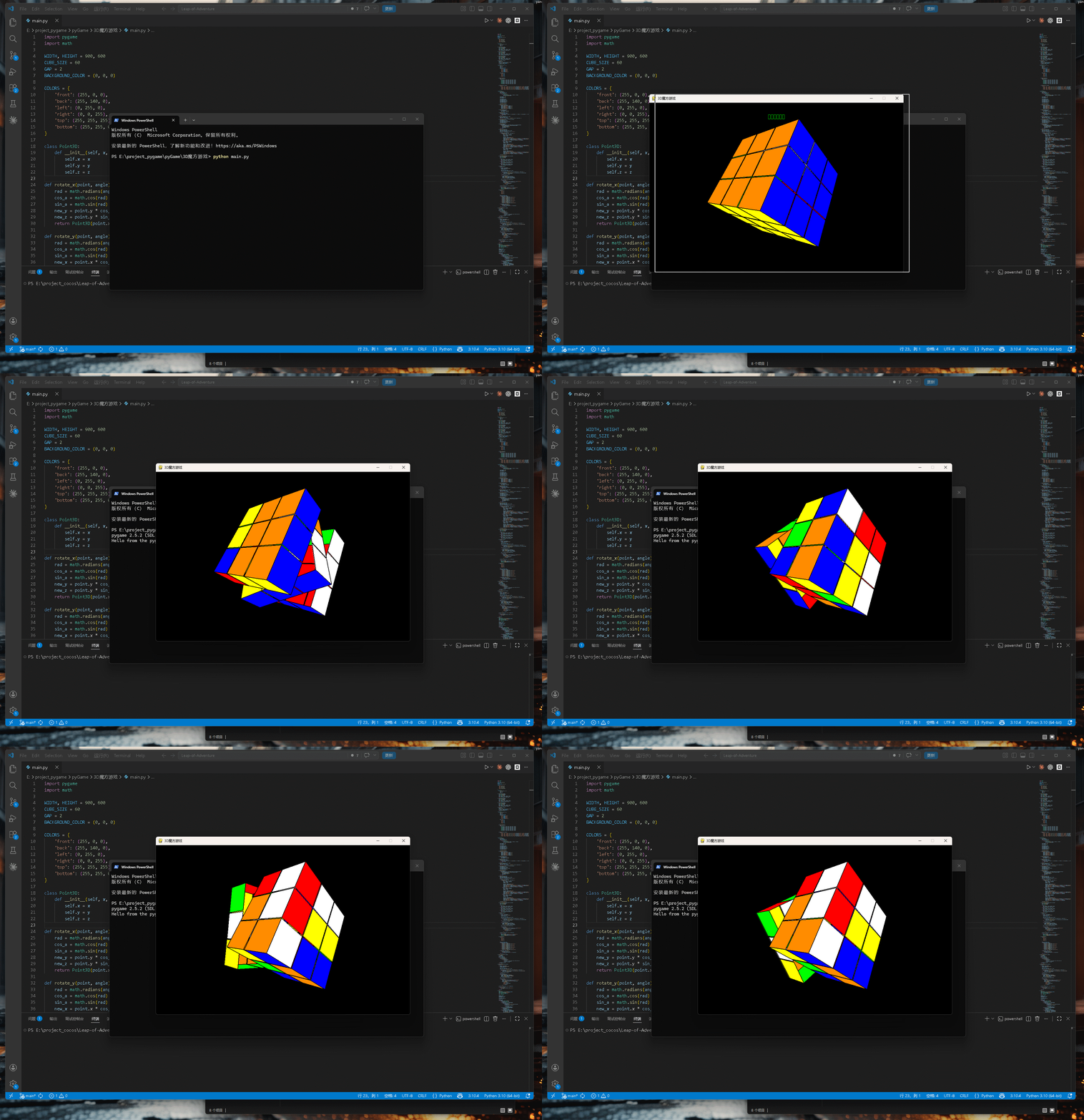
效果展示
核心代码
running = True
    while running:
        for event in pygame.event.get():
            if event.type == pygame.QUIT:
                running = False
            elif event.type == pygame.MOUSEBUTTONDOWN:
                if event.button == 1:
                    if not cube.animating:
                        clicked_face = get_clicked_face(cube, event.pos)
                        if clicked_face:
                            click_start_pos = event.pos
                        else:
                            cube_dragging = True
                            last_mouse_pos = event.pos
            elif event.type == pygame.MOUSEBUTTONUP:
                if event.button == 1:
                    cube_dragging = False
                    clicked_face = None
            elif event.type == pygame.MOUSEMOTION:
                if cube_dragging and not cube.animating:
                    dx = event.pos[0] - last_mouse_pos[0]
                    dy = event.pos[1] - last_mouse_pos[1]
                    cube.rotate_view(dx, dy)
                    last_mouse_pos = event.pos
                elif clicked_face and not cube.animating:
                    dx = event.pos[0] - click_start_pos[0]
                    dy = event.pos[1] - click_start_pos[1]

                    if abs(dx) > 10 or abs(dy) > 10:
                        cubelet = clicked_face['cubelet']
                        face_name = clicked_face['face']['name']

                        offset = CUBE_SIZE + GAP
                        layer_x = round(cubelet.x / offset)
                        layer_y = round(cubelet.y / offset)
                        layer_z = round(cubelet.z / offset)

                        if abs(dx) > abs(dy):
                            if face_name == 'front':
                                direction = 1 if dx > 0 else -1
                                cube.start_layer_rotation('y', layer_y, direction)
                            elif face_name == 'back':
                                direction = -1 if dx > 0 else 1
                                cube.start_layer_rotation('y', layer_y, direction)
                            elif face_name == 'left':
                                direction = 1 if dx > 0 else -1
                                cube.start_layer_rotation('z', layer_z, direction)
                            elif face_name == 'right':
                                direction = -1 if dx > 0 else 1
                                cube.start_layer_rotation('z', layer_z, direction)
                            elif face_name == 'top':
                                direction = -1 if dx > 0 else 1
                                cube.start_layer_rotation('y', layer_y, direction)
                            elif face_name == 'bottom':
                                direction = 1 if dx > 0 else -1
                                cube.start_layer_rotation('y', layer_y, direction)
                        else:
                            if face_name == 'front':
                                direction = -1 if dy > 0 else 1
                                cube.start_layer_rotation('x', layer_x, direction)
                            elif face_name == 'back':
                                direction = 1 if dy > 0 else -1
                                cube.start_layer_rotation('x', layer_x, direction)
                            elif face_name == 'left':
                                direction = -1 if dy > 0 else 1
                                cube.start_layer_rotation('x', layer_x, direction)
                            elif face_name == 'right':
                                direction = 1 if dy > 0 else -1
                                cube.start_layer_rotation('x', layer_x, direction)
                            elif face_name == 'top':
                                direction = 1 if dy > 0 else -1
                                cube.start_layer_rotation('x', layer_x, direction)
                            elif face_name == 'bottom':
                                direction = -1 if dy > 0 else 1
                                cube.start_layer_rotation('x', layer_x, direction)

                        clicked_face = None

        cube.update_animation()

        screen.fill(BACKGROUND_COLOR)
        cube.draw(screen)

        if cube.is_solved():
            text = font.render("魔方已还原!", True, (0, 255, 0))
            text_rect = text.get_rect(center=(WIDTH // 2, 50))
            screen.blit(text, text_rect)

        pygame.display.flip()
        clock.tick(60)

    pygame.quit()
游戏仓库链接
gitee仓库【断更】
https://gitee.com/HuangQiaoMaster/pyGame.git
github仓库【持续更新】
github仓库
引言
所有的小游戏集合发给你们了,随意下载哈!!
我会随时更新新做的游戏!
喜欢作者点个关注,支持一下!!!感谢感谢!
更多推荐
 0
0 0
0- 0


 已为社区贡献11条内容

所有评论(0)