
C++_IO流与文件操作详解
C++ I/O 流与文件操作完全指南
关键词: C++ 输入输出流、流运算符重载、文件流操作、fstream、ifstream、ofstream、二进制文件读写、seekg、read、write
一、C++ 输入/输出流(I/O Stream)
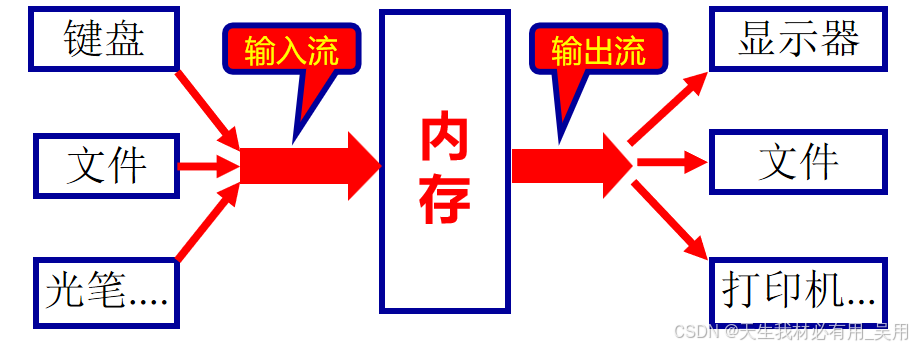
C++ 编译系统以运算符或函数的形式封装了对标准外设(键盘、屏幕、打印机、文件)的访问接口,使用时只需按照规定的格式调用即可。
cin >> x;
cout << x;
cin.get(ch);
C++ 的 I/O 系统为用户提供了一个统一的接口,使得程序设计尽可能与所访问的具体设备无关。它在用户与物理设备之间提供了一个抽象层——输入/输出流。
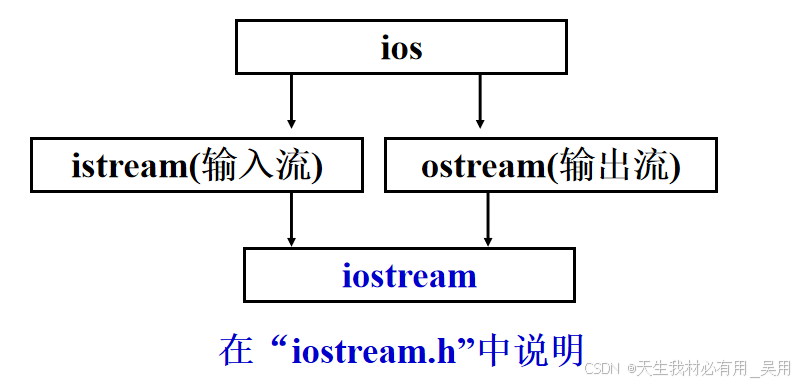
1.1 重载输入(提取)运算符 >>
使用标准流进行输入/输出时,系统会自动完成数据类型的转换:
- 输入流: 将字符序列形式的输入数据转换为计算机内部形式(二进制或 ASCII),再赋给变量,转换格式由变量的类型决定。
- 输出流: 将待输出数据转换为字符串形式后,送入输出流(文件)。
示例代码:重载提取运算符
#include <iostream>
#include <string>
using namespace std;

class CinCount {
public:
    CinCount(int a = 0, int b = 0) {
        c1 = a;
        c2 = b;
    }

    void showclc2(void) {
        cout << "c1=" << c1 << '\t' << "c2=" << c2 << endl;
    }

    friend istream& operator>>(istream&, CinCount&);

private:
    int c1, c2;
};

istream& operator>>(istream& is, CinCount& cc) {
    is >> cc.c1 >> cc.c2;
    return is;
}

int main() {
    CinCount o1, o2;
    o1.showclc2();
    o2.showclc2();

    cin >> o1;
    cin >> o2;
    o1.showclc2();
    o2.showclc2();

    return 0;
}
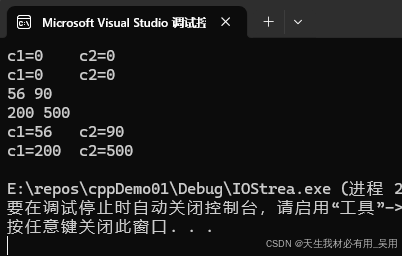
在 C++ 中,允许用户重载运算符 << 和 >> 来实现对象的输入与输出。重载这两个运算符时,应在对象所在的类中将重载函数声明为该类的友元函数。
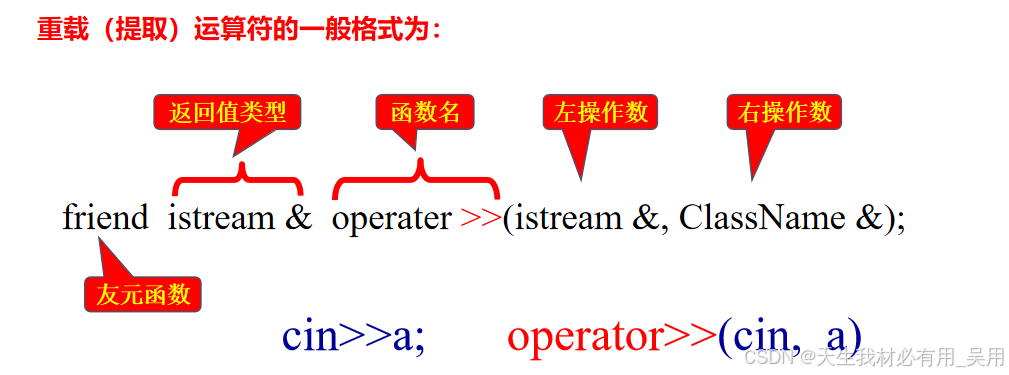
重载输入运算符
>>的一般格式:
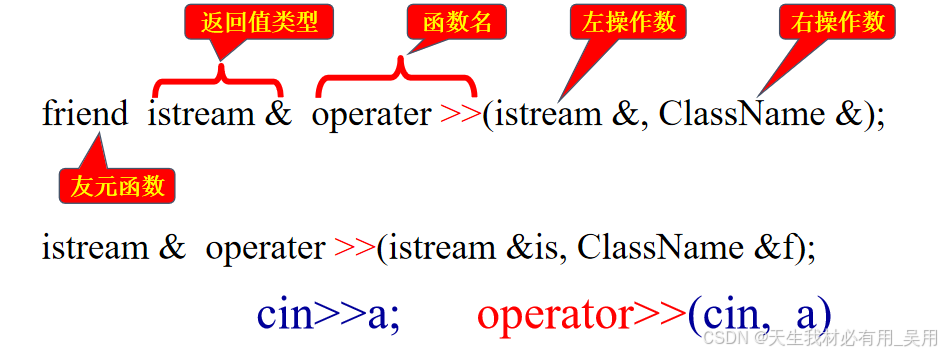
- 返回值类型:
istream&(istream 类的引用),使cin可以连续使用运算符>>,例如cin >> a >> b; - 第一个参数:
>>的左操作数,即cin,类型为istream& - 第二个参数:
>>的右操作数,即欲输入的对象的引用
1.2 重载输出(插入)运算符 <<
重载输出(插入)运算符 << 的一般格式如下:
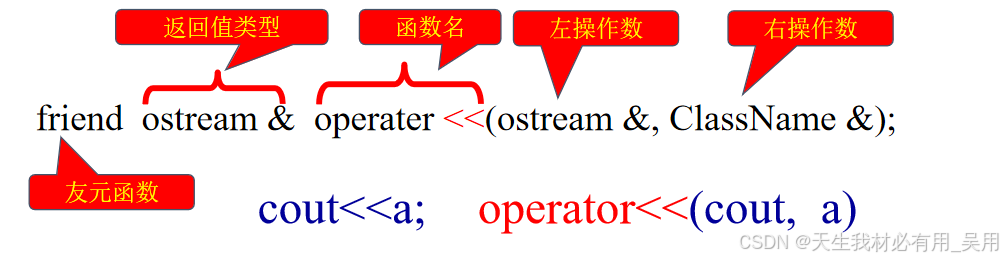
与输入运算符 >> 比较:
friend istream& operator>>(istream&, ClassName&);   // 输入
friend ostream& operator<<(ostream&, ClassName&);   // 输出
差别: 将输入流类 istream 替换为输出流类 ostream 即可。
完整示例:同时重载 >> 和 <<
#include <iostream>
#include <string>
using namespace std;

class InCount {
public:
    InCount(int a = 0, int b = 0) {
        c1 = a;
        c2 = b;
    }

    void show(void) {
        cout << "c1=" << c1 << "\t" << "c2=" << c2 << endl;
    }

    friend istream& operator>>(istream&, InCount&);
    friend ostream& operator<<(ostream&, InCount&);

private:
    int c1, c2;
};

istream& operator>>(istream& is, InCount& cc) {
    is >> cc.c1 >> cc.c2;
    return is;
}

ostream& operator<<(ostream& os, InCount& cc) {
    os << "c1=" << cc.c1 << "\t" << "c2=" << cc.c2 << endl;
    return os;
}

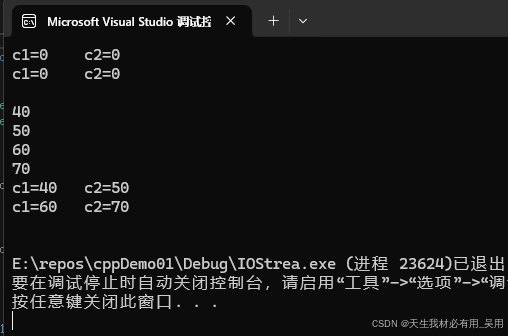
int main() {
    InCount obj1, obj2;
    cout << obj1 << obj2 << endl;

    cin >> obj1;
    cin >> obj2;
    cout << obj1 << obj2 << endl;

    return 0;
}
二、C++ 文件流(File Stream)
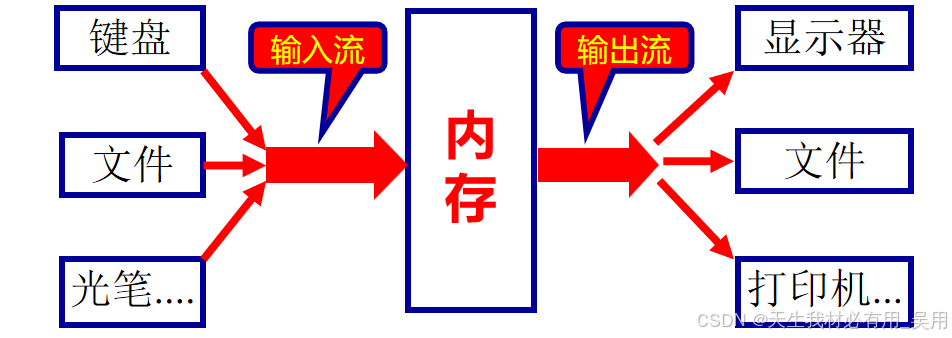
C++ 编译系统同样以运算符或函数的形式提供了对标准外设(键盘、屏幕、打印机、文件)的访问接口,使用时只需按规范格式调用即可。
cin >> x;
cout << x;
cin.get(ch);
C++ 在头文件 <fstream> 中定义了文件流类体系。当程序中需要操作文件时,必须包含此头文件:
#include <fstream>
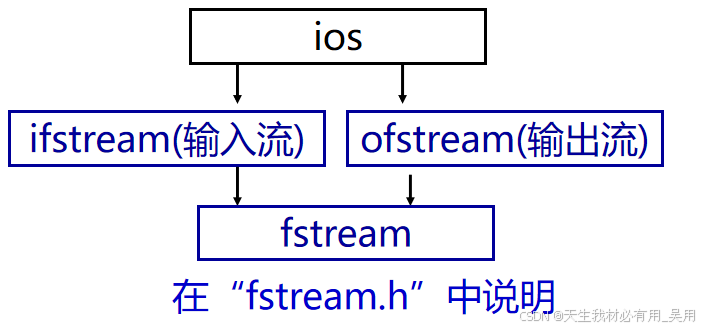
其中定义了各种文件操作运算符及函数。下面将文本文件操作与键盘/显示器操作进行对比:
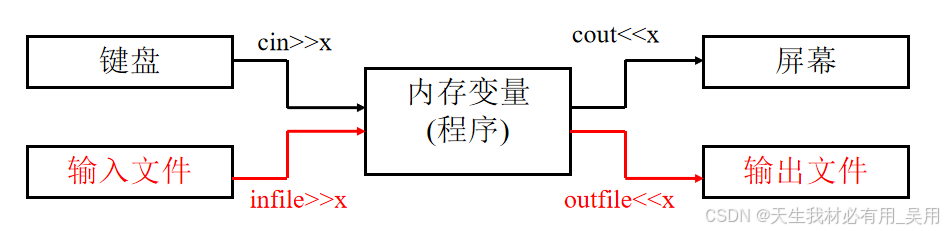
核心思想: 在文本文件操作中,将输入文件视作键盘,将输出文件视作显示器,操作格式不变。只需在程序中增加打开与关闭文件的语句即可。
2.1 文件操作基础
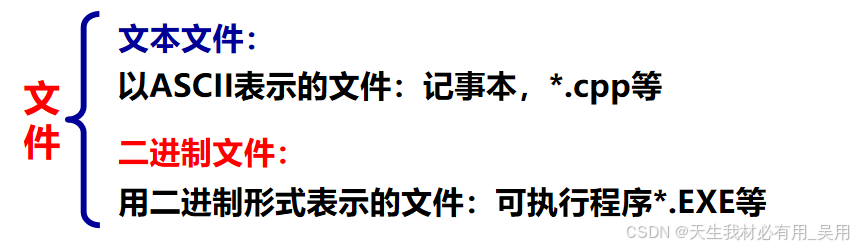
文本 vs 二进制存储示例:
56以 ASCII 存储:00110101 00110110,占 2 字节56以二进制存储:111000,占 6 个二进制位不同文件操作模式下的函数和格式有所区别。
C++ 标准库专门提供了 3 个文件流类,统称为文件流类:
| 类名 | 功能 | 头文件 |
|---|---|---|
ifstream |
专用于从文件中读取数据 | <fstream> |
ofstream |
专用于向文件中写入数据 | <fstream> |
fstream |
兼具读取与写入能力 | <fstream> |
2.2 fstream 类常用成员方法
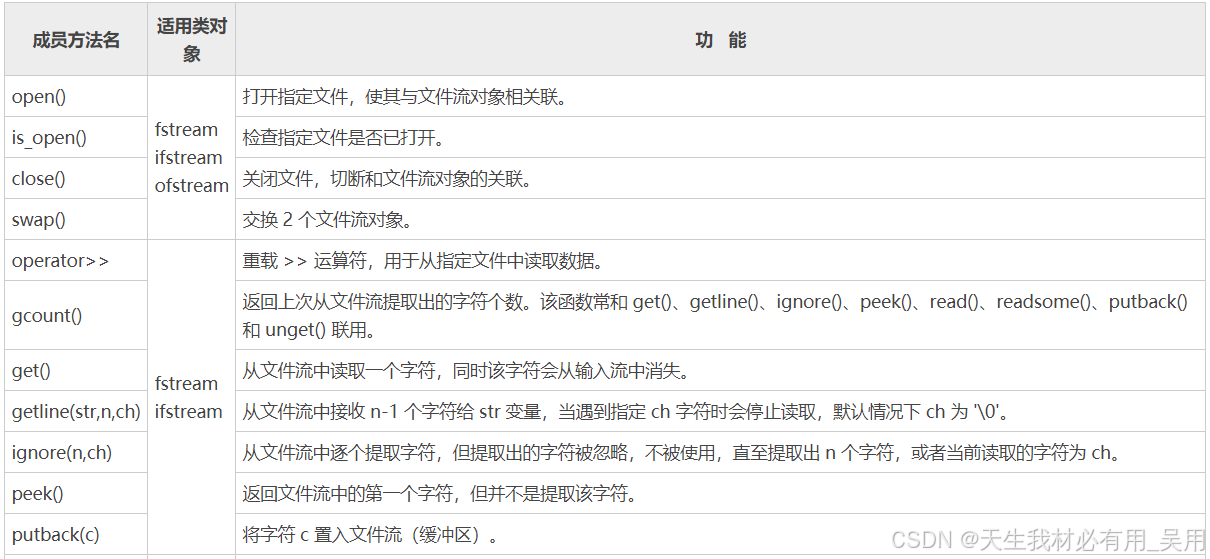
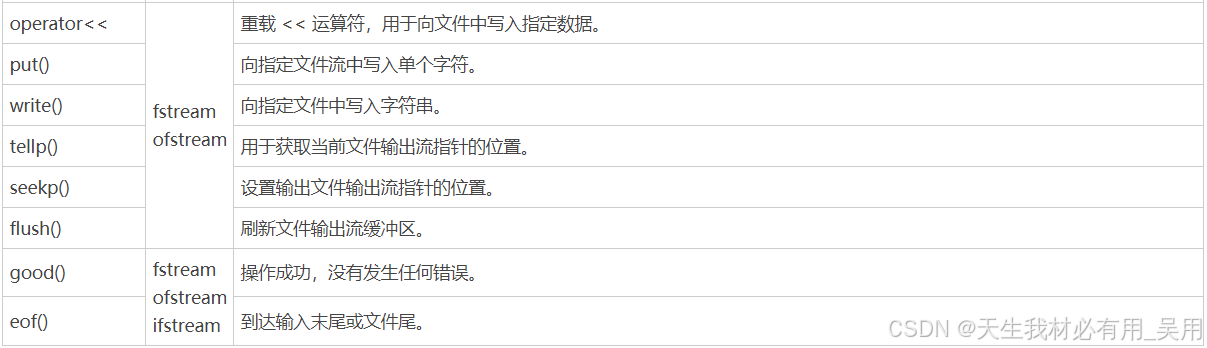
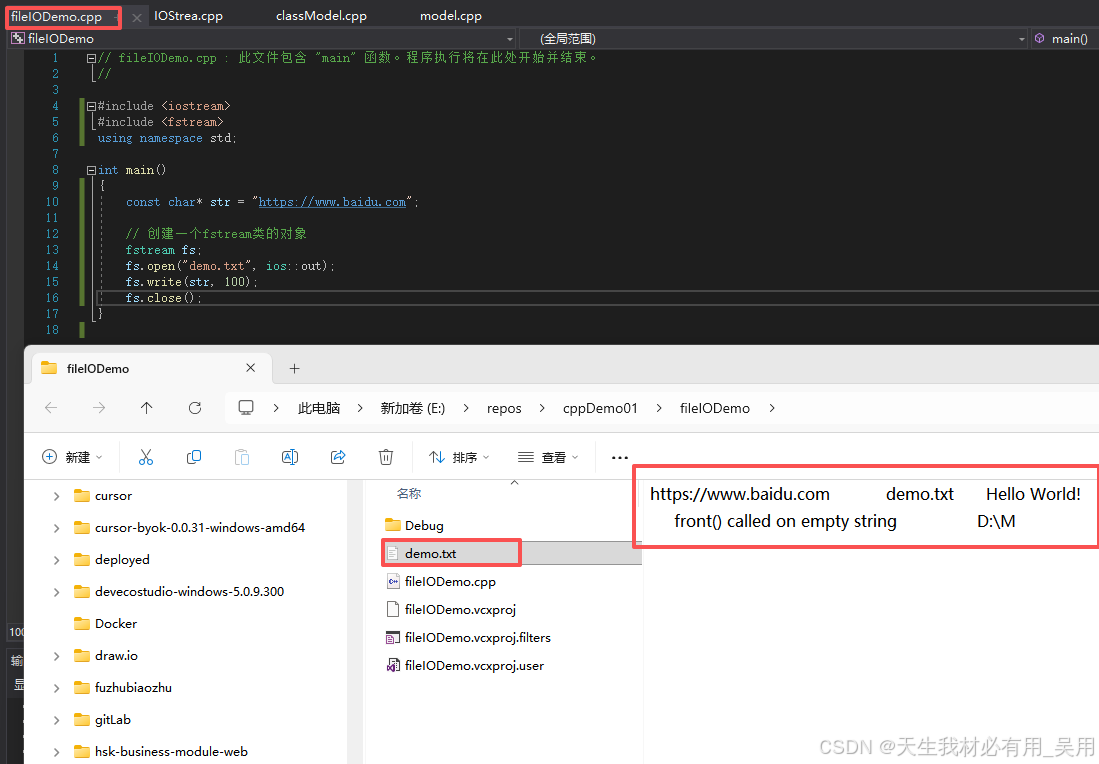
基本文件写入示例
#include <iostream>
#include <fstream>
using namespace std;

int main() {
    const char* str = "https://www.baidu.com";

    // 创建 fstream 类的对象
    fstream fs;
    fs.open("demo.txt", ios::out);
    fs.write(str, 100);
    fs.close();

    return 0;
}
2.3 文件打开模式标记
打开文件可以通过以下两种方式进行:
- 调用流对象的
open()成员函数打开文件 - 定义文件流对象时,通过构造函数直接打开文件
方式一:使用 open() 函数打开文件
以 ifstream 类为例(另外两个文件流类也有相同的 open() 成员函数):
void open(const char* szFileName, int mode);
- 第一个参数: 指向文件名的字符串指针
- 第二个参数: 文件的打开模式标记
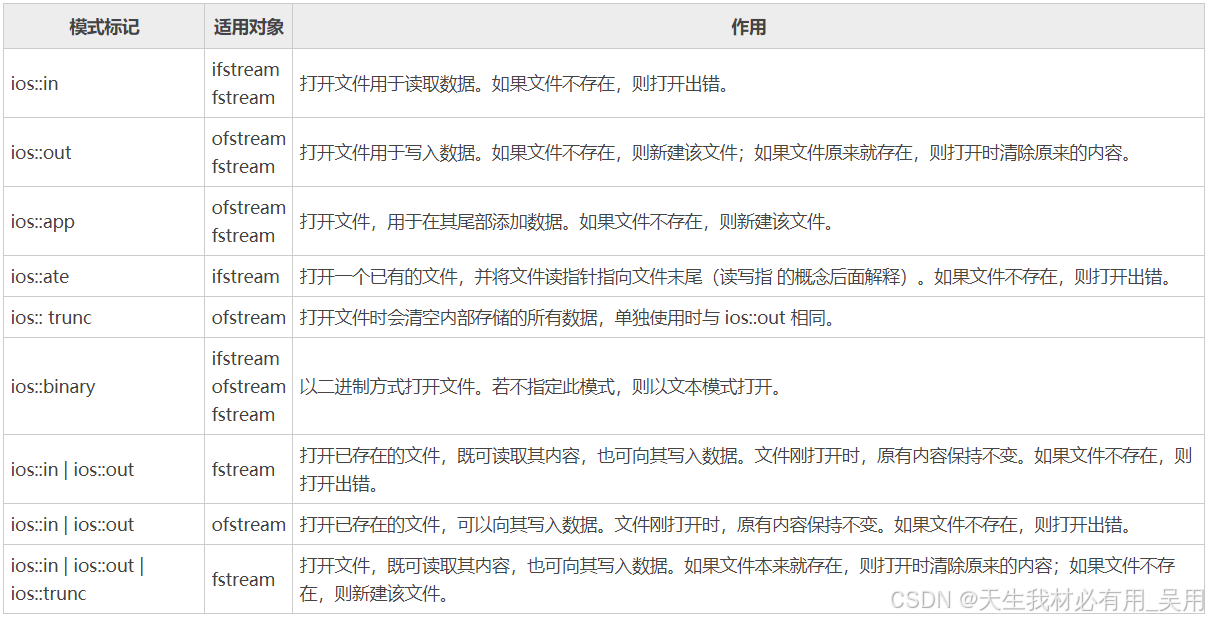
组合使用:
ios::binary可以与其他模式标记组合使用:
ios::in | ios::binary— 以二进制模式读取文件ios::out | ios::binary— 以二进制模式写入文件
判断文件是否打开成功,可以检查流对象本身的布尔值,若为 true 则表示打开成功。
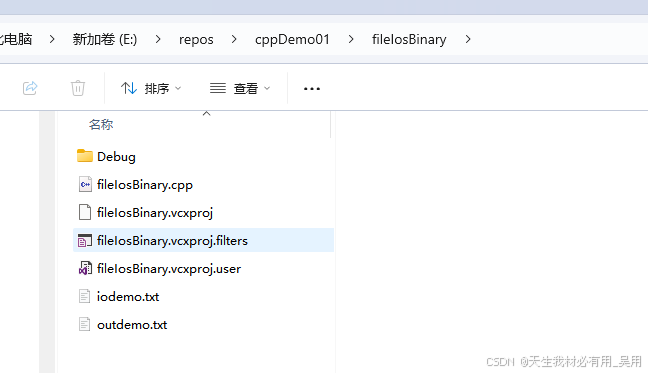
完整示例:三种文件流的打开与关闭
#include <iostream>
#include <fstream>
using namespace std;

int main() {
    // ========== ifstream:读取模式打开 ==========
    ifstream inFile;
    inFile.open(".\\demo.txt", ios::in);
    if (inFile) {
        cout << "\ndemo.txt 文件打开成功。" << endl;
        inFile.close();
    } else {
        cout << "\ndemo.txt 文件打开失败。" << endl;
        return 1;
    }

    // ========== ofstream:写入模式打开 ==========
    ofstream outFile;
    outFile.open(".\\outdemo.txt", ios::out);
    if (outFile) {
        cout << "\noutdemo.txt 文件打开成功。" << endl;
        outFile.close();
    } else {
        cout << "\noutdemo.txt 文件打开失败。" << endl;
        return 1;
    }

    // ========== fstream:读写模式打开(trunc 清空原有内容) ==========
    fstream ioFile;
    ioFile.open(".\\iodemo.txt", ios::in | ios::out | ios::trunc);
    if (ioFile) {
        cout << "\niodemo.txt 文件打开成功。" << endl;
        ioFile.close();
    } else {
        cout << "\niodemo.txt 文件打开失败。" << endl;
        return 1;
    }

    return 0;
}
关闭文件:close() 方法
调用 open() 方法打开文件,是建立文件流对象与文件之间关联的过程。相应地,调用 close() 方法关闭已打开的文件,即是切断文件流对象与文件之间的关联。
📌 注意:
close()方法仅切断关联,该文件流对象本身并不会被销毁,后续还可以用于关联其他文件。
语法格式:
void close();
该方法既不需要传递任何参数,也没有返回值。
2.4 write() 方法:二进制写入文件
ofstream 和 fstream 的 write() 成员方法继承自 ostream 类,其功能是将内存中 buffer 指向的 count 个字节内容写入文件。
语法格式:
ostream& write(char* buffer, int count);
buffer: 要写入文件的二进制数据起始位置count: 写入的字节个数
该方法返回一个对调用对象的引用。例如 obj.write(...) 的返回值就是对 obj 对象的引用——这使得链式调用成为可能。
write() 不仅可被 ofstream/fstream 对象调用,还可以被 cout 对象调用,用于向屏幕输出字符串。
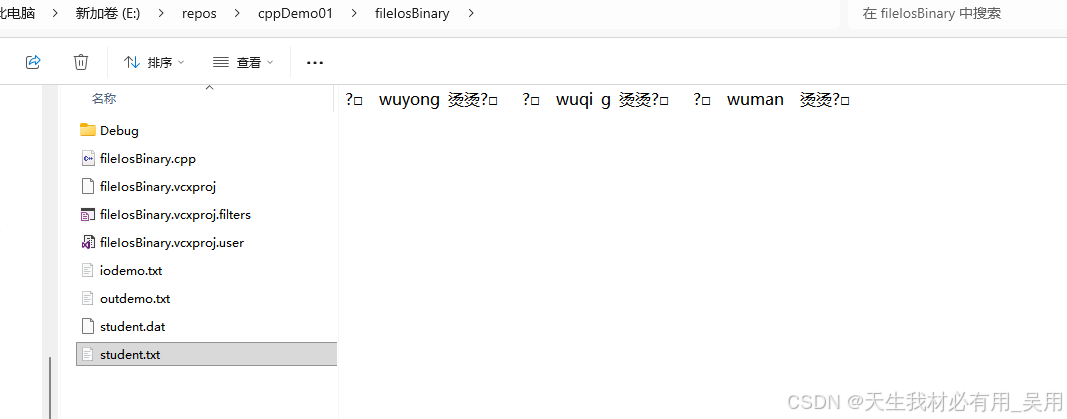
示例:将结构体数据以二进制写入文件
#include <iostream>
#include <fstream>
using namespace std;

class student {
public:
    int no;
    char name[10];
    int age;
};

int main() {
    student stu;
    ofstream outFile("student.dat", ios::out | ios::binary);

    if (!outFile) {
        cout << "\n打开文件 student.dat 失败" << endl;
        return 1;
    } else {
        cout << "\n打开文件 student.dat 成功" << endl;
    }

    while (cin >> stu.no >> stu.name >> stu.age) {
        outFile.write((char*)&stu, sizeof(stu));
    }

    outFile.close();
    return 0;
}
2.5 read() 方法:二进制读取文件
ifstream 和 fstream 的 read() 方法继承自 istream 类,功能与 write() 相反——从文件中读取 count 个字节的数据。
语法格式:
istream& read(char* buffer, int count);
buffer: 存放读取数据的内存起始位置count: 读取的字节个数
同样,该方法返回一个对调用对象的引用。
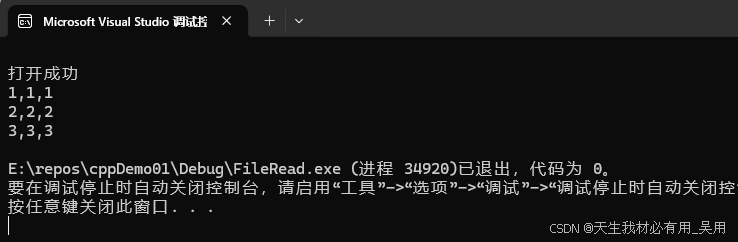
示例:从二进制文件中读取结构体数据
#include <iostream>
#include <fstream>
using namespace std;

class student {
public:
    int no;
    char name[10];
    int age;
};

int main() {
    student stu;
    ifstream inFile("student.dat", ios::in | ios::binary);

    if (!inFile) {
        cout << "\n打开文件失败" << endl;
        return 0;
    } else {
        cout << "\n打开文件成功" << endl;
    }

    while (inFile.read((char*)&stu, sizeof(stu))) {
        cout << stu.name << "," << stu.age << "," << stu.no << endl;
    }

    inFile.close();
    return 0;
}
2.6 put() 方法:单字符写入文件
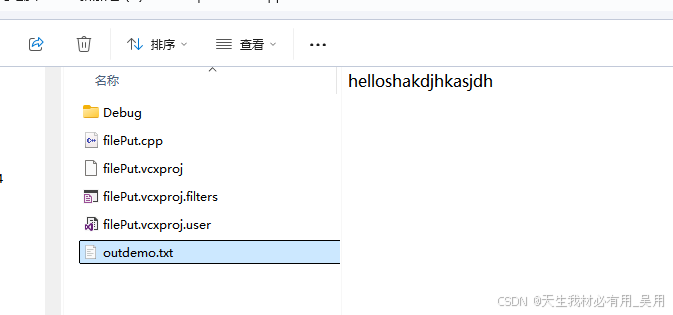
我们已经知道 cout.put() 可以向屏幕输出单个字符。类似地,fstream 和 ofstream 继承自 ostream 类,因此它们的对象同样可以调用 put() 方法,向指定文件写入单个字符。
语法格式:
ostream& put(char c);
c: 要写入文件的字符- 返回值: 对调用对象的引用
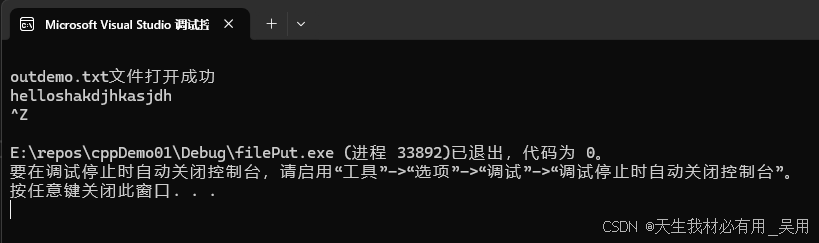
示例:逐字符写入文件
#include <iostream>
#include <fstream>
using namespace std;

int main() {
    char ch;
    ofstream outFile("outdemo.txt", ios::out | ios::binary);

    if (!outFile) {
        cout << "\noutdemo.txt 文件打开失败" << endl;
        return 0;
    } else {
        cout << "\noutdemo.txt 文件打开成功" << endl;
    }

    while (cin >> ch) {
        outFile.put(ch);
    }

    outFile.close();
    return 0;
}
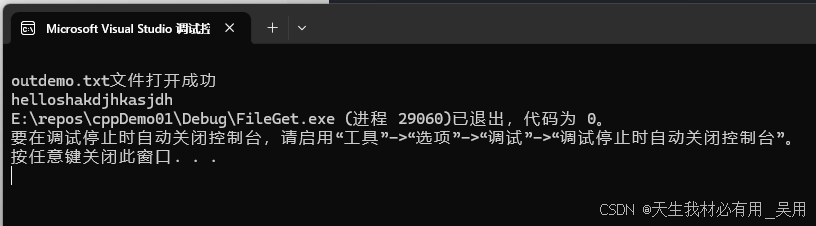
2.7 get() 方法:从文件读取字符
与 put() 相对应的是 get() 方法,定义在 istream 类中。借助 cin.get() 可以读取用户输入的字符。同理,fstream 和 ifstream 继承自 istream,因此它们的对象也可以调用 get() 方法,从指定文件中读取单个字符(或指定长度的字符串)。
这里介绍最常用的两种重载形式:
int get();                  // 返回读取字符的 ASCII 码,读到末尾返回 EOF
istream& get(char& c);      // 将读取的字符存入引用参数 c 中
- 第一种格式: 返回值为读取到的字符的 ASCII 码;若碰到输入末尾,则返回
EOF。 - 第二种格式: 需要传入一个字符变量引用,
get()会自行将读取到的字符赋值给该变量。
示例:从文件中逐字符读取并显示
#include <iostream>
#include <fstream>
using namespace std;

int main() {
    char ch;
    ifstream inFile("outdemo.txt", ios::in | ios::binary);

    if (!inFile) {
        cout << "\noutdemo.txt 文件打开失败" << endl;
        return 0;
    } else {
        cout << "\noutdemo.txt 文件打开成功" << endl;
    }

    while ((ch = inFile.get()) && ch != EOF) {
        cout << ch;
    }

    inFile.close();
    return 0;
}
2.8 文件指针与随机访问
文件打开时,文件指针位于文件头部,并随着读/写的字节数顺序移动。利用成员函数可以手动移动文件指针,实现文件的随机读写。
seekg():移动读指针(用于输入)
infile.seekg(100); // 将读指针移动到距文件头 100 字节处

seekg() 还可以接受第二个参数,指定偏移量的参照位置:
infile.seekg(100, ios::beg);    // 移动到距文件头 100 字节处
infile.seekg(-100, ios::cur);   // 移动到距当前位置往前 100 字节处
infile.seekg(-500, ios::end);   // 移动到距文件尾往前 500 字节处
小结
| 操作 | 方法 | 所属类 | 功能 |
|---|---|---|---|
| 打开文件 | open() |
ifstream / ofstream / fstream |
建立流对象与文件的关联 |
| 关闭文件 | close() |
同上 | 切断关联,流对象可复用 |
| 二进制写入 | write() |
ofstream / fstream |
写入指定字节数的二进制数据 |
| 二进制读取 | read() |
ifstream / fstream |
读取指定字节数的二进制数据 |
| 单字符写入 | put() |
ofstream / fstream |
写入单个字符 |
| 单字符读取 | get() |
ifstream / fstream |
读取单个字符 |
| 移动读指针 | seekg() |
ifstream / fstream |
随机定位读取位置 |
| 移动写指针 | seekp() |
ofstream / fstream |
随机定位写入位置 |
核心要点: C++ 文件流将文件操作与标准 I/O 操作统一在相同的抽象模型下——输入文件如同键盘,输出文件如同屏幕。掌握文件流的打开/关闭、读写和指针控制,即可高效处理各种文件操作场景。
更多推荐
 7
7 0
0- 0


 已为社区贡献11条内容

所有评论(0)