
React+Ts+Vite 为项目增加CI/CD
·
CI/CD 可以拆成两部分理解:
- CI(持续集成):每次 push / PR 自动跑检查(lint、build),保证合入主分支的代码能编译通过
- CD(持续部署):合并到
main后自动部署到线上
整体流程
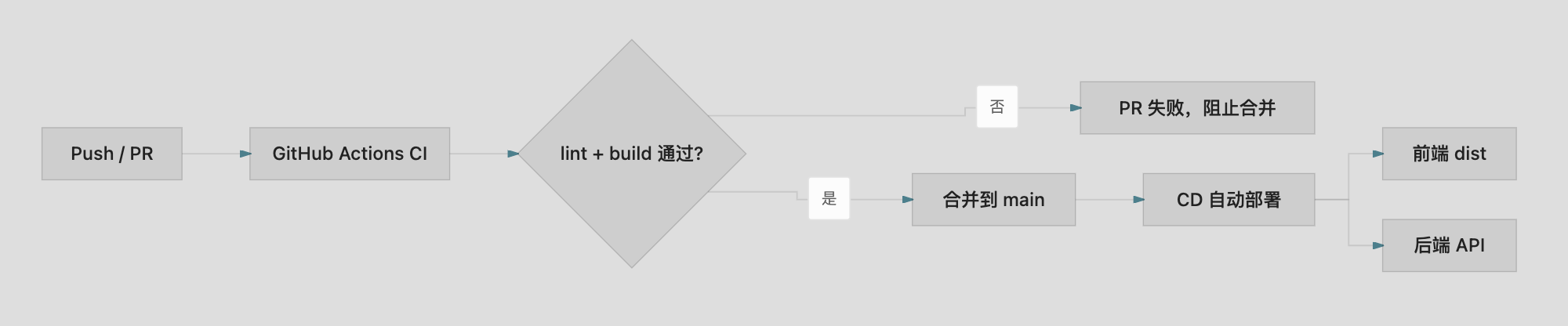
1. CI: GitHub Actions
我的仓库在 GitHub 上,创建 .github/workflows/ci.yml ,且配置如下:
name: CI

on:
  push:
    branches: [main]
  pull_request:
    branches: [main]

jobs:
  check:
    runs-on: ubuntu-latest

    steps:
      - uses: actions/checkout@v4

      - uses: pnpm/action-setup@v4
        with:
          version: 9

      - uses: actions/setup-node@v4
        with:
          node-version: 20
          cache: pnpm

      - run: pnpm install --frozen-lockfile
      - run: pnpm lint
      - run: pnpm build
触发时机:push 到 分支main、或向 分支main 提 PR 时自动运行。
执行步骤:
- 安装 pnpm 9 + Node 20
pnpm install --frozen-lockfilepnpm lintpnpm build
把改动 push 到 GitHub 后,在仓库 Actions 页即可看到 CI 运行结果
2. CD:
1. 新增.github/workflows/deploy.yml
name: Deploy

on:
    push:
        branches: [main]
    workflow_dispatch:

permissions:
    contents: read
    pages: write
    id-token: write

concurrency:
    group: pages
    cancel-in-progress: false

jobs:
    build:
        runs-on: ubuntu-latest
        steps:
            - name: Checkout
              uses: actions/checkout@v4

            - name: Setup pnpm
              uses: pnpm/action-setup@v4
              with:
                  version: 9

            - name: Setup Node.js
              uses: actions/setup-node@v4
              with:
                  node-version: 20
                  cache: pnpm

            - name: Install dependencies
              run: pnpm install --frozen-lockfile

            - name: Format check
              run: pnpm format:check

            - name: Lint
              run: pnpm lint

            - name: Test
              run: pnpm test

            - name: Build
              run: pnpm build
              env:
                  VITE_BASE_PATH: /${{ github.event.repository.name }}/
                  VITE_API_URL: ${{ secrets.VITE_API_URL }}

            - name: Setup SPA fallback
              run: cp dist/index.html dist/404.html

            - name: Setup Pages
              uses: actions/configure-pages@v5

            - name: Upload artifact
              uses: actions/upload-pages-artifact@v3
              with:
                  path: dist

    deploy:
        needs: build
        runs-on: ubuntu-latest
        environment:
            name: github-pages
            url: ${{ steps.deployment.outputs.page_url }}
        steps:
            - name: Deploy to GitHub Pages
              id: deployment
              uses: actions/deploy-pages@v4
2. 修改
vite.config.ts 支持 VITE_BASE_PATH
export default defineConfig({
    base: process.env.VITE_BASE_PATH || '/',
})
src/router/index.tsx 路由增加basename,适配子路径
export const router = createBrowserRouter(routes, {
    basename: import.meta.env.BASE_URL.replace(/\/$/, '') || undefined
});
src/api/kanban.ts 支持 VITE_API_URL 环境变量
// 生产环境 API 根地址,未配置时使用相对路径(走本地代理)
const API_BASE = (import.meta.env.VITE_API_URL ?? '').replace(/\/$/, '');

const apiUrl = (path: string) => `${API_BASE}${path}`;
src/vite-env.d.ts 环境变量类型声明
/// <reference types="vite/client" />

interface ImportMetaEnv {
    readonly VITE_API_URL?: string;
    readonly VITE_BASE_PATH?: string;
}

interface ImportMeta {
    readonly env: ImportMetaEnv;
}
启用步骤:
- GitHub 仓库设置 → Pages → Source 选 GitHub Actions
- Push 到
main,在 Actions 里查看 Deploy workflow - 部署成功后访问:https://zhangyuehan321.github.io/kanban/board
部署成功,但是接口不能正常访问。解决方法看下一篇
更多推荐
 6
6 0
0- 0


 已为社区贡献5条内容

所有评论(0)