
Aspose.Slides Java 安装
·
要开始使用Aspose.Slides for Java ,请联系慧都科技下载。或者,将以下 Maven 依赖项添加到您的项目中pom.xml:
<repository>
  <id>AsposeJavaAPI</id>
  <name>Aspose Java API</name>
  <url>https://repository.aspose.com/repo/</url>
</repository>
<dependency>
  <groupId>com.aspose</groupId>
  <artifactId>aspose-slides</artifactId>
  <version>25.10</version>
  <classifier>jdk16</classifier>
</dependency>
Aspose.Slides for Java具有易于集成、灵活和高级自定义选项等优点,是导出 PowerPoint 笔记为 PDF 的理想选择。
使用 Java 将 PowerPoint 笔记导出为 PDF - 代码片段
要使用Aspose.Slides for Java将 PowerPoint 笔记导出为 PDF ,请按照以下步骤操作:
- 实例化一个表示演示文稿文件的Presentation对象,并加载源 PPTX/PPT 文件
- 创建PdfOptions类的一个实例。
- 实例化NotesCommentsLayoutingOptions类。
- 调用setNotesPosition方法来设置笔记在页面上的位置。
- 通过调用setSlidesLayoutOptions方法,设置导出演示文稿时幻灯片在页面上的放置模式。
- 调用save方法将演示文稿保存为 PDF 备注。
以下是一个示例 Java 代码片段,用于以编程方式将 PowerPoint 中的笔记导出为 PDF:
package com.example;
import com.aspose.slides.*;

public class main {
  public static void main(String[] args) {
    String dataDir = "data";
    License lic = new License();
    lic.setLicense("license.lic");
    // Instantiate a Presentation object that represents a presentation file and
    // load the source PPTX/PPT file.
    Presentation presentation = new Presentation(dataDir + "NotesFile.pptx");
    try {
      // Create an instance of the PdfOptions class.
      PdfOptions pdfOptions = new PdfOptions();
      // Instantiate an instance of the NotesCommentsLayoutingOptions class.
      NotesCommentsLayoutingOptions options =
          new NotesCommentsLayoutingOptions();
      // Call the setNotesPosition method to set the position of the notes on
      // the page.
      options.setNotesPosition(NotesPositions.BottomFull);
      // Set the mode in which slides are placed on the page when exporting a
      // presentation by calling the setSlidesLayoutOptions method.
      pdfOptions.setSlidesLayoutOptions(options);
      // Saving the presentation to PDF notes by calling the save method.
      presentation.save(
          dataDir + "Pdf_Notes_out.pdf", SaveFormat.Pdf, pdfOptions);
    } finally {
      if (presentation != null)
        presentation.dispose();
    }
  }
}
输出:
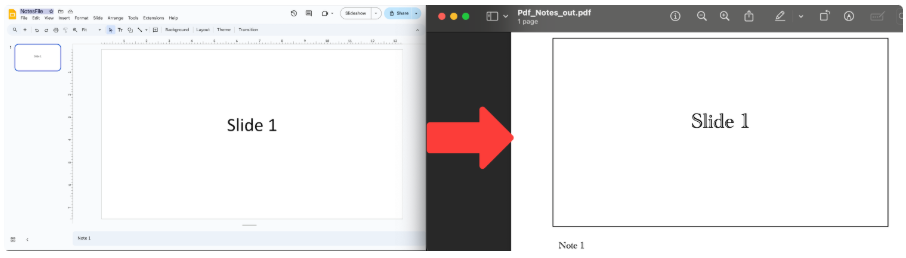
总之,使用Aspose.Slides for Java可以轻松地在 Java 中将 PowerPoint 备注导出为 PDF 。此 SDK 为开发人员提供了一个强大而灵活的解决方案。探索Aspose.Slides for Java,满足您的演示需求,并通过自动化复杂任务来提高您的工作效率。
常见问题解答
问:如何使用 Aspose.Slides for Java 将 PowerPoint 笔记导出为 PDF 文件?
答:您可以使用Presentation类加载 PowerPoint 文件,并使用PdfOptions将文件另存为 PDF 。
问:使用 Aspose.Slides for Java 进行此转换有哪些好处?
更多推荐
 4
4 0
0- 0


 已为社区贡献3条内容

所有评论(0)