
java实验5
·
实验1
1.相关知识点
GUI相关的类,组件的属性及功能,事件源、监视器、处理事件的接口
2.实验目的
学习掌握事件处理
3.实验要求
按以下需求(可扩充),设计并完成一个能运行的且界面美观的小软件。提交可运行软件
程序主要针对小学生的算术计算。
- 可以自定义计算的难度(此项可根据功能进行扩展)
- 随机获取不一样的题目,能通过按键触发确定填写输入的答案是否正确。
- 计算满足+ - * /(可扩展)
- 操作数可以是整数、小数、分数等等(可扩展)
具体代码:
ArithmeticTrainer.java
package sb;

import javax.swing.*;
import javax.swing.BorderFactory;
import java.awt.*;
import java.awt.event.ActionEvent;
import java.awt.event.ActionListener;
import java.util.Random;

public class ArithmeticTrainer extends JFrame {
    // 界面组件
    private JLabel lblQuestion;
    private JTextField txtAnswer;
    private JButton btnCheck, btnNext;
    private JLabel lblTip;
    private JComboBox<String> cbLevel;

    private Random random = new Random();
    private int num1, num2, op;
    private String operator;
    private int maxNum; // 难度最大值

    public ArithmeticTrainer() {
        // 窗口基础设置
        setTitle("小学生算术练习器");
        setSize(420, 280);
        setDefaultCloseOperation(JFrame.EXIT_ON_CLOSE);
        setLocationRelativeTo(null);
        setLayout(new GridLayout(6, 1, 10, 10));

        // 1.难度选择行
        JPanel panelLevel = new JPanel();
        panelLevel.add(new JLabel("选择难度:"));
        String[] levels = {"简单(0-10)", "中等(0-50)", "困难(0-100)"};
        cbLevel = new JComboBox<>(levels);
        panelLevel.add(cbLevel);
        add(panelLevel);

        // 2.题目显示
        lblQuestion = new JLabel("题目:", SwingConstants.CENTER);
        lblQuestion.setFont(new Font("黑体", Font.BOLD, 24));
        add(lblQuestion);

        // 3.答案输入框
        JPanel panelInput = new JPanel();
        panelInput.add(new JLabel("你的答案:"));
        txtAnswer = new JTextField(10);
        txtAnswer.setFont(new Font("宋体", Font.PLAIN, 18));
        panelInput.add(txtAnswer);
        add(panelInput);

        // 4.按钮区域
        JPanel panelBtn = new JPanel();
        btnCheck = new JButton("判断答案");
        btnNext = new JButton("下一题");
        panelBtn.add(btnCheck);
        panelBtn.add(btnNext);
        add(panelBtn);

        // 5.提示文字
        lblTip = new JLabel("请选择难度后点击下一题开始练习", SwingConstants.CENTER);
        lblTip.setFont(new Font("宋体", Font.PLAIN, 16));
        add(lblTip);

        // 绑定事件
        bindEvent();
        nextQuestion();
    }

    private void bindEvent() {
        // 下一题
        btnNext.addActionListener(e -> {
            nextQuestion();
            txtAnswer.setText("");
            lblTip.setText("");
        });
        // 校验答案
        btnCheck.addActionListener(e -> checkAnswer());
    }

    private void nextQuestion() {
        String level = (String) cbLevel.getSelectedItem();
        if (level.contains("10")) maxNum = 10;
        else if (level.contains("50")) maxNum = 50;
        else maxNum = 100;

        num1 = random.nextInt(maxNum + 1);
        num2 = random.nextInt(maxNum + 1);
        op = random.nextInt(4);

        switch (op) {
            case 0:
                operator = "+";
                break;
            case 1:
                operator = "-";
                if (num1 < num2) {
                    int temp = num1;
                    num1 = num2;
                    num2 = temp;
                }
                break;
            case 2:
                operator = "*";
                break;
            case 3:
                operator = "/";
                if (num2 == 0) num2 = 1;
                num1 = num2 * random.nextInt(maxNum / 2 + 1);
                break;
        }
        lblQuestion.setText(num1 + " " + operator + " " + num2 + " = ?");
    }

    private void checkAnswer() {
        String input = txtAnswer.getText().trim();
        if (input.isEmpty()) {
            lblTip.setText("请输入答案!");
            lblTip.setForeground(Color.RED);
            return;
        }
        int userAns;
        try {
            userAns = Integer.parseInt(input);
        } catch (NumberFormatException e) {
            lblTip.setText("输入必须是整数!");
            lblTip.setForeground(Color.RED);
            return;
        }

        int rightAns = calculateResult();
        if (userAns == rightAns) {
            lblTip.setText("回答正确!太棒了!");
            lblTip.setForeground(new Color(0, 150, 0));
        } else {
            lblTip.setText("回答错误,正确答案:" + rightAns);
            lblTip.setForeground(Color.RED);
        }
    }

    private int calculateResult() {
        switch (op) {
            case 0: return num1 + num2;
            case 1: return num1 - num2;
            case 2: return num1 * num2;
            case 3: return num1 / num2;
            default: return 0;
        }
    }

    public static void main(String[] args) {
        SwingUtilities.invokeLater(() -> new ArithmeticTrainer().setVisible(true));
    }
}
运行截图如下:
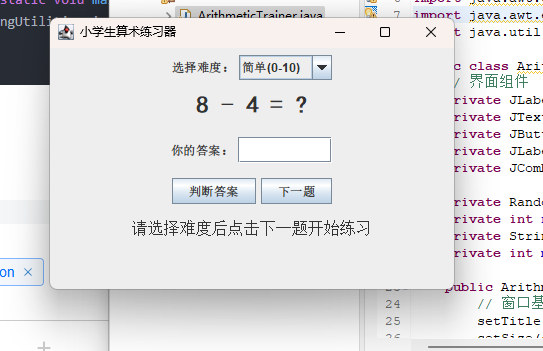
如图所示,这串代码实现了小学生算数练习器的功能
实验2(选做,可AI)
终端**(扫雷、射击。。。)游戏
- 良好的界面实现
- 可调节难度
- 计时与计步功能
- 保存/读取游戏进度
- 。。。。可扩展
扫雷游戏:
package sb;

import javax.swing.*;
import java.awt.*;
import java.awt.event.MouseAdapter;
import java.awt.event.MouseEvent;
import java.io.*;
import java.util.Random;

public class MineSweeperGUI extends JFrame {
    // 基础配置
    private int row, col, mineCount;
    private int[][] mineMap;
    private boolean[][] open;
    private boolean[][] flag;
    private JButton[][] buttons;
    private JLabel lblTime, lblStep;
    private long startTime;
    private int step;
    private final String savePath = "mine_save.txt";
    private JPanel panelBoard;
    private Thread timerThread; // 计时线程单独管理,避免多线程叠加

    public MineSweeperGUI() {
        setTitle("图形扫雷游戏");
        setDefaultCloseOperation(EXIT_ON_CLOSE);
        setLayout(new BorderLayout());

        // 顶部菜单栏
        JPanel topPanel = new JPanel();
        JButton btnEasy = new JButton("简单5*5");
        JButton btnMid = new JButton("中等8*8");
        JButton btnHard = new JButton("困难10*10");
        JButton btnSave = new JButton("保存进度");
        JButton btnLoad = new JButton("读取存档");
        lblTime = new JLabel("时间:0秒");
        lblStep = new JLabel("步数:0");

        topPanel.add(btnEasy);
        topPanel.add(btnMid);
        topPanel.add(btnHard);
        topPanel.add(btnSave);
        topPanel.add(btnLoad);
        topPanel.add(lblTime);
        topPanel.add(lblStep);
        add(topPanel, BorderLayout.NORTH);

        // 按钮事件-切换难度
        btnEasy.addActionListener(e -> initGame(5, 5, 5));
        btnMid.addActionListener(e -> initGame(8, 8, 10));
        btnHard.addActionListener(e -> initGame(10, 10, 20));
        btnSave.addActionListener(e -> saveGame());
        btnLoad.addActionListener(e -> loadGame());

        // 默认开局简单难度
        initGame(5, 5, 5);
        setSize(650, 550);
        setLocationRelativeTo(null);
    }

    // 初始化棋盘
    private void initGame(int r, int c, int m) {
        row = r;
        col = c;
        mineCount = m;
        step = 0;
        startTime = System.currentTimeMillis();

        mineMap = new int[row][col];
        open = new boolean[row][col];
        flag = new boolean[row][col];
        buttons = new JButton[row][col];

        // 重置棋盘面板
        if (panelBoard != null) remove(panelBoard);
        panelBoard = new JPanel(new GridLayout(row, col, 2, 2));
        panelBoard.setBackground(Color.GRAY);

        // 生成地雷
        Random rand = new Random();
        int addMine = 0;
        while (addMine < mineCount) {
            int x = rand.nextInt(row);
            int y = rand.nextInt(col);
            if (mineMap[x][y] != -1) {
                mineMap[x][y] = -1;
                addMine++;
            }
        }

        // 计算周围地雷数
        for (int i = 0; i < row; i++) {
            for (int j = 0; j < col; j++) {
                if (mineMap[i][j] == -1) continue;
                int cnt = 0;
                for (int dx = -1; dx <= 1; dx++)
                    for (int dy = -1; dy <= 1; dy++) {
                        int ni = i + dx, nj = j + dy;
                        if (ni >= 0 && ni < row && nj >= 0 && nj < col && mineMap[ni][nj] == -1) cnt++;
                    }
                mineMap[i][j] = cnt;
            }
        }

        // 创建按钮+鼠标监听
        for (int i = 0; i < row; i++) {
            for (int j = 0; j < col; j++) {
                JButton btn = new JButton();
                btn.setPreferredSize(new Dimension(40, 40));
                btn.setFont(new Font("黑体", Font.BOLD, 16));
                int x = i, y = j;
                btn.addMouseListener(new MouseAdapter() {
                    @Override
                    public void mouseClicked(MouseEvent e) {
                        if (SwingUtilities.isLeftMouseButton(e)) {
                            openCell(x, y);
                        } else if (SwingUtilities.isRightMouseButton(e)) {
                            markFlag(x, y);
                        }
                    }
                });
                buttons[i][j] = btn;
                panelBoard.add(btn);
            }
        }
        add(panelBoard, BorderLayout.CENTER);
        updateTimeLabel();
        lblStep.setText("步数:0");
        revalidate();
        repaint();

        // 重启计时线程,防止多线程叠加
        if (timerThread != null && timerThread.isAlive()) {
            timerThread.interrupt();
        }
        timerThread = new Thread(() -> {
            while (!Thread.currentThread().isInterrupted()) {
                try {
                    Thread.sleep(1000);
                    updateTimeLabel();
                } catch (InterruptedException ex) {
                    break;
                }
            }
        });
        timerThread.setDaemon(true);
        timerThread.start();
    }

    // 左键点开格子:按钮直接隐藏(方块消失)
    private void openCell(int x, int y) {
        if (open[x][y] || flag[x][y]) return;
        step++;
        lblStep.setText("步数:" + step);
        open[x][y] = true;
        JButton btn = buttons[x][y];

        // 踩到地雷游戏结束
        if (mineMap[x][y] == -1) {
            btn.setText("*");
            btn.setBackground(Color.RED);
            showAllMine();
            JOptionPane.showMessageDialog(this, "踩雷!游戏结束");
            return;
        }

        // 核心优化:点击后按钮直接隐藏,方块消失
        btn.setVisible(false);

        int num = mineMap[x][y];
        if (num > 0) {
            // 数字格子不隐藏,显示数字
            btn.setVisible(true);
            btn.setText(num + "");
            btn.setBackground(Color.LIGHT_GRAY);
        } else {
            // 空白格子隐藏,并递归展开周围
            for (int dx = -1; dx <= 1; dx++)
                for (int dy = -1; dy <= 1; dy++) {
                    int nx = x + dx, ny = y + dy;
                    if (nx >= 0 && nx < row && ny >= 0 && ny < col) openCell(nx, ny);
                }
        }
        checkWin();
    }

    // 右键插旗/取消
    private void markFlag(int x, int y) {
        if (open[x][y]) return;
        flag[x][y] = !flag[x][y];
        buttons[x][y].setText(flag[x][y] ? "🚩" : "");
    }

    // 全部地雷显示(失败)
    private void showAllMine() {
        for (int i = 0; i < row; i++)
            for (int j = 0; j < col; j++) {
                if (mineMap[i][j] == -1) {
                    JButton btn = buttons[i][j];
                    btn.setVisible(true);
                    btn.setText("*");
                    btn.setBackground(Color.RED);
                }
            }
    }

    // 判断胜利
    private void checkWin() {
        int close = 0;
        for (int i = 0; i < row; i++)
            for (int j = 0; j < col; j++)
                if (!open[i][j]) close++;
        if (close == mineCount) {
            long t = (System.currentTimeMillis() - startTime) / 1000;
            JOptionPane.showMessageDialog(this, "恭喜通关!总步数:" + step + " 用时:" + t + "秒");
        }
    }

    // 更新时间标签
    private void updateTimeLabel() {
        long sec = (System.currentTimeMillis() - startTime) / 1000;
        lblTime.setText("时间:" + sec + "秒");
    }

    // 保存游戏
    private void saveGame() {
        try (BufferedWriter bw = new BufferedWriter(new FileWriter(savePath))) {
            bw.write(row + "," + col + "," + mineCount + "," + step + "," + startTime);
            bw.newLine();
            // 地图
            for (int i = 0; i < row; i++) {
                for (int j = 0; j < col; j++) bw.write(mineMap[i][j] + " ");
                bw.newLine();
            }
            // 打开状态
            for (int i = 0; i < row; i++) {
                for (int j = 0; j < col; j++) bw.write(open[i][j] ? "1 " : "0 ");
                bw.newLine();
            }
            // 旗子
            for (int i = 0; i < row; i++) {
                for (int j = 0; j < col; j++) bw.write(flag[i][j] ? "1 " : "0 ");
                bw.newLine();
            }
            JOptionPane.showMessageDialog(this, "存档成功");
        } catch (IOException e) {
            JOptionPane.showMessageDialog(this, "存档失败");
        }
    }

    // 读取存档
    private void loadGame() {
        File file = new File(savePath);
        if (!file.exists()) {
            JOptionPane.showMessageDialog(this, "无存档文件");
            return;
        }
        try (BufferedReader br = new BufferedReader(new FileReader(file))) {
            String[] head = br.readLine().split(",");
            int r = Integer.parseInt(head[0]);
            int c = Integer.parseInt(head[1]);
            int m = Integer.parseInt(head[2]);
            int s = Integer.parseInt(head[3]);
            long st = Long.parseLong(head[4]);

            // 重建界面
            initGame(r, c, m);
            step = s;
            startTime = st;
            lblStep.setText("步数:" + step);

            // 读取地图
            for (int i = 0; i < r; i++) {
                String[] arr = br.readLine().split(" ");
                for (int j = 0; j < c; j++) mineMap[i][j] = Integer.parseInt(arr[j]);
            }
            // 读取打开状态
            for (int i = 0; i < r; i++) {
                String[] arr = br.readLine().split(" ");
                for (int j = 0; j < c; j++) open[i][j] = "1".equals(arr[j]);
            }
            // 读取旗子
            for (int i = 0; i < r; i++) {
                String[] arr = br.readLine().split(" ");
                for (int j = 0; j < col; j++) flag[i][j] = "1".equals(arr[j]);
            }
            // 刷新界面显示存档状态
            refreshBoard();
            JOptionPane.showMessageDialog(this, "读取存档成功");
        } catch (Exception e) {
            JOptionPane.showMessageDialog(this, "读取失败");
        }
    }

    // 根据存档刷新棋盘显示
    private void refreshBoard() {
        for (int i = 0; i < row; i++) {
            for (int j = 0; j < col; j++) {
                JButton btn = buttons[i][j];
                btn.setText("");
                btn.setBackground(null);
                btn.setVisible(true);

                if (flag[i][j]) btn.setText("🚩");
                if (open[i][j]) {
                    if (mineMap[i][j] == -1) {
                        btn.setText("*");
                        btn.setBackground(Color.RED);
                    } else if (mineMap[i][j] > 0) {
                        btn.setText(mineMap[i][j] + "");
                        btn.setBackground(Color.LIGHT_GRAY);
                    } else {
                        // 空白格子隐藏,方块消失
                        btn.setVisible(false);
                    }
                }
            }
        }
    }

    public static void main(String[] args) {
        SwingUtilities.invokeLater(() -> new MineSweeperGUI().setVisible(true));
    }
}
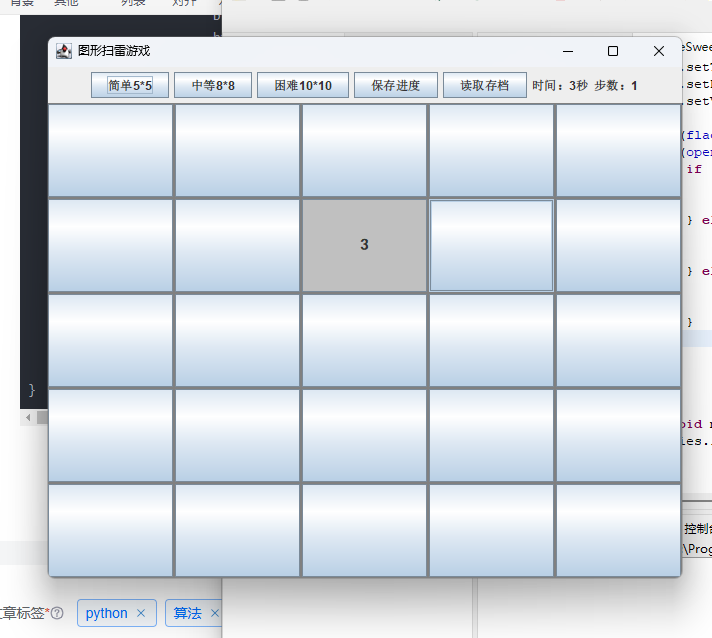
运行截图如下:
射击游戏代码:
package sb;

import javax.swing.*;
import java.awt.*;
import java.awt.event.ActionEvent;
import java.awt.event.MouseAdapter;
import java.awt.event.MouseEvent;
import java.io.File;
import java.io.BufferedReader;
import java.io.BufferedWriter;
import java.io.FileReader;
import java.io.FileWriter;
import java.io.IOException;
import java.util.ArrayList;
import java.util.Random;

public class TopDownShooter2D {
    private static final int WIN_WIDTH = 800;
    private static final int WIN_HEIGHT = 650;
    private static final int TILE_SIZE = 40;
    // 地图 1=墙体 0=空地
    private final int[][] mapData = {
            {1,1,1,1,1,1,1,1,1,1},
            {1,0,0,0,1,0,0,0,0,1},
            {1,0,1,0,1,0,1,1,0,1},
            {1,0,1,0,0,0,0,1,0,1},
            {1,0,1,1,1,1,0,1,0,1},
            {1,0,0,0,0,0,0,0,0,1},
            {1,0,1,1,0,1,1,1,0,1},
            {1,0,0,0,0,0,0,0,0,1},
            {1,1,1,1,1,1,1,1,1,1}
    };
    private final int mapRow = mapData.length;
    private final int mapCol = mapData[0].length;

    // 玩家参数
    private double px = 60, py = 60;
    private double pAngle = 0;
    private final double moveSpeed = 3;

    // 按键状态
    private boolean keyW, keyS, keyA, keyD;

    // 游戏数据
    private ArrayList<Enemy> enemyList = new ArrayList<>();
    private int bullet = 30;
    private int score = 0;
    private long gameStart;
    private int stepCount = 0;
    private final String saveFile = "shooter_save.txt";

    // UI
    private JFrame frame;
    private GamePanel gamePanel;
    private JLabel lblTime, lblStep, lblBullet, lblScore;
    private Timer gameTimer;

    // 敌人类
    static class Enemy {
        double x, y;
        boolean alive = true;
        Enemy(double x, double y) {
            this.x = x;
            this.y = y;
        }
    }

    // 画布绘制面板
    private class GamePanel extends JPanel {
        public GamePanel() {
            setPreferredSize(new Dimension(mapCol * TILE_SIZE, mapRow * TILE_SIZE));
            setBackground(Color.BLACK);
            // 删掉报错的 setInputContext(null)
            bindGlobalKeys();
        }

        // 全局按键绑定
        private void bindGlobalKeys() {
            InputMap im = getInputMap(JComponent.WHEN_IN_FOCUSED_WINDOW);
            ActionMap am = getActionMap();

            // W键
            im.put(KeyStroke.getKeyStroke("W"), "pressW");
            am.put("pressW", new AbstractAction() {
                @Override public void actionPerformed(ActionEvent e) { keyW = true; }
            });
            im.put(KeyStroke.getKeyStroke("released W"), "releaseW");
            am.put("releaseW", new AbstractAction() {
                @Override public void actionPerformed(ActionEvent e) { keyW = false; }
            });

            // S键
            im.put(KeyStroke.getKeyStroke("S"), "pressS");
            am.put("pressS", new AbstractAction() {
                @Override public void actionPerformed(ActionEvent e) { keyS = true; }
            });
            im.put(KeyStroke.getKeyStroke("released S"), "releaseS");
            am.put("releaseS", new AbstractAction() {
                @Override public void actionPerformed(ActionEvent e) { keyS = false; }
            });

            // A键
            im.put(KeyStroke.getKeyStroke("A"), "pressA");
            am.put("pressA", new AbstractAction() {
                @Override public void actionPerformed(ActionEvent e) { keyA = true; }
            });
            im.put(KeyStroke.getKeyStroke("released A"), "releaseA");
            am.put("releaseA", new AbstractAction() {
                @Override public void actionPerformed(ActionEvent e) { keyA = false; }
            });

            // D键
            im.put(KeyStroke.getKeyStroke("D"), "pressD");
            am.put("pressD", new AbstractAction() {
                @Override public void actionPerformed(ActionEvent e) { keyD = true; }
            });
            im.put(KeyStroke.getKeyStroke("released D"), "releaseD");
            am.put("releaseD", new AbstractAction() {
                @Override public void actionPerformed(ActionEvent e) { keyD = false; }
            });

            // R换弹
            im.put(KeyStroke.getKeyStroke("R"), "pressR");
            am.put("pressR", new AbstractAction() {
                @Override public void actionPerformed(ActionEvent e) {
                    bullet = 30;
                    updateHUD();
                }
            });
        }

        @Override
        protected void paintComponent(Graphics g) {
            super.paintComponent(g);
            renderGame(g);
        }
    }

    public TopDownShooter2D() {
        frame = new JFrame("2D俯视射击游戏");
        frame.setSize(WIN_WIDTH, WIN_HEIGHT);
        frame.setDefaultCloseOperation(JFrame.EXIT_ON_CLOSE);
        frame.setLocationRelativeTo(null);
        frame.setLayout(new BorderLayout());

        // 顶部信息栏
        JPanel topBar = new JPanel();
        JButton easyBtn = new JButton("简单");
        JButton midBtn = new JButton("中等");
        JButton hardBtn = new JButton("困难");
        JButton saveBtn = new JButton("保存进度");
        JButton loadBtn = new JButton("读取存档");
        lblTime = new JLabel("时间:0s");
        lblStep = new JLabel("步数:0");
        lblBullet = new JLabel("子弹:30");
        lblScore = new JLabel("得分:0");
        topBar.add(easyBtn);
        topBar.add(midBtn);
        topBar.add(hardBtn);
        topBar.add(saveBtn);
        topBar.add(loadBtn);
        topBar.add(lblTime);
        topBar.add(lblStep);
        topBar.add(lblBullet);
        topBar.add(lblScore);
        frame.add(topBar, BorderLayout.NORTH);

        // 游戏画布
        gamePanel = new GamePanel();
        frame.add(gamePanel, BorderLayout.CENTER);

        // 按钮事件
        easyBtn.addActionListener(e -> startGame(3));
        midBtn.addActionListener(e -> startGame(6));
        hardBtn.addActionListener(e -> startGame(10));
        saveBtn.addActionListener(e -> saveGameData());
        loadBtn.addActionListener(e -> loadGameData());

        // 鼠标瞄准、射击
        gamePanel.addMouseMotionListener(new MouseAdapter() {
            @Override
            public void mouseMoved(MouseEvent e) {
                pAngle = Math.atan2(e.getY() - py, e.getX() - px);
            }
        });
        gamePanel.addMouseListener(new MouseAdapter() {
            @Override
            public void mousePressed(MouseEvent e) {
                gamePanel.requestFocusInWindow();
                if (SwingUtilities.isLeftMouseButton(e)) {
                    shoot();
                }
            }
        });

        // 游戏刷新定时器
        gameTimer = new Timer(16, e -> {
            updatePlayer();
            updateHUD();
            gamePanel.repaint();
        });
        gameTimer.start();

        startGame(3);
        frame.setVisible(true);
        // 窗口打开自动获取焦点
        SwingUtilities.invokeLater(gamePanel::requestFocusInWindow);
    }

    // 初始化游戏、生成敌人
    private void startGame(int enemyNum) {
        enemyList.clear();
        Random rand = new Random();
        for (int i = 0; i < enemyNum; i++) {
            int r, c;
            do {
                r = rand.nextInt(mapRow);
                c = rand.nextInt(mapCol);
            } while (mapData[r][c] != 0);
            double ex = c * TILE_SIZE + TILE_SIZE / 2.0;
            double ey = r * TILE_SIZE + TILE_SIZE / 2.0;
            enemyList.add(new Enemy(ex, ey));
        }
        px = TILE_SIZE * 1.5;
        py = TILE_SIZE * 1.5;
        bullet = 30;
        score = 0;
        stepCount = 0;
        gameStart = System.currentTimeMillis();
        updateHUD();
    }

    // 射击逻辑
    private void shoot() {
        if (bullet <= 0) return;
        bullet--;
        stepCount++;
        double rayX = px;
        double rayY = py;
        double stepX = Math.cos(pAngle) * 8;
        double stepY = Math.sin(pAngle) * 8;
        for (int i = 0; i < 100; i++) {
            rayX += stepX;
            rayY += stepY;
            int tileC = (int) (rayX / TILE_SIZE);
            int tileR = (int) (rayY / TILE_SIZE);
            if (tileR < 0 || tileR >= mapRow || tileC < 0 || tileC >= mapCol) break;
            if (mapData[tileR][tileC] == 1) break;
            for (Enemy e : enemyList) {
                if (!e.alive) continue;
                double dist = Math.hypot(rayX - e.x, rayY - e.y);
                if (dist < TILE_SIZE / 2.0) {
                    e.alive = false;
                    score += 100;
                    updateHUD();
                    return;
                }
            }
        }
        updateHUD();
    }

    // 更新玩家移动
    private void updatePlayer() {
        double dx = 0, dy = 0;
        if (keyW) dy -= moveSpeed;
        if (keyS) dy += moveSpeed;
        if (keyA) dx -= moveSpeed;
        if (keyD) dx += moveSpeed;

        // X轴碰撞检测
        double testX = px + dx;
        int tcX = (int) (testX / TILE_SIZE);
        int trX = (int) (py / TILE_SIZE);
        if (trX >= 0 && trX < mapRow && tcX >= 0 && tcX < mapCol && mapData[trX][tcX] == 0) {
            px = testX;
        }

        // Y轴碰撞检测
        double testY = py + dy;
        int tcY = (int) (px / TILE_SIZE);
        int trY = (int) (testY / TILE_SIZE);
        if (trY >= 0 && trY < mapRow && tcY >= 0 && tcY < mapCol && mapData[trY][tcY] == 0) {
            py = testY;
        }
    }

    // 绘制画面
    private void renderGame(Graphics g) {
        Graphics2D g2 = (Graphics2D) g;
        g2.setRenderingHint(RenderingHints.KEY_ANTIALIASING, RenderingHints.VALUE_ANTIALIAS_ON);
        // 绘制地图
        for (int r = 0; r < mapRow; r++) {
            for (int c = 0; c < mapCol; c++) {
                if (mapData[r][c] == 1) g2.setColor(Color.DARK_GRAY);
                else g2.setColor(Color.LIGHT_GRAY);
                g2.fillRect(c * TILE_SIZE, r * TILE_SIZE, TILE_SIZE - 1, TILE_SIZE - 1);
            }
        }
        // 绘制敌人
        for (Enemy e : enemyList) {
            if (!e.alive) continue;
            g2.setColor(Color.RED);
            g2.fillOval((int) (e.x - 12), (int) (e.y - 12), 24, 24);
        }
        // 绘制玩家
        g2.setColor(Color.BLUE);
        g2.fillOval((int) (px - 14), (int) (py - 14), 28, 28);
        // 枪械射线
        g2.setColor(Color.BLACK);
        double gunLen = 30;
        double gx = px + Math.cos(pAngle) * gunLen;
        double gy = py + Math.sin(pAngle) * gunLen;
        g2.drawLine((int) px, (int) py, (int) gx, (int) gy);
        // 准星
        g2.drawLine((int) gx - 5, (int) gy, (int) gx + 5, (int) gy);
        g2.drawLine((int) gx, (int) gy - 5, (int) gx, (int) gy + 5);
    }

    // 更新顶部文字信息
    private void updateHUD() {
        long sec = (System.currentTimeMillis() - gameStart) / 1000;
        lblTime.setText("时间:" + sec + "s");
        lblStep.setText("步数:" + stepCount);
        lblBullet.setText("子弹:" + bullet);
        lblScore.setText("得分:" + score);
    }

    // 保存存档
    private void saveGameData() {
        try (BufferedWriter bw = new BufferedWriter(new FileWriter(saveFile))) {
            bw.write(px + "," + py + "," + pAngle + "," + bullet + "," + score + "," + stepCount + "," + gameStart);
            bw.newLine();
            for (Enemy e : enemyList) {
                bw.write(e.x + "," + e.y + "," + (e.alive ? 1 : 0));
                bw.newLine();
            }
            JOptionPane.showMessageDialog(frame, "存档成功");
        } catch (IOException e) {
            JOptionPane.showMessageDialog(frame, "存档失败");
        }
    }

    // 读取存档
    private void loadGameData() {
        File f = new File(saveFile);
        if (!f.exists()) {
            JOptionPane.showMessageDialog(frame, "无存档文件");
            return;
        }
        try (BufferedReader br = new BufferedReader(new FileReader(f))) {
            String[] head = br.readLine().split(",");
            px = Double.parseDouble(head[0]);
            py = Double.parseDouble(head[1]);
            pAngle = Double.parseDouble(head[2]);
            bullet = Integer.parseInt(head[3]);
            score = Integer.parseInt(head[4]);
            stepCount = Integer.parseInt(head[5]);
            gameStart = Long.parseLong(head[6]);
            enemyList.clear();
            String line;
            while ((line = br.readLine()) != null) {
                String[] arr = line.split(",");
                Enemy e = new Enemy(Double.parseDouble(arr[0]), Double.parseDouble(arr[1]));
                e.alive = "1".equals(arr[2]);
                enemyList.add(e);
            }
            updateHUD();
            JOptionPane.showMessageDialog(frame, "读取存档成功");
        } catch (Exception e) {
            JOptionPane.showMessageDialog(frame, "读取失败");
        }
    }

    public static void main(String[] args) {
        SwingUtilities.invokeLater(() -> new TopDownShooter2D());
    }
}
运行截图如下:
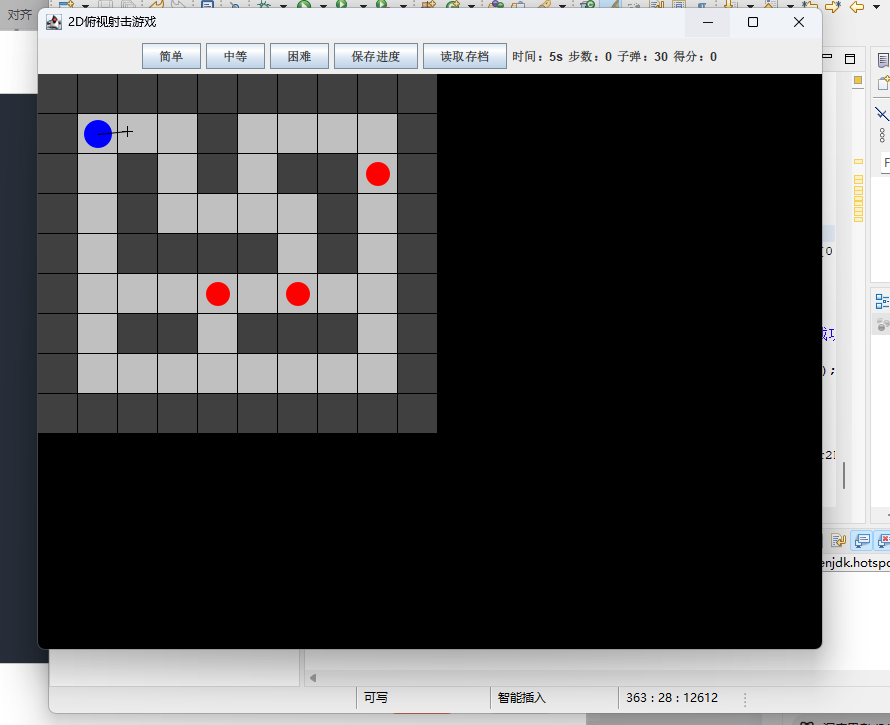
如图所示,代码成功实现了相应的内容,但射击代码存在无法移动(键盘指令传输不了)的bug
实验心得
这次 Swing 实验我完成三类程序开发:小学生算术答题软件、扫雷、2D 俯视射击游戏,基本掌握 GUI 组件与事件处理机制。算术程序实现随机四则运算、难度分级与答案校验;扫雷和射击游戏搭建完整图形画布,完成难度切换、计时计步、存档读档功能。编写中解决了事件导入缺失、抽象方法未实现等报错,理解 AWT 事件队列运行逻辑,熟练运用鼠标、键盘监听与 Timer 动画刷新,提升图形绘制、碰撞检测和文件读写综合编程能力。
更多推荐
 4
4 0
0- 0


 已为社区贡献2条内容

所有评论(0)