
全模态(Omni)推理引擎——vLLM-Omni
其实很早就想写这个东西,只是一直没有时间去写,而且看里面的源代码真的很难看懂
介绍
看到vllm-Omni这个名字,如果是做大模型相关的,肯定就想着这是不是vllm家的?是的,它就是vllm家的,只是从vllm里面抽离出去,单独做了一个项目,你可能有一个疑问,为啥要抽离出来单独开一个子项目呢?
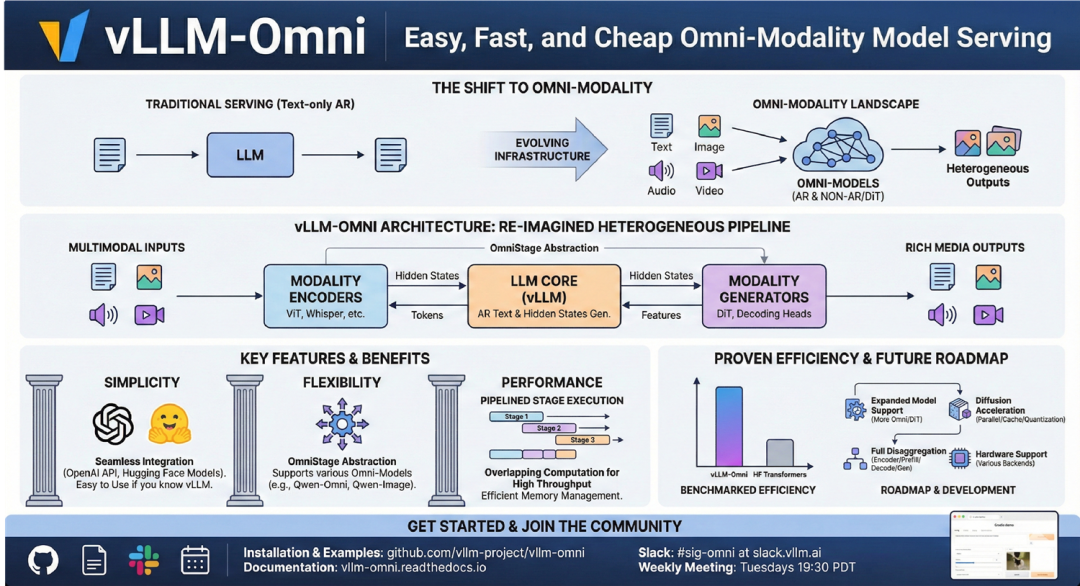
那是因为vLLM最初设计是专注于为了支持基于文本的自回归生成任务的大型语言模型推理引擎,并为其提供高吞吐量、内存高效服务。然而,随着生成式人工智能的迅速变化,模型不再只是文字输入、文字输出。如阿里开源的现有的Qwen3-Omni或者Wan2.2-I2V等最先进的模型能够跨越文本、图像、音频和视频进行推理,并通过多样的架构生成异构输出(音频、视频等格式)。
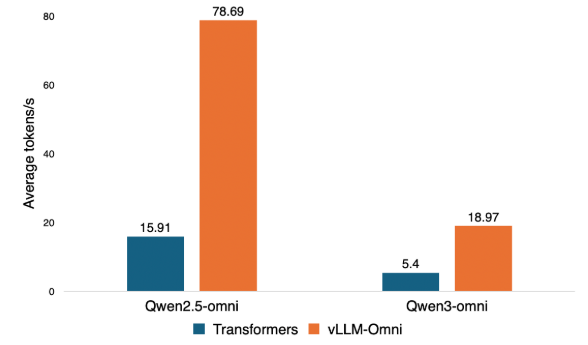
可能你会问,Transformer库也可以呀,而且一般官方模型服务商给的方式也是Tansformer,这里我就不多说了,直接放一个官方的图吧,你应该就知道了,为什么对于Omni模型要用这个推理引擎(看看是几倍的提升?)
架构
正因现在的模型格局发展,vLLM-Omni 应运而生,它是一个专门对全模态模型推断和服务支持的框架与引擎,它与vllm不同,它能够将文本、图片、音频、视频等作为输入,通过中间模态的转换,生成文本、图片、音频、视频,并以此作为输出。其整体架构如下图所示:
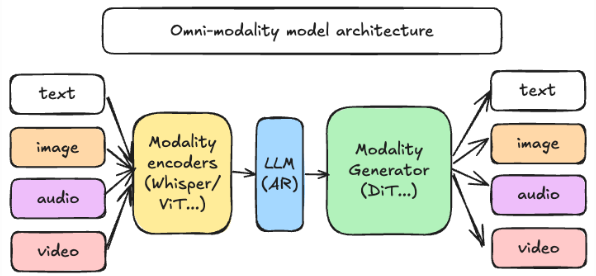
vllm-omni架构和vllm很相似但又不同,我们就先抛出它的优点,让大家能够记住它,其具体表现如下:
1、核心优势
vllm-Omni在架构上主要突出以下三个关键点:
1、它是真正的全模态,可以无缝处理和生成文本、图像、视频和音频。
2、它超越自回归架构,并将vllm自回归架构的经验(内存管理、流水线等)扩展到Diffusion Transformers 和其他相关的生成模型
3、采用异构模型流水线,通过协调复杂的模型工作流程,保障资源尽可能利用最大化,从而使单一请求尽可能的调用多个异构模型组件(例如,多模编码、AR 推理、基于扩散的多模生成等),从而实现高吞吐性能。
4、通过支持多种加速方式,使得推理更加高效快捷:并行推理(DP/TP/SP/USP…)、缓存加速(TeaCache/DBCache…)和计算加速(quantization/sparse attention…);
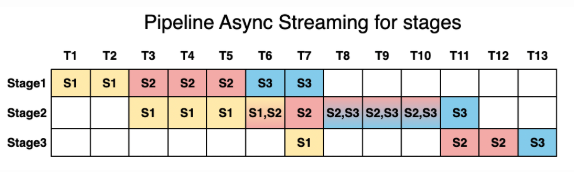
5、推理拆解成Stage(编码器/预填充/解码/生成),以提升吞吐量并降低延迟,这里我们以Qwen2.5-Omni来看它的Stage拆分(thinker、talker、code2wav),具体看配置文件,如下:
# stage config for running qwen2.5-omni with architecture of OmniLLM.
stage_args:
- stage_id: 0 # mark the unique id for each stage
runtime: # The disaggregated configuration
process: true  # Run this stage in a separate process
devices: "0" # Visible devices for this stage (CUDA_VISIBLE_DEVICES/torch.cuda.set_device)
max_batch_size: 1 # the batch_size for offline inference
engine_args: # Engine arguments for a certain engine
model_stage: thinker
model_arch: Qwen2_5OmniForConditionalGeneration # The model implementation registered in model_executor/models/registry.py
worker_cls: vllm_omni.worker.gpu_ar_worker.GPUARWorker # The specific worker used
scheduler_cls: vllm_omni.core.sched.omni_ar_scheduler.OmniARScheduler # The specific scehduler used
gpu_memory_utilization: 0.8 # The gpu memory allocation for the stage within a single chip
enforce_eager: true  # Now we only support eager mode
trust_remote_code: true # Needed by huggingface config parsing
engine_output_type: latent  # It claims that the stage will input latent hiddenstates besides token ids
enable_prefix_caching: false # For request with hiddenstates output, the prefix caching is not supported now
is_comprehension: true # If the stage is a text or multimodal comprehension module. If it is, the AsyncOmni will use its tokenizer as default
final_output: true # If the stage has output as part of final outputs. If it is false, which means that the stage only works as a intermediate role.
final_output_type: text # What is the final output type. It can be text and audio now.
default_sampling_params: # sampling parameters for the stage. Their meaning aligns with vLLM.
temperature: 0.0
top_p: 1.0
top_k: -1
max_tokens: 2048
seed: 42
detokenize: True
repetition_penalty: 1.1
- stage_id: 1
runtime:
process: true
devices: "1"
max_batch_size: 3
engine_args:
model_stage: talker
model_arch: Qwen2_5OmniForConditionalGeneration
worker_cls: vllm_omni.worker.gpu_ar_worker.GPUARWorker
scheduler_cls: vllm_omni.core.sched.omni_ar_scheduler.OmniARScheduler
gpu_memory_utilization: 0.8
enforce_eager: true
trust_remote_code: true
enable_prefix_caching: false
engine_output_type: latent
engine_input_source: [0]
custom_process_input_func: vllm_omni.model_executor.stage_input_processors.qwen2_5_omni.thinker2talker
default_sampling_params:
temperature: 0.9
top_p: 0.8
top_k: 40
max_tokens: 2048
seed: 42
detokenize: True
repetition_penalty: 1.05
stop_token_ids: [8294]
- stage_id: 2
runtime:
process: true
devices: "0"            # Example: use a different GPU than the previous stage; use "0" if single GPU
max_batch_size: 1
engine_args:
model_stage: code2wav
model_arch: Qwen2_5OmniForConditionalGeneration
worker_cls: vllm_omni.worker.gpu_generation_worker.GPUGenerationWorker
scheduler_cls: vllm_omni.core.sched.omni_generation_scheduler.OmniGenerationScheduler
gpu_memory_utilization: 0.15
enforce_eager: true
trust_remote_code: true
enable_prefix_caching: false
engine_output_type: audio
engine_input_source: [1]
final_output: true
final_output_type: audio
default_sampling_params:
temperature: 0.0
top_p: 1.0
top_k: -1
max_tokens: 2048
seed: 42
detokenize: True
repetition_penalty: 1.1
# Top-level runtime config (concise): default windows and stage edges
runtime:
enabled: true
defaults:
window_size: -1             # Simplified: trigger downstream only after full upstream completion
max_inflight: 1             # Simplified: process serially within each stage
edges:
- from: 0                   # thinker → talker: trigger only after receiving full input (-1)
to: 1
window_size: -1
- from: 1                   # talker → code2wav: trigger only after receiving full input (-1)
to: 2
window_size: -1
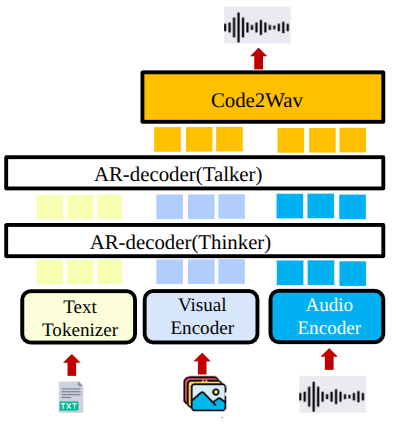
这个图就很好解释了上面的配置文件。
除此之外,vllm-Omni集成了vllm的灵活易用的特点:
1、兼容OpenAI的API 接口;
2、无缝衔接Huggingface上众多开源模型,如:全模态模型(Qwen2.5-Omni, Qwen3-Omni等)、DiT模型(Qwen-Image、wan2.2等);
3、通过设置启动参数方式,支持张量、流水线、数据和专家并行。
说了这么多,就一句话,好用,为啥好用?因为vllm-Omni是截至目前为止,唯一一个统一了Omni和DIT模型的推理加速引擎。
2、架构
前不久,vllm-omni做了一个分享,我觉得这个图很不错,也分享给大家看看,其实整个架构的核心也在这个图中,如下:
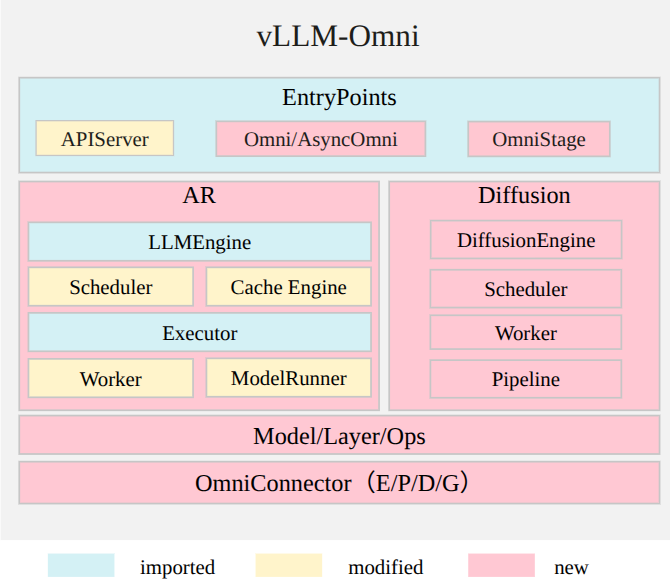
vllm-omni三将AR和Diffusion整个在一起,AR沿用LLMEngine,而Diffusion则使用DiffusionEngine。
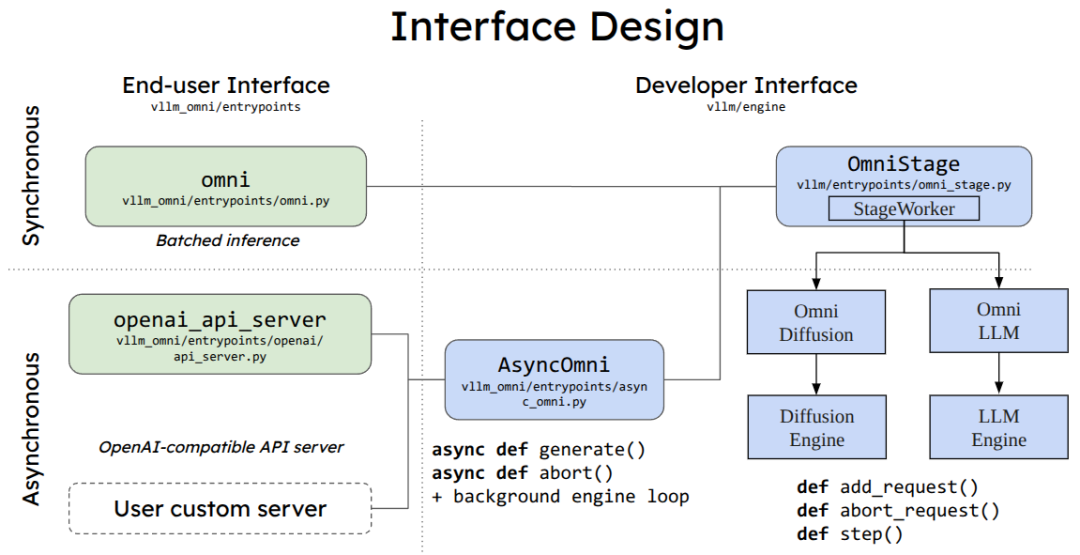
对于APIServer设计,也沿用了vllm的方案,有同步和异步,但是推理增加了diffusion engine。
3、支持模型
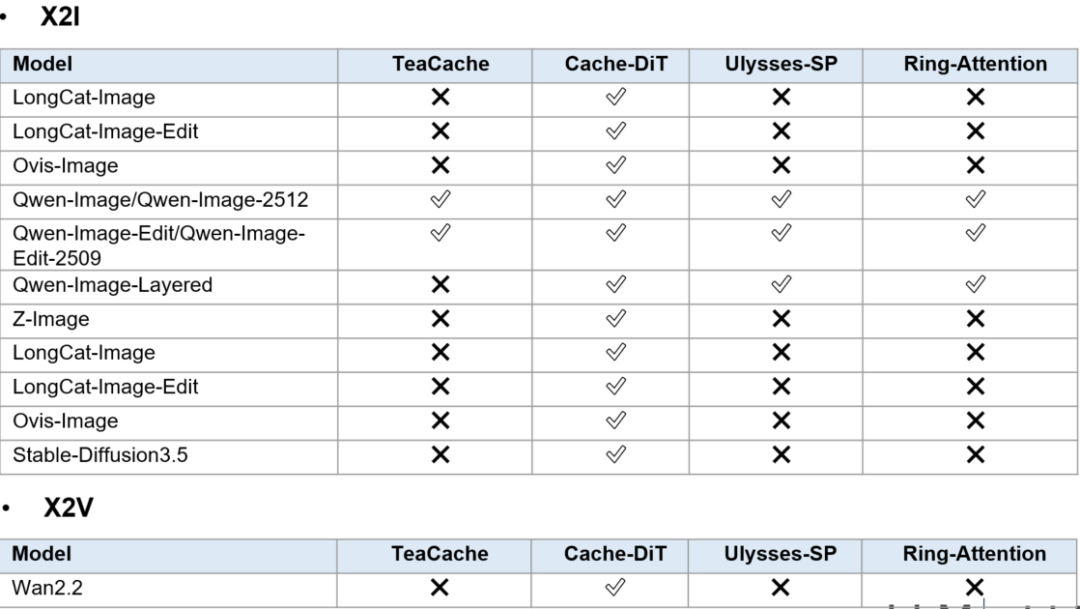
可以通过下图可知,支持的模型很多,更多是omni以及diffusion模型,这也弥补了diffusion推理框架的一个空白。
实践
本来想着试试text-to-video,用一下阿里开源的wan2.2-5b模型,查了一下发现,需要4090卡,emmm…,玩不起,4090都是24G起步,所以咱们玩玩image-to-image吧,试试Qwen-Image-Edit-2509。
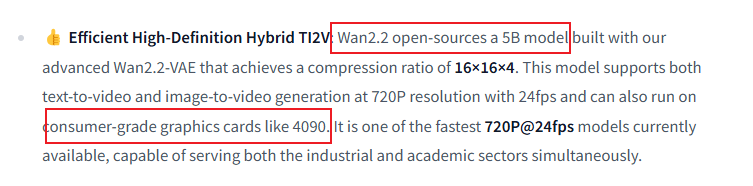
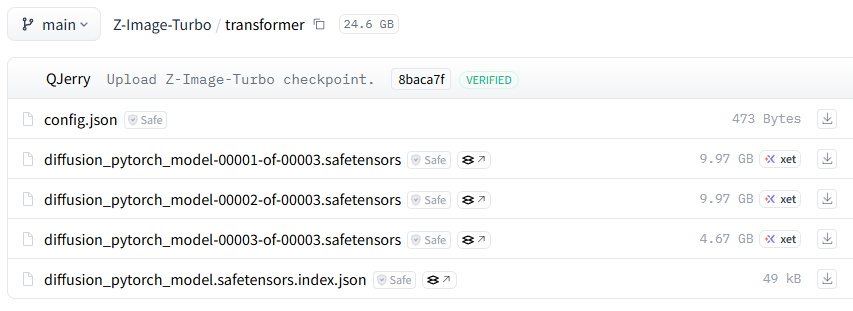
呵呵…笑死,看了下模型,没一个模型能玩的,找到最低尺寸的5b模型,大小都超过了我显卡显存,截图给你们看。
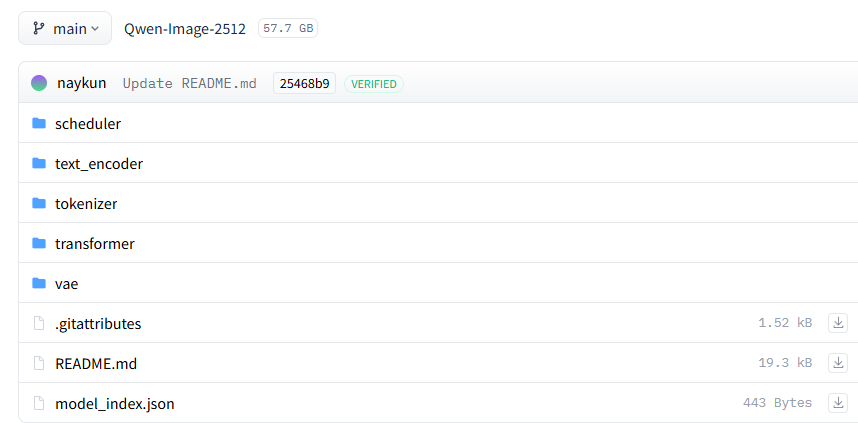
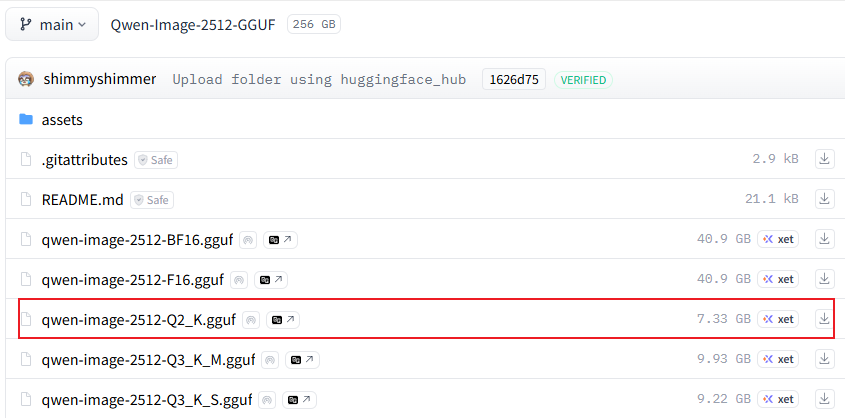
好消息是,看到unsloth有量化模型,不过也很大,跑不起啦
Qwen2.5-Omni部署
1、下载模型
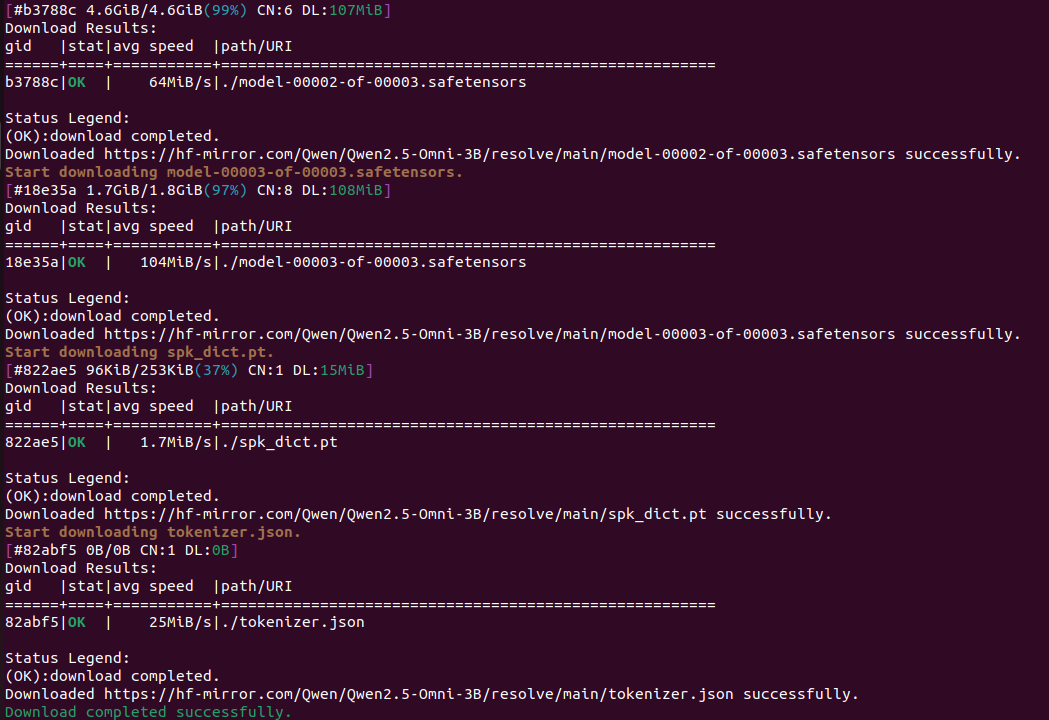
我们来试试Qwen2.5-Omni-3B模型吧,首先我们下载模型,如下图所示,已经下载好了模型,大概在6G大小左右。
2、docker部署
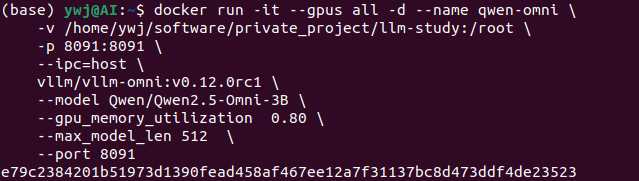
执行下面命令:
然后我们可以通过docker命令查看日志:
docker logs -f e79c
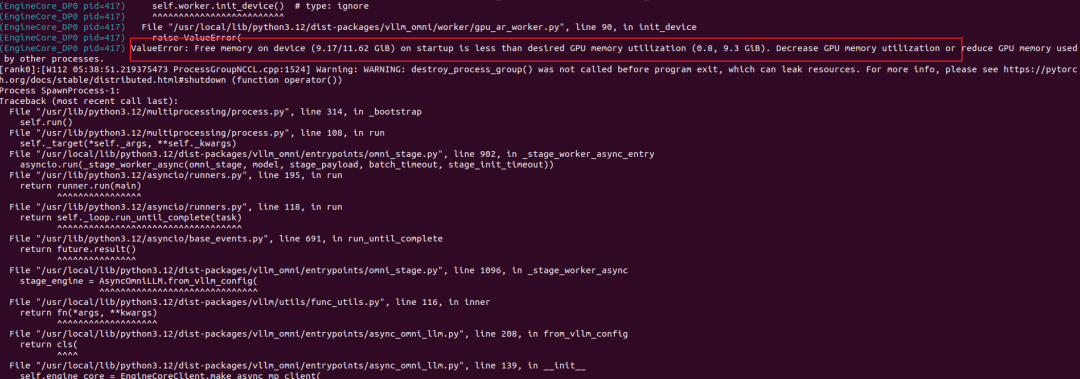
呐,最后就是我电脑显卡不足,连这个都跑不起来。
3、vllm命令部署
当然,除了docker部署,我们还可以通过vllm serve 部署,很多人想这一块,其实在vllm里面就可以实现,不一定要用vllm-omni,你错了,既然vllm-omni新开了,肯定在后续的模型支持里面vllm不会去支持了,要支持也会在vllm-omni项目中。
vllm serve Qwen/Qwen2.5-Omni-7B --omni --port 8091
注意:–omni参数
如果你使用了stage部署,可以使用如下方式:
vllm serve Qwen/Qwen2.5-Omni-7B --omni --port 8091 --stage-configs-path /path/to/stage_configs_file
这个可以参考之前上面提到的Qwen2.5-Omni的三阶段。
写在最后
LLM Agent 的诞生,为我们提供了一个极具想象空间的技术路线,它将传统模型的强大语言理解能力,与外部工具的实际动手能力相结合,创造出无限可能的应用空间。希望这篇文章能够启发你进一步探索和创新,用有限的代码,创造出更加强大、高效且安全的智能体,推动人工智能真正落地到更多场景,惠及更多人群。
学AI大模型的正确顺序,千万不要搞错了
🤔2026年AI风口已来!各行各业的AI渗透肉眼可见,超多公司要么转型做AI相关产品,要么高薪挖AI技术人才,机遇直接摆在眼前!
有往AI方向发展,或者本身有后端编程基础的朋友,直接冲AI大模型应用开发转岗超合适!
就算暂时不打算转岗,了解大模型、RAG、Prompt、Agent这些热门概念,能上手做简单项目,也绝对是求职加分王🔋
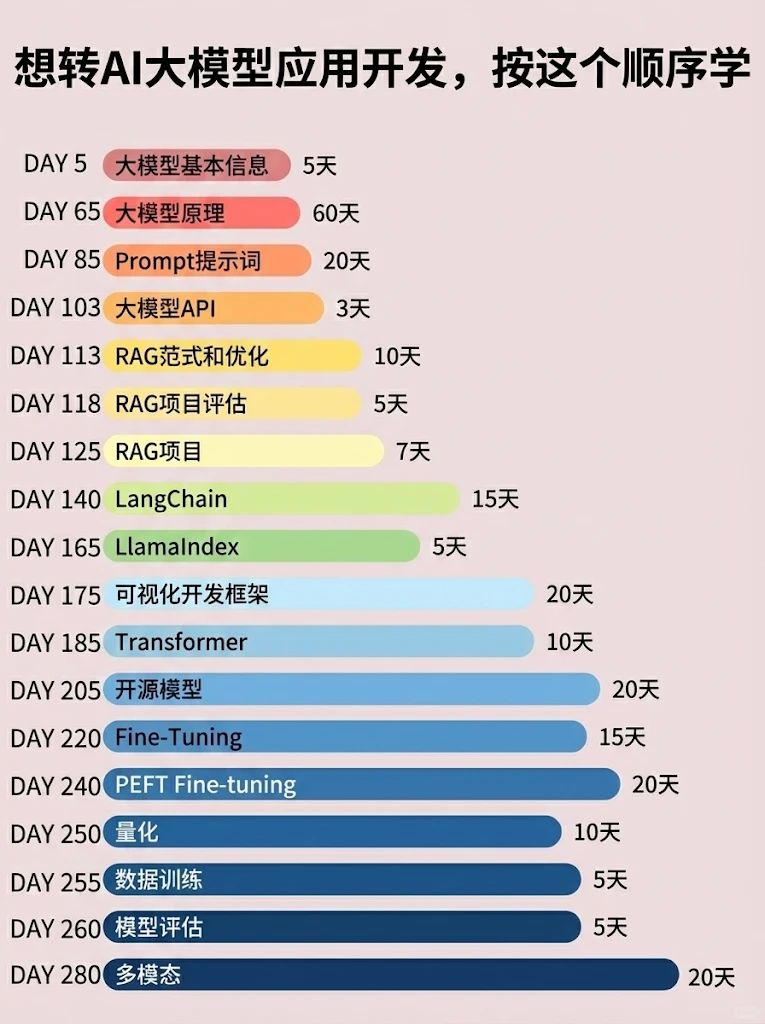
📝给大家整理了超全最新的AI大模型应用开发学习清单和资料,手把手帮你快速入门!👇👇
学习路线:
✅大模型基础认知—大模型核心原理、发展历程、主流模型(GPT、文心一言等)特点解析
✅核心技术模块—RAG检索增强生成、Prompt工程实战、Agent智能体开发逻辑
✅开发基础能力—Python进阶、API接口调用、大模型开发框架(LangChain等)实操
✅应用场景开发—智能问答系统、企业知识库、AIGC内容生成工具、行业定制化大模型应用
✅项目落地流程—需求拆解、技术选型、模型调优、测试上线、运维迭代
✅面试求职冲刺—岗位JD解析、简历AI项目包装、高频面试题汇总、模拟面经
以上6大模块,看似清晰好上手,实则每个部分都有扎实的核心内容需要吃透!
我把大模型的学习全流程已经整理📚好了!抓住AI时代风口,轻松解锁职业新可能,希望大家都能把握机遇,实现薪资/职业跃迁~
这份完整版的大模型 AI 学习资料已经上传CSDN,朋友们如果需要可以微信扫描下方CSDN官方认证二维码免费领取【保证100%免费】


免费领 150 小时云算力,进群参与显卡、AI PC 幸运抽奖
更多推荐
 3
3 0
0- 0


 已为社区贡献8条内容

所有评论(0)