
ollama安装脚本问题处理
在更新ollama版本过程中多次遇到下载软件失败
curl -fsSL https://ollama.com/install.sh | sh >>> Cleaning up old version at /usr/local/lib/ollama [sudo] password for sr: >>> Installing ollama to /usr/local >>> Downloading ollama-linux-amd64.tar.zst ################ 23.0%curl: (56) OpenSSL SSL_read: error:0A000126:SSL routines::unexpected eof while reading, errno 0 /*stdin*\ : Read error (39) : premature end tar: Unexpected EOF in archive tar: Unexpected EOF in archive tar: Error is not recoverable: exiting now ollama这个问题怎么处理,使用代理也会出现
不得已还是觉得查看安装脚本看是否可以把需要下载的部分提前下载好。
#linux安装指令
curl -fsSL https://ollama.com/install.sh | sh
先下载安装脚本
curl -fsSL https://ollama.com/install.sh
查看脚本大致逻辑:
1. 初始化阶段
2. macOS 安装流程
3. Linux 安装流程
4. 系统服务配置 (systemd)
5. GPU 支持检测与安装
注意到download_and_extract函数是做ollama下载解压功能,决定修改这个位置;
main() {
set -eu
# 注意额外修改内容一行,通过环境变量获取本地ollama文件位置
LOCAL_OLLAMA_PATH="${LOCAL_OLLAMA_PATH:-}"
……
……
download_and_extract() {
    local url_base="$1"
    local dest_dir="$2"
    local filename="$3"

    # 注意额外添加代码,直接复制到文本中。检查是否有本地文件路径
    if [ -n "$LOCAL_OLLAMA_PATH" ] && [ -f "$LOCAL_OLLAMA_PATH" ]; then
        status "Using local file: $LOCAL_OLLAMA_PATH"
        # 根据文件扩展名决定解压方式
        case "$LOCAL_OLLAMA_PATH" in
            *.tar.zst)
                if ! available zstd; then
                    error "Local file is .tar.zst format but zstd is not available. Please install zstd and try again."
                fi
                zstd -d < "$LOCAL_OLLAMA_PATH" | $SUDO tar -xf - -C "$dest_dir"
                ;;
            *.tgz|*.tar.gz)
                tar -xzf "$LOCAL_OLLAMA_PATH" -C "$dest_dir"
                ;;
            *)
                error "Unsupported local file format. Expected .tar.zst or .tgz file."
                ;;
        esac
        return 0
    fi
    # 复制以上内容到download_and_extract,这块是使用本地已下载ollama文件解压到指定位置
使用示例:
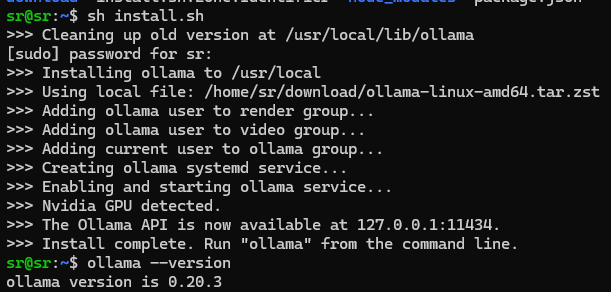
export LOCAL_OLLAMA_PATH=/path/to/local/ollama-linux-amd64.tar.zst sh ./install.sh
/path/to/local/ollama-linux-amd64.tar.zst 这部分根据自己文件位置替换
已经安装过再更新超方便
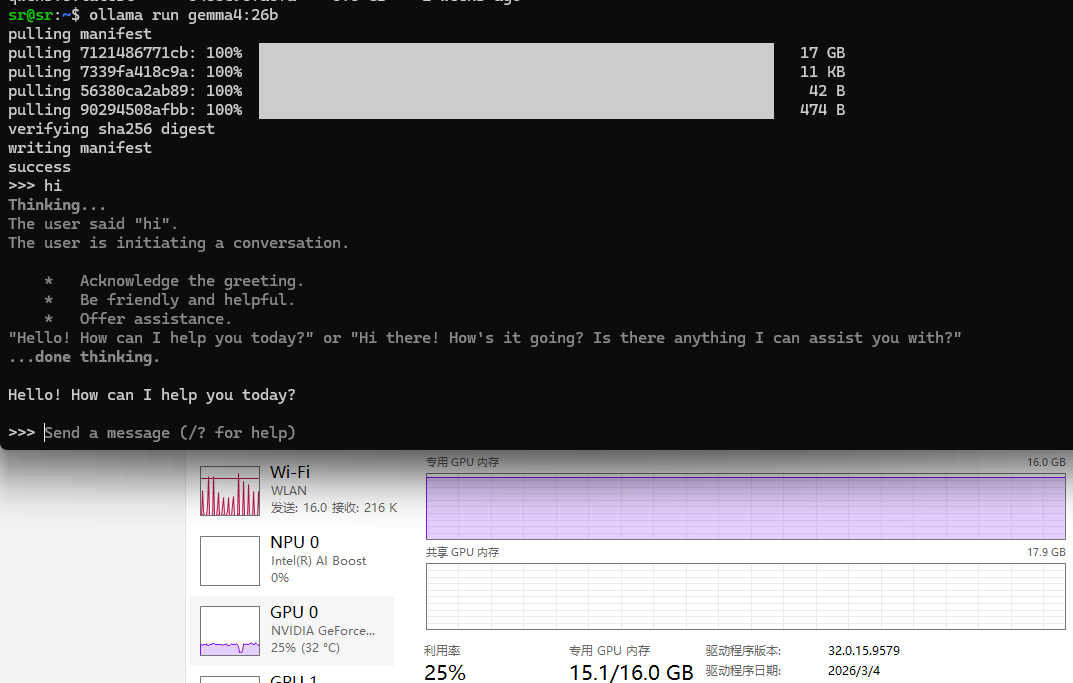
另外一提使用ollama运行gemma4:26b在本地消耗确实挺高,消耗了14GB显存+10GB多内存,速度可以。ollama本身模型是4bit量化,这大概是基础运行硬件需求,如果本地内存更低可以尝试配置更小的上下文给ollama。

免费领 150 小时云算力,进群参与显卡、AI PC 幸运抽奖
更多推荐

 0
0 0
0- 0


 已为社区贡献3条内容

所有评论(0)