
用 Vercel Eve 的 Subagent 和 Skill 搭建 Agent Team
为什么需要 skill 和 subagent
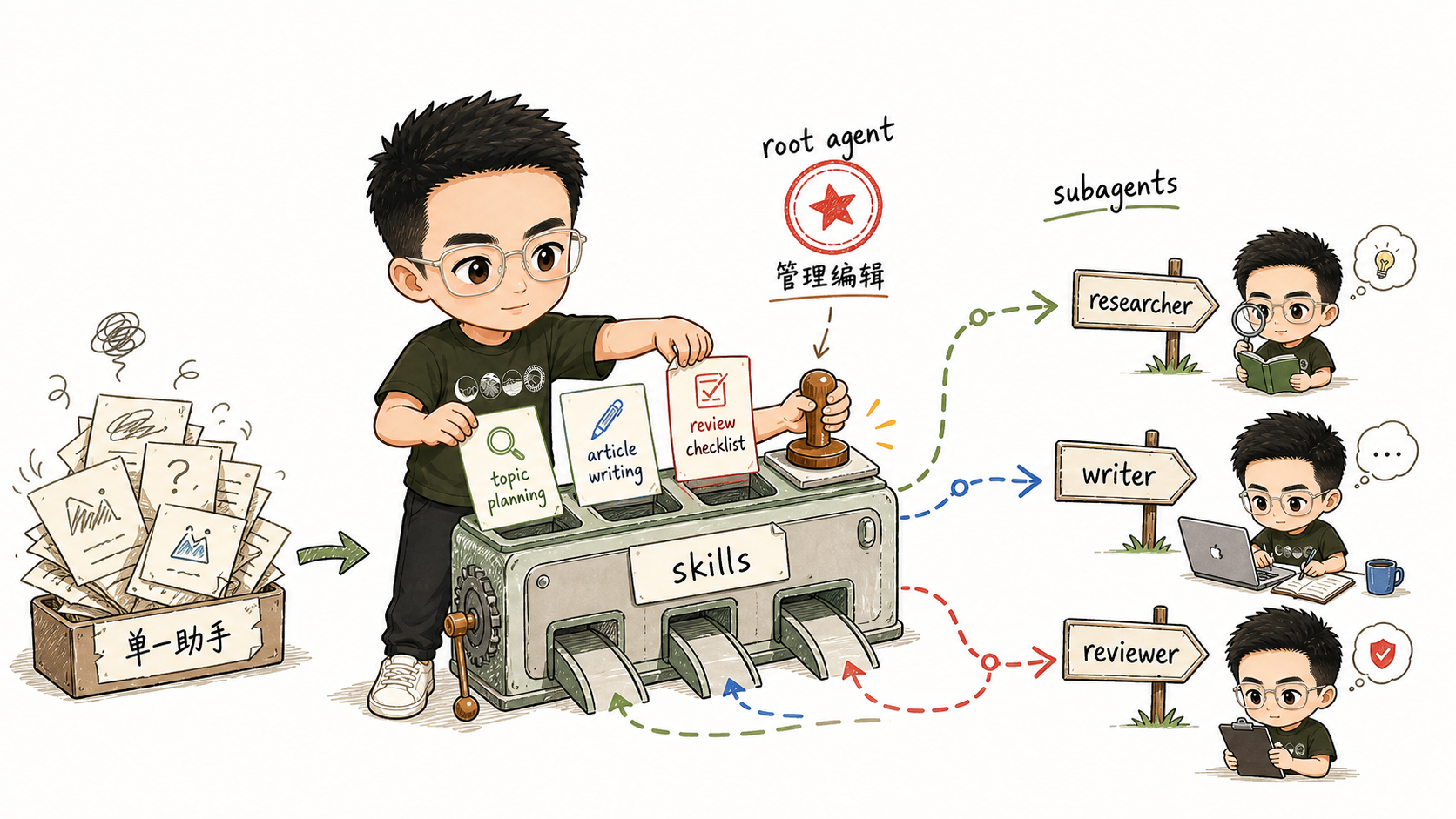
前两篇里的 Agent 本质上还是聊天助手。它知道自己是 SpringForAll 内容运营助手,但选题、写作、审核和协作规则都挤在同一个上下文里:
- 选题应该怎么判断;
- 写作应该用什么结构;
- 审稿应该检查哪些风险;
- 谁负责研究,谁负责写作,谁负责审核;
- 某一步失败时应该重试,还是交给人判断。
如果全部塞进 agent/instructions.md,它很快会变成难维护的长期提示词,也会让每次调用都带上不需要的流程细节。所以这里按职责拆:
- instructions 写稳定身份、长期边界和团队协作规则;
- skills 写可按需加载的工作流;
- subagents 写角色边界和各自独立上下文。
放到内容团队里,就是:
topic_planning: 选题流程;article_writing: 写作流程;review_checklist: 审核流程;researcher: 研究员,负责研究和选题;writer: 撰稿人,负责大纲和草稿;reviewer: 审核人,负责审校和发布前风险检查;root agent: 内容主编,负责任务拆解和结果整合。
本节样例结构
最终目录如下:
example/03-content-team/
  package.json
  tsconfig.json
  .env.example
  scripts/
    check-custom-gateway.mjs
  agent/
    agent.ts
    instructions.md
    lib/
      model.ts
    skills/
      topic_planning.md
      article_writing.md
      review_checklist.md
    subagents/
      researcher/
        agent.ts
        instructions.md
        skills/
          topic_planning.md
      writer/
        agent.ts
        instructions.md
        skills/
          article_writing.md
      reviewer/
        agent.ts
        instructions.md
        skills/
          review_checklist.md
    channels/
      eve.ts
和第 02 篇相比,主要增加了:
agent/skills/: root agent 可加载的三份流程说明;agent/subagents/: 三个专职 subagents;agent/subagents/*/skills/: subagent 自己可加载的 skill。
注意一个 Eve 设计细节:
declared subagent 不会继承 root agent 的 authored slots。
root agent 有 agent/skills/topic_planning.md,不代表 researcher 自动拥有这个 skill。每个 declared subagent 都是独立的 agent root,只发现自己目录下的 instructions、skills、tools、connections、sandbox 等内容。
所以如果希望 researcher、writer、reviewer 自己加载并遵循某个 skill,就要在它们各自的 skills/ 目录下放一份。
复用第 02 篇的模型配置
先把模型入口放到公共文件里:
import { createOpenAICompatible } from "@ai-sdk/openai-compatible";

const defaultGatewayModelId = "minimax/minimax-m3";
const customBaseURL = process.env.EVE_MODEL_BASE_URL;
const usesCustomGateway = customBaseURL !== undefined && customBaseURL.trim() !== "";
完整文件在:
agent/lib/model.ts
它导出两个值:
export const model = usesCustomGateway
  ? createOpenAICompatible({
      name: "custom",
      baseURL: customBaseURL,
      apiKey: process.env.EVE_MODEL_API_KEY,
      includeUsage: true,
    }).chatModel(requireCustomModelId())
  : (process.env.EVE_GATEWAY_MODEL_ID ?? defaultGatewayModelId);

export const modelContextWindowTokens = parseContextWindowTokens(process.env.EVE_MODEL_CONTEXT_WINDOW_TOKENS);
root agent 和三个 subagents 都复用这份配置:
import { defineAgent } from "eve";
import { model, modelContextWindowTokens } from "#lib/model.js";

export default defineAgent({
  model,
  modelContextWindowTokens,
});
这样可以把重点留给 skills 和 subagents,避免每个 subagent 都复制 Provider 配置。当然实际应用不同 subagent 需要配置不同模型的话, 也可以为他们配置各自的 Provider 和 Model,本篇不做展开,读者也可以自己尝试。
编写 root agent:内容主编
root agent 的 instructions 升级为内容主编:
# SpringForAll Content Editor

You are the managing editor for the SpringForAll community content team.

Your mission is to help Java, Spring, Spring AI, Spring Cloud, JVM, backend engineering, and developer tooling creators turn rough ideas into useful Chinese technical articles.
声明团队协作规则:
Use the content team as three specialist roles:

- Use the `researcher` subagent when the task needs topic discovery, trend analysis, source collection, or uncertainty checks.
- Use the `writer` subagent when the task needs an outline, first draft, rewrite, title options, or article packaging.
- Use the `reviewer` subagent when the task needs editorial review, technical risk checks, source checks, or publish-readiness feedback.
再声明 skill 加载规则:
Load the relevant skill before delegating or doing the work yourself:

- `topic_planning` for topic discovery, audience fit, source requirements, and topic scoring.
- `article_writing` for brief-to-draft writing, article structure, examples, and SpringForAll voice.
- `review_checklist` for final review, risk classification, missing evidence, and revision requests.
root agent 不负责亲自完成所有事,只负责判断:
- 当前任务属于哪一步;
- 应该加载哪个 skill;
- 应该把什么上下文交给哪个 subagent;
- subagent 返回后如何整合;
- 哪些内容还需要人确认。
编写第一个 skill:选题流程
agent/skills/topic_planning.md 是 root agent 可加载的选题流程。
skill 文件的关键是 frontmatter 里的 description:
---
description: Use when planning SpringForAll article topics, scoring candidate ideas, or turning a vague content direction into a research brief.
---
Eve 会把 description 暴露给模型。任务匹配时,模型再通过 load_skill 把完整 skill 加进上下文。
选题 skill 里最重要的是避免“内置静态选题列表”:
Do not rely on a static built-in topic list. For each topic, identify the real source categories that should be checked before writing:

- Spring official blog, reference docs, release notes, and GitHub repositories.
- Spring AI, Spring Boot, Spring Cloud, Spring Security, and Spring Framework updates.
- Java, JVM, build tools, observability, cloud-native, and backend architecture signals.
- Community questions, migration pain points, production incidents, and developer workflow changes.
内容运营 Agent 最容易凭空生成“看起来像热点”的标题。这里还没有接入真实搜索 tool,也没有接历史内容库,所以 skill 必须要求:
- 说明应该检查哪些真实来源;
- 如果无法访问实时来源,要把待人工核验项列出来;
- 不要把猜测包装成事实。
另外两个 skills 分别负责:
article_writing.md: 把选题简报变成标题、摘要、大纲、草稿;review_checklist.md: 检查受众、事实、证据、结构、可发布风险。
拆出 researcher subagent
我们先拆出研究员 subagent,也就是目录里的 researcher。一个 declared subagent 最少需要:
agent/subagents/researcher/
  agent.ts
  instructions.md
agent.ts 必须有 description。父 Agent 会根据它判断什么时候调用 subagent:
import { defineAgent } from "eve";
import { model, modelContextWindowTokens } from "#lib/model.js";

export default defineAgent({
  description:
    "Research SpringForAll content topics, collect source plans, compare candidate angles, and return evidence-aware topic briefs.",
  model,
  modelContextWindowTokens,
});
instructions.md 则写 researcher 自己的身份和输出格式:
# SpringForAll Researcher

You are the research subagent for SpringForAll content operations.

Your job is to turn vague content directions into evidence-aware topic briefs.

Load and follow the `topic_planning` skill before returning your result.
这里说的是 researcher 自己要加载 topic_planning。因为 declared subagent 不继承 root agent 的 skills,所以还要放一份:
agent/subagents/researcher/skills/topic_planning.md
这样 researcher 被调用时才能看到这个 skill。
撰稿人 writer 和审核人 reviewer 也是同样结构:
agent/subagents/writer/
  agent.ts
  instructions.md
  skills/article_writing.md

agent/subagents/reviewer/
  agent.ts
  instructions.md
  skills/review_checklist.md
为什么这里不用 outputSchema
Eve 的 subagent tool 支持 outputSchema,理论上可以让 researcher 返回严格 JSON:
outputSchema: z.object({
  candidates: z.array(...),
  recommended_topic: z.string(),
  open_questions: z.array(z.string()),
});
但这个样例没有默认使用 outputSchema。原因很直接:从第 02 篇开始,样例支持自定义 OpenAI-Compatible Provider,而不同 gateway、不同模型对严格结构化输出的支持并不一致。实际测试时容易遇到:
could not produce a result matching the requested schema
这通常不是 Eve 没发现 subagent,而是模型没有产出符合结构要求的结果。为了让读者复制后更容易跑通,这里采用更稳的方式:
- 不在 subagent 的
agent.ts里配置outputSchema; - 不让 root agent 调用 subagent 时传
outputSchema; - 用固定 Markdown 标题约束结果结构。
例如 researcher 的输出要求是:
Use exactly these headings:

## Candidate Topics

For each candidate, include title, reader, core question, angle, source plan, confidence, risk, and next step.

## Recommended Topic

Name the strongest topic and explain why.

## Open Questions

List unresolved questions for the editor.
这比严格 JSON 弱,但对教程更稳。等后面要做评测(evals)或自动处理结果时,再评估是否引入结构化输出。
处理 subagent 失败
subagent 失败时,不要让 root agent 悄悄把工作自己做完。否则界面上看似流程完成,实际上 researcher 或 reviewer 并没有参与。
所以 root agent 的 instructions 里加了这条规则:
If a subagent fails, returns an empty result, or returns an unusable result, do not silently complete that specialist's work yourself. Report the failed step, summarize what context was sent, and ask the user whether to retry with a smaller request.
这条规则是为了让流程可观察。教程阶段宁愿明确看到“researcher 这一步失败了,是否缩小任务重试”,也不要得到一份看似完整、但不知道谁做了什么的结果。
验证 Eve 是否发现了 skills 和 subagents
进入样例目录:
cd example/03-content-team
安装依赖并配置环境变量:
npm install
cp .env.example .env.local
如果使用 Vercel AI Gateway:
EVE_GATEWAY_MODEL_ID=minimax/minimax-m3
AI_GATEWAY_API_KEY=你的_Vercel_AI_Gateway_Key
如果使用自定义 OpenAI-Compatible Provider:
EVE_MODEL_BASE_URL=https://api.example.com/v1
EVE_MODEL_API_KEY=your-api-key
EVE_MODEL_ID=your-model-id
EVE_MODEL_CONTEXT_WINDOW_TOKENS=128000
可以先检查 gateway:
npm run check:gateway
小龙虾开发者社区是 CSDN 旗下专注 OpenClaw 生态的官方阵地,聚焦技能开发、插件实践与部署教程,为开发者提供可直接落地的方案、工具与交流平台,助力高效构建与落地 AI 应用
更多推荐
 2
2 0
0- 0


 已为社区贡献2条内容

所有评论(0)