
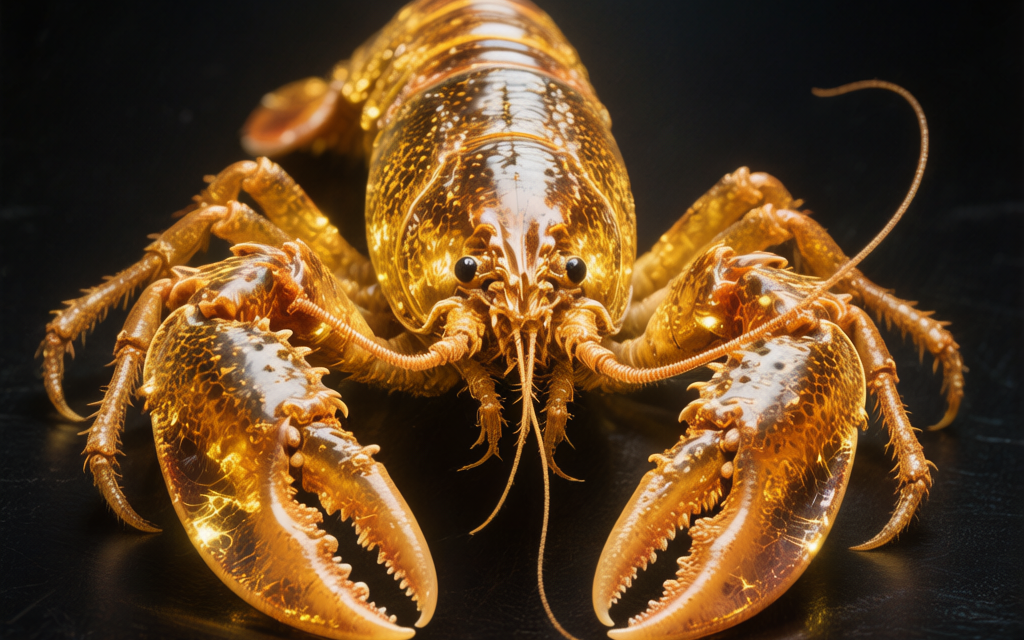
使用MiniMax生成图片、音乐和视频,还可以养龙虾、爱马仕,量大管饱
本文使用MiniMax的模型作展示,也是国内比较了一圈目前性价比最高的模型厂商了。目前Starter套餐是国内模型定价最便宜的,不是高频使用也完全足够,也可以通过点我分享的好友链接九折购买哦!

🧑💻使用MiniMax生成图片、音乐和视频,还可以养龙虾、爱马仕,量大管饱
一、购买体验目前最便宜的国产大模型
本文使用MiniMax的模型作展示,也是国内比较了一圈目前性价比最高的模型厂商了。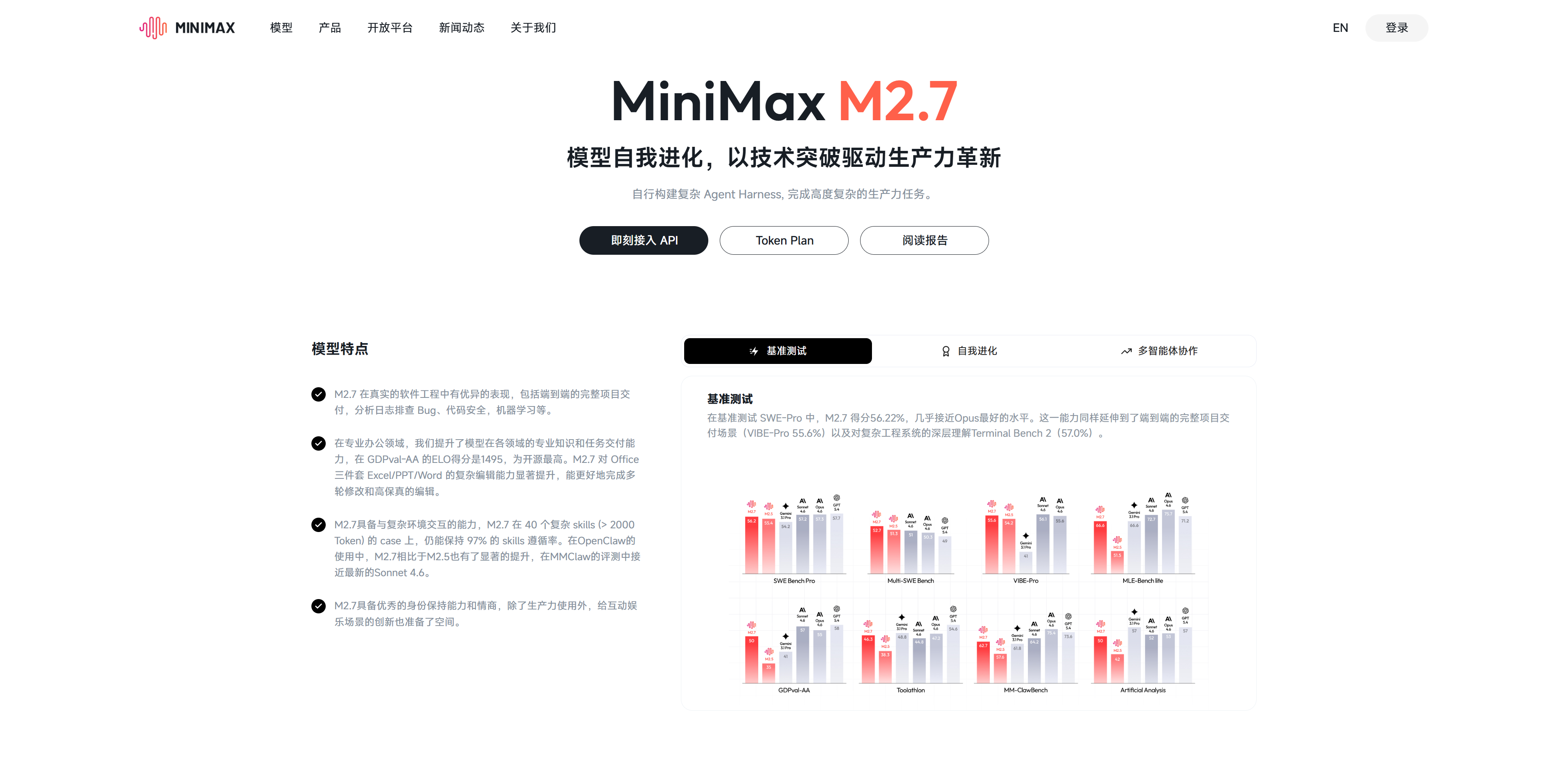
目前Starter套餐是国内模型定价最便宜的,不是高频使用也完全足够,也可以通过点我分享的好友链接九折购买哦!
🚀 MiniMax Token Plan 惊喜上线!新增语音、音乐、视频和图片生成权益。邀请好友享双重好礼,助力开发体验!
好友立享 9折 专属优惠 + Builder 权益,你赢返利 + 社区特权!
👉 立即参与:https://platform.minimaxi.com/subscribe/token-plan?code=1qsNMcoHhN&source=link
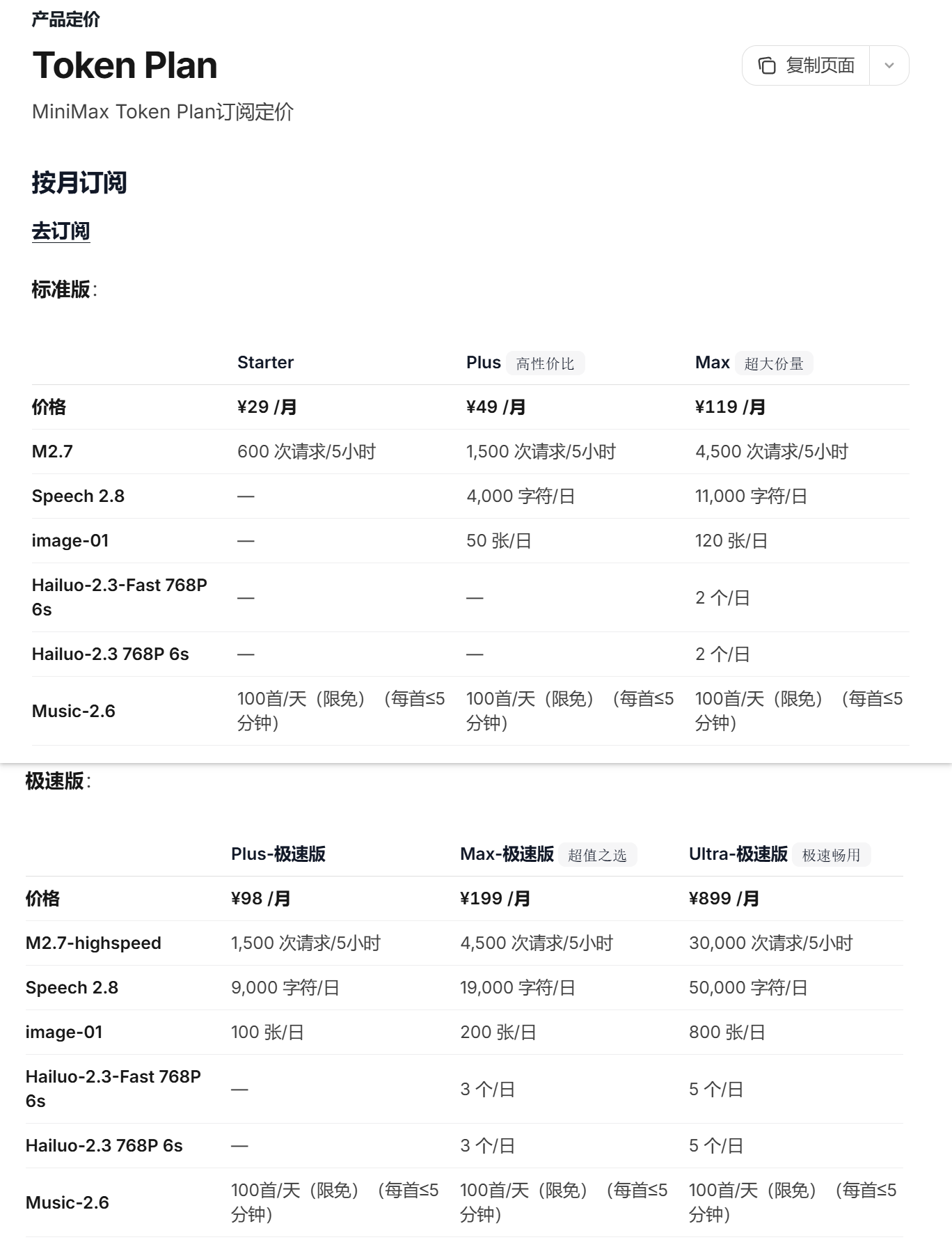
订阅TokenPlan之后,除了写代码养龙虾、爱马仕,还可以生成图片、音乐、视频,想体验一下国产模型的还是很推荐MiniMax的。
下面分享一下使用API调用具体功能的方法,可以在代码或其他工具中使用。
二、使用AI生成图片示例
图片生成服务提供文生图(text-to-image)与图生图(image-to-image)两种核心功能。
下面演示根据文本生成图片并保存到本地的完整代码:
import requests
import os
from datetime import datetime

url = "https://api.minimaxi.com/v1/image_generation"
api_key = "API_KEY"
headers = {
    "Content-Type": "application/json",
    "Authorization": f"Bearer {api_key}"}

payload = {
    "model": "image-01",
    "prompt": "拍摄视角: 第一人称男友视角(POV)"
              "景别: 中近景 (MCU)"
              "画面描述: 早上,高级公寓客厅。背景是巨大的落地窗,窗外是阳关晴朗的城市清晨。"
              "穿着非常宽松的白色衬衣,露出左侧肩膀,POV视角"
              "室内光线明亮,有一位美丽可爱的年轻中国少女。她衣着斜靠在浅色皮沙发上,妆容精致手里慵懒地晃动着半瓶酸奶,眼神满含热情的看着“你”。",
    "aspect_ratio": "16:9",
    "response_format": "url",
    "n": 9,
    "prompt_optimizer": True,
    #"style": {
    #    "style_type": "独立游戏,霓虹,漫画,卡通",
    #    "style_weight": 0.5
    #},
    # "seed": 3,
}

response = requests.post(url, json=payload, headers=headers)
data = response.json()

image_dir = os.path.join("generated_images", datetime.now().strftime("%Y%m%d_%H%M%S"))
os.makedirs(image_dir, exist_ok=True)

for i, img_url in enumerate(data["data"]["image_urls"]):
    img_response = requests.get(img_url)
    if img_response.status_code == 200:
        with open(os.path.join(image_dir, f"image_{i+1}.jpeg"), "wb") as f:
            f.write(img_response.content)
        print(f"已保存: {os.path.join(image_dir, f'image_{i+1}.jpeg')}")

print(data)
print(f"完成!共保存 {i+1} 张图片")
三、使用AI生成音乐示例
import requests
import os
from datetime import datetime

url = "https://api.minimaxi.com/v1/music_generation"
api_key = "API_KEY"
headers = {
    "Content-Type": "application/json",
    "Authorization": f"Bearer {api_key}"}

payload = {
    "model": "music-2.6",
    "prompt": "时长: 循环乐段 30-60秒,循环无缝。"
              "风格: 电子音乐 / Ambient / 氛围电子。"
              "描述: 神秘的氛围音乐,吸引玩家进入游戏。"
              "特征:- 节拍: 80-100 BPM (较慢,营造氛围)"
              "- 主音色: 柔和的合成器垫音- 低音: 持续但不强烈的低音"
              "- 旋律: 极简或无旋律,更注重氛围- 动态: 相对平稳,不要太抢注意力",
    "lyrics": "[verse]",
    "audio_setting": {
        "sample_rate": 44100,
        "bitrate": 256000,
        "format": "mp3",
    "is_instrumental": True
    }
}

response = requests.post(url, json=payload, headers=headers)
data = response.json()

audio_hex = data.get("data", {}).get("audio")
if audio_hex:
    music_dir = os.path.join("generated_music", datetime.now().strftime("%Y%m%d_%H%M%S"))
    os.makedirs(music_dir, exist_ok=True)

    file_path = os.path.join(music_dir, "music.mp3")
    with open(file_path, "wb") as f:
        f.write(bytes.fromhex(audio_hex))
    print(f"已保存: {file_path}")
else:
    print("未获取到音频数据,响应:", data)
四、使用AI生成视频示例
4.1 视频生成服务提供多种方式
视频生成服务提供多种功能:
- 文生视频:根据文本描述直接生成视频
- 图生视频:基于一张初始图片结合文本描述生成视频
- 首尾帧生成视频:提供视频开始、结束图片,来生成视频
- 主体参考生成视频:基于一人脸照片,文本描述生成视频,视频中保持人物特征一致性
4.2 文生视频展示案例
视频生成是一个异步过程,包含以下三个步骤:
- 创建生成任务:提交一个视频生成请求,获得任务 ID (task_id)
- 查询任务状态:使用 task_id 轮询任务状态。任务成功后,会返回一个文件 ID (file_id)
- 获取视频文件:使用 file_id 获取视频的下载地址并保存文件
第一步:创建生成任务
import requests
import os
import json
from datetime import datetime

url = "https://api.minimaxi.com/v1/video_generation"
api_key = "API_KEY"
headers = {
    "Content-Type": "application/json",
    "Authorization": f"Bearer {api_key}"}

payload = {
    "model": "MiniMax-Hailuo-2.3",
    "prompt": "拍摄视角: 第一人称男友视角(POV) 【镜头 01】"
              "景别: 中近景 (MCU)"
              "画面描述: 深夜,高级公寓客厅。背景是巨大的落地窗,窗外是失焦的城市霓虹(冷色调波点光斑)。"
              "室内光线昏暗,只有一盏暖色台灯照亮 kpop 年轻女子的侧脸。她斜靠在深色皮沙发上,妆容精致但略显疲态。手里慵懒地晃动着半杯红酒,眼神没有焦点地望着虚空。"
              "镜头与动作: 固定机位,模拟你坐在她对面的视角。她轻轻叹了口气,手指无意识地摩挲着高脚杯壁。"
              "音效与台词: 极度安静,只有城市远处极其微弱的车流白噪音。偶尔传来冰块撞击玻璃的轻响。 【镜头 02】"
              "景别: 近景 (CU)"
              "画面描述: 她似乎感觉到了你的注视,缓慢地转过头来直视镜头。眼神里带着三分醉意、七分疲惫,平日的锐利感被酒精柔化成了如丝般的媚态。"
              "镜头与动作: 缓慢推近,聚焦在她的面部表情。她的目光锁定镜头,嘴角极其勉强地扯动了一下。"
              "音效与台词: (御姐音,略沙哑慵懒)”工作……(停顿,眼神迷离)永远做不完呢……“ 【镜头 03】"
              "景别: 特写与互动 (ECU)"
              "画面描述: 突然,一只男性的大手(属于“你”,从屏幕下方或侧边伸入)坚定地握住了她手中的酒杯,并将酒杯从她手中抽走,移出画面外。"
              "镜头与动作: 镜头瞬间变为特写,强调手部动作和她一瞬间的错愕表情。她的手保持着握杯的姿势僵在半空一秒,眼睛因为惊讶而微微睁大,红唇微张。"
              "音效与台词: 酒杯被拿走时的轻微摩擦声。(画外音/你的声音,坚定低沉)”别喝了,去睡觉。“ 【镜头 04】"
              "景别: 近景 (CU)"
              "画面描述: 惊讶的表情在她脸上只停留了一瞬,随即化开。她收回僵在半空的手,身体放松地向后靠去。眼底泛起一丝促狭和被掌控的意外满足感,嘴角勾起一个似有似无的、复杂的笑容。"
              "镜头与动作: 镜头微幅晃动一下(模拟人的呼吸感),捕捉她表情的细腻转换。她轻轻歪了一下头,眼神变得顺从而玩味。"
              "音效与台词: (轻笑声)”呵……“ 【镜头 05】"
              "景别: 极致特写 (Extreme CU)"
              "画面描述: 她的脸庞突然在画面中放大,几乎填满屏幕。她主动倾身向前,凑近”你“的耳边(镜头边缘)。暖光打亮她的一侧脸颊和红唇,眼神在昏暗中显得格外深邃明亮。"
              "镜头与动作: 镜头被动后缩一点点,然后聚焦在她凑近的红唇和眼睛。带着一种致命的诱惑力和罕见的乖顺。"
              "音效与台词: (耳语,气声,极具诱惑力)“胆子变大了呀……(停顿,热气喷洒感)不过,听你的就是了。” 衣物摩擦的沙沙声被放大。",
    "duration": 6,
    "resolution": "768P"
}

response = requests.post(url, json=payload, headers=headers)
data = response.json()

# 创建响应保存目录
response_dir = os.path.join("video_responses", datetime.now().strftime("%Y%m%d"))
os.makedirs(response_dir, exist_ok=True)

# 生成文件名(包含 task_id 和时间戳)
task_id = data.get("task_id", "unknown")
timestamp = datetime.now().strftime("%H%M%S")
save_file = os.path.join(response_dir, f"task_{task_id}_{timestamp}.json")

# 保存为 JSON 文件
with open(save_file, "w", encoding="utf-8") as f:
    json.dump(data, f, ensure_ascii=False, indent=2)

print(f"响应已保存: {save_file}")
print(f"响应内容: {response.text}")
第二步:查询任务状态
import requests

task_id = ""
url = f"https://api.minimaxi.com/v1/query/video_generation?task_id={task_id}"
api_key = "API_KEY"
headers = {
    "Content-Type": "application/json",
    "Authorization": f"Bearer {api_key}"}

response = requests.get(url, headers=headers)

print(response.text)
第三步:获取视频文件
import requests
import os
from datetime import datetime

file_id = ""
url = f"https://api.minimaxi.com/v1/files/retrieve?file_id={file_id}"
api_key = "API_KEY"
headers = {
    "Content-Type": "application/json",
    "Authorization": f"Bearer {api_key}"}

response = requests.get(url, headers=headers)
data = response.json()

print("API 响应:", response.text)

# 检查请求是否成功
base_resp = data.get("base_resp", {})
if base_resp.get("status_code") != 0:
    print(f"请求失败: {base_resp.get('status_msg')}")
else:
    file_info = data.get("file", {})
    download_url = file_info.get("download_url")
    filename = file_info.get("filename", "output_video.mp4")

    if download_url:
        # 创建视频保存目录
        video_dir = os.path.join("generated_videos", datetime.now().strftime("%Y%m%d"))
        os.makedirs(video_dir, exist_ok=True)

        # 下载视频文件
        print(f"正在下载视频: {filename}")
        video_response = requests.get(download_url)

        if video_response.status_code == 200:
            # 加上时间戳避免覆盖
            name, ext = os.path.splitext(filename)
            save_path = os.path.join(video_dir, f"{name}_{datetime.now().strftime('%H%M%S')}{ext}")

            with open(save_path, "wb") as f:
                f.write(video_response.content)

            file_size = os.path.getsize(save_path) / (1024 * 1024)  # MB
            print(f"下载完成!保存路径: {save_path}")
            print(f"文件大小: {file_size:.2f} MB")
        else:
            print(f"下载失败,状态码: {video_response.status_code}")
    else:
        print("未获取到下载链接")
4.3 四种生成模式案例
四种生成模式案例,在在最后选择不同模式即可生效。
import os
import time
import requests

api_key ="API_KEY"
headers = {"Authorization": f"Bearer {api_key}"}


# --- 步骤 1: 发起视频生成任务 ---
# API 支持四种视频生成模式:文生视频、图生视频、首尾帧生成视频、主体参考生成视频。
# 以下四个函数分别对应这四种模式。它们都会发起一个异步的生成任务,并返回一个唯一的 task_id。

def invoke_text_to_video() -> str:
    """(模式一)通过文本描述发起视频生成任务。"""
    url = "https://api.minimaxi.com/v1/video_generation"
    payload = {
        # 'prompt' 是核心参数,用于描述视频的动态内容。
        "prompt": "镜头拍摄一个女性坐在咖啡馆里,女人抬头看着窗外,镜头缓缓移动拍摄到窗外的街道,画面呈现暖色调,色彩浓郁,氛围轻松惬意。",
        "model": "MiniMax-Hailuo-2.3",
        "duration": 6,
        "resolution": "768P",
    }
    response = requests.post(url, headers=headers, json=payload)
    print(f"(模式一)响应内容: {response.text}")
    response.raise_for_status()
    task_id = response.json()["task_id"]
    return task_id


def invoke_image_to_video() -> str:
    """(模式二)通过首帧图像和文本描述发起视频生成任务。"""
    url = "https://api.minimaxi.com/v1/video_generation"
    payload = {
        # 在图生视频模式下,'prompt' 用于描述基于首帧图像的动态变化。
        "prompt": "Contemporary dance,the people in the picture are performing contemporary dance.",
        # 'first_frame_image' 指定了视频的起始画面
        "first_frame_image": "https://filecdn.minimax.chat/public/85c96368-6ead-4eae-af9c-116be878eac3.png",
        "model": "MiniMax-Hailuo-2.3",
        "duration": 6,
        "resolution": "1080P",
    }
    response = requests.post(url, headers=headers, json=payload)
    print(f"(模式二)响应内容: {response.text}")
    response.raise_for_status()
    task_id = response.json()["task_id"]
    return task_id

def invoke_start_end_to_video() -> str:
    """(模式三) 使用首帧图像、尾帧图像和文本描述发起视频生成任务。"""
    url = "https://api.minimaxi.com/v1/video_generation"
    payload = {
        "prompt": "A little girl grow up.",
        # 'first_frame_image' 指定了视频的起始画面
        "first_frame_image": "https://filecdn.minimax.chat/public/fe9d04da-f60e-444d-a2e0-18ae743add33.jpeg",
        # 'last_frame_image' 指定了视频的结束画面
        "last_frame_image": "https://filecdn.minimax.chat/public/97b7cd08-764e-4b8b-a7bf-87a0bd898575.jpeg",
        "model": "MiniMax-Hailuo-02",
        "duration": 6,
        "resolution": "1080P"
    }
    response = requests.post(url, headers=headers, json=payload)
    print(f"(模式三)响应内容: {response.text}")
    response.raise_for_status()
    task_id = response.json()["task_id"]
    return task_id


def invoke_subject_reference() -> str:
    """(模式四) 使用人物主体图片和文本描述发起视频生成任务"""
    url = "https://api.minimaxi.com/v1/video_generation"
    payload = {
        "prompt": "On an overcast day, in an ancient cobbled alleyway, the model is dressed in a brown corduroy jacket paired with beige trousers and ankle boots, topped with a vintage beret. The shot starts from over the model's shoulder, following his steps as it captures his swaying figure. Then, the camera moves slightly sideways to the front, showcasing his natural gesture of adjusting the beret with a smile. Next, the shot slightly tilts down, capturing the model's graceful stance as he leans against the wall at a corner. The video concludes with an upward shot, showing the model smiling at the camera. The lighting and colors are natural, giving the footage a cinematic quality.",
        "subject_reference": [
            {
                "type": "character",
                "image": [
                    "https://filecdn.minimax.chat/public/54be8fbe-5694-4422-9c95-99cf785eb90e.PNG"
                ],
            }
        ],
        "model": "S2V-01",
        "duration": 6,
        "resolution": "1080P",
    }

    response = requests.post(url, headers=headers, json=payload)
    print(f"(模式四)响应内容: {response.text}")
    response.raise_for_status()
    task_id = response.json()["task_id"]
    return task_id


# --- 步骤 2: 轮询查询任务状态 ---
# 视频生成是一个耗时过程,因此 API 设计为异步模式。
# 提交任务后,需使用 task_id 通过此函数进行轮询,以获取任务的最终状态。
def query_task_status(task_id: str):
    """根据 task_id 轮询任务状态,直至任务成功或失败。"""
    url = "https://api.minimaxi.com/v1/query/video_generation"
    params = {"task_id": task_id}
    while True:
        # 推荐的轮询间隔为 10 秒,以避免对服务器造成不必要的压力。
        time.sleep(10)
        response = requests.get(url, headers=headers, params=params)
        response.raise_for_status()
        response_json = response.json()
        status = response_json["status"]
        print(f"当前任务状态: {status}")
        # 任务成功时,API 会返回一个 'file_id',用于下一步获取视频文件。
        if status == "Success":
            return response_json["file_id"]
        elif status == "":
            return Exception(f"视频生成失败: {response_json.get('error_message', response.text)}")
        elif status == "Fail":
            raise Exception(f"视频生成失败: {response_json.get('error_message', '未知错误')}")


# --- 步骤 3: 获取并保存视频文件 ---
# 任务成功后,我们得到的是 file_id 而非直接的下载链接。
# 此函数首先使用 file_id 从文件服务获取下载 URL,然后下载视频内容并保存到本地。
def fetch_video(file_id: str):
    """根据 file_id 获取视频下载链接,并将其保存到本地。"""
    url = "https://api.minimaxi.com/v1/files/retrieve"
    params = {"file_id": file_id}
    response = requests.get(url, headers=headers, params=params)
    response.raise_for_status()
    download_url = response.json()["file"]["download_url"]

    with open("output.mp4", "wb") as f:
        video_response = requests.get(download_url)
        video_response.raise_for_status()
        f.write(video_response.content)
    print("视频已成功保存至 output.mp4")


# --- 主流程: 完整调用示例 ---
# 该部分演示了从发起任务到最终保存视频的完整调用链路。
if __name__ == "__main__":
    # 选择一种方式创建任务
    task_id = invoke_text_to_video()  # 方式一:文生视频
    # task_id = invoke_image_to_video() # 方式二:图生视频
    # task_id = invoke_start_end_to_video() # 方式三: 根据首尾帧生成视频
    # task_id = invoke_subject_reference() # 方式四: 主体参考生成视频
    if task_id == "":
        print("视频生成失败: task_id为空!程序已退出")
        exit()

    print(f"视频生成任务已提交,任务 ID: {task_id}")
    file_id = query_task_status(task_id)
    print(f"任务处理成功,文件 ID: {file_id}")
    fetch_video(file_id)
五、即刻体验(调试台)
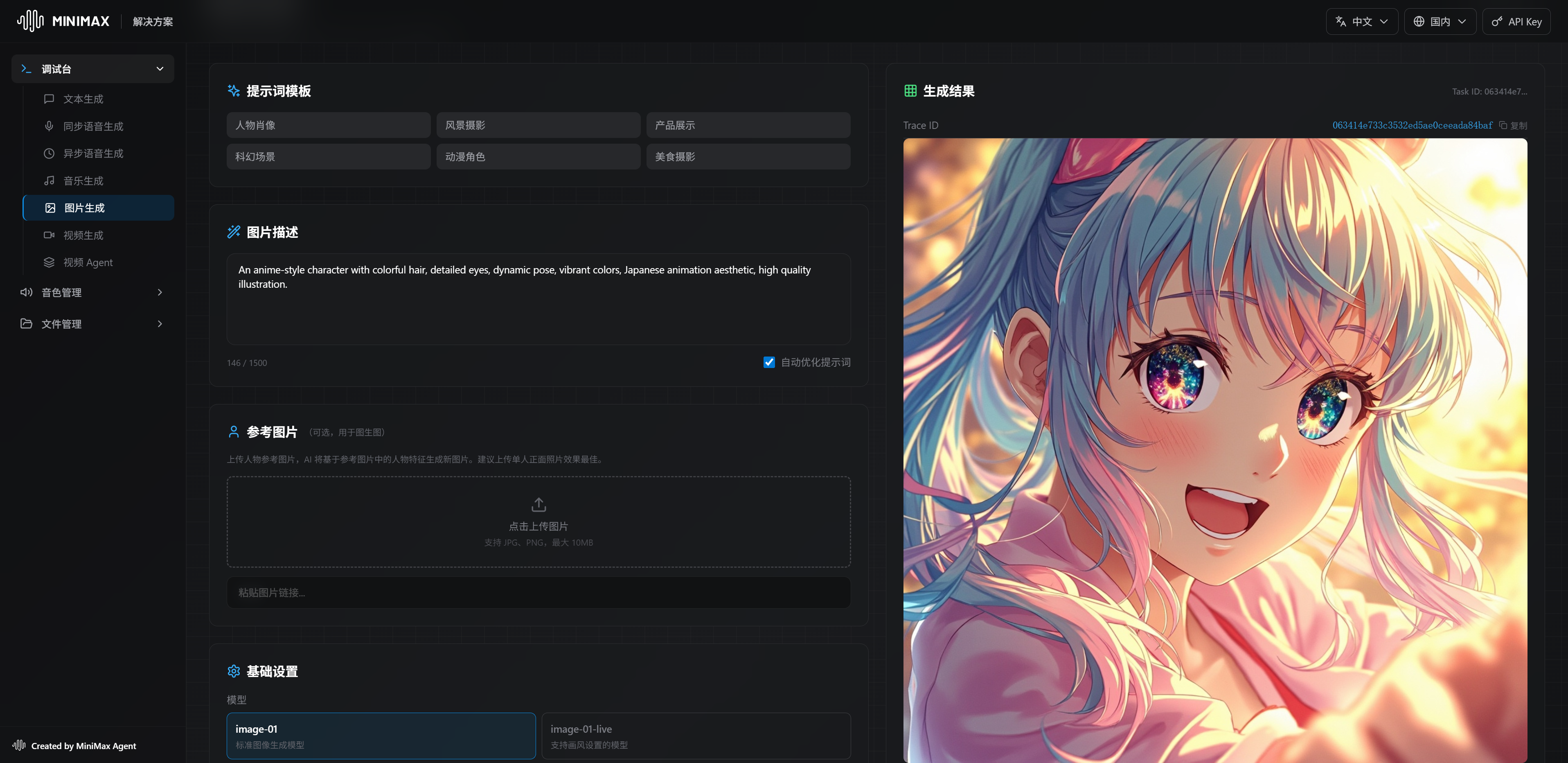
可以直接用调试台进行体验测试效果:https://solutions.minimaxi.com/debug/image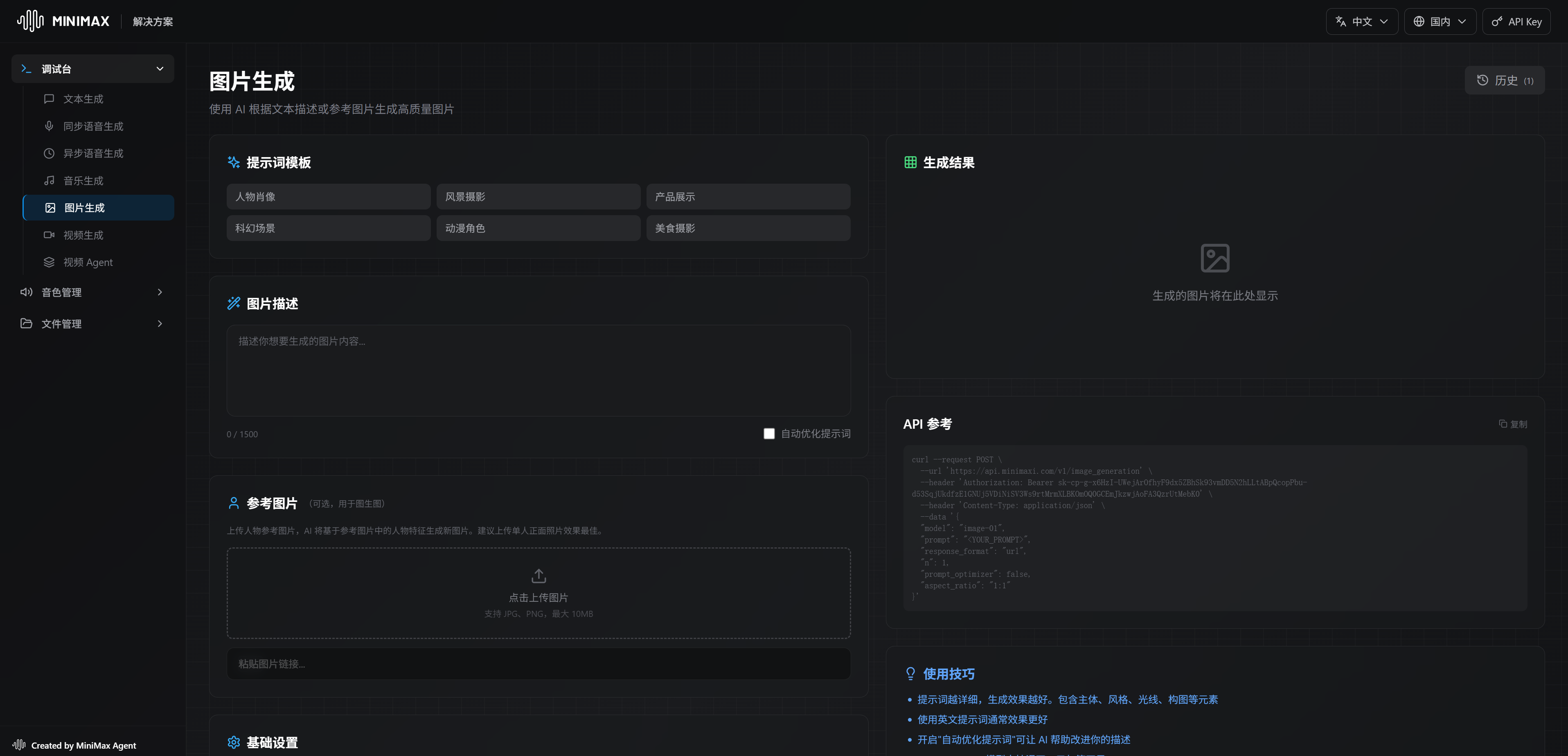
🎬 博客主页:https://xiaoy.blog.csdn.net
🎥 本文由 呆呆敲代码的小Y 原创 🙉
🎄 学习专栏推荐:Unity系统学习专栏
🌲 游戏制作专栏推荐:游戏制作
🌲Unity实战100例专栏推荐:Unity 实战100例 教程
🏅 欢迎点赞 👍 收藏 ⭐留言 📝 如有错误敬请指正!
📆 未来很长,值得我们全力奔赴更美好的生活✨
------------------❤️分割线❤️-------------------------

资料白嫖,技术互助
| 学习路线指引(点击解锁) | 知识定位 | 人群定位 |
|---|---|---|
| 🧡 Unity系统学习专栏 | 入门级 | 本专栏从Unity入门开始学习,快速达到Unity的入门水平 |
| 💛 Unity实战类项目 | 进阶级 | 计划制作Unity的 100个实战案例!助你进入Unity世界,争取做最全的Unity原创博客大全。 |
| ❤️ 游戏制作专栏 | 难度偏高 | 分享学习一些Unity成品的游戏Demo和其他语言的小游戏! |
| 💚 游戏爱好者万人社区 | 互助/吹水 | 数万人游戏爱好者社区,聊天互助,白嫖奖品 |
| 💙 Unity100个实用技能 | Unity查漏补缺 | 针对一些Unity中经常用到的一些小知识和技能进行学习介绍,核心目的就是让我们能够快速学习Unity的知识以达到查漏补缺 |


小龙虾开发者社区是 CSDN 旗下专注 OpenClaw 生态的官方阵地,聚焦技能开发、插件实践与部署教程,为开发者提供可直接落地的方案、工具与交流平台,助力高效构建与落地 AI 应用
更多推荐
 23
23 0
0- 0


 已为社区贡献2条内容

所有评论(0)