
【AI】OpenClaw问题排查
报错 disconnected (1008): unauthorized: gateway token missing (open a tokenized dashboard URL or paste token in Control UI settings)问题二:**回复消息聊天报错:⚠️ Agent failed before reply: No API key found for prov
问题一:报错 disconnected (1008): unauthorized: gateway token missing (open a tokenized dashboard URL or paste token in Control UI settings)
解决办法:
- 第一步:以管理员权限打开cmd,运行如下程序,查看是否存在gatewat token
openclaw config get gateway.auth.token
- 第二步:如果没有,执行如下功能获取
openclaw doctor --generate-gateway-token
- 第三步:复制控制台安装后的
Control UI中的token那串数字(token=[复制这里])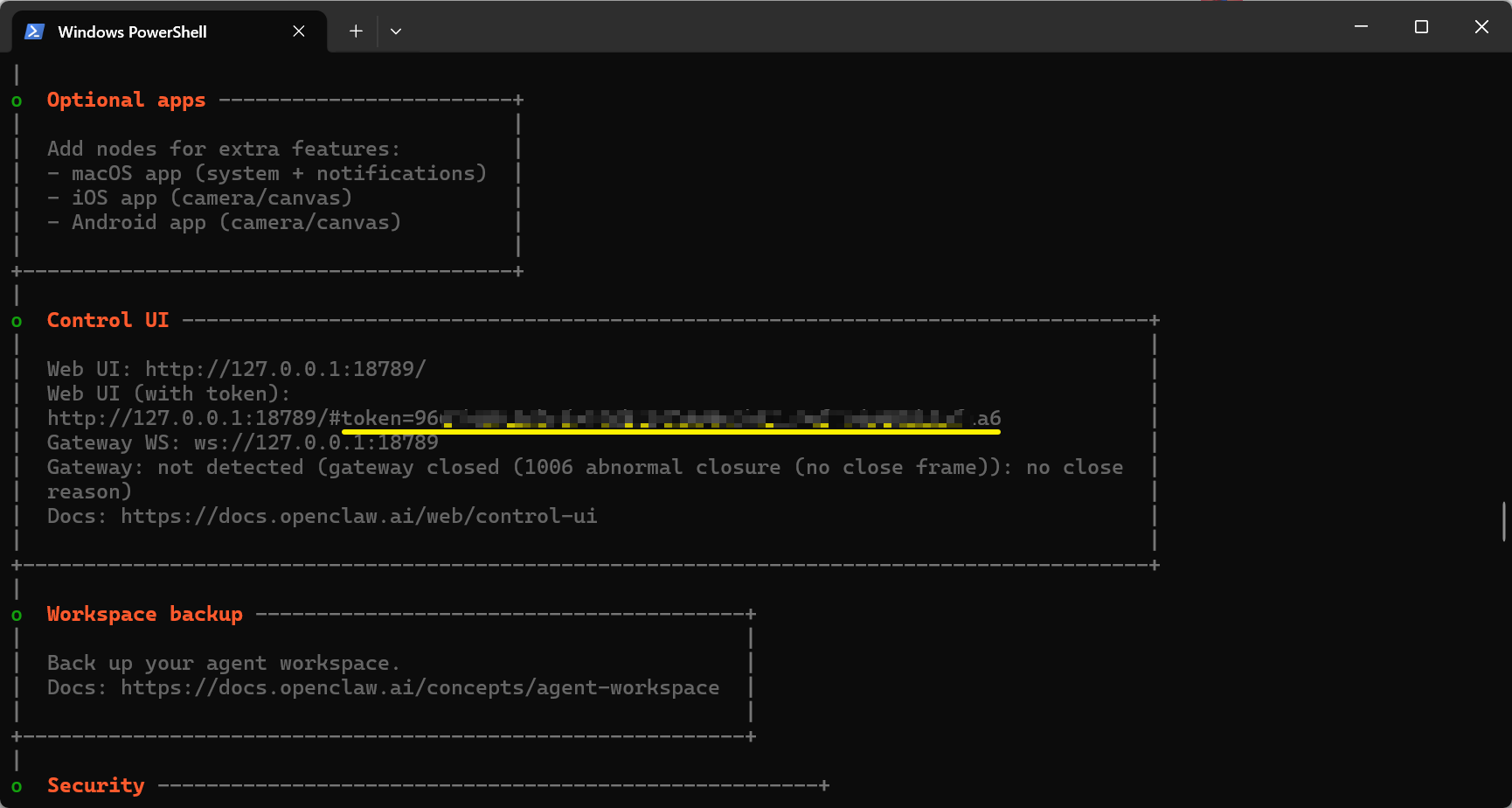
- 第四步:粘贴到
概览->网关令牌,并点击连接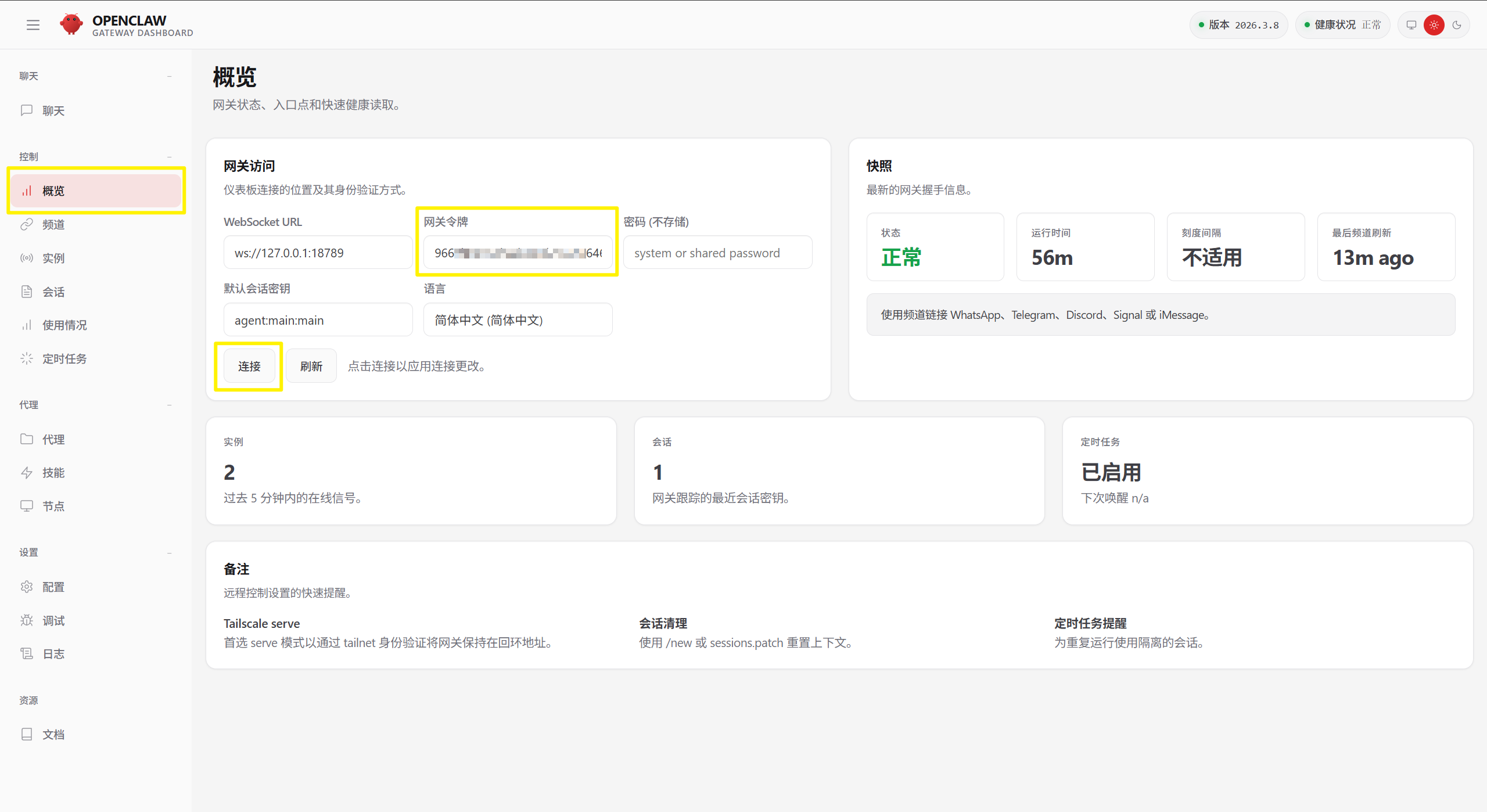
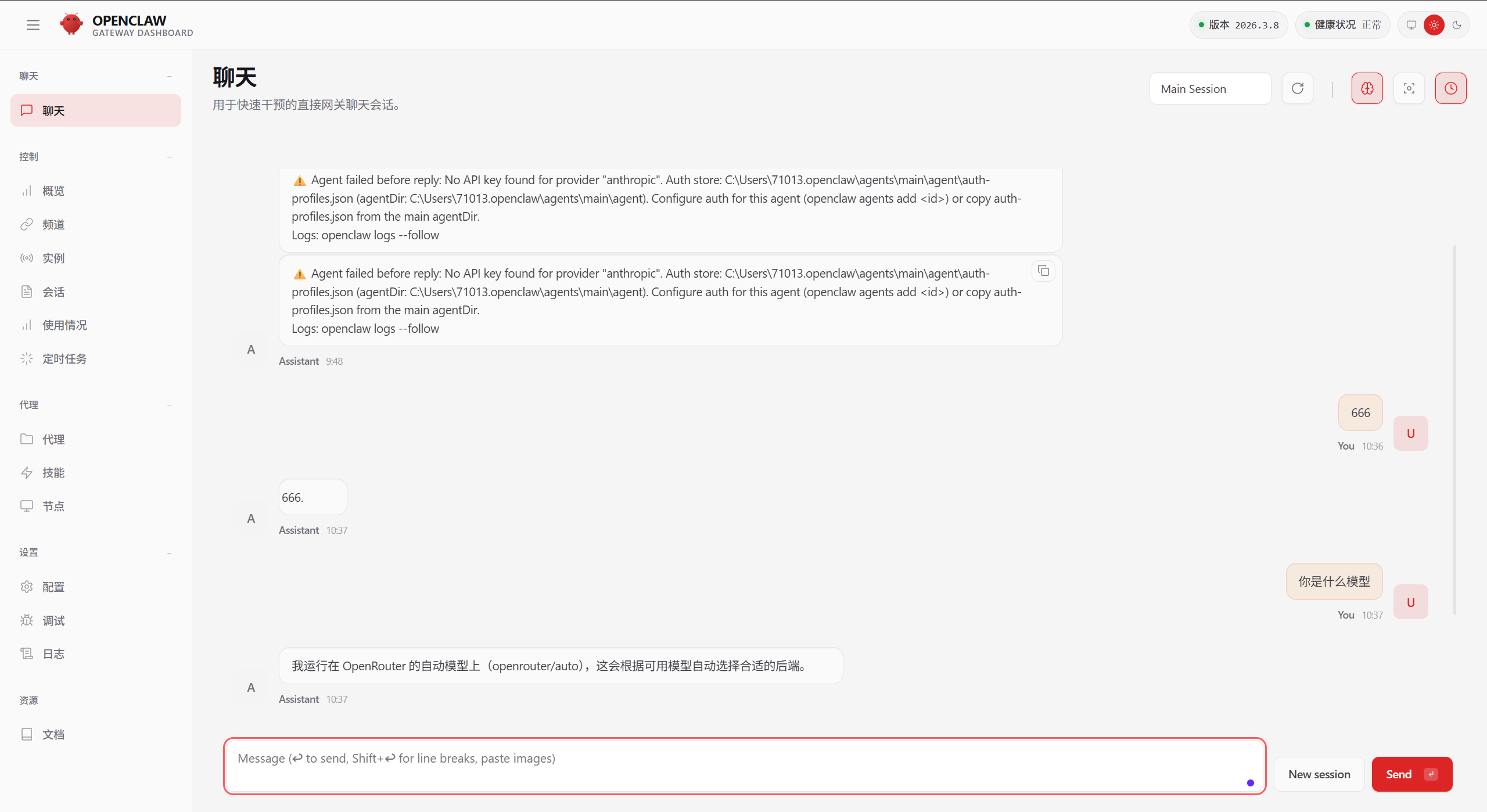
**问题二:**回复消息聊天报错:⚠️ Agent failed before reply: No API key found for provider “anthropic”. Auth store: C:\Users\71013.openclaw\agents\main\agent\auth-profiles.json (agentDir: C:\Users\71013.openclaw\agents\main\agent). Configure auth for this agent (openclaw agents add ) or copy auth-profiles.json from the main agentDir.
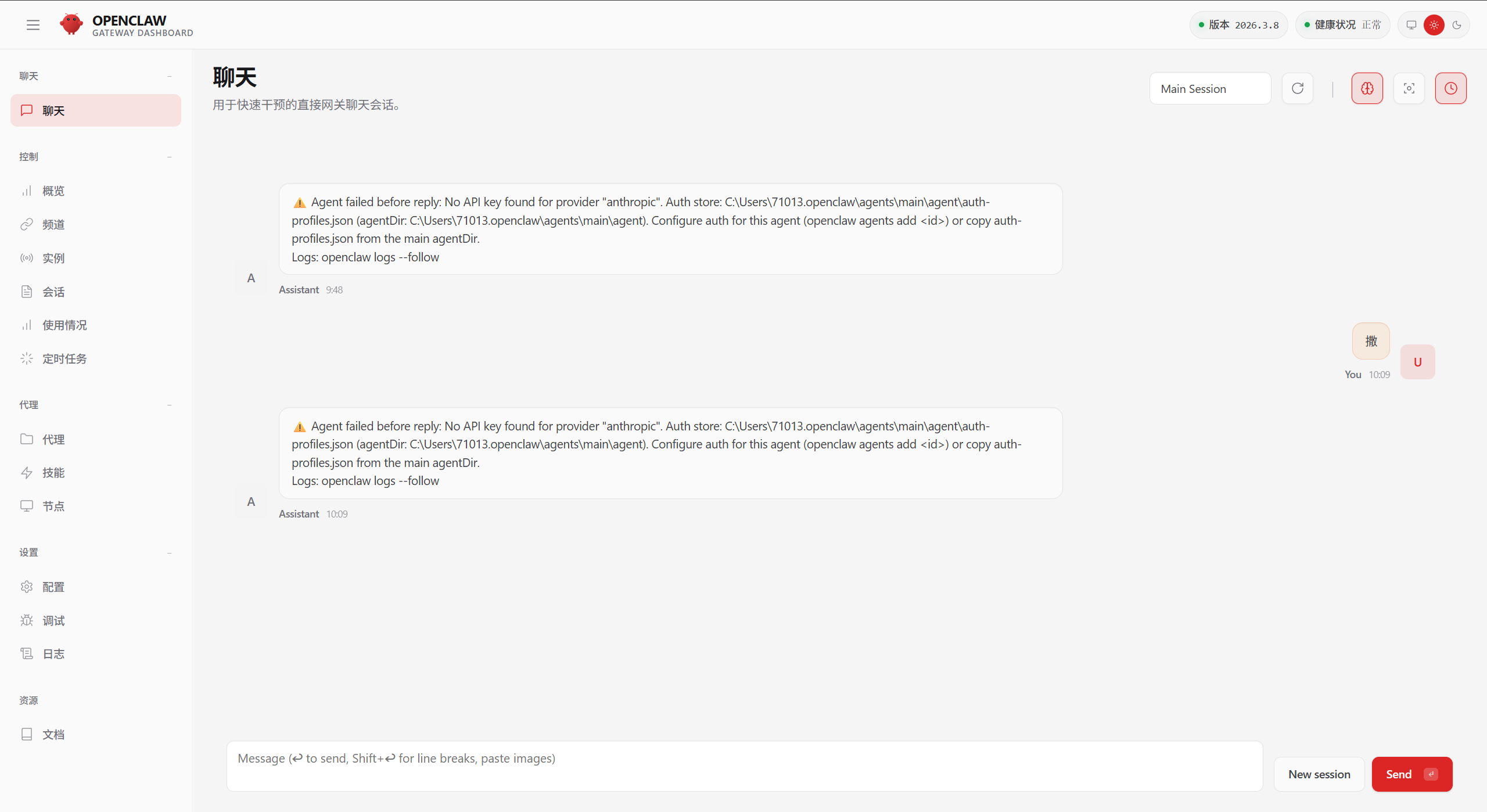
**原因分析:**安装时,你选择的模型,与现在使用的模型不一致。或未配置模型。
解决办法:
- **第一步:**以管理员权限运行PowerShell,输入如下命令,重新配置模型,并切换为你的模型
openclaw config set agent.model "openrouter/stepfun/step-3.5-flash:free"
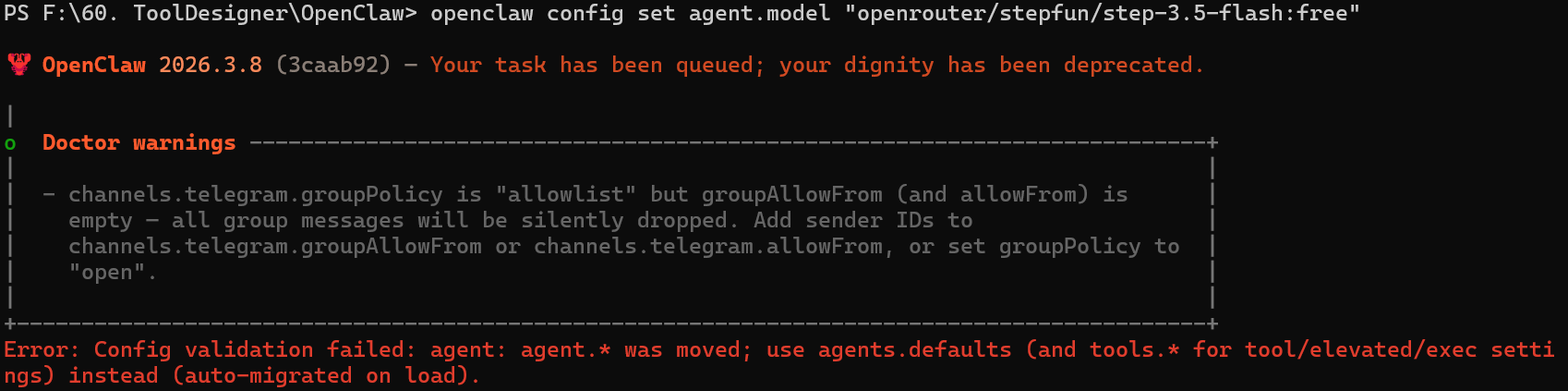
- **第二步:**运行如下命令, 为 agent 设置 OpenRouter API Key
openclaw agents add main
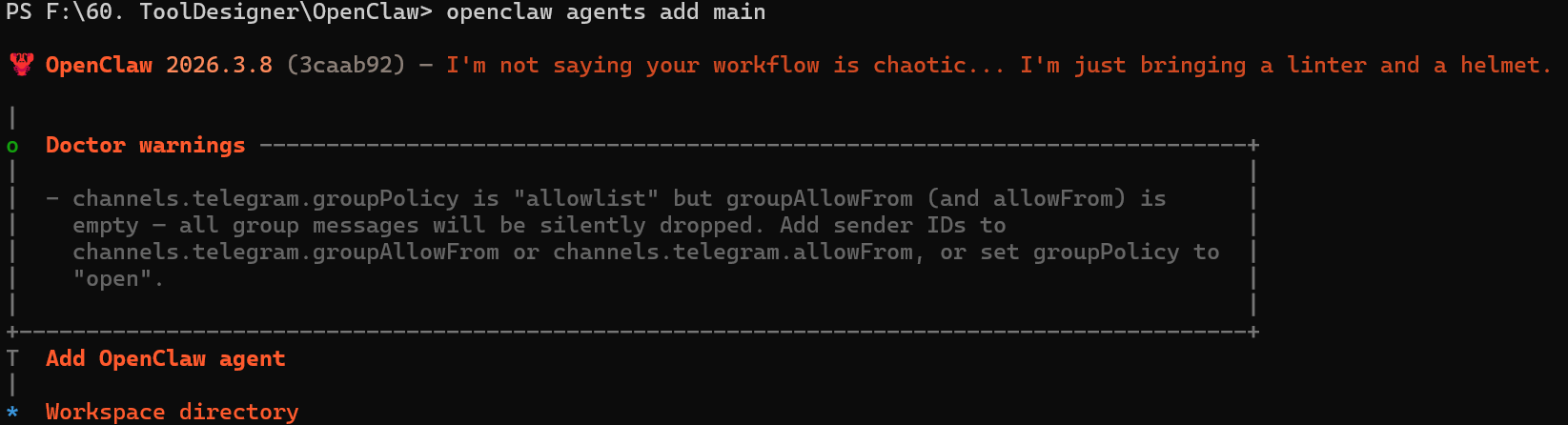
然后按照提示输入:
PS F:\60. ToolDesigner\OpenClaw>

🦞 OpenClaw 2026.3.8 (3caab92) — I'm not saying your workflow is chaotic... I'm just bringing a linter and a helmet.

|
o  Doctor warnings ------------------------------------------------------+
|                                                                                            |
|  - channels.telegram.groupPolicy is "allowlist" but groupAllowFrom (and allowFrom) is      |
|    empty — all group messages will be silently dropped. Add sender IDs to                  |
|    channels.telegram.groupAllowFrom or channels.telegram.allowFrom, or set groupPolicy to  |
|    "open".                                                                                 |
|                                                                                            |
+------------------------------------------------------------------------+
T  Add OpenClaw agent
|
o  Workspace directory
|  C:\Users\71013\.openclaw\workspace
|
o  Configure model/auth for this agent now?
|  Yes                                     [选择:Yes]
|
o  Model/auth provider
|  OpenRouter                              [选择:你的大模型,这里我选择的是OpenRouter]
|
o  How do you want to provide this API key?
|  Paste API key now                       [选择:输入你的密钥]
|
o  Enter OpenRouter API key
|  sk-or-v1-d52cde838xxxxxxxx              [选择:按照提示输入你的密钥]
|
o  Model configured ---------------------------------------+
|                                                          |
|  Default model set to openrouter/auto for agent "main".  |
|                                                          |
+----------------------------------------------------------+
|
o  Channel status ----------------------------+
|                                             |
|  Telegram: configured                       |
|  WhatsApp (default): not linked             |
|  Discord: needs token                       |
|  Slack: needs tokens                        |
|  Signal: needs setup                        |
|  signal-cli: missing (signal-cli)           |
|  iMessage: needs setup                      |
|  imsg: missing (imsg)                       |
|  IRC: not configured                        |
|  Google Chat: not configured                |
|  LINE: not configured                       |
|  Feishu: install plugin to enable           |
|  Google Chat: install plugin to enable      |
|  Nostr: install plugin to enable            |
|  Microsoft Teams: install plugin to enable  |
|  Mattermost: install plugin to enable       |
|  Nextcloud Talk: install plugin to enable   |
|  Matrix: install plugin to enable           |
|  BlueBubbles: install plugin to enable      |
|  LINE: install plugin to enable             |
|  Zalo: install plugin to enable             |
|  Zalo Personal: install plugin to enable    |
|  Synology Chat: install plugin to enable    |
|  Tlon: install plugin to enable             |
|                                             |
+---------------------------------------------+
|
o  Configure chat channels now?
|  Yes                                           [选择:Yes]
|
o  How channels work ---------------------------------------------------------+
|                                                                                           |
|  DM security: default is pairing; unknown DMs get a pairing code.                         |
|  Approve with: openclaw pairing approve <channel> <code>                                  |
|  Public DMs require dmPolicy="open" + allowFrom=["*"].                                    |
|  Multi-user DMs: run: openclaw config set session.dmScope "per-channel-peer" (or          |
|  "per-account-channel-peer" for multi-account channels) to isolate sessions.              |
|  Docs: channels/pairing              |
|                                                                                           |
|  Telegram: simplest way to get started — register a bot with @BotFather and get going.    |
|  WhatsApp: works with your own number; recommend a separate phone + eSIM.                 |
|  Discord: very well supported right now.                                                  |
|  IRC: classic IRC networks with DM/channel routing and pairing controls.                  |
|  Google Chat: Google Workspace Chat app with HTTP webhook.                                |
|  Slack: supported (Socket Mode).                                                          |
|  Signal: signal-cli linked device; more setup (David Reagans: "Hop on Discord.").         |
|  iMessage: this is still a work in progress.                                              |
|  LINE: LINE Messaging API webhook bot.                                                    |
|  Feishu: 飞书/Lark enterprise messaging with doc/wiki/drive tools.                        |
|  Nostr: Decentralized protocol; encrypted DMs via NIP-04.                                 |
|  Microsoft Teams: Bot Framework; enterprise support.                                      |
|  Mattermost: self-hosted Slack-style chat; install the plugin to enable.                  |
|  Nextcloud Talk: Self-hosted chat via Nextcloud Talk webhook bots.                        |
|  Matrix: open protocol; install the plugin to enable.                                     |
|  BlueBubbles: iMessage via the BlueBubbles mac app + REST API.                            |
|  Zalo: Vietnam-focused messaging platform with Bot API.                                   |
|  Zalo Personal: Zalo personal account via QR code login.                                  |
|  Synology Chat: Connect your Synology NAS Chat to OpenClaw with full agent capabilities.  |
|  Tlon: decentralized messaging on Urbit; install the plugin to enable.                    |
|                                                                                           |
+---------------------------------------------------------------------+
|
o  Select a channel
|  Finished
Config overwrite: C:\Users\71013\.openclaw\openclaw.json (sha256 b88e9a4bff0d9dd67f2b206eefb6dd759ef94a378fc3e0e79ada776a5cf38218 -> 2f5d9cb91d6d1df47c7b970f42514a25cc2f0c7a991f98aadc422eac48ba819b, backup=C:\Users\71013\.openclaw\openclaw.json.bak)
Updated ~\.openclaw\openclaw.json
Workspace OK: ~\.openclaw\workspace
Sessions OK: ~\.openclaw\agents\main\sessions
|
—  Agent "main" ready.
- **第三步:**刷新OpenClaw页面,在页面中输入,可正常聊天

小龙虾开发者社区是 CSDN 旗下专注 OpenClaw 生态的官方阵地,聚焦技能开发、插件实践与部署教程,为开发者提供可直接落地的方案、工具与交流平台,助力高效构建与落地 AI 应用
更多推荐

 10
10 0
0- 0


 已为社区贡献1条内容

所有评论(0)