Unable to Update Github desktop for Linux (Error: 429 Too Many Requests)
Answer a question
When I am trying to update Github Desktop through my update manager it giving an error
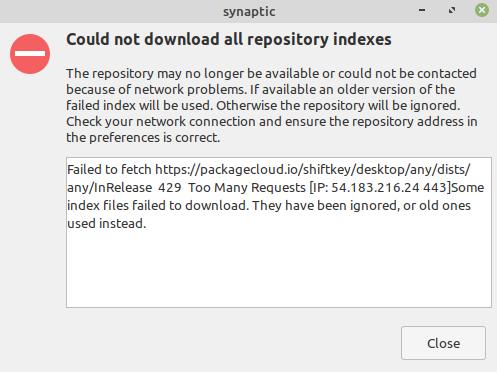
Failed to fetch https://packagecloud.io/shiftkey/desktop/any/dists/any/InRelease

429 Too Many Requests [IP: 54.183.216.24 443]Some index files failed to download.

They have been ignored, or old ones used instead.
How to fix it?
Thanks
Answers
Ok, the problem is Github desktop's hosting exceeded its monthly bandwidth allocation. That's why we are getting 429 Too Many Requests error.
You can check it from https://packagecloud.io/shiftkey/desktop/any/dists/any/InRelease
How to resolve :
A. Remove packagecloud-shiftky-desktop.list from sources.list.d
- Goto
/etc/apt/sources.list.ddirectory - Right-click inside the directory and choose
Open as Rootoption - Enter your login credential to Authenticate
- Select
packagecloud-shiftky-desktop.listfile and delete it - Now check the update again.
OR
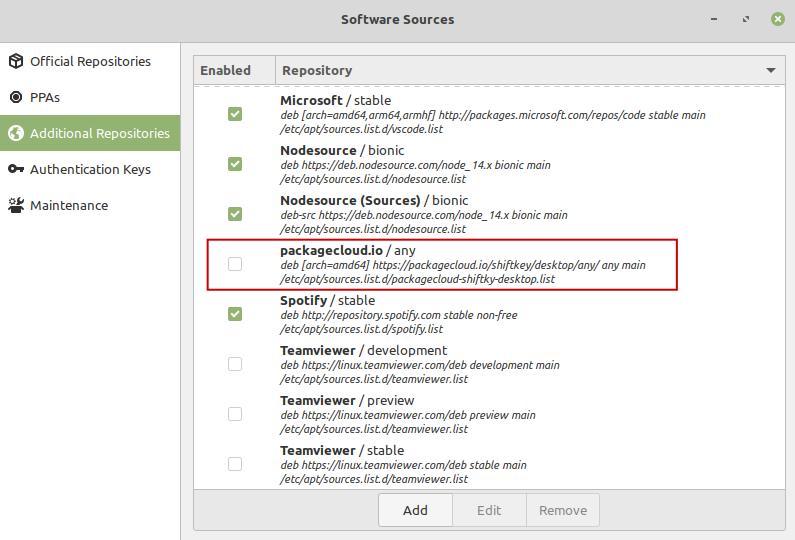
B. Through the Update Manager
- Open your Update Manager and find the
Additional Repositoriesoption
( Note : different Linux distributions has different settings, in Linux Mint, Update Manager -> Edit -> Software Sources -> Additional Repositories)
- Uncheck
packagecloud.io/anyoption -> Ok
Update
As long as, automatic update not available, the best way to check for the update is, download the latest release from its Github release page https://github.com/shiftkey/desktop/releases

Ubuntu 社区为您提供最前沿的新闻资讯和知识内容
更多推荐
 0
0 0
0- 0


 已为社区贡献9638条内容

所有评论(0)