Selenium - Finding xpath by text (td / tr)
Answer a question
I have a large HTML table of emails, i'm trying to find the name of a specific email and then select a button within this element. I can easily find the table body via XPATH with:
//*[@id="reportList"]/tbody
Then within this table there are multiple rows (tr), is it possible to search for text within all table rows?
The closest i've gotten is:
driver.find_element(By.XPATH, '//*[@id="reportList"]/tbody[contains(text(), "example text")]')
Unfortunately this can't locate the element.
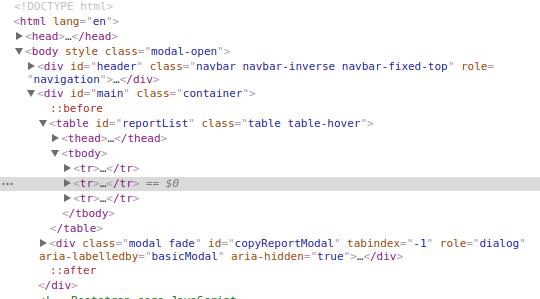
I am aware I can simply copy the XPATH for the specific tr to locate, however for automation purposes i'm trying to pass a string and then search all tr's for my specific text.
Answers
As I know table has tr and td, and probably you need td. So the xPath could be like this:
driver.find_element(By.XPATH, "//*[@id='reportList']/tbody//td[contains(text(), 'example text')]")
where ...tbody//td... means that it will search in all subnodes td of tbody. So td should not be a direct child of tbody
PS I would also add wait method to make sure that element is present:
# will wait up to 10 seconds until element will be present on the page
element = WebDriverWait(driver, 10).until(
        EC.presence_of_element_located((By.XPATH, "//*[@id='reportList']/tbody//td[contains(text(), 'example text')]"))
    )
Note: you have to do some imports:
from selenium.webdriver.support.ui import WebDriverWait
from selenium.webdriver.support import expected_conditions as EC

Python社区为您提供最前沿的新闻资讯和知识内容
更多推荐

 0
0 0
0- 0


 已为社区贡献126445条内容

所有评论(0)