Using Selenium and ChromeDriver, automatically scale the size of the page on print
Answer a question
I'm writing a script to automatically print a set of web pages in Chrome. If I were to print them manually, I'd choose "Custom" from the Scale drop down and enter 50 into the input field below.
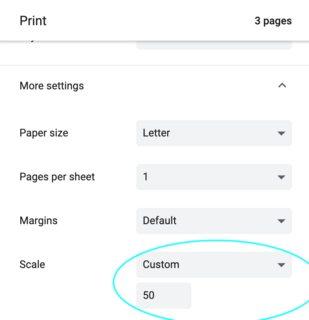
I can't figure out what arguments to pass in to replicate this setting when I automatically print these pages in bulk using Selnium with ChromeDriver.
appState = { "recentDestinations": [{
                "id": "Save as PDF",
                "origin": "local",
                "account": "",
                "printing.scaling": 'Custom', # <== Does it go here?
             }],
             "selectedDestinationId": "Save as PDF",
             "version": 2,
             "printing.scaling": 'Custom',  # <== Or here?
           }
profile = { 'printing.print_preview_sticky_settings.appState': json.dumps(appState),
            'printing.print_header_footer': False,

            # So many different versions of things I have tried :-(
            'printing.scaling': 'Custom',
            'printing.scaling_type': 'Custom',
            'print_preview.scaling': 'Custom',
            'print_preview.scaling_type': 'Custom',
            'printing.custom_scaling': True,
            'printing.fit_to_page_scaling': 50,
            'printing.page_scaling': True,
          }
chrome_options = webdriver.ChromeOptions()
chrome_options.add_experimental_option('prefs', profile)
br = webdriver.Chrome(options=chrome_options)
All of the different options shown above were guesses after reading through a lot of the Chromium source trying to get a hint.
https://src.chromium.org/viewvc/chrome/trunk/src/chrome/common/pref_names.cc?view=markup https://chromium.googlesource.com/chromium/src/+/master/printing/print_job_constants.cc https://chromium.googlesource.com/chromium/src/+/master/printing/print_job_constants.h
I'm out of leads... anyone have any ideas? Thank you!
Answers
After much searching and trial-and-error, I've finally found the solution! The setting lives in the appState dictionary, and is called "scalingType" but it's an enumeration, which annoyingly only seems to accept a number, which are defined here (Github mirror) or here (googlesource). 3 gives you custom scaling, which you can then define in the "scaling" setting (which is a string!). So my setup now looks like:
chrome_options = webdriver.ChromeOptions()
appState = {"recentDestinations": [{"id": "Save as PDF", "origin": "local", "account": ""}],
            "selectedDestinationId": "Save as PDF",
            "version": 2,
            "isHeaderFooterEnabled": False,
            "isLandscapeEnabled": True,
            "scalingType": 3,
            "scaling": "141"}
prefs = {'printing.print_preview_sticky_settings.appState': json.dumps(appState),
         'savefile.default_directory': BASE_DIR}
chrome_options.add_experimental_option('prefs', prefs)
chrome_options.add_argument('kiosk-printing')

driver = webdriver.Chrome(f'{BASE_DIR}\\chromedriver.exe', options=chrome_options)
Current options for scaling type are:
- 0: default
- 1: fit to page
- 2: fit to paper
- 3: custom
but I haven't had any success with either of the 'fit to' options.
More generally, most of these settings/options can be determined by looking through this file of the chromium source and/or it's containing folder.

Python社区为您提供最前沿的新闻资讯和知识内容
更多推荐

 0
0 0
0- 0


 已为社区贡献126445条内容

所有评论(0)