recaptcha wasn't solving by anticaptcha plugin in selenium python
Answer a question
I've recently started using selenium for a project I've been working on for a while that involves automation. One of the roadblocks in the plan was the ReCaptcha system, so I decided to use anti-captcha as the service that would solve the captchas when my bot encountered it. I properly installed the plugin and found some test code with selenium on their site.
from python_anticaptcha import AnticaptchaClient, NoCaptchaTaskProxylessTask

def captcha_solver():
    api_key = 'xxxxxxxxxxxxxxxxxxxxxxx'
    site_key = '6LdZPw8aAAAAAA_1XrIfloCojPwo4TdJ_A_7ioRy'  # grab from site
    url = 'https://www.rp.gob.pa/'

    client = AnticaptchaClient(api_key)
    task = NoCaptchaTaskProxylessTask(url, site_key)
    job = client.createTask(task)
    job.join()
    return job.get_solution_response()

captcha = captcha_solver()
driver.execute_script('document.getElementById("g-recaptcha-response").innerHTML = "{}";'.format(captcha))
time.sleep(1)
wait.until(EC.element_to_be_clickable((By.XPATH,'//button[@type="submit"]'))).click()
the anticaptcha says the recaptcha is solved, the solved code comes like this
03AGdBq24C2SwOzrdAoGpltxX-8vMuBEjwSmHVIRkVcthtqHEsmm7sEyac1vUgTZQHs7bUtK0YwW6NiduvAmXQt6xVxGRSvO1XhsiRPTfa8spSxRG6scwInLccriAV408I4plNzEykQVQya9v2u4PMyCyrVQ6NADI_A_56DuQvuzhLKuiNL-eN4MvtwEt1ueDefa3nwHUZoW-hgMiEcg1jQ4UhZJ0Ncz1favKF8aMB--Ru1-ewClN41MjyVwREHn1xuCNtnMt5rxaFLt0f5SehaFkdccem1rbCTqsb7lOomTEWpX0TiWKl2kOP9efgOJDlwV84ISncydrQseda7pTlf6nL0m_oUY8U-tnWFQi2i8g_ZWwOgrXb6o9lBapoy0-z0SWZARHKecBbfwHa906mG_b2jh9-IPOI-6rduxTnDw4HDlizXGKOU7Z8Cb8pQAhiaYEejiaBU0X2Dc44dq7CL4Q_365277zoKG4YDwgRXjUstT39e-3C_-lpjdNHMkkz9RJTNe0kOie2i3U-BruAh3trh-vM8F7JU4f8m52F335q3GdUb8FQXL7Fd9hLJpb9KfDMV0pfmRuxl5NoECKRbP2gtTTXUJ0ZwQ
I execute this solved code to g-recaptcha-response textarea and says the selenium to click the button, but the result is this 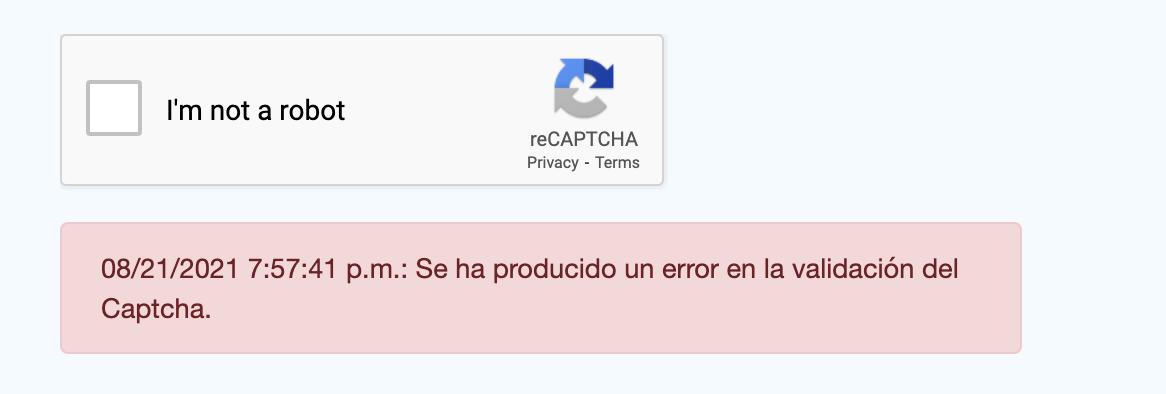
I cannot solve the recaptcha using anticaptcha, I don't whether my code has a problem, but I followed the official documentation to use the recaptcha. Guys please help me to solve this issue.
Answers
I've finally managed to resolve this myself. In case anyone else is struggling with a similar issue, here was my solution:
- Open the console and execute the following
cmd: ___grecaptcha_cfg.clients - Find the path which has the callback function, in my case it's ___grecaptcha_cfg.clients[0].R.R
- Use the following code:
driver.execute_script(f"___grecaptcha_cfg.clients[0].R.R.callback('{new_token}')")(Remember to change the path accordingly)
Can get the path using the google console 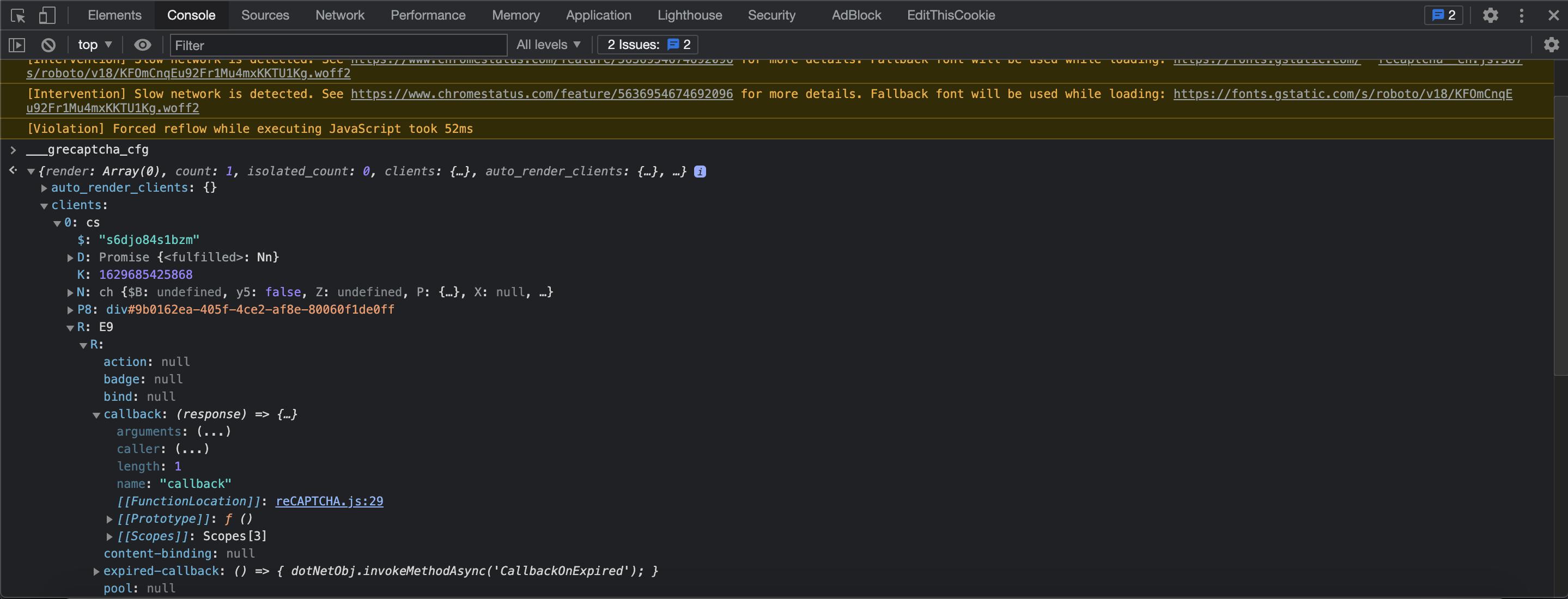
Right click the callback -> copy property path and paste in driver.execute_script and add this on start ___grecaptcha_cfg. and pass the solved token value
This Article will help you to find the ___grecaptcha_cfg.clients of your recaptcha site
driver.execute_script('document.getElementById("g-recaptcha-response").innerHTML = "{}";'.format(g_response))
time.sleep(1)
driver.execute_script(f"___grecaptcha_cfg.clients[0].R.R.callback('{g_response}')")

Python社区为您提供最前沿的新闻资讯和知识内容
更多推荐

 0
0 0
0- 0


 已为社区贡献126445条内容

所有评论(0)