在 matplotlib 中以 3d 形式绘制 imshow() 图像
·
问题:在 matplotlib 中以 3d 形式绘制 imshow() 图像
如何在 3d 轴上绘制imshow()图像?我正在尝试使用此帖子。在那篇文章中,表面图看起来与imshow()图相同,但实际上并非如此。为了演示,这里我采用了不同的数据:
import matplotlib.pyplot as plt
from mpl_toolkits.mplot3d import Axes3D
import numpy as np

# create a 21 x 21 vertex mesh
xx, yy = np.meshgrid(np.linspace(0,1,21), np.linspace(0,1,21))

# create vertices for a rotated mesh (3D rotation matrix)
X =  xx
Y =  yy
Z =  10*np.ones(X.shape)

# create some dummy data (20 x 20) for the image
data = np.cos(xx) * np.cos(xx) + np.sin(yy) * np.sin(yy)

# create the figure
fig = plt.figure()

# show the reference image
ax1 = fig.add_subplot(121)
ax1.imshow(data, cmap=plt.cm.BrBG, interpolation='nearest', origin='lower', extent=[0,1,0,1])

# show the 3D rotated projection
ax2 = fig.add_subplot(122, projection='3d')
ax2.plot_surface(X, Y, Z, rstride=1, cstride=1, facecolors=plt.cm.BrBG(data), shade=False)
这是我的情节:

解答
我认为您在 3D 与 2D 表面颜色方面的错误是由于表面颜色中的数据标准化造成的。如果您使用facecolors=plt.cm.BrBG(data/data.max())对传递给plot_surfacefacecolor 的数据进行标准化,结果会更接近您的预期。
如果你只是想要一个垂直于坐标轴的切片,而不是使用imshow,你可以使用contourf,从 matplotlib 1.1.0 开始,它在 3D 中受支持,
import matplotlib.pyplot as plt
from mpl_toolkits.mplot3d import Axes3D
import numpy as np
from matplotlib import cm

# create a 21 x 21 vertex mesh
xx, yy = np.meshgrid(np.linspace(0,1,21), np.linspace(0,1,21))

# create vertices for a rotated mesh (3D rotation matrix)
X =  xx
Y =  yy
Z =  10*np.ones(X.shape)

# create some dummy data (20 x 20) for the image
data = np.cos(xx) * np.cos(xx) + np.sin(yy) * np.sin(yy)

# create the figure
fig = plt.figure()

# show the reference image
ax1 = fig.add_subplot(121)
ax1.imshow(data, cmap=plt.cm.BrBG, interpolation='nearest', origin='lower', extent=[0,1,0,1])

# show the 3D rotated projection
ax2 = fig.add_subplot(122, projection='3d')
cset = ax2.contourf(X, Y, data, 100, zdir='z', offset=0.5, cmap=cm.BrBG)

ax2.set_zlim((0.,1.))

plt.colorbar(cset)
plt.show()
此代码生成此图像:
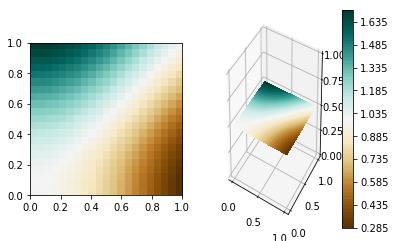
虽然这不适用于 3D 中任意位置的切片,其中 imshow解决方案更好。

Python社区为您提供最前沿的新闻资讯和知识内容
更多推荐

 0
0 0
0- 0


 已为社区贡献126440条内容

所有评论(0)