I have a simple API function as below,
from fastapi import FastAPI

app = FastAPI()


@app.get("/")
async def read_root():
    return {"Hello": "World"}
I am starting the server using uvicorn command as,
uvicorn main:app
Since we are not calling any python file directly, it is not possible to call uvicorn command from Pycharm.
So, How can I run the fast-api server using Pycharm?
Method-1: Run FastAPI by calling uvicorn.run(...)
In this case, your minimal code will be as follows,
# main.py

import uvicorn
from fastapi import FastAPI

app = FastAPI()


@app.get("/")
async def read_root():
    return {"Hello": "World"}


if __name__ == "__main__":
    uvicorn.run(app, host="0.0.0.0", port=8000)
Normally, you'll start the server by running the following command,
python main.py
Pycharm Setup
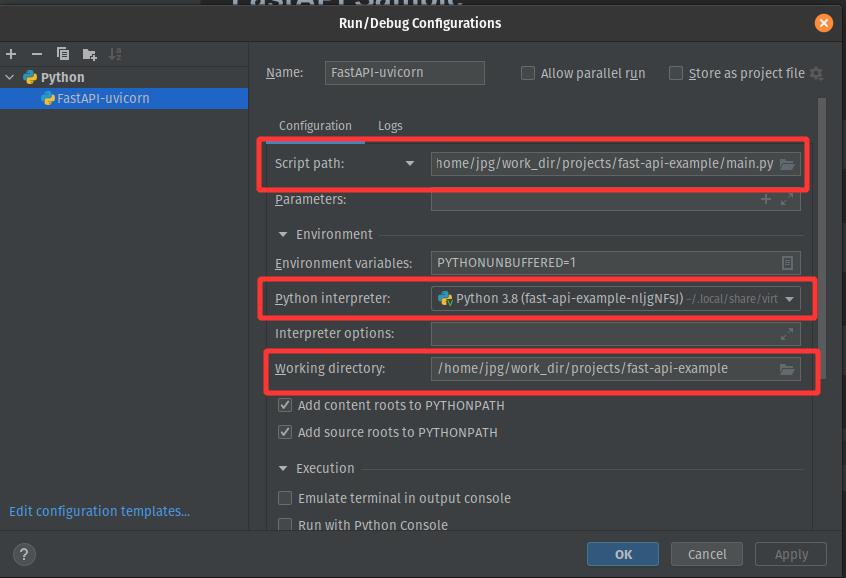
For this setup, and now, you can set the script path in Pycharm's config
Notes
- Script Path: path to the FastAPI script
- Python Interpreter: Choose your interpreter/virtual environment
- Working Directory: Your FastAPI project root
Method-2: Run FastAPI by calling uvicorn command
In this case, your minimal code will be as follows,
# main.py

from fastapi import FastAPI

app = FastAPI()


@app.get("/")
async def read_root():
    return {"Hello": "World"}
Normally, you'll start the server by running the following command,
uvicorn main:app --reload
Pycharm Setup
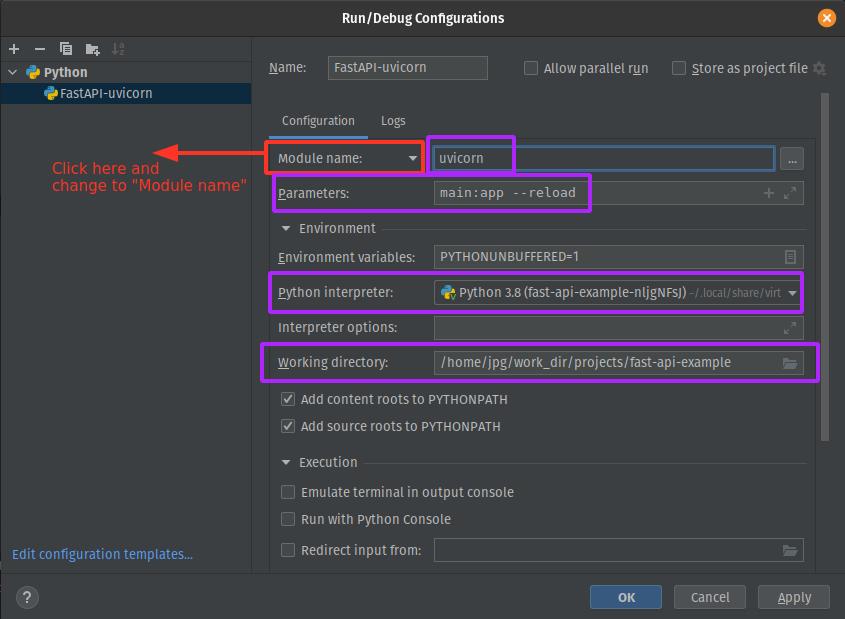
For this setup, and now, you can set the script path in Pycharm's config
Notes
- Module name: set to
uvicorn
- [Optional] Script: Path to
uvicorn binary. You will get the path by executing the command, which uvicorn , inside your environment. (See this image)
- Parameters: The actual parameters of
uvicorn command
- Python Interpreter: Choose your interpreter/virtual environment
- Working Directory: Your FastAPI project root





 已为社区贡献126445条内容

所有评论(0)