
What is AnimeGANV2?
AnimeGANv2, the improved version of AnimeGAN.
AnimeGAN is a lightweight GAN for a photo animation.
In brief, people can generate a photo that looks like an animation's scene from an image.
You can try AnimeGAN easily with this.
https://animegan.js.org/
Detail
https://tachibanayoshino.github.io/AnimeGANv2/
repos
Original repo
 TachibanaYoshino / AnimeGANv2
[Open Source]. The improved version of AnimeGAN. Landscape photos/videos to anime
AnimeGANv2
「Open Source」. The improved version of AnimeGAN.
「Project Page」 | Landscape photos/videos to anime
News
- (2021.12.25) AnimeGANv3 has been released.
🎄 - (2020.12.25) AnimeGANv3 will be released along with its paper in the spring of 2021.
- (2021.02.21) The pytorch version of AnimeGANv2 has been released, Be grateful to @bryandlee for his contribution.
Focus:
| Anime style | Film | Picture Number | Quality | Download Style Dataset |
|---|---|---|---|---|
| Miyazaki Hayao | The Wind Rises | 1752 | 1080p | Link |
| Makoto Shinkai | Your Name & Weathering with you | 1445 | BD | |
| Kon Satoshi | Paprika | 1284 | BDRip |
News:
The improvement directions of AnimeGANv2 mainly include the following 4 points:
-
1. Solve the problem of high-frequency artifacts in the generated image.
-
2. It is easy to train and directly achieve the effects in the paper.
-
3. Further reduce the number of parameters of the generator network. (generator size: 8.17 Mb), The lite version has a smaller generator model.
-
…
PyTorch Implementation
bryandlee / animegan2-pytorch
PyTorch implementation of AnimeGANv2
PyTorch Implementation of AnimeGANv2
Updates
-
2021-10-17Add weights for FacePortraitV2.
-
2021-11-07Thanks to ak92501, a web demo is integrated to Huggingface Spaces with Gradio. -
2021-11-07Thanks to xhlulu, thetorch.hubmodel is now available. See Torch Hub Usage.


Basic Usage
Inference
python test.py --input_dir [image_folder_path] --device [cpu/cuda]
Torch Hub Usage
You can load the model via torch.hub:
import torch
model = torch.hub.load("bryandlee/animegan2-pytorch", "generator").eval()
out = model(img_tensor)  # BCHW tensor
Currently, the following pretrained shorthands are available:
model = torch.hub.load("bryandlee/animegan2-pytorch:main", "generator", pretrained="celeba_distill")
model = torch.hub.load("bryandlee/animegan2-pytorch:main", "generator", pretrained="face_paint_512_v1")
model = torch.hub.load("bryandlee/animegan2-pytorch:main", "generator", pretrained="face_paint_512_v2")
model = torch.hub.load
…
steps
- Create a new note on Google Colab
- Upload an input image
- Run the following code
from PIL import Image
import torch
import IPython
from IPython.display import display

# https://github.com/bryandlee/animegan2-pytorch
# load models
model_celeba = torch.hub.load("bryandlee/animegan2-pytorch:main", "generator", pretrained="celeba_distill")
model_facev1 = torch.hub.load("bryandlee/animegan2-pytorch:main", "generator", pretrained="face_paint_512_v1")
model_facev2 = torch.hub.load("bryandlee/animegan2-pytorch:main", "generator", pretrained="face_paint_512_v2")
model_paprika = torch.hub.load("bryandlee/animegan2-pytorch:main", "generator", pretrained="paprika")

face2paint = torch.hub.load("bryandlee/animegan2-pytorch:main", "face2paint", size=512)

INPUT_IMG = "sg.jpg" # input_image jpg/png
img = Image.open(INPUT_IMG).convert("RGB")

out_celeba = face2paint(model_celeba, img)
out_facev1 = face2paint(model_facev1, img)
out_facev2 = face2paint(model_facev2, img)
out_paprika = face2paint(model_paprika, img)

# save images
out_celeba.save("out_celeba.jpg")
out_facev1.save("out_facev1.jpg")
out_facev2.save("out_facev2.jpg")
out_paprika.save("out_paprika.jpg")

# display images
display(img)
display(out_celeba)
display(out_facev1)
display(out_facev2)
display(out_paprika)
[original]
[celeba_distill]
[face_paint_512_v1]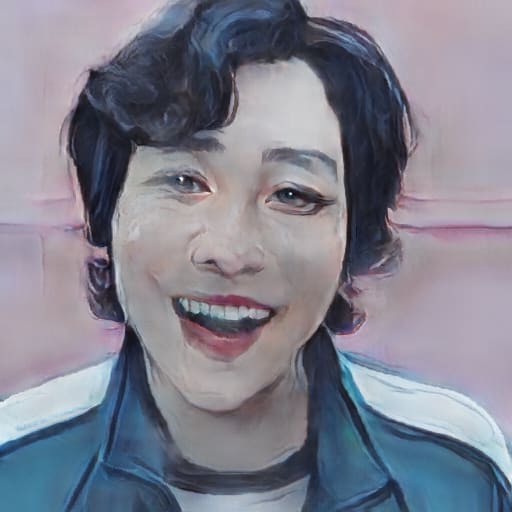
[face_paint_512_v2]
[paprika]



 已为社区贡献126440条内容

所有评论(0)