
使用 Terraform 为 Apache Airflow (MWAA) 环境配置和部署托管工作流
Terraform 是由 HashiCorp 创建的开源基础设施即代码软件工具。尽管我对它非常熟悉,并且在我的博客中介绍了一些非常酷的模块和内容,但我之前从未真正使用过 Terraform。当我听说AWS-IA 团队为 Terraform](https://registry.terraform.io/modules/aws-ia/mwaa/aws/0.0.1)组装了[个新的 Apache Airflow 托管工作流 (MWAA) 模块时,我知道是时候试一试了。上周我花了一些时间来解决这个问题,对其进行测试并对文档进行一些调整。我想我会利用这段时间做一些笔记,然后整理这篇博文。
如果您想了解如何使用 Terraform 自动配置和部署 MWAA 环境,请继续阅读。
[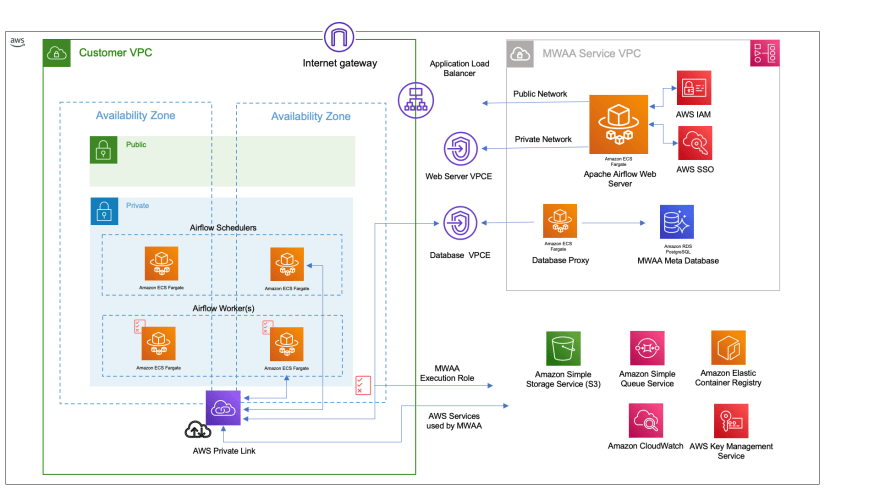 的架构概述](https://res.cloudinary.com/practicaldev/image/fetch/s--iVcWIbHg--/c_limit%2Cf_auto%2Cfl_progressive%2Cq_auto%2Cw_880/https://github. com/94459/blogpost-cdk-mwaa/blob/main/images/mwaa-architecture-iac.png%3Fraw%3Dtrue)
安装 Terraform
首先,需要安装它。
HashiCorp 的文档很棒,我可以通过这个页面](https://aws-oss.beachgeek.co.uk/1uf)安装 Terraform[。
brew tap hashicorp/tap
brew install hashicorp/tap/terraform
进入全屏模式 退出全屏模式
在我的 Mac 上,产生的输出看起来像这样
==> Tapping hashicorp/tap
Cloning into '/usr/local/Homebrew/Library/Taps/hashicorp/homebrew-tap'...
remote: Enumerating objects: 2210, done.
remote: Counting objects: 100% (94/94), done.
remote: Compressing objects: 100% (34/34), done.
remote: Total 2210 (delta 64), reused 69 (delta 60), pack-reused 2116
Receiving objects: 100% (2210/2210), 386.46 KiB | 752.00 KiB/s, done.
Resolving deltas: 100% (1373/1373), done.
Tapped 1 cask and 18 formulae (51 files, 540.4KB).
(base) @094459 ~ brew tap hashicorp/tapbrew install hashicorp/tap/terraform
(base) ✘ @094459 ~ brew install hashicorp/tap/terraform
==> Downloading https://releases.hashicorp.com/terraform/1.2.3/terraform_1.2.3_d
######################################################################## 100.0%
==> Installing terraform from hashicorp/tap
🍺 /usr/local/Cellar/terraform/1.2.3: 3 files, 67.4MB, built in 7 seconds
==> Running `brew cleanup terraform`...
Disable this behaviour by setting HOMEBREW_NO_INSTALL_CLEANUP.
Hide these hints with HOMEBREW_NO_ENV_HINTS (see `man brew`).
terraform -version
Terraform v1.2.3
on darwin_amd64
进入全屏模式 退出全屏模式
由于我倾向于使用 Visual Studio Code,因此我还安装了 HashiCorp 提供的扩展,以在 Code 中处理 Terraform 文件。
创建我们的 MWAA Terraform 配置
MWAA Terraform 模块位于https://github.com/aws-ia/terraform-aws-mwaa/tree/main。将 repo 克隆到本地工作区。
git clone https://github.com/aws-ia/terraform-aws-mwaa/tree/main
进入全屏模式 退出全屏模式
在示例/基本文件夹中,我们有一个简单的 MWAA 堆栈,我们可以使用它来测试一切是否正常。
├── README.md
├── dags
│   └── hello_world_dag.py
├── main.tf
├── mwaa
│   └── requirements.txt
├── outputs.tf
├── providers.tf
└── variables.tf
进入全屏模式 退出全屏模式
README.md 包含有关如何部署您的第一个环境的快速入门。这篇文章将引导您完成这些步骤,但我仍然建议您检查一下。在部署第一个 MWAA 环境之前,您需要了解许多关键文件。
mwaa 和 dags 文件夹
您会注意到我们有一个示例 Apache Airflow DAG (hellow_world_dag.py),我们希望在构建 MWAA 环境时部署它。我们还需要上传一个 requirements.txt 文件(目前为空)。
这个例子向你展示了如何做到这一点,我们稍后会看到。目前,您需要注意的是,这些是您在构建 MWAA 环境时要部署的资源。
变量.tf
此文件包含您可以更改以更改 MWAA 环境的配置选项 - 环境名称、AWS 区域和默认标签。对于这个演示,这些是我正在使用的值。
variable "name" {
  description = "Name of MWAA Environment"
  default     = "terraform-mwaa"
  type        = string
}

variable "region" {
  description = "region"
  type        = string
  default     = "eu-central-1"
}

variable "tags" {
  description = "Default tags"
  default     = {"env": "test", "dept": "AWS Developer Relations"}
  type        = map(string)
}

variable "vpc_cidr" {
  description = "VPC CIDR for MWAA"
  type        = string
  default     = "10.1.0.0/16"
}
进入全屏模式 退出全屏模式
main.tf
main.tf 包含将使用 variables.tf 中包含的值部署资源的主要 Terraform 配置文件。让我们更详细地看一下这个(main.tf)。
在文件的顶部,我们有以下内容,这里的重要值是“bucket_name”,它将配置一个唯一的 S3 存储桶,您的 MWAA 环境将使用该存储桶。这很重要,因为随后上传的示例 DAG、requirements.txt 以及所有 IAM 策略文档都使用此值。
locals {
  azs         = slice(data.aws_availability_zones.available.names, 0, 2)
  bucket_name = format("%s-%s", "aws-ia-mwaa", data.aws_caller_identity.current.account_id)
}
进入全屏模式 退出全屏模式
接下来在文件中,我们有创建和上传示例 DAG 和需求文件的部分
#-----------------------------------------------------------
# Create an S3 bucket and upload sample DAG
#-----------------------------------------------------------
#tfsec:ignore:AWS017 tfsec:ignore:AWS002 tfsec:ignore:AWS077
resource "aws_s3_bucket" "this" {
  bucket = local.bucket_name
  tags   = var.tags
}

resource "aws_s3_bucket_acl" "this" {
  bucket = aws_s3_bucket.this.id
  acl    = "private"
}

resource "aws_s3_bucket_versioning" "this" {
  bucket = aws_s3_bucket.this.id
  versioning_configuration {
    status = "Enabled"
  }
}
resource "aws_s3_bucket_server_side_encryption_configuration" "this" {
  bucket = aws_s3_bucket.this.id

  rule {
    apply_server_side_encryption_by_default {
      sse_algorithm = "AES256"
    }
  }
}

resource "aws_s3_bucket_public_access_block" "this" {
  bucket                  = aws_s3_bucket.this.id
  block_public_acls       = true
  block_public_policy     = true
  ignore_public_acls      = true
  restrict_public_buckets = true
}

# Upload DAGS
resource "aws_s3_object" "object1" {
  for_each = fileset("dags/", "*")
  bucket   = aws_s3_bucket.this.id
  key      = "dags/${each.value}"
  source   = "dags/${each.value}"
  etag     = filemd5("dags/${each.value}")
}

# Upload plugins/requirements.txt
resource "aws_s3_object" "reqs" {
  for_each = fileset("mwaa/", "*")
  bucket   = aws_s3_bucket.this.id
  key      = each.value
  source   = "mwaa/${each.value}"
  etag     = filemd5("mwaa/${each.value}")
}
进入全屏模式 退出全屏模式
在本节中,我们定义了我们要使用的 MWAA 环境的名称、Apache Airflow 的版本(1.12、2.0.2 或 2.2.2),以及 MWAA Worker 节点的大小(mw1.small、mw1.中,或 mw1.large)。然后,我们定义 Apache Airflow 将使用的 dags 文件夹的名称作为“dags 文件夹”来搜索要运行的 DAG。最后,您可以选择设置 plugins.zip 和 requirements.zip 文件和位置,但默认情况下不设置这些。
  name                 = "basic-mwaa"
  airflow_version      = "2.2.2"
  environment_class    = "mw1.medium"
  dag_s3_path          = "dags"
  #plugins_s3_path      = "plugins.zip"
  #requirements_s3_path = "requirements.txt"
进入全屏模式 退出全屏模式
如果您想设置 plugins_s3_path 或 requirements_s3_path,您需要在此处设置这些,然后分别配置/部署 plugins.zip 和 requirements.txt。
下一部分为各种 MWAA 服务配置日志记录。本节允许我们为不同的 MWAA 服务定义日志记录的详细程度。请记住,与此相关的成本,因此在配置这些之前了解这一点。您可以使用的值是 CRITICAL、ERROR、WARNING、INFO 或 DEBUG。
  logging_configuration = {
    dag_processing_logs = {
      enabled   = true
      log_level = "INFO"
    }

    scheduler_logs = {
      enabled   = true
      log_level = "WARNING"
    }

    task_logs = {
      enabled   = true
      log_level = "DEBUG"
    }

    webserver_logs = {
      enabled   = true
      log_level = "INFO"
    }

    worker_logs = {
      enabled   = true
      log_level = "INFO"
    }
  }
进入全屏模式 退出全屏模式
在下一部分中,您可以根据需要定义一些自定义 Apache Airflow 配置参数。您可以查看 MWAA 文档以了解更多信息,但您可能会使用这些文档来调整性能设置或启用 AWS 与 AWS Secrets Manager 等事物的集成。
  airflow_configuration_options = {
    "core.load_default_connections" = "false"
    "core.load_examples" = "false"
    "webserver.dag_default_view" = "tree"
    "webserver.dag_orientation" = "TB"
  }
进入全屏模式 退出全屏模式
为 Apache Airflow 工作程序节点提供扩展设置,然后提供 VPC 网络的详细信息。您可能不需要更改这些(网络)设置。
  min_workers        = 1
  max_workers        = 25
  vpc_id             = module.vpc.vpc_id
  private_subnet_ids = module.vpc.private_subnets

  webserver_access_mode = "PUBLIC_ONLY"
  source_cidr           = ["10.1.0.0/16"]
进入全屏模式 退出全屏模式
最后,这些选项允许您定义和使用您自己的 AWS 安全组、执行角色或 S3 存储桶以在 MWAA 中使用。如果您自己创建,请通过查看 MWAA 文档确保这些满足最低要求。此外,您需要注释掉上面的部分,以便 Terraform 配置正确的资源。
  # create_security_group =
  # source_bucket_arn =
  # execution_role_arn =
进入全屏模式 退出全屏模式
现在我们已经完成了这些配置,我们准备好尝试部署它。在我的 Visual Code IDE 中,我运行以下命令来启动。
terraform init
进入全屏模式 退出全屏模式
生成以下输出
 Initializing modules...
- mwaa in ../..
Downloading registry.terraform.io/terraform-aws-modules/vpc/aws 3.14.2 for vpc...
- vpc in .terraform/modules/vpc

Initializing the backend...

Initializing provider plugins...
- Finding hashicorp/aws versions matching ">= 3.63.0, ~> 4.20.0"...
- Installing hashicorp/aws v4.20.1...
- Installed hashicorp/aws v4.20.1 (signed by HashiCorp)

Terraform has created a lock file .terraform.lock.hcl to record the provider
selections it made above. Include this file in your version control repository
so that Terraform can guarantee to make the same selections by default when
you run "terraform init" in the future.

Terraform has been successfully initialized!

You may now begin working with Terraform. Try running "terraform plan" to see
any changes that are required for your infrastructure. All Terraform commands
should now work.

If you ever set or change modules or backend configuration for Terraform,
rerun this command to reinitialize your working directory. If you forget, other
commands will detect it and remind you to do so if necessary.
进入全屏模式 退出全屏模式
terraform plan
进入全屏模式 退出全屏模式
显示 Terraform 将创建的 AWS 资源。我不会显示所有输出,因为它与您的不同,但您可以查看它,您将看到即将配置和部署的所有不同资源。
您现在已准备好部署 MWAA 环境。
部署 MWAA 环境
要进行部署,您现在可以运行“terraform apply”,并检查输出,在提示是否一切正常时回答“是”。
terraform apply
进入全屏模式 退出全屏模式
然后将开始部署。这就是我的输出:
Do you want to perform these actions?
  Terraform will perform the actions described above.
  Only 'yes' will be accepted to approve.

  Enter a value: yes

module.vpc.aws_vpc.this[0]: Creating...
module.vpc.aws_eip.nat[0]: Creating...
module.mwaa.aws_iam_role.mwaa[0]: Creating...
module.mwaa.aws_s3_bucket.mwaa[0]: Creating...
module.vpc.aws_eip.nat[0]: Creation complete after 1s [id=eipalloc-0b7a488bea6bfddfc]
module.mwaa.aws_iam_role.mwaa[0]: Creation complete after 2s [id=mwaa-executor20220628091608972100000001]
module.mwaa.aws_s3_bucket.mwaa[0]: Creation complete after 3s [id=mwaa-704533066374-20220628091608973700000002]
module.mwaa.aws_s3_bucket_versioning.mwaa[0]: Creating...
module.mwaa.aws_s3_bucket_acl.mwaa[0]: Creating...
module.mwaa.aws_s3_bucket_server_side_encryption_configuration.mwaa[0]: Creating...
module.mwaa.aws_s3_bucket_public_access_block.mwaa[0]: Creating...
module.mwaa.aws_s3_object.python_requirements[0]: Creating...
module.mwaa.aws_s3_object.plugins[0]: Creating...
module.mwaa.data.aws_iam_policy_document.mwaa: Reading...
module.mwaa.data.aws_iam_policy_document.mwaa: Read complete after 0s [id=3112667403]
module.mwaa.aws_iam_role_policy.mwaa[0]: Creating...
module.mwaa.aws_iam_role_policy.mwaa[0]: Creation complete after 0s [id=mwaa-executor20220628091608972100000001:mwaa-executor20220628091611718600000003]
module.mwaa.aws_s3_bucket_acl.mwaa[0]: Creation complete after 1s [id=mwaa-704533066374-20220628091608973700000002,private]
module.mwaa.aws_s3_bucket_public_access_block.mwaa[0]: Creation complete after 1s [id=mwaa-704533066374-20220628091608973700000002]
module.mwaa.aws_s3_bucket_server_side_encryption_configuration.mwaa[0]: Creation complete after 1s [id=mwaa-704533066374-20220628091608973700000002]
module.mwaa.aws_s3_object.plugins[0]: Creation complete after 1s [id=plugins.zip]
module.mwaa.aws_s3_object.python_requirements[0]: Creation complete after 1s [id=requirements.txt]
module.mwaa.aws_s3_bucket_versioning.mwaa[0]: Creation complete after 2s [id=mwaa-704533066374-20220628091608973700000002]
module.vpc.aws_vpc.this[0]: Still creating... [10s elapsed]
module.vpc.aws_vpc.this[0]: Creation complete after 12s [id=vpc-08c5b33e125c3e2df]
module.vpc.aws_subnet.public[1]: Creating...
module.vpc.aws_subnet.private[0]: Creating...
module.vpc.aws_subnet.private[1]: Creating...
module.vpc.aws_subnet.public[0]: Creating...
module.vpc.aws_route_table.public[0]: Creating...
module.mwaa.aws_security_group.mwaa[0]: Creating...
module.vpc.aws_internet_gateway.this[0]: Creating...
module.vpc.aws_route_table.private[0]: Creating...
module.vpc.aws_route_table.public[0]: Creation complete after 1s [id=rtb-026cb73aa7c373b6d]
module.vpc.aws_subnet.private[1]: Creation complete after 1s [id=subnet-02c22ce11ef5d1f24]
module.vpc.aws_route_table.private[0]: Creation complete after 1s [id=rtb-06a02df385b093898]
module.vpc.aws_internet_gateway.this[0]: Creation complete after 1s [id=igw-058e9b992d5def525]
module.vpc.aws_route.public_internet_gateway[0]: Creating...
module.vpc.aws_subnet.private[0]: Creation complete after 1s [id=subnet-014e17effc050d3f8]
module.vpc.aws_route_table_association.private[0]: Creating...
module.vpc.aws_route_table_association.private[1]: Creating...
module.vpc.aws_route_table_association.private[0]: Creation complete after 1s [id=rtbassoc-063cb70e81c051767]
module.vpc.aws_route_table_association.private[1]: Creation complete after 1s [id=rtbassoc-00ced4c22a1f470c0]
module.vpc.aws_route.public_internet_gateway[0]: Creation complete after 1s [id=r-rtb-026cb73aa7c373b6d1080289494]
module.mwaa.aws_security_group.mwaa[0]: Creation complete after 2s [id=sg-0fc61902a4cbbae48]
module.mwaa.aws_security_group_rule.mwaa_sg_outbound[0]: Creating...
module.mwaa.aws_security_group_rule.mwaa_sg_inbound[0]: Creating...
module.mwaa.aws_security_group_rule.mwaa_sg_inbound_vpn[0]: Creating...
module.mwaa.aws_mwaa_environment.mwaa: Creating...
module.mwaa.aws_security_group_rule.mwaa_sg_inbound[0]: Creation complete after 1s [id=sgrule-1253679849]
module.mwaa.aws_security_group_rule.mwaa_sg_outbound[0]: Creation complete after 1s [id=sgrule-2481519482]
module.mwaa.aws_security_group_rule.mwaa_sg_inbound_vpn[0]: Creation complete after 2s [id=sgrule-2489225287]
module.vpc.aws_subnet.public[0]: Still creating... [10s elapsed]
module.vpc.aws_subnet.public[1]: Still creating... [10s elapsed]
module.vpc.aws_subnet.public[0]: Creation complete after 11s [id=subnet-02c0205901abdb075]
module.vpc.aws_subnet.public[1]: Creation complete after 11s [id=subnet-06ad25fc78a2cf59f]
module.vpc.aws_route_table_association.public[1]: Creating...
module.vpc.aws_route_table_association.public[0]: Creating...
module.vpc.aws_nat_gateway.this[0]: Creating...
module.vpc.aws_route_table_association.public[1]: Creation complete after 1s [id=rtbassoc-0440eeba24fee7e0b]
module.vpc.aws_route_table_association.public[0]: Creation complete after 1s [id=rtbassoc-02c12d5499fc36282]
module.mwaa.aws_mwaa_environment.mwaa: Still creating... [10s elapsed]
module.vpc.aws_nat_gateway.this[0]: Still creating... [10s elapsed]
module.mwaa.aws_mwaa_environment.mwaa: Still creating... [20s elapsed]
...
进入全屏模式 退出全屏模式
大约 20-25 分钟后,您应该会得到以下输出,表明部署已完成
Apply complete! Resources: 30 added, 0 changed, 0 destroyed.

Outputs:

mwaa_arn = "arn:aws:airflow:eu-central-1:704533066374:environment/basic-mwaa"
mwaa_role_arn = "arn:aws:iam::704533066374:role/mwaa-executor20220628091608972100000001"
mwaa_security_group_id = "sg-0fc61902a4cbbae48"
mwaa_service_role_arn = "arn:aws:iam::704533066374:role/aws-service-role/airflow.amazonaws.com/AWSServiceRoleForAmazonMWAA"
mwaa_status = "AVAILABLE"
mwaa_webserver_url = "1008702f-c770-4b55-bfbf-8f9e6ee823c5.c9.eu-central-1.airflow.amazonaws.com"
进入全屏模式 退出全屏模式
我们现在可以将“mwaa_webserver_url”复制到浏览器中,然后使用我们的 AWS 凭证登录以访问我们的新 MWAA 环境。
[![MWAA]中的 Apache Airflow UI(https://res.cloudinary.com/practicaldev/image/fetch/s--Lb6NGIXn--/c_limit%2Cf_auto%2Cfl_progressive%2Cq_auto%2Cw_880/https://raw.githubusercontent.com/aws-ia/terraform-aws-mwaa/main/images/mwaa-dag-ui.png)](https://res.cloudinary.com/practicaldev/image/fetch/s--Lb6NGIXn--/c_limit%2Cf_auto%2Cfl_progressive%2Cq_auto%2Cw_880/https://raw .githubusercontent.com/aws-ia/terraform-aws-mwaa/main/images/mwaa-dag-ui.png)
从屏幕截图中可以看到,我们的示例 DAG 也已上传到环境中,我们可以使用它来测试我们的环境是否按预期工作。
删除我们的 MWAA 环境
所以我们已经介绍了如何配置和部署 MWAA 环境,现在我将介绍如何清理和删除它们。清理过程大约需要 20 分钟才能完成。删除 MWAA 资源时需要注意一些事项。
首先,销毁过程将清理所有资源,包括包含 DAG 的 S3 存储桶。如果您需要确保这些安全,请确保在清理 MWAA 环境之前将它们复制/移动到另一个位置。
其次,配置 MWAA 环境时创建的 CloudWatch 日志组也不会被删除。如果您想彻底清理您的环境,请记住转到 CloudWatch 并在日志组下搜索并根据需要删除。
有了这个,为了移除我们创建的这个新环境并清理所有资源,我们发出“terraform destroy”命令,并在提示时做出适当的响应。
terraform destroy
进入全屏模式 退出全屏模式
这将产生大量输出,显示将删除哪些资源。这是我的输出的一小部分
module.mwaa.data.aws_caller_identity.current: Reading...
module.mwaa.data.aws_iam_policy_document.mwaa_assume: Reading...
module.mwaa.data.aws_region.current: Reading...
data.aws_availability_zones.available: Reading...
module.mwaa.data.aws_partition.current: Reading...
module.mwaa.data.aws_partition.current: Read complete after 0s [id=aws]
module.vpc.aws_vpc.this[0]: Refreshing state... [id=vpc-08c5b33e125c3e2df]
module.mwaa.data.aws_region.current: Read complete after 0s [id=eu-central-1]
module.mwaa.data.aws_iam_policy_document.mwaa_assume: Read complete after 0s [id=2236429369]
module.mwaa.aws_iam_role.mwaa[0]: Refreshing state... [id=mwaa-executor20220628091608972100000001]
data.aws_availability_zones.available: Read complete after 0s [id=eu-central-1]
module.vpc.aws_eip.nat[0]: Refreshing state... [id=eipalloc-0b7a488bea6bfddfc]
module.mwaa.data.aws_caller_identity.current: Read complete after 1s [id=704533066374]
module.mwaa.aws_s3_bucket.mwaa[0]: Refreshing state... [id=mwaa-704533066374-20220628091608973700000002]
module.mwaa.aws_security_group.mwaa[0]: Refreshing state... [id=sg-0fc61902a4cbbae48]
module.vpc.aws_route_table.private[0]: Refreshing state... [id=rtb-06a02df385b093898]
module.vpc.aws_route_table.public[0]: Refreshing state... [id=rtb-026cb73aa7c373b6d]
module.vpc.aws_subnet.private[0]: Refreshing state... [id=subnet-014e17effc050d3f8]
module.vpc.aws_internet_gateway.this[0]: Refreshing state... [id=igw-058e9b992d5def525]
module.vpc.aws_subnet.private[1]: Refreshing state... [id=subnet-02c22ce11ef5d1f24]
module.vpc.aws_subnet.public[0]: Refreshing state... [id=subnet-02c0205901abdb075]
module.vpc.aws_subnet.public[1]: Refreshing state... [id=subnet-06ad25fc78a2cf59f]
module.mwaa.aws_security_group_rule.mwaa_sg_outbound[0]: Refreshing state... [id=sgrule-2481519482]
module.mwaa.aws_security_group_rule.mwaa_sg_inbound[0]: Refreshing state... [id=sgrule-1253679849]
module.mwaa.aws_security_group_rule.mwaa_sg_inbound_vpn[0]: Refreshing state... [id=sgrule-2489225287]
module.vpc.aws_route.public_internet_gateway[0]: Refreshing state... [id=r-rtb-026cb73aa7c373b6d1080289494]
module.vpc.aws_route_table_association.private[0]: Refreshing state... [id=rtbassoc-063cb70e81c051767]
module.vpc.aws_route_table_association.private[1]: Refreshing state... [id=rtbassoc-00ced4c22a1f470c0]
module.vpc.aws_nat_gateway.this[0]: Refreshing state... [id=nat-0d73ce39bbe46fdd9]
module.vpc.aws_route_table_association.public[0]: Refreshing state... [id=rtbassoc-02c12d5499fc36282]
module.vpc.aws_route_table_association.public[1]: Refreshing state... [id=rtbassoc-0440eeba24fee7e0b]
module.vpc.aws_route.private_nat_gateway[0]: Refreshing state... [id=r-rtb-06a02df385b0938981080289494]
module.mwaa.aws_s3_bucket_public_access_block.mwaa[0]: Refreshing state... [id=mwaa-704533066374-20220628091608973700000002]
module.mwaa.aws_s3_bucket_versioning.mwaa[0]: Refreshing state... [id=mwaa-704533066374-20220628091608973700000002]
module.mwaa.aws_s3_object.plugins[0]: Refreshing state... [id=plugins.zip]
module.mwaa.aws_s3_object.python_requirements[0]: Refreshing state... [id=requirements.txt]
module.mwaa.aws_s3_bucket_server_side_encryption_configuration.mwaa[0]: Refreshing state... [id=mwaa-704533066374-20220628091608973700000002]
module.mwaa.aws_s3_bucket_acl.mwaa[0]: Refreshing state... [id=mwaa-704533066374-20220628091608973700000002,private]
module.mwaa.aws_mwaa_environment.mwaa: Refreshing state... [id=basic-mwaa]
module.mwaa.data.aws_iam_policy_document.mwaa: Reading...
module.mwaa.data.aws_iam_policy_document.mwaa: Read complete after 0s [id=3112667403]
module.mwaa.aws_iam_role_policy.mwaa[0]: Refreshing state... [id=mwaa-executor20220628091608972100000001:mwaa-executor20220628091611718600000003]

Terraform used the selected providers to generate the following execution plan. Resource actions are indicated with the following symbols:
  - destroy

Terraform will perform the following actions:

  # module.mwaa.aws_iam_role.mwaa[0] will be destroyed
  - resource "aws_iam_role" "mwaa" {
      - arn                   = "arn:aws:iam::704533066374:role/mwaa-executor20220628091608972100000001" -> null
      - assume_role_policy    = jsonencode(

...
...
进入全屏模式 退出全屏模式
系统将提示您输入“yes”以确认您要删除 MWAA 环境。然后它将开始清理资源,然后显示以下内容:
module.mwaa.aws_mwaa_environment.mwaa: Still destroying... [id=terraform-mwaa, 2m40s elapsed]
module.mwaa.aws_mwaa_environment.mwaa: Still destroying... [id=terraform-mwaa, 2m50s elapsed]
module.mwaa.aws_mwaa_environment.mwaa: Still destroying... [id=terraform-mwaa, 3m0s elapsed]
module.mwaa.aws_mwaa_environment.mwaa: Still destroying... [id=terraform-mwaa, 3m10s elapsed]
module.mwaa.aws_mwaa_environment.mwaa: Still destroying... [id=terraform-mwaa, 3m20s elapsed]
进入全屏模式 退出全屏模式
因为它清理了 MWAA 环境。这将需要大约。 20分钟。
反馈
我计划以这篇博文为基础,重新访问并为我撰写的其他一些 MWAA 相关文章提供 Terraform 构建文件,这些文章展示了 MWAA 与其他 AWS 资源,例如 Amazon EMR、Amazon Athena、Amazon RedShift 等。
您需要的所有资源都可以在 Terraform 模块页面https://github.com/aws-ia/terraform-aws-mwaa/tree/main上找到,并确保查看示例这是我在这篇文章中使用了什么。
MWAA Terraform 模块也可在Terraform 注册表中找到。
将这个新的 Terraform 模块放在一起的 AWS 会喜欢您的反馈。这是否按您的预期工作?您希望包括哪些示例?你试过这个并发现任何错误或怪癖吗?请直接通过提出问题或通过下面的评论告知我们。
非常感谢。

ModelScope旨在打造下一代开源的模型即服务共享平台,为泛AI开发者提供灵活、易用、低成本的一站式模型服务产品,让模型应用更简单!
更多推荐
 0
0 0
0- 0


 已为社区贡献27131条内容

所有评论(0)