I am trying to delete/remove all the pods running in my environment. When I issue
docker ps
I get the below output. This is a sample screenshot. As you can see that they are all K8s. I would like to delete all of the pods/remove them.

I tried all the below approaches but they keep appearing again and again
sudo kubectl delete --all pods --namespace=default/kube-public #returns "no resources found" for both default and kube-public namespaces
sudo kubectl delete --all pods --namespace=kube-system # shows "pod xxx deleted"
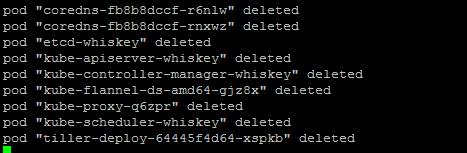
sudo kubectl get deployments # returns no resources found
Apart from the above, I also tried using docker stop and docker rm with the container ids but they either respawn. I want to clear all of them. I would like to start from the beginning
I have logged out and logged back in multiple times but still I see those items.
Can you help me to delete all the pods and I expect the output of "docker ps" to not have any kubernetes related items like shown above?
sudo kubectl get deployments # returns no resources found
Deployments are not the only Controllers in Kubernetes which may manage your Pods. There are many: StatefulSet, ReplicaSet, etc. (check the Controllers doc for details)
In short, a Controller is responsible of ensuring all Pods it manages are running, and create them if necessary - when you delete all Pods, the associated Controller will realise they are missing and simply re-create them to ensure it matchs its specifications.
If you want to effectively delete all Pods, you should delete all the related Controllers (or update them to set their replica to 0), such as:
# do NOT run this in the kube-system namespace, it may corrupt your cluster
# You can also specify --namespace xxx to delete in a specific namespace
kubectl delete deployment --all # configures ReplicaSets, deleting Deployments should delete ReplicaSet as well as associated Pods
kubectl delete statefulset --all
kubectl delete daemonset --all
kubectl delete job --all
kubectl delete cronjob --all
kubectl delete replicationcontroller --all # their should not be any ReplicationController as Deployment should be used
# Then delete what you find
EDIT: as mentionned by P Emkambaram answer's you can also delete the entire namespace with kubectl delete namespace mynamespace (don't delete kube-system of course) but it may also delete other components in the namespace such as Services
Important notes:
- You should also take care when deleting Pods or object in the
kube-system namespace which are related to the internal plumbing of the cluster itself.
- You should not delete directly Kubernetes components by deleting their underlying containers with
docker commands, this may have unexpected effects, use kubectl instead.



 已为社区贡献20439条内容

所有评论(0)