How to run a "sidecar" container in Jenkins Blue Ocean?
Answer a question
I am fairly new to Jenkins and CI/CD in general, but believe that I have searched long enough to conclude things are not as I expect.
I want to do some frontend tests on my website and just as in real life I want to test with the site in one Docker container and the database in another container. Jenkins has this documented as "sidecar" containers which can be part of a pipeline.
Their example:
node {
    checkout scm
    /*
     * In order to communicate with the MySQL server, this Pipeline explicitly
     * maps the port (`3306`) to a known port on the host machine.
     */
    docker.image('mysql:5').withRun('-e "MYSQL_ROOT_PASSWORD=my-secret-pw" -p 3306:3306') { c ->
        /* Wait until mysql service is up */
        sh 'while ! mysqladmin ping -h0.0.0.0 --silent; do sleep 1; done'
        /* Run some tests which require MySQL */
        sh 'make check'
    }
}
The thing is that I do not have a 'traditional' Jenkins pipeline, but I am running Jenkins Blue Ocean instead. This gives me a fancy pipeline editor, but also my pipeline code (Jenkinsfile) looks really different from the example:
pipeline {
  agent {
    docker {
      image 'php'
    }

  }
  stages {
    stage('Build') {
      steps {
        sh 'composer --version'
        sh 'composer install'
      }
    }

    stage('Tests') {
      steps {
        echo 'Do test'
      }
    }

  }
}
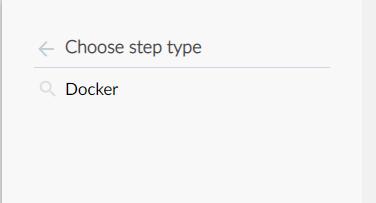
So how would I be spawning (and tearing down) these "sidecar" containers in a Blue Ocean pipeline? Currently the Pipeline editor has no available options if I want to add a step related to Docker. Can I still use docker.image? I do have the Docker Pipeline plugin installed.
 .
.
Answers
More then half a year later I finally figured out it was much simpler than I thought. It can be done with docker-compose.
You need to make sure that your Jenkins has access to docker-compose. So if you are running Jenkins as a docker container ensure it has access to the Docker socket. Also Jenkins is not likely to ship with docker-compose included (JENKINS-51898) so you will have to build your own blue ocean image to install docker-compose.
Rather than copying below file, check https://docs.docker.com/compose/install/ for the latest version!
# Dockerfile
FROM jenkinsci/blueocean

USER root

RUN curl -L https://github.com/docker/compose/releases/download/1.21.2/docker-compose-`uname -s`-`uname -m` -o /usr/local/bin/docker-compose && \
    chmod +x /usr/local/bin/docker-compose

USER jenkins
Once you have Jenkins and Docker up and running you can deploy a test version of your application with a regular docker-compose file, including all database and other containers you might need. You can install dependencies and start the tests by using docker-compose exec to execute commands inside containers started with docker-compose.
Note that docker-compose -f docker-compose.test.yml exec -T php composer-install executes the composer-install command in the container that was defined as the php service in the docker-compose file.
In the end, no matter the outcome of the test, all containers and associated volumes (-v flag) are shutdown and removed.
# Jenkinsfile
pipeline {
  agent any
  stages {
    stage('Start') {
      steps {
        sh 'docker-compose -f docker-compose.test.yml up -d'
      }
    }
    stage('Composer install') {
      steps {
        sh 'docker-compose -f docker-compose.test.yml exec -T php composer install --no-interaction --no-progress --optimize-autoloader'
      }
    }
    stage('Test') {
      steps {
        sh 'docker-compose -f docker-compose.test.yml exec -T php <run test script>'
      }
    }
  }
  post {
    always {
      sh 'docker-compose -f docker-compose.test.yml down -v'
    }
  }
}

CI/CD社区为您提供最前沿的新闻资讯和知识内容
更多推荐
 0
0 0
0- 0


 已为社区贡献13068条内容

所有评论(0)