

Finally, Azure DevOps yaml based CD has been GA!
Announcing General Availability of YAML CD features in Azure Pipelines
The very first question I had in my mind was "how to trigger release pipeline after build pipeline?"
If I author CI/CD in same yaml, even by using multi-stage, I don't have to think about "triggering CD", but what if I author CI and CD in separate yml and create two pipeline?
Resources in YAML pipelines
Resources is great way to trigger pipeline by types such as pipelines, builds, repositories, containers, and packages. In this article, I focus on pipeline resource.
Create build pipeline
Without further due, let's create build pipelines for test.
1. Create new DevOps project and new repository. I simply add a text file there.
2. Add build-pipeline.yml file and update yaml as below. As you can see, every steps is just dummy. This pipeline generate one artifact.
trigger:
  branches:
    include:
    - master
  paths:
    exclude:
    - build-pipeline.yml
    - release-pipeline.yml

variables:
  vmImageName: 'ubuntu-latest'

jobs:
- job: Build
  pool:
    vmImage: $(vmImageName)
  steps:
  - script: |
      echo 'do some unit test'
    displayName: 'unit test'
  - script: |
      echo 'compile application'
    displayName: 'compile'
  - task: ArchiveFiles@2
    displayName: 'Archive files'
    inputs:
      rootFolderOrFile: '$(System.DefaultWorkingDirectory)'
      includeRootFolder: false
      archiveType: zip
      archiveFile: $(Build.ArtifactStagingDirectory)/$(Build.BuildId).zip
      replaceExistingArchive: true
  - upload: $(Build.ArtifactStagingDirectory)/$(Build.BuildId).zip
    artifact: drop
3.Create new pipeline by specifying exiting yaml and select 'build-pipeline.yaml'

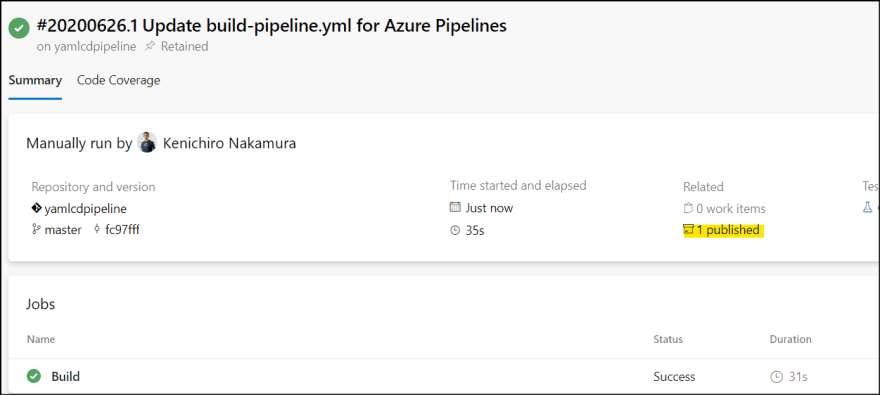
4. Run and see the result.

5. It generates one artifact.

6. Rename the pipeline so that it's easy to see this is build pipeline.
Release pipeline
Next, create release pipeline which will be triggered after the build pipeline.
1. Add release-pipeline.yml file and update yaml.
# Explicitly set none for repositry trigger
trigger:
- none

resources:
  pipelines:
  - pipeline: myappbuild  # Name of the pipeline resource
    source: myapp-build-pipeline # Name of the triggering pipeline
    trigger:
      branches:
      - master

variables:
  vmImageName: 'ubuntu-latest'

jobs:
- deployment: Deploy
  displayName: Deploy
  environment: dev
  pool:
    vmImage: $(vmImageName)
  strategy:
    runOnce:
      deploy:
        steps:
        - download: myappbuild
          artifact: drop
        - task: ExtractFiles@1
          inputs:
            archiveFilePatterns: '$(PIPELINE.WORKSPACE)/myappbuild/drop/$(resources.pipeline.myappbuild.runID).zip'
            destinationFolder: '$(agent.builddirectory)'
            cleanDestinationFolder: false
        - script: |
            cat $(agent.builddirectory)/greatcode.txt
2. Create new pipeline and select create file.

3. Save the pipeline.
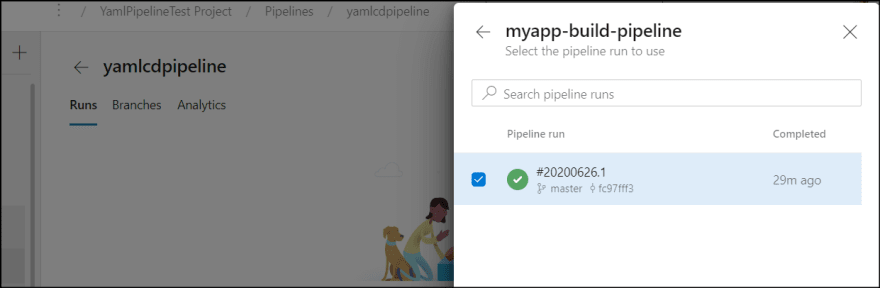
4. Click run the pipeline, and select "Resources".

5. Select resource from build pipeline.

6. Then, run the pipeline and see the result.
7. Rename the pipeline if you want.
Test CI/CD
Now it's time to do CI/CD test. Simply update greatcode.text content and commit to master.
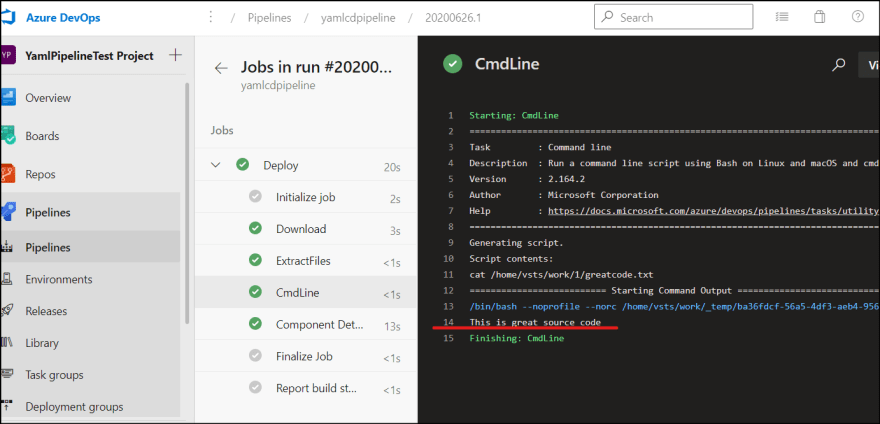
You see the build pipeline runs first, then release pipeline runs.
Important points
There are several things to note here.
release trigger
I set trigger to none explicitly so that the release pipeline won't be triggered in any change to branches.
# Explicitly set none for repositry trigger
trigger:
- none
Then I specify resources | pipelines. The pipeline name is just a name which I can reference later. source is where I specify build pipeline name.
resources:
  pipelines:
  - pipeline: myappbuild  # Name of the pipeline resource
    source: myapp-build-pipeline # Name of the triggering pipeline
    trigger:
      branches:
      - master
Then I reference this in many places.
I use download task to explicitly download drop artifact. This is useful when build pipeline publish multiple artifacts but release pipeline doesn't need them all.
- download: myappbuild
  artifact: drop
The downloaded artifact can be accessed with pre-defined variable.
$(PIPELINE.WORKSPACE)/myappbuild/drop
I also other pre-defined variable to identify zip file name.
$(resources.pipeline.myappbuild.runID).zip
I can simply speficy *.zip, but this is useful when I need Build.BuildId in release pipeline.
Summary
There are several things I need to know in advance to author pipelines, but once I know it, it's easy. Hope this information helps you.


 已为社区贡献22912条内容

所有评论(0)