
SportsMOT:多体育场景大规模多目标跟踪数据集
·
核心贡献与创新点
-
数据集特性
- 规模:240段视频、15万帧(MOT17的15倍)、160万边界框(MOT17的3倍),覆盖篮球、排球、足球三类运动。
- 关键挑战:
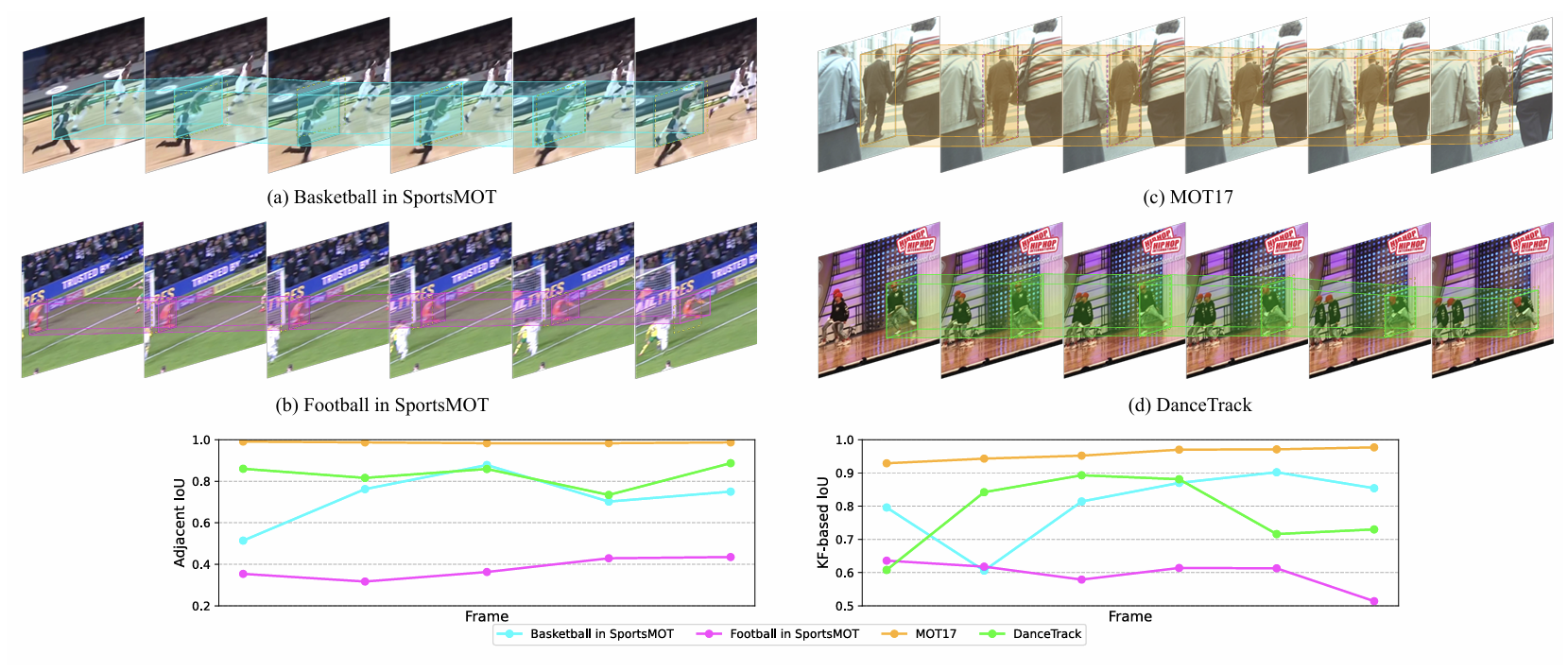
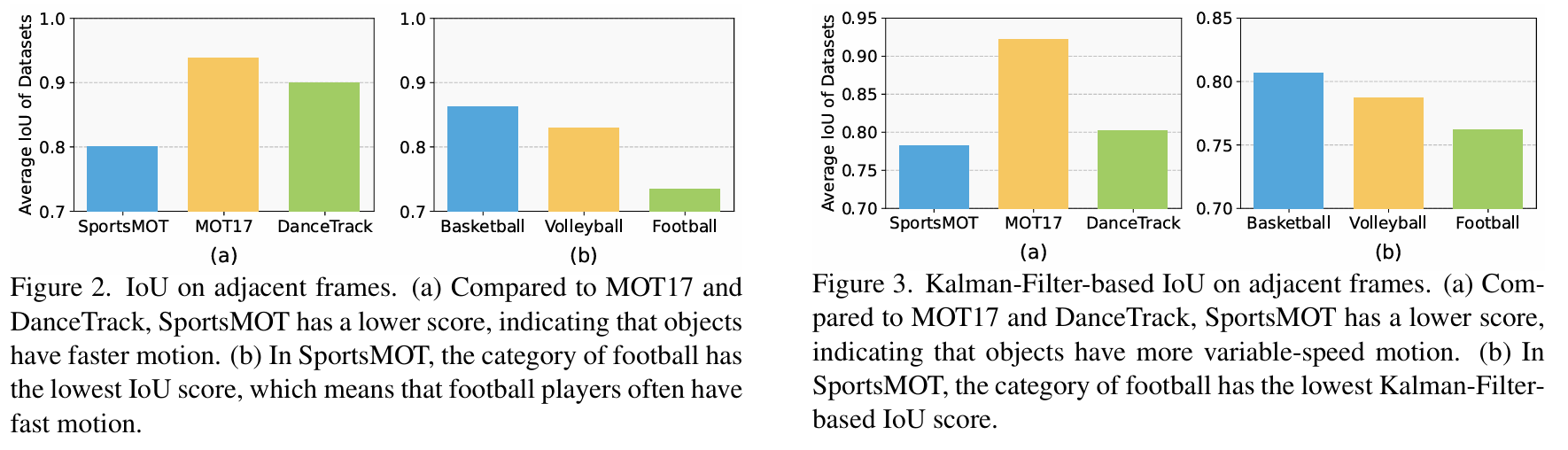
- 快速变速运动:运动员高速移动且频繁变速(图2-3显示相邻帧IoU显著低于MOT17/DanceTrack)。
- 相似但可区分的外观:球员身着相似队服但号码/姿态不同(图4特征可视化证明其外观区分度介于MOT17与DanceTrack之间)。
- 标注质量:仅标注场上球员(排除观众/裁判),标注工具结合KCF单目标跟踪辅助人工修正,确保ID一致性与边界框精度。
-
现有方法瓶颈分析
- 主流跟踪器(如ByteTrack、OC-SORT)依赖卡尔曼滤波的运动关联,但体育场景中运动员的非线性运动导致传统运动模型失效(表6显示直接IoU匹配优于卡尔曼滤波)。
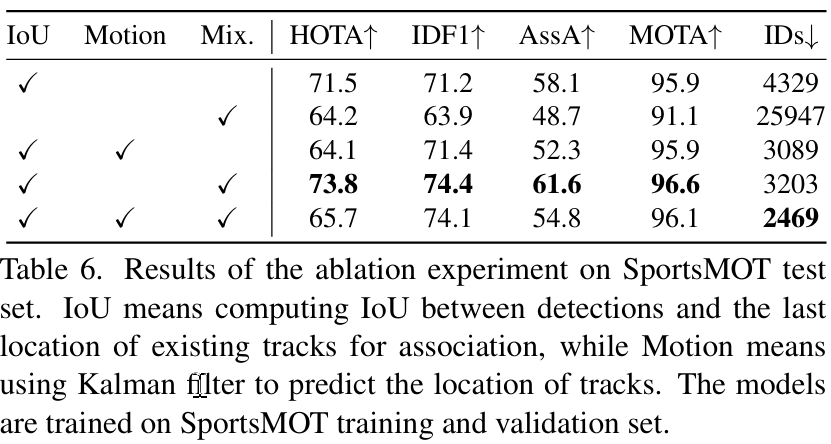
- 外观模型需兼顾相似性与可区分性:DanceTrack外观高度一致,而SportsMOT要求模型学习更细粒度特征(如球衣号码)。
- 新框架MixSort
- 设计思路:在检测跟踪框架(如ByteTrack)中引入类MixFormer的外观关联模块(图6),融合运动与外观相似度矩阵:
M = α ⋅ IoU + ( 1 − α ) ⋅ V MixFormer M = \alpha \cdot \text{IoU} + (1-\alpha) \cdot V_{\text{MixFormer}} M=α⋅IoU+(1−α)⋅VMixFormer - 优势:
-
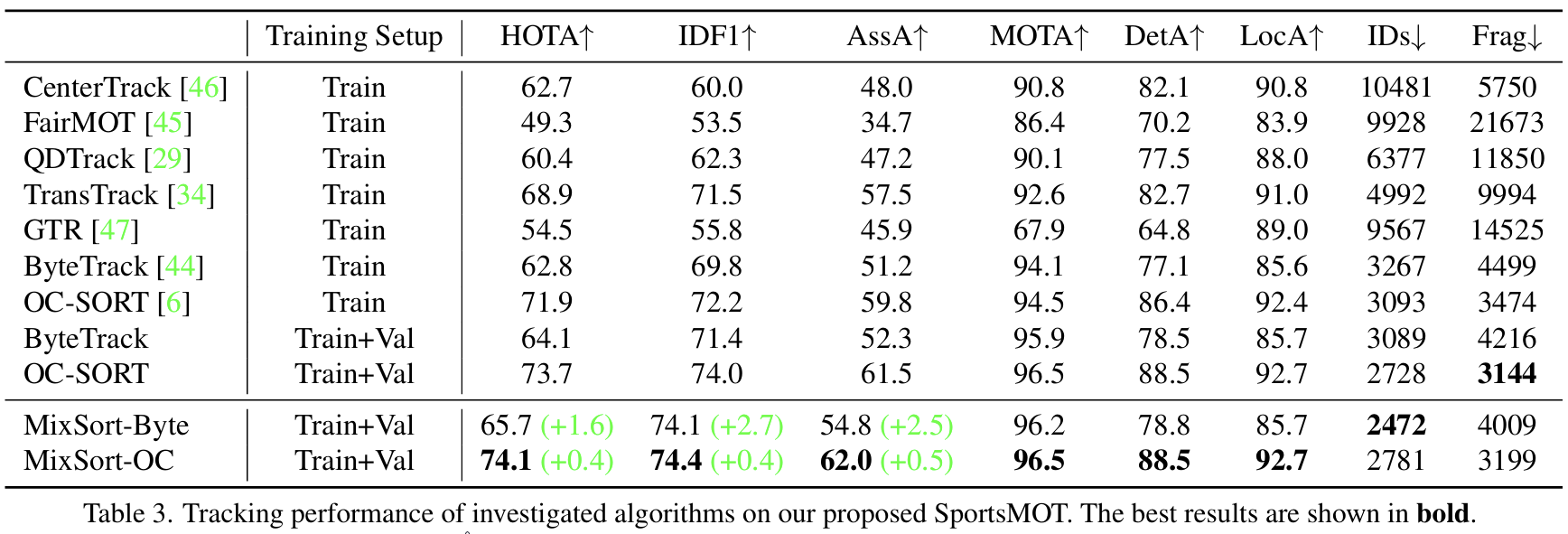
在SportsMOT上提升显著:ByteTrack + MixSort使HOTA↑1.6,IDF1↑2.7(表3)。
-
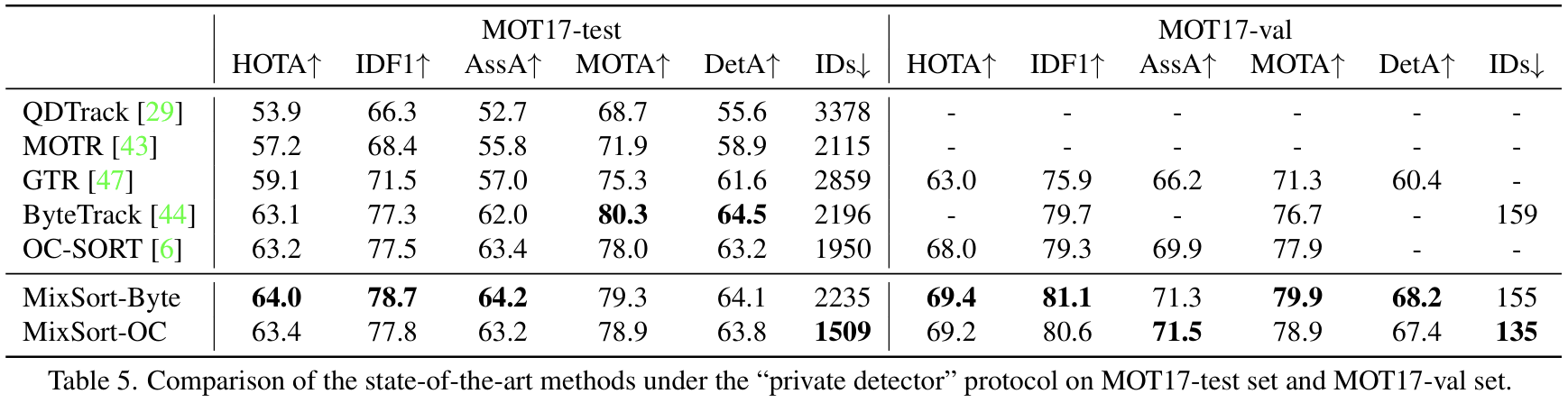
在MOT17上刷新SOTA:HOTA达64.0(表5),证明泛化能力。
-
- 设计思路:在检测跟踪框架(如ByteTrack)中引入类MixFormer的外观关联模块(图6),融合运动与外观相似度矩阵:
- 关键实现:将MixFormer的角点预测改为热力图中心预测,加速推理并适配MOT任务(图5)。
数据集对比与实验洞察
| 数据集 | 视频数 | 帧数 | 边界框数 | 核心挑战 |
|---|---|---|---|---|
| MOT17 | 14 | 11k | 292k | 行人低速线性运动 |
| DanceTrack | 100 | 105k | - | 外观一致+运动多样性 |
| SportsMOT | 240 | 150k | 1.6M | 快速变速+外观弱区分 |
- 运动特性(图2-3):
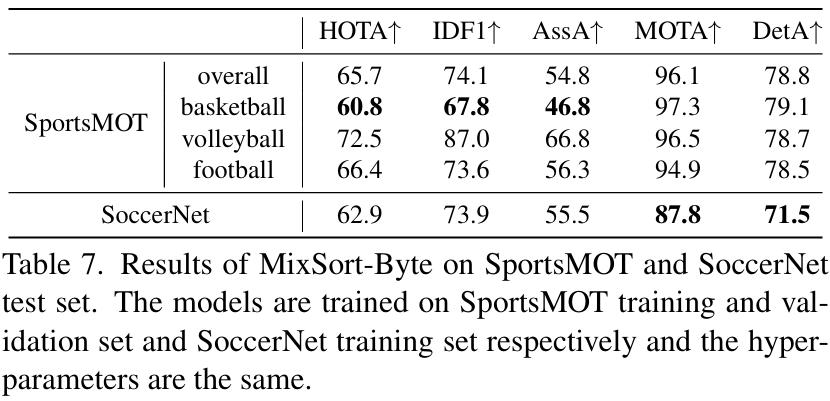
- 足球场景运动最快(相邻帧IoU最低),篮球因频繁身体对抗遮挡最严重(表7中HOTA最低:60.8)。
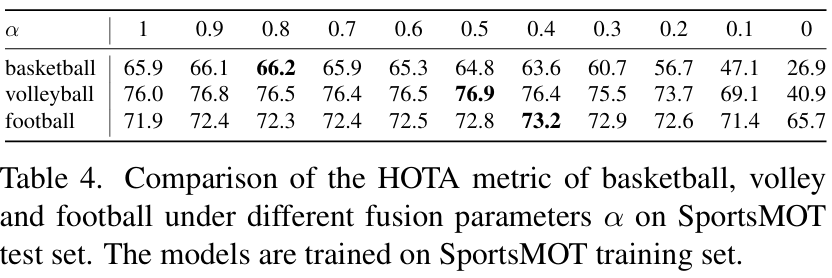
- 关联策略验证(表4):
- 纯外观关联(α=0)在足球场景效果最佳(HOTA 65.7),但融合策略(α=0.5~0.8)整体最优。
- 对比实验:
- MixSort在SportsMOT提升显著,但在DanceTrack上效果下降(表8),印证SportsMOT外观更具可区分性。
- 超越SoccerNet:DetA↑7.3(表7),凸显专注球员跟踪的优势。
应用价值与资源开放
- 目标:推动体育自动分析(如跑动距离统计、战术生成)。
- 数据拆分:训练集(45段)、验证集(45段)、测试集(150段)。
- 评估指标:推荐HOTA(平衡检测与关联)、IDF1、AssA。
- 开源:数据集与代码已公开(项目链接)。
总结
SportsMOT填补了体育场景MOT数据集的空白,其快速变速运动与弱外观区分特性挑战现有跟踪范式。所提MixSort框架通过融合运动预测与Transformer外观建模,在SportsMOT与MOT17均达SOTA。该数据集有望推动体育分析与多目标跟踪算法的协同发展。
下载链接
https://hf-mirror.com/datasets/MCG-NJU/SportsMOT/tree/main/dataset
转为Labelme格式的数据集
删除缓存文件
清楚很多不需要的文件(一些.开头的文件),代码如下:
import os
import shutil


def remove_dot_files_and_dirs(root_dir):
    """
    递归删除指定目录下所有以点开头的文件和文件夹
    :param root_dir: 要清理的根目录路径
    """
    for root, dirs, files in os.walk(root_dir, topdown=False):
        # 删除所有以点开头的文件
        for file in files:
            if file.startswith('.'):
                file_path = os.path.join(root, file)
                try:
                    os.remove(file_path)
                    print(f"已删除文件: {file_path}")
                except Exception as e:
                    print(f"删除文件失败 [{file_path}]: {str(e)}")

        # 删除所有以点开头的文件夹(需要后序遍历确保先处理子内容)
        for dir in dirs:
            if dir.startswith('.'):
                dir_path = os.path.join(root, dir)
                try:
                    shutil.rmtree(dir_path)  # 递归删除整个目录
                    print(f"已删除目录: {dir_path}")
                except Exception as e:
                    print(f"删除目录失败 [{dir_path}]: {str(e)}")


if __name__ == "__main__":
    target_dir ="../sportsmot"

    if not os.path.isdir(target_dir):
        print(f"错误: 目录不存在 [{target_dir}]")
    else:
        print(f"开始清理目录: {target_dir}")
        remove_dot_files_and_dirs(target_dir)
        print("清理完成!")
转为Labelme格式
代码:
'''
创建以下四个目录,用于存放图片和标签
images/train
images/val
labels/train
labels/val
'''
import os
import shutil
import numpy as np
import configparser
import cv2
import base64
import json
version = '5.0.2'
flags = {}
lineColor = [0, 255, 0, 128]
fillColor = [255, 0, 0, 128]

list_mot17=['../sportsmot/train/train','../sportsmot/val/val']
labelme_out='../Labelme_sportmot'
os.makedirs(labelme_out,exist_ok=True)
for dir in list_mot17:
    for mot_dir in os.listdir(dir):  # mot_dir是例如MOT17-02-FRCNN这种
        det_path = os.path.join(dir, mot_dir, 'gt/gt.txt')  # det.txt路径
        dets = np.loadtxt(det_path, delimiter=',')  # 读取det.txt文件
        ini_path = os.path.join(dir, mot_dir, 'seqinfo.ini')  # seqinfo.ini路径
        conf = configparser.ConfigParser()
        conf.read(ini_path)  # 读取seqinfo.ini文件
        seqLength = int(conf['Sequence']['seqLength'])  # MOT17-02-FRCNN序列的长度
        imgWidth = int(conf['Sequence']['imWidth'])  # 图片宽度
        imgHeight = int(conf['Sequence']['imHeight'])  # 图片长度
        dic_frame_id={}
        for det in dets:
            frame_id, _, left, top, width, height = int(det[0]), det[1], det[2], det[3], det[4], det[5]
            if frame_id in dic_frame_id:
                dic_frame_id[frame_id].append([left, top, width, height])
            else:
                ann_list = [[left, top, width, height]]
                dic_frame_id[frame_id]=ann_list

        for key_frame in dic_frame_id.keys():
            dic = {}
            dic['version'] = version
            dic['flags'] = flags
            dic['shapes'] = []
            oldimgpath = os.path.join(dir, mot_dir, 'img1','%06d' % key_frame + '.jpg')  # train/MOT17-02-FRCNN/img1/000001.jpg
            image_name = mot_dir + '-' + '%06d' % key_frame + '.jpg'
            img = cv2.imread(oldimgpath)
            imageHeight, imageWidth, _ = img.shape
            for data in dic_frame_id[key_frame]:
                shape = {}
                shape['label'] = 'person'
                shape['line_color'] = None
                shape['fill_color'] = None
                x1 = float(data[0])
                y1 = float(data[1])
                w = float(data[2])
                h = float(data[3])
                x2 = x1 + w
                y2 = y1 + h
                shape['points'] = [[x1, y1], [x2, y2]]
                shape['shape_type'] = 'rectangle'
                shape['flags'] = {}
                dic['shapes'].append(shape)
            dic['lineColor'] = lineColor
            dic['fillColor'] = fillColor
            dic['imagePath'] =image_name
            dic['imageData'] = base64.b64encode(
                open(oldimgpath, "rb").read()).decode('utf-8')
            dic['imageHeight'] = imageHeight
            dic['imageWidth'] = imageWidth
            fw = open(os.path.join(labelme_out, image_name.split('.')[0]+'.json'), 'w')
            json.dump(dic, fw)
            fw.close()
            shutil.copy(oldimgpath, os.path.join(labelme_out,image_name))
转为Labelme后,你会发现,这个数据集只标注了运动员,场外的很多人没有标注,如果想用来做目标检测数据集,场外的人会形成干扰,所以就要把背景去除掉,代码如下:
import json
import os
import cv2
import numpy as np
from pathlib import Path
import shutil


def process_labelme_images(json_dir, image_dir, output_dir):
    """
    处理LabelMe数据集,将标注区域之外的图像变为黑色
    只保留所有标注框组成的最小外接矩形区域
    同时复制并更新对应的JSON文件

    参数:
    json_dir: 包含LabelMe JSON文件的目录
    image_dir: 原始图片目录
    output_dir: 输出图片和JSON文件的目录
    """
    # 创建输出目录
    Path(output_dir).mkdir(parents=True, exist_ok=True)

    # 遍历所有JSON文件
    for json_file in Path(json_dir).glob('*.json'):
        with open(json_file, 'r') as f:
            data = json.load(f)

        # 获取图片路径
        image_path = Path(image_dir) / Path(data['imagePath']).name
        if not image_path.exists():
            print(f"图片不存在: {image_path}")
            continue

        # 读取图片
        img = cv2.imread(str(image_path))
        if img is None:
            print(f"无法读取图片: {image_path}")
            continue

        h, w = img.shape[:2]

        # 初始化边界值
        min_x, min_y = w, h
        max_x, max_y = 0, 0
        has_annotations = False

        # 计算所有标注框的最小外接矩形
        for shape in data['shapes']:
            points = np.array(shape['points'], dtype=np.int32)

            # 获取当前标注的边界
            if shape['shape_type'] == 'rectangle':
                x1, y1 = points[0]
                x2, y2 = points[1]
                cur_min_x, cur_min_y = min(x1, x2), min(y1, y2)
                cur_max_x, cur_max_y = max(x1, x2), max(y1, y2)
            else:
                # 对于多边形/其他形状,计算其最小外接矩形
                cur_min_x, cur_min_y = np.min(points, axis=0)
                cur_max_x, cur_max_y = np.max(points, axis=0)

            # 更新全局边界
            min_x = min(min_x, cur_min_x)
            min_y = min(min_y, cur_min_y)
            max_x = max(max_x, cur_max_x)
            max_y = max(max_y, cur_max_y)
            has_annotations = True

        # 如果没有标注,跳过处理
        if not has_annotations:
            print(f"图片无标注: {image_path.name}")
            continue

        # 确保边界在图像范围内
        min_x = max(0, min_x)
        min_y = max(0, min_y)
        max_x = min(w - 1, max_x)
        max_y = min(h - 1, max_y)

        # 创建全黑蒙版
        mask = np.zeros((h, w), dtype=np.uint8)

        # 在蒙版上绘制最小外接矩形(白色)
        cv2.rectangle(mask, (min_x, min_y), (max_x, max_y), 255, -1)

        # 应用蒙版:标注区域外变为黑色
        if len(img.shape) == 3:  # 彩色图像
            result = cv2.bitwise_and(img, img, mask=mask)
        else:  # 灰度图像
            result = cv2.bitwise_and(img, img, mask=mask)

        # 保存结果图片
        output_image_path = Path(output_dir) / image_path.name
        cv2.imwrite(str(output_image_path), result)
        print(f"处理完成: {output_image_path} - 保留区域: [{min_x}, {min_y}] 到 [{max_x}, {max_y}]")

        # 复制并更新JSON文件
        output_json_path = Path(output_dir) / json_file.name
        shutil.copy(json_file, output_json_path)

        # 更新JSON中的图像路径和大小
        with open(output_json_path, 'r+') as f:
            json_data = json.load(f)
            # 更新图像路径为当前文件名(相对路径)
            json_data['imagePath'] = image_path.name
            # 更新图像尺寸(虽然尺寸没变,但以防万一)
            json_data['imageWidth'] = w
            json_data['imageHeight'] = h
            # 设置imageData为None而不是删除
            json_data['imageData'] = None

            # 写回更新后的JSON
            f.seek(0)
            json.dump(json_data, f, indent=2)
            f.truncate()

        print(f"已更新JSON文件: {output_json_path}")


# 使用示例
if __name__ == "__main__":
    json_dir = "../Labelme_sportmot"  # 替换为JSON文件目录
    image_dir = "../Labelme_sportmot"  # 替换为原始图片目录
    output_dir = "../sportsmot_out"  # 替换为输出目录

    process_labelme_images(json_dir, image_dir, output_dir)
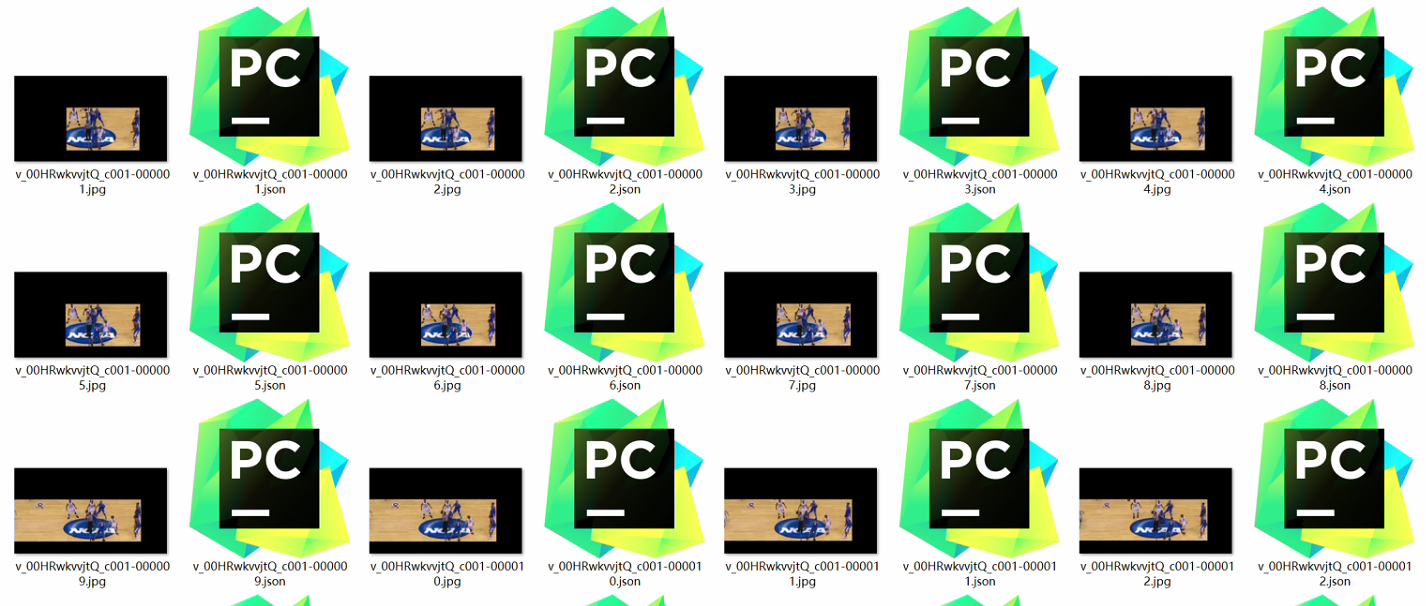
运行上面的代码就能去除大部分的背景,结果如下:

欢迎加入北京社区
更多推荐
 14
14 0
0- 0


 已为社区贡献7条内容

所有评论(0)