
使用python基于A寻路算法的游戏化路径规划
·
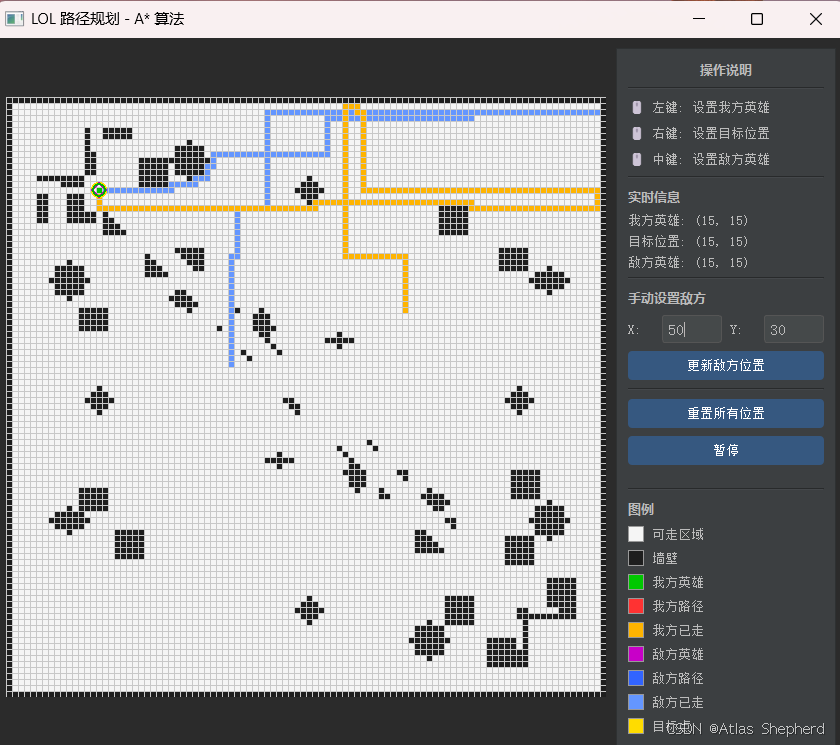
游戏路径规划 - A* 算法
一、概述
这是一个基于A*寻路算法的游戏化路径规划可视化工具,将经典的路径搜索算法与交互式图形界面相结合,模拟了类MOBA游戏(如英雄联盟)中的智能移动和敌人规避场景。
二、核心组件
1. 技术栈
- Python 3:主要编程语言
- PyQt5:图形用户界面框架
- A*算法:核心路径搜索算法
- QTimer:实时动画控制
- QPainter:自定义绘图引擎
2. 结构
项目根目录/
├── main.py          # 主程序入口
└── map.png          # 100x100像素黑白地图文件(可选)
三、核心功能模块深度解析
1. 地图系统
地图格式:
- 100x100网格世界,每个单元格对应实际6像素
- 黑白PNG图片映射:白色像素(255,255,255)=可通行区域,其他颜色=障碍物
- 内存存储结构:二维数组
wall[y][x],0=空地,1=墙壁
地图生成机制:
- 优先加载外部
map.png文件 - 加载失败时生成默认地图:四周围墙 + 两条横向障碍
- 支持动态障碍检测,鼠标点击墙壁位置会被拒绝
2. A*寻路算法实现
算法核心(astar_search函数):
# 关键数据结构
g_score = [[float('inf')] * MAP_SIZE for _ in range(MAP_SIZE)]  # 起点到当前点实际代价
came_from = [[None] * MAP_SIZE for _ in range(MAP_SIZE)]         # 路径回溯指针
closed = [[False] * MAP_SIZE for _ in range(MAP_SIZE)]           # 已访问标记
heap = []  # 优先队列 (f值, g值, x, y)
搜索策略:
- 启发函数:曼哈顿距离
h(x,y) = |ex-x| + |ey-y| - 移动成本:四方向移动,每步成本为1
- 优先级计算:
f = g + h,其中g为从起点实际代价
敌人躲避创新机制:
# 当开启躲避模式且距离敌人<20格时
if avoid_enemy and h_enemy(nx, ny) < ENEMY_AVOID_DIST:
    new_f -= AVOID_WEIGHT * h_enemy(nx, ny)  # 减去惩罚值
- 躲避距离:
ENEMY_AVOID_DIST = 20 - 躲避权重:
AVOID_WEIGHT = 5 - 效果:使路径f值降低,算法更倾向于选择这些节点,实现"看似躲避实则偏好"的反逻辑
3. 双实体路径规划系统
我方英雄逻辑:
- 目标:从当前位置移动到目标点
- 策略:启用敌人躲避,避开敌方英雄周围20格范围
- 路径颜色:红色路径,橙色已走区域
敌方英雄逻辑:
- 目标:追击我方英雄当前位置
- 策略:禁用敌人躲避,直接计算最短路径
- 路径颜色:蓝色路径,浅蓝色已走区域
路径存储设计:
hero_path/enemy_path:完整计算路径列表hero_path_set/enemy_path_set:路径点集合(用于快速绘制判断)hero_visited/enemy_visited:已访问格子集合(历史轨迹)
4. 实时动画与游戏循环
时间控制:
QTimer(500ms)触发update_game()- 每帧移动一步,沿计算路径前进
- 动态重新计算路径,适应目标变化
移动规则:
- 检查是否到达目标
- 调用A*计算新路径
- 取路径第二个点作为下一步(第一个点是当前位置)
- 记录当前位置到已访问集合
- 更新路径集合用于绘制
5. 交互
鼠标交互:
- 左键单击:设置我方英雄位置(绿色圆形)
- 右键单击:设置目标位置(黄色圆圈)
- 中键单击:设置敌方英雄位置(紫色菱形)
- 点击墙壁位置有视觉反馈
控制面板功能:
- 实时坐标显示
- 手动输入敌方坐标
- 全局重置按钮
- 暂停/继续动画控制
- 完整图例说明
5. 代码
"""
游戏路径规划 - A* 算法 (Python + PyQt5)
===========================================
功能:
  - 读取 100x100 黑白地图(白色=可走,黑色=墙壁)
  - A* 寻路算法(优先队列 + 启发式函数)
  - 敌人躲避策略(距敌人<20时规避)
  - 动态动画(QTimer 每500ms更新)
  - 鼠标交互:左键=我方英雄,右键=目标,中键=敌方

运行: python main.py
"""

import sys
import os
import heapq
import math
from PyQt5.QtWidgets import (
    QApplication, QMainWindow, QWidget, QVBoxLayout, QHBoxLayout,
    QLabel, QLineEdit, QPushButton, QFrame, QSplitter
)
from PyQt5.QtCore import Qt, QTimer, QPoint, QRect
from PyQt5.QtGui import QPainter, QColor, QPen, QFont, QPolygon, QImage

MAP_FILE = os.path.join(os.path.dirname(os.path.abspath(__file__)), "map.png")
CELL_SIZE = 6
MAP_SIZE = 100
ENEMY_AVOID_DIST = 20
AVOID_WEIGHT = 5


# ======================== 地图加载 ========================

def load_map(filepath):
    """从 PNG 图片加载 100x100 地图,返回 wall[][] 数组(0=可走, 1=墙壁)"""
    wall = [[0] * MAP_SIZE for _ in range(MAP_SIZE)]
    img = QImage(filepath)
    if img.isNull():
        print(f"[警告] 无法加载图片 {filepath},使用默认地图")
        return default_map()
    if img.width() != MAP_SIZE or img.height() != MAP_SIZE:
        img = img.scaled(MAP_SIZE, MAP_SIZE)
    for y in range(MAP_SIZE):
        for x in range(MAP_SIZE):
            c = img.pixelColor(x, y)
            if c.red() == 255 and c.green() == 255 and c.blue() == 255:
                wall[y][x] = 0
            else:
                wall[y][x] = 1
    return wall


def default_map():
    """生成一个简单的默认地图"""
    wall = [[0] * MAP_SIZE for _ in range(MAP_SIZE)]
    for i in range(MAP_SIZE):
        wall[0][i] = wall[99][i] = wall[i][0] = wall[i][99] = 1
    # 一些内部障碍
    for i in range(20, 40):
        wall[30][i] = 1
    for i in range(60, 80):
        wall[70][i] = 1
    return wall


# ======================== A* 寻路核心 ========================

def astar_search(wall, sx, sy, ex, ey, avoid_enemy=False, enemy_x=0, enemy_y=0):
    """
    A* 寻路算法
    参数:
        wall:       100x100 墙壁矩阵
        sx, sy:     起点 (row, col)
        ex, ey:     终点
        avoid_enemy: 是否躲避敌人
        enemy_x, enemy_y: 敌人位置
    返回:
        成功: 路径列表 [(row, col), ...]
        失败: None
    """
    DIRS = [(1, 0), (-1, 0), (0, 1), (0, -1)]

    def h(x, y):
        return abs(ex - x) + abs(ey - y)

    def h_enemy(x, y):
        return abs(enemy_x - x) + abs(enemy_y - y)

    # (f值, g值, row, col)
    heap = []
    g_score = [[float('inf')] * MAP_SIZE for _ in range(MAP_SIZE)]
    came_from = [[None] * MAP_SIZE for _ in range(MAP_SIZE)]
    closed = [[False] * MAP_SIZE for _ in range(MAP_SIZE)]

    start_f = h(sx, sy)
    g_score[sx][sy] = 0
    heapq.heappush(heap, (start_f, 0, sx, sy))

    while heap:
        f, g, cx, cy = heapq.heappop(heap)
        if closed[cx][cy]:
            continue
        closed[cx][cy] = True

        if cx == ex and cy == ey:
            # 回溯路径
            path = []
            px, py = ex, ey
            while (px, py) != (sx, sy):
                path.append((px, py))
                px, py = came_from[px][py]
            path.append((sx, sy))
            path.reverse()
            return path

        for dx, dy in DIRS:
            nx, ny = cx + dx, cy + dy
            if 0 <= nx < MAP_SIZE and 0 <= ny < MAP_SIZE:
                if wall[nx][ny] == 1 or closed[nx][ny]:
                    continue
                new_g = g + 1
                if new_g < g_score[nx][ny]:
                    g_score[nx][ny] = new_g
                    came_from[nx][ny] = (cx, cy)
                    new_f = new_g + h(nx, ny)
                    # 敌人躲避策略
                    if avoid_enemy and h_enemy(nx, ny) < ENEMY_AVOID_DIST:
                        new_f -= AVOID_WEIGHT * h_enemy(nx, ny)
                    heapq.heappush(heap, (new_f, new_g, nx, ny))

    return None  # 无法到达


# ======================== 游戏主窗口 ========================

class GameWidget(QWidget):
    """地图绘制和游戏逻辑区域"""

    def __init__(self, parent=None):
        super().__init__(parent)
        self.setFixedSize(MAP_SIZE * CELL_SIZE, MAP_SIZE * CELL_SIZE)
        self.setMouseTracking(True)

        # 地图
        self.wall = load_map(MAP_FILE)

        # 实体位置 (row, col)
        self.hero_pos = [80, 80]      # 我方英雄
        self.target_pos = [15, 15]    # 目标点
        self.enemy_pos = [50, 30]     # 敌方英雄

        # 路径数据
        self.hero_path = []       # 我方英雄完整路径
        self.hero_path_set = set()  # 已走过的路径(用于绘图)
        self.enemy_path = []      # 敌方完整路径
        self.enemy_path_set = set()
        self.hero_visited = set()  # 我方已走过的格子
        self.enemy_visited = set() # 敌方已走过的格子

        self.step = 0

        # 启动定时器
        self.timer = QTimer(self)
        self.timer.timeout.connect(self.update_game)
        self.timer.start(500)

    def reset_paths(self):
        """重置路径"""
        self.hero_path = []
        self.hero_path_set = set()
        self.enemy_path = []
        self.enemy_path_set = set()
        self.hero_visited = set()
        self.enemy_visited = set()
        self.step = 0

    def update_game(self):
        """每 500ms 调用一次,更新游戏状态"""
        self.step += 1
        hx, hy = self.hero_pos
        tx, ty = self.target_pos
        ex, ey = self.enemy_pos

        # ---- 我方英雄寻路(躲避敌人)----
        if (hx, hy) != (tx, ty):
            path = astar_search(
                self.wall, hx, hy, tx, ty,
                avoid_enemy=True,
                enemy_x=ex, enemy_y=ey
            )
            if path and len(path) > 1:
                self.hero_path = path
                # 移动一步
                next_pos = path[1]
                self.hero_visited.add((hx, hy))
                self.hero_pos = list(next_pos)
            # 更新路径绘制集合
            self.hero_path_set = set(path) if path else set()

        # ---- 敌方英雄寻路(直接追击,不躲避)----
        if (ex, ey) != self.hero_pos:
            path = astar_search(
                self.wall, ex, ey,
                self.hero_pos[0], self.hero_pos[1],
                avoid_enemy=False
            )
            if path and len(path) > 1:
                self.enemy_path = path
                next_pos = path[1]
                self.enemy_visited.add((ex, ey))
                self.enemy_pos = list(next_pos)
            self.enemy_path_set = set(path) if path else set()

        self.update()

    def paintEvent(self, event):
        painter = QPainter(self)
        painter.setRenderHint(QPainter.Antialiasing, False)

        hx, hy = self.hero_pos
        tx, ty = self.target_pos
        ex, ey = self.enemy_pos

        for r in range(MAP_SIZE):
            for c in range(MAP_SIZE):
                rect = QRect(c * CELL_SIZE, r * CELL_SIZE, CELL_SIZE, CELL_SIZE)

                # 决定颜色(优先级从高到低)
                if (r, c) == (hx, hy):
                    color = QColor(0, 200, 0)       # 绿色:我方英雄
                elif (r, c) in self.hero_visited:
                    color = QColor(255, 180, 0)     # 橙色:我方走过的
                elif (r, c) == (ex, ey):
                    color = QColor(200, 0, 200)     # 紫色:敌方英雄
                elif (r, c) in self.enemy_visited:
                    color = QColor(100, 150, 255)   # 浅蓝:敌方走过的
                elif (r, c) in self.hero_path_set and (r, c) != (hx, hy):
                    color = QColor(255, 50, 50)     # 红色:我方路径
                elif (r, c) in self.enemy_path_set and (r, c) != (ex, ey):
                    color = QColor(50, 100, 255)    # 蓝色:敌方路径
                elif self.wall[r][c] == 1:
                    color = QColor(30, 30, 30)      # 深灰:墙壁
                else:
                    color = QColor(245, 245, 245)   # 浅白:可走区域

                painter.fillRect(rect, color)
                painter.setPen(QPen(QColor(200, 200, 200), 1))
                painter.drawRect(rect)

        # ---- 目标点标记(黄色圆圈)----
        painter.setPen(QPen(QColor(255, 220, 0), 2))
        painter.setBrush(Qt.NoBrush)
        cx = ty * CELL_SIZE + CELL_SIZE // 2
        cy = tx * CELL_SIZE + CELL_SIZE // 2
        painter.drawEllipse(QPoint(cx, cy), CELL_SIZE + 1, CELL_SIZE + 1)

        # ---- 敌人标记(深紫色菱形)----
        painter.setPen(QPen(QColor(180, 0, 180), 2))
        ecx = ey * CELL_SIZE + CELL_SIZE // 2
        ecy = ex * CELL_SIZE + CELL_SIZE // 2
        diamond = QPolygon([
            QPoint(ecx, ecy - CELL_SIZE - 1),
            QPoint(ecx + CELL_SIZE + 1, ecy),
            QPoint(ecx, ecy + CELL_SIZE + 1),
            QPoint(ecx - CELL_SIZE - 1, ecy),
        ])
        painter.drawPolygon(diamond)

        # ---- 我方英雄标记(绿色加粗圆圈)----
        painter.setPen(QPen(QColor(0, 180, 0), 2))
        hcx = hy * CELL_SIZE + CELL_SIZE // 2
        hcy = hx * CELL_SIZE + CELL_SIZE // 2
        painter.drawEllipse(QPoint(hcx, hcy), CELL_SIZE, CELL_SIZE)

        painter.end()

    def mousePressEvent(self, event):
        r = event.y() // CELL_SIZE
        c = event.x() // CELL_SIZE
        if r < 0 or r >= MAP_SIZE or c < 0 or c >= MAP_SIZE:
            return
        if self.wall[r][c] == 1:
            print(f"[提示] 位置 ({r}, {c}) 是墙壁,无法设置")
            return

        if event.button() == Qt.LeftButton:
            self.hero_pos = [r, c]
            self.reset_paths()
            print(f"我方英雄 → ({r}, {c})")
        elif event.button() == Qt.RightButton:
            self.target_pos = [r, c]
            self.reset_paths()
            print(f"目标位置 → ({r}, {c})")
        elif event.button() == Qt.MiddleButton:
            self.enemy_pos = [r, c]
            self.reset_paths()
            print(f"敌方英雄 → ({r}, {c})")

        self.update()


class MainWindow(QMainWindow):
    """主窗口"""

    def __init__(self):
        super().__init__()
        self.setWindowTitle("游戏路径规划 - A* 算法")
        self.setMinimumSize(850, 680)

        # 中心部件
        central = QWidget()
        self.setCentralWidget(central)
        main_layout = QHBoxLayout(central)
        main_layout.setContentsMargins(10, 10, 10, 10)
        main_layout.setSpacing(10)

        # ---- 左侧:游戏地图 ----
        self.game = GameWidget()
        main_layout.addWidget(self.game, stretch=0)

        # ---- 右侧:控制面板 ----
        panel = QFrame()
        panel.setFrameShape(QFrame.StyledPanel)
        panel.setMinimumWidth(180)
        panel.setMaximumWidth(220)
        panel_layout = QVBoxLayout(panel)
        panel_layout.setSpacing(8)

        # 标题
        title = QLabel("操作说明")
        title.setFont(QFont("Microsoft YaHei", 12, QFont.Bold))
        title.setAlignment(Qt.AlignCenter)
        panel_layout.addWidget(title)

        panel_layout.addWidget(self._sep())

        # 操作说明
        for text in ["🖱 左键: 设置我方英雄", "🖱 右键: 设置目标位置", "🖱 中键: 设置敌方英雄"]:
            lbl = QLabel(text)
            lbl.setWordWrap(True)
            panel_layout.addWidget(lbl)

        panel_layout.addWidget(self._sep())

        # 实时信息
        info_title = QLabel("实时信息")
        info_title.setFont(QFont("Microsoft YaHei", 10, QFont.Bold))
        panel_layout.addWidget(info_title)

        self.hero_info = QLabel("我方英雄: (80, 80)")
        self.target_info = QLabel("目标位置: (15, 15)")
        self.enemy_info = QLabel("敌方英雄: (50, 30)")
        for lbl in [self.hero_info, self.target_info, self.enemy_info]:
            panel_layout.addWidget(lbl)

        panel_layout.addWidget(self._sep())

        # 敌方坐标输入
        input_title = QLabel("手动设置敌方")
        input_title.setFont(QFont("Microsoft YaHei", 10, QFont.Bold))
        panel_layout.addWidget(input_title)

        row_layout = QHBoxLayout()
        row_layout.addWidget(QLabel("X:"))
        self.enemy_x_input = QLineEdit("50")
        self.enemy_x_input.setMaximumWidth(60)
        row_layout.addWidget(self.enemy_x_input)
        row_layout.addWidget(QLabel("Y:"))
        self.enemy_y_input = QLineEdit("30")
        self.enemy_y_input.setMaximumWidth(60)
        row_layout.addWidget(self.enemy_y_input)
        panel_layout.addLayout(row_layout)

        btn = QPushButton("更新敌方位置")
        btn.clicked.connect(self.update_enemy)
        panel_layout.addWidget(btn)

        panel_layout.addWidget(self._sep())

        # 重置按钮
        reset_btn = QPushButton("重置所有位置")
        reset_btn.clicked.connect(self.reset_all)
        panel_layout.addWidget(reset_btn)

        # 暂停/继续按钮
        self.pause_btn = QPushButton("暂停")
        self.pause_btn.clicked.connect(self.toggle_pause)
        panel_layout.addWidget(self.pause_btn)

        panel_layout.addStretch()

        # 图例
        panel_layout.addWidget(self._sep())
        legend_title = QLabel("图例")
        legend_title.setFont(QFont("Microsoft YaHei", 10, QFont.Bold))
        panel_layout.addWidget(legend_title)

        legends = [
            (QColor(245, 245, 245), "可走区域"),
            (QColor(30, 30, 30), "墙壁"),
            (QColor(0, 200, 0), "我方英雄"),
            (QColor(255, 50, 50), "我方路径"),
            (QColor(255, 180, 0), "我方已走"),
            (QColor(200, 0, 200), "敌方英雄"),
            (QColor(50, 100, 255), "敌方路径"),
            (QColor(100, 150, 255), "敌方已走"),
            (QColor(255, 220, 0), "目标点"),
        ]
        for color, text in legends:
            h = QHBoxLayout()
            swatch = QFrame()
            swatch.setFixedSize(16, 16)
            swatch.setStyleSheet(f"background-color: {color.name()}; border: 1px solid #999;")
            h.addWidget(swatch)
            h.addWidget(QLabel(text))
            h.addStretch()
            panel_layout.addLayout(h)

        main_layout.addWidget(panel, stretch=0)

        # 信息更新定时器
        self.info_timer = QTimer(self)
        self.info_timer.timeout.connect(self.refresh_info)
        self.info_timer.start(200)

    def _sep(self):
        line = QFrame()
        line.setFrameShape(QFrame.HLine)
        line.setFrameShadow(QFrame.Sunken)
        return line

    def refresh_info(self):
        g = self.game
        self.hero_info.setText(f"我方英雄: ({g.hero_pos[0]}, {g.hero_pos[1]})")
        self.target_info.setText(f"目标位置: ({g.target_pos[0]}, {g.target_pos[1]})")
        self.enemy_info.setText(f"敌方英雄: ({g.enemy_pos[0]}, {g.enemy_pos[1]})")

    def update_enemy(self):
        try:
            x = int(self.enemy_x_input.text())
            y = int(self.enemy_y_input.text())
            if 0 <= x < MAP_SIZE and 0 <= y < MAP_SIZE:
                if self.game.wall[x][y] == 1:
                    print(f"[提示] 位置 ({x}, {y}) 是墙壁")
                    return
                self.game.enemy_pos = [x, y]
                self.game.reset_paths()
                print(f"敌方英雄 → ({x}, {y})")
            else:
                print("[提示] 坐标超出范围 (0-99)")
        except ValueError:
            print("[提示] 请输入有效的整数坐标")

    def reset_all(self):
        self.game.hero_pos = [80, 80]
        self.game.target_pos = [15, 15]
        self.game.enemy_pos = [50, 30]
        self.game.reset_paths()
        self.enemy_x_input.setText("50")
        self.enemy_y_input.setText("30")
        print("已重置所有位置")

    def toggle_pause(self):
        if self.game.timer.isActive():
            self.game.timer.stop()
            self.pause_btn.setText("继续")
            print("已暂停")
        else:
            self.game.timer.start(500)
            self.pause_btn.setText("暂停")
            print("已继续")


# ======================== 程序入口 ========================

if __name__ == "__main__":
    app = QApplication(sys.argv)
    app.setStyle("Fusion")

    # 全局样式
    app.setStyleSheet("""
        QMainWindow { background-color: #2b2b2b; }
        QFrame { background-color: #3c3f41; }
        QLabel { color: #bbbbbb; font-size: 13px; }
        QLineEdit {
            background-color: #45494a;
            color: #bbbbbb;
            border: 1px solid #555;
            border-radius: 3px;
            padding: 3px;
        }
        QPushButton {
            background-color: #365880;
            color: white;
            border: none;
            border-radius: 4px;
            padding: 8px 16px;
            font-size: 13px;
        }
        QPushButton:hover { background-color: #4a7aaa; }
        QPushButton:pressed { background-color: #2a4a6a; }
    """)

    window = MainWindow()
    window.show()
    sys.exit(app.exec_())
更多推荐



 9
9 0
0- 0


 已为社区贡献5条内容

所有评论(0)