
《Python实现Thorlabs_HDR50步进电机+PM100USB光功率计联合控制系统》
一、项目背景
在光学实验(如激光测量、角度扫描、光强分布测试等)中,经常需要实现:
👉 “角度控制 + 光强采集”同步进行
因此设计了一个自动化系统,实现:
✅ 步进电机控制角度
✅ 光功率计实时采集光强
✅ 自动记录 CSV 数据
✅ 多次采样提高精度
二、系统架构
整个系统由三部分组成:
1️⃣ 电机控制模块(HDR50)
- 基于 Thorlabs Kinesis SDK
- 控制角度旋转
2️⃣ 光强采集模块(PM100USB)
- 使用 Thorlabs 光功率计
- DLL 调用(ctypes)
3️⃣ 主控制程序
- 控制扫描流程
- 数据采集 + 存储
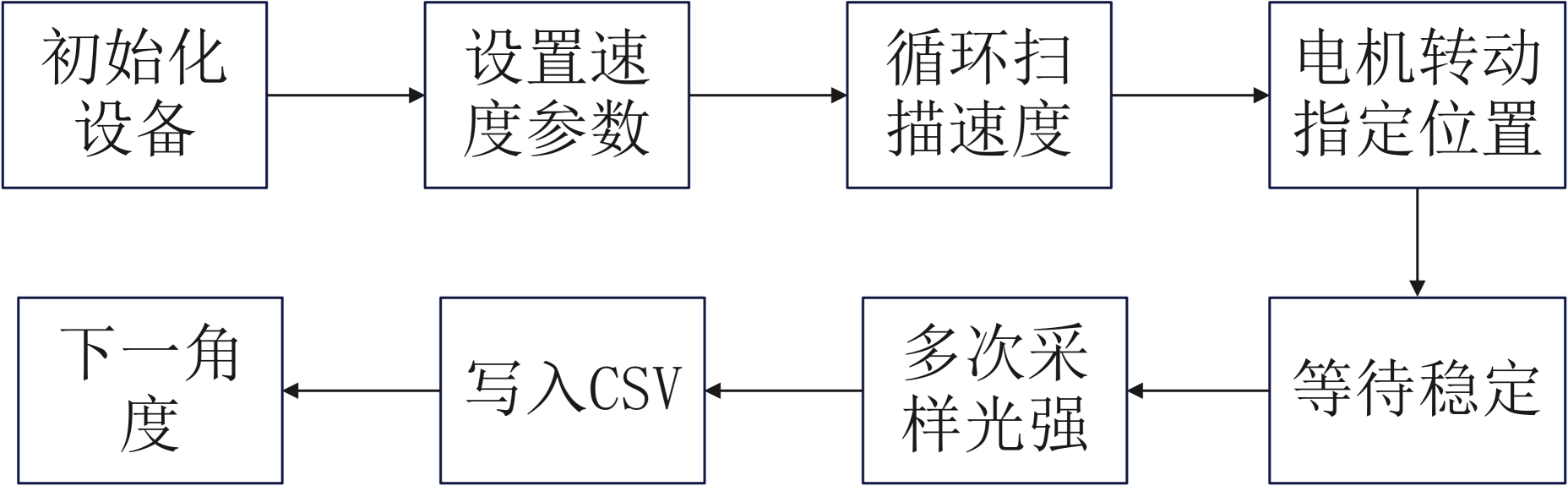
三、系统流程
整体代码逻辑如下:
四、主程序代码解析
📌 核心控制代码
import csv
import time
from hdr50_controller import HDR50Controller
from power_meter import ThorlabsPowerMeter
📌 参数配置
SAMPLES_PER_ANGLE = 3 # 每个角度采样次数
CSV_FILE = "scan_data.csv"
👉 说明:
- 多次采样可以降低噪声
- 建议 ≥3 次
📌 初始化 CSV
with open(CSV_FILE, mode='w', newline='') as f:
writer = csv.writer(f)
header = ["Index", "Angle"]
for i in range(SAMPLES_PER_ANGLE):
header.append(f"Power{i+1}_uW")
writer.writerow(header)
生成类似:
| Index | Angle | Power1 | Power2 | Power3 |
|---|
📌 初始化设备
motor = HDR50Controller("40344804")
pm = ThorlabsPowerMeter(wavelength_nm=633.0)
📌 设置电机参数
motor.set_velocity(5, 5)
👉 含义:
- 最大速度:5 deg/s
- 加速度:5 deg/s²
📌 扫描逻辑(核心)
for angle in range(30, 361, 5):
motor.move_to(angle)
time.sleep(0.7) # 等待稳定
👉 说明:
- 从 30° 扫到 360°
- 步长 5°
📌 光强采样
powers = []
for _ in range(SAMPLES_PER_ANGLE):
power = pm.read_power()
powers.append(power)
time.sleep(0.1)
👉 关键点:
- 防止连续读取导致数据抖动
- 加入采样间隔
📌 数据写入
with open(CSV_FILE, mode='a', newline='') as f:
writer = csv.writer(f)
writer.writerow([index, angle] + powers)
五、电机控制类解析(HDR50Controller)
📌 初始化设备
DeviceManagerCLI.BuildDeviceList()
self.device = BenchtopStepperMotor.CreateBenchtopStepperMotor(self.serial)
👉 使用 Thorlabs 官方 SDK
📌 启动设备
self.channel.StartPolling(250)
self.channel.EnableDevice()
📌 移动控制
def move_to(self, angle):
self.channel.MoveTo(Decimal(angle), 60000)
👉 精确角度控制(单位:度)
📌 扫描封装(高级用法)
def step_scan(self, start, end, step, delay=0.5, callback=None):
👉 支持回调函数(非常关键!)
例如:
def collect(angle):
print("采集数据")
motor.step_scan(0, 360, 5, callback=collect)
六、光强采集类解析(重点!)
📌 DLL加载
self.tlpm = ctypes.cdll.LoadLibrary("TLPM_64.dll")
👉 注意:
- 必须安装 Thorlabs 驱动
- 或指定路径
📌 自动设备查找
self.tlpm.TLPM_findRsrc(0, ctypes.byref(count))
📌 初始化设备
self.tlpm.TLPM_init(device_address, ...)
⭐ 核心优化:稳定处理
for _ in range(5):
self.tlpm.TLPM_measPower(...)
time.sleep(0.3)
👉 作用:
🚨 丢弃前几次不稳定数据(非常关键)
📌 光强读取
return power_W.value * 1e6
👉 单位转换:
- W → μW
七、系统整体代码
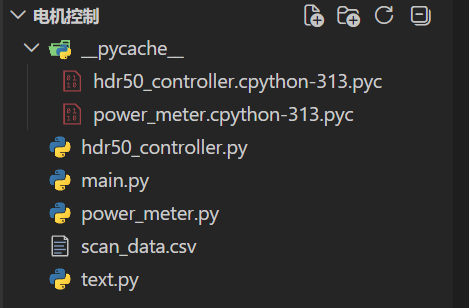
使用VSCode编辑器打开:文件整体架构如下
main.py如下
import csv
import time
from hdr50_controller import HDR50Controller
from power_meter import ThorlabsPowerMeter

# ===== 参数 =====
SAMPLES_PER_ANGLE = 3   # 每个角度采样次数
CSV_FILE = "scan_data.csv"

# ===== 初始化 CSV(写表头)=====
with open(CSV_FILE, mode='w', newline='') as f:
    writer = csv.writer(f)

    # 表头
    header = ["Index", "Angle"]
    for i in range(SAMPLES_PER_ANGLE):
        header.append(f"Power{i+1}_uW")

    writer.writerow(header)

print("📄 CSV 文件已创建")

# ===== 初始化设备 =====
motor = None
pm = None

try:
    motor = HDR50Controller("40344804")
    pm = ThorlabsPowerMeter(wavelength_nm=633.0)

    motor.set_velocity(5, 5)#加速度和最大速度
    # motor.home()

    index = 0

    # ===== 扫描 =====
    for angle in range(30, 361, 5):  # 0~360;1步
        motor.move_to(angle)

        # 等待稳定(建议保留)
        time.sleep(0.7)#700ms

        # ===== 多次采样 =====
        powers = []
        for _ in range(SAMPLES_PER_ANGLE):
            power = pm.read_power()
            powers.append(power)
            time.sleep(0.1)  # 防止连续读取太快

        # ===== 打印 =====
        print(f"👉 角度: {angle:>3}° | 数据: {powers}")

        # ===== 实时写入 CSV =====
        with open(CSV_FILE, mode='a', newline='') as f:
            writer = csv.writer(f)
            writer.writerow([index, angle] + powers)

        index += 1

except Exception as e:
    print(f"\n❌ 实验出错: {e}")

finally:
    if motor:
        motor.close()
    if pm:
        pm.close()

    print("🔌 设备已安全关闭")
hdr50_controller.py
import sys
import time
import clr

sys.path.append(r"C:\Program Files\Thorlabs\Kinesis")
# type: ignore
clr.AddReference("Thorlabs.MotionControl.DeviceManagerCLI")
clr.AddReference("Thorlabs.MotionControl.GenericMotorCLI")
clr.AddReference("Thorlabs.MotionControl.Benchtop.StepperMotorCLI")

from Thorlabs.MotionControl.DeviceManagerCLI import DeviceManagerCLI
from Thorlabs.MotionControl.Benchtop.StepperMotorCLI import BenchtopStepperMotor
from System import Decimal


class HDR50Controller:
    def __init__(self, serial_number, channel_id=1):
        self.serial = serial_number

        DeviceManagerCLI.BuildDeviceList()

        self.device = BenchtopStepperMotor.CreateBenchtopStepperMotor(self.serial)
        self.device.Connect(self.serial)

        time.sleep(1)

        self.channel = self.device.GetChannel(channel_id)

        self.channel.StartPolling(250)
        time.sleep(1)

        self.channel.EnableDevice()
        time.sleep(1)

        # ⭐ 初始化参数(必须)
        self.channel.WaitForSettingsInitialized(10000)
        if not self.channel.IsSettingsInitialized():
            raise Exception("Settings not initialized")

        self.channel.LoadMotorConfiguration(self.serial)
        self.channel.SetSettings(self.channel.MotorDeviceSettings, True, False)

        print("✅ 设备初始化完成")

    # ===== 设置速度 =====
    def set_velocity(self, max_vel, acc):
        self.channel.SetVelocityParams(Decimal(max_vel), Decimal(acc))
        print(f"⚙️ 速度设置: {max_vel} deg/s, 加速度: {acc} deg/s²")

    # ===== 回零 =====
    def home(self):
        print("🏠 回零中...")
        self.channel.Home(60000)
        print("✅ 回零完成")

    # ===== 移动到指定角度 =====
    def move_to(self, angle):
        print(f"➡️ 移动到 {angle} deg")
        self.channel.MoveTo(Decimal(angle), 60000)

    # ===== 获取当前位置 =====
    def get_position(self):
        return float(self.channel.Position)

    # ===== 步进扫描(核心函数)=====
    def step_scan(self, start, end, step, delay=0.5, callback=None):
        """
        start: 起始角度
        end: 终止角度
        step: 步长(比如1度)
        delay: 每步等待时间
        callback: 采集函数(你自己的数据采集)
        """

        angle = start
        while angle <= end:
            self.move_to(angle)
            time.sleep(delay)

            print(f"📡 当前角度: {angle}")

            # 👉 调用你的采集函数
            if callback:
                callback(angle)

            angle += step

    # ===== 关闭设备 =====
    def close(self):
        self.channel.StopPolling()
        self.device.Disconnect()
        print("🔌 设备已断开")
power_meter.py
import time
import ctypes

# ==========================================
# 终极稳定版:光强探测器类 (带自动丢弃不稳定数据功能)
# ==========================================
class ThorlabsPowerMeter:
    def __init__(self, wavelength_nm=633.0):
        print("🔌 正在连接光强探测器...")

        # 1. 加载 DLL
        try:
            self.tlpm = ctypes.cdll.LoadLibrary("TLPM_64.dll")
        except OSError:
            try:
                self.tlpm = ctypes.cdll.LoadLibrary(r"C:\Program Files\IVI Foundation\VISA\Win64\Bin\TLPM_64.dll")
            except OSError:
                raise Exception("❌ 找不到 TLPM_64.dll!")

        # 2. 查找并初始化设备
        count = ctypes.c_uint32(0)
        self.tlpm.TLPM_findRsrc(0, ctypes.byref(count))
        if count.value == 0:
            raise Exception("❌ 没有找到光强探测器。")

        buffer = ctypes.create_string_buffer(256)
        self.tlpm.TLPM_getRsrcName(0, 0, buffer)
        device_address = buffer.value

        self.handle = ctypes.c_uint32(0)
        status = self.tlpm.TLPM_init(device_address, ctypes.c_uint16(1), ctypes.c_uint16(1), ctypes.byref(self.handle))
        if status != 0:
            raise Exception(f"❌ 初始化失败,错误码: {status}")

        # 3. 设置波长
        self.set_wavelength(wavelength_nm)

        # ==================================================
        # ⭐ 核心修复:添加硬件稳定期(抛弃初期的垃圾数据)
        # ==================================================
        print("⏳ 正在等待硬件自动量程匹配与数据稳定 (约 1.5 秒)...")
        # 连续读取并丢弃 5 次数据,每次间隔 0.3 秒
        for _ in range(5):
            power_W = ctypes.c_double(0.0)
            self.tlpm.TLPM_measPower(self.handle, ctypes.byref(power_W))
            time.sleep(0.3)

        print("✅ 探测器已完全稳定就绪!\n")

    def set_wavelength(self, wl_nm):
        """设置探测器的校准波长"""
        status = self.tlpm.TLPM_setWavelength(self.handle, ctypes.c_double(wl_nm))
        if status == 0:
            print(f"🌈 波长已设置为: {wl_nm} nm")
        else:
            print(f"⚠️ 设置波长失败,错误码: {status}")

    def read_power(self):
        """
        读取当前光强
        :return: 光强值,单位 微瓦 (uW)
        """
        power_W = ctypes.c_double(0.0)
        self.tlpm.TLPM_measPower(self.handle, ctypes.byref(power_W))

        # 转换为微瓦
        return power_W.value * 1e6

    def close(self):
        """关闭设备"""
        if hasattr(self, 'handle') and self.handle.value != 0:
            self.tlpm.TLPM_close(self.handle)
            print("🔌 光强计连接已安全关闭。")


# ==========================================
# 单独测试代码
# ==========================================
# if __name__ == "__main__":
#     pm = None
#     try:
#         # 当执行这行代码时,系统会自动把前几组跳动的数据吃掉
#         pm = ThorlabsPowerMeter(wavelength_nm=633.0)

#         print("🚀 开始正式读取光强数据 (连续读取 5 次)...")
#         print("-" * 45)

#         for i in range(1, 20):
#             power_val_uW = pm.read_power()
#             print(f"👉 第 {i:2d} 次正式读取: 当前光强 = {power_val_uW:.3f} uW")
#             time.sleep(0.1)

#         print("-" * 45)
#         print("🎉 测试完毕!")

#     except Exception as e:
#         print(f"\n⚠️ 异常:\n{e}")

#     finally:
#         if pm is not None:
# pm.close()更多推荐


 12
12 0
0- 0


 已为社区贡献1条内容

所有评论(0)