
Python项目测试Pytest
·
Python项目测试Pytest
文章目录
1. 测试框架确认
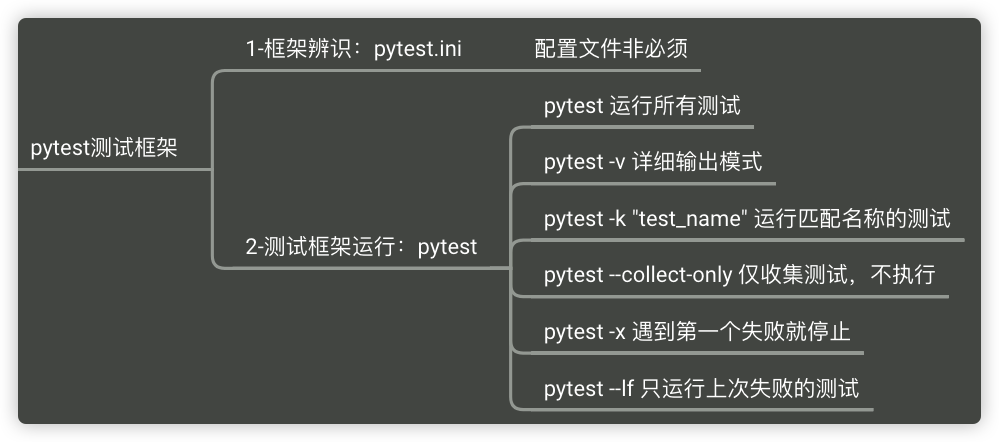
根据您提到的 pytest.ini 配置文件,可以确定您项目使用的是 pytest 测试框架。pytest 是 Python 中最流行的测试框架之一,简洁易用且功能强大。
2. 测试文件夹结构
典型的 Python 项目测试结构如下:
project/
├── src/                    # 源代码目录
│   └── mymodule.py
├── tests/                  # 测试文件夹(也可以叫 test/)
│   ├── __init__.py
│   ├── test_example.py     # 测试文件(必须以 test_ 开头)
│   └── test_another.py
├── pytest.ini              # pytest 配置文件
└── requirements.txt        # 依赖文件
3. 最小测试 Demo
第一步:创建测试文件
在 tests/ 目录下创建测试文件:
# tests/test_demo.py

# 导入被测试的模块
from mymodule import add, multiply


# 测试函数必须以 test_ 开头
def test_add():
    """测试加法函数"""
    assert add(1, 2) == 3
    assert add(-1, 1) == 0
    assert add(0, 0) == 0


def test_multiply():
    """测试乘法函数"""
    assert multiply(2, 3) == 6
    assert multiply(0, 100) == 0
    assert multiply(-2, 3) == -6


def test_add_with_floats():
    """测试浮点数加法"""
    assert abs(add(0.1, 0.2) - 0.3) < 1e-9
第二步:创建示例源代码
# src/mymodule.py

def add(a, b):
    """加法函数"""
    return a + b


def multiply(a, b):
    """乘法函数"""
    return a * b
第三步:运行测试
在项目根目录下执行:
# 运行所有测试
pytest

# 运行指定测试文件
pytest tests/test_demo.py

# 运行指定测试函数
pytest tests/test_demo.py::test_add

# 显示详细输出
pytest -v

# 显示打印信息
pytest -s
4. pytest.ini 配置文件示例
# pytest.ini
[pytest]
# 测试文件目录
testpaths = tests

# 测试文件匹配模式
python_files = test_*.py

# 测试类匹配模式
python_classes = Test*

# 测试函数匹配模式
python_functions = test_*

# 添加自定义选项
addopts = -v --tb=short
5. 常用 pytest 命令
| 命令 | 说明 |
|---|---|
pytest |
运行所有测试 |
pytest -v |
详细输出模式 |
pytest -k "test_name" |
运行匹配名称的测试 |
pytest --collect-only |
仅收集测试,不执行 |
pytest -x |
遇到第一个失败就停止 |
pytest --lf |
只运行上次失败的测试 |
6. 断言示例
pytest 提供了丰富的断言语法:
def test_assertions():
    # 相等断言
    assert result == expected

    # 异常断言
    with pytest.raises(ValueError):
        raise_value_error()

    # 近似相等(用于浮点数)
    assert abs(a - b) < 0.001

    # 成员断言
    assert item in list_

    # 类型断言
    assert isinstance(obj, str)
2-pytest.ini 配置文件需要手动配置吗?
不需要手动配置!pytest 有智能的默认行为,如果您遵循命名约定,pytest.ini 配置文件完全是可选的。
pytest 的默认行为
| 配置项 | 默认值 | 说明 |
|---|---|---|
| 测试目录 | tests/ 或 test/ |
自动查找 |
| 测试文件 | test_*.py 或 *_test.py |
自动识别 |
| 测试函数 | test_ 开头 |
自动识别 |
| 测试类 | Test 开头 |
自动识别 |
最小化配置示例
如果您遵循命名约定,只需要以下文件即可运行测试:
project/
├── src/
│   └── mymodule.py
└── tests/
    ├── __init__.py
    └── test_demo.py    # 文件名以 test_ 开头
然后直接运行:
pytest
什么时候需要 pytest.ini?
仅在以下情况需要手动配置:
- 测试目录名称不是
tests/或test/ - 想自定义测试文件命名模式
- 想添加运行选项(如
-v默认开启) - 想设置代码路径(pythonpath)
我的建议
如果您刚接触 pytest,可以直接删除 pytest.ini,先让测试跑起来。配置文件的优先级较低,等熟悉后再逐步添加自定义配置即可。
更多推荐


 8
8 0
0- 0



 已为社区贡献4条内容

所有评论(0)