
利用msys2和vscode配置opencv环境
·
项目场景:
利用msys2和vscode配置opencv环境
过程
1.下载msys2
进入清华源 https://mirrors.tuna.tsinghua.edu.cn/msys2/distrib/x86_64/,选择对应版本,注意系统架构。
下载后缀为.exe的
2.中断网络开始安装msys2,否则会卡在50%。
好像是签名校验要访问外网获取公钥,但国内访问不了,所以断网让本地公钥验证就行
3.改镜像源
打开自己喜欢的终端(推荐的ucrt64 ),输入命令
sed -i "s#https\?://mirror.msys2.org/#https://mirrors.tuna.tsinghua.edu.cn/msys2/#g" /etc/pacman.d/mirrorlist*
4.配置环境变量
详情请看这位博主,写得非常好
https://www.cnblogs.com/x420520/p/18489367
一是msys2的,二是ucrt64的
5.更新索引和软件,下载需要的东西(注意:不同终端对应软件名不一样,自行修改)
pacman -Syu
pacman -S mingw-w64-ucrt-x86_64-toolchain
pacman -S mingw-w64-x86_64-opencv
pacman -S mingw-w64-x86_64-qt6-base
6.配置vscode
在项目目录下新建.vscode,建立三个配置文件
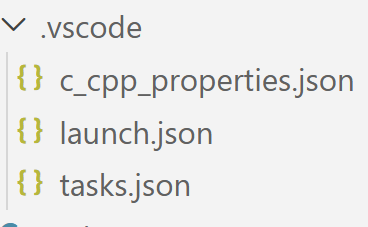
{
    "configurations": [
        {
            "name": "UCRT64",
            "includePath": [
                "${workspaceFolder}/**",
                "E:/msys64/ucrt64/include/**",
                "E:/msys64/ucrt64/include/opencv4/opencv2/**"
            ],
            "defines": [
                "_DEBUG",
                "UNICODE",
                "_UNICODE"
            ],
            "compilerPath": "E:/msys64/ucrt64/bin/g++.exe",
            "cStandard": "c17",
            "cppStandard": "c++17",
            "intelliSenseMode": "windows-gcc-x64"
        }
    ],
    "version": 4
}
{
    "version": "0.2.0",
    "configurations": [
        {
            "name": "Debug OpenCV Project",
            "type": "cppdbg",
            "request": "launch",
            "program": "${fileDirname}/${fileBasenameNoExtension}.exe",
            "args": [],
            "stopAtEntry": false,
            "cwd": "${fileDirname}",
            "environment": [],
            "externalConsole": false,
            "MIMode": "gdb",
            "miDebuggerPath": "E:/msys64/ucrt64/bin/gdb.exe",
            "setupCommands": [
                {
                    "description",
                    "text": "-enable-pretty-printing",
                    "ignoreFailures": true
                }
            ],
            "preLaunchTask": "Build OpenCV Project"
        }
    ]
}
{
  "tasks": [
    {
      "type": "cppbuild",
      "label": "C/C++: g++.exe 生成活动文件 (UCRT64)",
      "command": "E:/msys64/ucrt64/bin/g++.exe",
      "args": [
        "-fdiagnostics-color=always",
        "-g",
        "${file}",
        "-o",
        "${fileDirname}\\${fileBasenameNoExtension}.exe",
        "-I",
        "E:/msys64/ucrt64/include/opencv4",
        "-L",
        "E:/msys64/ucrt64/lib",
        "-l",
        "opencv_core",
        "-l",
        "opencv_imgcodecs",
        "-l",
        "opencv_highgui",
        "-l",
        "opencv_imgproc"
      ],
      "options": {
        "cwd": "${fileDirname}"
      },
      "problemMatcher": [
        "$gcc"
      ],
      "group": {
        "kind": "build",
        "isDefault": true
      },
      "detail": "使用 UCRT64 编译 OpenCV 程序"
    }
  ],
  "version": "2.0.0"
}
结束。
更多推荐



 8
8 0
0- 0


 已为社区贡献1条内容

所有评论(0)