
从73%到91%:用PyTRIO微调Qwen3.5-4B完成文本分类
用 PyTRIO 微调 Qwen3.5-4B,只训练 200 条文本分类数据,验证准确率从 73% 提升到 91%。整个实验约消耗 0.5M token。
在上面的章节中,我们对 pytrio 的核心 API 已经有了基本的了解。
本节,让我们来做一次训练实战:用 pytrio 写一个监督微调(sft)训练代码,完成一个文本分类任务,并评估微调前后的表现。在本次训练中,仅用200条数据,就将准确率从73%提高到了91%:
| 模型 | 训练数据 | 准确率 |
|---|---|---|
| Qwen3.5-4B Base | 0 | 73% |
| Qwen3.5-4B SFT | 200 | 91% |

任务介绍
文本分类是NLP领域的经典任务,做的事情是给一段文本,让模型说出这段文本属于某个标签(label)。
比如给一则NBA新闻,模型说这篇文章属于“体育”;给一篇帖子,让模型判断是不是“广告营销”等。一个高精度的文本分类模型,有很高的落地价值。
ok,了解了文本分类的概念后,我们进入这次的任务。
我们先看一个数据集:
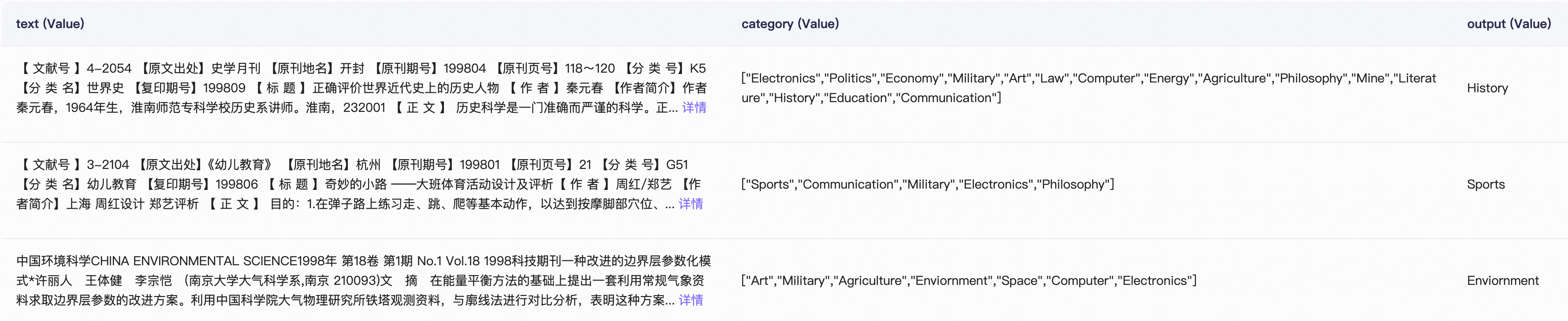
这个数据集由书报期刊文本组成(见第一列),并给出了一系列候选标签,比如“Electronics”(电子)、“Art”(艺术)、“History”(历史),其中只有一个是正确标签。下面给出一个JSONL格式的示例:
{
  "text": "A history of electronic music...",
  "category": ["Electronics", "Art", "History"],
  "output": "History"
}
模型要做的事就是,根据第一列的文本和第二列的候选标签,预测哪个标签是正确的。
考虑到性价比,选择「Qwen3.5-4B」作为基模。
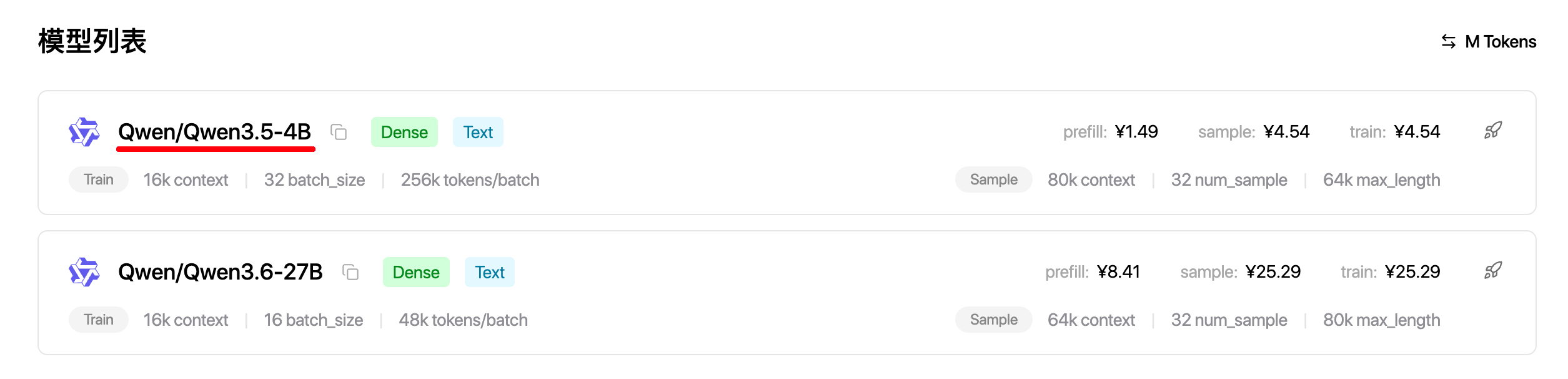
直接用基模+提示词,做这个任务的效果如何?经过实测,准确率只有76%,不太能满足需求;我们的目标是通过微调,让分类准确率大幅提升。
ok,了解了背景,我们开始实战。
准备工作
注册一个pytrio账号:pytrio.com,并在本地用trio login命令完成登录
设备: 任意一台CPU机器,比如你的个人电脑(本地电脑只负责数据处理和调用 PyTRIO SDK,模型的前向、反向传播和参数更新都在远程服务完成,因此不需要本地 GPU。)
Python版本: 3.10以上
本次代码在: https://github.com/Zeyi-Lin/awesome-pytrio-train/tree/main/sft/text_classification
数据集地址在: https://modelscope.cn/datasets/testUser/SFT-Text-Classification
- 我们把代码下载到本地:
git clone https://github.com/Zeyi-Lin/awesome-pytrio-train.git
- 进入到
sft/text_classification目录下:
cd sft/text_classification
- 安装需要的环境:
pip install -r requirements.txt
- 下载数据集,这里使用Modelscope,所以在国内网络下也很快:
modelscope download --dataset testUser/SFT-Text-Classification train.jsonl --local_dir ./
modelscope download --dataset testUser/SFT-Text-Classification test.jsonl --local_dir ./
完成上述准备工作后,文件结构是这样的:
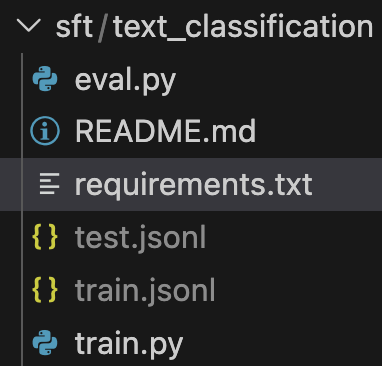
-
train.py:文本分类训练脚本 -
eval.py:评估脚本,用于评估训练完成后的权重表现 -
train.jsonl:训练集,有3000条数据 -
test.jsonl:验证集,有1000条数据
开始训练
启动训练:
python train.py
训练使用的默认设置是:
-
模型:Qwen3.5-4B
-
epoch:1轮
-
batch_size:32
-
train_size(训练集取的数据条数):200
-
max_seq_len(最大token长度):4096
整个训练过程大概消耗的token数是0.5M,花销是2.5元左右,只比农夫山泉略高一点。
如果想要调整配置,在train.py的开头部分修改即可。
下面是运行训练的终端打印,全程大约几分钟:
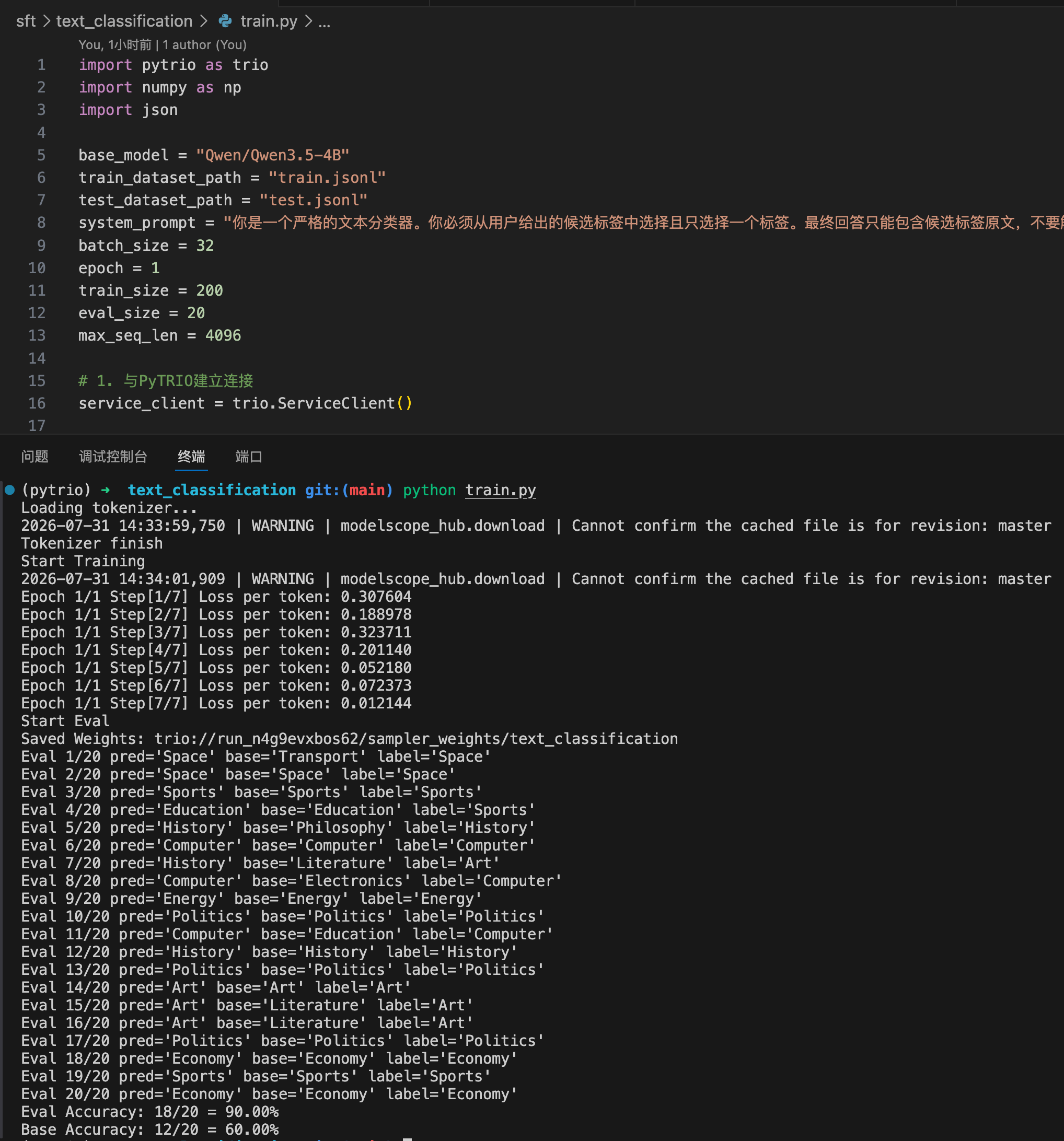
训练脚本中的评估,取的是测试集中的前20条,用未经训练的base model和刚刚训练好的模型测试。
可以看到,在这20条上,base model的准确率是60%,而sft后的模型的准确率是90%,非常显著。
评估结果
接下来我们在更多的数据上进行评估。
首先我们需要在控制台上找到刚训练好的权重路径:
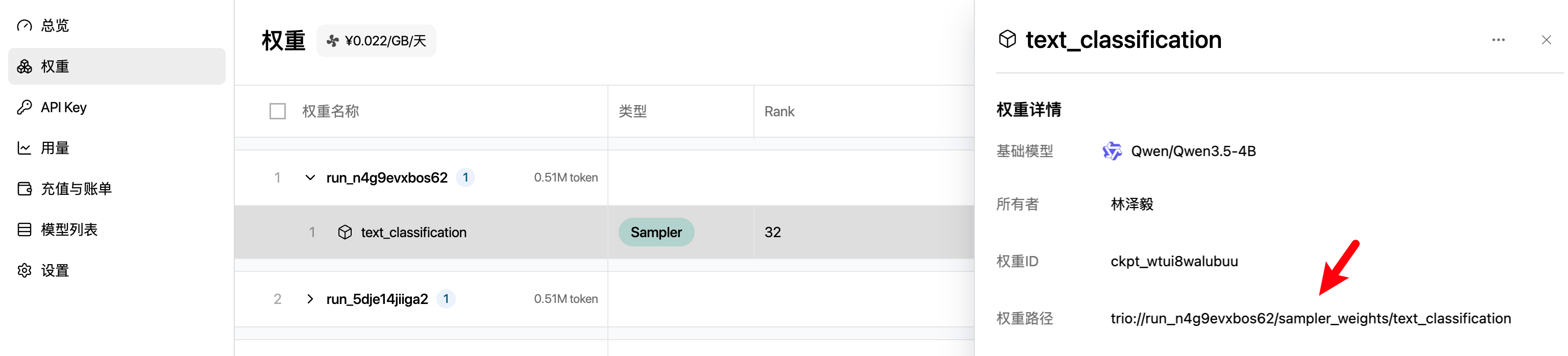
然后替换下面命令行的YOUR_PYTRIO_WEIGHT_PATH:
python eval.py --model-path YOUR_PYTRIO_WEIGHT_PATH --eval-size 100
运行后,会在验证集上取前100条进行评测,最终给出一个结果:
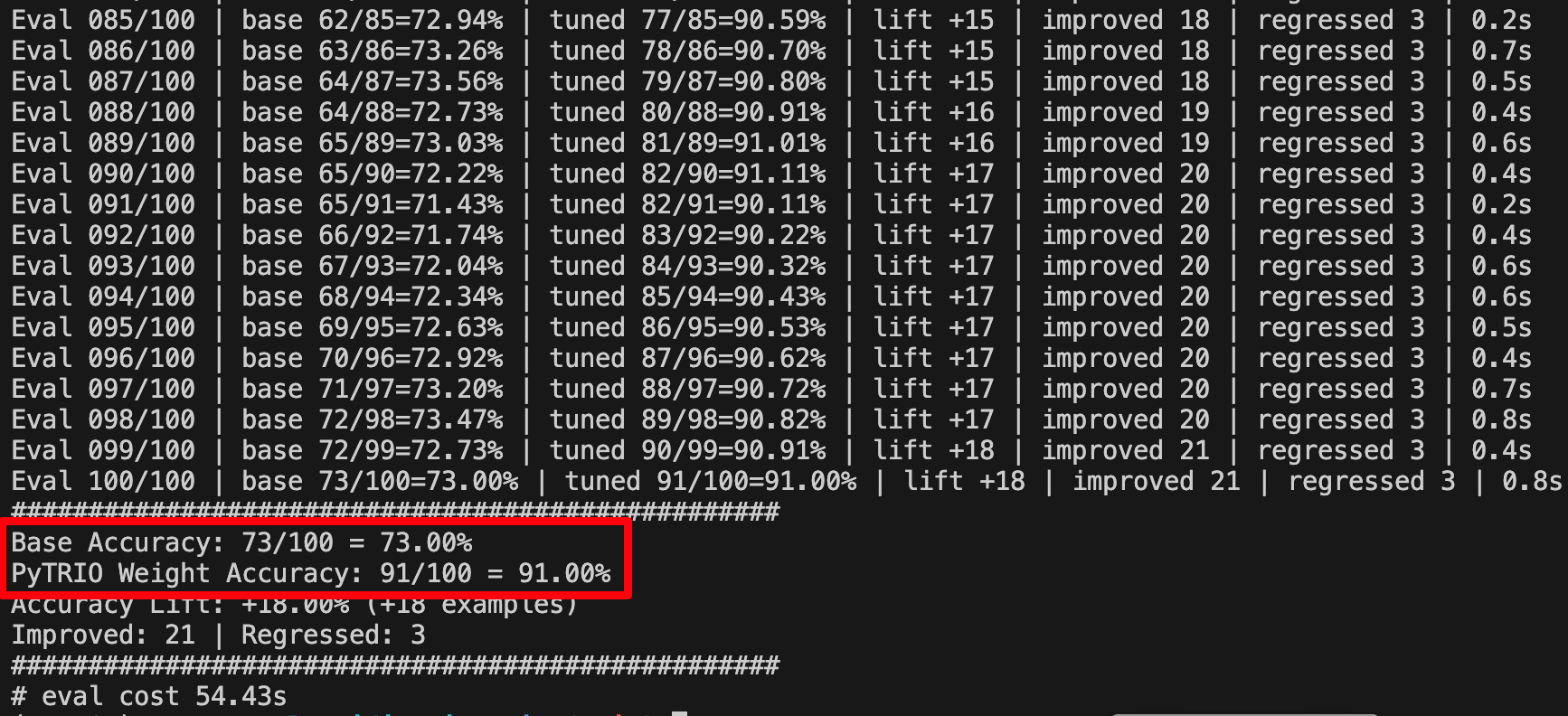
可以看到,base模型的分类准确率是73%,sft后模型则是91%,提高了18%的准确率。
这还只是训练了200条数据的结果,如果用更多数据 + 更丰富训练策略 + 换27B模型,相信准确率能提升的更高。
附录
-
PyTRIO:pytrio.com
-
代码:https://github.com/Zeyi-Lin/awesome-pytrio-train/tree/main/sft/text_classification
-
数据集:https://modelscope.cn/datasets/testUser/SFT-Text-Classification
-
训练代码完整版:
import pytrio as trio
import numpy as np
import json

base_model = "Qwen/Qwen3.5-4B"
train_dataset_path = "train.jsonl"
test_dataset_path = "test.jsonl"
system_prompt = "你是一个严格的文本分类器。你必须从用户给出的候选标签中选择且只选择一个标签。最终回答只能包含候选标签原文,不要解释、不要复述文本、不要输出标点、不要输出 JSON。"
batch_size = 32
epoch = 1
train_size = 200
eval_size = 20
max_seq_len = 4096

# 1. 与PyTRIO建立连接
service_client = trio.ServiceClient()

# 2. 创建1个训练客户端
training_client = service_client.create_lora_training_client(
    base_model=base_model,
    rank=32,
)

# 3. 数据集构建-文本分类
def load_examples(path: str = "train.jsonl") -> list[dict]:
    examples = []
    with open(path, "r", encoding="utf-8") as file:
        for line in file:
            if line.strip():
                examples.append(json.loads(line))
    return examples

examples = load_examples(train_dataset_path)[:train_size]
eval_examples = load_examples(test_dataset_path)[:eval_size]

# 4. 获取Tokenizer
print("Loading tokenizer...")
tokenizer = training_client.get_tokenizer()
print("Tokenizer finish")

# 5. 处理数据集,转换为训练需要的格式
def render_prompt_parts(example: dict) -> tuple[str, str]:
    categories = example["category"]
    if isinstance(categories, list):
        categories = ", ".join(categories)

    prefix = (
        f"<|im_start|>system\n{system_prompt}<|im_end|>\n"
        "<|im_start|>user\n文本:"
    )
    suffix = (
        f"\n候选标签:{categories}<|im_end|>\n"
        "<|im_start|>assistant\n<think>\n\n</think>\n\n"
    )
    return prefix, suffix

def encode_prompt(example: dict, tokenizer, max_tokens: int) -> list[int]:
    prefix, suffix = render_prompt_parts(example)
    prompt_tokens = tokenizer.encode(f"{prefix}{example['text']}{suffix}", add_special_tokens=False)
    if len(prompt_tokens) <= max_tokens:
        return prompt_tokens

    prefix_tokens = tokenizer.encode(prefix, add_special_tokens=False)
    suffix_tokens = tokenizer.encode(suffix, add_special_tokens=False)
    text_tokens = tokenizer.encode(example["text"], add_special_tokens=False)
    text_tokens = text_tokens[:max_tokens - len(prefix_tokens) - len(suffix_tokens)]
    return prefix_tokens + text_tokens + suffix_tokens

def process_example(example: dict, tokenizer) -> trio.Datum:
    completion_tokens = tokenizer.encode(f"{example['output']}<|im_end|>\n", add_special_tokens=False)
    completion_weights = [1] * len(completion_tokens)

    prompt_tokens = encode_prompt(example, tokenizer, max_seq_len - len(completion_tokens))
    prompt_weights = [0] * len(prompt_tokens)

    tokens = prompt_tokens + completion_tokens
    weights = prompt_weights + completion_weights

    input_tokens = tokens[:-1]
    target_tokens = tokens[1:]
    weights = weights[1:]

    # 转换为trio训练需要的格式
    return trio.Datum(
        model_input=trio.ModelInput.from_ints(tokens=input_tokens),
        loss_fn_inputs={
            "weights": np.asarray(weights, dtype=np.float32),
            "target_tokens": np.asarray(target_tokens, dtype=np.int32),
        },
    )

processed_examples = [process_example(ex, tokenizer) for ex in examples]

# 6. 训练
print("Start Training")
step = 0
steps_per_epoch = (len(processed_examples) + batch_size - 1) // batch_size
total_steps = epoch * steps_per_epoch
for ep in range(epoch):
    for start in range(0, len(processed_examples), batch_size):
        batch = processed_examples[start:start + batch_size]
        fwdbwd_future = training_client.forward_backward(batch, "cross_entropy")  # 前向反向计算
        optim_future = training_client.optim_step(trio.AdamParams(learning_rate=1e-4))  # Adam优化器更新

        fwdbwd_result = fwdbwd_future.result()
        optim_result = optim_future.result()

        step += 1
        print(f"Epoch {ep+1}/{epoch} Step[{step}/{total_steps}] Loss per token: {fwdbwd_result.metrics['loss_mean']:2f}")

# 7. 验证集评估
print("Start Eval")
sft_weights = training_client.save_weights_for_sampler(name="text_classification").result()
print(f"Saved Weights: {sft_weights.path}")
sampling_base_client = service_client.create_sampling_client(base_model=base_model)
sampling_sft_client = service_client.create_sampling_client(
    base_model=base_model,
    model_path=sft_weights.path,
)
params = trio.SamplingParams(max_tokens=20, temperature=0.0)
correct = 0
base_correct = 0

def clean_prediction(text: str) -> str:
    text = text.split("<|im_end|>")[0].strip()
    return text.splitlines()[0].strip() if text else ""

for idx, example in enumerate(eval_examples, start=1):
    prompt = trio.ModelInput.from_ints(encode_prompt(example, tokenizer, max_seq_len - 20))
    future = sampling_sft_client.sample(prompt=prompt, sampling_params=params, num_samples=1)
    base_future = sampling_base_client.sample(prompt=prompt, sampling_params=params, num_samples=1)
    result = future.result()
    base_result = base_future.result()

    pred = clean_prediction(result.sequences[0].text)
    base = clean_prediction(base_result.sequences[0].text)
    label = example["output"].strip()
    correct += int(pred == label)
    base_correct += int(base == label)
    print(f"Eval {idx}/{len(eval_examples)} pred={repr(pred)} base={repr(base)} label={repr(label)}")

print(f"Eval Accuracy: {correct}/{len(eval_examples)} = {correct / len(eval_examples):.2%}")
print(f"Base Accuracy: {base_correct}/{len(eval_examples)} = {base_correct / len(eval_examples):.2%}")
更多推荐

 7
7 0
0- 0


 已为社区贡献2条内容

所有评论(0)