
玩物联网第 5 期:使用CH348芯片IO端口,控制红外灯和传感器报警
系统拓扑:
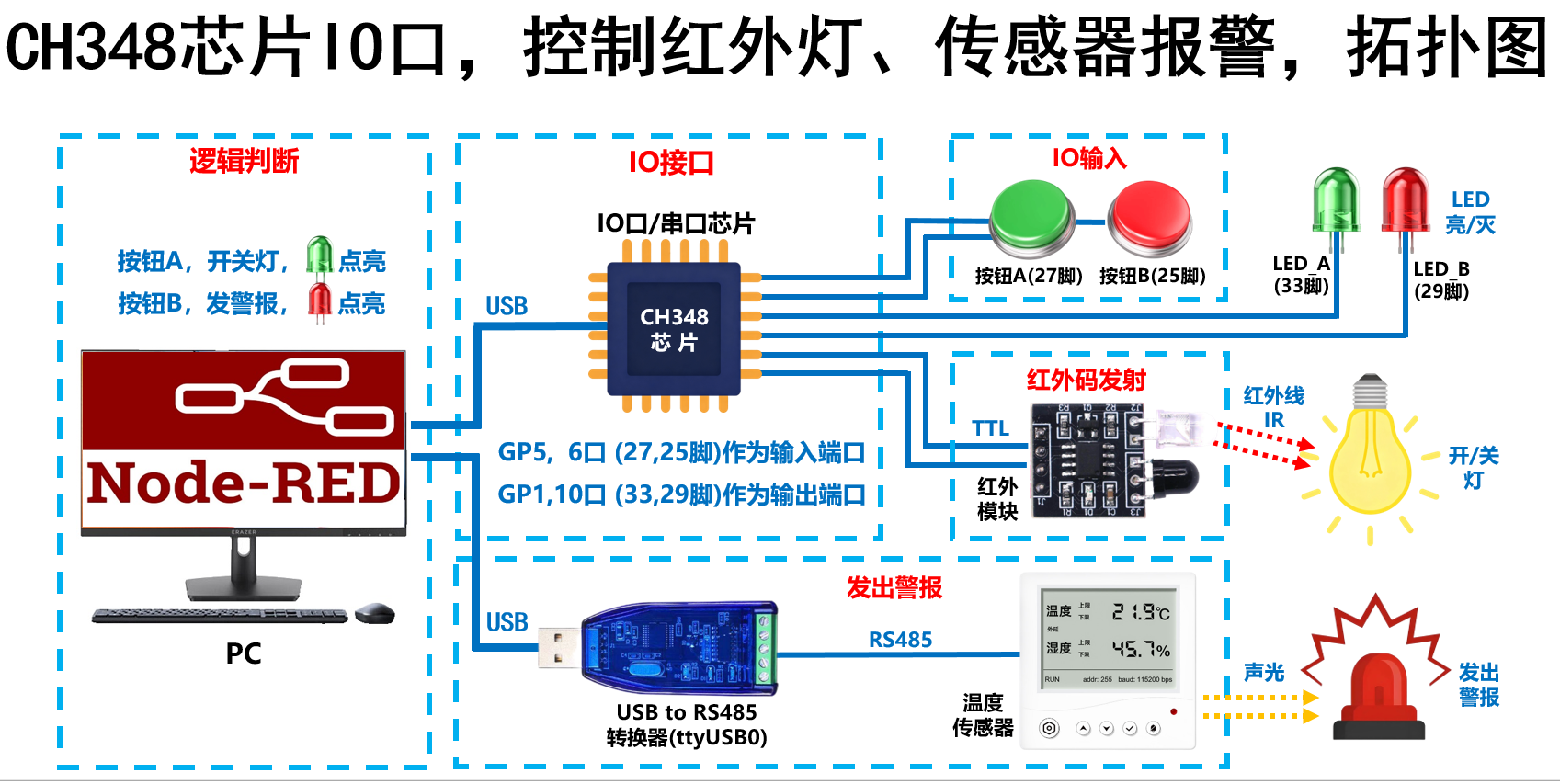

视频地址: https://v.douyin.com/i2voy4xqrho
node-red流json数据:
[
{
"id": "cd3040d39f7937b9",
"type": "tab",
"label": "按钮,控制红外灯、报警",
"disabled": false,
"info": "",
"env": []
},
{
"id": "117c0905ee03d996",
"type": "serial out",
"z": "cd3040d39f7937b9",
"name": "ttyUSB7-红外模块",
"serial": "28fe9f413d88b88a",
"x": 510,
"y": 40,
"wires": []
},
{
"id": "d506bf92bb2fcf4e",
"type": "function",
"z": "cd3040d39f7937b9",
"name": "开/关灯,红外码",
"func": "// lightStatus灯状态,为关false时,才进入if中去开灯\nif (!flow.get(\"lightStatus\")) {\n // 开灯 红外码\n msg.payload = Buffer.from(\"6863000022DC08B20446D5014347454745464646464645464646464646D50143D50143D50143D50143D50143D50143D50143D5014446464646464646464943494346464646D50144D50144D50144D50143D50144D40144D40144D026E50895024B1B16\", \"hex\");\n // flow.set(\"lightStatus\", true); // 将灯状态,设置为true\n} else {\n // 关灯 红外码\n msg.payload = Buffer.from(\"6863000022DE08B50443D5014347454745474547454745474547454745D50143D50143D50143D60143D60143D60143D501424745D60143474547454745474547454745D501434745D50143D50143D50142D60142D50143D50143D326DD089902471616\", \"hex\");\n // flow.set(\"lightStatus\", false); // 将灯状态,设置为false\n}\nreturn msg;",
"outputs": 1,
"timeout": 0,
"noerr": 0,
"initialize": "",
"finalize": "",
"libs": [],
"x": 300,
"y": 40,
"wires": [
[
"117c0905ee03d996"
]
]
},
{
"id": "af1307849d80a689",
"type": "inject",
"z": "cd3040d39f7937b9",
"name": "开/关 按钮",
"props": [
{
"p": "payload"
},
{
"p": "topic",
"vt": "str"
}
],
"repeat": "",
"crontab": "",
"once": false,
"onceDelay": 0.1,
"topic": "",
"payload": "",
"payloadType": "date",
"x": 120,
"y": 40,
"wires": [
[
"d506bf92bb2fcf4e"
]
]
},
{
"id": "a43122b200bae615",
"type": "modbus-write",
"z": "cd3040d39f7937b9",
"name": "设置,报警温度上限值",
"showStatusActivities": false,
"showErrors": false,
"showWarnings": true,
"unitid": "1",
"dataType": "MHoldingRegisters",
"adr": "608",
"quantity": "2",
"server": "c5ccfb4a6c3e3160",
"emptyMsgOnFail": false,
"keepMsgProperties": false,
"delayOnStart": false,
"startDelayTime": "",
"x": 480,
"y": 180,
"wires": [
[],
[]
]
},
{
"id": "e3a87633109033f3",
"type": "inject",
"z": "cd3040d39f7937b9",
"name": "报警,0度",
"props": [
{
"p": "payload"
}
],
"repeat": "",
"crontab": "",
"once": false,
"onceDelay": 0.1,
"topic": "",
"payload": "0",
"payloadType": "str",
"x": 120,
"y": 100,
"wires": [
[
"3a6032ad23f4711d"
]
]
},
{
"id": "6a56f001cff6514d",
"type": "inject",
"z": "cd3040d39f7937b9",
"name": "报警,99度",
"props": [
{
"p": "payload"
}
],
"repeat": "",
"crontab": "",
"once": false,
"onceDelay": 0.1,
"topic": "",
"payload": "99",
"payloadType": "str",
"x": 130,
"y": 160,
"wires": [
[
"3a6032ad23f4711d"
]
]
},
{
"id": "3a6032ad23f4711d",
"type": "function",
"z": "cd3040d39f7937b9",
"name": "转换成CDAB格式",
"func": "// 将温度字符串,变number(数字)\n// let temperature = Number(msg.payload);\n\nlet temperature = flow.get(\"alarmStatus\")?0:99;\n\nif (isNaN(temperature)) {\n node.error(\"温度不是有效数字\");\n return null;\n}\n\n// 声明buffer变量(二进制容器)\nlet buffer = Buffer.alloc(4);\n\n// 将温度值,写入buffer\nbuffer.writeFloatBE(temperature, 0);\n\n// 将温度值转为CDAB格式\nmsg.payload = [\n buffer.readUInt16BE(2), // 从第2格开始读2字节 → 00 00(CD低字)\n buffer.readUInt16BE(0) // 从第0格开始读2字节 → 42 A0(AB高字)\n];\nreturn msg;",
"outputs": 1,
"timeout": 0,
"noerr": 0,
"initialize": "",
"finalize": "",
"libs": [],
"x": 310,
"y": 120,
"wires": [
[
"a43122b200bae615"
]
]
},
{
"id": "b917608ef48e5d4c",
"type": "exec",
"z": "cd3040d39f7937b9",
"command": "/home/ch348/ch348_gpio",
"addpay": "payload",
"append": "",
"useSpawn": "false",
"timer": "0.06",
"winHide": false,
"oldrc": false,
"name": "",
"x": 490,
"y": 280,
"wires": [
[
"9f7cbc3216d30517"
],
[],
[]
]
},
{
"id": "ac52f4da0539aaa8",
"type": "inject",
"z": "cd3040d39f7937b9",
"name": "绿LED",
"props": [
{
"p": "payload"
},
{
"p": "topic",
"vt": "str"
}
],
"repeat": "",
"crontab": "",
"once": false,
"onceDelay": 0.1,
"topic": "",
"payload": "",
"payloadType": "date",
"x": 90,
"y": 360,
"wires": [
[
"831d7acbe495de40"
]
]
},
{
"id": "831d7acbe495de40",
"type": "function",
"z": "cd3040d39f7937b9",
"name": "输出,控制指令",
"func": "// // ledStatus状态,为关false时,调用“输出高电平”指令\n// if(!flow.get(\"ledStatus\")) {\n// msg.payload = \"write 1 1\"; // gpio1设置为高电平\n// flow.set(\"ledStatus\", true); // LED状态,设置为true\n// } else {\n// // ledStatus状态,为关true时,调用“输出低电平”指令\n// msg.payload = \"write 1 0\"; // gpio1设置为低电平\n// flow.set(\"ledStatus\", false); // LED状态,设置false\n// }\nmsg.payload = \"write 1 \" + (flow.get(\"lightStatus\")?0:1);\nreturn msg;",
"outputs": 1,
"timeout": 0,
"noerr": 0,
"initialize": "",
"finalize": "",
"libs": [],
"x": 240,
"y": 360,
"wires": [
[
"b917608ef48e5d4c"
]
]
},
{
"id": "8290cf21c15ab7b6",
"type": "inject",
"z": "cd3040d39f7937b9",
"name": "红LED",
"props": [
{
"p": "payload"
},
{
"p": "topic",
"vt": "str"
}
],
"repeat": "",
"crontab": "",
"once": false,
"onceDelay": 0.1,
"topic": "",
"payload": "",
"payloadType": "date",
"x": 90,
"y": 420,
"wires": [
[
"90e7c4c93927fd96"
]
]
},
{
"id": "90e7c4c93927fd96",
"type": "function",
"z": "cd3040d39f7937b9",
"name": "输出,控制指令",
"func": "// // ledStatus状态,为关false时,调用“输出高电平”指令\n// if(!flow.get(\"redLedStatus\")) {\n// msg.payload = \"write 10 1\"; // gpio10设置为高电平\n// flow.set(\"redLedStatus\", true); // LED状态,设置为true\n// } else {\n// // ledStatus状态,为关true时,调用“输出低电平”指令\n// msg.payload = \"write 10 0\"; // gpio10设置为低电平\n// flow.set(\"redLedStatus\", false); // LED状态,设置false\n// }\nmsg.payload = \"write 10 \" + (flow.get(\"alarmStatus\")?1:0);\nreturn msg;",
"outputs": 1,
"timeout": 0,
"noerr": 0,
"initialize": "",
"finalize": "",
"libs": [],
"x": 240,
"y": 420,
"wires": [
[
"b917608ef48e5d4c"
]
]
},
{
"id": "531c61bc00a810b5",
"type": "inject",
"z": "cd3040d39f7937b9",
"name": "检测,按钮B",
"props": [
{
"p": "payload"
},
{
"p": "topic",
"vt": "str"
}
],
"repeat": "0.5",
"crontab": "",
"once": true,
"onceDelay": "0.6",
"topic": "",
"payload": "read 6",
"payloadType": "str",
"x": 140,
"y": 300,
"wires": [
[
"b917608ef48e5d4c"
]
]
},
{
"id": "6c4a01e1a873c298",
"type": "inject",
"z": "cd3040d39f7937b9",
"name": "检测,按钮A",
"props": [
{
"p": "payload"
},
{
"p": "topic",
"vt": "str"
}
],
"repeat": "0.5",
"crontab": "",
"once": false,
"onceDelay": 0.1,
"topic": "",
"payload": "read 5",
"payloadType": "str",
"x": 140,
"y": 240,
"wires": [
[
"b917608ef48e5d4c"
]
]
},
{
"id": "9f7cbc3216d30517",
"type": "function",
"z": "cd3040d39f7937b9",
"name": "解析exec节点输出",
"func": "// 1. 强转 exec 节点输出的文本并去除首尾空格\nlet rawText = msg.payload.toString().trim();\n\ntry {\n // 2. 专业操作:将标准的 JSON 字符串解析成 JavaScript 纯对象\n let res = JSON.parse(rawText);\n \n // 3. 直接通过属性和纯数字进行精准、专业的工控逻辑判断\n if (res.data.pin === 5 && res.data.value === 1) {\n msg.payload = \"✅ 按钮 A,被按下!\";\n flow.set(\"lightStatus\", !flow.get(\"lightStatus\")); // 设置,红外灯状态\n return msg;\n } \n else if (res.data.pin === 6 && res.data.value === 1) {\n msg.payload = \"🔴 按钮 B,被按下!\";\n flow.set(\"alarmStatus\", !flow.get(\"alarmStatus\")); // 设置,报警状态\n return msg;\n }\n} catch (error) {\n // 驱动程序输出了非 JSON 错误信息,避免节点奔溃\n node.error(\"JSON 数据解析失败,原始文本为: \" + rawText);\n}\nreturn null;",
"outputs": 1,
"timeout": 0,
"noerr": 0,
"initialize": "",
"finalize": "",
"libs": [],
"x": 490,
"y": 360,
"wires": [
[
"ebc3cb76c0bac34e",
"d506bf92bb2fcf4e",
"831d7acbe495de40",
"3a6032ad23f4711d",
"90e7c4c93927fd96"
]
]
},
{
"id": "ebc3cb76c0bac34e",
"type": "debug",
"z": "cd3040d39f7937b9",
"name": "debug 1",
"active": true,
"tosidebar": true,
"console": false,
"tostatus": false,
"complete": "false",
"statusVal": "",
"statusType": "auto",
"x": 680,
"y": 360,
"wires": []
},
{
"id": "28fe9f413d88b88a",
"type": "serial-port",
"name": "ttyUSB7-红外模块",
"serialport": "/dev/ttyCH9344USB7",
"serialbaud": "115200",
"databits": 8,
"parity": "none",
"stopbits": 1,
"waitfor": "",
"dtr": "none",
"rts": "none",
"cts": "none",
"dsr": "none",
"newline": "\\n",
"bin": "false",
"out": "char",
"addchar": "",
"responsetimeout": 10000
},
{
"id": "c5ccfb4a6c3e3160",
"type": "modbus-client",
"name": "ttyUSB0",
"clienttype": "simpleser",
"bufferCommands": true,
"stateLogEnabled": false,
"queueLogEnabled": false,
"failureLogEnabled": true,
"tcpHost": "127.0.0.1",
"tcpPort": 502,
"tcpType": "DEFAULT",
"serialPort": "/dev/ttyUSB0",
"serialType": "RTU-BUFFERD",
"serialBaudrate": 9600,
"serialDatabits": 8,
"serialStopbits": 1,
"serialParity": "none",
"serialConnectionDelay": 100,
"serialAsciiResponseStartDelimiter": "0x3A",
"unit_id": 1,
"commandDelay": 1,
"clientTimeout": "20",
"reconnectOnTimeout": false,
"reconnectTimeout": "20",
"parallelUnitIdsAllowed": true,
"showErrors": false,
"showWarnings": true,
"showLogs": true
},
{
"id": "085c3b93156b9d02",
"type": "global-config",
"env": [],
"modules": {
"node-red-node-serialport": "2.0.3",
"node-red-contrib-modbus": "5.45.2"
}
}
]
更多推荐


 0
0 0
0- 0


 已为社区贡献3条内容

所有评论(0)